
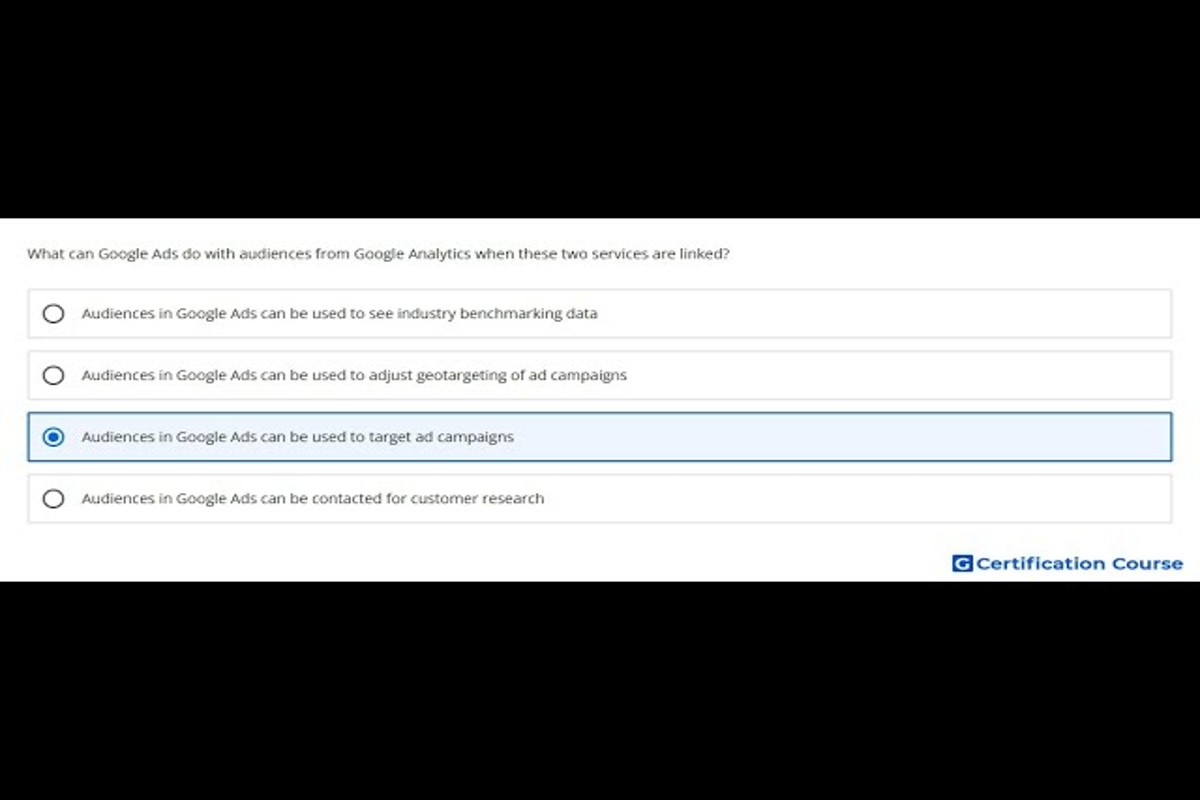
Google Ads can use audiences from Google Analytics to create targeted ad campaigns, optimize ad performance, and retarget users based on their previous interactions with your website. This integration allows advertisers to leverage detailed user behavior data for more effective marketing strategies.
Understanding how to utilize Google Ads with audiences from Google Analytics is crucial for marketers aiming to enhance their advertising efforts. Mismanagement of this integration can lead to ineffective campaigns and wasted budget, emphasizing the need for strategic audience targeting.
This article will detail how to set up audience segments in Google Analytics, how to import these audiences into Google Ads, and best practices for optimizing ad campaigns based on user behavior insights.
What are Google Analytics audiences in Google Ads?
Google Analytics audiences in Google Ads are defined groups of users segmented based on shared characteristics or behaviors tracked within Google Analytics. These audiences can be leveraged in Google Ads to enhance targeting and optimize advertising campaigns, allowing marketers to reach specific user segments effectively.
Audiences in Google Analytics can be created based on various criteria, including demographics, user behavior, and engagement levels. For example, marketers can create audiences of users who visited a particular page, completed specific actions, or exhibited behaviors indicative of high purchase intent. This segmentation allows advertisers to tailor their marketing messages and strategies to resonate with different audience groups.
- Behavioral Audiences: These are defined by actions taken on a website, such as page views, time spent, and conversion events.
- Demographic Audiences: These audiences are based on user characteristics like age, gender, and geographic location.
- Custom Audiences: Marketers can create unique audiences based on specific criteria or combinations of behaviors and demographics, allowing for highly targeted campaigns.
By integrating Google Analytics audiences into Google Ads, advertisers can enhance their campaign performance. This integration enables retargeting of users who have previously interacted with the brand, as well as reaching new users who share similar traits with existing customers. The ability to analyze audience performance metrics further informs future campaign adjustments and optimizations.
Expert Tip: Utilizing audience insights from Google Analytics can significantly improve ad relevance and conversion rates. Regularly reviewing and updating audience criteria based on evolving behaviors ensures campaigns remain effective and aligned with target market changes.
How can I create audiences in Google Analytics for Google Ads?
Creating audiences in Google Analytics for Google Ads involves a straightforward process that allows marketers to target specific user groups effectively. This process enhances ad targeting and improves campaign performance by leveraging user behavior data. Follow these steps to set up your audiences.
- Log in to your Google Analytics account and select the appropriate property.
- Navigate to the Admin section at the bottom left of the page.
- In the Property column, click on Audience Definitions and then select Audiences.
- Click the + New Audience button to start creating a new audience.
- Choose a predefined audience template or create a custom audience by clicking on Create New Audience.
- Define your audience criteria based on dimensions, metrics, and user segments, such as demographics, behavior, or technology.
- Once your audience is defined, select the option to share it with Google Ads to make it available for your ad campaigns.
- Finally, review your settings and click Publish to save your new audience.
After creating your audience, it may take up to 24 hours for it to appear in Google Ads. Audiences can be based on various factors, including user activity on your site, conversion history, and more. Utilizing these insights effectively allows for more tailored marketing efforts.
Leverage Google Analytics audience insights to refine your marketing strategy and improve ROI. By continuously monitoring audience performance, adjustments can be made to optimize ad spend and enhance engagement.
Regularly review and update your audiences to ensure they remain relevant and effective as user behavior evolves. This proactive approach can significantly enhance campaign effectiveness over time.
What is the difference between Google Analytics audiences and Google Ads audiences?
Google Analytics audiences and Google Ads audiences serve different yet complementary purposes within digital marketing. Google Analytics audiences are segments of website users defined by specific behaviors or characteristics, while Google Ads audiences are tailored groups used for targeted advertising campaigns. The key differences lie in their creation, application, and data sources.
Audiences in Google Analytics are created based on user interactions with a website. Marketers can define segments by criteria such as demographics, behavior, or traffic source. These audiences provide insights into user engagement and help in analyzing website performance. In contrast, Google Ads audiences are primarily focused on driving conversions through targeted advertising. They can be created from Google Analytics data, but also include additional options, such as remarketing lists and customer match lists, which are specifically designed for advertising purposes.
Another significant distinction involves the data source and usage context. Google Analytics audiences utilize data collected from website visits and user interactions, offering a comprehensive view of user behavior over time. Google Ads audiences, however, leverage this data to optimize ad targeting and campaign performance. While Google Analytics audiences can inform broader marketing strategies, Google Ads audiences are directly linked to advertising initiatives, enabling precise targeting and measurement of ad effectiveness.
Key Differences:
- Purpose: Analytics audiences focus on user behavior; Ads audiences target advertising efforts.
- Creation: Analytics audiences are created from website data; Ads audiences can include remarketing and customer lists.
- Data Source: Analytics audiences derive from website interactions; Ads audiences utilize both Analytics data and additional advertising metrics.
Utilizing audiences from Google Analytics in Google Ads can enhance campaign targeting, but it’s essential to understand the nuances of each audience type. Properly aligning audience definitions with marketing objectives can significantly improve campaign outcomes and ROI.
What are the costs associated with using Google Ads with Google Analytics audiences?
The costs of using Google Ads with audiences from Google Analytics can vary significantly based on several factors. Generally, advertisers can expect to spend a minimum of $1 to $2 per click, but costs can rise to $50 or more for highly competitive keywords. The overall budget will depend on campaign goals, audience targeting, and ad formats.
Several factors influence the costs associated with Google Ads campaigns utilizing Google Analytics audiences:
- Bid Strategy: The chosen bidding strategy (e.g., CPC, CPM, CPA) directly affects costs. Automated bidding can optimize for conversions but may lead to unpredictable spending.
- Audience Segmentation: More refined audience segments may cost more to target, especially if they include high-value consumers or niche markets.
- Ad Quality Score: Google assigns a Quality Score based on relevance and performance. Higher scores can lower costs per click, while lower scores may increase them.
- Competition: The level of competition for keywords and audience segments will also impact costs. More competitive markets generally lead to higher CPC rates.
- Campaign Duration: Longer campaigns may accumulate higher overall costs, but can also yield better returns if properly managed and optimized.
Advertisers should regularly monitor performance metrics and adjust their budgets accordingly. This ensures that spending aligns with campaign goals and audience effectiveness. Using tools within Google Ads and Google Analytics for performance tracking can lead to more informed budgeting decisions.
Expert Tip: Setting clear performance benchmarks before launching a campaign can help in assessing return on investment (ROI) more accurately. This allows for timely adjustments to budget and strategy based on real-time data insights.
How long does it take for Google Ads to reflect changes in Google Analytics audiences?
Changes made to audiences in Google Analytics typically take 24 to 48 hours to be reflected in Google Ads. This time frame can vary based on several factors, including the nature of the changes and the size of the audience being updated.
When audiences are modified in Google Analytics, the data must be processed before it syncs with Google Ads. This processing time can be influenced by the complexity of the audience criteria and the volume of data within the Google Analytics account. For example, significant changes to audience definitions or the addition of numerous segments may require more time compared to minor adjustments.
Additionally, the integration settings between Google Ads and Google Analytics can impact synchronization speed. If the accounts are correctly linked and data sharing settings are optimized, the reflection of changes tends to be faster. In contrast, discrepancies in account linking or delays in data processing may prolong the update period.
Expert Tip: Regularly monitor audience performance in Google Ads after making changes in Google Analytics. This enables quicker adjustments to campaigns based on the latest audience insights.
What are the best practices for using Google Analytics audiences in Google Ads?
Utilizing audiences from Google Analytics in Google Ads can significantly enhance targeting and campaign performance. By implementing best practices, advertisers can maximize their reach and improve ad effectiveness. Here are key strategies for leveraging these audiences effectively.
First, segment audiences based on specific behaviors and characteristics. For example, categorize users who have completed purchases, abandoned carts, or engaged with particular content. This segmentation allows for tailored messaging that resonates with each group, ultimately leading to higher conversion rates.
- Utilize Remarketing Lists: Create remarketing lists in Google Analytics to target users who previously interacted with your website. This can include visitors who viewed specific products but did not convert, allowing for personalized follow-up ads that encourage them to return and complete their purchase.
- Leverage Custom Audiences: Use custom dimensions and metrics to create audiences based on unique user actions or attributes. For instance, target users based on their frequency of visits or the amount spent, enabling more nuanced ad strategies that speak directly to user behaviors.
- Sync Audiences Regularly: Ensure audiences are synced between Google Analytics and Google Ads frequently. This allows for real-time adjustments to campaigns based on the latest user data, optimizing ad delivery and improving responsiveness to changing user behaviors.
- A/B Test Audiences: Conduct A/B testing with different audience segments to identify which groups respond best to specific ad creatives or messages. This data-driven approach helps refine targeting strategies and improve overall campaign performance.
Implementing these practices can lead to more targeted, efficient campaigns. By focusing on user behavior and continuously optimizing audience strategies, advertisers can enhance engagement and drive conversions.
Expert Tip: Consider integrating Google Ads with Google Analytics 4 (GA4) for advanced insights and predictive analytics, which can further refine audience targeting and improve campaign outcomes.
Can I use Google Analytics data to improve my Google Ads targeting?
Yes, Google Analytics data can significantly enhance your Google Ads targeting strategies. By leveraging audience insights from Google Analytics, advertisers can create more focused campaigns, optimizing ad spend and improving conversion rates.
For example, consider an e-commerce business that sells athletic gear. Using Google Analytics, the business identifies a specific audience segment: users who have visited the website multiple times but have not completed a purchase. This audience can be targeted through Google Ads by creating a remarketing campaign that specifically addresses their interests. The ads can showcase products that these users viewed, offer tailored promotions, or highlight customer reviews to increase the likelihood of conversion.
Another scenario involves analyzing user behavior on the website. The business discovers that users who engaged with blog content about running shoes are more inclined to purchase than those who only viewed product pages. By creating a custom audience in Google Ads from users who visited the blog, the business can serve ads that promote running shoes specifically to this engaged audience, potentially increasing the conversion rate from this segment.
Expert Tip: Regularly review audience performance metrics in Google Ads to refine targeting strategies. Adjust campaigns based on seasonal trends or shifts in user behavior observed in Google Analytics for optimal results.
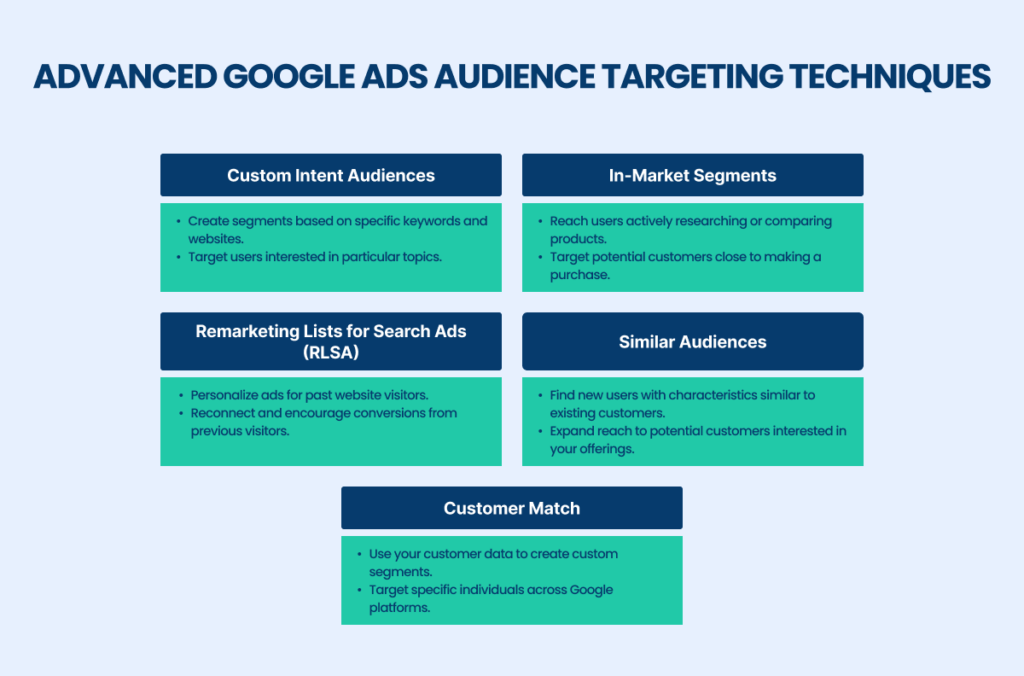
Advanced Audience Segmentation Techniques
This section explores sophisticated methods for segmenting audiences from Google Analytics, focusing on behavioral insights and custom data. Effective segmentation enhances ad targeting, improving conversion rates and ROI.
Utilizing Behavioral Data for Segmentation
Behavioral data offers a nuanced view of user interactions, enabling advertisers to segment audiences based on actions rather than demographics alone. Key behaviors include page views, session duration, and purchase history. By analyzing these metrics, advertisers can identify high-engagement users and tailor ads accordingly.
- Page Views: Segment users who frequently visit specific product categories.
- Session Duration: Target users who spend significant time on the site, indicating interest.
- Purchase History: Create segments for repeat customers and one-time buyers to develop personalized offers.
Creating Lookalike Audiences Based on Existing Customers
Lookalike audiences leverage existing customer data to find new potential customers with similar characteristics. Google Ads can analyze the profiles of high-value customers, then identify and target users with comparable behaviors and interests. This method expands reach effectively while maintaining a focus on quality.
Incorporating Custom Dimensions and Metrics
Custom dimensions and metrics provide a tailored framework for audience segmentation. By defining specific user attributes—such as membership status or user role—advertisers can create highly targeted segments. For example, a business can segment users based on their engagement level with loyalty programs or specific product lines, allowing for more precise ad messaging.
Leveraging User Engagement Data for Targeted Ads
User engagement data, including interactions with emails or social media, can significantly refine audience segmentation. By analyzing which users engage with specific content, advertisers can create segments that reflect user interests and tailor ad campaigns to resonate with those interests. This approach often leads to higher click-through rates and conversion rates.
Nuance / Expert Layer
Many advertisers mistakenly rely solely on demographic data for segmentation, overlooking the power of behavioral insights. While demographics provide a foundational understanding, behavioral data captures the complexities of user intent. For example, two users of the same age and gender may have vastly different purchasing behaviors. Effective segmentation requires integrating both types of data for a comprehensive view of the audience. Additionally, advertisers should be cautious about over-segmenting, which can lead to diluted messaging and increased complexity in campaign management.
Practical Application
To leverage these advanced audience segmentation techniques, implement the following steps:
- Analyze behavioral data from Google Analytics to identify high-engagement segments.
- Create lookalike audiences based on your best customers’ profiles.
- Define and utilize custom dimensions to segment users by specific attributes.
- Incorporate user engagement metrics to refine your ad targeting strategy.
By applying these strategies, advertisers can create more effective Google Ads campaigns, ultimately maximizing the potential of what Google Ads can do with audiences from Google Analytics.
Common Mistakes When Integrating Google Ads and Google Analytics
Integrating Google Ads with Google Analytics offers marketers powerful insights, but common mistakes can undermine effectiveness. This section identifies frequent errors and provides guidance on how to avoid them for optimal campaign performance.

Not Setting Up Proper Goals and Conversions
A fundamental mistake is the failure to establish clear goals and conversions within Google Analytics. Without well-defined objectives, tracking meaningful user actions becomes challenging, leading to inaccurate performance assessments. Marketers should specify what constitutes a conversion, such as purchases, sign-ups, or downloads, and ensure these goals are correctly configured in both Google Ads and Analytics.
Ignoring Audience Overlap and Cannibalization
Another critical error involves neglecting to analyze audience overlap between different campaigns. When similar audiences are targeted across multiple campaigns, it can lead to cannibalization, where one campaign undermines the performance of another. Marketers must regularly review audience segments and adjust targeting accordingly to minimize overlap. Utilizing Google Analytics’ audience reports can help identify these overlaps and fine-tune targeting strategies.
Failing to Regularly Update Audience Definitions
Static audience definitions can quickly become outdated. Failing to refresh these definitions based on user behavior or market changes can result in diminished campaign effectiveness. Marketers should routinely evaluate and update audience segments in Google Analytics to reflect evolving customer profiles and preferences. Regular updates ensure that targeted ads resonate with current audience needs.
Misunderstanding Attribution Models in Reporting
Attribution models play a crucial role in understanding how various marketing channels contribute to conversions. A common mistake is relying on the default attribution model without considering the unique dynamics of each campaign. Marketers should explore different attribution models—such as last-click, first-click, or linear—to gain a more nuanced understanding of how interactions across channels influence conversion paths. This insight can drive better resource allocation and campaign optimization.
- Establish clear goals and conversions in Google Analytics.
- Analyze audience overlap to prevent cannibalization between campaigns.
- Regularly update audience definitions based on user behavior.
- Experiment with various attribution models to capture the right insights.
Marketers must be vigilant about these common pitfalls when linking Google Ads and Google Analytics. By implementing precise goals, analyzing audience dynamics, updating definitions, and understanding attribution, the integration can yield actionable insights and improved performance. Regular audits of these areas will ensure that campaigns remain aligned with business objectives and effectively engage target audiences.
Real-World Applications of Google Analytics Audiences in Google Ads
This section explores real-life examples of how businesses leverage Google Analytics audiences in Google Ads to enhance their marketing strategies. These case studies illustrate the effectiveness of targeted advertising based on user behavior and engagement data.

Case Study: Retail Brand Utilizing Purchase History
A leading retail brand successfully harnessed the power of purchase history data from Google Analytics to refine its Google Ads campaigns. By creating audiences based on past purchases, the brand launched targeted ad campaigns promoting complementary products. For instance, customers who previously purchased running shoes were targeted with ads for performance socks and fitness accessories. This approach resulted in a 25% increase in conversion rates and a 30% boost in average order value within three months.
Service Provider Retargeting Website Visitors
A local service provider, specializing in home renovations, implemented a retargeting strategy using Google Analytics data. They identified users who visited specific service pages but did not convert. By creating a custom audience of these visitors in Google Ads, the provider delivered tailored ads highlighting special offers and testimonials. This strategy led to a 40% increase in lead generation and significantly improved their return on ad spend (ROAS).
B2B Company Leveraging Lead Scoring
A B2B software company integrated lead scoring metrics from Google Analytics into their Google Ads campaigns. They segmented their audience based on engagement levels, focusing on high-scoring leads who interacted with key content, like whitepapers and webinars. Targeted ads were created to promote product demos and consultations specifically for these high-value leads. This precision targeting resulted in a 50% increase in demo requests and a 20% reduction in customer acquisition costs.
E-commerce Success with Cart Abandonment Audiences
One e-commerce site enhanced its recovery of abandoned carts by utilizing Google Analytics audiences. They tracked users who added products to their cart but did not complete the purchase. The company launched a series of dynamic retargeting ads that featured the exact items left in the cart, coupled with limited-time discounts. This strategy yielded a 60% recovery rate for abandoned carts, significantly boosting overall sales revenue.
Expert Insights on Audience Targeting
While many marketers focus solely on creating broad audiences, leveraging detailed audience segments can yield superior results. A common misconception is that retargeting is only for cart abandoners. In reality, audiences can be built from various touchpoints, including engagement with email campaigns or specific content types. Additionally, understanding the customer journey allows for more nuanced targeting strategies, enhancing overall campaign effectiveness.
Practical Application
- Analyze your Google Analytics data to identify key user behaviors and engagement metrics.
- Create segmented audiences in Google Ads based on specific actions, such as past purchases or page visits.
- Develop tailored ad campaigns that address the unique needs and interests of each audience segment.
- Monitor and adjust your campaigns based on performance metrics to optimize for better results.
The Future of Audience Targeting in Google Ads
This section explores the emerging trends and technologies that will influence audience targeting strategies within Google Ads. Understanding these factors is essential for marketers aiming to optimize their advertising efforts.
Impact of Machine Learning on Audience Targeting
Machine learning is revolutionizing audience targeting in Google Ads by enhancing the ability to analyze vast datasets and predict user behavior. Algorithms continuously learn and adapt, identifying patterns that may not be evident to human analysts. This allows for more precise segmentation of audiences based on their online activities, preferences, and interactions with brands.
As machine learning models evolve, they will increasingly facilitate the automation of audience targeting processes. Advertisers can expect improved features such as:
- Dynamic audience creation: Automatically generating audience segments based on real-time data.
- Predictive analytics: Forecasting which audience segments are most likely to convert.
- Enhanced targeting recommendations: Providing insights into optimal bidding and budget allocation for different audience groups.
The Role of Privacy Regulations and Data Protection
Privacy regulations, such as the General Data Protection Regulation (GDPR) and the California Consumer Privacy Act (CCPA), are reshaping how advertisers collect and utilize data. Compliance with these laws necessitates a shift in audience targeting strategies. Advertisers must prioritize transparency and user consent when leveraging data from Google Analytics.
Future audience targeting in Google Ads will likely involve:
- First-party data utilization: Relying more on data collected directly from users through interactions with websites and apps.
- Privacy-first approaches: Implementing strategies that prioritize user privacy while still achieving effective targeting.
- Anonymization techniques: Using aggregated data to analyze trends without compromising individual user identities.
Evolving User Behavior and Its Influence on Targeting
User behavior is constantly evolving, driven by technological advancements, cultural shifts, and changes in consumer expectations. Marketers must remain agile and responsive to these trends to effectively engage their audiences. For instance, the rise of mobile devices and voice search is prompting a need for more contextually relevant and timely advertisements.
Key behavioral trends impacting audience targeting include:
- Increased reliance on social proof: Users are more likely to trust recommendations and reviews from peers.
- Preference for personalized experiences: Audiences expect tailored messaging and offers that resonate with their interests.
- Demand for real-time engagement: Users favor brands that interact with them promptly across multiple channels.
Integration of Cross-Channel Marketing Strategies
As consumers engage with brands across various platforms, the integration of cross-channel marketing strategies becomes essential. Google Ads can leverage audiences from Google Analytics to create cohesive, multi-platform campaigns that ensure consistent messaging and experience. This holistic approach allows advertisers to reach users at different touchpoints throughout their buyer journey.
To effectively implement cross-channel strategies, marketers should focus on:
- Unified messaging: Ensuring that brand messaging is consistent across all channels.
- Attribution modeling: Analyzing the impact of each channel on conversions to optimize budget allocation.
- Seamless user experience: Creating a frictionless transition for users moving between channels.
Future audience targeting in Google Ads will increasingly depend on a nuanced understanding of these trends. Marketers should prioritize the integration of machine learning, compliance with privacy regulations, adaptation to user behavior, and development of cross-channel strategies. To stay ahead, actively monitor industry developments, invest in data analytics capabilities, and refine audience targeting approaches as new technologies and regulations emerge.
Frequently Asked Questions
What are Google Analytics audiences in Google Ads?
Google Analytics audiences in Google Ads are specific groups of users segmented based on their behavior on your website. These audiences can be targeted in ad campaigns to enhance relevancy and improve performance.
How can I create audiences in Google Analytics for Google Ads?
To create audiences in Google Analytics for Google Ads, navigate to the Admin section, select the desired property, and click on “Audiences.” From there, you can define your audience criteria and link it to your Google Ads account.
What is the difference between Google Analytics audiences and Google Ads audiences?
Google Analytics audiences are based on user interactions and behaviors on your website, while Google Ads audiences can include additional targeting options like demographics and interests. This allows for more refined targeting in ad campaigns.
What are the costs associated with using Google Ads with Google Analytics audiences?
Using Google Analytics audiences in Google Ads does not incur additional costs; however, the cost of advertising will depend on your bidding strategy and the ad placements. You pay for the ads served to the targeted audiences.
How long does it take for Google Ads to reflect changes in Google Analytics audiences?
Changes made to Google Analytics audiences can take up to 24 hours to sync with Google Ads. Once synced, the updated audiences will be available for targeting in your campaigns.
What are the best practices for using Google Analytics audiences in Google Ads?
Best practices include regularly updating audience criteria based on performance data, using remarketing lists, and segmenting audiences for tailored messaging. This approach enhances engagement and conversion rates.
Can I use Google Analytics data to improve my Google Ads targeting?
Yes, Google Analytics data provides valuable insights into user behavior, which can be leveraged to refine targeting in Google Ads. By understanding audience interactions, you can create more effective ad campaigns.
Final Thoughts on what can google ads do with audiences from google analytics
Leveraging Google Analytics audiences in Google Ads significantly enhances targeting precision, enabling advertisers to create tailored campaigns that resonate with specific user segments. By utilizing advanced segmentation techniques, marketers can optimize their ad spend and improve conversion rates, making data-driven decisions that yield measurable results.
To harness this potential, implement a robust audience segmentation strategy in Google Analytics and seamlessly integrate these insights into your Google Ads campaigns, ensuring that you are reaching the right audience at the right time with the right message.
Mastering the synergy between Google Ads and Google Analytics audiences is crucial for maximizing advertising effectiveness and achieving sustainable growth in a competitive digital landscape.
Leave a Reply