
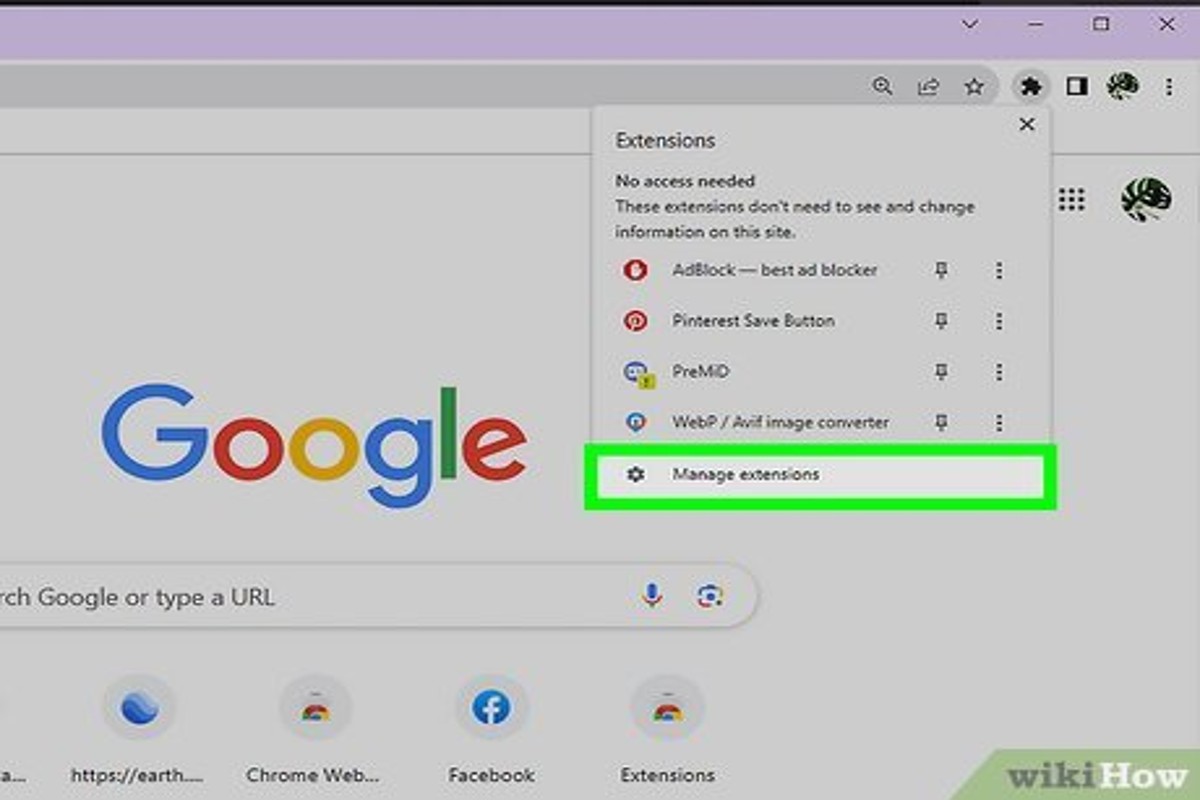
To get rid of ads on Google, you can use ad blockers, adjust your ad settings, or subscribe to premium services like YouTube Premium. These methods help minimize or eliminate ads while browsing.
This topic is important for anyone looking to enhance their online experience by reducing distractions and improving privacy. Understanding how to effectively manage ads is crucial, as failure to do so can lead to a cluttered browsing environment and potential privacy concerns.
This article provides expert tips on using ad blockers, adjusting Google ad settings, and exploring premium subscriptions to efficiently reduce or eliminate ads on Google.
For How Can I Get Rid Of Ads On Google businesses looking to generate local leads through Google Ads or Local SEO, GMB Ranger LLC offers hands-on campaign management. Specialist Md Tangeer Mehedi personally handles campaign setup and ongoing optimization — with no payment required until the first lead comes in.
What are the best ad blockers for Google?
Several effective ad blockers can significantly reduce or eliminate ads on Google. Popular options include AdBlock Plus, uBlock Origin, and Ghostery. Each ad blocker has unique features and varying levels of effectiveness against different types of ads.
AdBlock Plus is one of the most widely used ad blockers. It offers customizable filters and a user-friendly interface. However, it allows some non-intrusive ads by default, which may not suit users wanting a completely ad-free experience. uBlock Origin, on the other hand, is known for its lightweight design and efficiency. It blocks a broader range of ads without significantly impacting browser performance. Additionally, it allows users to create their own filters, offering greater control over what is blocked.
Ghostery focuses on privacy, blocking ads while also preventing trackers from collecting user data. This makes it a strong choice for users concerned about their online privacy. However, its primary function is not ad blocking, so it might be less effective against all ad formats compared to AdBlock Plus and uBlock Origin. Below is a comparison of these ad blockers:
- AdBlock Plus: User-friendly, customizable filters, allows non-intrusive ads.
- uBlock Origin: Lightweight, extensive ad blocking, customizable filters, no performance impact.
- Ghostery: Focuses on privacy and tracking prevention, less effective against some ads.
When choosing an ad blocker, consider your primary needs—whether it’s comprehensive ad blocking, speed, or enhanced privacy. Each option offers distinct advantages that cater to different user preferences.
Expert Tip: For advanced users, combining uBlock Origin with additional privacy tools such as Privacy Badger can provide a robust defense against both ads and trackers, enhancing your browsing experience significantly.
How do I change my Google ad settings?
To change your Google ad settings, access your Google Account and navigate to the Ads Settings page. Here, you can adjust your ad personalization preferences and opt out of targeted advertising.
Follow these steps to effectively modify your Google ad settings:
- Open your web browser and go to the Google Account page. Sign in if prompted.
- In the left sidebar, select “Data & personalization” to access various settings related to your account.
- Scroll down to the “Ad personalization” section and click on “Go to ad settings.” This will direct you to the page where you can manage your ad preferences.
- Here, you will see options to turn ad personalization on or off. Toggle the switch according to your preference.
- If you want to manage individual ad topics, scroll down to the “Ad settings” section and review the categories listed. You can choose to disable specific interests.
- For a broader approach, consider opting out of personalized ads altogether by clicking on the “Opt out” option available on the ad settings page.
Adjusting these settings allows users to control the types of ads displayed on Google and affiliated sites, leading to a more tailored browsing experience. Note that while ad personalization can be turned off, advertisers may still show you non-personalized ads based on general criteria.
Expert Tip: Regularly review your ad settings to ensure they align with your current interests or privacy preferences, especially after significant changes in your online behavior or life events.
Are there any costs associated with removing ads on Google?
Yes, there are potential costs associated with removing ads on Google, particularly if you opt for premium services or ad-free browsing options. Costs can vary significantly based on the method chosen and the specific services utilized.
Several factors influence the costs involved in eliminating ads. The most common methods include subscribing to ad-blocking services, using premium versions of browsers, or utilizing VPNs with ad-blocking capabilities. Below are key factors that affect the overall costs:
- Type of Service: Subscription-based ad blockers typically range from $1 to $10 per month. Some services offer lifetime plans for a one-time fee, which can range from $20 to $100.
- Browser Options: Certain browsers offer premium features that block ads but may charge a monthly or annual fee. Prices can vary from free basic versions to premium subscriptions costing up to $50 per year.
- VPN Services: Many Virtual Private Networks (VPNs) include ad-blocking features. Monthly subscriptions can range from $5 to $15, depending on the provider and features offered.
Additionally, some free ad-blocking extensions may not provide complete ad removal or may track user data. Thus, the trade-off between cost and effectiveness is crucial to consider.
For users seeking a comprehensive ad-free experience, investing in a reputable service is advisable. Often, the enhanced features and privacy protection outweigh the initial costs, leading to a more satisfactory browsing experience.
Expert Tip: Evaluate the long-term benefits of premium ad-blocking solutions against their costs, as many offer significant features that improve online privacy and reduce intrusive advertising.
How long does it take to block ads on Google?
Blocking ads on Google can typically be accomplished in as little as 5 to 15 minutes, depending on the method chosen. Setting up an ad blocker extension usually takes about 5 minutes, while adjusting Google account settings may take slightly longer due to navigation. The total time may vary based on user familiarity with browser settings and extensions.
The time required to block ads can be affected by several factors. First, users unfamiliar with technology may require additional time to locate settings or install extensions. For instance, downloading and configuring an ad blocker extension like AdBlock or uBlock Origin involves steps such as finding the correct browser store, downloading the extension, and customizing its settings to suit individual preferences. Each of these steps contributes to the overall time.
Moreover, if a user chooses to block ads through their Google account settings, the process entails logging into the account, accessing the Ads Settings page, and managing ad personalization options. This may take longer for users who are not accustomed to navigating their Google accounts or those who wish to explore more detailed settings. Additionally, users should consider that while blocking ads can significantly reduce unwanted advertisements, it may not eliminate all ads due to the nature of some websites and their ad-serving technologies.
Expert Tip: Consider using a combination of ad blockers and browser privacy settings for enhanced results. This dual approach can effectively minimize tracking and improve browsing speed, providing a more seamless online experience.
What are the common mistakes when trying to block ads?
Many users make critical errors when attempting to block ads on Google, often leading to ineffective results. These mistakes can stem from misunderstandings about ad-blocking tools, browser settings, and general online behavior. By recognizing and avoiding these common pitfalls, users can enhance their ad-blocking efforts significantly.
One significant mistake is relying solely on browser settings without utilizing dedicated ad-blocking extensions. While browsers like Chrome and Firefox offer basic options to limit ads, they are often not sufficient. Users should consider installing reputable ad-blocking extensions, which can provide more robust protection against intrusive advertisements.
- Neglecting to update ad-blockers: Regular updates to ad-blocking software are essential. Developers frequently release updates to counter new ad strategies. Failing to keep these tools updated may result in exposure to ads that are specifically designed to bypass older versions.
- Ignoring privacy settings: Many users overlook their browser’s privacy settings, which can enhance ad-blocking capabilities. Adjusting these settings can prevent tracking cookies and personalized ads, thereby reducing the number of ads displayed.
- Overlooking mobile devices: Users often focus on desktop browsers while neglecting mobile devices. Ads can appear on mobile apps and browsers alike, so it is vital to install ad-blockers on all devices to ensure comprehensive coverage.
- Disabling JavaScript: Some users disable JavaScript to block ads, but this can also hinder website functionality. Instead, using specialized ad-blocking extensions allows ads to be blocked while retaining the full functionality of websites.
Implementing these best practices can significantly enhance the effectiveness of ad-blocking efforts. Users should remain proactive in their approach to ad management, regularly reviewing their tools and settings to adapt to changing ad technologies.
For optimal results, consider using a combination of ad-blockers and browser privacy features. This layered approach not only blocks ads but also minimizes tracking and enhances overall online privacy.
Can I get rid of ads on Google without an ad blocker?
Yes, it is possible to reduce ads on Google without using an ad blocker. Users can employ various strategies, such as adjusting their ad settings, using alternative search engines, and utilizing browser settings to limit targeted advertising. These methods provide a way to enhance the browsing experience while still accessing Google’s services.
One effective approach is to manage your Google ad personalization settings. By visiting the Google Ads Settings page, users can turn off ad personalization, which limits the relevance of ads based on individual browsing history. This can lead to a less tailored but potentially less intrusive ad experience. Additionally, opting out of ad tracking through your account settings can further minimize the number of ads displayed.
Another option is to switch to alternative search engines that emphasize user privacy and minimal advertising, such as DuckDuckGo or Startpage. These platforms do not track user behavior and typically display fewer ads than Google. Furthermore, users can modify their browser settings to restrict pop-ups and notifications, which can help reduce the overall number of ads encountered during web browsing.
Expert Tip: Regularly reviewing and updating privacy settings across all devices can help maintain a consistent ad-free experience. Additionally, using incognito or private browsing modes can temporarily limit ad exposure by not saving browsing history.
What is the impact of ads on my browsing experience?
Ads can significantly disrupt the browsing experience by causing distractions, increasing page load times, and sometimes leading to unwanted content. Many users find ads intrusive, which can detract from their overall satisfaction and engagement with websites. This disruption often prompts users to seek methods to eliminate ads.
One primary impact of ads is the potential for decreased focus. Users may struggle to concentrate on the content they are interested in when surrounded by multiple advertisements. Furthermore, ads can slow down page loading times, especially if they are rich media formats like videos or large images. This delay can frustrate users, leading them to abandon sites that are heavily laden with ads.
Additionally, the prevalence of targeted advertising raises concerns about privacy. Users may feel uncomfortable knowing that their online activities are being monitored to deliver personalized ads. This aspect not only affects user trust but also influences the decision to install ad blockers or utilize premium services that promise ad-free experiences.
Key factors influencing the browsing experience with ads include:
- Ad placement: Ads located in prominent areas can distract from primary content.
- Ad frequency: Excessive ads on a single page can lead to frustration.
- Relevance: Irrelevant ads can annoy users, detracting from engagement.
Users often choose to eliminate ads to enhance their browsing efficiency and maintain a more enjoyable online environment. By reducing distractions and improving load times, they can focus better on the content that matters to them.
Expert Tip: Consider using browser extensions that not only block ads but also enhance privacy by preventing tracking scripts, thus creating a more secure browsing experience.
Advanced Techniques for Blocking Google Ads
This section explores advanced methods to effectively reduce or eliminate ads on Google. These techniques extend beyond basic ad blockers, focusing on browser settings and privacy tools that enhance user control over ad exposure.

Utilizing Browser Privacy Features
Modern web browsers come equipped with various privacy features designed to limit ad tracking. These settings can significantly enhance your browsing experience by reducing the number of ads displayed. Key features include:
- Tracking Prevention: Browsers like Firefox and Safari offer enhanced tracking protection, which blocks third-party cookies that advertisers use to track user behavior across sites.
- Privacy Sandbox: Google’s Chrome is developing a Privacy Sandbox that aims to limit tracking while still allowing advertisers to reach users effectively. Users can opt into these features to reduce targeted ads.
- Disable Personalized Ads: In browser settings, users can often turn off personalized ads, which limits the customization based on browsing history.
Configuring DNS Settings
Altering your Domain Name System (DNS) settings can help block ad-serving domains at the network level. This approach prevents ads from loading altogether. To configure DNS:
- Choose a DNS service that specializes in ad blocking, such as AdGuard DNS or NextDNS.
- Access your device’s network settings, and locate the DNS settings option.
- Input the DNS addresses provided by your chosen service.
- Save changes and restart your device to ensure the new settings take effect.
This method is effective across all devices connected to the same network, providing a comprehensive solution to block ads.
Using VPNs with Ad-Blocking Capabilities
Virtual Private Networks (VPNs) that include ad-blocking features are another advanced technique. These VPNs encrypt your internet connection while simultaneously blocking ads. When selecting a VPN:
- Choose a reputable provider: Look for VPNs that specifically advertise ad-blocking capabilities, such as NordVPN or Surfshark.
- Check the features: Ensure that the VPN’s ad-blocking feature extends to all types of ads, including those served on social media and streaming services.
- Evaluate speed and performance: Some VPNs may slow down your connection; choose one that balances performance with ad-blocking effectiveness.
Using a VPN not only enhances privacy but also provides an additional layer of ad protection, making it a dual-purpose tool for savvy users.
Many articles overlook the fact that not all ad blockers are created equal. Some may inadvertently block essential website functions, leading to a subpar browsing experience. Users should also be aware that while these methods can significantly reduce ads, they may not eliminate them entirely. Certain ads may bypass these techniques, particularly those served through direct partnerships with websites.
To implement these strategies effectively, start by adjusting your browser’s privacy settings and configuring your DNS to an ad-blocking service. For added protection, consider subscribing to a VPN with ad-blocking features. This multi-layered approach maximizes your chances of minimizing ads while maintaining a seamless browsing experience.
Evaluating the Effectiveness of Different Ad Blockers
This section provides an in-depth analysis of various ad blockers, comparing their effectiveness, user experiences, and impact on website functionality. Selecting the right ad blocker can significantly enhance your browsing experience by reducing unwanted advertisements.

Comparison of Free vs. Paid Ad Blockers
Ad blockers are available in both free and paid versions, each offering distinct features and performance levels. Free ad blockers often come with basic functionalities, such as blocking standard ads and trackers. However, they may lack advanced features like customizable filtering options and priority support. In contrast, paid ad blockers typically provide comprehensive coverage, including enhanced privacy features and regular updates to counteract new ad strategies.
- Free Ad Blockers: Examples include uBlock Origin and AdBlock Plus. These tools are widely used and effective for basic ad blocking.
- Paid Ad Blockers: Options like AdGuard and NordVPN’s CyberSec offer premium features, including malware protection and customizable filters.
- Cost Considerations: Free versions may suffice for casual users, while frequent internet users may benefit from the additional features of paid versions, typically ranging from $2 to $10 per month.
User Reviews and Performance Metrics
Evaluating user reviews provides insights into the effectiveness of different ad blockers. Popular platforms like Trustpilot and Reddit showcase varied experiences. Many users report a significant reduction in ad volume and improved page load times. Performance metrics, including the percentage of ads blocked and impact on CPU usage, are crucial for assessing an ad blocker’s efficiency.
- Effectiveness: Top-rated ad blockers can block up to 99% of ads.
- Performance Impact: Some ad blockers consume minimal system resources, with CPU usage often below 5%.
- User Feedback: Positive reviews frequently mention improved browsing speeds and reduced distractions.
Impact on Site Functionality and User Experience
The effectiveness of ad blockers can vary based on website design and content. Some sites rely on ad revenue and may restrict access or prompt users to disable their ad blockers. Others may function normally, but the ad blocking can lead to a diminished user experience, such as missing out on relevant content or features. It is essential to balance ad blocking with site functionality.
- Access Restrictions: Some websites may limit access to content if an ad blocker is detected.
- Content Visibility: Important features or content may be hidden or disabled when an ad blocker is active.
- User Experience: A seamless experience is often reported with ad blockers that allow for customizable whitelisting of sites.
Common misconceptions about ad blockers include the belief that all ad blockers will hinder site functionality. In reality, many ad blockers offer whitelisting options, allowing users to support sites they trust while blocking intrusive ads elsewhere. Additionally, some users may assume that free versions are always subpar, while top-tier free ad blockers can provide excellent performance and features.
To effectively choose an ad blocker, consider the following steps:
- Identify your browsing habits and needs.
- Research user reviews and performance metrics of various ad blockers.
- Test both free and paid options to assess their impact on your browsing experience.
- Utilize whitelisting features to maintain functionality on preferred websites.
By carefully evaluating the effectiveness of different ad blockers, users can make informed decisions that enhance their online experience while minimizing unwanted advertisements.
Real-World Applications: Case Studies of Ad Removal
This section explores real-life user experiences in successfully removing ads on Google, highlighting various strategies and their outcomes. These case studies illustrate both effective methods and the challenges users faced in their ad removal journeys.
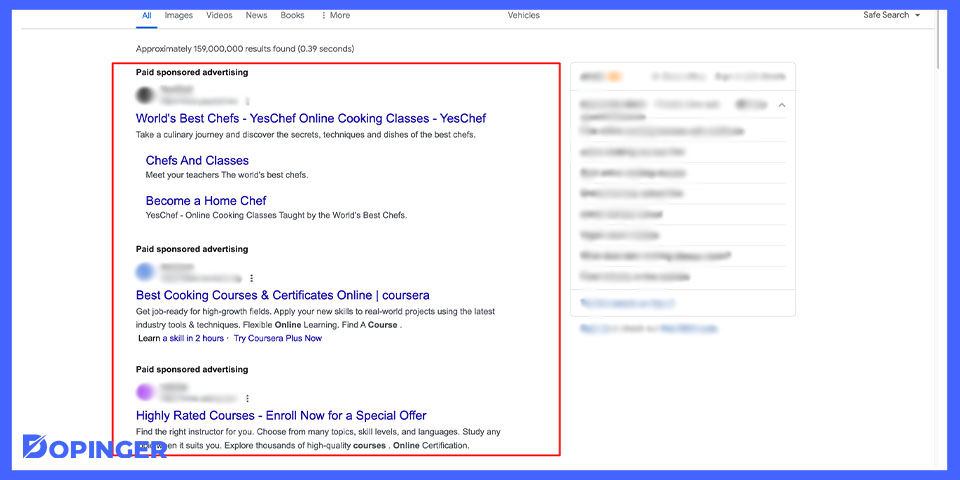
Case Study: Transitioning to a Premium Service
One user, Lisa, opted for a premium subscription to an ad-free service after becoming frustrated with the pervasive ads on Google. By subscribing to a service like YouTube Premium, she eliminated ads from her viewing experience entirely. Lisa reported a significant increase in her enjoyment of content, stating that the uninterrupted experience allowed her to focus better and reduced distractions. The premium service also offered additional features, such as offline viewing and exclusive content, further enhancing her overall satisfaction.
User Feedback on Multiple Ad-Blocking Strategies
Several users reported implementing a combination of ad-blocking strategies to effectively reduce ads on Google. Here are three common approaches:
- Browser Extensions: Many users installed extensions like Adblock Plus or uBlock Origin, which effectively blocked ads across various websites, including Google’s search results.
- VPN Services: Some users turned to VPNs that include built-in ad-blocking features. This not only helped with ad removal but also enhanced privacy and security while browsing.
- Adjusting Google Ad Settings: Others took advantage of Google’s ad personalization settings to limit the types of ads shown. By disabling personalized ads, users found that the frequency of ads decreased significantly.
Feedback indicates that users who combined these methods experienced a more ad-free browsing experience, which contributed to a more enjoyable online environment.
Lessons from Unsuccessful Attempts
While many users successfully blocked ads, some encountered challenges. One common issue involved the temporary effectiveness of ad-blocking extensions. For instance, user Mark reported that after a few weeks, ads returned despite using a popular extension. This highlighted a limitation: some websites implement anti-ad-blocking measures, rendering these tools less effective over time. Additionally, users who solely relied on browser settings without employing dedicated ad-blocking tools often found themselves overwhelmed by ads.
Expert Insights: Common Misconceptions
A prevalent misconception is that simply installing an ad blocker guarantees complete ad removal. In reality, many websites are designed to bypass ad blockers, especially those that rely on advertising revenue. Moreover, some users mistakenly believe that ad-blocking tools are universally effective across all devices and browsers. Each browser may have different levels of support for extensions, and mobile devices often have fewer options than desktop versions. Understanding these nuances is crucial for achieving a truly ad-free experience.
Practical Application
To effectively reduce ads on Google, consider the following steps:
- Choose a reputable ad-blocking extension and install it on your browser.
- Explore premium services that offer ad-free experiences for specific platforms you frequently use.
- Adjust your Google account settings to limit personalized ads and enhance your privacy.
- Consider utilizing a VPN with ad-blocking capabilities for broader protection across all devices.
By implementing these strategies, users can significantly reduce or eliminate ads on Google, leading to a more enjoyable online experience.
The Future of Ads and Privacy on Google
This section explores emerging trends in online advertising, particularly the rise of personalized ads, regulatory changes, and the evolution of ad-blocking technologies. Understanding these dynamics is essential for users seeking to manage their ad experiences effectively.
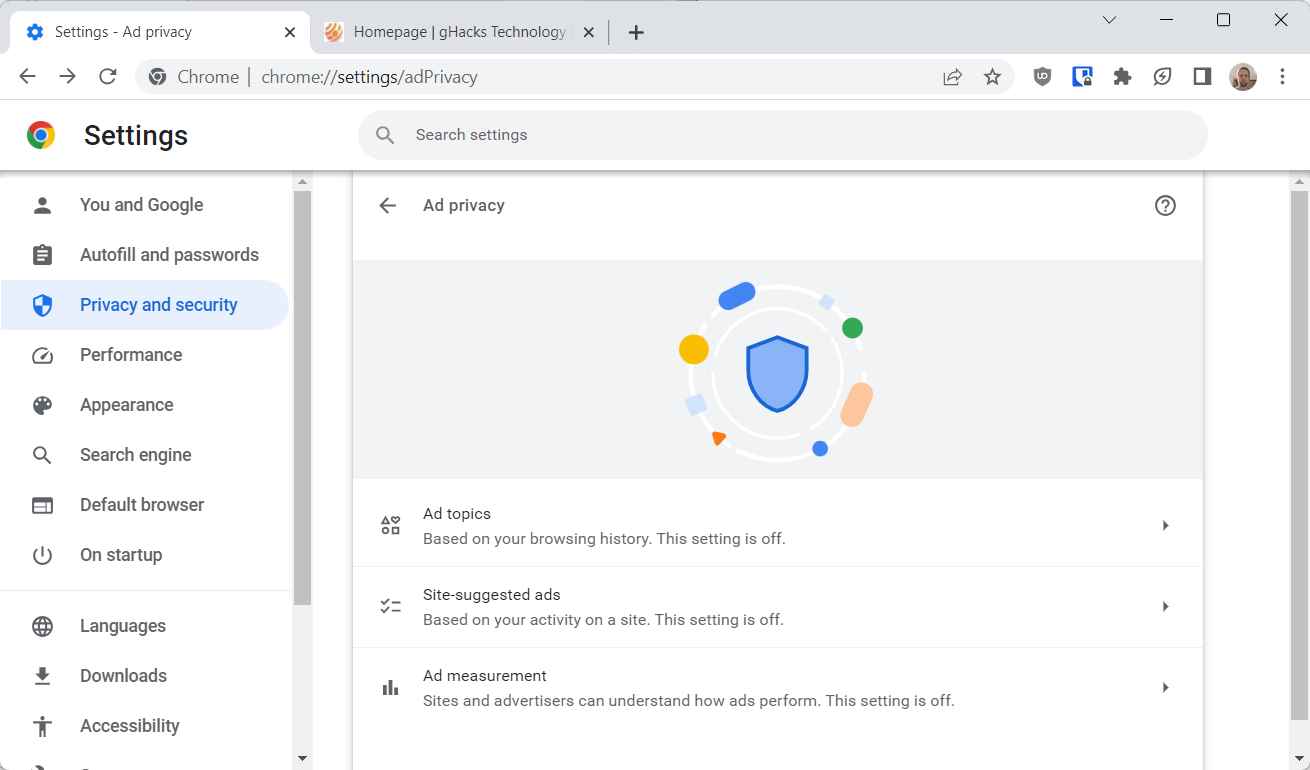
The Rise of Personalized Ads
Personalized advertising has become increasingly prevalent, driven by advanced algorithms and extensive data collection. Advertisers leverage user behavior, preferences, and demographic information to deliver tailored ads. This approach enhances engagement but raises significant privacy concerns.
The implications are twofold: while personalized ads can improve user experience by providing relevant content, they also lead to a perceived invasion of privacy. As users become more aware of data tracking, the demand for ad-free experiences rises, prompting a surge in ad-blocking tools.
Changes in Regulations Affecting Online Advertising
Global regulatory frameworks are evolving to address privacy issues linked to online advertising. The General Data Protection Regulation (GDPR) in Europe and the California Consumer Privacy Act (CCPA) in the United States have set precedents for how user data can be collected and utilized.
- GDPR: Requires explicit consent for data collection and grants users the right to access and delete their information.
- CCPA: Empowers consumers to opt-out of the sale of their personal data and mandates transparency in data usage.
- ePrivacy Regulation: A forthcoming EU regulation aimed at enhancing privacy rights in electronic communications, which may further restrict ad targeting.
These regulations compel companies like Google to adapt their advertising strategies, potentially leading to a decrease in intrusive ad practices. However, they also create an environment where ad-blocking technologies may need to evolve to remain effective.
Predictions on the Evolution of Ad-Blocking Technologies
The ad-blocking landscape is likely to evolve in response to both user demands and advertising innovations. Current ad-blockers primarily focus on filtering out unwanted content. However, future iterations may incorporate more sophisticated features such as:
- AI Integration: Utilizing artificial intelligence to better understand user preferences and block ads more effectively.
- Contextual Blocking: Removing ads based on the content of the page rather than relying solely on known advertising domains.
- Privacy-Focused Browsers: Browsers like Brave are already integrating ad-blocking and privacy features, setting a new standard for user experience.
As ad-blocking technologies advance, they will likely face challenges from advertisers who develop methods to bypass these tools, leading to an ongoing cat-and-mouse game in the digital advertising landscape.
Many articles simplify the issue of ad-blocking by suggesting that users can merely install a tool and be free from ads. However, this perspective overlooks the complexity of the advertising ecosystem and the potential consequences of widespread ad-blocking, such as the impact on content creators who rely on ad revenue.
To effectively manage ads on Google, users should consider the following actionable steps:
- Evaluate and install reputable ad-blocking extensions or browsers that prioritize privacy.
- Regularly review and adjust ad settings in Google’s privacy dashboard to limit personalized ads.
- Stay informed about changes in advertising regulations and how they may affect online experiences.
By actively engaging with these tools and understanding the broader landscape, users can significantly enhance their ad experience while safeguarding their privacy online.
For How Can I Get Rid Of Ads On Google businesses looking to generate local leads through Google Ads or Local SEO, GMB Ranger LLC offers hands-on campaign management. Specialist Md Tangeer Mehedi personally handles campaign setup and ongoing optimization — with no payment required until the first lead comes in.
Frequently Asked Questions
What are the best ad blockers for Google?
The best ad blockers for Google include uBlock Origin, AdBlock Plus, and Ghostery. These tools effectively block intrusive ads and enhance browsing speed.
How do I change my Google ad settings?
To change your Google ad settings, visit the Google Ads Settings page and adjust your preferences under “Ad Personalization.” This allows you to manage the types of ads you see based on your interests.
Are there any costs associated with removing ads on Google?
Using ad blockers is typically free, though some premium versions may require a subscription. Changing Google ad settings incurs no costs, as it involves personalizing your ad experience.
How long does it take to block ads on Google?
Blocking ads on Google can be instantaneous with the installation of an ad blocker. Adjusting your ad settings may take a few minutes to reflect changes in your ad experience.
What are the common mistakes when trying to block ads?
Common mistakes include not updating ad blocker software regularly and disabling essential browser settings. Additionally, users may overlook configuring ad blocker filters effectively.
Can I get rid of ads on Google without an ad blocker?
Yes, ads can be reduced by adjusting your Google ad settings or using browser features like “Do Not Track.” However, these methods may not eliminate all ads entirely.
What is the impact of ads on my browsing experience?
Ads can slow down page loading times and create distractions during browsing. However, they also support free content online, making their complete removal a trade-off.
Final Thoughts on how can i get rid of ads on google
To effectively eliminate ads on Google, users must adopt a multifaceted approach that includes leveraging advanced ad blockers, adjusting Google ad settings, and understanding the implications of these actions. The choice of ad blocker should be informed by personal browsing habits and the specific types of ads encountered.
As a practical next step, users should immediately install a reputable ad blocker extension that suits their needs, followed by a thorough review of their Google ad settings to customize their experience further.
Addressing unwanted ads is not just about aesthetics; it significantly enhances user experience and productivity in an increasingly distraction-filled digital landscape.
Leave a Reply