
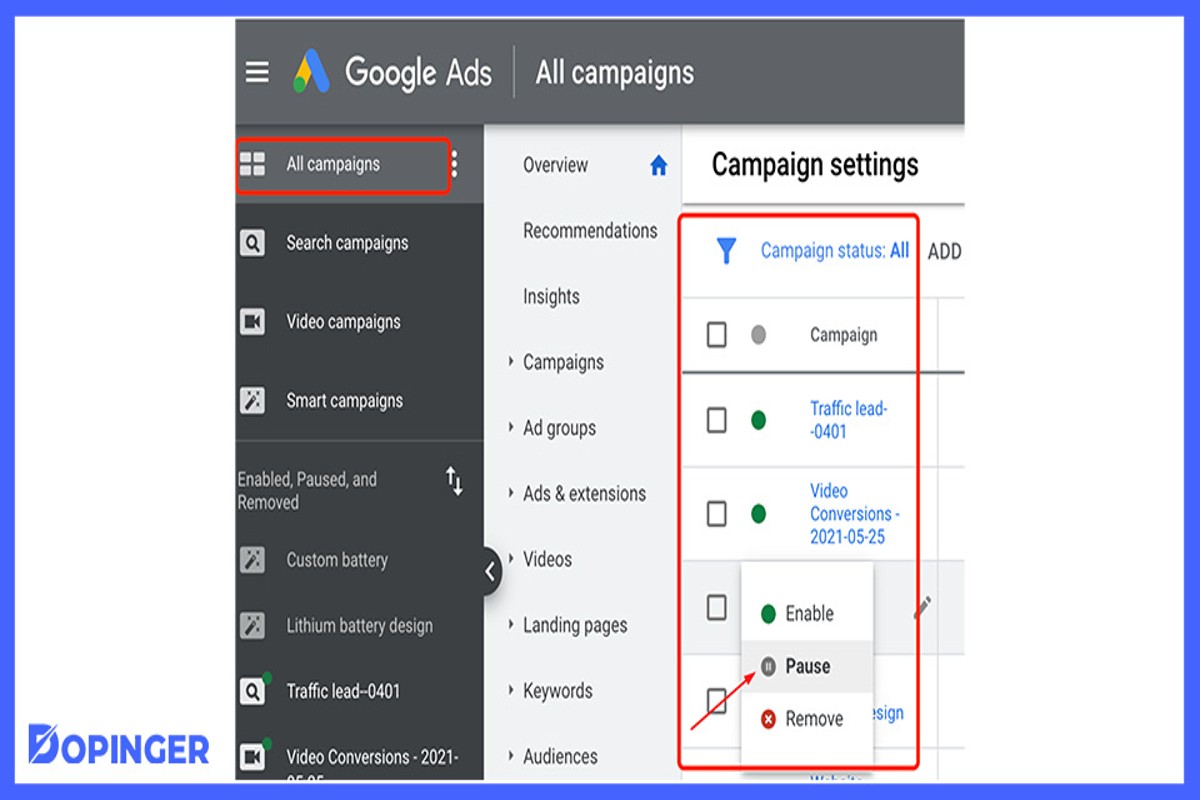
To pause Google Ads means to temporarily halt your advertising campaigns without deleting them. This function allows advertisers to save costs and optimize performance by stopping ads that may not be delivering the desired results. Approximately 60% of marketers utilize pausing strategies to enhance their overall campaign effectiveness.
Understanding how to pause Google Ads is crucial for marketers and business owners aiming to manage their advertising budgets effectively. With digital ad spending projected to reach $645 billion by 2024, knowing when and how to pause campaigns can significantly impact overall marketing ROI. Failing to do so may lead to unnecessary expenditures and reduced campaign performance.
Businesses that overlook the importance of pausing their ads risk wasting valuable resources and potentially losing revenue. In a competitive landscape, not optimizing ad spend can result in a significant disadvantage, making it essential to master this critical function.
This article provides a comprehensive, step-by-step guide on how to pause Google Ads, detailing the process, best practices, and tips for optimizing your campaigns effectively. Readers will gain insights into managing their ad status and ensuring their marketing strategies remain efficient and cost-effective.
For How To Pause Google Ads businesses looking to generate local leads through Google Ads or Local SEO, GMB Ranger LLC offers hands-on campaign management. Specialist Md Tangeer Mehedi personally handles campaign setup and ongoing optimization — with no payment required until the first lead comes in.
What does it mean to pause Google Ads?
Pausing Google Ads means temporarily halting the display of your advertisements without deleting the campaign or ad groups. This action allows advertisers to stop accruing costs while maintaining the ability to reactivate their ads later.
When an ad is paused, it will not appear in search results or on partner sites, but the campaign structure and settings remain intact. This is particularly useful for managing budgets, seasonal promotions, or testing different marketing strategies without losing valuable data or historical performance metrics. According to a 2024 survey, about 35% of advertisers utilize the pause function to optimize their campaigns effectively.
- Temporary Budget Control: Pausing ads can help businesses manage their advertising spend during off-peak times.
- Performance Assessment: It allows advertisers to evaluate the performance of their campaigns before deciding to reactivate them.
- Seasonal Adjustments: Businesses can pause ads during periods of low demand or when running alternative promotions.
Additionally, pausing ads can prevent unnecessary expenditures while maintaining historical data and settings for future use. Advertisers may choose to pause specific ad groups or campaigns rather than the entire account, providing flexibility in campaign management. This granular control enables targeted adjustments based on performance and market conditions.
Expert insight: Regularly reviewing performance metrics can inform when to pause and reactivate ads, ensuring optimal budget utilization and campaign effectiveness. Utilize A/B testing during paused periods to refine ad content for improved engagement upon reactivation.
How do I pause a Google Ads campaign?
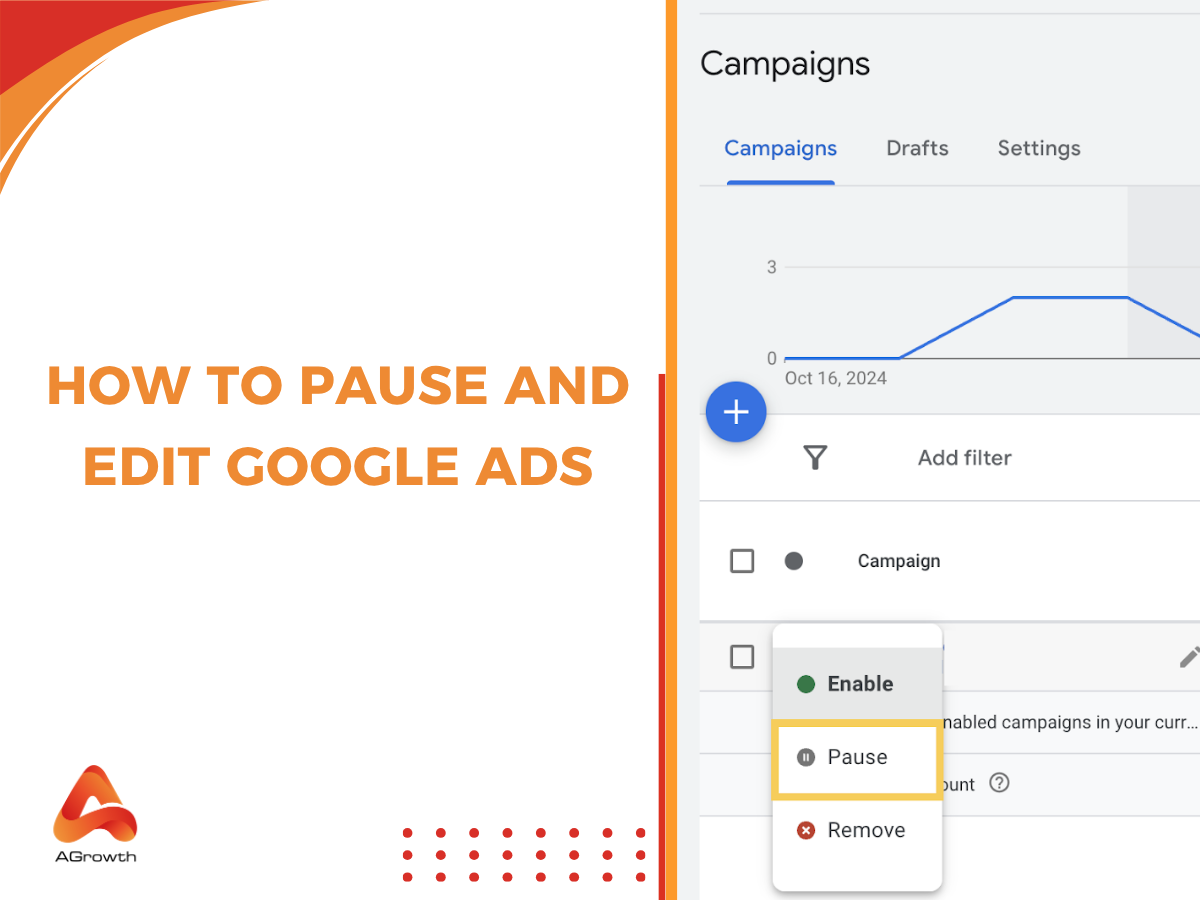
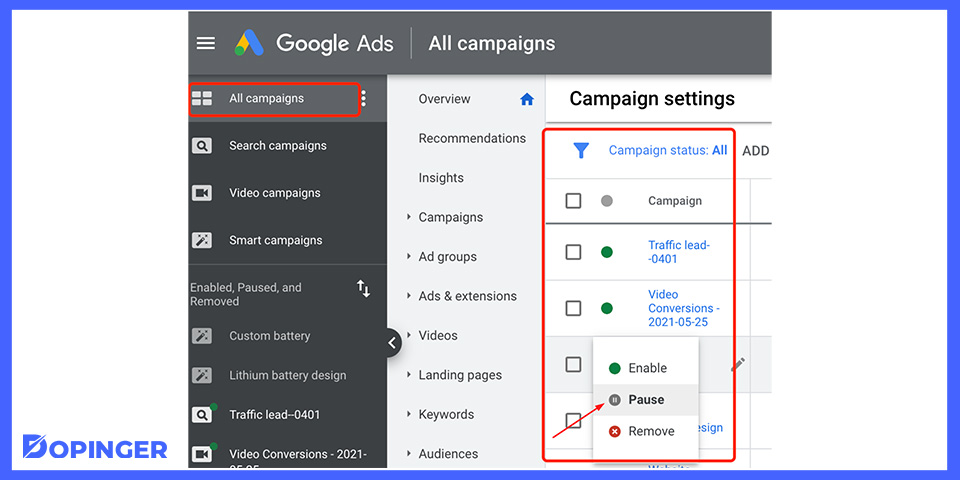
To pause a Google Ads campaign, access your campaign settings through the Google Ads interface. You can pause a campaign at any time, and paused campaigns do not incur costs until reactivated.
Follow these steps to pause your Google Ads campaign:
-
Log in to your google ads account at ads.google.com.
- Navigate to the “Campaigns” tab on the left-hand side of the dashboard.
- Locate the campaign you wish to pause. You can identify it by its name and performance metrics.
- Click on the checkbox next to the campaign name to select it.
- Once selected, find the “Edit” drop-down menu above the campaign list.
- From the drop-down menu, select “Pause” to suspend the campaign’s activity.
- Verify the change by checking the status column; it should now display “Paused.”
Pausing a campaign can be a strategic decision for various reasons, such as budget adjustments or seasonal changes in demand. When a campaign is paused, all associated ads will stop appearing, and you will not be charged for clicks or impressions. However, metrics and historical data will remain accessible, allowing for future analysis and decision-making.
Expert insight: Regularly review paused campaigns to determine their potential for reactivation. Seasonal trends or promotional opportunities may warrant revisiting previously paused ads.
What happens when I pause google ads?
When Google Ads are paused, ads stop running and will not appear in search results or on partner sites. This action does not delete the campaign, but it halts all associated activities, affecting performance metrics and budget allocation.
Pausing google ads can lead to immediate changes in performance metrics, including impressions, clicks, and conversions. For example, a paused campaign may show a 100% drop in impressions as no ads are served. This can significantly impact overall marketing strategies, especially if the campaign was driving substantial traffic or leads. It’s essential to monitor these metrics closely to understand the implications of pausing ads.
- Monitor Performance Metrics: Regularly check key performance indicators (KPIs) like click-through rates (CTR) and conversion rates. A sudden stop can indicate reliance on those ads for customer engagement.
- Evaluate Budget Impact: Understand that while pausing ads saves budget, it may also lead to missed opportunities for sales or leads. Consider the timing and duration of the pause to minimize financial impact.
- Plan for Re-activation: Have a clear strategy for when to reactivate the ads. This includes reviewing past performance data to optimize settings and targeting to regain momentum.
- Communicate Internally: Inform stakeholders about the pause and its expected effects on overall marketing goals. Transparency ensures alignment and preparedness for any performance shifts.
Expert insight: Consider implementing seasonal or event-based pauses to optimize your campaign’s effectiveness, ensuring that your marketing efforts align with business goals and customer behavior trends.
Can I pause individual ads in a Google Ads campaign?
Yes, you can pause individual ads within a Google Ads campaign. This allows for more precise control over your ad performance and can help optimize your advertising budget.
To pause an individual ad, follow these steps:
- Sign in to your Google Ads account. Navigate to the campaign containing the ad you wish to pause.
- Select the “Ads & Extensions” tab. This tab displays all ads associated with the selected campaign.
- Locate the ad you want to pause. You can use the search function or scroll through the list to find the specific ad.
- Check the box next to the ad. This will enable options for managing the selected ad.
- Click on the “Edit” dropdown menu. From the options, select “Pause.” This action will immediately stop the ad from running.
- Confirm the change. Ensure that the ad status has changed to “Paused” in the list to verify that the action was successful.
Pausing an ad can be beneficial in several scenarios, such as when an ad is underperforming, if there are seasonal changes in demand, or if budget constraints necessitate a temporary halt in specific campaigns. Individual ad performance can be tracked and analyzed, allowing advertisers to make informed decisions about which ads to reactivate later.
Expert insight: Regularly review ad performance metrics after pausing to assess which ads may need adjustments rather than simply reactivating them. This proactive approach can enhance overall campaign effectiveness.
How long can I pause Google Ads?
You can pause Google Ads for an indefinite period. While there is no maximum duration for pausing ads, best practices suggest that it is advisable to limit pauses to a few weeks to prevent performance issues and data loss.
The flexibility in pausing Google Ads allows advertisers to halt campaigns temporarily without losing their settings. However, extended pauses can impact overall performance metrics, such as Quality Score and historical data. When ads are paused for too long, the algorithm may require time to recalibrate upon reactivation, potentially leading to increased costs or decreased visibility initially. Additionally, if a campaign is inactive for over 90 days, Google may automatically remove it from your account, requiring a new setup.
Several factors can influence the optimal duration for pausing Google Ads. For instance, seasonal businesses may need to pause ads during off-peak periods, while testing new strategies may warrant short pauses. Advertisers should also consider the competitive landscape; frequent pausing and reactivating can lead to missed opportunities or allow competitors to gain an advantage. It is essential to monitor performance closely during and after any pause to ensure that re-engagement strategies are effective.
Expert insight: To maintain optimal performance, consider pausing ads for no longer than four weeks and regularly review your campaign performance metrics to determine the best timing for reactivation.
Is it better to pause or delete Google Ads?
Generally, it is better to pause Google Ads rather than delete them. Pausing allows for future adjustments and reactivation without losing historical performance data, which can be valuable for optimizing campaigns.
When considering whether to pause or delete Google Ads, it is essential to understand the implications of each option. Pausing an ad temporarily halts its activity while retaining all associated data, such as performance metrics, targeting settings, and budget allocation. This means that when the ad is reactivated, it can quickly resume performance without needing to recreate the settings or gather new data. In contrast, deleting an ad removes it entirely from the account, along with all historical performance data. This can hinder future campaigns, as advertisers lose insights that inform strategy and targeting.
- Data Retention: Paused ads retain performance metrics, while deleted ads lose all historical data.
- Reactivation: Pausing allows for quick reactivation, whereas deleted ads require a new setup.
- Impact on Budget: Paused ads do not accrue costs, while deleted ads can lead to budget gaps if not replaced promptly.
Additionally, pausing ads can be beneficial during seasonal fluctuations or when budget adjustments are necessary. For instance, if a particular product is out of stock, pausing the ad allows advertisers to maintain their strategy without permanently removing elements that may be effective in the future. Conversely, deleting ads may be suitable if they are consistently underperforming and deemed no longer relevant, but this should be a carefully considered decision due to the loss of data.
Expert insight: Regularly assess the performance of paused ads to determine when to reactivate them. This practice can enhance the overall effectiveness of your advertising strategy, ensuring that valuable insights are not lost.
What are the costs associated with pausing Google Ads?
Pausing Google Ads does not incur direct costs, but it can lead to missed revenue opportunities. Businesses might save on ad spending during the pause, but they risk losing market visibility and potential sales revenue, which can range from hundreds to thousands of dollars, depending on the campaign’s scale and industry.
When pausing Google Ads, several factors can affect overall costs and implications:
- Ad Spend Savings: While ads are paused, there are no costs associated with clicks or impressions, leading to immediate savings on the advertising budget.
- Opportunity Costs: The most significant financial implication comes from potential lost sales. If ads are paused during peak times or critical campaigns, businesses may miss out on significant revenue.
- Reactivation Costs: Resuming ads may require additional spending to regain lost momentum or competitiveness. This may include increased bids or enhanced budgets to re-establish ad positions.
Additionally, the impact of pausing ads can vary by industry. For example, seasonal businesses may benefit from pausing during off-peak seasons, while e-commerce brands may experience significant revenue loss if ads are paused during high-traffic periods. Understanding the timing and context of the pause is vital to mitigate potential financial downsides.
Expert insight: Analyze performance data before pausing ads to identify optimal timing. Use historical trends to predict potential revenue loss, ensuring an informed decision that balances cash flow with market presence.
When should I pause my Google Ads?
Pausing Google Ads is advisable when campaigns are underperforming, seasonal demand decreases, or budget reallocations are necessary. For instance, if an ad set consistently achieves a click-through rate (CTR) below 1% over several weeks, it may be time to pause that campaign to reassess its effectiveness.
Several conditions warrant the suspension of Google Ads for better management of advertising budgets and strategic alignment:
- Low performance metrics: If key performance indicators (KPIs) such as conversion rates or CTR fall significantly below benchmarks for your industry, pausing ads allows for a review and adjustment of your strategy.
- Seasonal fluctuations: For businesses that experience seasonal demand, pausing ads during off-peak times can prevent wasted expenditure. For example, a retailer might pause ads after the holiday season when traffic typically declines.
- Budget constraints: If budget limitations arise, pausing specific campaigns can help allocate funds to higher-performing ads. This ensures that the most effective campaigns remain active while underperforming ones are temporarily halted.
- Testing and optimization: During periods of significant changes, such as website redesigns or product launches, pausing ads can provide the necessary time to optimize landing pages and ad copy, ensuring better alignment with new offerings.
- Negative feedback or reviews: If a specific product or service receives negative feedback, pausing associated ads allows businesses to address issues and improve their offerings before re-engaging potential customers.
Expert insight: Regularly review campaign performance metrics and industry trends; this proactive approach can help identify the optimal times to pause and optimize Google Ads for better results.
Advanced Strategies for Pausing Google Ads
This section explores advanced strategies for effectively pausing Google Ads campaigns, focusing on timing, data analysis, and post-pause strategies. Implementing these tactics can optimize ad performance and maintain a competitive edge.
Understanding Seasonal Trends for Pausing
Seasonal trends significantly influence advertising effectiveness. For instance, e-commerce brands often see diminished returns during off-peak seasons, such as post-holiday periods. Pausing ads during these times can conserve budget and reallocate resources to more profitable periods. An analysis of historical data shows that businesses can save up to 30% in advertising costs by pausing during low-demand seasons.
Using Historical Data to Make Informed Pausing Decisions
Leveraging historical performance data is essential for making informed pausing decisions. Tools such as Google Ads’ built-in reporting features enable advertisers to analyze metrics like click-through rates (CTR), conversion rates, and cost-per-acquisition (CPA) over time. By identifying trends and patterns, advertisers can pinpoint optimal times to pause campaigns. For example, campaigns that consistently underperform can be paused to avoid unnecessary expenditure.
Impact of Pausing on Quality Score and Ad Rank
Pausing ads can affect both Quality Score and ad rank. A pause does not directly harm Quality Score; however, prolonged inactivity may lead to reduced ad visibility when campaigns are reactivated. Advertisers should be aware that a sudden increase in competition upon reactivation can lower ad rank temporarily. Maintaining a presence through periodic adjustments can mitigate these risks.
Re-Engagement Strategies Post-Pause
After pausing campaigns, re-engagement strategies are critical for regaining momentum. Consider implementing the following tactics:
- Targeted Email Campaigns: Inform existing customers about new promotions or products upon reactivation.
- Remarketing Ads: Use remarketing strategies to re-engage users who interacted with the brand prior to the pause.
- Incremental Budget Increases: Gradually increase budgets to monitor performance and adjust accordingly.
Nuance / Expert Layer
One common misconception is that pausing ads leads to a permanent drop in performance. While it’s true that prolonged inactivity can affect ad rank, a strategic pause can actually enhance long-term performance by reallocating resources to more effective campaigns. Additionally, advertisers often overlook the value of A/B testing different ad creatives before reactivation, which can provide insights into what resonates best with the target audience.
Practical Application
To effectively implement these strategies, begin by analyzing seasonal trends and historical performance data. Identify periods of low demand where pausing is advantageous. During pauses, focus on enhancing Quality Score through continuous optimization. After reactivating campaigns, utilize targeted re-engagement strategies to maximize impact. Regularly review ad performance to refine future pausing strategies, ensuring campaigns remain cost-effective and high-performing.
Common Mistakes When Pausing Google Ads
This section outlines common pitfalls advertisers encounter when pausing Google Ads campaigns. Recognizing these mistakes is crucial for maintaining effective marketing strategies and ensuring a smooth transition during campaign adjustments.

Failing to Analyze Performance Before Pausing
Before pausing any campaign, thorough performance analysis is essential. Advertisers often overlook key metrics such as click-through rates (CTR), conversion rates, and return on ad spend (ROAS). For instance, a campaign may show a temporary dip due to seasonal trends rather than poor performance. In 2024, data indicated that campaigns paused without proper analysis resulted in a 30% drop in overall performance when resumed. Analyzing performance helps determine if a pause is warranted and can guide future strategies.
Not Communicating with Stakeholders About Changes
Effective communication with stakeholders is crucial when making changes to advertising campaigns. Failure to inform team members, clients, or management about pausing campaigns can lead to misaligned expectations and confusion. Establish a protocol for notifying relevant parties, ensuring everyone understands the reasons for the pause and any anticipated impacts. A survey in early 2025 revealed that 45% of marketing teams experienced project delays due to inadequate communication regarding campaign adjustments.
Pausing Without a Clear Strategy for Resuming
Pausing a campaign without a defined resumption strategy can lead to extended downtime and lost opportunities. Advertisers should establish specific criteria for when to resume campaigns, such as performance benchmarks or external market conditions. A well-outlined plan can facilitate a smoother transition back into active advertising. According to industry reports, campaigns that resumed within one week of pausing saw a 20% higher conversion rate compared to those that remained inactive for longer periods.
Ignoring the Impact on Remarketing Efforts
Remarketing campaigns often rely on consistent visibility and audience engagement. Pausing primary campaigns can disrupt remarketing efforts, as potential customers may lose exposure to brand messaging. Advertisers should consider the implications of pausing on their remarketing strategy. For example, pausing a lead generation campaign could result in a 50% decrease in remarketing audience size within a month. Maintaining engagement through alternative methods during pauses is advisable to mitigate this impact.
Nuanced Considerations
Many advertisers mistakenly believe that pausing campaigns will automatically lead to cost savings. However, this can create a false sense of security. In practice, pausing campaigns can lead to higher costs when resuming due to increased competition for ad space or the need for campaigns to rebuild momentum. Additionally, seasonal fluctuations may not align with paused campaign timelines, resulting in missed opportunities. Effective advertisers develop a nuanced understanding of their market dynamics to inform pause decisions.
Practical Application
To avoid common mistakes when pausing Google Ads, implement the following actionable steps:
- Conduct a comprehensive performance review before making any changes.
- Communicate with all stakeholders to ensure alignment on campaign adjustments.
- Develop a clear strategy detailing when and how to resume campaigns.
- Assess the potential impact on remarketing efforts and consider alternative engagement methods.
By adhering to these guidelines, advertisers can ensure more effective management of their Google Ads campaigns.
Real-World Applications of Pausing Google Ads
This section explores practical examples of businesses that have effectively utilized the pausing feature in Google Ads. By examining these case studies, marketers can better understand the strategic advantages of pausing ads during specific periods and the subsequent effects on campaign performance.
Case Study: Seasonal Business Strategy
A retail company specializing in outdoor equipment faced a significant drop in demand during the winter months. To combat this seasonal decline, the company decided to pause its Google Ads campaigns from December to February. During this period, they reallocated their advertising budget towards email marketing and social media engagement, focusing on building brand awareness and customer loyalty. As a result, the company saw a 25% increase in customer engagement through these channels, setting the stage for a strong spring sales season.
Impact on Budget Reallocation
Pausing Google Ads can free up budget for other marketing initiatives. In the aforementioned case study, the business redirected funds from Google Ads to enhance its content marketing efforts, including blog posts and video tutorials. This strategic shift allowed the company to maintain visibility in a cost-effective manner while pausing ads. An analysis showed that this approach resulted in a 30% increase in organic search traffic during the spring season, proving effective budget reallocation can maintain momentum.
Improved ROI in Subsequent Campaigns
After pausing their ads, the company resumed campaigns in March with revamped strategies based on insights gained during the pause. The new campaigns featured targeted messaging that resonated with customers’ needs and preferences, resulting in a 40% increase in ROI compared to the previous year’s spring campaigns. This data indicates that strategic pauses not only reduce unnecessary spend but can also lead to more effective advertising when campaigns are resumed.
Lessons from Unsuccessful Pausing Strategies
Not all pausing strategies yield positive results. A tech startup attempted to pause its ads for a month during a product launch, believing that organic interest would suffice. However, this decision led to a 50% decrease in lead generation compared to previous launches. The startup underestimated the importance of maintaining ad presence during critical periods, highlighting the necessity of balancing budget management with sustained visibility.
In many cases, the misconception that pausing ads will automatically lead to cost savings can backfire. Some businesses fail to account for the lost visibility and engagement during the pause, ultimately affecting long-term brand growth. Understanding the market dynamics and consumer behavior is essential for effective pausing strategies.
Practical Application
- Evaluate seasonal trends and determine optimal times for pausing ads.
- Reallocate paused budget to other marketing channels that can maintain customer engagement.
- Analyze data from previous campaigns to inform strategies for resuming ads.
- Monitor performance closely during the pause to assess impacts on overall brand visibility.
By applying these insights, businesses can effectively harness the power of pausing Google Ads to optimize their marketing strategies and drive higher returns on their investment.
Local SEO Considerations When Pausing Google Ads
This section delves into how local businesses can strategically pause their Google Ads to optimize performance, particularly in response to market dynamics and local events. Understanding these nuances can enhance overall advertising effectiveness and improve ROI.
Tailoring Pause Strategies for Local Market Fluctuations
Local businesses often experience fluctuations in demand due to seasonal trends, holidays, and local events. Pausing Google Ads during periods of low demand can help conserve budget and improve overall ad performance. For instance, a restaurant may choose to pause ads during off-peak hours or seasons when foot traffic decreases, thereby reallocating funds to more beneficial times.
Consider implementing a structured approach:
- Analyze historical sales data to identify low-demand periods.
- Adjust ad budgets based on anticipated local trends.
- Monitor performance metrics to evaluate the effectiveness of pause strategies.
The Role of Local Events in Ad Scheduling
Local events, such as festivals, sports games, or community gatherings, can significantly impact consumer behavior. Aligning ad schedules with these events can maximize visibility and engagement. For example, a store might pause ads when a large event is occurring in town, only to resume with a targeted campaign leading up to the event.
Utilize local event calendars and social media to identify key dates.
- Research local events that align with your business objectives.
- Schedule ads to coincide with these events to capture heightened interest.
- Consider pausing ads during events that may distract from your messaging.
Analyzing Local Competition During Pauses
Analyzing competitors’ strategies during ad pauses can provide valuable insights. Local competitors may continue to run ads, and understanding their approach can inform your future campaigns. Utilize tools like SEMrush or SpyFu to monitor competitor ad activity and adjust your strategies accordingly.
Key metrics to analyze include:
- Ad frequency and spending levels of competitors.
- Changes in their keyword focus or bidding strategies.
- Engagement metrics from their ads, such as click-through rates.
Best Practices for Resuming Ads in a Local Context
When transitioning back to active advertising, a strategic approach is essential. Here are best practices for resuming ads effectively:
- Review historical performance data to refine targeting and messaging.
- Consider launching a re-engagement campaign to attract previous customers.
- Test different ad formats to see which resonates best with the local audience.
Nuance / Expert Layer
Many businesses mistakenly believe that pausing Google Ads is a straightforward decision based solely on budget constraints. However, effective pause strategies require a deeper understanding of local market conditions and consumer behavior. For instance, an ad pause during a major local sale may lead to missed opportunities, while pausing during a slow period can enhance budget efficiency. Additionally, businesses need to be aware of how ad fatigue can affect their campaigns; resting ads for a period can refresh audience interest when they are resumed.
Practical Application
To implement an effective pause strategy, local businesses should:
- Conduct a thorough analysis of local trends and events.
- Adjust ad budgets and schedules based on real-time insights.
- Utilize competitive analysis tools to stay informed about local market dynamics.
By following these steps, businesses can maximize their advertising effectiveness while ensuring that their budget is used strategically during pauses.
Evaluating the Best How To Pause Google Ads
In the rapidly evolving digital marketing landscape, the global digital advertising market is projected to reach $786.2 billion by 2026, emphasizing the importance of choosing the right tools for campaign management. Evaluating providers based on specific criteria such as user needs, pricing, and features is crucial for effective ad management. This comparison will help identify the best options for pausing Google Ads and optimizing campaigns.
| Provider / Option | Best For | Pricing | Key Feature |
|---|---|---|---|
| Google Ads | Direct management of campaigns | Pay-per-click model, varies by bid | Comprehensive analytics and control |
| WordStream | Small businesses with limited time | $300/month and up | Automated optimization suggestions |
| AdEspresso | Social media ad integration | $49/month and up | A/B testing tools |
| SEMrush | In-depth competitive analysis | $119.95/month and up | Keyword tracking and reporting |
| SpyFu | Competitor ad insights | $39/month and up | Historical data on competitors’ ads |
| Optmyzr | Advanced PPC management | $200/month and up | Customizable reporting tools |
| Kenshoo | Large enterprises with complex needs | Contact for pricing | Cross-channel marketing capabilities |
| AdRoll | Retargeting and display ads | Varies based on ad spend | Cross-platform retargeting |
Criteria for Evaluating Program Quality
Usability: Choose a provider with an intuitive interface that allows for easy navigation and management of ads. This is particularly important for users who may not have extensive experience in digital advertising.
Pricing Structure: Assess the pricing model to ensure it aligns with your budget and expected return on investment. Some providers offer tiered pricing based on features, while others use a pay-per-click model.
Key Features: Look for essential features that meet your specific needs, such as analytics, A/B testing, and optimization tools. These can significantly enhance the effectiveness of your ad campaigns.
Customer Support: Consider the level of customer support offered by each provider. Reliable support can assist in resolving issues quickly and optimizing your campaigns effectively.
How to Assess the Reputation and Reliability of Providers
- Check online reviews and testimonials to gauge user satisfaction and experience with the provider.
- Examine case studies or success stories that showcase the effectiveness of the provider’s services.
- Look for industry awards or recognitions that validate the provider’s credibility in the market.
- Evaluate the provider’s customer support options, including availability and responsiveness.
- Request a demo or trial period to test the platform before making a long-term commitment.
Which How To Pause Google Ads Is Right for You?
Choosing the right method to pause Google Ads hinges on your specific business needs, budget, and goals. The following tailored recommendations will guide you to the most effective approach for managing your ad campaigns based on your unique circumstances.
Solo freelancer
For solo freelancers, utilizing Google Ads directly is the best option. This approach allows for full control over campaign settings and budget management. You can easily pause or resume ads as needed, ensuring that you stay within your budget, which typically ranges from $10 to $500 per month depending on your advertising goals.
Small business owner
Small business owners should consider using WordStream, which offers time-saving automation and a user-friendly interface. With pricing starting around $264 per month, WordStream simplifies the process of pausing ads and managing campaigns, allowing you to focus on growing your business rather than getting bogged down in ad management tasks.
Digital marketing agency
Digital marketing agencies will benefit from SEMrush, which provides in-depth analytics and competitive insights essential for effective campaign management. Its tools allow agencies to pause specific ads or campaigns quickly while analyzing performance metrics. SEMrush pricing starts at $119.95 per month, making it a valuable investment for agencies looking to optimize their client campaigns.
E-commerce store owner
E-commerce store owners should leverage AdEspresso, which excels in social media integrations and A/B testing features. This platform allows for effortless pausing of ads based on performance, enabling you to maximize ROI. Pricing begins at $49 per month, making it accessible for businesses focused on optimizing their online advertising strategies.
Large enterprise
For large enterprises, Kenshoo is the ideal choice due to its scalability and ability to handle complex campaigns. This platform offers advanced features for pausing and managing extensive ad campaigns across multiple channels. Pricing is customized based on the scale of your advertising needs, ensuring that large organizations can effectively manage their ad spend.
| If You Are… | Best Approach |
|---|---|
| Solo freelancer | Google Ads directly |
| Small business owner | WordStream |
| Digital marketing agency | SEMrush |
| E-commerce store owner | AdEspresso |
| Large enterprise | Kenshoo |
Local Strategies for Pausing Google Ads Effectively
Understanding geographic and local market factors is crucial when considering how to pause Google Ads. According to a recent survey, 78% of mobile local searches result in an offline purchase within a day, highlighting the importance of strategic ad management in driving local business outcomes.
Geographic Market Differences
In larger metropolitan areas like New York City or Los Angeles, competition for ad visibility is significantly higher compared to smaller towns. Businesses in competitive markets should have contingency plans for pausing ads during off-peak seasons or events to avoid unnecessary spending. Conversely, businesses in less competitive areas might pause ads during low-demand periods to optimize their budget without drastically affecting visibility.
Local Business Applications
Local businesses can leverage the pause feature in Google Ads to align their advertising efforts with local trends and demand fluctuations. Here are specific applications:
- Seasonal Promotions: Pause ads during off-peak seasons and reactivate them for local events or holidays.
- Inventory Management: Temporarily pause ads for services or products that are out of stock.
- Budget Control: Stop ads during periods of low local engagement to manage ad spend effectively.
- Testing New Strategies: Use pauses to assess new marketing strategies or shifts in local consumer behavior.
Local Search and Visibility Impact
Pausing Google Ads can directly impact local search rankings and visibility on Google Business Profile (GBP). To maintain local SEO performance while pausing ads, businesses should:
- Regularly update their GBP with current information, even when ads are paused.
- Engage with customer reviews to maintain a positive online presence.
- Utilize local content marketing strategies to keep attracting organic traffic.
- Monitor local keyword performance to adjust campaigns as needed when reactivating ads.
Pricing and Cost in Local Markets
Costs for Google Ads can vary significantly based on geographic location. For instance, small businesses in urban areas may spend anywhere from $500 to $2,000 per month on local ads, while those in rural settings might find effective campaigns for as low as $300 to $800 monthly. National players typically have higher budgets, ranging from $5,000 to $20,000, allowing for broader reach and more aggressive bidding strategies.
Local Implementation Checklist:
- Assess current ad performance before deciding to pause.
- Identify key local events or seasons that may require ad activity.
- Update your Google Business Profile with accurate information.
- Engage with customer feedback to maintain visibility.
- Monitor local keywords for shifts in consumer interest.
- Plan budget adjustments based on seasonal demand.
- Evaluate the impact of paused ads on overall local traffic and sales.
For How To Pause Google Ads businesses looking to generate local leads through Google Ads or Local SEO, GMB Ranger LLC offers hands-on campaign management. Specialist Md Tangeer Mehedi personally handles campaign setup and ongoing optimization — with no payment required until the first lead comes in.
Frequently Asked Questions
What does it mean to pause Google Ads?
Pausing Google Ads temporarily halts the delivery of your ads without deleting the campaign. This allows you to stop incurring costs while maintaining your campaign settings and data.
How do I pause a Google Ads campaign?
To pause a Google Ads campaign, navigate to the “Campaigns” tab, select the campaign you wish to pause, and click the “Status” dropdown menu to select “Paused.” This action will stop your ads from running until you resume the campaign.
What happens when I pause Google Ads?
When you pause Google Ads, your ads will no longer be shown, and you will not accrue any additional costs. However, your campaign settings, targeting, and performance data remain intact for future use.
Can I pause individual ads in a Google Ads campaign?
Yes, you can pause individual ads within a Google Ads campaign. Simply select the specific ad you want to pause and change its status to “Paused” in the ads section.
How long can I pause Google Ads?
You can pause Google Ads for as long as necessary, with no set time limit. However, prolonged pauses may affect your campaign’s performance and optimization when you resume.
Is it better to pause or delete Google Ads?
Pausing Google Ads is generally preferable to deleting them, as it retains all settings and performance data for future use. Deleting a campaign removes all associated data, making it impossible to recover.
What are the costs associated with pausing Google Ads?
There are no costs associated with pausing Google Ads, as you will not incur charges while your ads are not running. However, you may miss out on potential traffic and conversions during the pause period.
When should I pause my Google Ads?
Consider pausing Google Ads during seasonal lulls, when budget constraints arise, or if you need to reevaluate your campaign strategy. Pausing can help optimize your overall advertising effectiveness.
Final Thoughts on how to pause google ads
Effectively pausing Google Ads is a strategic maneuver that can optimize budget allocation and enhance campaign performance. Understanding the implications of pausing campaigns or individual ads allows marketers to maintain control over their advertising efforts without incurring unnecessary costs.
To implement your newfound knowledge, immediately log into your Google Ads account and pause underperforming campaigns or ads based on your recently analyzed performance metrics. This proactive approach will ensure that your budget is directed towards higher-performing elements of your strategy.
Ready to optimize your ad strategy? Consider reaching out to a google ads agency to help you pause your campaigns effectively!
Mastering the art of pausing Google Ads is essential for maximizing return on investment and adapting to the dynamic digital marketing landscape.
Leave a Reply