
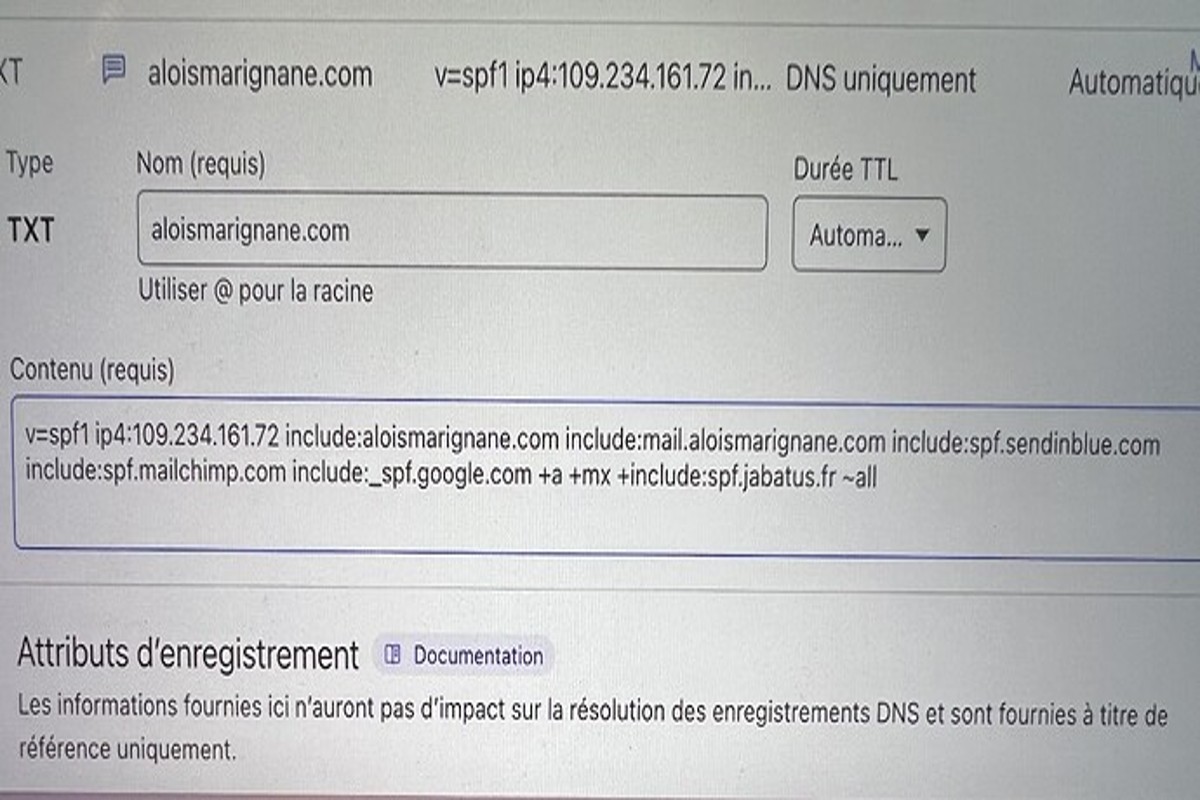
Adding SPF for only Google will not directly affect Mailchimp. However, it can influence email deliverability by affecting how receiving servers validate emails, potentially impacting the successful delivery of marketing campaigns sent through Mailchimp.
This topic is crucial for marketers and IT professionals managing email campaigns, as proper SPF configuration is essential for ensuring email authenticity. Misconfiguration can lead to increased instances of emails being marked as spam or rejected altogether, jeopardizing communication efforts.
This article examines the implications of implementing SPF records specifically for Google, the relationship between SPF and Mailchimp, and best practices for optimizing email deliverability.
What is SPF and how does it work for email?
Sender Policy Framework (SPF) is an email authentication protocol designed to prevent email spoofing. It allows domain owners to specify which mail servers are authorized to send emails on their behalf. When an email is received, the recipient’s server checks the SPF record of the sending domain to verify the legitimacy of the source.
SPF works by using DNS (Domain Name System) records to publish the authorized mail servers. When an email is sent, the recipient server queries the DNS for the SPF record associated with the sender’s domain. If the sending server is listed in the SPF record, the email passes the check; otherwise, it may be flagged as spam or rejected. This process enhances email deliverability and protects against phishing attacks.
- Authentication: SPF helps verify whether the email sender is legitimate, reducing the risk of fraudulent emails.
- DNS Records: SPF records are formatted as TXT records in DNS and contain the IP addresses or hostnames of permitted mail servers.
- Policy Enforcement: Domain owners can define policies that dictate how emails failing SPF checks should be treated, such as marking them as spam or rejecting them outright.
Implementing SPF is essential for organizations that rely on email for communication. However, it is important to configure SPF records correctly, as misconfigurations can lead to legitimate emails being rejected or sent to spam folders. Additionally, SPF should be used in conjunction with other authentication methods, such as DKIM and DMARC, for improved email security.
Expert Tip: Regularly review and update SPF records to account for changes in email service providers or infrastructure. Failure to do so can lead to authentication failures and decreased email deliverability.
How does SPF impact email deliverability for Mailchimp?
SPF (Sender Policy Framework) significantly impacts email deliverability for Mailchimp by helping receiving mail servers verify the authenticity of emails. When SPF records are correctly configured, they reduce the likelihood of emails being marked as spam or rejected. This validation process is critical for maintaining high deliverability rates, especially when using third-party services like Mailchimp.
- Establishing Domain Authorization: SPF records define which servers are authorized to send emails on behalf of your domain. If Mailchimp’s sending IPs are included in your SPF record, receiving servers are more likely to accept the emails as legitimate.
- Reducing Spam Flagging: Proper SPF configuration minimizes the chances of your emails being flagged as spam. This is crucial for maintaining your sender reputation and ensuring that your campaigns reach the inbox instead of the spam folder.
- Impacts of Multiple SPF Records: Having multiple SPF records can lead to validation failures. Ensure only one SPF record exists for your domain, and that it includes all authorized sending sources, including Mailchimp.
- Monitoring Deliverability Metrics: Regularly track your email deliverability metrics through Mailchimp’s analytics. If you notice a drop in open rates or increased bounce rates, revisit your SPF settings to ensure they are correctly configured.
SPF is one aspect of a broader email authentication strategy, which may also include DKIM (DomainKeys Identified Mail) and DMARC (Domain-based Message Authentication, Reporting & Conformance). Together, these protocols enhance your email deliverability and protect your domain from spoofing.
For optimal results, routinely check and update your SPF record as needed. This proactive approach ensures that all legitimate sending services, including Mailchimp, are covered and helps maintain effective communication with your audience.
Can I set up SPF records for only Google and still use Mailchimp?
Yes, you can set up SPF records for only Google while using Mailchimp. However, doing so may negatively impact the deliverability of emails sent through Mailchimp. For optimal performance, it is recommended to include Mailchimp’s sending domains in your SPF records.
SPF (Sender Policy Framework) records are a type of DNS record that specify which mail servers are permitted to send emails on behalf of your domain. When you set up SPF records solely for Google, you authorize Google’s servers to send emails for your domain, but you do not authorize Mailchimp’s servers. This omission can lead to email deliverability issues, such as your Mailchimp emails being marked as spam or rejected entirely.
To ensure effective email delivery from both Google and Mailchimp, it is essential to include the appropriate SPF entries for both services. This can be structured in a single SPF record as follows:
- Include Google’s SPF: include:_spf.google.com
- Include Mailchimp’s SPF: include:servers.mcsv.net
By combining these entries, you create a unified SPF record that allows emails sent from both platforms to be authenticated properly. This not only improves deliverability but also maintains your domain’s reputation among email providers.
Expert Tip: Regularly monitor your SPF records and email deliverability metrics. Adjusting your SPF entries based on changes in your email service providers can help maintain optimal performance and reduce the risk of emails being flagged as spam.
What are the costs associated with setting up SPF records?
Setting up SPF (Sender Policy Framework) records typically incurs no direct financial costs, but it may require an investment of time and technical expertise. Organizations can implement SPF records for free through their domain hosting provider’s DNS management interface. However, the complexity of the setup and the need for skilled personnel can indirectly contribute to costs.
Several factors influence the overall cost of setting up SPF records:
- Technical Expertise: If in-house staff lack the necessary skills, hiring a consultant or IT professional may be required, leading to potential labor costs.
- Time Investment: The time taken to configure SPF records can vary. For organizations with complex email systems, more time may be needed to ensure proper configuration.
- Potential Tooling Costs: Some organizations may choose to invest in email authentication tools or services that provide additional features, which can incur subscription or licensing fees.
Furthermore, organizations must consider ongoing maintenance related to SPF records. Changes in email service providers, domain configurations, or email sending practices can necessitate updates to SPF records. Each of these changes may require additional technical resources, which can result in further indirect costs.
Key takeaway: Properly setting up SPF records can enhance email deliverability and security, ultimately saving organizations from potential revenue loss due to misdirected emails. Investing time in proper configuration upfront can mitigate future complications.
How long does it take for SPF changes to take effect?
SPF changes can take effect within minutes, but full DNS propagation may take up to 48 hours. The timing varies based on several factors, including the TTL (Time to Live) settings of your DNS records and the caching behavior of mail servers.
When an SPF record is updated, the change is usually recognized by the DNS provider quickly. However, other servers may still refer to the cached version of the DNS record until their own caches expire. The TTL setting, which is configured in seconds, dictates how long information is stored before a refresh is necessary. A shorter TTL leads to faster propagation, while a longer TTL can delay the update significantly.
Additionally, different mail servers may have varying response times to DNS changes. Some servers may check for updates frequently, while others may rely on cached data longer. This difference can affect how soon the new SPF record is recognized across the internet. As a practical implication, if immediate action is required, it is advisable to monitor the SPF change and test email deliverability after the update.
To facilitate quicker updates, consider temporarily lowering the TTL of your SPF record before making changes. Once the new record is confirmed to be effective, the TTL can be increased again to reduce DNS query load.
Expert Tip: Always verify SPF changes using tools like SPF record checkers to ensure that the updated record is being recognized correctly across different mail servers.
What are best practices for setting up SPF with Mailchimp?
Setting up SPF (Sender Policy Framework) records for Mailchimp requires a comprehensive approach to ensure email deliverability. Best practices include incorporating all sending domains and regularly updating SPF records to mitigate potential deliverability issues. A well-configured SPF record can enhance email authenticity and improve inbox placement.
Begin by including all sending domains in your SPF record. If you are using multiple email service providers, each must be listed within the SPF record to ensure that emails sent from those platforms are authenticated. Failure to include all necessary domains can lead to emails being flagged as spam or rejected altogether. Additionally, ensure that you specify the correct mechanisms, such as include:mailchimp.com, to authorize Mailchimp as a legitimate sender.
Another best practice is to monitor and regularly update your SPF records. Changes in your email sending practices, such as adding new domains or switching providers, necessitate updates to your SPF record. Regular audits of your SPF configuration can help identify any outdated entries or errors that may impede deliverability. It is also wise to keep your SPF record under the 10 DNS lookup limit, as exceeding this can result in SPF failures.
Expert Tip
Consider implementing a DMARC (Domain-based Message Authentication, Reporting & Conformance) policy alongside your SPF setup. DMARC works in conjunction with SPF and DKIM (DomainKeys Identified Mail) to provide an additional layer of email authentication, enhancing your overall email security and deliverability.
What common mistakes should I avoid when configuring SPF for Mailchimp?
Common mistakes when configuring SPF for Mailchimp include omitting Mailchimp’s domains from the SPF record and creating overly restrictive policies that prevent legitimate emails from being delivered. These errors can lead to issues with email deliverability and impact marketing campaigns.
For example, consider a scenario where a user configures their SPF record to include only Google’s servers, such as “v=spf1 include:_spf.google.com ~all.” This setup neglects to include Mailchimp’s SPF record, which is “include:servers.mcsv.net.” As a result, emails sent through Mailchimp may be flagged as suspicious or rejected entirely, leading to lower engagement rates and missed marketing opportunities.
Another common mistake is setting an overly restrictive SPF policy. For instance, using “-all” at the end of the SPF record indicates that only the listed servers are allowed to send emails on behalf of the domain. If a legitimate email source, such as Mailchimp, is not included, any emails sent through that service will likely bounce. A more flexible approach, like “~all,” allows for some leniency in email delivery, which can help ensure that emails sent via Mailchimp are successfully delivered.
Expert Tip: Regularly review and update SPF records, especially when adding new email services. Testing the SPF record using tools like MXToolbox can identify potential issues before they affect email deliverability.
Understanding the Interaction Between SPF and Email Marketing Platforms
This section examines how SPF records interact with email marketing platforms like Mailchimp, emphasizing the importance of proper configuration for optimal email deliverability.
The Role of SPF in Email Authentication
Sender Policy Framework (SPF) is a crucial email authentication protocol that enables domain owners to specify which mail servers are authorized to send emails on their behalf. This mechanism helps prevent email spoofing and phishing attacks, thereby enhancing the overall security of email communication. Proper SPF configuration is essential for ensuring that legitimate emails reach their intended recipients, which directly impacts deliverability rates.
How Mailchimp Handles SPF Records
Mailchimp, as an email marketing platform, utilizes SPF records to verify the authenticity of the emails being sent from its servers. When a user employs Mailchimp to send campaigns, the SPF record associated with the sender’s domain must include Mailchimp’s sending IP addresses. This inclusion allows recipient mail servers to validate that the emails are indeed sent by an authorized service, reducing the likelihood of emails being marked as spam.
Potential Issues with Incorrect SPF Configuration
- Reduced Deliverability: If the SPF record does not include Mailchimp’s IP addresses, emails may be rejected or delivered to spam folders.
- Domain Reputation Damage: Incorrect SPF settings can lead to increased bounce rates, negatively affecting the domain’s reputation.
- Inconsistent Email Performance: Campaigns may show variable success rates based on recipient mail server policies, leading to erratic open and click-through rates.
Real-World Examples of SPF Configurations
Numerous cases illustrate the impact of SPF configurations on email marketing effectiveness. For instance, a company that solely configured SPF for Google Workspace without including Mailchimp’s sending servers experienced a significant drop in email open rates. In another scenario, a nonprofit organization found that their newsletters were frequently landing in spam folders after they neglected to update their SPF record to include new Mailchimp IP addresses following a service change. These examples underscore the necessity of a comprehensive SPF setup.
Nuance in SPF Configurations
Common misconceptions exist regarding SPF records, particularly the belief that configuring SPF for one service suffices for all email platforms. Each email service provider (ESP) has unique IP addresses that must be included in the SPF record. Failing to account for these distinctions can lead to deliverability issues. Additionally, exceeding the DNS lookup limit during SPF verification can result in SPF failures, which is often overlooked during setup. Therefore, a thorough understanding of each service’s requirements is vital for maintaining optimal email performance.
Practical Application
To ensure effective email deliverability using Mailchimp, follow these steps:
- Review your current SPF record to determine if it includes the necessary Mailchimp IP addresses.
- If not included, update the SPF record in your DNS settings to encompass Mailchimp’s sending servers.
- Test the updated SPF record using an SPF validation tool to confirm proper configuration.
By taking these actions, users can mitigate potential issues related to email deliverability, ensuring successful email campaigns.
Advanced SPF Configuration Techniques for Enhanced Deliverability
Properly configuring SPF records is essential for maximizing email deliverability across multiple platforms. This section delves into advanced strategies that can enhance your email authentication efforts, ensuring both Google and Mailchimp function optimally without compromising deliverability.
Using Include Mechanisms to Incorporate Multiple Sending Services
One of the most effective ways to manage multiple sending services is through the use of include mechanisms within your SPF record. This allows you to consolidate various sending domains under one SPF record, simplifying management and improving deliverability. For example, a combined SPF record might look like this:
- v=spf1 include:_spf.google.com include:servers.mcsv.net -all
In this case, both Google and Mailchimp are authorized to send emails on behalf of your domain. Leveraging include mechanisms reduces the risk of exceeding DNS lookup limits while maintaining a clean SPF configuration.
Understanding the Impact of DNS Limits on SPF Records
SPF records are subject to DNS lookup limits, which can significantly affect email deliverability. An SPF record can include a maximum of 10 DNS lookups, including those for include mechanisms, a, mx, ptr, and redirect. Exceeding this limit can lead to SPF failures, causing emails to be marked as spam or rejected entirely.
To optimize your SPF record, consider the following:
- Consolidate sending services where possible to minimize lookups.
- Regularly audit your SPF record to remove any outdated or unnecessary entries.
- Utilize subdomains for different services to distribute DNS load.
Best Practices for Managing SPF Records as Your Email Strategy Evolves
As email marketing strategies evolve, so too should your SPF configuration. Regular updates are necessary to reflect changes in sending services or organizational structure. Implement the following best practices for effective SPF management:
- Schedule periodic reviews of your SPF records, ideally quarterly.
- Document all changes to your SPF records for future reference.
- Test your SPF configuration using tools such as MXToolbox or SPF Record Checker.
Troubleshooting SPF-Related Deliverability Issues Effectively
When facing deliverability issues, troubleshooting SPF records is a critical step. Common problems include emails landing in spam folders or being rejected altogether. To diagnose these issues, follow these steps:
- Check for syntax errors in your SPF record using online validators.
- Utilize feedback loops and delivery reports from email service providers.
- Review your domain’s reputation with tools like SenderScore or Google Postmaster Tools.
In many cases, deliverability issues stem from improperly configured SPF records. Regularly validating and updating these records can prevent significant disruptions in email communication.
Many articles overlook the importance of maintaining a dynamic SPF record as your email strategy changes. A common misconception is that once an SPF record is set, it requires no further attention. However, as new services are adopted or existing services are phased out, failing to update your SPF configuration can lead to deliverability problems. Additionally, many users underestimate the complexity of managing multiple sending domains, which can lead to exceeded DNS lookup limits if not handled effectively.
To enhance email deliverability, regularly audit and refine your SPF records. Implement include mechanisms to streamline your configuration, monitor DNS limits, and actively troubleshoot any issues that arise. By following these advanced SPF configuration techniques, email authentication will support your overall marketing strategy, ensuring that adding SPF for only Google does not adversely affect Mailchimp or other platforms.
Comparative Analysis: SPF vs. DKIM and DMARC for Email Authentication
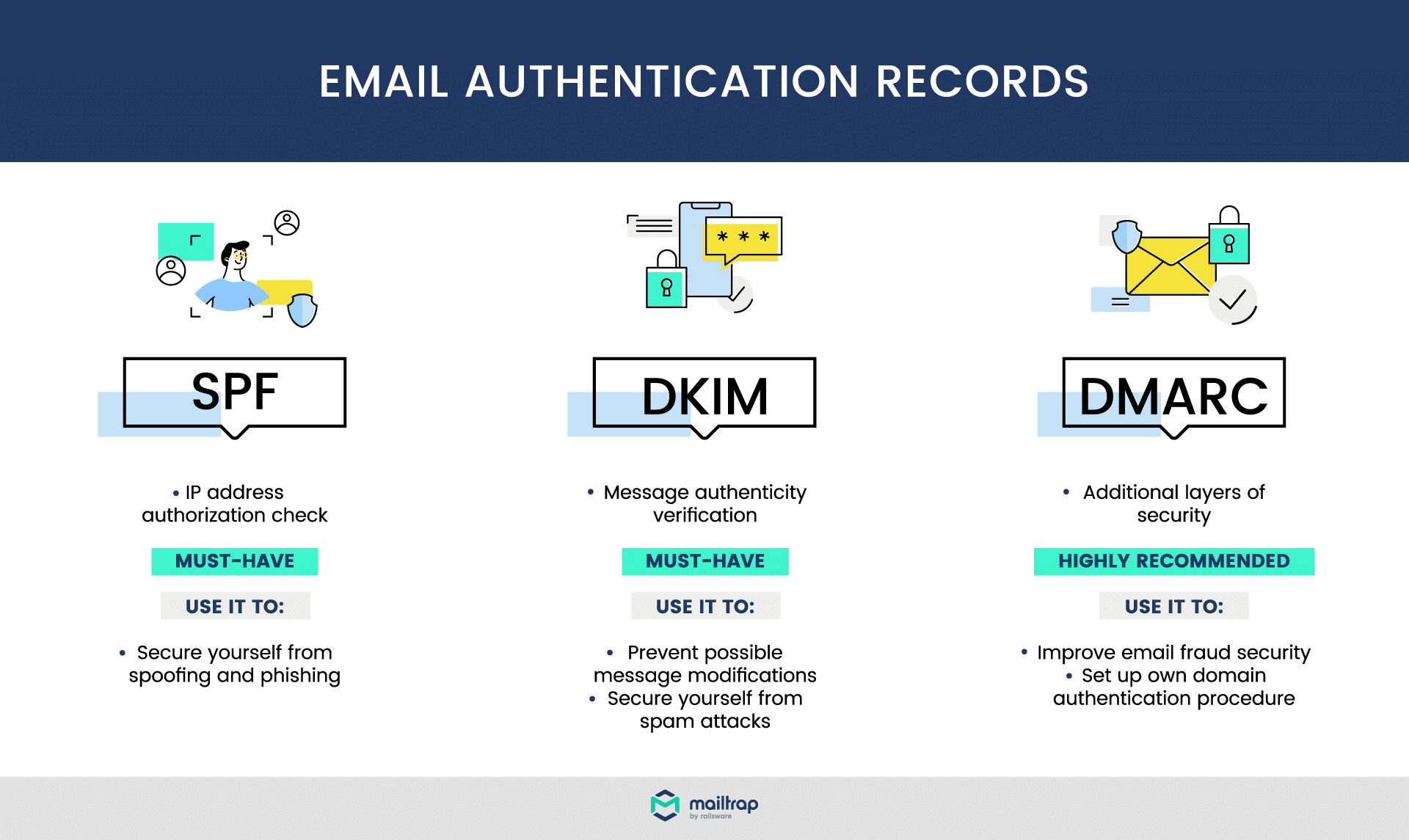
This section examines the roles of SPF, DKIM, and DMARC in email authentication. Understanding these protocols is essential for enhancing email security and ensuring deliverability, particularly when considering the implications of adding SPF for only Google and its potential impact on services like Mailchimp.
Definitions and Differences
Sender Policy Framework (SPF) is an email validation system designed to prevent email spoofing by allowing domain owners to specify which IP addresses are permitted to send emails on their behalf. In contrast, DomainKeys Identified Mail (DKIM) uses cryptographic signatures to verify that an email has not been altered in transit and confirms the sender’s identity. Domain-based Message Authentication, Reporting & Conformance (DMARC) builds on both SPF and DKIM by providing a way for domain owners to publish policies that inform email receivers on how to handle messages that fail SPF or DKIM checks.
How These Protocols Work Together
SPF, DKIM, and DMARC function synergistically to bolster email security. When an email is sent, the receiving mail server checks the SPF record to verify the sender’s IP address. If SPF validation passes, the server then checks for a DKIM signature to confirm the integrity and authenticity of the message. DMARC policies guide the server on how to respond to emails that fail these checks, allowing domain owners to specify whether emails should be quarantined or rejected.
Impact on Email Deliverability and Security
- SPF improves deliverability by reducing the chances of emails being marked as spam, especially when correctly configured.
- DKIM enhances security by validating the content of the email, thus preventing tampering and increasing trust in the sender.
- DMARC provides actionable feedback through reports, allowing domain owners to monitor their email traffic and adjust policies as necessary.
Best Practices for Implementation
For an effective email authentication strategy, consider the following best practices:
- Implement SPF by listing all authorized sending IP addresses in your DNS records.
- Set up DKIM to sign outgoing emails, ensuring the private key is securely stored.
- Publish a DMARC record that specifies your policy for handling emails that fail SPF or DKIM checks.
- Regularly monitor SPF, DKIM, and DMARC reports to identify and address potential issues.
- Educate your team about the importance of these protocols to maintain compliance and security.
Nuances and Common Misconceptions
One common misconception is that configuring SPF alone is sufficient for email security. However, SPF does not protect against email spoofing if the email is forwarded, as it relies solely on the sender’s IP address. Additionally, relying on only one protocol can lead to vulnerabilities. Implementing all three—SPF, DKIM, and DMARC—creates a multi-layered defense against email fraud. Furthermore, many organizations overlook the importance of regular updates to their DNS records, which can lead to outdated configurations that undermine security.
Practical Application
To enhance your email authentication, implement SPF, DKIM, and DMARC as a unified strategy. Start by assessing your current email infrastructure, then configure SPF records for all authorized senders, enable DKIM signing, and set DMARC policies that align with your organization’s needs. Regularly review and update your records to ensure optimal performance and security. This comprehensive approach will mitigate risks and improve deliverability, addressing any concerns regarding whether adding SPF for only Google will affect Mailchimp.
Frequently Asked Questions
What is SPF and how does it work for email?
SPF, or Sender Policy Framework, is an email authentication protocol that helps prevent spoofing. It allows domain owners to specify which mail servers are authorized to send emails on their behalf.
How does SPF impact email deliverability for Mailchimp?
SPF plays a crucial role in email deliverability by verifying the sender’s identity, which helps reduce the chances of emails being marked as spam. Properly configured SPF records can enhance Mailchimp’s ability to deliver emails to recipients’ inboxes.
Can I set up SPF records for only Google and still use Mailchimp?
Yes, you can configure SPF records specifically for Google while also including Mailchimp’s sending servers. However, it’s essential to combine all authorized senders in a single SPF record to ensure proper email delivery.
What are the costs associated with setting up SPF records?
Setting up SPF records typically incurs no direct costs, as it involves configuring DNS settings through your domain registrar. However, if you require professional assistance, there may be fees associated with that service.
How long does it take for SPF changes to take effect?
SPF changes can take effect almost immediately, but DNS propagation may take up to 48 hours in some cases. It is advisable to check the new settings after a few hours to ensure they are correctly implemented.
What are best practices for setting up SPF with Mailchimp?
Best practices include including all authorized sending domains in a single SPF record and keeping the record under the 10 DNS lookup limit. Regularly review and update the SPF record to accommodate any changes in your sending services.
What common mistakes should I avoid when configuring SPF for Mailchimp?
Avoid creating multiple SPF records for the same domain, as this can lead to authentication failures. Additionally, ensure that all sending sources, including Mailchimp, are included in a single, properly formatted SPF record.
Final Thoughts on will adding spf for only google affect mailchimp
The strategic implementation of SPF solely for Google can enhance email deliverability, but it requires careful consideration of Mailchimp’s authentication needs. While it is feasible to configure SPF for Google without compromising Mailchimp, neglecting comprehensive SPF settings may inadvertently affect email performance across platforms.
To optimize your email deliverability, it is imperative to establish a unified SPF record that includes all sending domains, including Mailchimp, to ensure consistent authentication across your email marketing efforts.
Understanding the nuances of SPF and its interaction with your email service providers is essential for maintaining a robust email reputation, ultimately impacting your marketing success.
Leave a Reply