
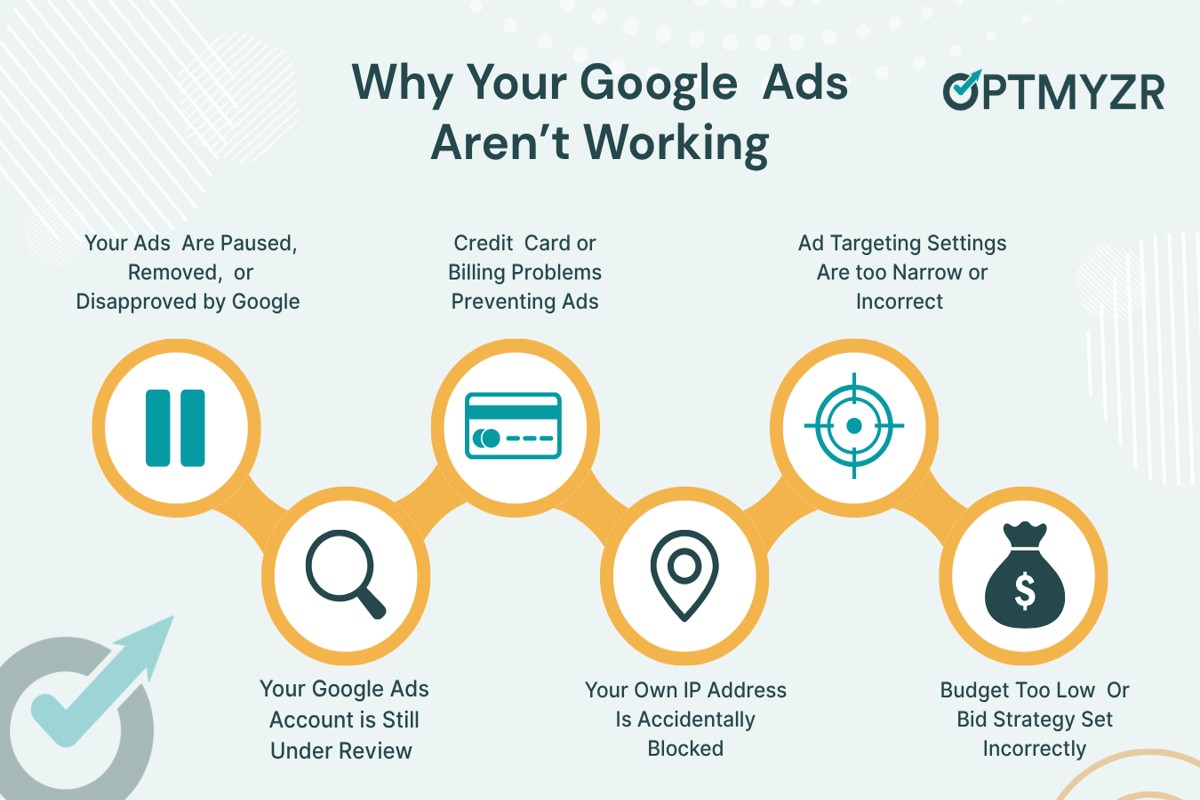
Why does Google Ads not work immediately? Google Ads often requires time for optimization, audience targeting, and bidding strategies to take effect, impacting initial performance. Advertisers may not see immediate results due to these complexities in the platform’s operation.
This topic is crucial for businesses and marketers investing in digital advertising. Understanding the timeline for Google Ads effectiveness is essential; misjudging this can lead to frustration, misallocated budgets, and missed opportunities for growth.
This article will clarify the factors affecting the immediate performance of Google Ads, including optimization timelines, audience targeting nuances, and effective bidding strategies. It will also provide actionable solutions to enhance ad performance over time.
Why do my Google Ads not show up right away?
Google Ads may not appear immediately due to several factors, including the ad approval process and budget settings. These elements ensure that ads meet Google’s quality standards and are positioned effectively within the auction system. Delays can vary, but understanding these factors can help optimize ad visibility.
1. Ad Approval Process: Once an ad is submitted, it undergoes a review process to ensure compliance with Google’s advertising policies. This review can take a few hours up to a full day. Ads that contain restricted content or violate policies may face longer delays or be disapproved altogether.
2. Budget and Bidding Settings: The daily budget and bidding strategy directly influence ad visibility. If the budget is too low or the bids are not competitive, the ad may not enter the auction frequently, leading to limited exposure. Adjusting these settings can enhance the chances of the ad being shown more promptly.
3. Targeting Options: The specific targeting criteria set for the ad can also delay visibility. If the targeting is very narrow, it may take longer for the ad to reach the intended audience. Expanding targeting options can increase the likelihood of ad impressions.
4. Ad Rank: Google determines ad placement through a metric called Ad Rank, which is influenced by bid amount, quality score, and expected impact of extensions. A low Ad Rank can result in delayed or limited visibility. Regularly monitoring and improving ad quality can help enhance Ad Rank.
5. Account Status: If an account has a history of policy violations or is under review, this can impact the immediate display of ads. Maintaining a healthy account status by adhering to policies is essential for ensuring timely ad visibility.
Expert Tip: Regularly reviewing performance metrics within the Google Ads dashboard can provide insights into ad visibility issues. Utilize this data to make informed adjustments to budgets, bids, and targeting strategies for improved outcomes.
How long does it take for Google Ads to start working?
Google Ads typically takes between a few days to several weeks to start delivering measurable results. This timeline can vary significantly based on several factors, including campaign setup, competition, and target audience.
Initially, after launching a campaign, Google needs time to gather data on ad performance. This includes understanding how users interact with the ads, which keywords generate clicks, and the conversion rates associated with different landing pages. During this learning phase, which can last from a few days to a week, the system is optimizing ad delivery based on user behavior and preferences.
Additionally, factors such as industry competition and budget allocation can influence how quickly results materialize. In highly competitive markets, it may take longer to see significant traffic and conversions. Conversely, campaigns with lower competition might yield quicker results. Moreover, the effectiveness of ad copy, targeting settings, and landing page quality also play critical roles in determining when a campaign starts to perform well.
Practical Implications
Advertisers should be prepared for a gradual build-up in performance. It is essential to monitor key metrics such as click-through rates (CTR) and conversion rates throughout the campaign. Adjustments can be made based on initial performance data, but expecting immediate results can lead to frustration and misinformed decisions regarding campaign adjustments.
Implementing a robust tracking system is crucial for understanding the effectiveness of various elements of the campaign. By analyzing data from the outset, advertisers can make informed decisions to optimize their campaigns effectively.
Expert Tip: Utilize the Google Ads optimization score feature to identify areas for improvement and expedite the learning phase. This tool offers tailored recommendations that can enhance ad performance more rapidly.
What are common reasons Google Ads fail initially?
Common reasons for the initial failure of Google Ads include poor targeting, low bids, and ineffective ad copy. These factors can prevent ads from reaching the right audience or being competitive enough in the bidding process. As a result, advertisers may not see immediate results from their campaigns.
For example, consider a local bakery that launches a Google Ads campaign targeting the keyword “bread.” If the campaign is set to a broad match type without any geographic restrictions, the ads may appear to users searching for bread-related topics far outside the bakery’s delivery area. This misalignment leads to low click-through rates, as the ads are not relevant to potential customers. Additionally, if the bakery sets a low bid, it may not compete effectively against larger chains that dominate the market, further diminishing visibility.
Moreover, if the ad copy fails to engage or persuade, it will not entice users to click. For instance, an ad that simply states “Buy Bread Here” lacks the appeal of a more descriptive option such as “Freshly Baked Artisan Bread, Delivered Daily!” This lack of compelling messaging can result in poor performance metrics, leading to a perception that Google Ads are ineffective. Each of these issues can contribute to a frustrating initial experience for advertisers, who may prematurely conclude that the platform does not work for their business.
To improve outcomes, advertisers should focus on refining their targeting strategies, adjusting bids to be competitive, and crafting engaging ad copy that resonates with their target audience.
Expert Tip: Utilize A/B testing for ad copy and targeting options to identify which combinations yield the best results, allowing for data-driven adjustments that enhance campaign performance over time.
Is Google Ads worth it if it doesn’t work immediately?
Yes, Google Ads can be worth it despite not yielding immediate results. While initial campaigns may not generate instant traffic or conversions, the long-term benefits often outweigh short-term frustrations. Properly managed campaigns can lead to sustained growth, brand visibility, and increased sales over time.
When evaluating the effectiveness of Google Ads, consider both short-term outcomes and long-term strategies. Initially, businesses may face challenges such as high competition, insufficient keyword targeting, or inadequate ad quality. These factors can hinder immediate success. However, Google Ads provides valuable data that can be analyzed and optimized, leading to improved performance over time. The platform allows for adjustments based on user behavior, enabling businesses to refine their targeting and messaging.
- Immediate Results: Google Ads can generate instant visibility and traffic once a campaign is live, but it may take time to optimize ads for conversions.
- Long-Term Value: With effective management, campaigns can achieve sustained traffic and sales growth, leading to a better return on investment (ROI).
- Data-Driven Insights: The platform provides analytics that help businesses understand customer behavior and improve targeting, which can enhance future ad performance.
The key to leveraging Google Ads effectively lies in patience and continuous optimization. Initial setbacks should not deter businesses from investing in the platform, as the insights gained can inform future strategies and lead to better outcomes. Regularly reviewing performance metrics and adjusting campaigns accordingly is essential for maximizing potential.
Expert Tip: Focus on optimizing your Quality Score by improving ad relevance, landing page experience, and expected click-through rate. A higher Quality Score can lead to lower costs and better ad placements over time.
What can I do to improve my Google Ads performance quickly?
To enhance Google Ads performance quickly, implement targeted optimizations and strategic adjustments. Focus on refining your campaigns to ensure they align with user intent and market conditions. Quick improvements can lead to better visibility and increased conversions.
Start by optimizing your keyword selection. Conduct thorough keyword research to identify high-performing terms relevant to your products or services. Utilize tools like Google Keyword Planner to discover keywords with strong search volume and manageable competition. Prioritize long-tail keywords as they often result in higher conversion rates due to their specificity.
- Refine Ad Copy: Craft compelling ad copy that directly addresses user needs. Highlight unique selling propositions (USPs) and include strong calls to action (CTAs) to encourage clicks.
- Leverage Ad Extensions: Utilize ad extensions to provide additional information and increase ad visibility. Include site link, call, and location extensions to enhance engagement and improve click-through rates.
- Adjust Bidding Strategies: Experiment with different bidding strategies such as Target CPA or Target ROAS. These can help optimize your ad spend based on your specific goals and improve ad performance.
- Monitor and Adjust: Regularly review campaign performance metrics. Use A/B testing to evaluate different ad variations and make data-driven adjustments to improve overall effectiveness.
Implementing these strategies can lead to significant improvements in ad performance within a short timeframe. Continuous optimization is key to adapting to changing market dynamics and user behavior.
Expert Tip: Regularly analyze competitor strategies to identify gaps in your approach. This insight can help refine your campaigns and uncover new opportunities for growth that may not be immediately apparent.
How does bidding affect the performance of Google Ads?
Bidding in Google Ads determines how much an advertiser is willing to pay for a specific action, such as a click or impression, which directly influences ad visibility and effectiveness. A higher bid can lead to better positioning on search results, while a lower bid may result in less visibility. Therefore, the chosen bidding strategy can significantly impact overall campaign performance.
There are several types of bidding strategies available, each with different implications for ad performance:
- Manual CPC (Cost Per Click): Advertisers set their own maximum bids for clicks. This method offers greater control but requires ongoing adjustments based on performance.
- Automated Bidding: Google optimizes bids for conversions or clicks based on algorithms. This strategy can save time and improve efficiency but may lack the granular control that some advertisers prefer.
- Target CPA (Cost Per Acquisition): This strategy sets bids to achieve a specified cost per conversion. It’s effective for campaigns focused on maximizing conversions while maintaining budget constraints.
The effectiveness of any bidding strategy is also influenced by factors such as ad quality, relevance, and competition in the market. Higher quality ads typically receive a better ad rank, which can lower the actual cost per click and improve visibility without necessarily increasing bids. Additionally, the competitive landscape can fluctuate, affecting how much advertisers need to bid to maintain or improve their positions.
To maximize the impact of bidding strategies, continuous monitoring and adjustments are essential. Analyzing performance data allows advertisers to refine their approaches and achieve better results over time.
Expert Tip: Regularly testing different bidding strategies, especially during peak seasons or promotional periods, can uncover optimal performance levels and enhance overall campaign effectiveness. Adjust bids based on performance data rather than static assumptions for better outcomes.
What is the importance of ad quality score in Google Ads?
The ad quality score in Google Ads is a metric that evaluates the relevance and quality of your ads, keywords, and landing pages. This score directly influences ad placement and the cost per click (CPC), which can significantly affect the initial effectiveness of a campaign. A higher quality score typically results in better ad positions and lower costs, while a lower score can hinder visibility and increase expenses.
The ad quality score is determined by several factors, including:
- Expected Click-Through Rate (CTR): This predicts how likely users are to click on your ad based on historical performance.
- Ad Relevance: This measures how closely your ad matches the intent behind a user’s search query.
- Landing Page Experience: This assesses the quality and relevance of the landing page users are directed to after clicking the ad.
These components work together to create a comprehensive score that Google uses to determine ad placement in search results. Ads with higher quality scores tend to rank higher, receiving more impressions and clicks. Conversely, low-quality scores can lead to higher costs and reduced visibility, which is why new campaigns may not yield immediate results.
Ad quality score is not static; it can change over time based on performance and adjustments to the campaign. Regularly monitoring and optimizing ads based on quality score insights is essential for improving campaign effectiveness.
Expert Tip: Focus on optimizing your landing pages to ensure they provide a seamless user experience, as this can significantly boost your quality score and enhance overall ad performance.
Understanding the Google Ads Approval Process
The Google Ads approval process is a critical component that can lead to delays in campaign launches. Understanding this process is essential for advertisers aiming for timely and effective ad deployment.

Overview of the Ad Review Process
The ad review process in Google Ads involves several stages where ads are evaluated against Google’s advertising policies. Each ad submitted undergoes an automated review and, in some cases, a manual review to ensure compliance with guidelines related to content, format, and targeting. The criteria for approval include:
- Ad Content: Ads must not contain prohibited content, such as misleading claims or inappropriate material.
- Landing Page Quality: The landing page must provide a good user experience, including relevance to the ad and functional links.
- Ad Format: Ads must adhere to specific formatting guidelines, including character limits and image requirements.
Typical Timeframes for Ad Approval
The standard timeframe for ad approval is typically between one and three business days. However, several factors can lead to delays:
- High Volume of Submissions: During peak periods, the review process may slow down due to increased ad submissions.
- Complexity of the Ad: Ads that require a manual review or involve sensitive content may take longer to process.
- Account History: New accounts or those with a history of policy violations may face additional scrutiny, extending approval times.
Ensuring Compliance for Faster Approval
To expedite the approval process, advertisers should ensure their ads comply with Google’s guidelines from the outset. Key steps include:
- Review Google Ads policies thoroughly before creating ads.
- Use clear, truthful language and avoid sensational claims.
- Ensure that the landing page is relevant, functional, and provides a good user experience.
Impact of Ad Approval on Campaign Launch and Initial Performance
The timing of ad approval can significantly affect campaign performance. Delays in approval can result in missed opportunities, especially in competitive markets. Furthermore, the time taken for approval can impact the initial performance metrics, such as click-through rates (CTR) and conversion rates, as potential customers may lose interest during the waiting period. A smoothly running approval process ensures that ads are launched promptly, maximizing their exposure and effectiveness.
Common misconceptions suggest that ads should start showing immediately after submission. However, the reality is that the approval process is designed to protect users and maintain the integrity of the advertising ecosystem. Understanding this can help set realistic expectations for campaign launches.
Practical Application
To optimize your Google Ads approval process, implement the following strategies:
- Conduct a pre-launch checklist to ensure compliance with all ad policies.
- Utilize Google’s ad preview and diagnosis tool to assess potential issues before submission.
- Monitor the approval status regularly and be prepared to make adjustments if ads are disapproved.
By proactively managing the ad approval process, advertisers can mitigate delays and enhance the overall effectiveness of their campaigns, addressing the question of why does Google Ads not work immediately.
The Role of Audience Targeting in Ad Performance
Effective audience targeting is crucial for the success of Google Ads campaigns. This section examines how defining your target audience and employing various targeting options can significantly enhance ad performance over time.
Defining Your Target Audience
Identifying a clear target audience is fundamental for maximizing ad effectiveness. A well-defined audience allows advertisers to tailor messaging and offers to resonate with potential customers. Factors such as demographics, interests, and behaviors play a vital role in audience definition. For instance, targeting a niche market can yield higher conversion rates than a broader approach.
Targeting Options in Google Ads
Google Ads offers multiple targeting options, enabling advertisers to reach specific audience segments effectively. Key options include:
- Demographic Targeting: Focus on age, gender, and household income.
- Geographic Targeting: Target users based on location, such as country, region, or city.
- Interest Targeting: Reach users based on their interests and online behavior.
- Remarketing: Re-engage users who have previously interacted with your website or ads.
- Custom Audiences: Create tailored audiences based on specific criteria, such as email lists or website visitors.
Analyzing and Adjusting Targeting
Regular analysis of audience performance is essential for optimizing targeting strategies. Advertisers should utilize Google Ads tools, such as the Audience Insights report, to understand audience engagement. Key metrics to monitor include:
- Click-Through Rate (CTR): Indicates how effectively ads attract user interest.
- Conversion Rate: Measures the percentage of users completing desired actions after clicking the ad.
- Cost Per Acquisition (CPA): Evaluates the cost-effectiveness of acquiring new customers through ads.
Adjustments to targeting can be made based on these insights, such as refining demographic parameters or expanding geographic reach.
Case Studies of Successful Targeting Strategies
Several brands have successfully leveraged audience targeting to improve their Google Ads performance. For example:
- Brand A: Increased CTR by 30% by implementing interest-based targeting, focusing on users interested in eco-friendly products.
- Brand B: Achieved a 25% reduction in CPA through remarketing, converting previous site visitors who abandoned their carts.
- Brand C: Enhanced conversion rates by 40% by creating custom audiences based on previous customer data.
These examples illustrate the impact of effective audience targeting on ad performance and overall campaign success.
Common misconceptions about audience targeting include the belief that broader targeting will yield better results. In reality, precision often trumps breadth. Advertisers should focus on understanding their audience’s unique characteristics and preferences to craft tailored messages that resonate.
To optimize Google Ads campaigns, advertisers should take the following actionable steps:
- Define your target audience using demographic and interest-based criteria.
- Utilize Google Ads targeting options to reach specific segments effectively.
- Regularly analyze performance metrics to identify areas for improvement.
- Test different targeting strategies and adjust based on results.
Implementing these strategies can address the question of why Google Ads does not work immediately, paving the way for improved long-term results.
Analyzing Bidding Strategies for Immediate Impact
This section explores various bidding strategies within Google Ads and their implications for achieving immediate results. Selecting an appropriate bidding strategy is essential for optimizing ad performance and meeting specific business goals.

Overview of Bidding Strategies
Google Ads offers several bidding strategies, each catering to different objectives:
- Cost-Per-Click (CPC): This strategy allows advertisers to pay for each click on their ad. It is suitable for campaigns focused on driving traffic.
- Cost-Per-Mille (CPM): Advertisers using this method pay for every thousand impressions their ad receives. This approach is effective for brand awareness campaigns.
- Cost-Per-Acquisition (CPA): With CPA bidding, advertisers pay when a specific action is completed, such as a purchase or sign-up. This strategy is ideal for performance-driven campaigns.
Choosing the Right Bidding Strategy
Selecting the appropriate bidding strategy hinges on campaign objectives. Consider the following factors:
- Campaign Goals: Align the bidding strategy with your objectives, whether they are traffic generation, brand awareness, or conversions.
- Target Audience: Understand the audience’s behavior and preferences to choose a strategy that resonates with them.
- Budget Constraints: Evaluate how much you are willing to spend and select a strategy that fits within your financial limits.
Adjusting Bids Based on Performance Data
Continuous monitoring of performance data is critical for optimizing bidding strategies. Implement the following tips:
- Review Key Metrics: Regularly analyze click-through rates (CTR), conversion rates, and cost per acquisition to gauge campaign effectiveness.
- Adjust Bids by Device: If performance varies across devices, consider adjusting bids accordingly to maximize visibility where it matters most.
- Use Bid Modifiers: Implement bid modifiers to increase or decrease bids based on location, time of day, or audience segments to enhance performance.
Real-World Examples of Successful Bidding Adjustments
Several businesses have successfully implemented bidding adjustments for immediate impact:
- A travel agency increased their CPC bids during peak booking seasons, resulting in a 35% increase in conversions.
- An e-commerce retailer utilized CPA bidding and adjusted their bids based on real-time performance data, which led to a 50% reduction in cost per sale.
- A local service provider employed CPM bidding during a promotional campaign, achieving a 60% increase in brand visibility within the target market.
Many advertisers assume that a one-size-fits-all approach applies to bidding strategies. However, the effectiveness of a chosen strategy can vary significantly based on industry dynamics, competitive landscape, and target audience behavior. For instance, while CPA may seem optimal for conversion-focused campaigns, a business in a niche market may achieve better results with CPC to ensure a steady inflow of traffic before optimizing for conversions.
To leverage these insights, advertisers should regularly review their campaign performance and be ready to adapt their bidding strategy. Start by analyzing your current campaign goals and metrics, then experiment with different bidding strategies to identify what yields the best results. Implement adjustments based on data-driven insights, and remain agile in your approach to optimize immediate impact effectively.
Common Mistakes That Delay Google Ads Success
This section outlines frequent errors that advertisers make, which can significantly hinder the immediate effectiveness of their Google Ads campaigns. Recognizing and addressing these pitfalls is essential for achieving timely results.
Poor Ad Copy
Ad copy plays a critical role in attracting potential customers. Poorly written ads can lead to low click-through rates (CTR) and reduced relevance scores. Essential elements of effective ad copy include clarity, conciseness, and a compelling call to action. If the messaging fails to resonate with the target audience, the campaign’s performance will suffer. Advertisers should prioritize crafting engaging headlines and informative descriptions that align with user search intent.
Inadequate Budget Settings
Setting an insufficient budget can severely limit ad visibility. When the budget is too low, ads may not be shown frequently enough to generate clicks, leading to missed opportunities. Google Ads operates on a bidding system, and a competitive budget is necessary to secure ad placements in a crowded market. Advertisers should evaluate their budget against industry benchmarks and adjust accordingly to ensure adequate exposure.
Neglecting A/B Testing
A/B testing is a fundamental practice for optimizing ad performance. Failing to test different ad variations can result in stagnation, as advertisers may miss out on identifying the highest-performing elements. Key components to test include headlines, descriptions, and calls to action. Implementing a systematic approach to A/B testing allows for data-driven decisions that enhance campaign effectiveness over time.
Strategies to Rectify Common Mistakes
- Revise Ad Copy: Conduct a thorough review of existing ad copy and ensure it aligns with target audience preferences. Utilize tools like the Google Ads Keyword Planner to identify relevant keywords.
- Adjust Budget: Assess current budget allocations in relation to campaign goals. Increase funding where necessary to enhance visibility and potential returns.
- Implement A/B Testing: Develop a structured testing schedule for various ad components. Analyze performance data to determine the best-performing ads and implement findings in future campaigns.
Common misconceptions regarding Google Ads often revolve around the belief that simply launching an ad will yield immediate results. In reality, success requires continuous optimization and monitoring. Additionally, many advertisers underestimate the importance of ad relevance and user experience, factors that significantly impact campaign performance. Recognizing that Google Ads success is not solely about initial placements but also about ongoing adjustments is vital.
To enhance Google Ads performance, advertisers should take the following actions:
1. Conduct regular audits of ad copy and refine messaging based on audience feedback.
2. Review and adjust budget settings to ensure competitiveness in the marketplace.
3. Establish a routine for A/B testing to identify and implement effective strategies continually.
By addressing these common mistakes, advertisers can improve their chances of achieving immediate and sustained success in their Google Ads campaigns.
Frequently Asked Questions
Why do my Google Ads not show up right away?
Google Ads may not appear immediately due to the review process, which can take up to 24 hours. Additionally, factors like budget constraints and targeting settings can affect ad visibility.
How long does it take for Google Ads to start working?
Typically, Google Ads can start generating impressions and clicks within a few hours after approval. However, achieving optimal performance may take several days or weeks as the system gathers data.
What are common reasons Google Ads fail initially?
Common reasons for initial Google Ads failure include low-quality ads, insufficient budget, and poor targeting. Additionally, high competition for keywords can hinder ad visibility.
Is Google Ads worth it if it doesn’t work immediately?
Yes, Google Ads can be worth the investment despite initial setbacks, as it often requires optimization and testing over time. Many businesses see improved results as they refine their strategies based on performance data.
What can I do to improve my Google Ads performance quickly?
To quickly enhance Google Ads performance, focus on optimizing ad copy, refining targeting settings, and increasing bids where necessary. Regularly reviewing analytics can also help identify areas for improvement.
How does bidding affect the performance of Google Ads?
Bidding directly influences ad placement and visibility in Google Ads. Higher bids can improve ad ranking, leading to more impressions and clicks, while low bids may restrict ad exposure.
What is the importance of ad quality score in Google Ads?
The ad quality score is crucial as it impacts ad rankings and costs per click. A higher quality score, determined by relevance and user experience, can lead to better ad placements at lower costs.
Final Thoughts on why does google ads not work immediately
The inherent complexities of the Google Ads ecosystem mean that immediate results are often unrealistic. Factors such as the approval process, audience targeting, and bidding strategies must align properly for ads to perform effectively, and this typically requires time and optimization.
To enhance the likelihood of success, focus on meticulously refining your audience targeting and continuously analyzing performance metrics to adjust your strategy accordingly. This proactive approach can significantly accelerate the effectiveness of your campaigns.
Understanding the nuances of Google Ads is crucial, as it can make the difference between a fleeting attempt and sustained advertising success in a competitive digital landscape.
Leave a Reply