
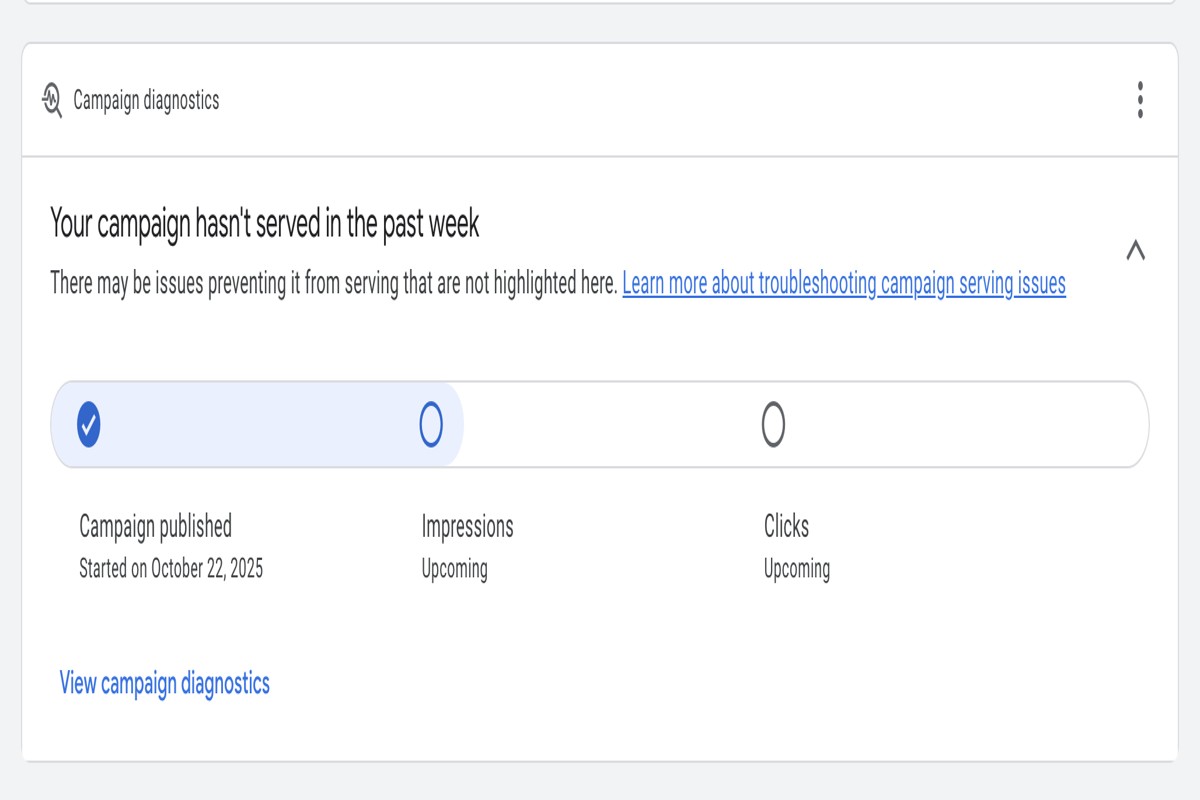
Why are my Google Ads not getting impressions? This issue often stems from factors such as low bid amounts, poor ad quality, or targeting settings that restrict audience reach. Adjusting these elements can significantly enhance ad visibility.
Understanding why Google Ads fail to generate impressions is crucial for advertisers aiming to maximize their return on investment. Missing key details can lead to wasted budgets and missed opportunities for engagement with potential customers.
This article examines the primary reasons for low impressions, including bid strategies, ad quality assessments, and targeting configurations, offering actionable insights to improve campaign performance.
For Why Are My Google Ads Not Getting Impressions businesses looking to generate local leads through Google Ads or Local SEO, GMB Ranger LLC offers hands-on campaign management. Specialist Md Tangeer Mehedi personally handles campaign setup and ongoing optimization — with no payment required until the first lead comes in.
What does it mean if my Google Ads are not getting impressions?
If your Google Ads are not getting impressions, it means that your ads are not appearing in search results or on websites within the Google Display Network. This lack of visibility can stem from various factors affecting your ad campaigns, including targeting settings, budget constraints, and ad quality. Essentially, no impressions indicate that potential customers are not seeing your ads at all.
Several factors can contribute to the absence of impressions for your Google Ads. Key components to consider include:
- Targeting Settings: If your ads are overly restrictive in terms of demographics, locations, or keywords, they may not be reaching a sufficient audience.
- Budget Limitations: A low daily budget can limit the number of impressions your ads receive, particularly in competitive markets.
- Ad Quality and Relevance: Ads with low Quality Scores are less likely to be shown. Google prioritizes high-quality, relevant ads that align with user searches.
Additionally, the status of your campaign can impact impressions. If your campaign is paused or disapproved, your ads will not be eligible to show. It’s also essential to monitor the ad auction dynamics; if competitors have higher bids or better ad relevance, your ads may be sidelined, resulting in fewer or no impressions.
Reviewing these aspects regularly can help identify the root causes of low visibility and guide adjustments to improve overall ad performance.
Expert Tip: Utilize the Google Ads Keyword Planner to research and refine your keyword strategy. This tool can help you discover new, relevant keywords that can enhance your ad visibility and increase impressions.
How can I check why my Google Ads are not getting impressions?
To diagnose why Google Ads are not receiving impressions, utilize the tools and reports within Google Ads. A systematic approach can help identify potential issues affecting your ad visibility. Follow the steps below to assess and address the situation effectively.
- Access Google Ads Account: Log in to your Google Ads account and navigate to the specific campaign or ad group you wish to analyze. This ensures you are focusing on the correct segment of your advertising efforts.
- Check Campaign Status: Review the status of your campaigns. Ensure they are active and not paused, as inactive campaigns will not receive impressions.
- Review Ad Approval Status: Navigate to the “Ads & Extensions” tab and verify that your ads have been approved. Disapproved ads will not show, affecting overall impressions.
- Inspect Budget and Bids: Analyze the budget and bids set for your campaigns. A low budget or insufficient bids can limit the ad’s ability to compete in auctions, resulting in fewer or no impressions.
- Examine Targeting Settings: Check your targeting settings, including geographic location, demographics, and keywords. Narrow targeting can restrict the audience, leading to fewer impressions.
- Utilize the “Ad Preview and Diagnosis” Tool: Use this tool to see how your ads appear in search results. It can provide insights into whether your ads are being displayed and if there are any issues impacting visibility.
- Analyze Search Terms Report: Review the search terms report to identify if your ads are being triggered by relevant searches. This can help you understand if your targeting is effective or needs adjustment.
Regularly monitoring these aspects can help maintain optimal performance for your Google Ads campaigns. Identifying issues promptly can enhance visibility and increase impressions over time.
Expert Tip: Always keep a close eye on your Quality Score, as a low score can lead to higher costs and fewer impressions. Improving ad relevance, landing page experience, and expected click-through rate can significantly enhance your ad visibility.
What are common reasons for low impressions in Google Ads?
Low impressions in Google Ads can arise from several factors, including budget constraints, targeting errors, and ad relevance issues. Each of these elements plays a critical role in determining how often ads are shown to potential customers.
For instance, consider a small business that sets a daily budget of $10 for its Google Ads campaign. If the cost-per-click (CPC) for their chosen keywords averages $5, the ad may only receive two clicks per day, significantly limiting its visibility. In this scenario, increasing the budget or selecting lower-cost keywords could lead to more impressions and better reach.
Another common issue is targeting errors. If a company sells winter clothing but has set its geographical targeting to a region with a warm climate, the ads will receive minimal impressions. Additionally, if the ad copy does not resonate with the intended audience or lacks relevant keywords, it may not appear in the search results at all. Ensuring that both targeting and ad content align with the intended audience is essential for maximizing impressions.
To enhance ad performance, advertisers should regularly review budget allocations and targeting settings. Conducting A/B tests on ad copy can also identify which messages resonate better with the audience, thus improving relevance and increasing impressions over time.
Expert Tip: Regularly use Google Ads’ “Keyword Planner” tool to identify trending keywords relevant to your business, ensuring that your ads are not only visible but also appealing to potential customers.
How do my keywords affect Google Ads impressions?
Keywords play a critical role in determining the visibility of Google Ads. The choice of keywords, including their match types, directly influences whether ads will appear to potential customers. Selecting the right keywords can significantly enhance ad impressions, while poor keyword selection can lead to minimal visibility.
Keywords can be categorized into three main match types: Broad Match, Phrase Match, and Exact Match. Each type has distinct implications for ad impressions:
- Broad Match: This match type allows ads to show for a wide range of related searches. While it increases potential impressions, it may result in less targeted traffic.
- Phrase Match: Ads appear for searches that include the exact phrase or close variations. This type balances reach and specificity, improving the likelihood of relevant impressions.
- Exact Match: This restricts ads to show only for the exact keyword or close variations. While it yields the most targeted traffic, it can limit overall impressions.
The effectiveness of keywords also depends on factors such as search volume, competition, and relevance to the ad content. High-competition keywords may lead to fewer impressions if the budget is insufficient to compete effectively. Additionally, using negative keywords can prevent ads from appearing in irrelevant searches, optimizing the overall performance.
Furthermore, keyword quality and alignment with user intent are crucial. Ads that align closely with user searches are more likely to earn higher quality scores, which in turn can enhance visibility and impressions.
Expert Tip: Regularly conduct keyword research and review performance metrics to refine keyword strategies. This practice can help identify which keywords are driving impressions and which may need adjustment or replacement.
What is the average cost per impression in Google Ads?
The average cost per impression (CPM) in Google Ads typically ranges from $0.10 to $3.00, depending on various factors. However, this figure can vary significantly based on the industry, competition, and the specific targeting options chosen. Advertisers should understand that CPM is influenced by their bidding strategy and overall ad spend.
Several factors affect the cost of impressions in Google Ads:
- Industry Competition: Highly competitive industries, such as finance or healthcare, often see higher CPM rates due to increased bidding for ad space.
- Targeting Options: More refined targeting can lead to higher costs. Options like geographic targeting or demographic filters may increase overall costs.
- Bidding Strategy: The choice between automated bidding and manual bidding can influence CPM. Automated strategies may optimize for visibility but can lead to higher costs.
- Ad Quality Score: Ads with a higher Quality Score may achieve better placement for lower costs, as Google rewards relevant ads with lower prices.
Advertisers must also consider that CPM is not the only metric to evaluate ad performance. Cost-per-click (CPC) is often more relevant, as it directly correlates with user engagement. A high CPM may still be worthwhile if it leads to conversions, emphasizing the need for a comprehensive approach to ad spend.
Expert Tip: Regularly analyze performance metrics like CTR and conversion rates alongside CPM to optimize ad campaigns effectively. Adjusting targeting and improving ad quality can significantly reduce costs while increasing impressions.
How long does it take for Google Ads to start getting impressions?
Google Ads typically begins to generate impressions within 24 to 48 hours after the campaign is launched. However, this timeline can vary based on several factors, such as campaign settings, competition, and budget allocation.
The initial period for gaining impressions can be influenced by the campaign’s targeting options. For instance, highly specific targeting, such as niche demographics or geographic locations, may result in fewer impressions initially, as the audience is limited. Conversely, broader targeting may lead to quicker impressions, but this can dilute the effectiveness of the campaign if the audience is not well-defined.
Competition within the selected keywords also plays a critical role. If a campaign is targeting highly competitive keywords, it may take longer to gain impressions, especially if the bid strategy is not aggressive enough. Additionally, the daily budget and bidding strategy can affect how frequently ads appear. A lower budget may limit the frequency of ad displays, prolonging the time to achieve impressions.
Practical Implications
Setting up an effective Google Ads campaign requires patience during the initial phase. Advertisers should monitor performance closely in the first few days and make adjustments as necessary. Utilizing tools such as Google Ads’ Keyword Planner can help identify less competitive keywords and optimize bidding strategies to improve visibility more quickly.
To maximize the chances of gaining impressions promptly, consider implementing a flexible budget and testing various ad formats. This approach can enhance the campaign’s overall performance and visibility, leading to a more successful advertising experience.
Expert Tip: Regularly review and optimize your campaign settings based on performance data. Adjusting targeting, refining keywords, and increasing budgets strategically can significantly reduce the time it takes to start seeing impressions.
What best practices can improve impressions for my Google Ads?
Improving impressions for Google Ads requires a strategic approach focusing on ad relevance, targeting, and overall quality. By optimizing various elements of your campaigns, you can enhance visibility and engagement. Implementing these best practices will help ensure your ads reach the intended audience effectively.
- Optimize Keywords: Conduct thorough keyword research to identify high-volume and relevant keywords. Use tools like Google Keyword Planner to find terms that align closely with your offerings, ensuring that you target the right audience.
- Enhance Ad Quality: Create compelling ad copies that include strong calls to action and relevant keywords. Ads that resonate with users and match their search intent tend to achieve higher Quality Scores, leading to better visibility.
- Refine Targeting Settings: Utilize demographic and geographic targeting to reach your ideal customer segments. Adjusting settings based on user behavior and interests can significantly improve ad impressions among relevant audiences.
- Increase Budget and Bids: If the competition for your chosen keywords is high, consider increasing your daily budget or bids. A higher bid can enhance your ad’s position on the search results page, increasing the likelihood of impressions.
- Utilize Ad Extensions: Implement ad extensions such as sitelinks, callouts, and structured snippets. These features not only provide additional information but also make your ads more visually appealing, which can lead to higher click-through rates and impressions.
Regularly monitor and analyze campaign performance to identify areas for improvement. Adjusting bids, refining keywords, and testing different ad copies can lead to better outcomes over time. A/B testing is particularly effective for understanding what resonates with your audience.
Expert Tip: Regularly review your Quality Score metrics. A higher Quality Score can lead to lower costs per click and improved ad positions, thus increasing your ad impressions significantly.
Understanding Google Ads Auction and Its Impact on Impressions
This section elucidates the Google Ads auction process and its critical role in determining ad visibility. Understanding these mechanisms is essential for optimizing campaigns and enhancing impression rates.

Overview of the Google Ads Auction Process
The Google Ads auction is a real-time bidding system that determines which ads appear on the search results page and their positioning. When a user conducts a search, Google evaluates all eligible ads based on several criteria, including bid amount and ad quality. The auction is not solely about the highest bid; it incorporates various factors to provide a fair competition landscape.
Factors Influencing Ad Rank and Impression Share
Ad rank is the position of an ad in the search results, influenced by:
- Bid Amount: The maximum amount an advertiser is willing to pay per click.
- Quality Score: A metric based on the relevance of the ad, landing page experience, and expected click-through rate (CTR).
- Ad Extensions: Additional information provided within the ad that can improve its visibility.
Impression share, the percentage of times an ad is shown compared to the total possible impressions, is directly linked to ad rank. Lower ad rank can significantly reduce impression share, resulting in fewer ad views.
Importance of Quality Score in Ad Visibility
Quality Score, ranging from 1 to 10, is pivotal in determining ad visibility. A higher Quality Score indicates that the ad is relevant to users, which not only enhances ad rank but can also lower the cost-per-click (CPC). Key components of Quality Score include:
- Expected CTR: Google’s estimate of how likely users are to click on the ad.
- Ad Relevance: The relevance of the ad copy to the keywords being targeted.
- Landing Page Experience: The quality and relevance of the landing page users are directed to after clicking the ad.
How Competition Affects Impressions
Competition among advertisers significantly impacts impression rates. In highly competitive markets, even well-optimized ads may struggle for visibility if competing ads have higher bids or better Quality Scores. Factors influencing competition include:
- Industry Trends: Seasonal demand fluctuations can increase competition.
- Keyword Popularity: High-demand keywords attract more advertisers, intensifying competition.
- Geographic Targeting: Localized campaigns may face varying levels of competition based on location.
Many advertisers overlook the importance of the auction dynamics, assuming that increasing bids alone will improve visibility. In reality, a balanced approach focusing on both bid strategies and Quality Score is vital for enhancing ad impressions.
Practical Application
To improve impressions, advertisers should:
- Regularly monitor and optimize Quality Scores by enhancing ad relevance and landing page experience.
- Adjust bid strategies based on performance and competition analysis.
- Utilize ad extensions effectively to increase ad visibility and improve CTR.
Implementing these strategies will help address the question, “Why Are My Google Ads Not Getting Impressions,” by enhancing both ad rank and visibility in the competitive landscape of Google Ads.
Advanced Targeting Strategies to Enhance Ad Impressions
Targeting strategies play a critical role in increasing the visibility of Google Ads. By honing in on specific demographics and interests, advertisers can significantly enhance the chances of their ads being seen and clicked.
Using Demographic and Geographic Targeting Effectively
Demographic targeting allows advertisers to reach audiences based on characteristics such as age, gender, and household income. Utilizing these features effectively can lead to more relevant ad placements. For example, a luxury goods retailer might focus on higher-income brackets, while a youth-focused brand may prioritize younger age groups.
Geographic targeting narrows the audience further by showing ads only to users in specific locations. This is particularly beneficial for local businesses. For instance, a restaurant can set its ads to display only within a certain radius, ensuring that only potential customers in the vicinity see the ads.
Leveraging Audience Insights for Better Targeting
Google Ads provides robust audience insights that can guide targeting decisions. Advertisers can create custom audiences based on user behavior and interests, which can enhance ad relevance. Using in-market audiences, which consist of users actively researching or comparing products, can also boost impression rates.
- Affinity Audiences: Target users based on their lifestyle and interests.
- In-Market Audiences: Reach potential customers who are actively considering purchases.
- Custom Intent Audiences: Create audiences based on specific keywords and URLs relevant to your products.
The Role of Remarketing in Increasing Impressions
Remarketing is a powerful strategy that allows advertisers to show ads to users who have previously interacted with their website or app. This approach targets an already familiar audience, increasing the likelihood of impressions and conversions. Remarketing lists can be tailored based on user behavior, such as pages visited or actions taken, to create highly relevant ad experiences.
Adjusting Targeting Settings Based on Performance Data
Performance data should drive decisions about targeting settings. Regularly reviewing metrics such as click-through rate (CTR) and conversion rate can identify which demographics or locations yield the best results. Adjusting targeting strategies based on this analysis can lead to improved impressions and overall campaign effectiveness. Consider implementing A/B testing to compare the performance of different targeting options.
Many advertisers overlook the significance of adjusting their targeting settings based on real-time data. A common misconception is that once a campaign is live, no further adjustments are necessary. In reality, continual optimization is essential for maximizing ad visibility. For instance, if data shows that a particular age group is engaging more with the ads, reallocating budget towards that demographic can yield better impressions.
Practical Application
To enhance ad impressions effectively, implement the following steps:
- Utilize demographic targeting to focus on your ideal customer profile.
- Set geographic targeting to localize your ad reach.
- Analyze audience insights to refine your targeting strategy.
- Incorporate remarketing techniques to re-engage previous visitors.
- Regularly review and adjust your targeting settings based on performance data.
By applying these advanced targeting strategies, advertisers can significantly improve their chances of overcoming the challenge of “Why Are My Google Ads Not Getting Impressions.”
Common Mistakes That Lead to Low Impressions in Google Ads
Low impressions in Google Ads can stem from various common mistakes that advertisers often make. Addressing these issues can significantly enhance ad visibility and overall campaign effectiveness.

Neglecting Ad Relevance and Quality
Ad relevance is a critical factor in determining how often ads are displayed. Google uses a metric called Quality Score, which evaluates the relevance of keywords, ad copy, and landing pages. A low Quality Score can lead to fewer impressions. Advertisers should ensure that ad copy closely aligns with the targeted keywords and provides a compelling reason for users to click.
Setting Overly Restrictive Targeting Criteria
While targeting the right audience is essential, using overly restrictive criteria can limit ad exposure. Advertisers may inadvertently exclude potential customers by setting tight geographical locations, demographics, or interests. Consider broadening these criteria to increase visibility while still maintaining relevance to the intended audience.
Ignoring Negative Keywords and Their Impact
Negative keywords prevent ads from being shown for specific search terms. Failing to implement a comprehensive negative keyword strategy can lead to wasted impressions on irrelevant searches. Advertisers should regularly review search term reports to identify and add negative keywords, ensuring ads are only displayed to relevant queries.
Failing to Monitor and Adjust Bids Appropriately
Bidding plays a pivotal role in ad visibility. If bids are set too low, ads may not compete effectively in the auction. Regular monitoring of bid performance allows advertisers to adjust bids based on competition and ad performance metrics. Utilizing automated bidding strategies can also optimize bids based on specific goals.
Expert Insights on Ad Visibility
Many advertisers underestimate the importance of ad rotation settings. Google Ads offers two options: optimize for clicks or rotate evenly. Choosing to optimize for clicks can lead to some ads receiving significantly fewer impressions if they are not performing as well in comparison to others. Additionally, advertisers often overlook the impact of seasonal trends and market fluctuations on impressions, leading to misaligned expectations.
Practical Application
- Regularly review and optimize ad copy for relevance and alignment with keywords.
- Evaluate targeting criteria and consider broader options to capture a wider audience.
- Implement and update negative keywords to enhance targeting precision.
- Monitor bid performance and adjust bids based on competitive analysis.
- Test different ad rotation settings to maximize visibility and performance.
Real-World Case Studies: Improving Google Ads Impressions
This section examines practical examples of campaigns that successfully enhanced Google Ads impressions. By analyzing specific strategies that yielded measurable results, advertisers can gain insights into effective optimization techniques.
Keyword Optimization: A Successful Campaign
One notable case involved a retail brand that experienced stagnant impressions due to poor keyword selection. Initially, the campaign focused on broad keywords, resulting in high competition and low visibility. The team conducted a thorough keyword audit, identifying long-tail keywords with lower competition yet high relevance to their products. By adjusting their keyword strategy to include these targeted terms, the brand saw a 150% increase in impressions within three weeks. This shift not only improved visibility but also led to a 30% increase in click-through rates (CTR).
Enhanced Ad Copy for Better Visibility
A tech startup faced significant challenges with ad visibility due to generic ad copy. Their ads failed to communicate unique selling propositions effectively, resulting in low engagement. After conducting A/B testing on various ad variations, the team developed more compelling ad copy that highlighted specific features, benefits, and customer testimonials. The optimized ads led to a 200% increase in impressions and a 50% increase in CTR within a month, demonstrating the critical role of engaging content in attracting attention.
Effective Budget Management
Another example comes from a local service provider that struggled with impressions due to budget constraints. Initially, the budget was spread too thin across multiple campaigns, diluting the impact of each. The company decided to consolidate their budget, focusing on high-performing campaigns with the best potential for conversions. By reallocating funds to prioritize these campaigns, they experienced a 75% increase in impressions and a more efficient use of their advertising spend. This strategic budget management ensured that resources were directed where they could achieve the greatest impact.
Lessons from Failed Campaigns
A financial services firm initially launched a campaign that failed to gain traction due to a lack of audience targeting and poor ad scheduling. Ads were shown at times when their target audience was least active, resulting in minimal impressions. After analyzing the data, the team refined their target demographics and adjusted their ad scheduling to peak activity times. This turnaround strategy yielded a 300% increase in impressions over the next quarter, demonstrating the importance of data-driven decision-making.
Common misconceptions surrounding Google Ads often lead to ineffective strategies. Many advertisers believe that simply increasing the budget will resolve impression issues; however, factors such as quality score, keyword relevance, and ad copy effectiveness play a more significant role. Additionally, relying solely on broad match keywords can hinder visibility. Advertisers should prioritize a balanced approach that includes precise targeting and compelling messaging.
To apply these insights effectively, advertisers should:
- Conduct regular keyword audits to identify high-potential terms.
- Test and optimize ad copy to align with customer needs and preferences.
- Analyze budget allocation and focus on high-performing campaigns.
- Utilize data analytics to refine audience targeting and ad scheduling.
Implementing these strategies can lead to significant improvements in Google Ads impressions and overall campaign performance.
For Why Are My Google Ads Not Getting Impressions businesses looking to generate local leads through Google Ads or Local SEO, GMB Ranger LLC offers hands-on campaign management. Specialist Md Tangeer Mehedi personally handles campaign setup and ongoing optimization — with no payment required until the first lead comes in.
Frequently Asked Questions
What does it mean if my Google Ads are not getting impressions?
If your Google Ads are not getting impressions, it indicates that your ads are not being shown to users. This can result from various factors, including budget constraints, targeting settings, or low ad quality.
How can I check why my Google Ads are not getting impressions?
You can check the performance of your Google Ads in the Google Ads dashboard. Look for notifications, quality score metrics, and campaign settings to identify potential issues affecting impressions.
What are common reasons for low impressions in Google Ads?
Common reasons for low impressions include insufficient budget, overly restrictive targeting, low ad rank, or disapproved ads. Additionally, high competition for keywords can also limit visibility.
How do my keywords affect Google Ads impressions?
Your keywords directly impact Google Ads impressions by determining when and where your ads appear. If your keywords are too broad or too specific, they may not trigger your ads effectively, resulting in fewer impressions.
What is the average cost per impression in Google Ads?
The average cost per impression in Google Ads varies widely depending on the industry, competition, and ad quality. Generally, costs can range from a fraction of a cent to several dollars per impression.
How long does it take for Google Ads to start getting impressions?
Typically, Google Ads can start generating impressions within a few hours after the campaign is activated. However, it may take longer for ads to gain traction depending on factors like bidding strategy and competition.
What best practices can improve impressions for my Google Ads?
To improve impressions, ensure your ads are relevant and high-quality, use targeted keywords effectively, and optimize your bidding strategy. Additionally, increasing your budget and refining your audience targeting can also enhance visibility.
Final Thoughts on Why Are My Google Ads Not Getting Impressions
Understanding the intricacies of Google Ads is essential for maximizing campaign visibility. Low impressions often stem from factors such as insufficient bid strategy, poorly targeted keywords, or suboptimal ad settings, all of which require strategic adjustments to enhance performance.
To immediately address low impressions, conduct a thorough audit of your keyword selection and adjust bids based on performance insights and competitive analysis, ensuring alignment with user intent and search volume.
Effective ad visibility is crucial for driving targeted traffic and achieving business objectives, making it imperative to continuously optimize your Google Ads strategy.
Leave a Reply