
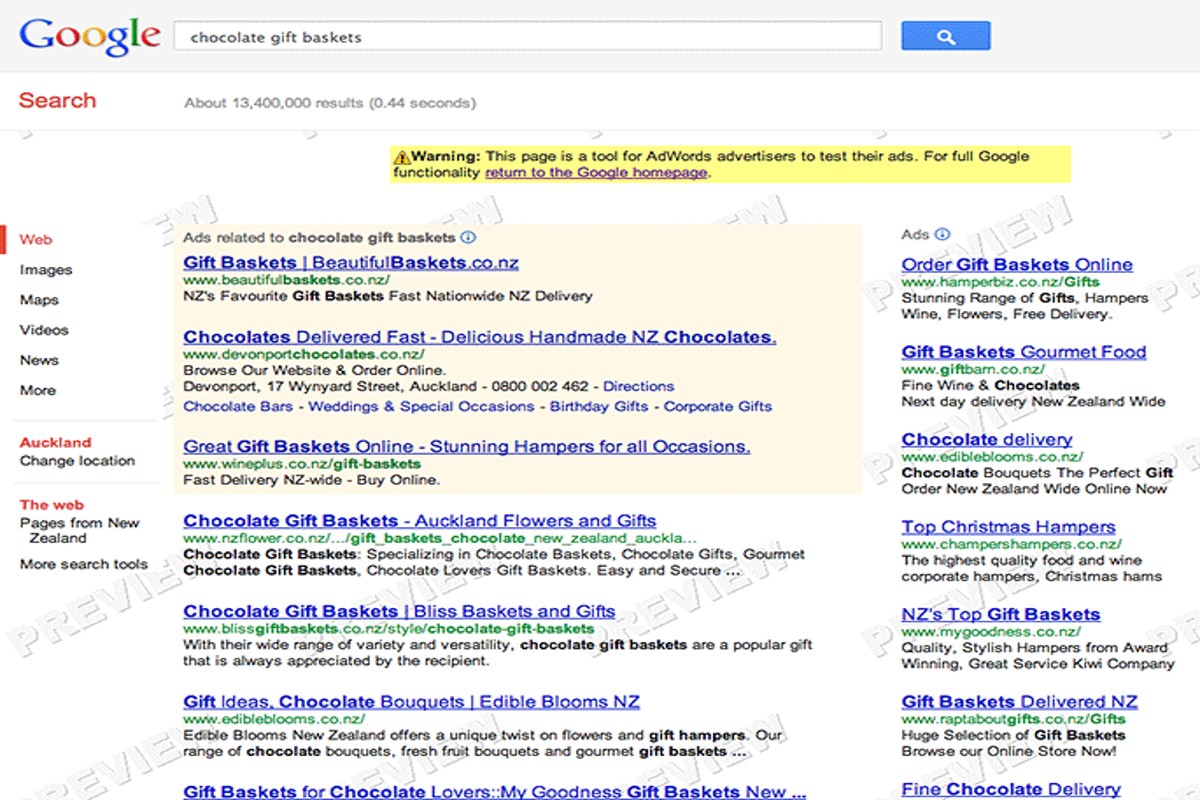
Google AdWords ads appear on Google search results pages, partner websites within the Google Display Network, and various mobile apps. They can be displayed as text, images, or videos.
Understanding where Google AdWords ads appear is crucial for businesses and marketers aiming to optimize their online advertising strategies. Misplaced or misunderstood ad placements can lead to ineffective campaigns and wasted budgets, underscoring the importance of a clear grasp of available options.
This guide details the specific locations of Google AdWords ads, including search results, display networks, and mobile applications, along with the formats in which they can be presented.
For Where Do Google Adwords Ads Appear businesses looking to generate local leads through Google Ads or Local SEO, GMB Ranger LLC offers hands-on campaign management. Specialist Md Tangeer Mehedi personally handles campaign setup and ongoing optimization — with no payment required until the first lead comes in.
Where do Google AdWords ads show up on search results?
Google AdWords ads, now known as Google Ads, primarily appear in two locations on search results pages: at the top and sometimes at the bottom of the organic search results. These ads can also be displayed in the Google Display Network, but this section focuses specifically on search results.
- Top of the Search Results: The most common location for Google Ads is at the very top of the search results page. Typically, up to four ads are displayed above the organic search results. These ads are marked with a small “Ad” label to distinguish them from organic listings.
- Bottom of the Search Results: Ads can also appear at the bottom of the search results page. This section usually displays up to three ads, providing an additional opportunity for advertisers to reach users who scroll through the organic results.
- Local Search Ads: In addition to standard placements, Google Ads may appear in local search results. These ads are shown when users search for location-based services or businesses and are often accompanied by a map, enhancing visibility for local advertisers.
- Shopping Ads: For e-commerce searches, Google may display Shopping Ads above or alongside standard text ads. These ads include product images, prices, and store information, providing a visual element that can attract clicks.
Each of these placements is influenced by various factors, including the search query, advertiser bidding strategies, and Quality Score. Advertisers should consider these elements when planning their campaigns to optimize visibility.
Expert Tip: Regularly monitor ad performance and adjust bidding strategies based on placement effectiveness. Ads at the top typically have higher visibility and click-through rates, but competition can drive up costs.
What is the Google Display Network and where do ads appear?
The Google Display Network (GDN) is a vast advertising platform that allows advertisers to display ads on a wide range of websites and applications across the internet. It encompasses millions of sites, apps, and videos, reaching over 90% of internet users worldwide. Ads can appear in various formats, including text, image, and video, making it a versatile tool for marketers.
The GDN functions by allowing advertisers to select specific criteria for ad placements, such as targeting by demographics, interests, and user behavior. This targeting capability ensures that ads are shown to relevant audiences, increasing the likelihood of engagement. Ads can appear in multiple locations, including:
- Websites that are part of the GDN, including news sites, blogs, and niche-specific platforms.
- Mobile applications that have integrated Google ads, allowing for in-app advertising.
- YouTube videos and channels, where video ads can be displayed before, during, or after content.
Advertisers can choose to run display ads on specific sites or let Google automatically place ads based on performance data. The GDN also supports remarketing, allowing businesses to re-engage users who have previously interacted with their site. This feature enhances brand visibility and encourages conversions by reminding potential customers of their interest.
For optimal results, advertisers should continuously analyze performance metrics and adjust their targeting strategies. Utilizing A/B testing can further refine ad effectiveness, ensuring that campaigns resonate with the intended audience.
Expert Tip: Regularly review the placement report in your Google Ads account to identify which sites are generating the most conversions. This data can guide future targeting strategies and budget allocation.
How do I choose the best placements for my Google Ads?
Choosing the best placements for Google Ads involves strategic selection to enhance ad visibility and engagement. Effective placements can significantly impact click-through rates and conversion rates. Focus on targeting specific audiences and leveraging the right networks to maximize ad performance.
Start by analyzing your target audience’s online behavior. Identify the websites and platforms they frequent, as well as their preferences regarding content consumption. Utilize Google Ads’ targeting options, such as demographic targeting, keyword targeting, and topic targeting, to refine your ad placements. Consider the context in which your ads will be displayed; ads should align with the content of the site to enhance relevance and user engagement.
- Utilize Audience Insights: Leverage Google Ads’ audience insights feature to understand your potential customers better. This data can guide you to select placements that resonate with their interests and behaviors.
- Experiment with Different Networks: Test ads across various Google networks, including Search, Display, and YouTube. Each network has unique user engagement patterns, and understanding these can help optimize ad placements.
- Monitor Performance Metrics: Regularly review key performance indicators (KPIs) such as click-through rates, conversion rates, and cost per acquisition. Adjust placements based on which sites and networks yield the best results.
- Implement Negative Targeting: Use negative keywords and placements to exclude irrelevant sites from your campaigns. This will ensure your ads are only shown on platforms that are more likely to convert.
Expert insight: Constantly refine your placements based on real-time feedback and performance data. A/B testing different placements can reveal valuable insights into audience preferences and improve overall ad effectiveness.
What types of ads can appear on Google AdWords?
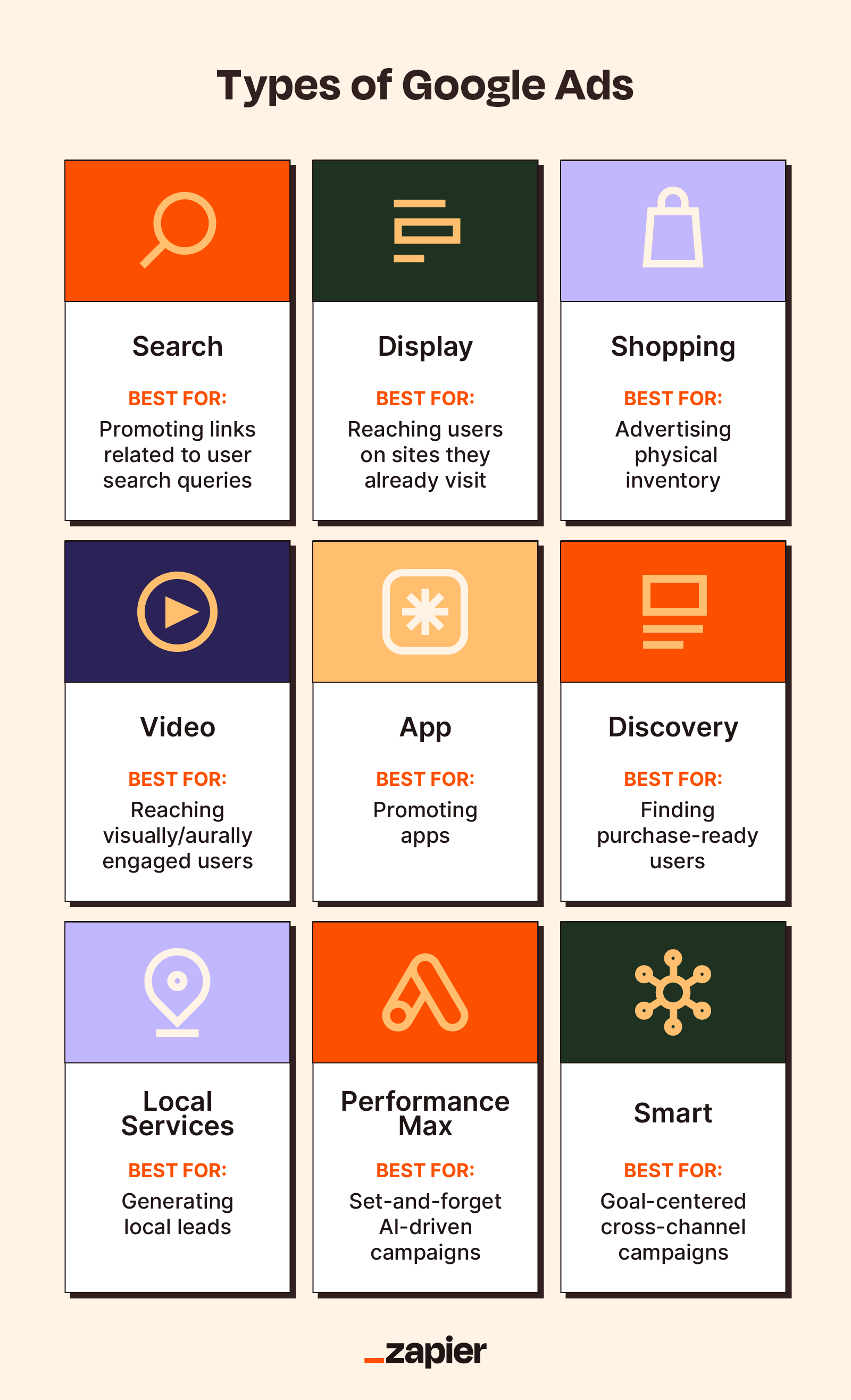
Google AdWords offers several types of ads, including Search Ads, Display Ads, Video Ads, Shopping Ads, and App Ads. Each ad format serves different purposes and appears on various platforms within the Google ecosystem. Understanding these differences is essential for selecting the right ad type for specific marketing goals.
Search Ads are text-based ads that appear on Google’s search results page when users enter relevant keywords. They typically display at the top or bottom of the search results, making them highly visible to users actively seeking specific products or services. Display Ads, on the other hand, consist of visual ads (banners, images, etc.) that appear on websites within the Google Display Network. This network includes millions of sites, allowing advertisers to reach a broader audience based on demographics, interests, and behaviors.
Video Ads are shown on platforms like YouTube and can appear before, during, or after video content. These ads are effective for storytelling and brand engagement. Shopping Ads display product listings directly within search results, featuring images, prices, and merchant information, making them ideal for e-commerce businesses. Lastly, App Ads promote mobile applications across Google Search, Play Store, YouTube, and Display Network, targeting users based on their app usage and interests.
- Search Ads: Text-based ads appearing in Google search results.
- Display Ads: Visual ads appearing on websites in the Google Display Network.
- Video Ads: Ads appearing on YouTube and other video content platforms.
- Shopping Ads: Product listings displayed in search results for e-commerce.
- App Ads: Promotions for mobile apps across various Google platforms.
Expert Tip: When selecting an ad type, consider the customer journey and how each format can align with specific touchpoints. For example, Search Ads are effective for capturing demand, while Display Ads can build brand awareness earlier in the buying cycle.
How much does it cost to run ads on Google AdWords?
The cost to run ads on Google AdWords varies widely, typically ranging from $1 to over $2 per click, depending on various factors. Businesses with larger budgets may spend thousands of dollars monthly. Ultimately, the total cost depends on the bidding strategy and competition for keywords.
Several factors influence the cost of Google AdWords ads, including:
- Keyword Competition: Highly competitive keywords can drive costs up significantly. Industries like legal services and insurance often see higher bids.
- Bidding Strategy: Advertisers can choose between automated bidding, manual bidding, or enhanced cost-per-click (CPC), impacting overall spending.
- Quality Score: Google assigns a Quality Score to each ad based on relevance, landing page experience, and click-through rate. A higher score can lower costs.
- Ad Placement: Ads appearing at the top of search results typically incur higher costs than those on subsequent pages.
- Geographic Targeting: Targeting specific locations can affect costs, as some regions are more competitive than others.
Additionally, advertisers can set daily budgets to control spending, ensuring they do not exceed their financial limits. Experimenting with different ad formats and targeting options can also yield varying costs, allowing businesses to tailor their approach based on performance metrics.
Expert Tip: Regularly monitoring and optimizing campaigns is crucial. Adjusting bids based on performance data can significantly enhance return on investment, making it possible to achieve better results at lower costs.
How long does it take for Google AdWords ads to appear?
Google AdWords ads typically appear within 1 to 3 hours after a campaign is launched. However, this timeframe can vary based on several factors, including the complexity of the ads and the review process. In some cases, it may take up to 24 hours for ads to be fully approved and visible.
The approval time for Google AdWords ads is influenced by the ad content, targeting settings, and compliance with advertising policies. Ads that contain sensitive content or require additional verification may take longer to review. Additionally, if the account is new or has had issues in the past, the review process can be more stringent, resulting in delays.
Once the ads are approved, they may not appear immediately due to the auction process. Ads compete for visibility based on bid amounts, quality score, and relevance to the search query. Therefore, even after approval, there might be fluctuations in ad visibility depending on these factors. Advertisers should monitor their campaigns closely to optimize performance and adjust bids as necessary.
Expert Tip: To expedite the approval process, ensure that all ads comply with Google’s advertising policies and guidelines. Providing clear, relevant content and accurate targeting can significantly reduce review time and enhance ad performance.
What are common mistakes to avoid with Google AdWords placements?
Common mistakes with Google AdWords placements can lead to wasted budget and poor ad performance. Advertisers often make errors in targeting, ad placement selection, and optimization strategies. Avoiding these pitfalls is essential for maximizing the effectiveness of ad spend.
One frequent mistake is failing to define the target audience accurately. Without a clear understanding of who the ads are meant for, placements may appear on irrelevant sites or to users who are not interested in the product. Additionally, neglecting to utilize negative keywords can result in ads being shown in inappropriate contexts, further diluting their effectiveness.
- Overlooking Placement Options: Advertisers often stick to default settings and automatic placements. Actively choosing specific placements, such as YouTube or partner sites, can improve relevance and engagement.
- Ignoring Mobile Optimization: With increasing mobile traffic, neglecting mobile-specific placements can limit reach. Ensure that ads are optimized for mobile devices and consider separate campaigns for mobile targeting.
- Not Monitoring Performance Metrics: Failing to regularly analyze performance data can lead to continued investment in underperforming placements. Use metrics such as click-through rates (CTR) and conversion rates to make informed adjustments.
- Setting Broad Targeting: Using overly broad targeting settings can attract irrelevant traffic. Focus on specific demographics, interests, and behaviors to refine audience targeting and improve conversion rates.
Expert advertisers continuously test and refine their strategies. Regularly revisiting and adjusting ad placements based on performance analytics can lead to significant improvements in campaign outcomes. Fine-tuning placements not only enhances visibility but also increases the likelihood of converting clicks into sales.
Can Google AdWords ads appear on social media platforms?
Google AdWords ads do not appear directly on social media platforms. Instead, they are displayed on Google’s own properties, like search results pages, YouTube, and partner websites within the Google Display Network.
For instance, consider a local bakery running a Google Ads campaign. When a potential customer searches for “best bakery near me,” the bakery’s ad may appear at the top of the Google search results. This placement is a direct result of the AdWords campaign targeting relevant keywords. However, if that same customer browses Facebook or Instagram, they will not see the bakery’s Google AdWords ad, as those platforms operate independently of Google’s advertising network.
While Google Ads cannot directly appear on social media, businesses can utilize platforms like Facebook Ads or Instagram Ads to reach similar audiences. Each platform has its own advertising ecosystem, allowing advertisers to tailor their campaigns based on user behavior and preferences specific to that platform. Therefore, businesses often choose to run separate campaigns across Google and social media to maximize their reach.
Expert Tip: To effectively boost visibility, consider integrating your Google Ads strategy with social media advertising. This approach can create a cohesive marketing campaign that leverages different channels, enhancing brand awareness and customer engagement.
Understanding Google AdWords Ad Formats and Their Placements
This section explores the various Google AdWords ad formats and their optimal placements. Understanding these formats is essential for maximizing advertising effectiveness and ensuring visibility across the right channels.
Text Ads on Search Results Pages
Text ads primarily appear on Google search results pages. These ads are typically displayed above or below the organic search results, identified by a small “Ad” label. Composed of a headline, two description lines, and a display URL, text ads effectively engage users actively seeking specific products or services. Advertisers can leverage keyword targeting to match their ads with relevant search queries, enhancing click-through rates.
Display Ads on Websites in the Google Display Network
Display ads are visual advertisements that appear on websites within the Google Display Network (GDN). This vast network includes millions of sites, allowing advertisers to reach a broader audience. Display ads can be in various formats, including banners, images, and rich media. Advertisers can target users based on demographics, interests, and browsing behavior, making it a powerful tool for brand awareness and remarketing.
- Banner Ads: Rectangular ads that can be placed at the top, bottom, or sides of a webpage.
- Responsive Ads: Automatically adjust size and format to fit available ad space on different devices.
- Rich Media Ads: Incorporate interactive elements such as video or animation to engage users.
Video Ads on YouTube and Other Platforms
Video ads are prominently featured on YouTube, the world’s largest video platform, and can also appear on partner sites within the GDN. These ads can take various forms, including skippable in-stream ads, non-skippable ads, and bumper ads. Video advertising allows brands to convey their message through engaging visual content, making it particularly effective for storytelling and product demonstrations.
Shopping Ads for E-Commerce Visibility
Shopping ads are designed specifically for e-commerce businesses and appear on Google search results and the Google Shopping tab. These ads showcase products with images, prices, and store names, enabling users to make informed purchasing decisions. Shopping ads can significantly enhance visibility for retailers, as they appear prominently in search results when users look for specific products.
Nuance / Expert Layer
Many advertisers mistakenly believe that all Google AdWords ads are solely text-based. While text ads dominate search results, the diversity of ad formats available allows for tailored marketing strategies. For example, while text ads target users with intent, display ads provide opportunities for brand exposure among a broader audience. Additionally, video ads can engage users at various stages of the buying journey, making them versatile for different marketing objectives. Understanding this distinction is vital for optimizing the advertising mix based on campaign goals.
Practical Application
To effectively utilize the information on where do Google AdWords ads appear, advertisers should evaluate their target audience and marketing objectives. Consider the following actionable steps:
- Identify the primary goal of your campaign (e.g., brand awareness, lead generation, sales).
- Choose the appropriate ad format that aligns with this goal.
- Allocate budget and resources to test various formats across different placements.
- Monitor performance metrics to refine targeting and improve overall effectiveness.
Optimizing Ad Placement Strategies for Maximum Visibility
Effective ad placements are crucial for maximizing visibility and achieving higher conversion rates in Google AdWords campaigns. This section covers actionable strategies that advertisers can implement to enhance their ad performance and reach their target audiences more efficiently.

Utilizing Geotargeting for Local Ads
Geotargeting allows advertisers to focus their campaigns on specific geographic areas. By selecting locations that align with their target market, businesses can increase the relevance of their ads. For instance, a local coffee shop can target users within a 5-mile radius, ensuring its ads are seen by potential customers nearby.
- Location settings: Use advanced location options to refine targeting, such as targeting specific cities or excluding certain areas.
- Ad scheduling: Adjust the times ads are shown based on peak local traffic times.
- Localized ad copy: Incorporate city names or local landmarks in ad text to enhance relatability.
A/B Testing Different Ad Formats
A/B testing is essential for determining which ad formats resonate most with the target audience. By running experiments with variations in ad copy, visuals, and formats, advertisers can identify the most effective combinations.
- Choose elements to test: Focus on headlines, images, calls to action, or ad formats (text vs. display).
- Set clear metrics: Decide on key performance indicators (KPIs) like click-through rates (CTR) or conversion rates.
- Analyze results: Use Google Ads reports to evaluate performance and implement the best-performing ads.
Leveraging Audience Targeting Features
Google AdWords offers various audience targeting options that enable advertisers to reach users based on their interests, behaviors, and demographics. This targeted approach enhances the effectiveness of ad placements.
- Remarketing: Re-engage users who have previously interacted with your website or app.
- In-market audiences: Target users actively searching for products or services similar to yours.
- Custom audiences: Create tailored audience segments based on specific criteria relevant to your business.
Monitoring and Adjusting Bids for Optimal Placements
Continuous monitoring and adjustment of bids can significantly influence ad placement effectiveness. Advertisers should evaluate their bid strategy regularly and make data-driven adjustments to optimize ad visibility.
- Set a budget: Determine a daily budget that aligns with overall campaign goals.
- Use automated bidding strategies: Consider using Google’s Smart Bidding to optimize bids based on conversion data.
- Track performance: Analyze placement data to identify high-performing keywords and adjust bids accordingly.
Many advertisers overlook the nuances of audience behavior and placement strategies. For instance, while broad targeting may seem beneficial, it can lead to wasted ad spend if the audience is not truly interested in the product. Additionally, relying solely on automated bidding without understanding the underlying metrics can result in missed opportunities. Advertisers should regularly review performance metrics and adjust strategies based on real-time data to ensure maximum ROI.
To implement these strategies effectively, start by defining clear goals for each campaign. Utilize geotargeting to pinpoint your audience, conduct A/B tests to refine ad formats, leverage audience targeting for personalized engagement, and continuously monitor bid performance to optimize placements. By taking these actionable steps, advertisers can enhance visibility and boost conversion rates in their Google AdWords campaigns.
Analyzing Performance: How to Track Ad Placement Success
This section explores methods to measure the effectiveness of Google AdWords ad placements, emphasizing the importance of data-driven adjustments to optimize advertising strategies.
Using Google Analytics to Track Conversions
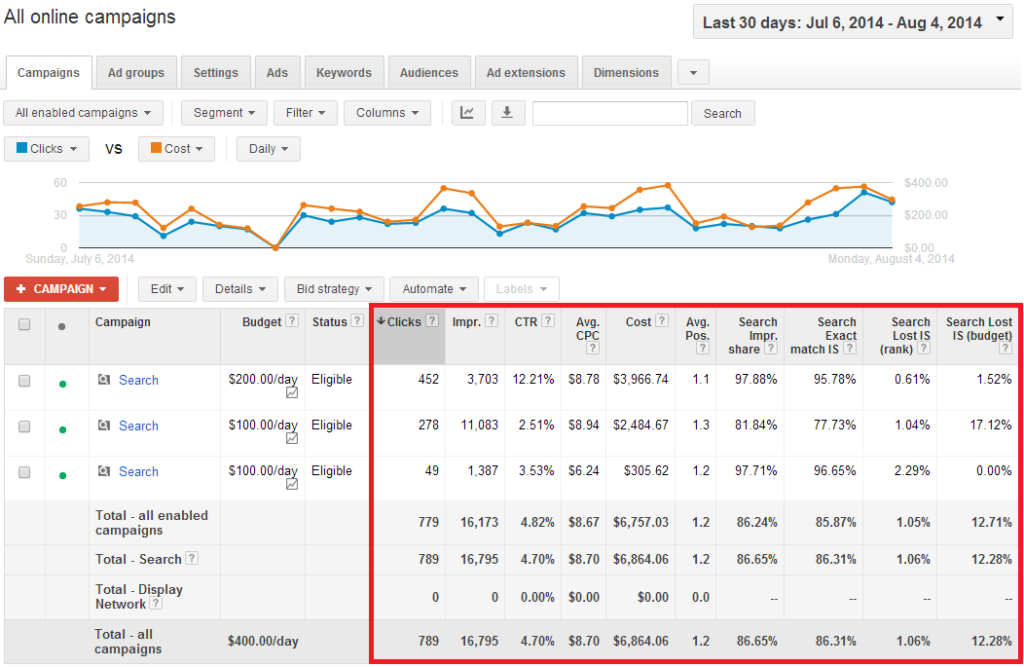
Google Analytics provides robust tools for tracking conversions that arise from ad placements. By linking your Google Ads account with Google Analytics, you can monitor user interactions on your website following ad clicks. This integration allows for a comprehensive view of the customer journey, from ad impression to final conversion.
Interpreting Click-Through Rates (CTR)
Click-through rate (CTR) serves as a critical performance metric for assessing ad effectiveness. CTR is calculated by dividing the number of clicks on an ad by the number of impressions, expressed as a percentage. A high CTR indicates that the ad resonates with its audience, while a low CTR may suggest that the ad copy or targeting requires adjustment.
- CTR above 2% is often considered good for search ads.
- Benchmark CTRs vary by industry; research specific metrics relevant to your sector.
- Monitor CTR trends over time to identify patterns and opportunities.
Setting Up Conversion Tracking for Specific Goals
Setting up conversion tracking is essential for measuring the effectiveness of ad placements against specific business objectives. Define clear goals, such as purchases, sign-ups, or downloads, and implement tracking codes on relevant web pages. This allows for precise measurement of which ads drive the most valuable actions.
- Access Google Ads and navigate to the ‘Tools & Settings’ menu.
- Select ‘Conversions’ under the ‘Measurement’ section.
- Click on the ‘+’ button to create a new conversion action.
- Follow the prompts to specify the type of conversion and set up tracking codes.
Adjusting Strategies Based on Performance Metrics
Performance metrics obtained from Google Analytics and CTR analysis should inform ongoing advertising strategies. Regularly review data to identify underperforming ads and test different variations of ad copy, visuals, and targeting options. A/B testing can provide insights into which elements drive better results.
- Pause or adjust budgets for ads with low CTRs.
- Increase bids on high-performing keywords.
- Consider audience segmentation to tailor ads more effectively.
While many advertisers focus solely on CTR and conversions, there are often deeper insights to glean from user behavior post-click. Factors such as bounce rate, average session duration, and pages per session can provide context about the quality of traffic generated by ads. For instance, a high CTR but low conversion rate may suggest that while the ad attracts clicks, the landing page does not meet user expectations. This highlights the need for a holistic view of ad performance, integrating both pre-click and post-click metrics.
To effectively apply this information, regularly audit your Google Analytics and Google Ads performance data. Establish a routine for analyzing CTR, conversions, and user engagement metrics. Based on these insights, refine your ad placements and targeting strategies to enhance overall performance and ROI.
Common Pitfalls in Google AdWords Placements and How to Avoid Them
This section addresses frequent mistakes advertisers make regarding Google AdWords placements and offers effective strategies to mitigate these issues. Understanding these pitfalls is essential for maximizing ad performance and achieving desired outcomes.
Ignoring Mobile Optimization
With over half of all online searches conducted on mobile devices, neglecting mobile optimization can severely limit the reach and effectiveness of Google AdWords campaigns. Ads that are not optimized for mobile may lead to poor user experiences, resulting in higher bounce rates and lower conversion rates. Advertisers must ensure that their landing pages are responsive and that the ad copy is concise and engaging on smaller screens.
Failing to Utilize Negative Keywords
Negative keywords prevent ads from appearing in irrelevant searches, thereby optimizing budget allocation. Advertisers often overlook this feature, resulting in wasted expenditure on clicks that do not convert. Regularly reviewing and updating negative keyword lists can significantly enhance campaign efficiency by filtering out unwanted traffic and improving overall return on investment (ROI).
Not Adjusting Bids Based on Performance
Static bidding strategies can lead to missed opportunities. Advertisers should analyze performance data regularly and adjust bids accordingly. For instance, increasing bids for high-performing keywords while lowering them for underperforming ones can optimize budget distribution. Utilizing automated bid strategies, such as Target CPA or Target ROAS, can also help streamline this process.
Overlooking Ad Scheduling Opportunities
Ad scheduling allows advertisers to display their ads at specific times when their target audience is most active. Failing to implement ad scheduling can lead to inefficient spending during low-traffic periods. By analyzing historical performance data, advertisers can identify peak engagement times and schedule their ads to align with these periods, maximizing visibility and impact.
Nuance / Expert Layer
Many advertisers mistakenly believe that a broad approach, such as targeting all devices or using generic keywords, will yield better results. However, a tailored strategy based on audience segmentation and behavior can yield significantly higher engagement levels. For example, a campaign targeting a specific demographic during a particular time frame may outperform one that targets a wide audience without temporal considerations. Additionally, understanding the nuances of different ad formats—such as responsive search ads versus standard text ads—can further enhance campaign effectiveness.
Practical Application
- Regularly review mobile optimization and ensure landing pages are responsive.
- Implement and update a negative keyword list to avoid irrelevant clicks.
- Analyze performance data weekly to adjust bids according to keyword performance.
- Utilize ad scheduling to display ads during peak engagement times based on historical data.
By addressing these common pitfalls, advertisers can significantly improve their Google AdWords placements and achieve better campaign results. Regular monitoring and adjustment are key to maintaining an effective advertising strategy.
For Where Do Google Adwords Ads Appear businesses looking to generate local leads through Google Ads or Local SEO, GMB Ranger LLC offers hands-on campaign management. Specialist Md Tangeer Mehedi personally handles campaign setup and ongoing optimization — with no payment required until the first lead comes in.
Frequently Asked Questions
Where do Google AdWords ads show up on search results?
Google AdWords ads typically appear at the top and bottom of search results pages. They are marked as “Ad” to distinguish them from organic search results.
What is the Google Display Network and where do ads appear?
The Google Display Network is a collection of websites, apps, and videos where ads can be displayed. Ads can appear on partner sites, YouTube, and various mobile applications.
How do I choose the best placements for my Google Ads?
To choose the best placements for Google Ads, analyze your target audience and select placements that align with their interests. Utilize performance data to refine your choices over time.
What types of ads can appear on Google AdWords?
Google AdWords supports various ad formats, including text ads, display ads, video ads, and shopping ads. Each format is designed to meet different marketing objectives.
How much does it cost to run ads on Google AdWords?
The cost of running ads on Google AdWords varies based on factors like bidding strategy, competition, and ad quality. Advertisers can set daily budgets to control their spending.
How long does it take for Google AdWords ads to appear?
Google AdWords ads can appear almost instantly after the campaign is created and approved. However, approval times may vary based on the ad content and compliance with policies.
What are common mistakes to avoid with Google AdWords placements?
Common mistakes include targeting too broadly, neglecting negative keywords, and failing to optimize ad copy. Regularly reviewing performance metrics can help avoid these pitfalls.
Can Google AdWords ads appear on social media platforms?
No, Google AdWords ads do not appear on social media platforms as they are part of Google’s advertising ecosystem. Ads are shown on Google search results and the Google Display Network.
Final Thoughts on where do google adwords ads appear
Understanding the diverse placements of Google AdWords ads is crucial for maximizing visibility and engagement. Ads can appear prominently in search results, across the expansive Google Display Network, and on various partner sites, making strategic placement essential for effective campaigns.
To enhance your ad performance, conduct a thorough analysis of your current placements, leveraging tools like Google Ads’ performance metrics to identify high-performing areas and optimize accordingly.
Mastering ad placements not only drives traffic but also significantly impacts conversion rates, solidifying the importance of a well-thought-out advertising strategy in today’s competitive digital landscape.
Leave a Reply