
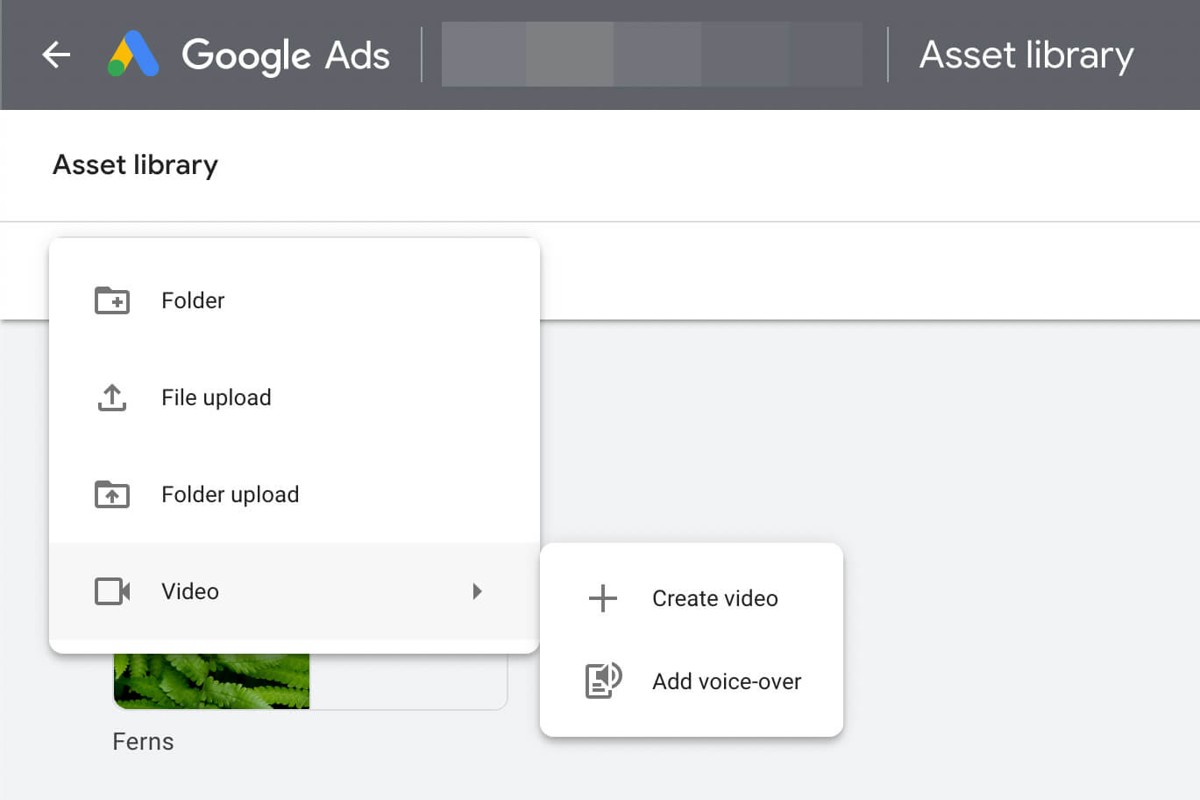
To upload video to Google Ads, first sign in to your Google Ads account. Then, navigate to the ‘Campaigns’ tab, select your campaign, and click on ‘Ads & extensions’ to upload your video.
Understanding how to upload video to Google Ads is crucial for marketers and businesses aiming to leverage video content for effective advertising. A misstep in the upload process can lead to delays in campaign launches and missed opportunities for engagement.
This guide provides a detailed, step-by-step approach to uploading videos, including file format requirements, best practices for video length, and tips for optimizing your video ads for maximum impact.
For How To Upload Video To Google Ads businesses looking to generate local leads through Google Ads or Local SEO, GMB Ranger LLC offers hands-on campaign management. Specialist Md Tangeer Mehedi personally handles campaign setup and ongoing optimization — with no payment required until the first lead comes in.
What video formats are supported by Google Ads?
Google Ads supports several video formats for uploads, including MP4, AVI, MOV, and WMV. These formats are widely used and ensure compatibility across various devices and platforms. Each format has specific characteristics that may affect video quality and file size.
The most commonly accepted format is MP4, which utilizes the H.264 codec for video and AAC for audio, making it suitable for high-quality streaming. AVI and MOV formats are also accepted, but they may result in larger file sizes, which can impact upload times and storage limits. WMV, while less commonly used, is still supported but may not offer the same level of compatibility across devices.
- MP4: Best for quality and file size, widely compatible.
- AVI: Higher quality but larger file size, may affect upload speed.
- MOV: High-quality format often used in Apple environments, larger files.
- WMV: Less common, but still accepted; consider compatibility issues.
When preparing videos for Google Ads, ensure that they adhere to additional specifications such as maximum file size and resolution. Videos should not exceed 1 GB and should have a resolution of at least 720p for optimal performance across platforms.
Expert Tip: Always check the specific requirements and recommendations for each video format on the Google Ads Help Center to ensure the best performance and compliance with current standards.
How long can videos be for Google Ads?
Videos for Google Ads can vary in length depending on the ad format. Generally, video ads can range from a minimum of 6 seconds to a maximum of 6 minutes, with specific formats having their own duration requirements.
The duration limits for Google Ads videos are influenced by the ad type being utilized. For example, the skippable in-stream ads must be at least 12 seconds long, whereas non-skippable in-stream ads are strictly limited to 15 or 20 seconds, depending on the region. Additionally, bumper ads are capped at 6 seconds, designed for brief, impactful messaging.
- Skippable in-stream ads: 12 seconds minimum, up to 6 minutes.
- Non-skippable in-stream ads: 15 or 20 seconds, depending on the region.
- Bumper ads: 6 seconds maximum.
Another factor to consider is the platform where the ads will be displayed. YouTube, being a significant platform for Google Ads, may have different expectations for content length compared to other placements within the Google Display Network. Advertisers should also be mindful of audience engagement; shorter videos often perform better, capturing attention quickly.
Advertisers are encouraged to optimize video length based on the message and target audience. Testing different durations can yield insights into viewer preferences and enhance overall campaign performance.
Expert Tip: Always align video length with your specific campaign goals. For brand awareness, shorter formats may suffice, while more detailed storytelling may require longer videos to convey the message effectively.
What are the best practices for video ads on Google Ads?
Effective video ads on Google Ads can significantly enhance engagement and conversion rates. Implementing best practices ensures that your video content resonates with your target audience and meets your marketing objectives. Here are some proven strategies to optimize your video ads.
First, capture attention quickly. The initial few seconds of your video are crucial. Start with a compelling hook that draws viewers in immediately. Use striking visuals or an intriguing question to ensure viewers stay engaged. Additionally, keep your video short and to the point; aim for a duration of 15-30 seconds for maximum impact.
- Incorporate a clear call-to-action (CTA). Your video should guide viewers on what to do next. Whether it’s visiting your website, signing up for a newsletter, or making a purchase, a strong CTA can drive conversions effectively. Ensure the CTA is visually prominent and verbally reinforced.
- Optimize for mobile viewing. A significant percentage of video ads are viewed on mobile devices. Ensure your video is easily viewable on smaller screens by using bold text, clear visuals, and a vertical or square format. Test your video across various devices to verify compatibility.
- Utilize targeting options. Google Ads offers various targeting mechanisms to reach your ideal audience. Use demographic, interest-based, and behavior-based targeting to ensure your video reaches viewers who are most likely to engage with your content.
- Test and iterate. Continuously analyze the performance of your video ads. Use A/B testing to experiment with different elements such as video length, messaging, and visuals. Gather data on viewer engagement and adjust your strategy accordingly to improve performance over time.
Implementing these best practices will enhance the effectiveness of your video ads on Google Ads, leading to better engagement and higher conversion rates. Remember that the digital landscape is dynamic; staying updated with trends and algorithms is essential for ongoing success.
How much does it cost to run video ads on Google Ads?
The cost of running video ads on Google Ads typically ranges from $0.10 to $0.30 per view, depending on various factors. Advertisers can also set a daily budget, which influences overall expenditure. Therefore, the total cost can vary widely based on targeting, ad format, and competition.
Several factors can affect the cost of video ads on Google Ads:
- Target Audience: Costs can vary based on the demographics and interests of the targeted audience. Reaching niche segments may incur higher costs due to competition.
- Ad Format: Different video ad formats, such as skippable or non-skippable ads, influence pricing. Non-skippable ads often have higher costs due to guaranteed viewer engagement.
- Bid Strategy: The choice of bidding strategy, whether manual or automated, affects costs. Automated bidding can optimize for specific goals, potentially reducing overall spend.
- Geographic Location: Advertising in high-demand areas typically incurs higher costs. Regional variations in competition can significantly impact pricing.
- Campaign Objectives: The purpose of the campaign, whether for brand awareness or direct conversions, can lead to different cost structures. Brand awareness campaigns may have different cost metrics compared to lead generation.
Effective budgeting requires understanding these cost factors. Analyzing past campaign performance can provide insights into expected costs for future efforts. Ensuring a clear strategy can help optimize spending and achieve desired outcomes.
Expert Tip: Utilize Google Ads’ performance tracking tools to regularly assess the return on investment (ROI) for video ads. This approach enables informed adjustments to targeting and budget allocation, maximizing ad effectiveness.
How can I optimize my video ad campaign on Google Ads?
To optimize your video ad campaign on Google Ads, focus on targeting, creative quality, and performance monitoring. These elements significantly influence your campaign’s success and ensure you reach the right audience effectively. Implementing the following strategies will enhance engagement and improve conversion rates.
- Define Your Target Audience: Utilize Google Ads’ robust targeting options to reach specific demographics, interests, and behaviors. This ensures your video ads are shown to users most likely to engage with your content.
- Utilize Compelling Thumbnails: Create eye-catching thumbnails that accurately represent your video content. A strong thumbnail can increase click-through rates by capturing viewer attention.
- Craft Engaging Video Content: Focus on delivering a clear message within the first few seconds of your video. Retaining viewer attention is crucial; aim for a strong hook that communicates the value proposition quickly.
- Incorporate Call-to-Actions: Include clear and actionable CTAs within your video and in the ad placement. Guide viewers on what to do next, whether visiting your website or signing up for a newsletter.
- Monitor Performance Metrics: Regularly analyze key performance indicators such as view rates, click-through rates, and conversion rates. Use this data to adjust targeting, creative elements, or bidding strategies to enhance campaign effectiveness.
- A/B Test Variations: Experiment with different versions of your video ads to identify which elements resonate best with your audience. Testing various headlines, visuals, and CTAs can reveal insights that drive better results.
Successful optimization requires continuous refinement based on performance data. Regularly revisit your targeting settings and creative content to stay aligned with audience preferences and trends.
Expert Tip: Leverage Google Ads’ automated bidding strategies, such as Target CPA or Maximize Conversions, to optimize your ad spend effectively. This can help you achieve better results without constant manual adjustments.
What is the process for creating a video ad in Google Ads?
The process for creating a video ad in Google Ads involves several key steps that guide users from campaign setup to ad creation. This ensures that the video ad reaches the intended audience effectively. Below is a structured approach to creating video ads in Google Ads.
- Sign in to Google Ads: Access your Google Ads account. If you don’t have one, create an account by following the prompts on the Google Ads homepage.
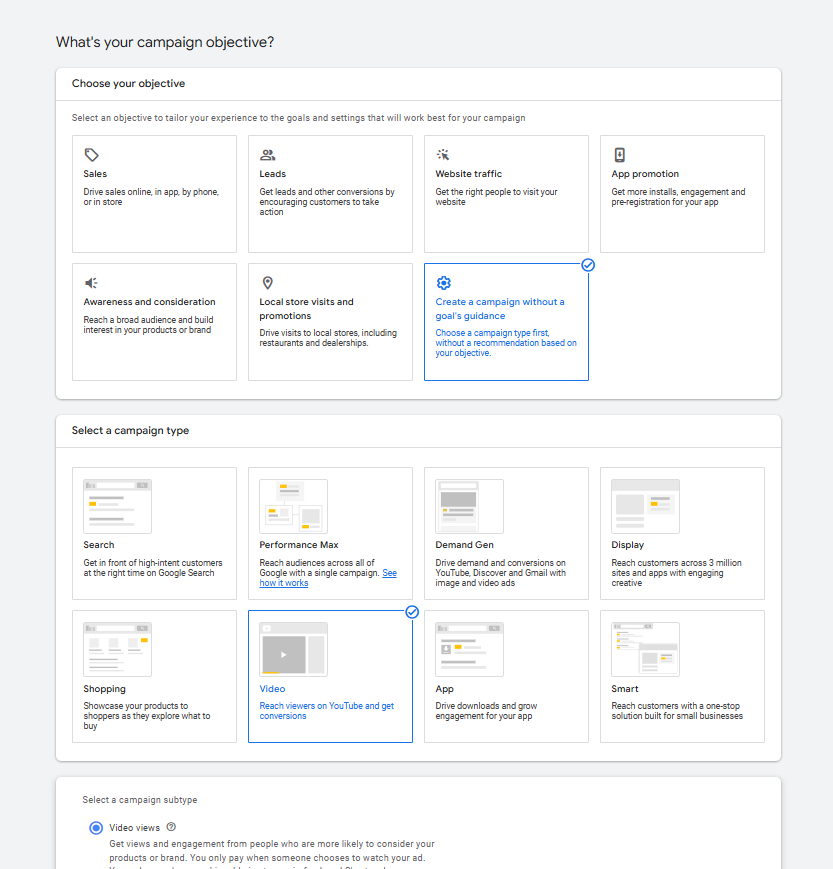
- Create a new campaign: Click on the “Campaigns” tab and select the “+” button to start a new campaign. Choose “Video” as your campaign type to proceed.
- Select your campaign goal: Choose a specific goal for your video ad, such as “Brand awareness” or “Product consideration.” This will help tailor your ad settings.
- Set campaign settings: Adjust settings like budget, bidding strategy, and targeting options. Specify who will see your ads based on demographics, interests, and location.
- Choose ad format: Select the type of video ad you want to create, such as skippable in-stream ads or bumper ads. Each format has unique characteristics suited for different marketing objectives.
- Upload your video: Click on “Add video” to upload your video file from your computer or link it directly from YouTube. Ensure your video meets Google Ads’ technical requirements.
- Fill in ad details: Provide essential information like the ad name, final URL, and call-to-action text. This information helps guide viewers to your desired landing page.
- Review and launch: Double-check all settings and details for accuracy. Once confirmed, click “Publish” to launch your video ad campaign.
Creating video ads requires careful attention to detail to ensure alignment with campaign goals. Consider leveraging A/B testing to determine the most effective video content and ad formats for your audience. This approach can enhance engagement and improve return on investment.
Expert Tip: Utilize YouTube’s analytics tools to track the performance of your video ads post-launch. Understanding viewer behavior can inform future ad strategies and optimize campaign results.
How long does it take for video ads to be approved on Google Ads?
Video ads submitted to Google Ads typically take between 1 to 3 business days for approval. However, this timeframe can vary based on several factors including the complexity of the ad and the current volume of submissions.
The approval process is influenced by the adherence to Google’s advertising policies. Ads that comply with these guidelines generally see quicker approvals. In contrast, those that require further review due to policy violations or content issues may take longer. Additionally, during peak times, such as holiday seasons or major events, the approval process may experience delays due to higher submission volumes.
Another factor affecting approval time is the specific type of video ad format used. For instance, more complex ad formats, such as those involving interactive elements or multiple assets, may require additional review time. Advertisers should also consider that any changes made to the video after submission can reset the approval timeline. Therefore, it is advisable to ensure that all aspects of the ad are finalized before uploading.
Expert Tip: To expedite the approval process, ensure your video ad adheres to Google’s specific guidelines regarding content, length, and format. Preemptively reviewing the Google Ads policies can help prevent unnecessary delays.
Can I use YouTube videos in Google Ads?
Yes, YouTube videos can be used in Google Ads campaigns. This integration allows advertisers to leverage video content already hosted on YouTube to promote their products or services across various Google platforms.
There are distinct methods for utilizing YouTube videos in Google Ads. Advertisers can link directly to their YouTube videos or use them within video ad formats. The primary difference lies in how the video is displayed and the associated objectives of the campaign. Below are the key options:
- YouTube Video Ads: These ads are created specifically within Google Ads using videos uploaded to YouTube. They can appear before, during, or after other videos on YouTube, or on websites and apps that are part of the Google Display Network.
- Linking YouTube Videos: Advertisers can also link to their existing YouTube content in their ads, driving traffic directly to their YouTube channel or specific videos without creating a separate ad format.
- Video Discovery Ads: These ads promote videos in search results, suggested video lists, or on YouTube’s homepage, encouraging users to watch videos that align with their interests.
While both approaches utilize the same video content, the choice between them affects visibility and engagement. Video Ads are typically more integrated into the viewing experience, while linking videos might serve broader objectives like channel growth or brand awareness.
For campaigns focused on maximizing video views, utilizing YouTube Video Ads is often more effective. This method allows for better targeting and placement, increasing the chances of engaging the audience compared to simply linking to a video.
Expert Tip: Use YouTube’s analytics tools to track performance metrics of your videos. Understanding viewer engagement can guide future ad strategies and optimize your content for better results.
Advanced Strategies for Video Ad Targeting
This section delves into advanced targeting strategies that can significantly enhance the performance of video ads on Google Ads. By employing precise audience segmentation, remarketing, and leveraging custom intent audiences, advertisers can ensure their video content reaches the most relevant viewers.
Understanding Audience Segmentation for Better Targeting
Audience segmentation is the process of dividing a target market into distinct groups based on shared characteristics. This allows advertisers to tailor their video ads to specific demographics, interests, or behaviors. Key segmentation strategies include:
- Demographic Targeting: Segmenting by age, gender, and location can help refine audience reach.
- Behavioral Targeting: Analyzing user behavior, such as engagement with previous video content, can lead to more effective ad placements.
- Interest Targeting: Utilizing users’ interests to align video content with their preferences can enhance ad relevance.
Utilizing Remarketing Lists for Video Ads
Remarketing lists allow advertisers to re-engage users who have previously interacted with their videos or website. This strategy is particularly effective as it targets an audience already familiar with the brand. Key steps to implement remarketing include:
- Create a remarketing list based on specific actions, such as video views or website visits.
- Set up your video ad campaign to target these lists, ensuring ads reach users likely to convert.
- Measure performance and adjust targeting based on engagement rates and conversions.
Leveraging Custom Intent Audiences
Custom intent audiences allow advertisers to reach users based on their recent search behavior and intent signals. By analyzing search queries, advertisers can create audiences that are more likely to be interested in their video content. Steps to leverage this technique include:
- Identify relevant keywords related to your video content.
- Create a custom intent audience based on these keywords.
- Integrate this audience into video ad campaigns to target users actively seeking similar content.
The Role of Demographics and Interests in Targeting
Demographics and interests play a vital role in video ad targeting. Advertisers can utilize Google Ads’ detailed demographics options to ensure their ads reach the right age groups, genders, and locations. Additionally, interest categories can help align video content with the preferences of potential viewers. For effective targeting, consider:
- Using Google’s predefined interest categories to reach users with specific interests.
- Adjusting ad messaging and creative based on the demographic data of the audience.
- Regularly analyzing demographic performance metrics to refine targeting strategies.
Many advertisers overlook the importance of combining multiple targeting strategies. A common misconception is that relying solely on one method, such as demographic targeting, will yield optimal results. In reality, a multi-faceted approach that integrates audience segmentation, remarketing, and custom intent audiences can lead to higher engagement rates and conversion outcomes. This nuanced strategy allows advertisers to create a more personalized viewer experience, increasing the likelihood of successful ad performance.
To effectively implement these advanced targeting strategies, advertisers should:
- Analyze existing audience data to create refined segments.
- Set up remarketing lists and custom intent audiences based on user behavior.
- Continuously monitor and adjust campaigns based on performance metrics.
By applying these strategies, advertisers can enhance their video ad targeting, ensuring that the right message reaches the right audience at the right time.
Common Mistakes to Avoid When Uploading Video Ads
Uploading video ads to Google Ads can significantly enhance your marketing strategy. However, many advertisers fall into common traps that can hinder their ad performance. This section outlines these pitfalls and offers solutions to ensure a successful video ad campaign.
Ignoring Video Quality and Resolution Standards
Video quality is paramount when it comes to engaging viewers. Google Ads has specific requirements for video resolution and format. Failing to adhere to these standards can result in poor playback or outright rejection of your ad. Aim for a resolution of at least 720p (1280 x 720 pixels) and utilize formats such as MP4 or MOV. High-quality visuals not only capture attention but also reflect your brand’s professionalism.
Failing to Include a Compelling Call-to-Action
A video ad without a strong call-to-action (CTA) can lose its effectiveness. A well-crafted CTA directs viewers on the next steps to take, whether it’s visiting your website, signing up for a newsletter, or making a purchase. Ensure that your CTA is clear, concise, and visually prominent within the video. Phrases like “Download Now” or “Learn More” can significantly increase viewer engagement.
Not Testing Different Video Formats and Lengths
Different audiences respond to various video formats and lengths. What works for one demographic may not resonate with another. Test multiple formats, such as skippable ads, non-skippable ads, and bumpers to see which garners the best results. Likewise, experiment with video lengths; while shorter videos (6-15 seconds) cater to quick consumption, longer formats (30 seconds or more) allow for deeper storytelling. A/B testing can provide valuable insights into viewer preferences.
Overlooking the Importance of Captions and Subtitles
Many viewers watch videos without sound, making captions and subtitles essential. Not including them can lead to a missed opportunity for engagement. Adding captions increases accessibility and ensures your message reaches a broader audience. Use clear, easy-to-read fonts and ensure that captions are synchronized with the audio for maximum impact.
Nuance / Expert Layer
One common misconception is that video ads must always be highly polished or professionally produced. While quality is crucial, authenticity often resonates more with audiences. User-generated content or behind-the-scenes footage can perform exceptionally well when they align with your brand’s voice. Additionally, consider the platform where your ad will appear; different devices may require unique approaches. For instance, mobile users may prefer shorter, punchier content, while desktop users might engage more with detailed storytelling.
Practical Application
- Review and enhance your video quality to meet Google Ads standards.
- Create a clear and compelling CTA that guides viewers effectively.
- Conduct tests on various video formats and lengths to identify what works best for your audience.
- Incorporate captions and subtitles to boost accessibility and retention.
By addressing these common mistakes, advertisers can improve their video ad performance and ensure that their campaigns effectively reach and engage their intended audience.
Real-World Case Studies: Successful Video Ads on Google Ads
This section examines effective video ad campaigns on Google Ads, highlighting strategies and insights from various industries. By analyzing real-world examples, advertisers can draw inspiration and apply successful tactics to their own campaigns.

Analysis of High-Performing Video Ad Campaigns
Several brands have successfully leveraged video ads on Google Ads to achieve remarkable results. For instance, a notable campaign by Dollar Shave Club showcased a humorous and relatable narrative, leading to a 12% increase in subscriptions within the first 48 hours. Similarly, GoPro utilized user-generated content to create engaging videos that resonated with adventure enthusiasts, resulting in a 30% increase in sales during peak seasons.
Key Takeaways from Successful Advertisers
Successful advertisers share several common strategies that enhance the effectiveness of their video ads:
- Clear Messaging: Ensure that the core message is communicated quickly and effectively, ideally within the first few seconds.
- Emotional Engagement: Craft stories that evoke emotions, whether humor, nostalgia, or inspiration, to foster a connection with viewers.
- Strong Call-to-Action: Include a clear and compelling call-to-action to guide viewers toward the desired next step, such as visiting a website or subscribing.
How Different Industries Utilize Video Ads Effectively
Various industries adopt unique approaches to video advertising.
– The **retail industry** often focuses on product demonstrations and customer testimonials, creating relatable scenarios that encourage purchases.
– **Travel and hospitality** companies frequently use stunning visuals to showcase destinations, enticing viewers to book trips or explore services.
– In the **technology sector**, brands highlight innovative features through tutorials, helping consumers understand complex products.
Each industry tailors its video content to align with audience preferences, maximizing engagement and conversions.
Metrics That Indicate Success in Video Advertising
Measuring the success of video ad campaigns involves analyzing several critical metrics, including:
– **View-Through Rate (VTR):** Indicates the percentage of viewers who watched a video ad to completion. A higher VTR signals effective content.
– **Click-Through Rate (CTR):** Measures the proportion of viewers who clicked on the ad after watching. A higher CTR often correlates with compelling calls-to-action.
– **Conversion Rate:** Tracks the percentage of users who completed a desired action post-view. This metric is essential for assessing the overall effectiveness of the campaign.
Nuance / Expert Layer
Common misconceptions about video advertising often include the belief that longer videos are more effective. While detailed storytelling can engage viewers, shorter videos that deliver concise messages typically yield higher engagement rates. Additionally, many advertisers overlook the importance of A/B testing different video formats, lengths, and messaging styles. Conducting these tests allows brands to refine their strategies based on actual performance data, leading to more optimized campaigns.
Practical Application
To apply these insights, advertisers should:
1. Analyze successful campaigns within their industry to identify effective strategies.
2. Develop a clear, emotionally engaging narrative that quickly conveys the core message.
3. Implement A/B testing to refine video content and improve performance metrics.
4. Monitor key metrics such as VTR, CTR, and conversion rates to evaluate the effectiveness of video ads.
By adopting these practices, advertisers can enhance their video ad campaigns on Google Ads, ultimately driving better results.
Comparing Video Ads on Google Ads vs. Other Platforms
This section provides a comparative analysis of video advertising on Google Ads and other popular platforms like Facebook and Instagram. Understanding these differences can help advertisers optimize their campaigns and allocate resources effectively.
Targeting Capabilities
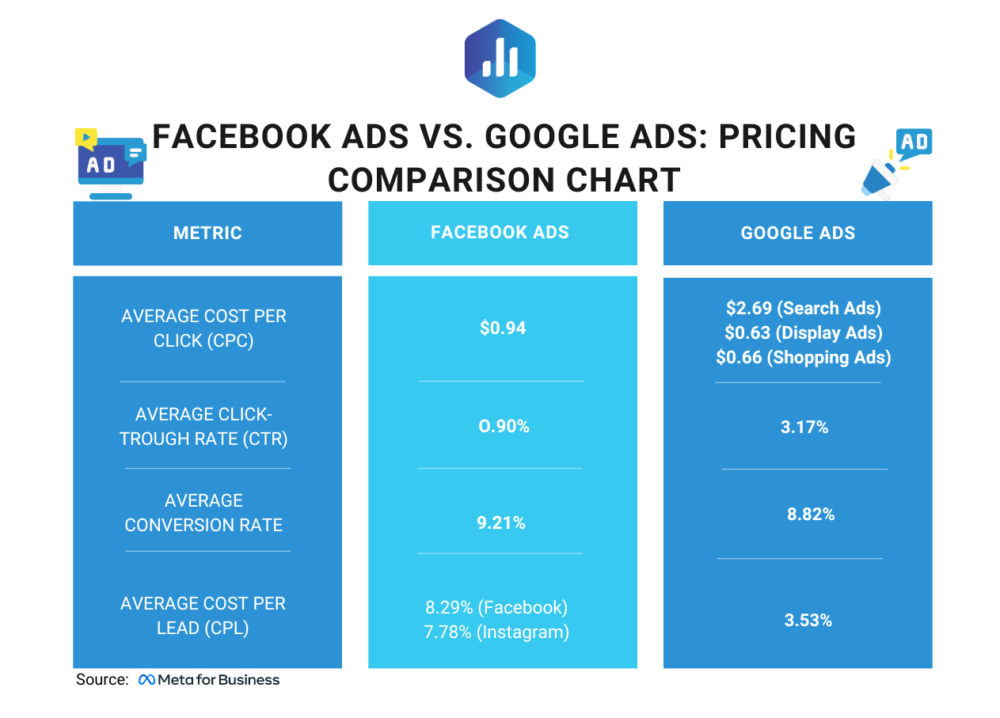
Google Ads offers advanced targeting options, including demographics, interests, and keywords. Advertisers can utilize features like remarketing and Customer Match to reach specific audiences. In contrast, Facebook and Instagram, which operate under the same parent company, emphasize social connections and user behavior. Their targeting is heavily based on user interactions, interests, and social relationships.
- Google Ads: Keyword targeting, demographic targeting, remarketing, and in-market audiences.
- Facebook/Instagram: Interest-based targeting, lookalike audiences, and behavioral targeting.
Cost Comparisons
Cost structures vary significantly among platforms. Google Ads typically operates on a pay-per-click (PPC) basis, while video ads may also utilize a cost-per-view (CPV) model. According to recent data, the average CPV on Google Ads ranges from $0.10 to $0.30, depending on the competition. In contrast, Facebook’s cost-per-click (CPC) averages around $0.97, but video ad costs can fluctuate based on engagement metrics. Advertisers should consider their budget and campaign goals when selecting a platform.
Engagement Metrics and Performance Indicators
Performance measurement is crucial for evaluating the success of video ads. Google Ads provides metrics such as view rate, average watch time, and interaction rates. These metrics help advertisers assess how effectively their content engages viewers. On the other hand, Facebook and Instagram offer insights into likes, shares, comments, and overall engagement rates, which reflect social interaction more than viewer retention.
- Google Ads: View rate, average watch time, click-through rate (CTR).
- Facebook/Instagram: Engagement rate, shares, comments, and reactions.
Unique Features of Video Ads
Each platform offers distinct functionalities that enhance user experience and ad effectiveness. Google Ads features like TrueView ads allow users to skip ads after five seconds, promoting viewer choice. Additionally, YouTube’s extensive reach provides opportunities for brand awareness. Conversely, Facebook and Instagram capitalize on Stories and Reels, encouraging more immersive and interactive experiences. These formats engage users in a different context, often leading to higher interaction rates.
Nuance / Expert Layer
Common misconceptions arise regarding the effectiveness of video ads based solely on platform popularity. For instance, while Facebook is often viewed as the superior platform for brand engagement, Google Ads can deliver high conversion rates when targeting users actively searching for products or services. Advertisers must analyze their specific target audience and campaign objectives to determine the best platform. The effectiveness of a video ad also heavily depends on creative quality, which can transcend platform limitations.
Practical Application
To leverage this information effectively, businesses should assess their target audience and campaign goals before choosing a platform. Create a detailed budget that accounts for both advertising costs and creative production. Regularly analyze performance metrics to refine strategies and optimize advertising spend. For those looking to expand their reach, experimenting with cross-platform campaigns can provide valuable insights into audience preferences and engagement.
For How To Upload Video To Google Ads businesses looking to generate local leads through Google Ads or Local SEO, GMB Ranger LLC offers hands-on campaign management. Specialist Md Tangeer Mehedi personally handles campaign setup and ongoing optimization — with no payment required until the first lead comes in.
Frequently Asked Questions
What video formats are supported by Google Ads?
Google Ads supports several video formats including .MP4, .MOV, and .AVI. Ensure that your video meets the platform’s specifications for optimal playback.
How long can videos be for Google Ads?
Videos for Google Ads can range from 6 seconds to 6 minutes, depending on the ad format. Shorter videos often perform better in capturing viewer attention.
What are the best practices for video ads on Google Ads?
Best practices include keeping videos concise, using eye-catching visuals, and including a strong call to action. Engaging content that resonates with your target audience is crucial for success.
How much does it cost to run video ads on Google Ads?
The cost of running video ads on Google Ads varies based on factors like bidding strategy, targeting options, and competition. Advertisers can set daily budgets to control spending.
How can I optimize my video ad campaign on Google Ads?
To optimize a video ad campaign, focus on targeting the right audience, testing different ad creatives, and analyzing performance metrics. Regular adjustments based on data insights will enhance effectiveness.
What is the process for creating a video ad in Google Ads?
Creating a video ad in Google Ads involves selecting the campaign type, uploading your video, setting targeting options, and defining your budget. Follow the prompts in the Google Ads interface for guidance.
How long does it take for video ads to be approved on Google Ads?
Video ads typically take about one business day for approval, but this can vary based on the complexity of the ad and current review volumes. Monitoring the status in your Google Ads account is recommended.
Can I use YouTube videos in Google Ads?
Yes, YouTube videos can be used in Google Ads campaigns. Simply link your YouTube channel and select the desired video when creating your ad.
Final Thoughts on how to upload video to google ads
Successfully uploading video to Google Ads is not just about following steps; it requires a strategic approach that aligns with your overall advertising goals. Understanding video specifications, optimizing for engagement, and applying advanced targeting techniques are essential for maximizing the effectiveness of your campaigns.
To elevate your video advertising efforts, conduct a thorough analysis of your target audience and tailor your video content to their preferences and behaviors. This targeted approach will enhance viewer engagement and conversion rates.
Mastering video ads on Google Ads can significantly impact your brand visibility and ROI, making it a critical component of any comprehensive digital marketing strategy.
Leave a Reply