
To setup conversion tracking in Google Ads, first, sign in to your account. Navigate to ‘Tools & Settings’, select ‘Conversions’, and click the ‘+’ button to create a new conversion action.
Understanding how to setup conversion tracking in Google Ads is crucial for advertisers aiming to measure the effectiveness of their campaigns. Accurate tracking enables businesses to optimize their ad spend and improve return on investment, while errors in setup can lead to misguided strategies and wasted resources.
This guide provides a step-by-step process for setting up conversion tracking, including creating conversion actions, implementing tracking codes, and analyzing conversion data to enhance campaign performance.
For How To Setup Conversion Tracking In Google Ads businesses looking to generate local leads through Google Ads or Local SEO, GMB Ranger LLC offers hands-on campaign management. Specialist Md Tangeer Mehedi personally handles campaign setup and ongoing optimization — with no payment required until the first lead comes in.
What is conversion tracking in Google Ads?
Conversion tracking in Google Ads is a feature that allows advertisers to measure specific actions taken by users after interacting with their ads. These actions, known as conversions, can include purchases, sign-ups, or any other valuable engagement that aligns with marketing goals. By implementing conversion tracking, businesses can evaluate the effectiveness of their advertising campaigns and optimize them for better performance.
Conversion tracking provides insights into how well ads drive desired outcomes, enabling advertisers to allocate budgets efficiently and make data-driven decisions. It helps identify which keywords, ads, or campaigns are generating the most conversions. This information is crucial for refining marketing strategies, improving return on investment (ROI), and enhancing overall ad performance.
- Types of conversions: Common types include website actions (e.g., purchases, form submissions), phone calls, and app downloads.
- Conversion value: Assigning a monetary value to conversions helps in measuring the financial impact of ads.
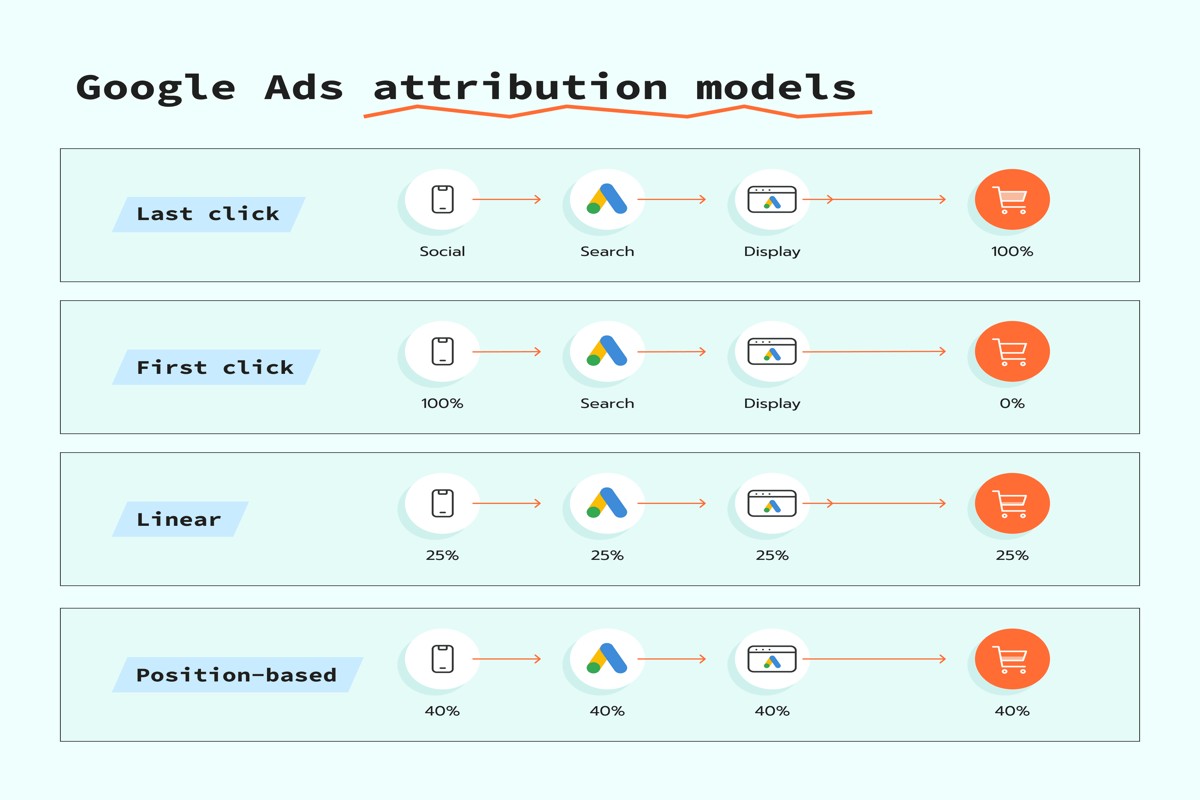
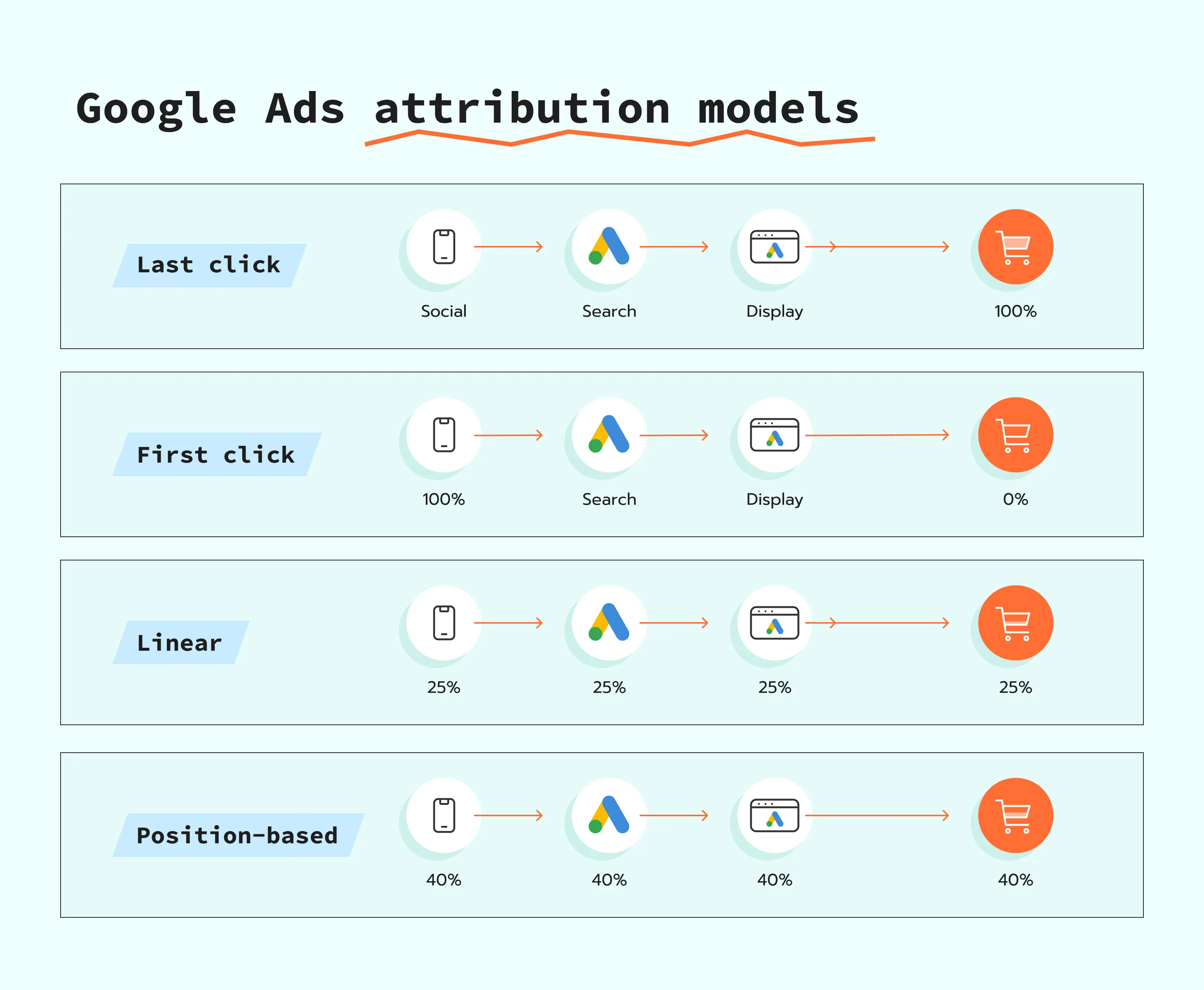
- Attribution models: Different models (last click, first click, linear, etc.) determine how credit for conversions is assigned across multiple touchpoints.
Setting up conversion tracking requires adding a small piece of code, known as a conversion tag, to the website or app. This tag collects data on user interactions and sends it back to Google Ads for analysis. Advertisers should ensure that the tracking setup aligns with their specific goals and that proper testing is conducted to verify its accuracy.
Expert Tip: Regularly review conversion data to identify trends and adjust campaigns accordingly. Utilizing automated bidding strategies based on conversion data can significantly enhance ad performance and ROI.
How do I setup conversion tracking in Google Ads?
Setting up conversion tracking in Google Ads involves creating a conversion action, placing the tracking code on your website, and confirming that data is being recorded. This process allows advertisers to measure the effectiveness of their campaigns based on user actions. Below is a step-by-step guide to help you implement conversion tracking effectively.
- Sign in to Google Ads: Access your Google Ads account using your login credentials. Ensure you are in the correct account if you manage multiple accounts.
- Navigate to Tools & Settings: Click on the wrench icon in the upper right corner of the interface. From the dropdown menu, select “Conversions” under the “Measurement” section.
- Create a New Conversion Action: Click the plus button (+) to add a new conversion action. Choose the type of conversion you want to track, such as website, app, phone calls, or import.
- Configure Conversion Settings: For website conversions, enter details such as the conversion name, value (if applicable), count (every or one), and conversion window. Adjust additional settings based on your tracking needs.
- Set Up the Tracking Tag: After saving, Google Ads will provide a tracking tag. You can either install it manually on your website or use Google Tag Manager for easier integration.
- Implement the Tag: If installing manually, copy the provided code and paste it into the HTML of your website on the page where the conversion occurs, such as a purchase confirmation page or a sign-up thank you page.
- Test the Conversion Tracking: Use the Google Tag Assistant or the Google Ads interface to test if the tag is firing correctly. Ensure that conversions are being recorded accurately in your Google Ads account.
Conversion tracking can significantly enhance your understanding of user behavior and campaign performance. Regularly review your conversion data to optimize your advertising strategy and improve return on investment.
Expert Tip: Consider setting up different conversion actions for various user interactions, such as form submissions and newsletter sign-ups, to gain deeper insights into your audience’s engagement with your brand.
What are the best practices for Google Ads conversion tracking?
To ensure effective conversion tracking in Google Ads, it is essential to implement best practices that enhance accuracy and data integrity. These practices help marketers understand user behavior and optimize campaigns accordingly. Adopting these strategies will lead to more informed decision-making and improved advertising performance.
First, ensure that conversion actions are clearly defined and aligned with business goals. This means selecting actions that truly reflect valuable user interactions, such as purchases, sign-ups, or downloads. In addition, categorize conversions by type, such as primary or secondary, to better understand the impact of different actions on the overall marketing strategy.
- Use the Google Tag Manager: Implement Google Tag Manager (GTM) to manage conversion tracking tags efficiently. GTM allows for easier updates and modifications without needing to alter the website code directly, reducing the risk of errors.
- Test conversions before launching: Always test conversion tracking setup before fully launching campaigns. Use the “Tag Assistant” tool to verify that conversions are being recorded accurately and troubleshoot any issues that arise.
- Utilize conversion values: Assign monetary values to conversions whenever possible. This practice enables performance measurement and optimization based on return on investment (ROI), giving a clearer picture of the effectiveness of ad spend.
- Regularly review and optimize: Periodically assess conversion data to identify patterns and trends. This helps in fine-tuning campaigns and adjusting bids according to the most profitable conversions.
Incorporating these best practices will not only enhance the accuracy of conversion tracking but also improve overall campaign performance. Regular monitoring and adjustments based on data insights are critical for long-term success.
Expert Tip: Integrate cross-device tracking to gain a comprehensive view of user interactions across various devices. This will yield richer insights into customer journeys and enhance the effectiveness of targeting strategies.
How much does Google Ads conversion tracking cost?
Google Ads conversion tracking itself is free to set up and use. However, businesses should consider the cost of advertising within Google Ads, as conversion tracking is a tool that enhances the effectiveness of ad spend rather than a standalone expense.
Several factors influence the overall costs associated with Google Ads conversion tracking:
- Advertising Budget: The primary cost is the budget allocated for Google Ads campaigns. Higher budgets can lead to more data collection and potentially more conversions.
- Cost-Per-Click (CPC): The CPC varies by industry, competition, and keywords. Higher CPCs can increase overall advertising costs while utilizing conversion tracking to optimize campaigns.
- Conversion Goals: Different types of conversions (e.g., sales, leads, sign-ups) may have varying costs associated with achieving them, influencing how budget is managed.
While the setup of conversion tracking does not impose any direct fees, the effectiveness and efficiency of ad spending can significantly impact costs. Businesses that leverage conversion tracking properly can optimize their campaigns to achieve better return on investment (ROI), which can mitigate advertising expenses over time.
Expert Tip: Regularly monitor conversion data to refine targeting and bidding strategies, ensuring that ad spend is aligned with the most profitable conversion actions. This proactive approach can lead to more cost-effective advertising campaigns in the long run.
How long does it take to setup conversion tracking in Google Ads?
Setting up conversion tracking in Google Ads typically takes between 30 minutes to 2 hours. The exact duration depends on the complexity of the tracking setup and the user’s familiarity with Google Ads and website code.
Several factors can influence the time required for setup. First, the type of conversions being tracked matters. For example, tracking simple actions like form submissions or button clicks may require less time than tracking complex e-commerce transactions, which often involve multiple steps and more intricate coding. Additionally, if you are implementing conversion tracking for the first time, you may need extra time to familiarize yourself with the Google Ads interface and the necessary setup procedures.
Another factor includes whether you have access to your website’s backend. If you need to implement tracking codes directly into your website, the process may take longer, especially if you require assistance from a developer. On the other hand, using Google Tag Manager can streamline the process significantly, allowing you to implement changes without touching the website code directly.
Expert Tip: To expedite the process, prepare your conversion goals in advance and ensure you have all necessary access permissions. Testing the conversion tracking after implementation is crucial to ensure accurate data collection.
What types of conversions can I track in Google Ads?
You can track various types of conversions in Google Ads, including purchases, sign-ups, phone calls, and app downloads. Each type reflects a specific user action that aligns with your business goals. Tracking these conversions allows for more effective campaign optimization and performance measurement.
For example, consider an e-commerce site that sells shoes online. The primary conversion type for this business would be a purchase made through the website. By setting up conversion tracking for purchases, the site can analyze which ads and keywords lead to actual sales, enabling better budget allocation and ad targeting. In addition to purchases, the site might also want to track sign-ups for a newsletter, as this indicates potential customer interest and can lead to future sales.
Other conversion types include phone calls generated from ads and app downloads for businesses with mobile applications. For instance, a local service provider may prioritize phone call conversions, where the tracking setup would count every call initiated from a Google Ads ad. Similarly, if a company has a mobile app, tracking app downloads would be crucial to understand how effectively ads drive installations and user engagement.
Expert Tip: Utilize Google Tag Manager for seamless conversion tracking implementation. This tool allows for easy updates and management of tracking codes without modifying the website’s code directly, streamlining the process and reducing errors.
Can I track conversions from multiple sources in Google Ads?
Yes, Google Ads allows tracking conversions from multiple sources, including website interactions, app activity, and offline conversions. This capability enables businesses to gain a comprehensive view of their conversion data across different platforms. By integrating various sources, advertisers can optimize their campaigns effectively based on a holistic understanding of user behavior.
Google Ads supports several conversion tracking options, each catering to different sources of data. The main types of conversion tracking include:
- Website Conversions: Track actions taken on your website after clicking an ad, such as purchases or sign-ups.
- App Conversions: Monitor in-app actions for mobile applications, such as downloads or purchases made within the app.
- Phone Call Conversions: Measure calls made to your business as a result of ad interactions, either directly through call extensions or after a click on your website.
- Importing Offline Conversions: Track conversions that occur offline, such as in-store purchases, by importing data from your CRM or other sources.
The key differences among these options lie in their implementation and the types of data they capture. For instance, website conversions require adding a tracking code to specific pages, while app conversions necessitate integrating the Google Ads SDK into the mobile app. Phone call conversions can be tracked through unique call tracking numbers assigned by Google Ads, whereas offline conversions require manual data upload. Each method provides insights into different customer interactions, allowing for more targeted advertising strategies.
To maximize the effectiveness of conversion tracking, it’s essential to ensure that all relevant sources are integrated and that tracking codes are correctly implemented. This comprehensive approach enables advertisers to accurately attribute conversions to specific campaigns, ad groups, or keywords, leading to improved decision-making and budget allocation.
Expert Tip: Regularly analyze conversion data from all sources to identify trends and optimize campaigns. Utilizing Google Analytics alongside Google Ads can provide deeper insights into user behavior across platforms, enhancing your overall marketing strategy.
What are common mistakes when setting up conversion tracking in Google Ads?
Common mistakes in setting up conversion tracking in Google Ads include improper tagging, neglecting to define conversion actions, and overlooking cross-device tracking. These errors can lead to inaccurate data collection, ultimately skewing performance insights and decision-making.
One frequent error is the use of incorrect or incomplete conversion tags. This can occur when the tags are not placed on the right pages, or when they are misconfigured, leading to missed conversions. It is crucial to ensure that each tag is correctly implemented on the appropriate pages, such as the confirmation or thank-you pages after a desired action.
Another common oversight is failing to define specific conversion actions. Advertisers often set up a single conversion action instead of multiple distinct actions that reflect different user interactions, such as purchases, sign-ups, or downloads. This lack of granularity can hinder the ability to analyze which actions drive the most value. Furthermore, ignoring cross-device tracking can significantly impair the ability to measure user behavior across different platforms. This is particularly important as consumers often switch between devices during their purchase journey.
- Improper Tagging: Incorrect placement or configuration of conversion tags leading to lost data.
- Undefined Conversion Actions: Setting up a single conversion action instead of multiple specific actions that reflect user interactions.
- Overlooking Cross-Device Tracking: Not enabling tracking across devices, resulting in incomplete user journey insights.
Expert Tip: Regularly audit your conversion tracking setup to ensure tags are functioning correctly and that conversion actions are aligned with your current business goals. This proactive approach minimizes errors and maximizes data accuracy.
Advanced Techniques for Optimizing Conversion Tracking
Enhancing conversion tracking in Google Ads requires advanced strategies that leverage existing tools and data. This section delves into sophisticated techniques that improve tracking accuracy and drive better campaign performance.
Utilizing UTM Parameters for Better Tracking
UTM parameters are critical for tracking the effectiveness of campaigns beyond Google Ads. By appending these parameters to your URLs, you can gain insights into user behavior across different traffic sources. Implement the following UTM parameters to optimize tracking:
- utm_source: Identifies the source of traffic (e.g., google, newsletter).
- utm_medium: Describes the marketing medium (e.g., cpc, email).
- utm_campaign: Names the specific campaign (e.g., spring_sale).
- utm_term: Tracks keywords for paid search campaigns.
- utm_content: Differentiates content variations or ads.
Integrating Google Analytics with Google Ads
Integration between Google Analytics and Google Ads facilitates a comprehensive view of user interactions post-click. To set this up, follow these steps:
- Sign in to Google Analytics and navigate to the Admin section.
- In the Property column, click “Google Ads Linking.”
- Select the Google Ads account you wish to link and click “Continue.”
- Choose the Analytics views where you want Google Ads data, then click “Link accounts.”
This integration allows for better attribution of conversions and deeper insights into user behavior on your website, enhancing your ability to optimize campaigns effectively.
Setting Up Cross-Device Conversion Tracking
Cross-device conversion tracking is essential for understanding customer journeys that span multiple devices. Google Ads employs a unique user ID to track interactions across devices. To enable cross-device tracking:
- Ensure that your Google Ads account is linked to your Google Analytics account.
- Enable tracking for users who sign in to your website, allowing you to collect user ID data.
- Utilize the “Cross-device conversions” report in Google Ads to analyze conversion paths.
This setup provides insights into how many users convert after interacting with ads on different devices, informing future targeting strategies.
Leveraging Remarketing Lists for Enhanced Conversions
Remarketing lists allow advertisers to target users who have previously engaged with their website. This technique significantly improves conversion rates by re-engaging interested users. To create effective remarketing lists:
- Define specific user behaviors, such as page visits or cart abandonment.
- Segment lists based on user actions, such as time spent on site or products viewed.
- Utilize dynamic remarketing to show tailored ads based on user interactions.
By strategically deploying remarketing lists, advertisers can enhance the likelihood of conversions from users already familiar with their brand.
Common misconceptions surrounding conversion tracking often overlook the necessity of comprehensive data integration. Many marketers assume that simply setting up basic conversion tracking suffices. However, without leveraging tools like UTM parameters, Analytics integration, and cross-device tracking, the full potential of conversion data remains untapped. Each tool contributes to a more nuanced understanding of customer behavior, enhancing the ability to make data-driven decisions.
To implement these advanced techniques, marketers should:
- Set up UTM parameters for all online campaigns.
- Integrate Google Analytics with Google Ads for a unified view of user data.
- Establish cross-device tracking to understand user journey comprehensively.
- Create and segment remarketing lists based on user engagement.
Actioning these strategies will lead to improved conversion tracking effectiveness, ultimately driving better ROI for advertising efforts.
Troubleshooting Conversion Tracking Issues
Effective conversion tracking is vital for optimizing Google Ads campaigns. However, issues can arise that may hinder accurate data collection, leading to misguided marketing strategies. This section addresses common problems encountered during setup and execution of conversion tracking, along with practical solutions.
Identifying and Fixing Tracking Code Issues
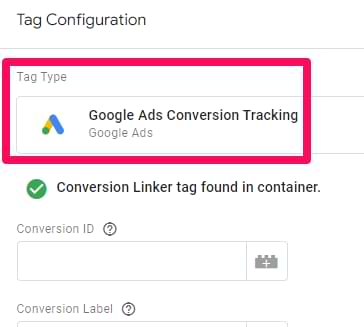
Tracking code problems are among the most prevalent issues with conversion tracking in Google Ads. Improper installation or missing code can lead to inaccurate or absent conversion data. To identify and fix these issues, follow these steps:
- Access the Google Ads account and navigate to the ‘Tools and Settings’ menu.
- Select ‘Conversions’ and choose the specific conversion action to review.
- Verify that the tracking code is correctly implemented on the designated web pages or applications.
Utilizing the Google Tag Assistant can simplify this process by checking for errors in your tags and ensuring they are firing correctly.
Resolving Discrepancies in Conversion Data
Discrepancies between the number of conversions reported in Google Ads and those tracked on your website can arise from several factors. Common reasons include:
- Differences in conversion window settings between platforms.
- Inconsistent attribution models applied in Google Ads versus website analytics.
- Ad blockers that prevent tracking scripts from executing.
To resolve these discrepancies, ensure that both platforms use the same conversion window and attribution settings. Regularly audit tracking setups to identify any potential conflicts or issues that may affect data accuracy.
Understanding Attribution Models and Their Impact
Attribution models determine how credit for conversions is assigned to different marketing touchpoints. Google Ads offers several models, including last-click, first-click, and linear attribution. Each model can yield different insights about campaign performance. For example, a last-click model may undervalue campaigns that contribute to earlier stages of the customer journey.
Choosing the right attribution model is crucial as it influences campaign optimization strategies. Evaluate your business goals and customer behavior to select an attribution model that accurately reflects the value of each touchpoint within your marketing funnel.
Using Google Tag Assistant for Troubleshooting
Google Tag Assistant is a powerful tool for diagnosing tracking issues. This Chrome extension helps verify the implementation of tracking tags and checks for errors. Key features include:
- Tag validation to confirm that tags are firing as intended.
- Error identification for quick troubleshooting.
- Detailed reports on tag performance and suggestions for improvement.
Regularly using Google Tag Assistant can help maintain the integrity of your conversion tracking and ensure that data collected is reliable and actionable.
Common misconceptions about conversion tracking often stem from a lack of understanding of how tracking codes interact with website behaviors. For instance, many assume that merely placing a tracking code on a landing page guarantees accurate data. However, user interactions—like ad blockers or browser settings—can interfere with tracking, leading to incomplete data. It’s essential to perform regular audits and tests to ensure all elements function correctly.
To effectively troubleshoot conversion tracking issues, implement these actionable steps: conduct thorough reviews of tracking code placements, regularly audit conversion data for discrepancies, select appropriate attribution models, and utilize diagnostic tools like Google Tag Assistant. Establishing a routine for monitoring and optimizing conversion tracking will enhance data accuracy and support informed marketing decisions.
Measuring and Analyzing Conversion Data Effectively
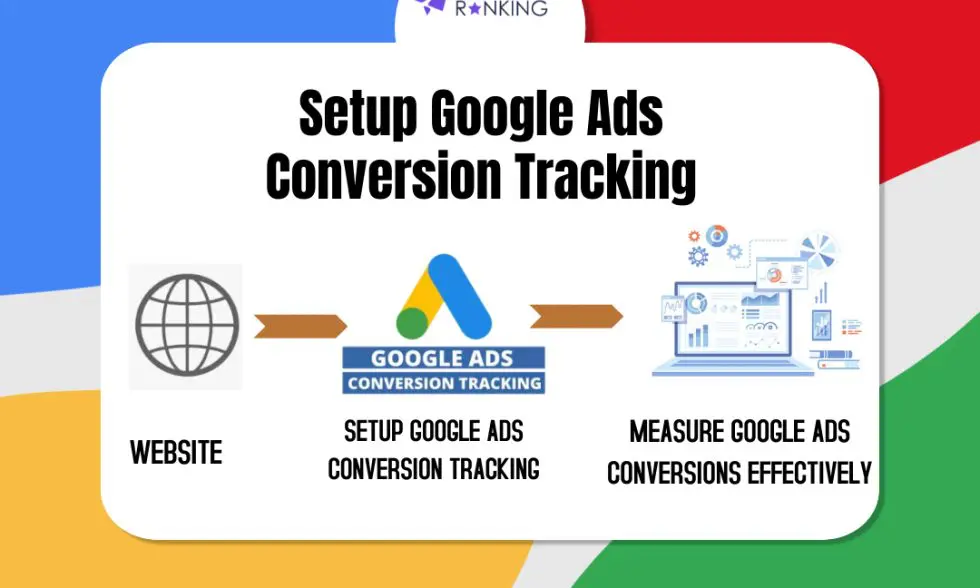
This section outlines the methodologies for interpreting conversion data in Google Ads, emphasizing the importance of data analysis for optimizing advertising strategies and improving ROI.
Analyzing Conversion Rates and ROI
Conversion rates represent the percentage of users who complete a desired action after interacting with an ad. A higher conversion rate indicates effective ad targeting and messaging. To calculate ROI (Return on Investment), use the formula:
- Determine total revenue generated from conversions.
- Subtract total ad spend from this revenue.
- Divide the result by total ad spend and multiply by 100 to get the percentage.
Monitoring ROI over time can reveal trends in campaign performance, helping identify which ads yield the best financial results.
Using Google Ads Reports for Insights
Google Ads provides various reporting tools that offer insights into conversion performance. Key reports include:
- Campaign Performance Report: Evaluates overall campaign effectiveness.
- Ad Group Report: Analyzes performance at the ad group level.
- Keyword Report: Assesses which keywords drive conversions.
Utilize these reports to identify underperforming areas and optimize ad spend accordingly.
Setting Up Conversion Goals in Google Analytics
Integrating Google Ads with Google Analytics enhances data analysis capabilities. To set up conversion goals in Google Analytics:
- Go to the Admin section and select the appropriate view.
- Click on “Goals” and then “New Goal.”
- Choose a template or custom goal type and define the goal details.
Goals can include page views, duration on site, or specific events, providing a comprehensive view of user interactions.
Adjusting Ad Strategies Based on Conversion Data
Conversion data should inform ad strategy adjustments. Consider the following actions:
- Reallocate budget to high-performing campaigns or ad groups.
- Pause or rework ads with low conversion rates.
- Implement A/B testing on ad copy and landing pages to enhance engagement.
Regularly reviewing and adjusting strategies based on conversion data ensures that advertising efforts remain aligned with business objectives.
While many advertisers focus solely on immediate conversions, it’s crucial to also analyze long-term customer value. A common misconception is that a single conversion represents the total value of a customer. In reality, understanding customer lifetime value can inform broader strategic decisions, potentially leading to higher investments in customer acquisition if the long-term returns justify it.
To apply this information effectively, regularly review conversion reports in Google Ads and Google Analytics. Set specific performance benchmarks for conversions and ROI. Adjust your campaigns based on these insights, ensuring that budget allocations reflect the most successful strategies. Conduct A/B tests to refine your approach continuously and maximize the effectiveness of your ad spend.
Real-World Applications of Conversion Tracking
This section explores practical implementations of conversion tracking across various industries, highlighting case studies, strategies, and lessons learned. Understanding these real-world applications illuminates the value of conversion insights in optimizing advertising campaigns.
Case Studies of Successful Conversion Tracking Implementations
Numerous companies have effectively leveraged conversion tracking to enhance their advertising performance. For instance, an e-commerce retailer used Google Ads conversion tracking to identify which keywords led to sales. By analyzing this data, the retailer increased their ROI by 25% within three months. In the travel industry, a booking platform implemented conversion tracking to measure the effectiveness of different ad creatives. This led to a 40% increase in bookings after reallocating budget toward higher-performing ads based on conversion data.
Industry-Specific Conversion Tracking Strategies
- Retail: Retailers often track purchases, add-to-cart actions, and newsletter sign-ups. This multi-faceted approach allows for a comprehensive understanding of customer journeys.
- Healthcare: Healthcare providers may track appointment bookings, patient inquiries, and downloads of informational resources. Accurate tracking helps in optimizing patient acquisition strategies.
- Education: Educational institutions commonly focus on tracking applications, course enrollments, and event registrations. This data informs decisions on marketing spend and outreach efforts.
Lessons Learned from Conversion Tracking Failures
Not all conversion tracking implementations succeed. A common pitfall is neglecting to define clear conversion goals. For example, a software company set up tracking without distinguishing between free trial sign-ups and paid conversions, leading to misleading data. Another frequent error is misconfiguration of tracking codes, resulting in inaccurate data collection. Businesses must regularly audit their tracking setups to ensure they capture the right metrics.
Adjusting Campaigns Based on Conversion Insights
Conversion tracking provides actionable insights that can refine advertising strategies significantly. For instance, a local restaurant utilized conversion data to identify peak times for online reservations. By adjusting their ad schedule to focus on these times, they saw a 30% increase in reservations. Similarly, a fitness center analyzed conversion data to determine which promotions resulted in the most memberships. This insight allowed them to tailor future campaigns more effectively, increasing their membership base by 20%.
Beyond simply tracking conversions, businesses can enhance their campaigns by integrating conversion data with customer feedback and market trends. This holistic approach enables brands to adapt quickly to changes in consumer behavior.
To implement effective conversion tracking, businesses should start by clearly defining their conversion goals tailored to their industry. Next, set up tracking codes accurately and regularly review performance metrics. By analyzing this data and making informed adjustments to campaigns, organizations can maximize their return on investment in Google Ads. This proactive strategy will lead to continuous improvement and greater marketing effectiveness.
For How To Setup Conversion Tracking In Google Ads businesses looking to generate local leads through Google Ads or Local SEO, GMB Ranger LLC offers hands-on campaign management. Specialist Md Tangeer Mehedi personally handles campaign setup and ongoing optimization — with no payment required until the first lead comes in.
Frequently Asked Questions
What is conversion tracking in Google Ads?
Conversion tracking in Google Ads is a feature that allows advertisers to measure the actions users take after interacting with their ads. It helps determine the effectiveness of ad campaigns by tracking specific user behaviors, such as purchases or sign-ups.
How do I setup conversion tracking in Google Ads?
To set up conversion tracking in Google Ads, navigate to the “Tools & Settings” menu, select “Conversions,” and then click the “+” button to create a new conversion action. Follow the prompts to define the conversion type and implement the tracking code on your website.
What are the best practices for Google Ads conversion tracking?
Best practices for Google Ads conversion tracking include defining clear conversion goals, using descriptive names for conversion actions, and regularly reviewing conversion data. Additionally, ensure that the tracking code is correctly implemented on your website for accurate data collection.
How much does Google Ads conversion tracking cost?
Google Ads conversion tracking is a free feature offered within the Google Ads platform. However, costs may arise from the ads themselves, depending on your budget and bidding strategy.
How long does it take to setup conversion tracking in Google Ads?
Setting up conversion tracking in Google Ads typically takes 10 to 30 minutes, depending on your familiarity with the platform. After setup, it may take a few hours for conversions to start appearing in your reports.
What types of conversions can I track in Google Ads?
You can track various types of conversions in Google Ads, including website purchases, sign-ups, phone calls, and app downloads. Each conversion action can be customized based on specific business goals.
Can I track conversions from multiple sources in Google Ads?
Yes, Google Ads allows you to track conversions from multiple sources, such as your website, mobile app, and offline interactions. You can create separate conversion actions for each source to analyze performance effectively.
What are common mistakes when setting up conversion tracking in Google Ads?
Common mistakes in setting up conversion tracking include not properly implementing the tracking code, failing to define clear conversion goals, and neglecting to test the setup. These errors can lead to inaccurate data and ineffective campaign optimization.
Final Thoughts on how to setup conversion tracking in google ads
Implementing effective conversion tracking in Google Ads is crucial for optimizing campaigns and maximizing return on investment. By accurately measuring user actions and refining strategies based on comprehensive data analysis, advertisers can make informed decisions to enhance performance.
To elevate your conversion tracking setup, prioritize integrating Google Tag Manager, allowing for streamlined tracking adjustments and improved data collection efficiency. This approach not only simplifies management but also enhances your ability to respond to evolving marketing needs.
Mastering conversion tracking is essential for any business looking to thrive in the competitive online landscape, as it directly impacts profitability and growth potential.
Leave a Reply