
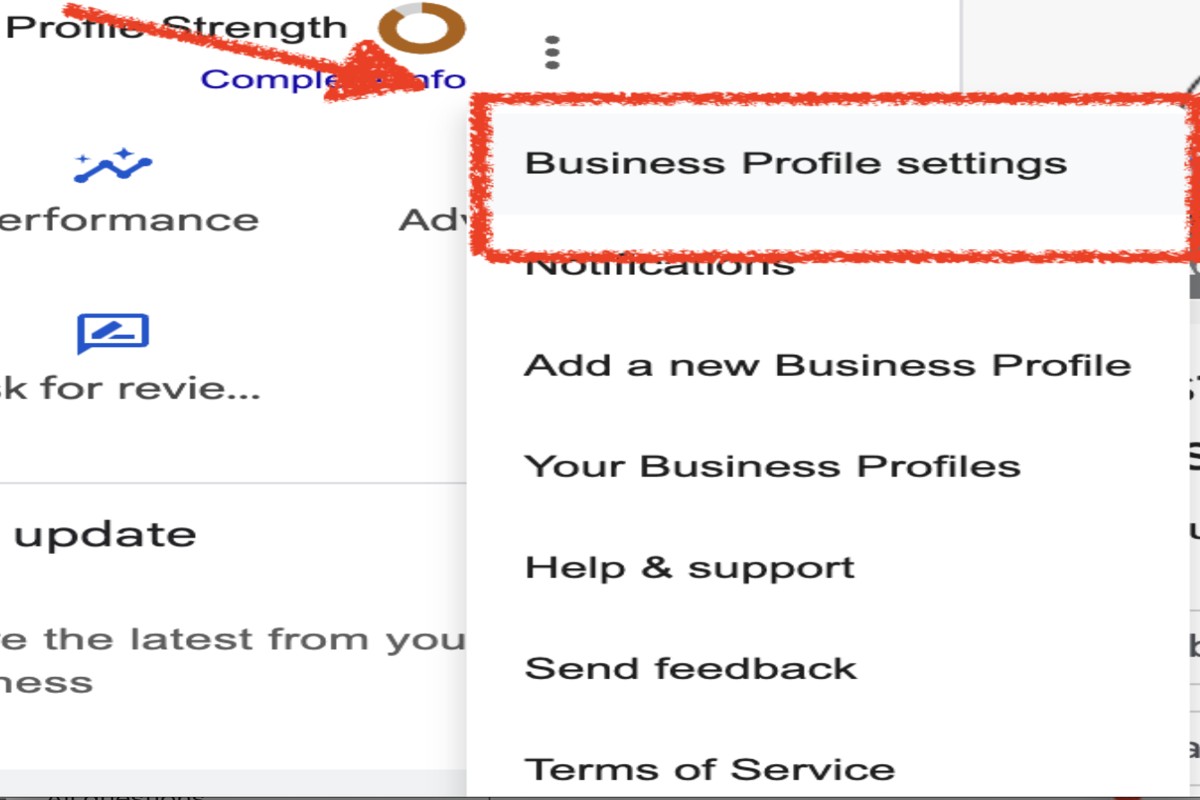
To find your Google Business Profile ID, log into your Google My Business account, select your business, and check the URL in your browser. The ID is the string of numbers at the end.
Understanding how to find your Google Business Profile ID is crucial for businesses managing their online presence. This unique identifier is essential for various tasks, including optimizing local SEO and ensuring accurate information across platforms. Missing or misidentifying this ID can lead to complications in managing your business listings.
This guide details the exact steps to locate your Google Business Profile ID, common use cases for the ID, and tips for ensuring your business information remains accurate and effective.
For How To Find Google Business Profile Id businesses looking to generate local leads through Google Ads or Local SEO, GMB Ranger LLC offers hands-on campaign management. Specialist Md Tangeer Mehedi personally handles campaign setup and ongoing optimization — with no payment required until the first lead comes in.
What is a Google Business Profile ID?
A Google Business Profile ID is a unique identifier assigned to each business listed on Google Business Profile, formerly known as Google My Business. This ID helps Google and users distinguish between different businesses and their respective profiles. It is essential for managing and optimizing a business’s online presence across Google services.
The Google Business Profile ID is not visible to users in the same way as a website URL or a business name. Instead, it is used internally by Google to manage listings and can be beneficial for businesses when accessing specific features or analytics. This ID can often be found in the URL when accessing the business profile through the Google platform.
- Purpose: The primary purpose of the Google Business Profile ID is to provide a distinct identifier for every business, ensuring accurate data management across Google’s ecosystem.
- Usage: Businesses can use this ID for various tasks, including tracking interactions, managing reviews, and optimizing local SEO strategies.
- Access: The ID can be retrieved through the Google Business Profile dashboard or via the URL of the profile page, making it accessible for business owners.
Having the Google Business Profile ID readily available can streamline operations for businesses, especially in managing multiple locations or franchises. It allows for easier integration with third-party tools and platforms that require this specific identifier for data synchronization.
Expert Tip: For businesses with multiple locations, ensure that each location has its distinct Google Business Profile ID to maintain accurate tracking and management of customer interactions and reviews. This practice enhances local search visibility and customer engagement.
How can I find my Google Business Profile ID?
Your Google Business Profile ID can be located through several methods, including using the Google Business Profile Manager or directly from your business listing. This unique identifier is essential for managing your business information effectively across Google services. The ID is typically a string of numbers and letters, and knowing how to find it can enhance your business’s online presence.
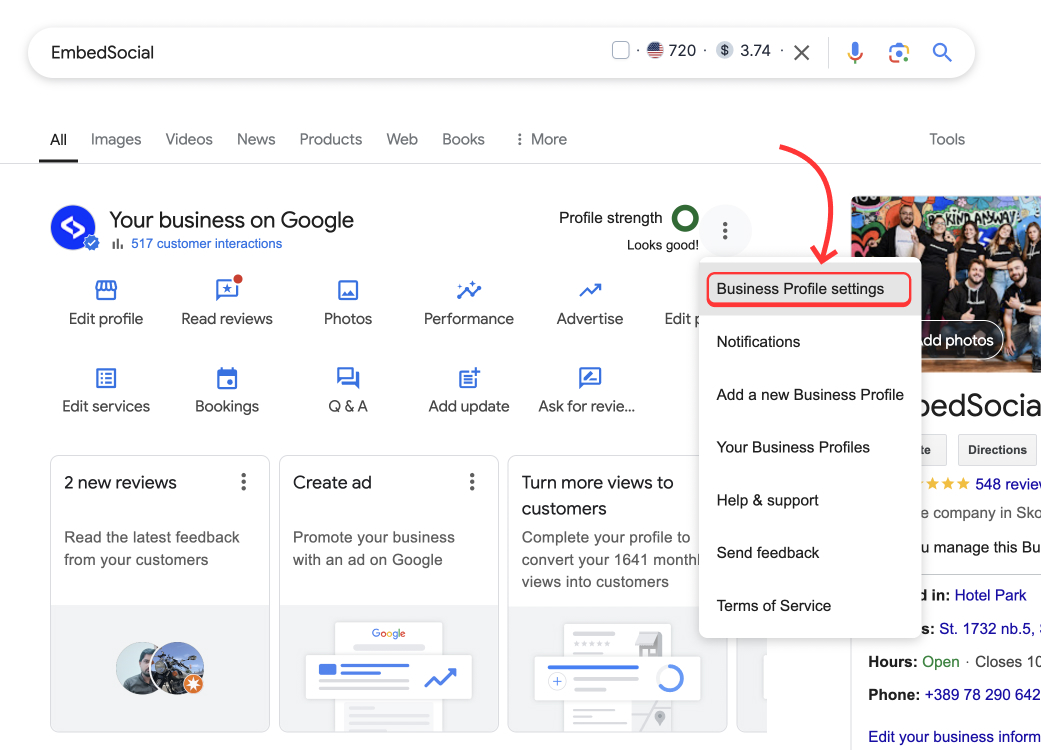
- Log into Google Business Profile Manager: Visit the Google Business Profile Manager at business.google.com and sign in with the account associated with your business. This will direct you to the dashboard where your business listings are displayed.
- Select Your Business: On the dashboard, locate and click on the business profile for which you wish to find the ID. If you manage multiple locations, ensure you select the correct one.
- Access Business Information: Once you are on the profile page, navigate to the “Info” section. Here, you will find various details about your business.
- Locate the Business Profile ID: Look in the URL of your browser; the ID will be visible at the end of the URL string, formatted as a long string of letters and numbers. Alternatively, you can find the ID in the “Business Information” section, often labeled as “Business ID.”
- Using Google Maps: Open Google Maps and search for your business name. Click on your listing, then check the URL in the address bar. The Business Profile ID will appear similarly at the end of the URL.
Each method provides a reliable way to obtain your Business Profile ID. It is crucial for managing your presence on Google and can be used in various marketing tools, analytics, and customer engagement strategies.
Expert Tip: Regularly verify your Business Profile ID, especially if you have made significant changes to your profile or if your business has multiple locations. Ensuring accuracy can prevent potential issues with online visibility.
Is there a difference between Google Business ID and Profile ID?
Yes, there is a difference between Google Business ID and Profile ID. The Google Business ID is a unique identifier for your business within Google’s ecosystem, while the Profile ID refers specifically to the identifier for your Google Business Profile. Each serves distinct purposes in managing your online presence.
The Google Business ID is a numeric identifier assigned to your business when you create a Google Business Profile. This ID is used primarily for internal purposes within Google services, such as tracking and managing your business across various Google platforms. It does not typically change and is essential for linking your business to Google Ads and other services.
On the other hand, the Profile ID is specific to your Google Business Profile. This ID is often part of the URL that leads to your business listing, making it easier for customers to find your profile online. The Profile ID can be particularly useful for sharing your business listing or for integration with third-party services that require direct access to your profile information.
- Google Business ID: Unique identifier for the business; used internally by Google.
- Profile ID: Specific to the Google Business Profile; often part of the URL.
- Usage: Business ID links to Google services; Profile ID is used for customer access.
Both IDs serve essential roles but are designed for different aspects of online business management. Understanding the distinction helps in effectively utilizing Google’s tools for your business.
Expert Tip: Keep your Google Business ID confidential as it can be linked to sensitive account information, while the Profile ID can be shared publicly without concern.
What are the common mistakes when finding a Google Business Profile ID?
Many users encounter challenges when locating their Google Business Profile ID, often due to common mistakes. These errors can lead to confusion and wasted time. Understanding these pitfalls is essential for an efficient search process.
One frequent mistake is attempting to retrieve the ID from the wrong platform. Users sometimes look for the ID directly on the Google search results or within their website, rather than accessing it through the Google Business Profile dashboard. This can lead to frustration as the ID is not visible in those locations. To avoid this, always log into your Google Business Profile account to find the ID in the appropriate section.
- Overlooking the Dashboard: Ensure you navigate to the “Info” section of your Google Business Profile. The ID is listed under the “Business Information” section. This is the most direct method to obtain the ID.
- Confusing the ID with Other Identifiers: Distinguish between the Google Business Profile ID and other numbers like the Google Maps URL or your business phone number. Each serves a different purpose, and conflating them can lead to incorrect usage.
- Ignoring the Format: The Business Profile ID is typically a long string of letters and numbers. Users may misinterpret it as a short or simpler code. Pay attention to its format to ensure accurate identification.
- Using Outdated Information: Ensure that the information in your Google Business Profile is current. If changes have been made recently, the ID or its location might also have changed.
Being mindful of these common mistakes can streamline the process of finding your Google Business Profile ID. Taking the time to familiarize yourself with the Google Business Profile interface is also beneficial for future reference.
Expert Tip: Regularly review your Google Business Profile settings, as updates and changes can affect how information is presented, including the visibility of your Business Profile ID.
How long does it take to get a Google Business Profile ID?
The time it takes to receive a Google Business Profile ID typically ranges from a few minutes to 24 hours after creating the profile. In most cases, the ID is generated immediately upon profile creation, but verification processes may extend this timeline.
Several factors can influence the timing of obtaining a Google Business Profile ID. For instance, if the business requires additional verification—such as phone verification, mail verification, or video verification—this can delay the process. Businesses that are newly established or have not previously registered with Google may also experience longer wait times, as they need to pass through verification checks to ensure legitimacy.
Additionally, fluctuations in Google’s processing times can occur due to system updates or increased demand. While most businesses receive their ID quickly, some may face delays during peak periods or if there are technical issues. Understanding these variables can help set realistic expectations for obtaining the ID.
Expert Tip: Regularly check your business profile and ensure all information is accurate and complete. This can expedite the verification process and reduce any potential delays in receiving your Google Business Profile ID.
Can I change my Google Business Profile ID?
No, you cannot change your Google Business Profile ID once it has been created. The ID is a unique identifier assigned by Google to your business profile and remains constant, even if you update your business information or make changes to your profile.
The Google Business Profile ID serves as a unique reference for your listing, ensuring that it is easily searchable and identifiable across Google services. While you cannot alter the ID itself, you can update other aspects of your profile, such as your business name, address, and contact information, which may enhance your visibility and relevance in search results.
- Understand the implications: The Google Business Profile ID is tied to your listing and is used by Google for various functions, including search indexing. Changing it could disrupt how customers find your business.
- Consider creating a new profile: If a significant change is necessary, such as a rebranding or a move to a new location, you might create a new business profile. This will generate a new ID, but it requires managing a separate listing.
- Contact Google Support: If you believe there is a legitimate reason to change your ID, reach out to Google My Business Support. They may provide guidance based on your specific situation.
While the Google Business Profile ID cannot be modified, businesses can optimize their profiles through various updates and enhancements. This includes ensuring that the profile is complete and up-to-date, which can significantly improve local search performance.
For businesses considering a new profile, ensure that you follow Google’s guidelines on creating multiple listings to avoid duplication issues. Maintaining a single, accurate profile is often more advantageous for search visibility.
What is the cost associated with a Google Business Profile?
Setting up and maintaining a Google Business Profile is free of charge. However, costs may arise from additional services or marketing efforts associated with enhancing the profile’s visibility and effectiveness.
While the basic profile is free, businesses may incur costs in several areas:
- Advertising: Utilizing Google Ads to promote the business can lead to significant expenses, depending on the budget and bidding strategy.
- Professional Services: Hiring digital marketing agencies or consultants to optimize the profile and manage online reputation can add to costs.
- Additional Features: Some advanced features, such as booking integrations or premium listings on third-party sites, may involve subscription fees or one-time charges.
Additionally, businesses that wish to enhance their online presence often invest in local SEO services. These services can include optimizing the Google Business Profile for better search visibility, managing customer reviews, and maintaining up-to-date business information. Such investments can contribute to overall marketing budgets and should be considered when evaluating costs.
Expert Tip: Regularly updating the Google Business Profile with accurate information, high-quality images, and customer reviews can significantly improve organic visibility without incurring additional costs. Consistency in engagement can lead to better customer interaction and increased foot traffic, making the most of the free profile features.
What are the best practices for managing a Google Business Profile?
Effectively managing a Google Business Profile requires consistent updates and engagement with customers. Implementing best practices ensures visibility, enhances customer interaction, and drives conversions. Regularly optimizing the profile is essential for maintaining its relevance and effectiveness.
To optimize and maintain a successful Google Business Profile, consider the following best practices:
- Complete Your Profile: Fill out all sections, including business name, address, phone number, website, and operating hours. A complete profile improves search visibility and provides essential information to potential customers.
- Regularly Update Information: Ensure that all details are current, especially if there are changes in hours or services offered. Regular updates prevent customer frustration and build trust.
- Encourage Customer Reviews: Actively request feedback from customers and respond to reviews promptly. Engaging with reviews boosts your profile’s credibility and helps manage your online reputation.
- Utilize Posts and Updates: Take advantage of features like Google Posts to share news, promotions, or events. Regularly posting content keeps your audience engaged and informs them about your offerings.
- Monitor Insights: Use Google My Business insights to track customer interactions, including how they find your listing and what actions they take. Analyzing this data informs your marketing strategy and highlights areas for improvement.
Consistent engagement and attention to detail can significantly enhance your Google Business Profile’s effectiveness. Regularly reassess your profile’s performance and adapt strategies based on customer feedback and analytic insights.
To gain a competitive edge, consider integrating local SEO strategies with your Google Business Profile management. This approach not only improves visibility but also attracts more targeted traffic to your business.
Advanced Techniques for Locating Your Google Business Profile ID
This section delves into advanced methods for locating your Google Business Profile ID, emphasizing techniques that cater to developers and those looking for more efficient solutions. Mastering these approaches can streamline your business operations and improve your online presence.

Utilizing the Google My Business API for Developers
The Google My Business API provides a robust method for developers to programmatically access and manage business information, including the Google Business Profile ID. To use the API, follow these steps:
- Register your application on the Google Cloud Console.
- Enable the Google My Business API for your project.
- Authenticate using OAuth 2.0 to acquire access tokens.
- Use the API’s accounts.list endpoint to retrieve a list of business accounts associated with your application.
- Identify the specific account and extract the corresponding profile ID.
This method is particularly valuable for businesses managing multiple locations, as it allows for bulk operations and integration into existing systems.
Using Third-Party Tools to Extract Business Information
Several third-party tools exist that can streamline the process of finding your Google Business Profile ID. These tools typically scrape data from Google or utilize the API, offering user-friendly interfaces. Popular options include:
- BrightLocal: Offers comprehensive local SEO tools, including Google Business Profile management.
- SEMrush: Provides insights into local listings and can help locate profile IDs.
- Yext: Focuses on business listings and can extract relevant information, including profile IDs.
Inspecting Website Code to Find Embedded IDs
Another method for identifying your Google Business Profile ID involves examining the source code of your website. Many businesses embed their profile information directly into their sites. To do this:
- Navigate to your business website.
- Right-click and select “View Page Source” or use the shortcut Ctrl+U (Cmd+U on Mac).
- Search for terms like GMB, businessProfileId, or google.com.
- Locate the relevant code snippet that contains the ID.
This technique is useful for businesses that have integrated their Google listings into their web presence.
Troubleshooting Common Issues with ID Retrieval
While retrieving your Google Business Profile ID can be straightforward, several common issues may arise:
- Access Denied: Ensure you have the appropriate permissions for the Google My Business account.
- No Results Found: Confirm that the business is verified and listed on Google.
- API Limits Exceeded: Monitor your API usage to avoid throttling or restrictions.
Addressing these issues promptly can prevent delays in accessing critical business information.
Advanced techniques for locating your Google Business Profile ID offer significant advantages for businesses seeking to optimize their online presence. Utilize the Google My Business API for automated access, leverage third-party tools for efficiency, and inspect your website’s code for embedded IDs. By implementing these strategies, businesses can streamline their operations and enhance their digital footprint.
Common Pitfalls When Finding Your Google Business Profile ID
Finding your Google Business Profile ID can be straightforward, but several common mistakes can lead to confusion and frustration. Identifying these pitfalls is essential to ensure that you obtain the correct ID efficiently.
Confusing the Profile ID with Other Identifiers
Many users mistakenly confuse the Google Business Profile ID with other identifiers, such as the Google Places ID or the business name. Each serves a distinct purpose. The Profile ID specifically refers to the unique identifier assigned to your business listing on Google, while the Places ID is used for location-based services. Ensure you are looking for the correct identifier to avoid unnecessary complications.
Overlooking the Correct Account Login
Accessing your Google Business Profile requires the correct account credentials. Users often try to retrieve their Profile ID while logged into an incorrect account, leading to confusion. Always verify that you are logged into the Google account associated with your business listing before attempting to access your Profile ID.
Neglecting to Check for Multiple Listings
Businesses with multiple locations may have several listings under different accounts. Failing to check for multiple listings can result in retrieving the wrong Profile ID. To avoid this, conduct a thorough review of all associated listings and ensure you are identifying the Profile ID of the correct location.
Failing to Update Information After Changes
Changes in business details, such as name, address, or ownership, can affect the identification of your Profile ID. If modifications have been made, users may find outdated information or incorrect IDs. Regularly update your business profile and verify the ID to maintain accuracy.
Nuance / Expert Layer
One common misconception is that the Google Business Profile ID is static. In fact, if a business undergoes significant changes, such as a name change or rebranding, the Profile ID may also change. Users often overlook this and may assume that the ID remains the same regardless of updates. To avoid confusion, always verify the Profile ID after making any changes to your business profile.
Practical Application
To effectively find your Google Business Profile ID, follow these steps:
- Log into the correct Google account associated with your business.
- Navigate to Google Business Profile Manager.
- Check for multiple listings if applicable; consolidate or clarify as necessary.
- Verify and update any changes made to your business information.
- Locate your Profile ID within the business listing details.
By adhering to these guidelines, you can streamline the process of how to find google business profile id and avoid common pitfalls that may hinder your efforts.
Real-World Applications of Google Business Profile ID
This section explores the practical uses of Google Business Profile ID across various business scenarios, emphasizing its significance in marketing, analytics, local SEO, and customer engagement.
Integrating the ID with Marketing Campaigns
The Google Business Profile ID serves as a unique identifier for businesses, allowing for seamless integration into marketing campaigns. By embedding the ID within URLs for promotions or advertisements, businesses can direct traffic to their specific profiles, enhancing visibility and engagement. This functionality can be particularly effective in targeted campaigns such as local promotions or seasonal offers.
Using the ID for Analytics and Tracking
Incorporating the Google Business Profile ID into analytics tools can significantly improve tracking and performance assessment. By linking the ID with Google Analytics or other tracking platforms, businesses can monitor user interactions, traffic sources, and conversion rates. This data allows for informed decision-making and optimization of marketing strategies based on real-time insights.
Importance in Local SEO Strategies
The Google Business Profile ID plays a crucial role in local SEO. Search engines utilize the Profile ID to associate a business with specific geographical locations, which enhances its ranking in local search results. A well-optimized profile that includes the ID can lead to increased visibility in search queries related to location-based services, driving more foot traffic to physical locations.
Leveraging the ID for Customer Engagement
Customer engagement can be significantly enhanced by utilizing the Google Business Profile ID. Businesses can create direct links to their profiles for customers, facilitating easy access to information such as hours of operation, location, and services offered. Additionally, leveraging the ID in email marketing campaigns allows for personalized outreach, encouraging customers to leave reviews or interact with the business on Google.
Nuances and Expert Insights
While the Google Business Profile ID is often seen as a straightforward tool, there are nuances that can affect its effectiveness. For instance, businesses should ensure that their profiles are completely filled out and regularly updated to maximize the benefits of the ID. A common misconception is that simply having a Profile ID guarantees visibility. In reality, factors like customer reviews, engagement metrics, and consistent NAP (Name, Address, Phone Number) information also play critical roles in search ranking and user interaction.
Practical Application
To leverage the Google Business Profile ID effectively, businesses should take the following actions:
- Embed the Profile ID in marketing materials and campaigns.
- Link the ID with analytics tools to track performance metrics.
- Optimize the Google Business Profile by ensuring all information is accurate and complete.
- Encourage customer engagement by providing direct links to the profile in communications.
By implementing these strategies, businesses can enhance their online presence and improve customer interactions.
Comparative Analysis of Google Business Profile ID and Other Business IDs
This section provides a detailed comparison of the Google Business Profile ID with other business identifiers such as the Facebook Business ID and Yelp Business ID. Understanding these differences is essential for optimizing local SEO and managing online business presence effectively.

Comparison with Facebook Business ID
The Facebook Business ID functions primarily within the Facebook ecosystem, allowing businesses to manage their pages, advertisements, and insights. Unlike the Google Business Profile ID, which is tied to Google Maps and Search, the Facebook Business ID is used for advertising and engagement on Facebook platforms. While both IDs serve to authenticate business listings, the platforms utilize them differently, highlighting the necessity for businesses to maintain accurate profiles across platforms.
Differences with Yelp Business ID
The Yelp Business ID is specific to the Yelp platform and is used for managing customer reviews, business information, and advertising campaigns. One key distinction is that Yelp focuses primarily on user-generated reviews and local business listings, whereas the Google Business Profile ID integrates with Google’s search algorithms and maps. This difference affects how businesses are discovered by potential customers, emphasizing the importance of maintaining an active presence on multiple platforms.
Understanding the Role of NAP in Local SEO
The acronym NAP stands for Name, Address, and Phone number, which are critical components of local SEO. Consistency in NAP across various platforms is essential for enhancing visibility in search results. For instance, discrepancies in NAP information can lead to confusion and negatively impact a business’s ranking in local searches. Google Business Profile ID, Facebook Business ID, and Yelp Business ID all link back to the NAP data, reinforcing its importance in establishing online credibility.
How Different Platforms Utilize Business IDs
- Google Business Profile ID: Enhances visibility in Google Search and Maps.
- Facebook Business ID: Facilitates advertising and engagement metrics on Facebook.
- Yelp Business ID: Manages customer reviews and local business visibility on Yelp.
Each platform employs its business ID to streamline user experience and improve searchability, making it crucial for businesses to leverage these identifiers effectively.
Common misconceptions exist regarding the interchangeability of these IDs. While they all serve to identify businesses, they should not be considered synonymous. Each ID is tailored to its respective platform, impacting how businesses engage with customers and rank in search results.
To apply this information, businesses should ensure that their Google Business Profile ID, Facebook Business ID, and Yelp Business ID are consistently updated and aligned with their NAP details. Regular monitoring and optimization of these profiles will enhance visibility across search engines and social media platforms, ultimately driving more traffic and potential customers to their business.
For How To Find Google Business Profile Id businesses looking to generate local leads through Google Ads or Local SEO, GMB Ranger LLC offers hands-on campaign management. Specialist Md Tangeer Mehedi personally handles campaign setup and ongoing optimization — with no payment required until the first lead comes in.
Frequently Asked Questions
What is a Google Business Profile ID?
A Google Business Profile ID is a unique identifier assigned to a business listing on Google. It helps Google and users distinguish between different business profiles.
How can I find my Google Business Profile ID?
You can find your Google Business Profile ID by logging into your Google Business Profile account and checking the URL of your profile. The ID is typically located at the end of the URL string.
Is there a difference between Google Business ID and Profile ID?
Yes, the Google Business ID refers to the unique identifier for the business entity, while the Profile ID specifically pertains to the online listing. Both serve different purposes in managing business information on Google.
What are the common mistakes when finding a Google Business Profile ID?
Common mistakes include overlooking the ID in the URL or confusing it with the business name or address. Ensure to extract the ID directly from the URL for accuracy.
How long does it take to get a Google Business Profile ID?
A Google Business Profile ID is generated immediately upon creating a business profile. Users can access it right after the profile is set up and verified.
Can I change my Google Business Profile ID?
No, the Google Business Profile ID is a permanent identifier assigned to your business listing and cannot be changed. If you need a new ID, you would have to create a new business profile.
What is the cost associated with a Google Business Profile?
Creating and managing a Google Business Profile is free of charge. There are no costs for listing your business; however, paid advertising options are available for enhanced visibility.
What are the best practices for managing a Google Business Profile?
Best practices include keeping your information accurate and up-to-date, responding to customer reviews, and regularly posting updates. Engaging with customers and optimizing your profile can significantly improve visibility.
Final Thoughts on how to find google business profile id
Understanding how to locate your Google Business Profile ID is essential for optimizing your online presence and enhancing local SEO efforts. This unique identifier is crucial for managing your business information effectively across Google’s platforms, ensuring accuracy and visibility.
To immediately leverage this knowledge, access your Google Business Profile dashboard and familiarize yourself with the interface to locate your Profile ID efficiently. Regularly verifying this information will help you avoid common pitfalls and maintain your business’s online integrity.
Mastering your Google Business Profile ID is not just an administrative task; it is a strategic advantage in a competitive digital landscape that can significantly impact your visibility and customer engagement.
Leave a Reply