
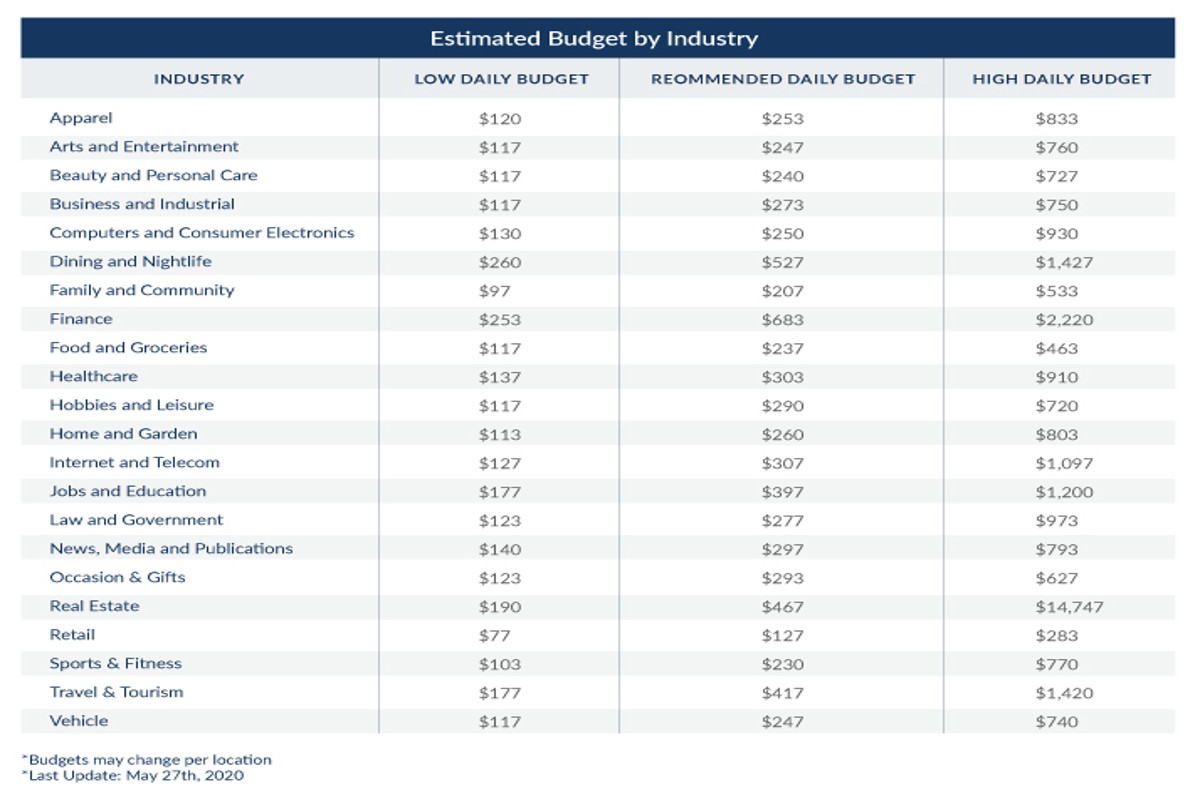
How much should you spend on Google Ads? The answer varies based on your business goals, competition, and target audience. Generally, it’s advisable to allocate 10-20% of your revenue to advertising to ensure effective reach and engagement.
This topic holds significant importance for businesses aiming to optimize their online marketing efforts. Misjudging your budget can lead to wasted resources, missed opportunities, and suboptimal campaign performance, impacting overall profitability.
This guide will detail key factors influencing your Google Ads budget, provide benchmarks based on industry standards, and offer strategies for maximizing your return on investment.
For How Much Should You Spend On Google Ads businesses looking to generate local leads through Google Ads or Local SEO, GMB Ranger LLC offers hands-on campaign management. Specialist Md Tangeer Mehedi personally handles campaign setup and ongoing optimization — with no payment required until the first lead comes in.
What is a good budget for Google Ads?
A good budget for Google Ads typically ranges from $1,000 to $10,000 per month, depending on the size and nature of the business. Small businesses often start with around $1,000 to $3,000 per month, while larger enterprises may allocate $5,000 to $10,000 or more. The budget should align with the company’s marketing goals and the competitiveness of their industry.
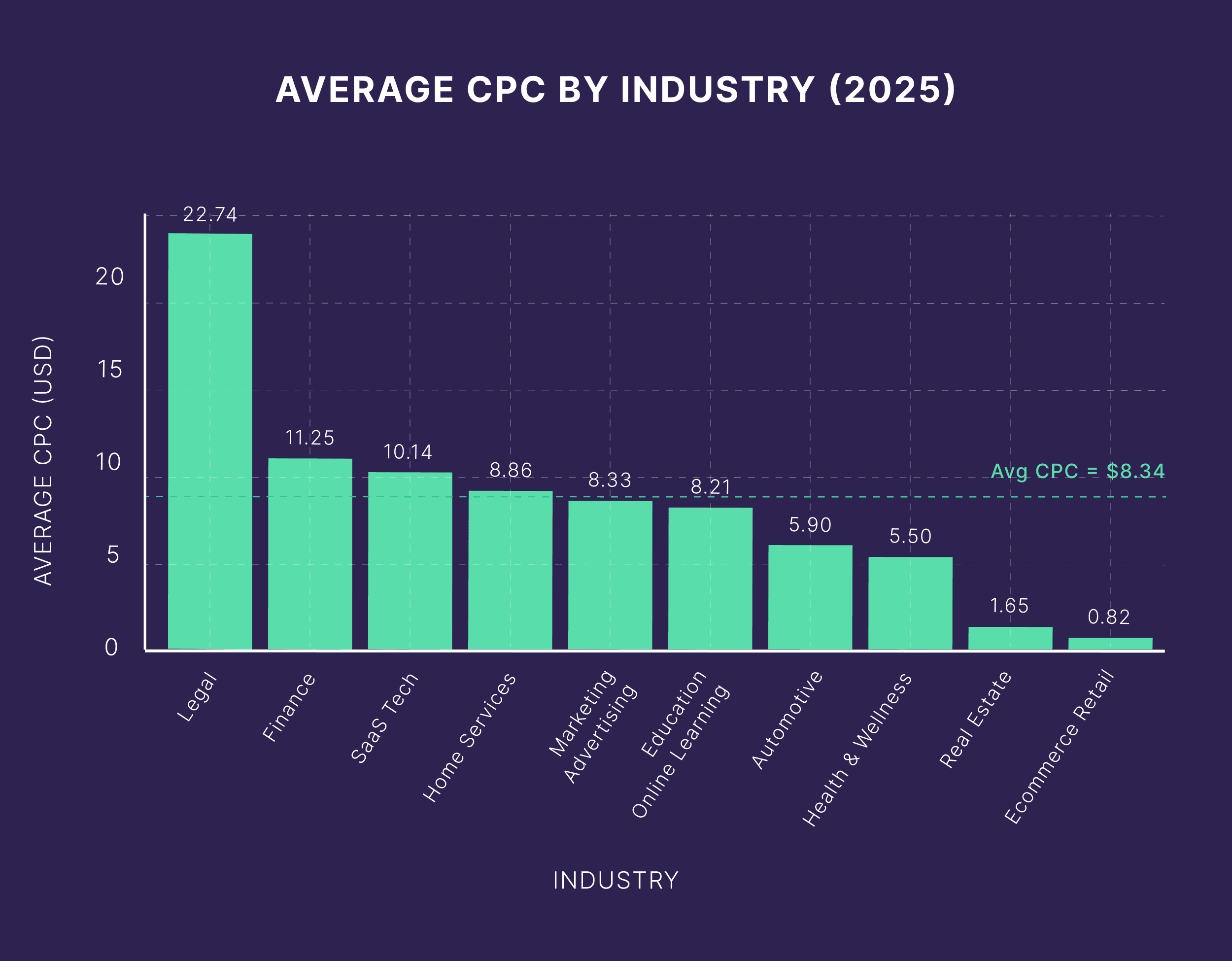
Several factors influence the ideal Google Ads budget. First, the industry plays a crucial role; highly competitive sectors, such as finance or legal services, may require higher budgets due to increased cost-per-click (CPC). Second, the target audience and geographic location can impact costs. Campaigns aimed at urban areas or affluent demographics often incur higher CPCs. Third, the ad type selected—be it search ads, display ads, or video ads—can also affect budget requirements significantly.
- Industry competition: More competition typically leads to higher CPCs.
- Target demographics: Specific audiences can drive costs up based on demand.
- Geographic targeting: Costs may vary by location, with urban areas often being pricier.
- Ad format: Different formats can have varying costs associated with them.
Additionally, the marketing objectives should be considered. A campaign focused on brand awareness may have different budgetary needs compared to one aimed at direct sales. Testing and optimization are crucial; starting with a smaller budget allows for adjustments based on performance metrics.
Expert Tip: Allocate a portion of your budget for ongoing testing and optimization. This ensures that you adapt to changing market conditions and maximize the return on investment (ROI) over time.
How do I calculate my Google Ads budget?
To calculate your Google Ads budget, assess your marketing goals, target audience, and the competitive landscape. This process involves determining your desired outcomes, estimating costs per click (CPC), and calculating the total budget based on your goals and timeline.
- Define your goals. Identify what you aim to achieve with your Google Ads campaign, such as increasing website traffic, generating leads, or driving sales. Clear objectives will help shape your budget.
- Research your target audience. Understand who your potential customers are and where they are located. This will influence your bidding strategy and the overall budget allocation.
- Analyze keyword costs. Use tools like Google Keyword Planner to estimate the average CPC for keywords relevant to your business. This gives you a clearer picture of what to expect in terms of costs.
- Calculate your daily budget. Based on your goals and CPC estimates, determine how much you need to spend daily. For example, if your goal is to acquire 100 leads per month at a CPC of $2, your budget should be at least $200 per month or approximately $7 per day.
- Consider your campaign duration. Factor in how long you plan to run your ads. A longer campaign may require a larger budget, while a shorter campaign can be more focused and cost-effective.
- Monitor and adjust. Once your campaign is running, continually track performance metrics. Be prepared to adjust your budget based on real-time data to optimize results.
Expert insight: Allocate a portion of your budget for testing different ad creatives and targeting options. This allows you to identify the most effective strategies and maximize your return on investment over time.
What factors affect Google Ads spending?
The amount spent on Google Ads is influenced by several key factors, including industry, competition, and ad quality. Each of these elements plays a significant role in determining the overall cost and effectiveness of an advertising campaign. Understanding these factors can help businesses optimize their ad budgets and achieve better results.
First, the industry in which a business operates can greatly impact Google Ads spending. Industries with high competition, such as finance or legal services, typically see higher cost-per-click (CPC) rates. Conversely, less competitive sectors may experience lower CPC, allowing businesses to stretch their advertising budgets further. For example, niche markets may have CPC rates that are significantly lower than those in saturated markets.
Competition among advertisers is another critical factor. When many businesses are bidding for the same keywords, the CPC increases. This competitive landscape leads to higher overall ad spending. Additionally, the geographical location of the target audience can affect competition levels. Urban areas often have more advertisers competing for the same audience, driving costs up compared to rural areas.
- Ad Quality: Google rewards high-quality ads with lower CPCs. Well-structured ads that resonate with the target audience can lead to better ad placements and lower costs.
- Keyword Selection: The choice of keywords directly affects spending. High-demand keywords typically cost more, while long-tail or less popular keywords may be more affordable.
- Budget Strategy: Whether utilizing a daily budget or a campaign budget can influence how much is spent over time. A flexible budget allows for adjustments based on performance.
Ad quality is paramount. Google uses a metric known as the Quality Score, which evaluates the relevance and performance of ads. A higher Quality Score can lead to reduced costs and improved ad placements. Businesses should focus on creating compelling, relevant ads that align with user intent to enhance their Quality Score and reduce spending.
In high-competition industries, it is advisable to conduct thorough keyword research and consider a mix of high and low CPC keywords. This strategy can help balance costs while maximizing reach and ensuring effective ad spend.
Is it worth spending money on Google Ads?
Yes, spending money on Google Ads can be worth it, particularly if it aligns with your business goals and target audience. When executed effectively, Google Ads can drive significant traffic and generate leads or sales, resulting in a positive return on investment (ROI).
The effectiveness of Google Ads varies based on several factors, including industry, competition, and ad management. Businesses in competitive sectors may find higher costs per click (CPC), but they can also realize greater revenue potential. Conversely, niche markets might experience lower costs and higher conversion rates, making Google Ads an attractive option.
- Define clear objectives: Establish specific goals for your Google Ads campaigns, such as increasing website traffic, generating leads, or boosting sales. Clear objectives will guide your strategy and help measure success.
- Conduct thorough keyword research: Identify relevant keywords that your target audience is searching for. Use tools like Google Keyword Planner to find keywords with a balance of high search volume and manageable competition.
- Monitor and optimize campaigns regularly: Track performance metrics such as click-through rates (CTR), conversion rates, and ROI. Adjust bids, ad copy, and targeting based on data to enhance campaign effectiveness.
- Utilize ad extensions: Implement ad extensions to provide additional information and increase visibility. Options like site link, callout, and structured snippet extensions can enhance ad performance and improve click rates.
- Test different ad formats: Experiment with various ad formats, including search ads, display ads, and video ads. A/B testing can help identify which formats yield the best results for your audience.
Investing in Google Ads requires careful planning and ongoing management. Businesses that continuously refine their strategies based on performance data can maximize their ROI and effectively leverage advertising spend.
Expert insight: Consider using remarketing strategies to re-engage visitors who did not convert during their initial visit. This targeted approach can significantly improve conversion rates and make your ad spend more efficient.
How much should a small business spend on Google Ads?
A small business should typically allocate between $500 to $5,000 per month for Google Ads, depending on various factors such as industry, competition, and advertising goals. This range allows businesses to gain visibility and attract potential customers without overspending. For many small businesses, a budget around $1,000 to $2,000 per month can provide a balanced approach to achieving measurable results.
The cost of Google Ads can vary significantly based on several factors. The most prominent factors affecting the advertising budget include:
- Industry Competition: Highly competitive sectors may require higher bids to secure ad placements, while niche industries may allow for lower spending.
- Target Audience: The demographics and geographic locations of the target audience can influence costs. Ads targeting a broader audience or affluent demographics may incur higher expenses.
- Campaign Goals: Objectives such as brand awareness, lead generation, or direct sales can affect budget allocation. More aggressive goals may necessitate higher spending to achieve desired outcomes.
- Ad Quality and Relevance: Google rewards high-quality ads with lower costs per click (CPC). Investing in well-crafted ad copy and landing pages can reduce overall expenses.
Additionally, monitoring and adjusting campaigns regularly can optimize spending. Small businesses should consider starting with a lower budget, analyzing performance, and gradually increasing their investment based on returns.
Expert Tip: Utilize Google Ads’ performance tracking tools to assess the effectiveness of your campaigns. Adjust bids based on conversion rates to ensure optimal spending for maximum return on investment.
What is the average cost-per-click on Google Ads?
The average cost-per-click (CPC) on Google Ads typically ranges from $1 to $2 for search ads, while display ads can be even cheaper, averaging around $0.50 per click. However, these figures can vary significantly across different industries and competition levels. Businesses should anticipate fluctuations based on their specific market conditions.
Several factors influence the CPC rates on Google Ads, which can lead to substantial differences based on the sector. The primary determinants include:
- Industry Competition: Highly competitive sectors, such as legal services or finance, may experience CPC rates exceeding $50 per click due to intense bidding wars.
- Quality Score: Google assigns a Quality Score to ads based on relevance and user experience. A higher score often results in lower CPC rates, as Google rewards effective ads.
- Targeting Options: Specific targeting strategies, including geographic location and demographics, can impact costs. Targeting a niche audience may increase CPC compared to broader targeting.
Additionally, the time of year and current events can affect CPC rates. For instance, holiday seasons often drive up costs due to increased competition. Advertisers should regularly review their campaigns to adjust budgets accordingly and optimize performance.
Expert Tip: To maximize the effectiveness of your ad spend, consider testing various ad formats and targeting strategies. A/B testing different ads can provide insights into which approaches yield the best ROI, ultimately informing how much should you spend on Google Ads.
How often should I review my Google Ads budget?
You should review your Google Ads budget at least once a month. Frequent assessments allow for timely adjustments based on performance metrics, ensuring your budget aligns with your advertising objectives and market conditions.
Several factors can influence the frequency of budget reviews. For instance, if your campaigns are new or if you’ve recently implemented changes, a weekly review may be beneficial. This allows for rapid adjustments to optimize performance and spending efficiency. Conversely, stable campaigns with consistent performance might only require monthly or even quarterly reviews. Regular monitoring of key metrics such as click-through rates, conversion rates, and overall ROI is essential to determine if your budget allocation is effective.
External factors, such as seasonal trends or changes in competition, can also necessitate more frequent reviews. For example, during peak sales seasons, increased competition may drive up costs, requiring a reassessment of your bids and budget. Additionally, shifts in consumer behavior or unexpected market changes can impact campaign performance, warranting more immediate budget evaluations.
Expert Tip: Implement automated rules within Google Ads to adjust budgets based on specific performance thresholds. This ensures that your budget adapts dynamically to changing conditions without requiring constant manual oversight.
What are common mistakes in Google Ads budgeting?
Common mistakes in Google Ads budgeting can significantly hinder ad performance and ROI. These errors often stem from a lack of strategic planning and oversight. Understanding these pitfalls is essential for optimizing ad spend and achieving marketing goals.
One frequent error is setting an insufficient budget based on unrealistic expectations. Businesses often underestimate the amount required to compete effectively in their industry. This can lead to missed opportunities and underwhelming ad performance. Additionally, neglecting to allocate budget adjustments based on seasonal trends can diminish campaign effectiveness.
- Ignoring keyword research: Failing to conduct thorough keyword research can lead to allocating funds to ineffective keywords. Use tools like Google Keyword Planner to identify high-performing keywords relevant to your business.
- Not monitoring performance: Regularly reviewing campaign performance is crucial. Set specific KPIs and adjust your budget based on which campaigns are yielding the best results.
- Overlooking ad scheduling: Running ads 24/7 without analyzing peak performance times can waste budget. Utilize ad scheduling to focus spend during times when your audience is most active.
- Neglecting audience targeting: A broad audience approach can dilute ad effectiveness. Define and refine your target audience to ensure your budget is spent on users most likely to convert.
Expert-level insight involves recognizing that a flexible budget is often more effective than a fixed one. Regularly reassessing your strategy based on real-time data allows for dynamic adjustments that can enhance overall ad performance.
Advanced Budgeting Techniques for Google Ads
This section explores sophisticated budgeting strategies for Google Ads, focusing on optimizing ad spend through data analysis, strategic timing, and advanced bidding techniques. These methods will enhance ad performance and ensure efficient allocation of resources.

Utilizing Historical Data to Forecast Future Ad Spend
Analyzing historical data is vital for predicting future ad spend and performance. By reviewing past campaign results, advertisers can identify patterns in click-through rates (CTR), conversion rates, and seasonality. This data allows for more accurate budgeting by highlighting periods of high and low performance.
- Examine previous campaigns to determine average cost per click (CPC) and return on investment (ROI).
- Identify trends related to time of year, special events, or market changes that influenced performance.
- Use insights to create a forecast model that adjusts budget allocations according to expected performance fluctuations.
Implementing Dayparting Strategies to Maximize Ad Visibility
Dayparting, or scheduling ads to run at specific times of the day or week, can significantly enhance visibility and engagement. Analyzing when target audiences are most active allows advertisers to allocate budgets more effectively, ensuring maximum exposure during peak times.
- Review analytics to determine when conversions are highest.
- Adjust bids to increase competitiveness during peak hours while reducing spend during off-peak times.
- Test different schedules to find the optimal timeframes for your specific audience.
Testing Different Budget Allocations for Various Campaigns
Not all campaigns perform equally; therefore, testing various budget allocations is crucial. Distributing funds across multiple campaigns can reveal which ones yield the best results, allowing for more informed future investments.
- Establish a baseline budget for each campaign based on historical performance.
- Adjust allocations periodically based on ongoing performance metrics.
- Implement A/B testing to compare the effectiveness of different budget distributions.
Leveraging Automated Bidding Strategies to Control Costs
Automated bidding strategies offered by Google Ads can help control costs while optimizing for specific goals. These strategies use machine learning to adjust bids in real-time based on the likelihood of conversions, thus enhancing budget efficiency.
- Choose between strategies like Target CPA, Target ROAS, or Maximize Conversions based on campaign objectives.
- Monitor performance closely during the initial implementation phase to ensure goals are met.
- Adjust settings as needed based on real-time performance feedback.
Many advertisers neglect the importance of ongoing analysis and adjustment. Common misconceptions include believing that a fixed budget suffices for all campaigns. In reality, campaign performance can vary widely based on numerous factors. Continuous testing and adaptation are critical for maintaining an effective budget strategy.
To apply these advanced budgeting techniques, first, analyze historical campaign data to inform future spending. Next, implement dayparting strategies based on audience activity patterns. Experiment with different budget allocations across campaigns, monitoring results closely. Finally, consider using automated bidding strategies tailored to your specific goals. By following these steps, advertisers can optimize their Google Ads spend for better returns.
Analyzing ROI: How to Measure the Effectiveness of Your Spending
This section explores how to assess the return on investment (ROI) from Google Ads expenditures, highlighting key performance indicators (KPIs), conversion tracking, customer lifetime value (CLV), and budget adjustments based on performance metrics.
Defining Key Performance Indicators (KPIs) for Ad Success
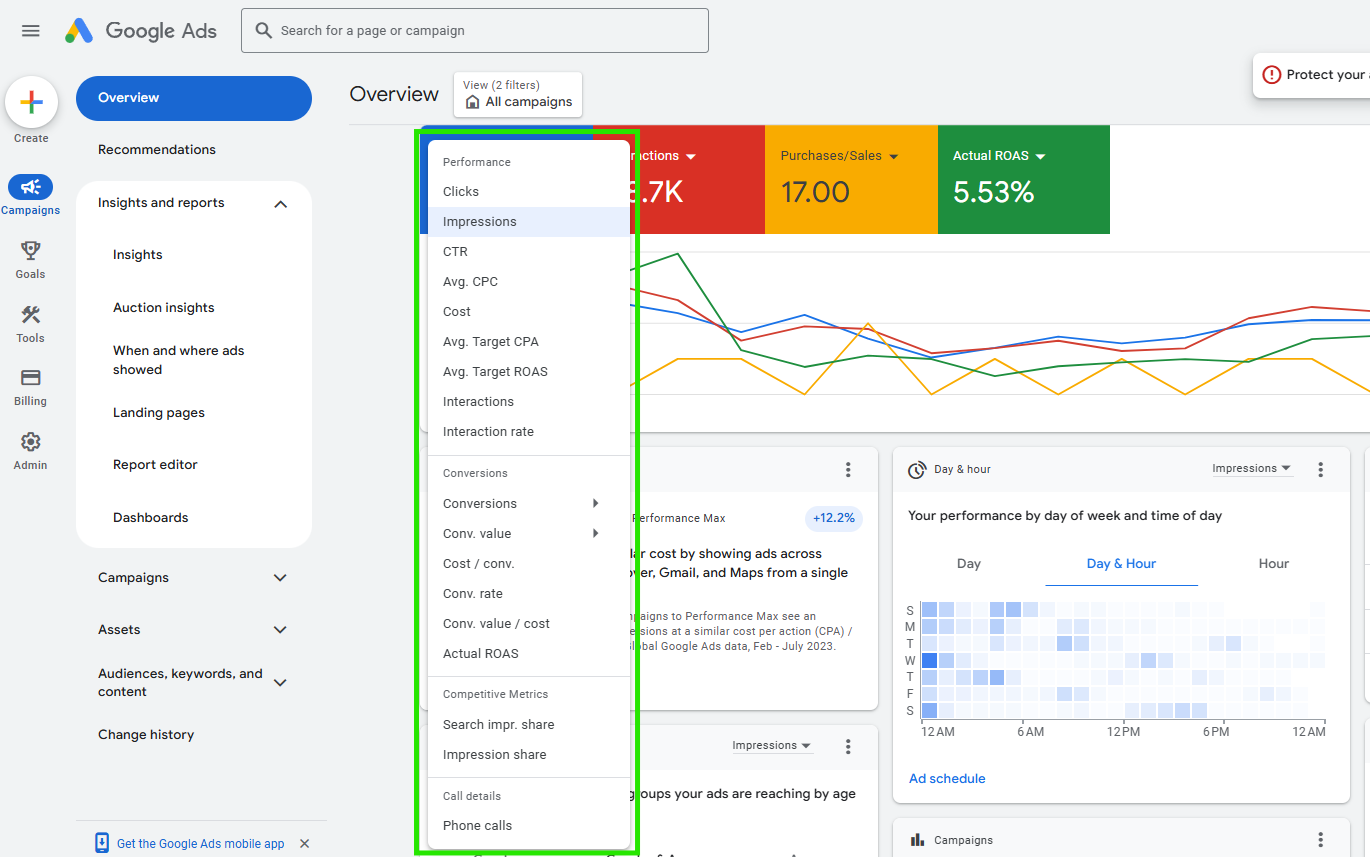
Establishing clear KPIs is vital for measuring the success of Google Ads campaigns. Common KPIs to consider include:
- Click-Through Rate (CTR): This metric indicates the percentage of users who click on an ad after seeing it. A higher CTR often suggests effective ad copy and targeting.
- Conversion Rate: This measures the percentage of users who complete a desired action, such as making a purchase or signing up for a newsletter, after clicking on the ad.
- Cost Per Acquisition (CPA): This is the total cost of acquiring a customer through ads. Lower CPA values indicate more efficient spending.
Using Conversion Tracking to Measure Effectiveness
Implementing conversion tracking is essential for understanding how ads translate into actual sales or leads. Google Ads provides tools to set up conversion tracking for various actions, such as:
- Purchases completed on an e-commerce site
- Form submissions for lead generation
- Phone calls initiated from ads
By analyzing conversion data, advertisers can identify which campaigns are performing well and which require optimization.
Calculating Customer Lifetime Value (CLV) in Relation to Ad Spend
Understanding the Customer Lifetime Value (CLV) helps businesses determine how much they can afford to spend on acquiring a customer. CLV is calculated by estimating the total revenue a customer generates over their lifetime and subtracting costs associated with acquiring and serving that customer. Knowing CLV allows businesses to align their Google Ads budget with the expected returns from each customer.
Adjusting Budget Based on Performance Metrics
Regular analysis of performance metrics enables businesses to optimize their Google Ads budget. Strategies for budget adjustment include:
- Increasing budget allocation for high-performing campaigns to maximize returns.
- Reducing spend on underperforming ads or pausing them altogether.
- Testing different bidding strategies, such as automated bidding, to improve cost efficiency.
Frequent monitoring and adjusting based on these metrics ensure that the budget aligns with the overall business goals and maximizes ROI.
Nuance / Expert Layer
Many businesses overlook the significance of attribution modeling when analyzing Google Ads effectiveness. Attribution models determine how credit for conversions is assigned to different touchpoints in the customer journey. Relying solely on last-click attribution can misrepresent the value of ads, especially in long sales cycles where multiple interactions occur. Advanced models, such as data-driven attribution, provide a more nuanced understanding of which ads contribute most significantly to conversions.
Practical Application
To effectively measure the ROI of Google Ads spending, follow these steps:
- Define your key performance indicators (KPIs) based on your campaign goals.
- Set up conversion tracking to gather data on user interactions.
- Calculate your customer lifetime value and compare it against your ad spend.
- Regularly review performance metrics and adjust your budget accordingly.
By applying these strategies, businesses can refine their approach to Google Ads and ensure their spending aligns with achieving maximum returns.
Real-World Case Studies: Successful Google Ads Budgets
This section examines real-world case studies from diverse industries that effectively allocate their Google Ads budgets. By analyzing these examples, businesses can gain insights into strategic budget management and optimize their advertising efforts.
Case Studies by Industry
- Retail Sector: A mid-sized online clothing retailer allocated $50,000 monthly to Google Ads. They focused on targeted campaigns during seasonal sales, resulting in a 30% increase in sales during peak shopping periods. Their strategy included utilizing remarketing ads to re-engage past customers.
- Technology Services: A software company spent $20,000 per month on Google Ads with a focus on lead generation. They implemented A/B testing for ad copies, achieving a 40% increase in conversion rates. Their budget was divided with 60% on search ads and 40% on display ads.
- Local Services: A plumbing business allocated $3,000 monthly to target local keywords. By focusing on high-intent search terms, they achieved a 25% increase in service calls. Their budget emphasized local SEO and geographic targeting, optimizing their ad spend effectively.
Lessons Learned from Successful Campaigns
- Data-Driven Decisions: Utilizing analytics to track performance metrics is essential for optimizing budget allocation.
- Targeted Campaigns: Focusing on specific demographics or geographic areas can yield higher returns on investment.
- Seasonal Adjustments: Modifying budgets based on seasonal trends can maximize visibility and sales during peak times.
Budget Allocation by Business Size
Businesses of varying sizes adopt different budget strategies based on their resources and objectives:
- Small Businesses: Typically allocate $1,000 to $5,000 monthly, focusing on niche markets and local targeting.
- Medium-Sized Enterprises: Generally invest $10,000 to $50,000 per month, employing a mix of search and display ads for broader reach.
- Large Corporations: Often spend upwards of $100,000 monthly, leveraging extensive data analytics to refine their campaigns and maximize ROI.
Impact of Seasonal Trends on Ad Spending
Seasonal trends significantly influence Google Ads budgets. Businesses that anticipate and prepare for seasonal fluctuations can enhance their advertising effectiveness. For instance:
- Retailers increase budgets during holidays, resulting in higher visibility and sales.
- Service-based businesses may experience spikes during summer months, necessitating increased spending for local targeting.
- Travel and hospitality sectors often ramp up budgets during peak vacation seasons to capture more traffic.
Understanding seasonal trends allows businesses to allocate their budgets dynamically, ensuring they capitalize on peak opportunities without overspending during slower periods.
Nuance and Expert Insight
A common misconception is that higher spending guarantees better results. This is not always the case. Quality of ads, targeting precision, and ongoing optimization play more critical roles in campaign success. Many businesses overlook the importance of refining their keyword strategy and ad copy. A well-targeted campaign with a moderate budget can outperform a poorly executed one with a significantly higher spend.
Practical Application
To effectively manage Google Ads budgets, businesses should:
- Conduct market research to identify peak seasons relevant to their industry.
- Implement a structured budget allocation based on past performance and future projections.
- Regularly analyze campaign metrics to adjust spending dynamically, ensuring optimal ROI.
By applying these strategies, businesses can determine how much they should spend on Google Ads and enhance their overall advertising success.
Common Pitfalls in Google Ads Budgeting and How to Avoid Them
This section identifies frequent budgeting mistakes in Google Ads and provides strategies for effective financial planning. Recognizing these pitfalls can significantly enhance campaign performance and return on investment.

Overlooking the Importance of Keyword Research
Effective budgeting in Google Ads begins with thorough keyword research. Many advertisers allocate funds based on broad estimates without assessing the competitiveness of chosen keywords. This oversight can lead to overspending on high-cost keywords that do not yield adequate returns.
To avoid this pitfall, utilize tools like Google Keyword Planner to identify not only search volume but also cost-per-click (CPC) estimates. Establish a budget that reflects the competitiveness of your key phrases, prioritizing those that offer the best potential for conversion.
Failing to Adjust Budgets Based on Seasonal Changes
Consumer behavior often fluctuates with seasons, holidays, or specific events. Failing to adapt budgets accordingly can result in wasted spending during low-demand periods or insufficient funds during peak times.
- Analyze historical data to identify seasonal trends in your industry.
- Implement budget adjustments in advance of peak seasons to maximize visibility.
- Monitor performance metrics regularly to make real-time budget shifts as necessary.
Neglecting to Analyze Competitor Spending
Understanding competitor spending can provide valuable insights into budget allocation. Advertisers often overlook the necessity of competitive analysis, leading to uninformed budget decisions.
Utilize tools such as SEMrush or SpyFu to gauge competitor strategies. Identify their top-performing keywords and associated budgets. This information can guide your own spending strategies to either compete directly or find less saturated niches.
Misjudging the Importance of Ad Quality Scores
Ad Quality Scores greatly influence both ad placement and cost. Some advertisers focus solely on budget rather than optimizing ad quality. A low-quality score can lead to higher costs per click and reduced visibility, ultimately impacting overall campaign effectiveness.
Enhancing ad relevance, improving landing page experience, and increasing expected click-through rates can elevate quality scores. Allocate resources not only for ad spend but also for continuous optimization efforts.
Many articles on Google Ads budgeting emphasize basic strategies without addressing the complexity of real-world factors. For example, while keyword research is commonly recommended, the nuances of selecting long-tail vs. short-tail keywords and their respective budgets often go unexplored. Similarly, the impact of ad quality scores on bid strategy is frequently undervalued. A comprehensive approach considers these factors to create a sustainable budget.
To implement these insights effectively, follow these steps:
- Conduct thorough keyword research and adjust your budget based on CPC estimates.
- Review historical data to identify and prepare for seasonal trends.
- Perform competitive analysis to refine your spending strategies.
- Invest in improving ad quality to enhance performance and reduce costs.
By addressing these common pitfalls, advertisers can optimize their budgets and improve the effectiveness of campaigns, ultimately answering the question of how much should you spend on Google Ads more strategically.
For How Much Should You Spend On Google Ads businesses looking to generate local leads through Google Ads or Local SEO, GMB Ranger LLC offers hands-on campaign management. Specialist Md Tangeer Mehedi personally handles campaign setup and ongoing optimization — with no payment required until the first lead comes in.
Frequently Asked Questions
What is a good budget for Google Ads?
A good budget for Google Ads varies by industry and goals, but many businesses start with $1,000 to $10,000 per month. This range allows for effective testing and optimization of campaigns.
How do I calculate my Google Ads budget?
To calculate your Google Ads budget, consider your business goals, target audience, and the average cost-per-click (CPC) in your industry. Divide your desired monthly spend by your estimated CPC to determine the number of clicks you can afford.
What factors affect Google Ads spending?
Factors affecting Google Ads spending include competition, keyword selection, ad quality, and targeting options. Seasonal trends and campaign objectives also play a significant role in determining budget needs.
Is it worth spending money on Google Ads?
Investing in Google Ads can be worthwhile if it aligns with your marketing strategy and generates a positive return on investment (ROI). Properly managed campaigns can drive targeted traffic and increase conversions.
How much should a small business spend on Google Ads?
Small businesses typically allocate between $500 and $5,000 per month for Google Ads, depending on their industry and marketing goals. Starting with a lower budget allows for experimentation and gradual scaling as results are analyzed.
What is the average cost-per-click on Google Ads?
The average cost-per-click (CPC) on Google Ads varies widely, typically ranging from $1 to $2 for search ads, but can exceed $50 for highly competitive keywords. Industry and keyword selection significantly influence CPC rates.
How often should I review my Google Ads budget?
Reviewing your Google Ads budget at least once a month is recommended to assess performance and make necessary adjustments. Frequent analysis helps optimize spending and improve campaign effectiveness.
What are common mistakes in Google Ads budgeting?
Common mistakes in Google Ads budgeting include setting unrealistic budgets, neglecting to adjust bids based on performance, and failing to track ROI. Inadequate keyword research can also lead to overspending without achieving desired results.
Final Thoughts on how much should you spend on google ads
Determining your Google Ads budget is not solely about numbers; it requires a strategic approach that aligns with your business goals and market dynamics. A well-calibrated budget, informed by data analytics and ongoing ROI assessments, can significantly enhance the effectiveness of your advertising efforts.
To optimize your Google Ads spending, conduct a thorough analysis of your past campaigns and set specific, measurable objectives that can guide your budget allocation. Use tools like Google Analytics to track performance and adjust your strategy accordingly.
Investing wisely in Google Ads can drive substantial growth and visibility, making it an essential component of any modern marketing strategy.
Leave a Reply