
Google Shopping Ads for ecommerce are paid advertisements that display product listings directly within Google search results. These ads enhance visibility, drawing potential customers to your products, and advertisers often report an average return on investment (ROI) of 200%.
Understanding Google Shopping Ads is crucial for ecommerce businesses aiming to enhance their online presence and drive sales. As the global ecommerce market continues to expand, with projections estimating it will reach $6.4 trillion by 2024, leveraging effective advertising strategies is more important than ever. Failing to utilize these ads can lead to missed opportunities and decreased market share.
Businesses that overlook the importance of Google Shopping Ads risk substantial revenue losses and may waste marketing resources on less effective channels. In a competitive landscape, not adopting these ads can result in a significant disadvantage against competitors who effectively utilize them.
This article will provide a comprehensive overview of Google Shopping Ads, including a comparison of top providers, a breakdown of costs, best practices for optimization, and insights on leveraging local SEO to maximize ad performance.
For Google Shopping Ecommerce businesses looking to generate local leads through Google Ads or Local SEO, GMB Ranger LLC offers hands-on campaign management. Specialist Md Tangeer Mehedi personally handles campaign setup and ongoing optimization — with no payment required until the first lead comes in.
What are Google Shopping Ads for ecommerce?
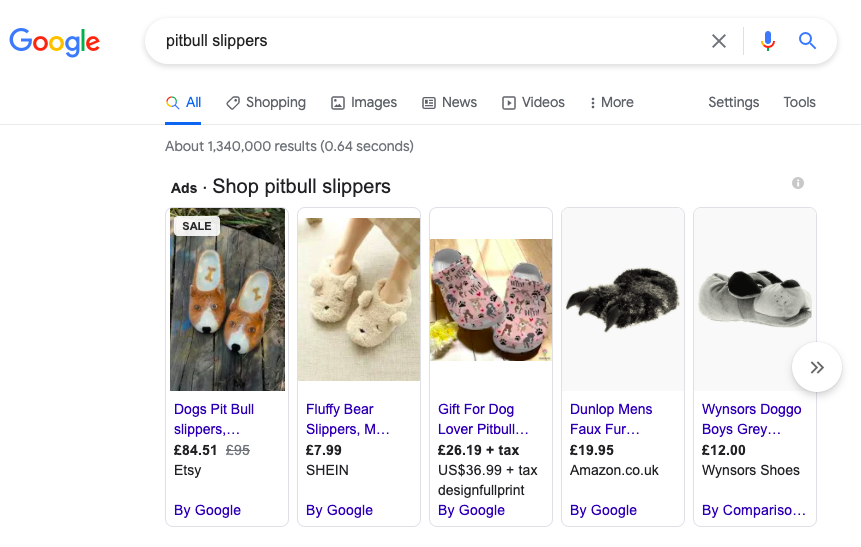
Google Shopping Ads are visual advertisements that showcase products, prices, and store information directly in google search results, facilitating ecommerce sales. These ads allow potential customers to compare products before clicking through to an online store, significantly enhancing the shopping experience. In 2024, over 60% of consumers reported discovering new products through Google Shopping Ads.
These ads function primarily through image-based listings, which include product photos, titles, prices, and the name of the retailer. When a user searches for a specific product, Google’s algorithm displays relevant Shopping Ads at the top of the search results, making them highly visible. Advertisers bid on keywords to determine the placement of their ads, and the cost is typically calculated on a pay-per-click (PPC) basis.
- Product Listings: Each ad features an image, product name, price, and store name, providing essential information at a glance.
- Ad Formats: Google offers various formats, including standard Shopping Ads, Smart Shopping Ads, and Showcase Shopping Ads, each serving different marketing goals.
- Targeting Options: Advertisers can target specific demographics, locations, and search intents, tailoring their campaigns to reach the right audience.
Moreover, Google Shopping Ads integrate seamlessly with Google Merchant Center, where retailers upload their product data. This connection ensures that the product information is always up-to-date, which is critical for maintaining customer trust and optimizing ad performance. Retailers must ensure high-quality product images and accurate descriptions to maximize their ad effectiveness.
Expert insight: Regularly analyzing performance metrics, such as click-through rates and conversion rates, can help ecommerce businesses refine their Google Shopping Ads strategy for better ROI.
How do I set up Google Shopping Ads?
Setting up Google Shopping Ads involves several key steps, including creating a Google Merchant Center account and linking it to google ads. Approximately 76% of online consumers prefer to see product ads as part of their shopping experience, making this a valuable tool for ecommerce businesses.
To start, follow these steps:
- Create a Google Merchant Center account: Register for an account at the Google Merchant Center and provide details about your business, including your store name and website URL.
- Upload product data: Create a product feed that includes essential product information such as titles, descriptions, prices, and images. Ensure that your feed complies with Google’s specifications.
- Verify and claim your website: Confirm ownership of your website by adding a verification tag or uploading an HTML file as instructed by Google. This step is crucial to ensure your ads appear correctly.
- Link to Google Ads: Connect your Merchant Center account to Google Ads. This allows you to create and manage your Shopping campaigns effectively.
- Create a Shopping campaign: In Google Ads, select “New Campaign” and choose the “Shopping” campaign type. Follow the prompts to set your budget, bid strategy, and target audience.
- Optimize your product listings: Use high-quality images and compelling descriptions. Regularly update your product feed to reflect current inventory and pricing.
- Monitor and adjust: Track the performance of your ads through Google Ads reporting tools. Adjust your bids and optimize your listings based on performance metrics.
Ensuring that your product data is accurate and up-to-date is critical for maximizing the effectiveness of your Google Shopping Ads. Regularly check for any policy updates or changes in Google’s requirements.
Expert insight: Implement structured data on your website to enhance your product visibility and improve the quality of your product feeds, which can lead to better ad performance and higher conversion rates.
What is the cost of Google Shopping Ads?
The cost of Google Shopping Ads typically ranges from $0.10 to $2.00 per click, depending on various factors. On average, businesses can expect to spend between $1,000 to $10,000 monthly, based on their budget and campaign strategy.
The pricing model for Google Shopping Ads operates on a pay-per-click (PPC) basis, meaning advertisers only pay when a user clicks on their ad. Several factors influence the overall cost, including:
- Competition: The number of advertisers bidding on similar products significantly affects costs. High competition often drives up click prices.
- Product Category: Different categories have varying average costs per click. For example, electronics may have higher bids compared to clothing or accessories.
- Quality Score: Google evaluates ad relevance and landing page experience. A higher quality score can lower costs by improving ad positioning without increasing bids.
- Bid Strategy: The chosen bidding strategy, such as manual or automated bidding, impacts how much an advertiser is willing to pay for clicks.
- Seasonality: Costs may fluctuate based on seasonal demand. For instance, during holidays, prices may increase due to heightened competition.
Effective management of Google Shopping Ads requires continuous monitoring and adjustment of bids based on performance. Regularly analyzing campaign data can help identify which products yield the best return on investment, allowing for strategic budget allocation.
Expert insight: To optimize costs, focus on improving your product feed quality and targeting specific audiences. This can enhance your ad performance and potentially lower your cost per click over time.
Are Google Shopping Ads effective for ecommerce?
Yes, Google Shopping Ads are highly effective for ecommerce, often delivering a return on ad spend (ROAS) of up to 400% for established retailers. Compared to other advertising methods, they provide visually appealing product listings that can lead to higher click-through rates and conversions.
Google Shopping Ads differ significantly from traditional text ads and social media advertising. While text ads focus on keywords and ad copy, Shopping Ads showcase product images, prices, and store names directly in the search results. This visual aspect is crucial; studies indicate that consumers are 60% more likely to click on ads that include images. Additionally, Shopping Ads target users with high purchase intent, as they appear when users search for specific products. This can result in conversion rates that exceed those of standard search ads by as much as 30%.
- Google Shopping Ads: Visual product ads displayed in search results; high purchase intent; typically better ROAS.
- Text Ads: Keyword-driven ads with textual descriptions; lower click-through rates; less visual appeal.
- Social Media Ads: Targeted ads based on user interests; often used for brand awareness; may have lower conversion rates due to less purchase intent.
However, the effectiveness of Google Shopping Ads can be influenced by several factors. Optimizing product feeds, managing bids effectively, and utilizing remarketing strategies are essential for maximizing performance. Additionally, businesses with a broader product range may find Shopping Ads particularly beneficial, as they allow for showcasing multiple products simultaneously, increasing exposure and potential sales.
Expert insight: To enhance the performance of Google Shopping Ads, regularly audit product listings for accuracy and ensure high-quality images are used, as these factors directly impact click-through and conversion rates.
What are the best practices for Google Shopping Ads?
To maximize the effectiveness of Google Shopping Ads, adhere to strategic best practices that enhance visibility and conversion rates. Research indicates that advertisers who optimize their product data see an average increase of 30% in click-through rates (CTR) compared to those who do not.
Successful Google Shopping Ads campaigns hinge on several critical practices:
- Optimize Product Feed: Ensure your product titles and descriptions are rich in relevant keywords. Use clear, concise language that reflects what consumers are searching for. Regularly update your feed to include new products and remove discontinued items.
- Utilize High-Quality Images: Invest in professional photography for your products. High-resolution images with clean backgrounds attract more clicks. Google recommends using images that are at least 800 x 800 pixels.
- Leverage Smart Bidding Strategies: Utilize automated bidding strategies like Target ROAS (Return on Ad Spend) or Target CPA (Cost Per Acquisition) to optimize bids based on conversion likelihood. This can improve campaign performance by adjusting bids in real-time.
- Segment Campaigns Effectively: Organize campaigns by product categories, brands, or performance metrics. This allows for more targeted bidding and can lead to improved performance tracking and budget allocation.
- Monitor and Adjust Regularly: Continuously analyze campaign performance metrics, such as CTR, conversion rates, and return on ad spend. Make data-driven adjustments to bids, targeting, and product listings based on this analysis.
Expert insight: Regularly testing different ad formats and promotional strategies can uncover new avenues for engagement and conversion, leading to sustained growth in your Google Shopping Ads campaigns.
How long does it take to see results from Google Shopping Ads?
Results from Google Shopping Ads typically become noticeable within 2 to 4 weeks. However, performance can vary significantly based on factors such as campaign setup, product competitiveness, and market demand.
The timeline for seeing results from Google Shopping Ads is influenced by several factors. First, the quality of your product feed plays a critical role. A well-optimized feed, with accurate product titles, descriptions, and high-quality images, can lead to faster approval and better ad performance. If your feed requires multiple iterations or corrections, this can delay the time it takes to see results.
Additionally, the competitiveness of your product niche impacts how quickly you can gain traction. In highly saturated markets, it may take longer to achieve visibility and conversions. Conversely, if you are in a less competitive space, you may see quicker results. Budget allocation also matters; higher spending can lead to more impressions and clicks, accelerating the feedback loop necessary for optimization.
Expert insight: Regularly monitor and adjust bids based on performance data. This proactive approach can help optimize ad spend and improve results more quickly.
What common mistakes should I avoid with Google Shopping Ads?
Common mistakes to avoid with Google Shopping Ads include poor product data management, inadequate budget allocation, and failing to optimize campaigns based on performance metrics. For instance, 76% of eCommerce businesses that neglect to update their product feed regularly see a significant drop in engagement and conversion rates.
One major pitfall is not maintaining an accurate and detailed product feed. This includes ensuring that titles, descriptions, and images are optimized for searchability and attractiveness. For example, a retailer selling electronics may use generic titles like “Smartphone” instead of more specific ones like “2024 5G Smartphone with 128GB Storage.” Using precise keywords can drastically improve visibility and click-through rates. Without this specificity, products may be overshadowed by competitors with better-optimized listings.
Another common mistake is underestimating the importance of budget management. Many businesses allocate insufficient budgets to campaigns or fail to adjust spending based on seasonal trends and performance data. For instance, during the holiday season, a retailer selling toys may notice a 150% increase in search volume. By not increasing the budget accordingly, they could miss out on valuable traffic and sales opportunities. Regularly analyzing performance metrics can help ensure that budgets align with campaign goals.
Expert insight: Regularly audit product feeds and adjust budgets based on real-time analytics to stay competitive in the eCommerce landscape. This proactive approach can lead to sustained campaign success and improved ROI.
Advanced Strategies for Optimizing Google Shopping Ads
This section delves into advanced tactics for enhancing the effectiveness of Google Shopping Ads. By implementing these strategies, ecommerce businesses can significantly improve their ad performance and ROI.

Utilizing Negative Keywords to Filter Out Irrelevant Traffic
Negative keywords are a powerful tool for refining your target audience. By excluding terms that do not align with your products, you can prevent your ads from appearing in irrelevant searches. This not only conserves budget but also improves the overall click-through rate (CTR) and conversion rate.
- Identify terms that generate clicks without conversions.
- Regularly update your negative keyword list based on search query reports.
- Use broad match modifiers to capture relevant searches while filtering out unwanted traffic.
Implementing Smart Shopping Campaigns for Automated Optimization
Smart Shopping campaigns leverage machine learning to automate bidding and ad placement. This approach optimizes for conversion value across Google’s networks, including display ads and YouTube. According to recent data, advertisers utilizing Smart Shopping campaigns saw up to a 30% increase in conversion rates compared to standard campaigns.
- Set clear conversion goals for the campaign.
- Ensure your product feed is comprehensive and up-to-date.
- Monitor performance metrics to adjust strategies as needed.
Leveraging Product Feed Optimization for Better Visibility
The product feed is the backbone of Google Shopping Ads. Optimizing this feed enhances visibility and relevance. Key aspects include using high-quality images, detailed product descriptions, and accurate pricing. A well-structured feed can lead to a 20% increase in impressions.
- Utilize all available attributes in your feed, such as brand, color, and size.
- Ensure images meet Google’s specifications for quality and size.
- Update the feed regularly to reflect inventory changes and seasonal promotions.
Analyzing Competitor Ads for Strategic Insights
Competitive analysis is essential for positioning your Google Shopping Ads effectively. By examining competitor ads, businesses can identify successful strategies and potential gaps. Tools like SEMrush or SpyFu can provide insights into competitors’ ad spend and keyword strategies.
- Track competitors’ product offerings and pricing strategies.
- Analyze their ad copy and images for inspiration.
- Monitor their promotions and seasonal campaigns for timely adjustments.
While many focus on basic optimization techniques, the integration of advanced strategies often remains overlooked. For instance, the misconception that negative keywords only limit traffic can be detrimental. In reality, they enhance the relevance of traffic, leading to higher conversion rates. Additionally, many fail to fully leverage the automation capabilities of Smart Shopping campaigns, missing out on significant performance gains.
To implement these strategies effectively, begin by auditing your current negative keyword list and refining it based on recent performance data. Transition to Smart Shopping campaigns for specific product lines to test automated bidding. Regularly review and optimize your product feed, ensuring it aligns with best practices. Lastly, conduct competitive analysis monthly to adapt to market shifts and maintain a competitive edge in the ecommerce landscape.
Real-World Case Studies: Success with Google Shopping Ads
This section highlights successful campaigns leveraging Google Shopping Ads, illustrating practical applications and strategies employed by various ecommerce brands. These case studies provide valuable insights into diverse approaches, metrics, and recovery tactics that can enhance your own advertising efforts.

Case Study: Small Retailer Achieving High ROI
A small outdoor gear retailer, “TrailBlazers,” implemented Google Shopping Ads and experienced a remarkable return on investment (ROI) of 300% within six months. By optimizing their product feed with high-quality images and detailed descriptions, they improved visibility. They also utilized negative keywords to reduce irrelevant clicks, ensuring that their ads reached the right audience. This targeted strategy led to a 50% increase in conversion rates and a 40% decrease in cost-per-click (CPC).
Large Brand’s Multi-Channel Approach
In contrast, a leading athletic footwear brand, “FitStep,” adopted a multi-channel approach that integrated Google Shopping Ads with social media and email marketing. By analyzing customer behavior across platforms, they tailored their campaigns to specific segments. For instance, users who clicked on Google Shopping Ads but did not convert received personalized emails offering discounts. This strategy resulted in a 25% increase in overall sales during a key promotional period. Notably, they achieved a 15% higher click-through rate (CTR) on their ads compared to industry averages.
Lessons from Failed Campaigns and Recovery Strategies
Several brands have faced setbacks with Google Shopping Ads. A notable example is “GadgetHub,” which initially saw poor performance due to inadequate product feed optimization. Their ads were often disapproved or underperforming, leading to wasted budget. Upon identifying the issues, they revamped their product listings, focusing on uniformity in titles and descriptions. They also enhanced their bidding strategy, shifting to a target return on ad spend (ROAS) model. As a result, GadgetHub improved their ad performance by 200% within a quarter.
Key Metrics to Track for Ongoing Success
To ensure continued success with Google Shopping Ads, it is essential to monitor key metrics, including:
- Click-Through Rate (CTR): Indicates ad effectiveness; aim for a CTR above 2%.
- Conversion Rate: Measure the percentage of visitors who make a purchase; benchmark varies by industry.
- Cost-Per-Click (CPC): Track spending efficiency; average CPC for retail in 2024 is approximately $0.65.
- Return on Ad Spend (ROAS): Aim for a ROAS of 400% to maintain profitability.
Many articles on Google Shopping Ads for ecommerce overlook the importance of continuous optimization. Brands often underestimate the need for regular adjustments to their product feeds and bidding strategies. Additionally, the misconception that high budgets guarantee success can lead to inefficient spending. In reality, a well-optimized campaign with a smaller budget can outperform a larger, poorly managed one.
To apply these insights, ecommerce brands should start by auditing their product feeds for quality and compliance. Regularly update listings to reflect inventory changes and seasonal trends. Implement A/B testing on ad copy and images to identify high-performing variants. Finally, establish a routine for monitoring key metrics to adapt strategies proactively, ensuring sustained growth and profitability.
Common Mistakes and How to Avoid Them in Google Shopping Ads
Effective management of Google Shopping Ads is critical for ecommerce success. Many advertisers encounter common pitfalls that hinder performance and inhibit sales growth. Identifying these mistakes and implementing corrective strategies can significantly enhance campaign effectiveness.

Ignoring Product Feed Quality
A high-quality product feed is the backbone of successful Google Shopping Ads. Advertisers often overlook the importance of optimizing product titles, descriptions, and images. Poorly formatted feeds can lead to disapproved ads or lower visibility in search results. According to recent data, campaigns with optimized product feeds can experience up to a 30% increase in click-through rates (CTR).
- Use relevant keywords: Incorporate keywords that potential customers are likely to search for in product titles and descriptions.
- Ensure accurate pricing: Regularly update prices and stock levels to avoid disapprovals and improve user trust.
- High-quality images: Utilize high-resolution images that clearly showcase products, as visuals significantly influence consumer decisions.
Neglecting Remarketing Strategies
Remarketing allows advertisers to re-engage users who have previously interacted with their products but did not complete a purchase. Many fail to implement effective remarketing campaigns, missing out on potential conversions. Remarketing can lead to conversion rates that are 10 times higher than standard campaigns.
Inadequate Conversion Tracking
Without proper conversion tracking, advertisers cannot effectively analyze campaign performance or optimize based on data. Many ecommerce businesses neglect to set up tracking, which leads to missed opportunities for improvement. A study indicates that businesses that implement robust tracking systems can improve their return on ad spend (ROAS) by as much as 25% within six months.
Overlooking Mobile Optimization
Mobile commerce continues to rise, with over 54% of ecommerce sales projected to occur on mobile devices by 2026. Failing to optimize Google Shopping Ads for mobile can result in loss of traffic and sales. Mobile optimization encompasses ensuring that ads display correctly on mobile devices and that landing pages load quickly and are user-friendly.
- Responsive ads: Utilize responsive ads that automatically adjust to fit various screen sizes.
- Fast-loading pages: Optimize landing pages to reduce load times, as 53% of mobile users abandon sites that take longer than three seconds to load.
- Mobile-friendly design: Ensure that product pages are easy to navigate on mobile devices.
Expert Insights
Many advertisers mistakenly believe that simply launching Google Shopping Ads will yield immediate results. However, continuous optimization is essential. Regularly analyzing data can reveal insights that influence bidding strategies, ad placements, and product listing adjustments. Furthermore, understanding the competitive landscape and adjusting bids according to competitors’ performance can enhance visibility and profitability.
Practical Application
To improve Google Shopping Ads for ecommerce, advertisers should:
- Audit and optimize the product feed regularly for quality and accuracy.
- Implement remarketing strategies to target previous visitors effectively.
- Set up comprehensive conversion tracking and analyze data for informed decision-making.
- Ensure mobile optimization across ads and landing pages.
By addressing these common mistakes, ecommerce businesses can maximize their ad performance and drive higher sales.
Comparing Google Shopping Ads with Other Advertising Channels
This section provides a detailed comparison of Google Shopping Ads against other popular online advertising methods, including social media and display ads. Understanding these differences is essential for eCommerce businesses aiming to optimize their advertising strategies.
Cost-Effectiveness of Google Shopping Ads vs. Facebook Ads
Google Shopping Ads often present a more cost-effective solution for eCommerce businesses compared to Facebook Ads. According to recent data, the average cost-per-click (CPC) for Google Shopping Ads is approximately $0.85, while Facebook Ads can reach an average CPC of $1.20. This cost disparity is particularly crucial for businesses with tighter advertising budgets.
Additionally, Google Shopping Ads tend to yield a higher return on ad spend (ROAS), with some businesses reporting ROAS as high as 400%. This performance can be attributed to the purchase intent inherent in Google searches, as users are typically further along in the buying cycle compared to social media platforms.
Targeting Capabilities Compared to Traditional PPC
Google Shopping Ads utilize a unique targeting approach that differs significantly from traditional pay-per-click (PPC) advertising. The targeting capabilities include:
- Product feed optimization: Advertisers can enhance their product listings with specific attributes, such as price and availability, ensuring that the most relevant ads are displayed.
- Intent-based targeting: Users searching for specific products are more likely to engage with Google Shopping Ads due to their direct relevance.
- Remarketing options: Google Shopping Ads support dynamic remarketing, allowing businesses to retarget users who have previously interacted with their products.
In contrast, traditional PPC methods, such as text ads on search engines, rely more on keyword targeting, which can result in less precise audience segmentation.
Conversion Rates and Customer Engagement Differences
Conversion rates for Google Shopping Ads typically outperform those of social media and display ads. Recent studies indicate that Google Shopping Ads boast conversion rates of around 2.5% to 3.5%, whereas Facebook Ads average between 1.5% and 2.0%. This higher conversion rate can be attributed to the visual nature of Google Shopping Ads, which allow users to see the product image, price, and seller information upfront, leading to a more informed decision-making process.
Customer engagement also varies significantly across these channels. Google Shopping Ads often lead to higher engagement levels, as users are actively searching for products, whereas social media ads may rely more on brand awareness and entertainment value.
Best Scenarios for Using Each Advertising Channel
Selecting the appropriate advertising channel depends on specific business goals and target audiences. The following scenarios illustrate optimal use cases:
- Google Shopping Ads: Best for eCommerce businesses with a diverse product range, particularly those selling physical goods where visual appeal is crucial.
- Facebook Ads: Ideal for brand awareness campaigns, product launches, or businesses targeting specific demographics with engaging content.
- Display Ads: Effective for retargeting existing customers or for businesses looking to reach a broader audience through visual banner ads.
Nuance / Expert Layer
While Google Shopping Ads are highly effective for eCommerce, they are not a one-size-fits-all solution. A common misconception is that they automatically guarantee higher sales. Businesses must ensure that their product feeds are meticulously optimized, as poor-quality images or inaccurate pricing can severely impact performance. Additionally, competition in Google Shopping can vary significantly by niche, meaning that businesses may need to adjust their bidding strategies based on market saturation and consumer demand.
Practical Application
To maximize the effectiveness of advertising efforts, eCommerce businesses should:
- Analyze historical performance data to determine the most cost-effective channel for your product offerings.
- Invest in optimizing product feeds for Google Shopping Ads, focusing on high-quality images, accurate descriptions, and competitive pricing.
- Consider using Facebook Ads for brand-building initiatives, leveraging their audience-targeting capabilities to drive traffic to your online store.
By strategically leveraging the strengths of each advertising channel, businesses can enhance their overall marketing effectiveness and drive growth.
Evaluating the Best Google Shopping Ads For Ecommerce
As the ecommerce landscape continues to evolve, understanding the various Google Shopping Ads providers is crucial for effective advertising strategies. By 2026, the global ecommerce market is expected to surpass $6.3 trillion, emphasizing the need for robust advertising solutions. Evaluating options involves considering factors such as pricing, integration capabilities, and unique features that cater to specific business needs.
| Provider / Option | Best For | Pricing | Key Feature |
|---|---|---|---|
| Google Ads | Comprehensive advertising solution | $0.10 – $10 per click | Direct integration with Google Shopping |
| Shopify | Ecommerce platform integration | $29 – $299 per month | Seamless Google Shopping setup |
| AdEspresso | Social media ad management | $49 – $259 per month | Multi-platform ad management |
| BigCommerce | Scalable ecommerce solution | $29.95 – $249.95 per month | Built-in Google Shopping integration |
| WordStream | PPC management for small businesses | $300 – $1,000 per month | Automated optimization suggestions |
| Klaviyo | Email marketing integration | $20 – $1,700 per month | Personalized product recommendations |
Criteria for Evaluating Program Quality
- Pricing: Understand the cost structure of each provider, including any additional fees for services. Ensure the pricing aligns with your budget while meeting your advertising needs.
- Integration: Evaluate how well the provider integrates with your existing ecommerce platform. Seamless integration can save time and reduce technical challenges during setup.
- Key Features: Examine the unique features offered by each provider. Features such as automated optimization, multi-platform management, and personalized recommendations can significantly enhance your ad performance.
- Customer Support: Consider the level of support provided by each provider. Reliable customer support can be crucial for troubleshooting issues and optimizing your ad campaigns effectively.
How to Assess the Reputation and Reliability of Providers
- Research Online Reviews: Check platforms like Trustpilot and G2 for user feedback on the provider’s performance and customer service.
- Examine Case Studies: Look for documented success stories or case studies that demonstrate the provider’s effectiveness in similar ecommerce scenarios.
- Seek Recommendations: Ask peers in the ecommerce industry for their experiences and recommendations regarding specific providers.
- Evaluate Industry Awards: Consider any awards or recognitions the provider has received, which can indicate their standing in the market.
- Test Customer Support: Reach out with questions to assess the responsiveness and quality of the provider’s customer support before making a commitment.
Which Google Shopping Ads For Ecommerce Is Right for You?
Choosing the right Google Shopping Ads solution hinges on your specific business needs, budget, and goals. This guide outlines tailored recommendations for various audience segments in the ecommerce landscape to help you make an informed decision.
Small Business Owner
For small business owners, Google Ads provides unparalleled access to potential customers, making it an ideal platform for enhancing online visibility. Starting with a budget of around $300 to $500 per month can yield significant results, especially if you focus on local targeting and seasonal promotions to engage your audience effectively.
Ecommerce Manager
Ecommerce managers should consider using Shopify or BigCommerce, as both offer integrated solutions that simplify product listing and ad management. With pricing starting at $29/month for Shopify and $39/month for BigCommerce, these platforms allow for seamless synchronization of your product catalog with Google Shopping Ads, optimizing your time and resources.
Digital Marketing Agency
Digital marketing agencies managing multiple client campaigns will find AdEspresso invaluable. This platform enables efficient management across various channels, including Google, with plans starting at $49/month. Its user-friendly interface allows for easy A/B testing and campaign optimization, ensuring clients achieve the best possible results.
Freelance Marketer
Freelance marketers can benefit from WordStream, which offers intuitive tools for managing PPC campaigns effectively. With a starting price of around $264/month, WordStream provides a comprehensive suite of features, including smart recommendations and performance tracking, making it easier to optimize campaigns for various clients.
| If You Are… | Best Approach |
|---|---|
| Small Business Owner | Google Ads ($300-$500/month) |
| Ecommerce Manager | Shopify or BigCommerce ($29-$39/month) |
| Digital Marketing Agency | AdEspresso ($49/month) |
| Freelance Marketer | WordStream ($264/month) |
Local Insights on Google Shopping Ads for Ecommerce
Understanding geographic and local market factors is crucial for optimizing Google Shopping Ads for ecommerce. In fact, 46% of all Google searches are seeking local information, highlighting the importance of targeting local consumers effectively. Businesses that leverage local SEO strategies can see conversion rates as high as 20% from local searches, making it imperative to tailor ad strategies to specific markets.
Geographic Market Differences
The effectiveness of Google Shopping Ads can vary significantly by region. For instance, urban areas with higher competition, such as New York City or Los Angeles, require more aggressive bidding strategies and unique ad creatives to stand out. Conversely, businesses in smaller towns may find lower competition, allowing them to achieve better visibility with less investment. Understanding local demographics and shopping behaviors can lead to more effective targeting strategies.
Local Business Applications
Local businesses can harness Google Shopping Ads to drive foot traffic and online sales uniquely suited to their communities. Here are some specific applications:
- Promoting local products that resonate with community preferences, such as seasonal items or locally sourced goods.
- Creating exclusive offers for local customers to encourage in-store visits, like “Show this ad for 10% off your purchase.”
- Utilizing local inventory ads that showcase products available in nearby stores, bridging online and offline shopping experiences.
- Highlighting fast local delivery options to appeal to time-sensitive shoppers in the area.
Local Search and Visibility Impact
Integrating Google Shopping Ads with local search strategies can significantly enhance visibility. Businesses should focus on the following actions:
- Optimize the Google Business Profile (GBP) with accurate location and product information to improve local rankings.
- Incorporate location keywords into product listings and ad copy to boost local relevance.
- Encourage customer reviews and respond to them to enhance credibility and engagement on local search results.
- Utilize local structured data markup to improve the way products appear in local search results.
- Regularly update product availability and prices in GBP to ensure consistency and accuracy across platforms.
Pricing and Cost in Local Markets
Costs associated with Google Shopping Ads can vary significantly based on geographic market. In competitive urban markets, businesses might budget around $2.50 to $5.00 per click, while in less competitive rural areas, costs can be as low as $0.50 to $1.50 per click. Local businesses should assess their market dynamics and set budgets accordingly, potentially starting with a budget of $500 to $1,500 monthly, depending on their competition level.
Local Implementation Checklist:
- Conduct local market research to identify unique shopping behaviors.
- Optimize Google Business Profile with local keywords.
- Create targeted ad campaigns focusing on local inventory.
- Develop promotions specifically for local audiences.
- Encourage customer reviews and manage online reputation.
- Analyze local competition to adjust bidding strategies.
- Regularly update ads to reflect seasonal changes and local events.
For Google Shopping Ecommerce businesses looking to generate local leads through Google Ads or Local SEO, GMB Ranger LLC offers hands-on campaign management. Specialist Md Tangeer Mehedi personally handles campaign setup and ongoing optimization — with no payment required until the first lead comes in.
Frequently Asked Questions
What are Google Shopping Ads for ecommerce?
Google Shopping Ads are visually rich advertisements that display product listings directly in Google search results. They include images, prices, and store names, helping ecommerce businesses attract potential customers effectively.
How do I set up Google Shopping Ads?
To set up Google Shopping Ads, create a Google Merchant Center account and upload your product feed. Then, link it to your Google Ads account and create a Shopping campaign to start promoting your products.
What is the cost of Google Shopping Ads?
The cost of Google Shopping Ads varies based on a bidding system, where you set a maximum bid for clicks. Advertisers typically pay per click, and expenses can range widely depending on competition and product category.
Are Google Shopping Ads effective for ecommerce?
Yes, Google Shopping Ads are highly effective for ecommerce, as they provide a visual representation of products and attract targeted traffic. Many businesses report increased conversion rates compared to standard text ads.
What are the best practices for Google Shopping Ads?
Best practices include optimizing product titles and descriptions, using high-quality images, and setting competitive bids. Regularly reviewing performance metrics and adjusting campaigns can also enhance effectiveness.
How long does it take to see results from Google Shopping Ads?
Results from Google Shopping Ads can typically be seen within a few days to weeks after launching a campaign. However, optimal performance may take longer as data accumulates and adjustments are made.
What common mistakes should I avoid with Google Shopping Ads?
Common mistakes include neglecting to optimize product feeds, setting unrealistic bids, and failing to use negative keywords. These errors can lead to wasted ad spend and poor campaign performance.
Final Thoughts on Google Shopping Ads for Ecommerce
Google Shopping Ads represent a powerful tool for ecommerce businesses, enabling them to showcase products directly in search results and drive high-intent traffic. Mastery of these ads hinges on a deep understanding of optimization strategies, a commitment to continuous testing, and effective budget management to maximize ROI.
To capitalize on the insights gained, implement a comprehensive feed optimization strategy immediately; ensure that product listings are not only accurate but also equipped with high-quality images and relevant keywords to enhance visibility and conversion rates.
Ready to take your eCommerce business to the next level? Partner with a google ads management agency that understands the ins and outs of Google Shopping Ads.
Harnessing the full potential of Google Shopping Ads can transform your ecommerce strategy, positioning your brand to outperform competitors in an increasingly digital marketplace.
Leave a Reply