
Google Ads Grants for nonprofits provide eligible organizations with up to $10,000 per month in free advertising credits. This program enables nonprofits to effectively reach their target audience and enhance awareness of their mission, significantly increasing their online visibility and engagement.
Understanding Google Ads Grants for nonprofits is crucial for organizations seeking to maximize their outreach and impact. With over 1.5 million nonprofits in the U.S. alone, leveraging this program can be a game-changer for those aiming to connect with supporters and drive donations. Misunderstanding the eligibility requirements or application process could result in missed opportunities to amplify their cause.
Failing to grasp the nuances of Google Ads Grants can lead to wasted advertising budgets, ineffective outreach strategies, and a competitive disadvantage in a crowded nonprofit sector. Organizations that do not optimize their use of these grants may struggle to attract essential support and funding.
This article will cover the fundamentals of Google Ads Grants, including eligibility criteria, application steps, best practices for maximizing the benefits, and tips for integrating local SEO strategies to further enhance outreach efforts.
For Google Ads Grants For Nonprofits businesses looking to generate local leads through Google Ads or Local SEO, GMB Ranger LLC offers hands-on campaign management. Specialist Md Tangeer Mehedi personally handles campaign setup and ongoing optimization — with no payment required until the first lead comes in.
What are Google Ads Grants for nonprofits?
Google Ads Grants for nonprofits is a program that provides eligible nonprofit organizations with free advertising credits to promote their missions and initiatives on Google. Specifically, nonprofits can receive up to $10,000 per month in ad credits, allowing them to reach a broader audience and increase visibility for their causes.
The program aims to empower nonprofits by facilitating access to online marketing tools that they may not otherwise afford. With the increasing importance of digital presence, these grants enable organizations to drive traffic to their websites, engage with potential supporters, and ultimately enhance their fundraising efforts. Participation in the program can significantly boost an organization’s outreach and impact.
- Eligibility Criteria: Nonprofits must be registered as a 501(c)(3) organization in the United States or a similar designation in other countries, and they must adhere to Google’s policies.
- Ad Management: While the grants provide funding, nonprofits are responsible for creating and managing their ad campaigns, requiring a basic understanding of Google Ads.
- Performance Requirements: Nonprofits must maintain a minimum click-through rate (CTR) of 5% and comply with Google’s guidelines to retain their grant status.
Utilizing Google Ads Grants effectively can lead to increased website traffic, greater community engagement, and enhanced fundraising opportunities. However, nonprofits must invest time and resources into learning the platform to maximize the benefits of the grant. The competitive nature of online advertising necessitates a well-planned strategy to ensure that ads reach the intended audience.
Expert insight: Nonprofits should regularly analyze ad performance data and adjust their strategies accordingly, leveraging A/B testing to optimize ad effectiveness and ensure sustained engagement with their target audience.
How do I apply for Google Ads Grants?
To apply for Google Ads Grants, a nonprofit organization must complete a multi-step application process that includes verifying eligibility, creating a Google Ads account, and submitting a request for the grant. This program provides eligible nonprofits with up to $10,000 per month in free advertising credits.
Begin by ensuring your organization meets the eligibility criteria. Only registered 501(c)(3) nonprofit organizations in the U.S. or equivalent entities in other countries are eligible. Additionally, organizations must not be governmental entities, hospitals, or schools, and they must have a functioning website that complies with Google’s policies.
- Register with TechSoup: Start by registering your nonprofit with TechSoup, which verifies nonprofit status. This verification is necessary to receive a validation token required for the Google application.
- Create a Google for Nonprofits account: Visit the Google for Nonprofits website to sign up. Use the TechSoup validation token received during registration to verify your organization.
- Set up a Google Ads account: After your Google for Nonprofits account is approved, create a Google Ads account. Ensure that you select the option for Google Ads Grants during the setup process.
- Complete the application: Fill out the application form for Google Ads Grants within Google Ads. Include details about your nonprofit’s mission, programs, and how you plan to use the advertising credits effectively.
- Adhere to policies: Familiarize yourself with Google’s advertising policies and guidelines. Failure to comply can result in disqualification from the program.
- Monitor your application: After submission, monitor your email for any updates or requests for further information from Google. Be prepared to provide additional documentation if required.
Expert insight: Regularly review Google Ads performance metrics after receiving the grant to optimize campaign effectiveness. Utilizing A/B testing and adjusting keywords can significantly enhance outreach and impact.
What are the benefits of using Google Ads Grants?
Google Ads Grants provide nonprofits with up to $10,000 per month in free advertising on the Google platform, significantly increasing their visibility and outreach. This funding allows organizations to attract new donors, volunteers, and beneficiaries, ultimately enhancing their mission-driven activities.
One notable example is the American Red Cross. After leveraging Google Ads Grants, they reported a 300% increase in website traffic and a 50% increase in online donations within just six months. This surge in engagement can be attributed to targeted ad campaigns that reached individuals searching for disaster relief information, thus aligning their services with community needs effectively. Furthermore, the ability to adjust campaigns based on real-time data allows organizations to optimize their messaging and outreach strategies continually.
Another benefit is the opportunity for nonprofits to raise awareness about specific issues or events. For instance, a local animal shelter utilized Google Ads Grants to promote an adoption event. By targeting specific keywords like “pet adoption near me,” they attracted a record number of visitors to the event, leading to the successful adoption of over 50 animals. The ability to tailor ads to local audiences ensures that nonprofits can connect with potential supporters in their communities directly.
Expert insight: Nonprofits should continually test different ad formats and keywords to maximize their Google Ads Grants potential. Regularly analyzing performance data can reveal insights that drive even greater engagement and support.
How does Google Ads Grants compare to Facebook Ads?
Google Ads Grants provide nonprofits with up to $10,000 per month in free advertising on Google, while Facebook Ads operate on a pay-per-click or pay-per-impression model. The primary differences lie in targeting capabilities, cost structures, and overall effectiveness in reaching specific audiences.
In terms of targeting, Google Ads Grants excel in keyword-based search advertising. Nonprofits can target users actively searching for relevant terms, which often leads to higher intent and engagement. Facebook Ads, on the other hand, leverage demographic, geographic, and behavioral targeting. This allows organizations to reach specific groups based on interests and online behavior, which can be beneficial for building brand awareness and engagement rather than immediate action.
Cost structure significantly differs between the two platforms. Google Ads Grants provide a fixed monthly budget, with no additional costs for impressions or clicks, making it a low-risk option for nonprofits. Facebook Ads require a budget allocation that can vary widely based on competition and ad optimization strategies, often making it more expensive, especially in competitive sectors. A 2024 study indicated that nonprofits typically spend an average of $1,000 to $2,000 monthly on Facebook Ads to achieve similar reach as $10,000 in Google Ads Grants.
- Targeting: Google Ads Grants focus on keyword searches; Facebook Ads utilize demographic and behavioral targeting.
- Cost: Google Ads Grants offer $10,000 monthly at no cost; Facebook Ads incur varying costs based on competition.
- Effectiveness: Google Ads Grants often yield higher conversion rates due to intent-driven searches; Facebook Ads are effective for audience engagement and brand awareness.
Expert insight: Nonprofits should assess their campaign goals when choosing between Google Ads Grants and Facebook Ads. A hybrid approach may yield the best results, combining the intent-driven nature of Google with the engagement potential of Facebook.
What are common mistakes to avoid with Google Ads Grants?
Nonprofits often make several common mistakes when using Google Ads Grants, which can hinder their advertising effectiveness. These pitfalls include not optimizing campaigns, underutilizing available features, and failing to adhere to Google’s guidelines. Approximately 75% of nonprofits report challenges in achieving optimal performance with their Google Ads Grants.
One major mistake is not regularly monitoring and optimizing campaigns. Nonprofits should review their performance metrics, such as click-through rates (CTR) and conversion rates, at least once a month. This helps in identifying underperforming keywords or ads that need adjustments. Additionally, failing to use all available ad formats, such as responsive search ads, can limit reach and engagement. Utilizing various formats can increase visibility and improve overall campaign performance.
- Neglecting Keyword Research: Proper keyword research is essential. Nonprofits should focus on relevant, specific keywords that align with their mission. Using tools like Google Keyword Planner can help identify the most effective keywords for your campaigns.
- Ignoring Ad Extensions: Ad extensions enhance ads by providing additional information, such as location or phone numbers. Not using these can result in lower engagement. Implementing sitelink and callout extensions can significantly improve the visibility of ads.
- Failing to Adhere to Google Policies: Google has strict policies regarding ad content and account management. Nonprofits must ensure compliance to avoid account suspension. Regularly reviewing Google’s guidelines can help maintain adherence.
Expert insight: Focus on creating a structured account with tightly themed ad groups. This not only improves Quality Score but also enhances the relevance of ads to the targeted keywords, ultimately leading to better performance and lower costs.
How much time does it take to see results from Google Ads Grants?
Nonprofits can typically expect to see initial results from Google Ads Grants within 1 to 3 months after launching their campaigns. However, achieving significant outcomes may take up to 6 months or longer, depending on various factors.
Several elements influence the timeline for seeing results. First, the effectiveness of the campaign’s setup plays a crucial role. Nonprofits that invest time in keyword research, ad copy optimization, and audience targeting are more likely to see quicker results. Effective campaigns often lead to improved Quality Scores, which can enhance ad visibility and click-through rates (CTR).
Another key factor is the competitiveness of the chosen keywords. Nonprofits targeting highly competitive terms may face challenges in gaining visibility, resulting in longer wait times for measurable results. Additionally, the nature of the nonprofit’s mission can impact engagement. Organizations addressing urgent social issues may attract more immediate interest compared to those in less urgent sectors. Consistent monitoring and adjustments to the campaigns are essential, as these actions can expedite the timeline for achieving desired results.
Expert insight: Regularly analyzing performance metrics and making data-driven adjustments can significantly enhance the effectiveness of campaigns, leading to faster results. Nonprofits should also consider seasonal trends that might affect their visibility and engagement rates.
Maximizing Your Google Ads Grant: Best Practices
This section provides actionable strategies to help nonprofits fully leverage their Google Ads Grants. By implementing these best practices, organizations can enhance their visibility and drive meaningful engagement.
Setting Up Effective Campaigns
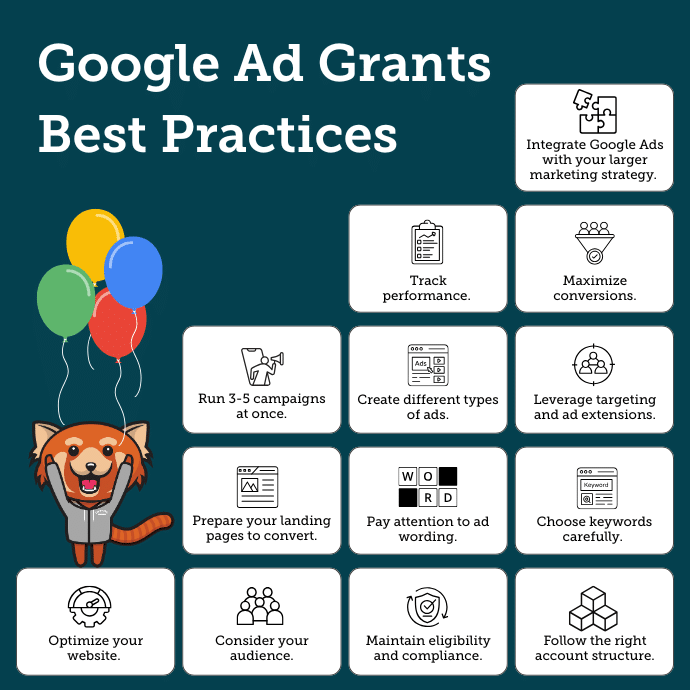
Establishing well-structured campaigns is foundational for success with Google Ads Grants. Begin by defining clear objectives that align with your nonprofit’s mission. Use a campaign structure that segments different programs or initiatives, allowing for tailored messaging and budget allocation. Aim to create at least three distinct campaigns, each with specific goals, such as raising awareness, driving donations, or promoting events.
Utilizing Keyword Research Tools
Keyword research is essential to identify the terms potential supporters use when searching for your services. Tools such as Google Keyword Planner, SEMrush, and Ubersuggest can provide insights into relevant keywords. Focus on long-tail keywords, which often have lower competition and higher conversion rates. For example, instead of targeting “animal shelter,” consider “local animal shelter donations.” This approach can increase your ad relevance and improve click-through rates (CTR).
Optimizing Ad Copy and Landing Pages
Ad copy should be concise and compelling, clearly communicating your nonprofit’s mission and call to action. Use active language and emotional triggers to resonate with your audience. For instance, instead of saying, “We help homeless pets,” try “Save a homeless pet today!” Additionally, ensure that landing pages are optimized for user experience. They should load quickly, be mobile-friendly, and contain relevant information that matches the ad’s promise. According to a 2024 study, optimized landing pages can improve conversion rates by up to 25%.
Monitoring and Adjusting Campaigns Regularly
Regular monitoring is critical for optimizing ad performance. Use Google Ads’ reporting tools to track key performance indicators (KPIs) such as CTR, conversion rate, and cost per conversion. Set aside time at least once a month to review campaign data and make adjustments as needed. If a particular ad group underperforms, consider revising the keywords, adjusting the budget, or refreshing the ad copy. Research indicates that nonprofits that actively optimize their campaigns can see up to a 40% increase in overall engagement.
Beyond basic monitoring, consider employing A/B testing for different ad variations. This process involves creating two versions of an ad to determine which performs better, allowing for data-driven decisions that enhance overall effectiveness.
Common misconceptions about Google Ads Grants for nonprofits include the belief that a large budget guarantees success. In reality, effective targeting and compelling messaging are far more critical than budget size. Nonprofits often overlook the importance of quality scores, which impact ad placement and cost-per-click. High-quality ads yield better placements even with limited budgets.
To maximize the effectiveness of Google Ads Grants, nonprofits should:
- Define specific campaign objectives.
- Utilize keyword research tools to identify relevant terms.
- Craft compelling ad copy and optimize landing pages.
- Conduct regular performance reviews and make data-driven adjustments.
- Implement A/B testing to refine ad strategies.
By following these best practices, nonprofits can harness the full potential of their Google Ads Grants, driving awareness and engagement to support their missions effectively.
Navigating Common Challenges with Google Ads Grants
This section addresses the common challenges nonprofits face when utilizing Google Ads Grants, offering solutions to enhance advertising effectiveness and compliance.
Understanding Policy Compliance
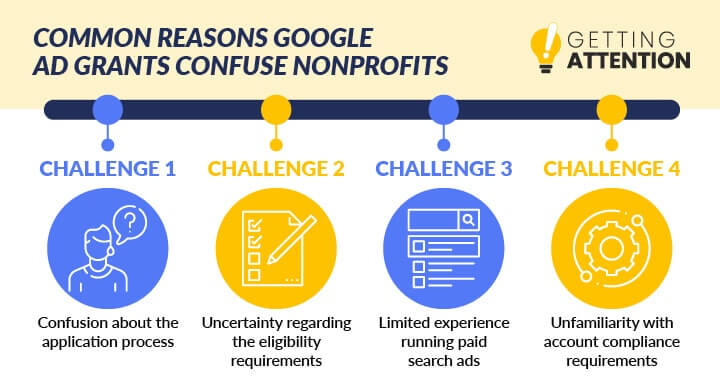
Compliance with Google Ads policies is essential for maintaining access to Google Ads Grants. Nonprofits must adhere to specific guidelines, including restrictions on ad content, targeting, and campaign structure. Failure to comply can lead to account suspension. Regularly reviewing the Google Ads policies and ensuring that all campaigns align with these rules is critical.
Dealing with Account Suspension
Account suspension often results from policy violations or inactivity. If a Google Ads Grants account is suspended, the first step is to identify the reason cited by Google. Common causes include:
- Non-compliance with advertising policies
- Failure to maintain a minimum click-through rate (CTR) of 5%
- Inactivity for more than 90 days
Addressing these issues requires an appeal process. Nonprofits should rectify the identified problems and submit a detailed appeal to Google, explaining the corrective measures taken.
Managing Budget Constraints Effectively
Google Ads Grants provide a monthly budget of $10,000. However, effective management is crucial to maximize this allocation. Nonprofits should consider the following strategies:
- Prioritize high-impact campaigns that align with organizational goals.
- Utilize keyword research tools to identify cost-effective keywords.
- Regularly review and adjust bids to optimize spend within the grant limits.
In 2024, organizations that strategically allocate their budgets have seen a 25% increase in conversions compared to those with less structured approaches.
Leveraging Analytics for Improvement
Analytics play a vital role in refining advertising strategies. Nonprofits should utilize Google Analytics and Google Ads reporting tools to track campaign performance. Key metrics to monitor include:
- Click-through rate (CTR)
- Conversion rate
- Cost per conversion
By analyzing this data, nonprofits can make informed decisions to enhance ad effectiveness. For instance, a focus on improving CTR can lead to a higher Quality Score, subsequently lowering costs.
Many organizations overlook the importance of A/B testing different ad copies and landing pages. Implementing systematic A/B tests can reveal insights into which messages resonate best with target audiences, resulting in improved engagement and conversion rates.
Nuance / Expert Layer
Many nonprofits mistakenly believe that simply running ads will yield results. Success with Google Ads Grants requires continuous optimization and an understanding of the competitive landscape. For instance, competition in particular sectors, such as healthcare and education, can significantly affect ad performance. Nonprofits should also be aware that Google evaluates the relevance and quality of ads, so a focus on audience targeting and ad relevance is essential to avoid falling into the trap of low-performing ads.
Practical Application
To effectively navigate challenges with Google Ads Grants, nonprofits should:
- Regularly review Google Ads policies to ensure compliance.
- Develop a structured plan for budget management, prioritizing key campaigns.
- Utilize analytics to track performance and make data-driven adjustments.
- Engage in A/B testing to refine messaging and improve engagement.
Implementing these strategies will enhance the effectiveness of google ads grants for nonprofits, driving greater visibility and impact.
Integrating Google Ads with Local SEO Strategies
Effective integration of Google Ads with local SEO strategies significantly enhances a nonprofit’s visibility within its community. By leveraging both tools, organizations can connect with local audiences, drive engagement, and maximize their outreach efforts.

Importance of Local Keywords
Local keywords are essential for targeting audiences in specific geographic areas. These keywords often include the name of the city, neighborhood, or region combined with the services offered by the nonprofit. For example, a nonprofit focused on environmental conservation might use keywords like “clean-up events in [City]” or “wildlife protection [Neighborhood].” Incorporating local keywords into both website content and Google Ads campaigns can increase search relevance, leading to higher click-through rates and improved ad performance.
Creating Location-Specific Ads
Location-specific ads allow nonprofits to tailor their messaging to resonate with local audiences. By utilizing Google Ads features such as location targeting, organizations can ensure their ads are seen by users searching within specific geographic parameters. This means creating ad copy that references local events, partnerships, or volunteer opportunities. Utilizing phrases like “join us this Saturday in [City]” or “support local families in [Neighborhood]” can create a stronger connection with the target audience. Data from 2024 indicates that location-based ads can boost engagement rates by up to 25% when compared to generic campaigns.
Engaging with the Local Community Through Ads
Engagement with the local community is paramount for nonprofits. Google Ads can facilitate this by promoting community events, fundraisers, or volunteer opportunities directly to local residents. By using ad extensions, nonprofits can provide additional information such as addresses, phone numbers, and links to event sign-up pages. This direct approach not only drives traffic but also fosters community involvement and support.
Tracking Local Campaign Performance
Monitoring the performance of local campaigns is essential for optimizing advertising strategies. Nonprofits should utilize Google Ads’ built-in analytics tools to track key performance indicators (KPIs) such as click-through rates, conversion rates, and geographic performance data. By analyzing these metrics, organizations can identify which local keywords and ad formats yield the best results, allowing them to refine their approach continuously.
According to a 2025 study, organizations that effectively integrated local SEO strategies with Google Ads experienced a 40% increase in overall visibility in local search results compared to those that did not.
Common misconceptions regarding local SEO and Google Ads integration often overlook the importance of consistent messaging. Many nonprofits assume that simply running ads in their location will suffice. However, without a cohesive strategy that aligns ad content with local SEO efforts, the potential impact may be drastically reduced. Additionally, focusing solely on large-scale campaigns can lead to missed opportunities in niche markets that local keywords can effectively capture.
To effectively integrate Google Ads with local SEO, nonprofits should take the following actionable steps:
- Conduct keyword research to identify relevant local terms and phrases.
- Create and optimize Google Ads campaigns that include these local keywords.
- Engage with the community through targeted ads promoting local initiatives.
- Regularly analyze campaign performance metrics to identify areas for improvement.
- Adjust ad content and targeting based on performance data and community feedback.
By implementing these strategies, nonprofits can maximize their visibility and engagement within their communities, effectively utilizing the resources provided by Google Ads grants for nonprofits.
Success Stories: Nonprofits Thriving with Google Ads Grants
This section highlights real-world examples of nonprofits utilizing Google Ads Grants to achieve remarkable outcomes. These success stories demonstrate the potential impact of strategic online advertising for organizations with limited budgets.
Case Studies of Diverse Nonprofits
Several nonprofits across various sectors have successfully harnessed Google Ads Grants to expand their reach and enhance their missions. Here are three notable examples:
- Wildlife Conservation Society (WCS): Focused on global wildlife conservation, WCS utilized Google Ads Grants to promote its educational resources. As a result, website traffic increased by over 200%, allowing them to engage more supporters and drive donations.
- National Multiple Sclerosis Society (NMSS): NMSS leveraged Google Ads Grants to increase awareness of their programs and services. By optimizing their campaigns, they achieved a 150% rise in event registrations, significantly boosting participation in their fundraising activities.
- Habitat for Humanity: This nonprofit used Google Ads Grants to highlight local building projects. Their targeted ads led to a 300% increase in volunteer sign-ups within six months, enabling them to expand their community impact.
Quantifiable Outcomes and Impacts
The benefits of utilizing Google Ads Grants extend beyond mere visibility. Here are some quantifiable outcomes from the highlighted nonprofits:
- WCS: Increased engagement resulted in a 25% growth in online donations year-over-year.
- NMSS: The surge in event registrations translated into a 40% increase in funds raised during their annual gala.
- Habitat for Humanity: The influx of volunteers contributed to a 35% increase in completed housing projects over the previous year.
Lessons Learned from Their Experiences
These organizations learned valuable lessons that can aid other nonprofits in their Google Ads journey. Key takeaways include:
- Target Audience Identification: Understanding the demographics and interests of the target audience is crucial to crafting effective ads.
- Keyword Optimization: Regularly updating and optimizing keywords can significantly enhance ad performance and relevance.
- Performance Monitoring: Consistent tracking of ad performance metrics allows nonprofits to adjust strategies for maximum impact.
Inspiration for Other Nonprofits
These success stories serve as a source of inspiration for other nonprofits contemplating the use of Google Ads Grants. The potential to increase visibility, engage with supporters, and enhance fundraising efforts is attainable with a well-planned advertising strategy.
Expert Insights on Common Misconceptions
A common misconception about Google Ads Grants is that they are only suitable for large organizations. In reality, small and mid-sized nonprofits can also achieve significant results. Many smaller entities have reported similar success rates when applying best practices in targeting and ad management. Understanding the nuances of campaign structure and audience engagement is essential for all sizes of nonprofits to leverage these grants effectively.
Practical Application
To capitalize on the insights gained from these success stories, nonprofits should:
- Assess their target audience and identify relevant keywords.
- Create targeted ad campaigns focusing on specific programs or initiatives.
- Regularly analyze performance data to refine strategies and maximize impact.
By implementing these actionable steps, nonprofits can unlock the potential of Google Ads Grants for nonprofits, driving growth and enhancing their missions.
Evaluating the Best Google Ads Grants For Nonprofits
As the nonprofit sector increasingly leverages digital marketing, understanding the various advertising options available is crucial. In 2024, the global digital advertising market is projected to reach $786 billion, indicating a significant opportunity for nonprofits to enhance their visibility. Evaluating providers based on specific criteria such as pricing, features, and target audience can help organizations make informed decisions that align with their marketing goals.
| Provider / Option | Best For | Pricing | Key Feature |
|---|---|---|---|
| Google Ads Grants | Nonprofits seeking free advertising | Up to $10,000/month in credits | No cost for eligible nonprofits |
| Facebook Ads | Social media engagement | $0.50 – $3.00 per click | Targeted social media outreach |
| Bing Ads for Nonprofits | Alternative search engine ads | Similar to Google Ads | Less competition than Google |
| Charity Navigator | Nonprofit credibility building | Free listing | Boosts trust with donors |
| Constant Contact | Email marketing integration | $20/month | Email outreach tools |
Criteria for Evaluating Program Quality
Pricing: Consider the financial implications of each advertising option. Free programs like Google Ads Grants offer significant value, while others may require ongoing costs that could impact a nonprofit’s budget.
Target Audience: Analyze how well each provider aligns with your organization’s target demographic. Facebook Ads, for instance, excels in social media engagement and can effectively reach younger audiences.
Key Features: Evaluate the unique features each provider offers. For example, Google Ads Grants provide a no-cost advertising solution, while Constant Contact focuses on email marketing, which may be essential for some nonprofits.
Competition: Understand the level of competition within each advertising platform. Bing Ads, for example, may be less competitive than Google, potentially leading to better ad placements at lower costs.
How to Assess the Reputation and Reliability of Providers
- Research Reviews: Look for user reviews and testimonials on independent platforms to gauge satisfaction and effectiveness.
- Check Accreditation: Verify if the provider holds relevant certifications or partnerships that enhance credibility.
- Examine Case Studies: Review case studies or success stories that demonstrate the provider’s impact on similar nonprofits.
- Contact Support: Reach out to customer service with questions to evaluate their responsiveness and support quality.
- Analyze Transparency: Ensure the provider is transparent about pricing, terms, and conditions to avoid hidden fees.
Which Google Ads Grants For Nonprofits Is Right for You?
Selecting the right Google Ads Grant option hinges on your nonprofit’s unique needs, budget constraints, and strategic goals. The following recommendations are tailored to specific audience segments to help you make an informed decision.
Small nonprofit organizations
For small nonprofits with limited marketing budgets, Google Ads Grants are a perfect fit. This program offers up to $10,000 per month in in-kind advertising, allowing you to promote your mission effectively. Focus on creating targeted campaigns that highlight your organization’s impact and engage potential donors or volunteers in your community.
Established nonprofits with marketing teams
Established nonprofits should leverage Google Ads in conjunction with other digital marketing platforms like social media and email marketing. This multi-channel approach can enhance your visibility and engagement. For example, consider allocating a portion of your budget to Google Ads while using analytics tools like Google Analytics to track performance across all channels, optimizing your strategies accordingly.
Nonprofits focusing on local outreach
For nonprofits aiming to boost local engagement, integrating local SEO strategies with Google Ads is crucial. Use geo-targeting features in Google Ads to reach specific communities, coupled with localized keywords. This approach can significantly enhance your visibility in local search results, driving community support and participation in events or initiatives.
Nonprofits new to digital marketing
For organizations just starting their digital marketing journey, Google Ads Grants provide a low-risk introduction to online advertising. Begin with simple campaigns focused on your core mission and goals, and utilize Google’s educational resources to understand the basics of digital marketing. This foundational experience can help you build confidence and refine your strategies over time.
| If You Are… | Best Approach |
|---|---|
| A small nonprofit organization | Utilize Google Ads Grants for targeted outreach. |
| An established nonprofit with a marketing team | Integrate Google Ads with multi-channel strategies. |
| A nonprofit focusing on local outreach | Implement local SEO with geo-targeted Google Ads. |
| A nonprofit new to digital marketing | Start with Google Ads Grants to learn the basics. |
Local Insights on Google Ads Grants for Nonprofits
Understanding local market dynamics is crucial for nonprofits leveraging Google Ads grants. With 46% of all Google searches seeking local information, tailoring campaigns to geographic nuances can significantly enhance engagement and funding opportunities.
Geographic Market Differences
In larger metropolitan areas, nonprofits may face stiffer competition for attention and funding through Google Ads grants compared to rural or less populated regions. For instance, organizations in cities like San Francisco or New York should prioritize targeted keywords and localized content to stand out. Conversely, nonprofits in smaller towns may benefit from broader keyword strategies due to lower competition.
local business Applications
Local nonprofits can maximize the impact of Google Ads grants through specific applications, including:
- Promoting community events and fundraisers to increase attendance and donations.
- Targeting local volunteers for specific initiatives, enhancing community engagement.
- Advertising local services offered, such as food banks or shelters, to connect with those in need.
- Raising awareness about local issues or campaigns, driving support from nearby residents.
Local Search and Visibility Impact
Utilizing Google Ads grants can significantly boost local search rankings and visibility. Nonprofits should focus on optimizing their Google Business Profile (GBP) and local citations by:
- Ensuring consistent NAP (Name, Address, Phone Number) information across all platforms.
- Incorporating local keywords into ad copy and GBP descriptions.
- Encouraging reviews from community members to enhance local credibility.
- Utilizing local event listings and sponsorships to increase visibility.
Pricing and Cost in Local Markets
Costs associated with Google Ads can vary significantly across geographic markets. Nonprofits in high-cost areas like Los Angeles may need to budget $1,500 to $3,000 monthly for effective campaigns, while those in lower-cost regions might successfully operate on $500 to $1,000 per month. Understanding local CPC (Cost Per Click) rates is essential for budgeting effectively.
Local Implementation Checklist:
- Research local keywords and phrases relevant to your nonprofit.
- Set up and optimize your Google Business Profile.
- Develop ad content that highlights local community impact.
- Engage with local media and online communities to promote your initiatives.
- Monitor and adjust your budget based on ad performance and local competition.
- Encourage local supporters to leave reviews on your GBP.
- Utilize local events and partnerships to enhance visibility and engagement.
For Google Ads Grants For Nonprofits businesses looking to generate local leads through Google Ads or Local SEO, GMB Ranger LLC offers hands-on campaign management. Specialist Md Tangeer Mehedi personally handles campaign setup and ongoing optimization — with no payment required until the first lead comes in.
Frequently Asked Questions
What are Google Ads Grants for nonprofits?
Google Ads Grants provide eligible nonprofits with free advertising on Google’s platform, allowing them to promote their missions and reach a wider audience. This program offers up to $10,000 per month in ad credits to help increase visibility and engagement.
How do I apply for Google Ads Grants?
To apply for Google Ads Grants, nonprofits must first register with Google for Nonprofits and verify their eligibility. Afterward, they can complete the application process through the Google Ads platform.
What are the benefits of using Google Ads Grants?
Using Google Ads Grants allows nonprofits to increase their online presence, attract new supporters, and drive traffic to their websites without incurring advertising costs. This can lead to greater awareness and support for their causes.
How does Google Ads Grants compare to Facebook Ads?
Google Ads Grants focus on search-based advertising, targeting users actively seeking information related to nonprofit missions, while Facebook Ads leverage social media engagement. Each platform offers unique advantages depending on the target audience and campaign goals.
What are common mistakes to avoid with Google Ads Grants?
Common mistakes include failing to adhere to Google’s policies, neglecting keyword research, and not optimizing ad campaigns regularly. These errors can lead to disapproval of ads or ineffective use of the grant funds.
How much time does it take to see results from Google Ads Grants?
Results from Google Ads Grants can vary, but nonprofits typically start seeing traffic and engagement within a few weeks of launching their campaigns. Ongoing optimization is essential for maximizing the impact of the ads over time.
Final Thoughts on Google Ads Grants for Nonprofits
The strategic use of Google Ads Grants can significantly amplify a nonprofit’s outreach and impact, transforming how organizations connect with their communities and stakeholders. By leveraging these grants effectively, nonprofits not only enhance their visibility but also drive actionable engagement that furthers their mission and objectives.
To capitalize on this opportunity, nonprofits should conduct a comprehensive audit of their existing digital marketing efforts and develop a targeted Google Ads strategy that aligns with their goals, ensuring maximum utilization of the grant resources available.
Ready to maximize your organization’s impact? Discover how a google ads agency can help you leverage Google Ads Grants for free advertising.
Embracing Google Ads Grants is not just an option; it’s a vital step toward sustainable growth and community engagement in an increasingly digital landscape.
Leave a Reply