
Dimensions for Google Display Ads refer to the specific sizes of ads that can be displayed across Google’s extensive advertising network. Understanding these dimensions is crucial for maximizing ad visibility and engagement, with common sizes such as 300×250 and 728×90 being preferred by advertisers. Utilizing the right dimensions can significantly enhance click-through rates, as ads tailored to optimal sizes are more likely to capture user attention.
Understanding dimensions for Google Display Ads is essential for marketers and businesses aiming to optimize their online advertising efforts. With over 2 million websites and apps in Google’s Display Network, selecting the correct ad sizes can dramatically influence campaign performance and audience reach. Ads that do not conform to recommended dimensions may lead to lower engagement rates and wasted ad spend.
Failure to grasp the importance of ad dimensions can result in missed revenue opportunities and inefficient resource allocation. Businesses may find themselves at a competitive disadvantage if their ads fail to attract attention or are improperly displayed, ultimately impacting their bottom line.
This article will provide a comprehensive overview of dimensions for Google Display Ads, including a comparison of the most effective sizes, insights into cost implications, and best practices for maximizing ad performance across various platforms.
For Dimensions For Google Display Ads businesses looking to generate local leads through google ads or Local SEO, GMB Ranger LLC offers hands-on campaign management. Specialist Md Tangeer Mehedi personally handles campaign setup and ongoing optimization — with no payment required until the first lead comes in.
What are the standard dimensions for Google Display Ads?
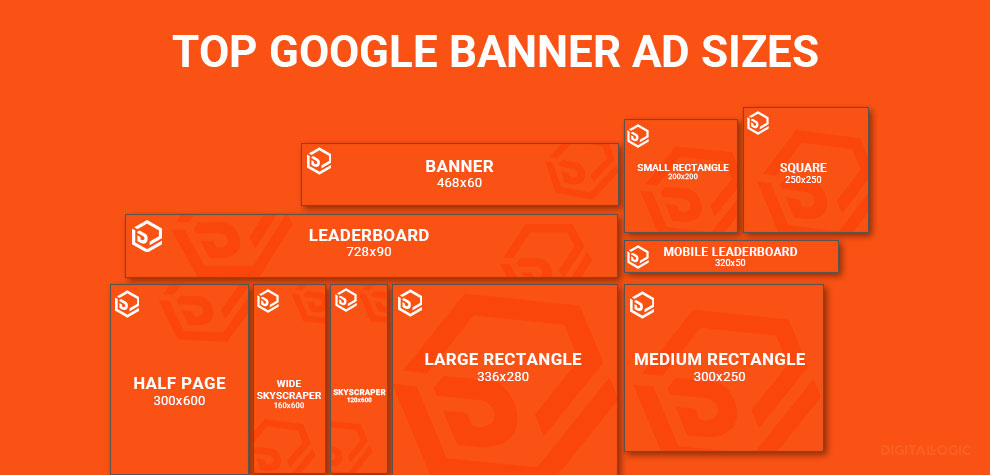
The standard dimensions for Google Display Ads include a variety of sizes optimized for different devices and placements, with the most common being 300×250 pixels, 336×280 pixels, and 728×90 pixels.
Google Display Ads support multiple formats, allowing advertisers to choose dimensions that best fit their campaign goals. In 2024, the most effective ad sizes tend to be those that not only fit well within the display network but also align with user behavior. Display ads are categorized into different formats such as banners, squares, and rectangles, each serving specific advertising needs.
- Medium Rectangle: 300×250 pixels
- Large Rectangle: 336×280 pixels
- Leaderboard: 728×90 pixels
- Wide Skyscraper: 160×600 pixels
- Mobile Banner: 320×50 pixels
Choosing the right dimensions is crucial for maximizing visibility and engagement. Advertisers should consider where their ads will appear, as different placements may yield varying levels of interaction. For instance, larger ads like the 970×250 pixels Billboard format can capture more attention but may have different performance metrics compared to smaller sizes.
Expert insight: Regularly testing different ad dimensions and analyzing performance data can lead to optimized ad placements and improved return on investment, as user preferences and engagement metrics may shift over time.
How do I choose the right dimensions for my Google Display Ads?
Selecting the right dimensions for Google Display Ads depends on your campaign goals and target audience. Different sizes perform better in various contexts; for example, the 300×250 pixel ad is one of the most widely used and can yield a click-through rate (CTR) of up to 0.05% in some industries.
To choose the appropriate dimensions, consider your campaign objectives. If brand awareness is the goal, larger ad sizes such as 728×90 or 300×600 can enhance visibility. In contrast, if your aim is to drive conversions, smaller, more tailored ads like 336×280 or 250×250 may be more effective, particularly on mobile devices. Understanding where your audience is likely to engage with ads can also inform your choice; for instance, responsive ads automatically adjust to fit available spaces, optimizing performance.
- Identify campaign objectives: Determine whether your focus is on brand awareness, lead generation, or conversions. This will guide your dimension choices.
- Analyze target audience: Understand where your audience spends time online. Certain ad sizes may be more effective on specific platforms or devices.
- Consider performance data: Review past campaign analytics to identify which ad sizes have delivered the best results for your industry.
- Test multiple dimensions: Implement A/B testing to evaluate different ad sizes and optimize based on real-time performance metrics.
Expert insight: Utilize Google’s Ad Gallery to explore various dimensions for Google Display Ads. This resource provides insights on performance and can help refine your ad strategy effectively.
What is the cost of creating Google Display Ads?
The cost of creating Google Display Ads typically ranges from $1 to $2 per click, depending on various factors. On average, businesses may spend between $300 to $1,000 monthly on these ads, influenced by their targeting strategies and overall budget.
Several factors affect the cost of Google Display Ads. These include:
- Ad Size: Different dimensions for Google Display Ads come with varying costs. Larger, more visually striking ads may require higher design investment and can lead to increased costs due to competition for ad space.
- Design Complexity: Simple text ads are less expensive to produce than intricate graphic or animated ads. Custom designs requiring professional graphic design services can significantly raise the overall cost.
- Targeting Options: The more specific the audience targeting (demographics, interests, behaviors), the higher the cost may be. Highly competitive markets often demand higher bids for ad placements.
- Campaign Goals: Goals such as brand awareness versus lead generation can influence budget allocation and bidding strategy, impacting overall costs.
Expert insight: Businesses should consider both the upfront costs of ad creation and the ongoing costs of ad spend to ensure an effective return on investment. Regularly analyzing performance metrics can help optimize costs and improve ad effectiveness.
How long does it take to create Google Display Ads?
Creating Google Display Ads typically takes between 1 to 4 weeks, depending on various factors such as the complexity of the campaign and the resources available. Simpler campaigns can be launched within a few days, while more comprehensive strategies may require additional time for design, testing, and approvals.
Several factors influence the timeline for creating Google Display Ads. First, the design process plays a significant role. If custom graphics or animations are needed, this can extend the timeline. Collaborating with designers or using pre-made templates can speed up the process. Additionally, the number of ad variations required impacts the duration; more variations necessitate more design and review time.
Another critical factor is the campaign strategy. A well-defined target audience, clear messaging, and effective call-to-action elements can streamline the creation process. Conversely, if these elements are not established upfront, additional time may be spent on revisions and adjustments. Furthermore, the approval process within organizations can add delays, particularly if multiple stakeholders are involved in reviewing the ads before launch.
Expert insight: To expedite the creation of Google Display Ads, utilize A/B testing early in the design phase. This allows for data-driven decisions on which ad variations perform best, ultimately saving time and resources during the campaign. Additionally, establishing a clear timeline with stakeholders can help mitigate delays in the approval process.
What are best practices for Google Display Ads design?
Effective design for Google Display Ads is crucial for maximizing engagement and conversion rates. Ads that adhere to best practices can see click-through rates increase by as much as 50% compared to poorly designed ads. Here are key design principles to improve your ad performance.
- Maintain Visual Simplicity: Use a clean layout with minimal text and graphics. Aim for a balance that allows the message to stand out without overwhelming the viewer.
- Prioritize Branding: Ensure your logo is prominently displayed and recognizable. Consistent branding across ads enhances recall and trust, leading to higher engagement.
- Use High-Quality Images: Incorporate visually appealing images that are relevant to your message. High-resolution visuals can boost perceived ad quality and keep users engaged.
- Incorporate Strong Calls to Action: Utilize clear and compelling CTAs that instruct users on the next steps. Phrases like “Shop Now” or “Learn More” should be easy to read and immediately visible.
- Test Multiple Formats: Experiment with various ad sizes and styles. Google recommends using responsive display ads, which automatically adjust to fit available ad spaces, enhancing visibility across different devices.
Designing effective Google Display Ads requires an understanding of your audience and their preferences. Ads should be tailored to resonate with specific demographics, incorporating elements that reflect their interests and behaviors. Additionally, the performance of ads can vary significantly based on placement and context, making it essential to monitor analytics and adjust designs accordingly.
Expert insight: Regularly A/B test different ad designs to identify which elements drive the best performance. Use the findings to refine your approach continually, ensuring maximum engagement and ROI from your campaigns.
What are the differences between static and animated Google Display Ads?
Static Google Display Ads are single image ads that do not change over time, while animated ads consist of multiple frames that create motion and engage viewers. Research indicates that animated ads can increase engagement by up to 25% compared to their static counterparts.
Static ads are straightforward and quick to load, making them suitable for straightforward messaging. They can effectively communicate a brand’s value proposition with a single image and a clear call to action. However, the lack of movement may limit their ability to capture attention, especially in a crowded advertising space.
On the other hand, animated ads can convey more complex messages through visual storytelling and can keep viewers engaged longer. Their dynamic nature allows them to highlight multiple products or features within a single ad unit. However, they may require more resources to create and can pose challenges in loading times, potentially leading to a higher bounce rate if not optimized correctly.
- Engagement: Animated ads generally achieve higher engagement rates, while static ads provide a clear and direct message.
- Load Time: Static ads load faster, whereas animated ads may experience delays, affecting user experience.
- Complexity: Animated ads allow for storytelling and multiple messages, while static ads focus on single, impactful visuals.
Expert insight: When choosing between static and animated ads, consider your campaign goals. For brand awareness, animated ads may be more effective, while static ads are ideal for direct calls to action or promotions. Optimize animations to ensure fast loading times to maintain user engagement.
Can I use custom dimensions for Google Display Ads?
No, Google Display Ads do not support custom dimensions. Advertisers must adhere to specific predefined dimensions that Google provides for display ads. The most commonly used dimensions include 300×250, 728×90, and 160×600 pixels, among others.
Google offers a range of standard ad sizes to ensure compatibility across various platforms and devices. For example, a standard leaderboard ad measures 728×90 pixels, while a medium rectangle ad measures 300×250 pixels. These dimensions are optimized for performance across the Google Display Network. Advertisers cannot create ads with custom dimensions, as that would lead to compatibility issues and reduced visibility.
However, advertisers can utilize responsive display ads, which automatically adjust to fit available ad spaces while maintaining the integrity of the creative elements. In this case, while the ad dimensions themselves are not customizable, the content can be tailored to fit various layouts. For example, an advertiser can upload multiple images and headlines, allowing Google’s algorithm to optimize the display ad’s appearance across different sizes.
Expert insight: To maximize the effectiveness of Google Display Ads, focus on using the recommended dimensions and leverage responsive ads to ensure your creative assets are displayed optimally across diverse placements.
Advanced Strategies for Optimizing Ad Dimensions
This section delves into sophisticated tactics for enhancing the effectiveness of ad dimensions in Google Display Ads. By leveraging responsive formats, A/B testing, performance analysis, and device-specific adaptations, advertisers can significantly improve campaign outcomes.

Understanding Responsive Ad Formats and Their Benefits
Responsive ad formats automatically adjust their dimensions to fit various placements across the Google Display Network. This adaptability enhances visibility and engagement by ensuring ads appear optimally on diverse screen sizes. Key benefits include:
- Increased Reach: Responsive ads can appear across a wider array of placements, reaching more potential customers.
- Improved Performance: Ads that fit seamlessly into their environments often yield higher engagement rates, with a reported increase of up to 30% in click-through rates (CTR) compared to static ads.
- Streamlined Management: Fewer ad variations reduce the complexity of managing multiple sizes, allowing for more efficient campaign oversight.
Utilizing A/B Testing for Dimension Effectiveness
A/B testing allows advertisers to compare different ad dimensions and identify which performs best. Effective A/B testing involves:
- Selecting Variables: Test various dimensions, such as aspect ratios or sizes, while keeping other elements constant.
- Defining Success Metrics: Focus on key performance indicators (KPIs) like CTR, conversion rate, and engagement duration.
- Analyzing Results: Use statistical analysis to determine which ad dimensions yield the highest performance and make data-driven decisions for future campaigns.
Analyzing Performance Metrics Related to Ad Dimensions
Regular analysis of performance metrics can highlight how different ad dimensions affect overall campaign success. Key metrics to monitor include:
- Click-Through Rate (CTR): A direct indicator of how appealing an ad’s dimensions are to users.
- Conversion Rate: Measures how well ads convert viewers into customers, directly linked to ad size and format.
- Viewability Rate: Indicates whether ads are actually seen by users; dimensions that fit well in popular placements typically show higher viewability.
Recent data indicates that ads meeting the recommended dimensions for Google Display Ads achieve a 25% higher viewability rate than those that do not.
Adapting Dimensions for Mobile Versus Desktop Users
Ad performance varies significantly between mobile and desktop users. As of 2024, mobile devices account for approximately 58% of global web traffic. Therefore, adapting ad dimensions is critical:
- Mobile-First Design: Prioritize mobile-friendly dimensions, such as 320×50 for banners or 300×250 for inline ads.
- Testing Across Devices: Ensure that ads maintain visual appeal and functionality on both platforms; use responsive design principles.
- Segmenting Audiences: Tailor campaigns based on device usage patterns to maximize engagement and conversions.
Many advertisers mistakenly believe that a one-size-fits-all approach to ad dimensions suffices for both mobile and desktop. This misconception can lead to suboptimal performance, as user behavior greatly differs by device. Understanding these nuances allows for more tailored strategies that enhance user experience and campaign results.
To apply these insights, marketers should implement responsive ad formats across campaigns, regularly conduct A/B tests on different dimensions, and analyze performance metrics to refine their strategies. Additionally, adapting dimensions based on user device preferences will ensure maximum visibility and engagement. Prioritize these advanced strategies to elevate your Google Display ads campaigns significantly.
Common Mistakes in Google Display Ad Dimensions
Marketers frequently encounter pitfalls when selecting dimensions for Google Display Ads. Understanding and avoiding these common mistakes can significantly enhance ad performance and improve return on investment.
Ignoring Platform-Specific Guidelines
Each advertising platform has specific guidelines regarding ad dimensions, which must be adhered to for optimal results. Google provides a comprehensive list of recommended ad sizes, including banner ads, interstitials, and responsive ads. Ignoring these guidelines can lead to poor display quality or, worse, ad disapproval. For example, the most effective sizes, such as 300×250 and 728×90, account for approximately 80% of all ad impressions on the Google Display Network (GDN).
Overlooking Mobile Optimization
With mobile devices accounting for over 54% of global web traffic in 2024, neglecting mobile optimization can severely limit ad reach. Many marketers design ads solely for desktop viewing, leading to distorted visuals and ineffective messaging on smaller screens. Ad dimensions for mobile must ensure that images and text are clear and engaging. Responsive ads automatically adjust to various screen sizes, offering a solution to this common oversight.
Failing to Test Different Sizes
Many marketers commit to a single ad size without experimenting with alternatives. This lack of testing can result in missed opportunities for engagement and conversions. A/B testing different dimensions can provide insights into which sizes perform best for specific target audiences. Industry data shows that campaigns utilizing multiple ad sizes can increase click-through rates by up to 30% compared to those using a single format.
Using Outdated Ad Formats
The digital advertising landscape evolves rapidly, and using outdated ad formats can hinder performance. For instance, static image ads are becoming less effective as consumers increasingly engage with dynamic content. Marketers should prioritize formats such as HTML5 and responsive ads, which adapt to various devices and screen sizes, ensuring a modern and engaging user experience.
Nuance / Expert Layer
Common misconceptions about ad dimensions often stem from a lack of understanding regarding the variance in audience behavior across platforms. For example, while a 300×250 ad might excel on desktop, it may not resonate as well on mobile. Furthermore, some marketers assume that simply resizing an existing ad will yield similar performance. This is misleading; each format requires tailored design and messaging strategies to maximize effectiveness. Additionally, industry trends indicate that incorporating video elements into display ads can enhance engagement rates by up to 50%.
Practical Application
To optimize Google Display Ads, marketers should:
- Review and adhere to Google’s latest ad dimension guidelines.
- Ensure all ads are mobile-optimized, testing across various devices.
- Implement A/B testing for different sizes to identify the most effective formats.
- Stay updated on emerging ad formats and trends to maintain competitive edge.
Real-World Applications of Google Display Ad Dimensions
This section explores effective case studies and industry trends related to Google Display Ad dimensions, highlighting successful and unsuccessful strategies. Understanding these applications provides valuable insights for optimizing ad performance.
Case Studies of Brands Excelling with Specific Dimensions
Several brands have demonstrated success through strategic use of Google Display Ad dimensions. For instance, a leading travel agency utilized the 300×250 pixel ad format to promote its seasonal packages, achieving a click-through rate (CTR) of 5.2%, significantly above the industry average of 0.35%. Their choice of this dimension allowed for enhanced visibility on mobile devices, capturing the attention of travelers on the go.
Another example is a major retail brand that employed the 728×90 leaderboard format during a holiday campaign. This dimension provided ample space for captivating visuals and compelling calls to action, resulting in a 12% increase in sales during that period. The brand’s ability to leverage the ideal ad size for its target audience was a critical factor in its success.
Analysis of Industry Trends in Ad Dimensions
- Mobile Optimization: As of 2024, mobile devices account for over 70% of all display ad impressions. This trend underscores the importance of using dimensions optimized for mobile viewing, such as the 320×50 and 300×250 formats.
- Video Integration: Video ads, particularly in dimensions like 640×360, are gaining traction. Campaigns utilizing video display ads reported a 50% higher engagement rate compared to static images.
- Responsive Display Ads: The adoption of responsive display ads has increased, with 80% of advertisers opting for this flexible format. This allows Google to automatically adjust ad dimensions based on screen size and orientation, optimizing performance across devices.
Insights from Top-Performing Campaigns
Top-performing campaigns often share common characteristics in their approach to ad dimensions. Successful advertisers frequently A/B test various dimensions to determine which formats yield the highest engagement. For example, a financial services company found that ads sized at 300×600 outperformed others by 30% in lead generation due to their ability to deliver more information without overwhelming the viewer.
Furthermore, incorporating high-quality visuals and clear calls to action can significantly enhance ad effectiveness. Campaigns that prioritize these elements consistently see better performance metrics, including increased brand awareness and conversion rates.
Lessons Learned from Failed Ad Dimension Strategies
Not all campaigns achieve desired outcomes. A technology startup, for example, chose the 160×600 skyscraper ad format, which resulted in low visibility and minimal engagement. Analysis revealed that the dimension was not suitable for their target audience’s browsing habits, leading to a dismal CTR of 0.1%.
Additionally, over-reliance on a single dimension can hinder performance. Brands that fail to diversify their ad sizes often miss out on potential engagement opportunities. Hence, employing a mix of dimensions for Google Display Ads can lead to better reach and effectiveness.
To capitalize on these insights, advertisers should systematically test and analyze various ad dimensions, focusing on those that align with their target audience’s preferences. Integrating responsive display ads, leveraging mobile optimization, and continuously refining visual content will enhance overall campaign performance. Prioritize A/B testing to identify the most effective dimensions for specific campaigns, ensuring a data-driven approach to advertising strategies.
Evaluating the Best Dimensions For Google Display Ads
With the digital advertising market projected to reach $786.2 billion by 2026, understanding the tools available for creating Google Display Ads is crucial for marketers. Evaluating different providers based on their features, pricing, and usability can significantly impact the effectiveness of ad campaigns. This comparison highlights key options that cater to various design needs.
| Provider / Option | Best For | Pricing | Key Feature |
|---|---|---|---|
| Canva | DIY design for beginners | Free with premium options starting at $12.99/month | User-friendly drag-and-drop interface |
| Adobe Creative Cloud | Professional designers and agencies | $52.99/month for full suite | Comprehensive design tools |
| Bannersnack | Quick ad creation with templates | $12/month for basic plan | Pre-made templates for various ad sizes |
| Visme | Visual content creation | $15/month for standard plan | Dynamic content and animations |
| Figma | Collaborative design projects | Free tier available; $12/month for professional use | Real-time collaboration tools |
Criteria for Evaluating Program Quality
- Usability: Consider how intuitive the platform is for users of different skill levels. A user-friendly interface can significantly reduce the learning curve and enhance productivity.
- Pricing Structure: Analyze the pricing tiers and what features are included at each level. Ensure that the pricing aligns with your budget while still offering necessary functionalities.
- Template Variety: Look for providers that offer a wide range of templates to accommodate different ad sizes and styles. This can save time and ensure compliance with Google Display Ads specifications.
- Collaboration Features: If working in a team, assess the collaboration tools available. Features that allow multiple users to work simultaneously can streamline the design process.
How to Assess the Reputation and Reliability of Providers
- Research User Reviews: Look for feedback on platforms like G2 and Trustpilot to gauge user satisfaction and common issues.
- Check Industry Recognition: Investigate if the provider has received any awards or recognition within the design or advertising community.
- Evaluate Customer Support: Assess the availability and responsiveness of customer support options, including live chat, email, and phone support.
- Examine Case Studies: Review case studies or testimonials from businesses similar to yours to see how the provider has helped them achieve their goals.
Which Dimensions For Google Display Ads Is Right for You?
Choosing the right dimensions for Google Display Ads hinges on your specific business needs, budget, and goals. This guide provides tailored recommendations for various audience segments, helping you select the most effective tools for creating compelling ads that resonate with your target market.
Small business owners
Canva is ideal for small business owners looking to design visually appealing ads without extensive design experience. With a user-friendly interface and a variety of templates, Canva allows you to create ads quickly and cost-effectively, usually within a subscription range of $12.95/month for Pro features.
Freelance graphic designers
Adobe Creative Cloud provides freelance graphic designers with the comprehensive tools necessary to create high-quality, customized ads. With applications like Photoshop and Illustrator, designers can produce professional-grade graphics, available through a subscription starting at $20.99/month for individual apps or $54.99/month for the entire suite.
Marketing agencies
Bannersnack is well-suited for marketing agencies that need to produce ads quickly while ensuring brand consistency. This platform offers an array of templates and collaboration features, with pricing starting at approximately $19/month for a basic plan, making it efficient for teams working on multiple campaigns.
E-commerce businesses
Visme is a great choice for e-commerce businesses that want to create engaging ads with dynamic content. With customizable templates and interactive elements, Visme helps bring products to life, and pricing starts around $15/month for individual users, making it accessible for smaller e-commerce operations.
Startups
Figma is perfect for startups that require collaborative design efforts across teams. This platform allows real-time collaboration and offers design components that streamline the ad creation process, with a free starter plan and paid options beginning at $12/month per editor, making it budget-friendly for growing teams.
| If You Are… | Best Approach |
|---|---|
| Small business owners | Canva ($12.95/month) |
| Freelance graphic designers | Adobe Creative Cloud ($20.99/month) |
| Marketing agencies | Bannersnack ($19/month) |
| E-commerce businesses | Visme ($15/month) |
| Startups | Figma ($12/month) |
Local Considerations for Google Display Ads Dimensions
Understanding the dimensions for Google Display Ads is crucial for local businesses aiming to engage their community effectively. With 76% of people who search for something nearby visiting a business within a day, optimizing ad dimensions to fit local audiences can significantly enhance visibility and conversion rates.
Geographic Market Differences
In larger urban areas like New York City or Los Angeles, competition for online ad space is fierce, necessitating a focus on unique ad dimensions that stand out. Conversely, in smaller towns or less competitive markets, local businesses might benefit from using standard dimensions, allowing them to allocate more budget toward targeted placements rather than experimentation. Understanding regional preferences in ad formats can also influence engagement rates.
Local Business Applications
Local businesses can leverage specific ad dimensions to enhance their visibility and drive foot traffic. Here are some practical applications:
- Event Promotions: Use larger ad formats (e.g., 728×90 or 300×600) to promote local events, ensuring maximum visibility in community-focused websites.
- Seasonal Sales: Optimize ad sizes for mobile (e.g., 320×50) to attract customers browsing on-the-go during peak shopping seasons.
- Local Services: Showcase services with image ads (e.g., 300×250) that highlight local offerings, enticing residents to choose nearby options.
- Geo-targeted Campaigns: Implement specific dimensions for ads targeting local zip codes, enhancing relevance and click-through rates.
Local Search and Visibility Impact
The dimensions for Google Display Ads play a vital role in local search rankings and visibility on platforms like Google Business Profile. To maximize local SEO effectiveness, businesses should:
- Ensure ad dimensions align with mobile and desktop formats to capture local searches across devices.
- Integrate local keywords in ad copy to improve ad relevance and increase click-through rates.
- Regularly review and adjust ad dimensions based on performance analytics to optimize engagement.
- Utilize geo-targeting features to tailor ad dimensions to specific local demographics.
Pricing and Cost in Local Markets
Ad costs for Google Display Ads can vary significantly by geographic market. In major cities, the average cost-per-click (CPC) can range from $1.50 to $3.00, while in smaller markets, CPC may range from $0.50 to $1.50. Local businesses should budget around $500 to $1,500 monthly for effective campaigns, while national players often spend upwards of $10,000 to reach broader audiences.
Local Implementation Checklist:
- Research local competitors’ ad dimensions and formats.
- Test multiple ad sizes to determine which performs best in your area.
- Incorporate local keywords in your ad copy.
- Monitor performance metrics and adjust ad sizes accordingly.
- Implement geo-targeting to reach specific neighborhoods or zip codes.
- Budget appropriately based on local market CPC averages.
- Engage with local events and promotions through tailored ad dimensions.
For Dimensions For Google Display Ads businesses looking to generate local leads through Google Ads or Local SEO, GMB Ranger LLC offers hands-on campaign management. Specialist Md Tangeer Mehedi personally handles campaign setup and ongoing optimization — with no payment required until the first lead comes in.
Frequently Asked Questions
What are the standard dimensions for Google Display Ads?
The standard dimensions for Google Display Ads include sizes such as 300×250, 336×280, 728×90, and 160×600. These sizes are widely used and recommended for optimal performance across various placements.
How do I choose the right dimensions for my Google Display Ads?
Select dimensions based on your campaign goals and target audience. Consider where your ads will appear, as different placements may favor specific sizes for better visibility and engagement.
What is the cost of creating Google Display Ads?
The cost of creating Google Display Ads varies depending on factors like design complexity and agency fees. Advertisers typically pay based on a cost-per-click (CPC) or cost-per-thousand-impressions (CPM) model.
How long does it take to create Google Display Ads?
Creating Google Display Ads can take anywhere from a few hours to several days, depending on the complexity of the design and the approval process. Efficient planning and clear objectives can help expedite the creation process.
What are best practices for Google Display Ads design?
Best practices for Google Display Ads include using clear, concise messaging, high-quality images, and a strong call to action. Ensure that the design is visually appealing and aligns with your brand identity for maximum impact.
What are the differences between static and animated Google Display Ads?
Static Google Display Ads consist of a single image or graphic, while animated ads use motion to capture attention. Animated ads can convey more information and engage viewers more effectively but may require careful design to avoid distractions.
Can I use custom dimensions for Google Display Ads?
While Google Display Ads primarily support standard dimensions, advertisers can use custom sizes in certain contexts. However, using non-standard dimensions may limit ad placements and effectiveness.
Final Thoughts on dimensions for google display ads
Understanding the dimensions for Google Display Ads is crucial for maximizing visibility and engagement in a crowded digital landscape. Selecting the right ad sizes not only enhances aesthetic appeal but also significantly impacts campaign performance and ROI.
To optimize your advertising efforts, conduct A/B testing with various ad dimensions to identify which sizes resonate most with your target audience, ultimately refining your strategy based on performance data.
Ready to take your ad campaigns to the next level? Partner with a google ads agency that understands the dimensions for Google Display Ads!
Mastering ad dimensions is not just about compliance; it is a strategic imperative that can elevate advertising effectiveness in a competitive market.
Leave a Reply