
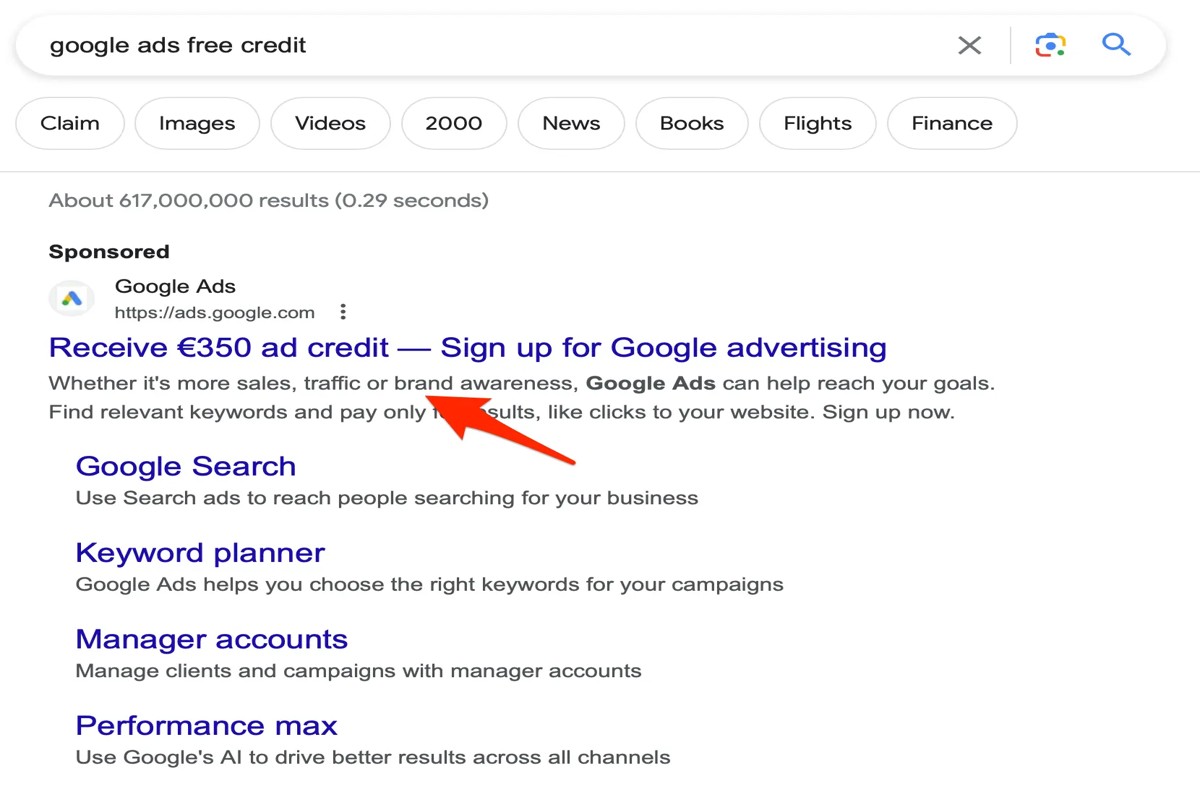
Are Google Ads free? No, Google Ads are not free. Advertisers pay for clicks on their ads, and costs can vary significantly based on factors such as competition and targeting options.
This topic is crucial for businesses and marketers looking to leverage online advertising effectively. Understanding the costs associated with Google Ads is essential for budgeting and maximizing return on investment, as miscalculating expenses can lead to ineffective campaigns and wasted resources.
This article will clarify the pricing structure of Google Ads, explore the factors influencing ad costs, and highlight the benefits of investing in this advertising platform.
For Are Google Ads Free businesses looking to generate local leads through Google Ads or Local SEO, GMB Ranger LLC offers hands-on campaign management. Specialist Md Tangeer Mehedi personally handles campaign setup and ongoing optimization — with no payment required until the first lead comes in.
How much do Google Ads cost?
Google Ads costs can vary widely, but businesses typically spend anywhere from $1 to $2 per click on the Search Network. However, costs can increase significantly depending on the industry and competition, with some keywords costing over $50 per click.
The pricing model for Google Ads primarily operates on a pay-per-click (PPC) basis. Advertisers set a daily budget and bid on keywords relevant to their business. When a user clicks on the ad, the advertiser is charged based on their maximum bid and the quality score of the ad. The actual cost per click (CPC) may differ from the maximum bid due to the auction-based system Google employs.
- Keyword Competition: Highly competitive industries, such as finance or insurance, generally have higher CPCs due to the demand for ad placement.
- Ad Quality Score: Google assesses the relevance and quality of ads. Higher quality scores can lower CPC, making ads more cost-effective.
- Geographic Targeting: Costs may vary based on the location targeted. Ads aimed at urban areas or specific demographics can incur higher expenses due to competition.
Additionally, Google Ads allows advertisers to set a maximum daily budget, providing control over total spending. This budget can be adjusted at any time, accommodating changes in marketing strategy or financial capacity.
Expert Tip: To optimize costs, regularly monitor and adjust keyword bids and pause underperforming ads. This strategy helps maximize return on investment and ensures ad spend is effectively allocated.
Are there any free alternatives to Google Ads?
Yes, there are several free alternatives to Google Ads that businesses can utilize for advertising. These options include social media marketing, search engine optimization (SEO), and content marketing. While these methods do not involve direct costs, they often require time and effort to achieve effective results.
Social media platforms, such as Facebook, Instagram, and Twitter, allow for organic reach through posts, stories, and engagement with followers. Companies can create profiles and share content without incurring any costs, although promoting posts or ads incurs fees. The primary difference between social media marketing and Google Ads lies in the nature of the audience; social media relies on user engagement and community building, whereas Google Ads targets users actively searching for specific products or services.
Search engine optimization (SEO) focuses on improving website visibility in organic search results. This involves optimizing website content, structure, and backlinks to rank higher on search engines. Unlike Google Ads, which provides immediate visibility through paid placements, SEO requires ongoing efforts and time to build authority and relevance. The key contrast is that SEO is a long-term strategy that yields sustainable traffic, while Google Ads provides immediate exposure at a cost.
- Social Media Marketing: Engaging users through organic posts on platforms like Facebook and Instagram.
- Search Engine Optimization (SEO): Enhancing website content and structure to rank higher in organic search results.
- Content Marketing: Creating valuable content (blogs, videos) to attract and engage target audiences without direct advertising costs.
Content marketing also serves as a free alternative, where businesses create informative and engaging materials that resonate with their audience. This approach fosters trust and authority, leading to organic traffic growth. Unlike Google Ads, which targets immediate conversions, content marketing emphasizes building relationships over time.
To maximize effectiveness, businesses should consider a holistic approach that incorporates both paid and organic strategies. Leveraging free alternatives can complement Google Ads, creating a well-rounded marketing strategy that optimizes reach and engagement.
What is the minimum budget for Google Ads?
The minimum budget for Google Ads is typically set at around $1 per day. However, to effectively compete and achieve meaningful results, a more realistic budget ranges from $10 to $50 per day, depending on the industry and goals of the campaign.
Several factors influence the minimum budget for a Google Ads campaign. These include:
- Industry Competition: Highly competitive industries may require higher bids to achieve visibility. For example, sectors like finance or legal services often demand larger budgets.
- Campaign Goals: The objectives of the campaign—such as brand awareness, lead generation, or sales—will affect the budget. More aggressive goals typically necessitate higher spending.
- Target Audience: The size and specificity of the target audience can influence costs. A broader audience may require a higher budget to reach effectively.
- Ad Quality and Relevance: Google rewards relevant ads with lower costs per click (CPC). Higher quality ads can reduce overall spending, making budget management more feasible.
Setting a budget also involves considering the duration of the campaign. A longer campaign with a lower daily budget may yield better results than a short-term, high-budget blitz. Testing different budget levels can help determine the most effective spend for specific goals.
Expert Tip: Regularly monitoring and adjusting your Google Ads budget based on performance metrics can lead to more efficient spending and improved return on investment (ROI). Consider using automated bidding strategies to optimize your campaign expenditure effectively.
How do I set up a Google Ads account?
Setting up a Google Ads account is a straightforward process that allows businesses to create and manage online advertising campaigns. Follow these steps to establish your account and launch your first campaign effectively.
- Visit the Google Ads website: Go to ads.google.com. Click on the “Start now” button to begin the account creation process.
- Sign in or create a Google account: If you already have a Google account, sign in. If not, select the option to create a new Google account and follow the prompts.
- Set your account preferences: Choose the account type that aligns with your advertising goals. You can select between options like “Switch to Expert Mode” for advanced settings or use the guided setup for beginners.
- Define your advertising goals: Specify what you want to achieve with your ads, such as increasing website traffic or generating leads. Google Ads will tailor recommendations based on your goals.
- Create your first campaign: Follow the prompts to set up your first campaign. Select your campaign type, set a budget, and choose your target audience. Be sure to include compelling ad copy and relevant keywords.
- Set up billing information: Enter your billing details. This step is crucial, as Google Ads operates on a pay-per-click basis, meaning you will incur costs based on user interactions with your ads.
- Review and launch: Review all settings and configurations before launching your campaign. Ensure everything aligns with your marketing objectives.
Once your account is set up and your campaign is live, monitor performance regularly. Adjust your strategies based on analytics to optimize results and maximize return on investment.
Expert Tip: Utilize Google Ads’ built-in tools like Keyword Planner and Performance Planner to refine your campaigns. These resources provide insights that can enhance targeting and budgeting strategies, leading to more effective advertising outcomes.
Can I run Google Ads without a website?
No, running Google Ads typically requires a landing page or website. Advertisers must direct users to a specific URL that provides relevant information or services related to the ad content. Without a website, it becomes challenging to create effective ad campaigns that meet Google’s advertising policies.
While it is possible to run Google Ads without a traditional website, there are alternatives. For example, businesses can use social media profiles or landing pages created through platforms like Google My Business. However, these options may limit the effectiveness of ad campaigns, as they often lack the full functionality and customization of a dedicated website.
- Landing Pages: Essential for providing detailed information and capturing leads.
- Social Media Profiles: Can serve as a temporary solution but may not convert traffic effectively.
- Google My Business: Useful for local businesses to promote services without a full website.
Having a dedicated website enhances credibility and allows for better tracking of user engagement. Advertisers can optimize their campaigns based on user behavior and conversion rates, leading to improved ROI.
Expert Tip: Consider creating a well-structured landing page even if you do not have a full website. This can significantly improve your ad performance by ensuring that users land on relevant content that encourages action.
What are the best practices for Google Ads?
To maximize the effectiveness of Google Ads, advertisers should follow several best practices. These strategies enhance ad performance and improve return on investment (ROI). Implementing these practices can lead to more effective campaigns and better budget management.
First, keyword research is essential for targeting the right audience. Utilize tools like Google Keyword Planner to identify relevant keywords with high search volume and low competition. This ensures that ads reach potential customers actively searching for products or services. Next, create compelling ad copy that includes a clear call to action. Highlight unique selling points and benefits that differentiate your offerings, increasing the likelihood of clicks.
- Optimize landing pages: Ensure that landing pages are relevant to the ad content. A seamless user experience with fast load times and mobile optimization can significantly reduce bounce rates and improve conversion rates.
- Utilize ad extensions: Take advantage of ad extensions such as site links, callouts, and structured snippets. These provide additional information and increase the visibility of ads, making them more appealing to users.
- Monitor and adjust bids: Regularly analyze campaign performance and adjust bids based on metrics like click-through rate (CTR) and conversion rate. Employ automated bidding strategies to optimize campaign performance based on goals.
- Conduct A/B testing: Continuously test different ad formats, headlines, and calls to action. A/B testing helps identify what resonates best with the target audience, enabling data-driven decisions for future campaigns.
Focus on tracking key performance indicators (KPIs) to evaluate the success of campaigns. Metrics such as CTR, cost per click (CPC), and conversion rates provide insights into campaign effectiveness and areas for improvement.
Expert insight: Regularly review and refine keyword lists to eliminate underperforming keywords. This helps allocate budget more efficiently and can lead to improved ad performance over time.
How long does it take for Google Ads to show results?
Google Ads can show initial results within 24 hours, but significant outcomes typically take 1 to 3 months. The speed at which results are visible largely depends on campaign setup, budget, competition, and optimization efforts.
Several factors influence the timeline for achieving results. First, the campaign type matters; search ads may yield faster responses compared to display ads, which often require more time to build brand awareness. Additionally, the budget allocated plays a critical role; higher budgets generally lead to increased visibility and quicker data collection, allowing for more rapid adjustments. Furthermore, the industry and level of competition can affect results. In highly competitive niches, it may take longer to establish a strong presence and see conversions.
Another essential aspect is the optimization process. Initial results may provide insights into performance, but ongoing adjustments based on data analytics are crucial for sustained success. Advertisers should closely monitor metrics such as click-through rates, conversion rates, and return on ad spend to refine their strategies. This iterative process can lead to improved results as the campaign matures.
Expert insight: A/B testing different ad copies and targeting options early on can accelerate the optimization phase, leading to faster and more effective campaign adjustments. This proactive approach can significantly enhance the likelihood of achieving desired results within the initial months of advertising.
Understanding Google Ads Pricing Models
This section explores the various pricing models utilized in Google Ads, focusing on Cost Per Click (CPC), Cost Per Mille (CPM), and Cost Per Acquisition (CPA). Understanding these models is essential for advertisers to optimize their budgets and achieve desired outcomes.
Cost Per Click (CPC)
Cost Per Click (CPC) is a pricing model where advertisers pay each time a user clicks on their ad. This model is particularly effective for driving traffic to websites and generating leads. Advertisers set a maximum bid, which is the highest amount they are willing to pay for a click. The actual CPC can vary based on several factors, including the ad’s quality score and competition for keywords.
In a CPC model, the implications for budgeting are significant. Advertisers must consider both the average cost per click and their conversion rates to assess the overall cost-effectiveness of their campaigns. A higher CPC may be justified if it leads to a higher conversion rate.
Cost Per Mille (CPM)
Cost Per Mille (CPM), also known as Cost Per Thousand Impressions, is a model where advertisers pay for every one thousand times their ad is shown, regardless of clicks. This model is commonly used for brand awareness campaigns where the goal is to increase visibility rather than direct responses.
- Use CPM when focusing on reach and visibility.
- Effective for brand-building efforts.
- Typically lower costs compared to CPC for high-volume impressions.
CPM is particularly advantageous for businesses looking to create a strong brand presence without immediate action from viewers.
Cost Per Acquisition (CPA)
Cost Per Acquisition (CPA) is a pricing model that charges advertisers for each successful acquisition, such as a sale or lead generated. This model aligns advertising costs directly with revenue, making it a preferred choice for performance-driven campaigns.
Advertisers can set a target CPA, allowing for more precise budget management. This model is particularly useful for e-commerce businesses where tracking conversions is straightforward. Understanding CPA allows advertisers to focus on optimizing their campaigns for profitability rather than just traffic.
Factors Affecting Ad Costs
Several factors influence the costs associated with Google Ads, including:
- Quality Score: A metric based on the relevance of ads, keywords, and landing pages. Higher quality scores can lead to lower costs and better ad placements.
- Competition: The number of advertisers bidding for the same keywords can drive up CPC and CPA rates.
- Ad Relevance: Ads that closely match user intent tend to perform better, influencing both the quality score and the overall cost.
Understanding these factors helps in strategizing effectively to minimize costs while maximizing ad performance.
Many advertisers mistakenly assume that choosing a pricing model guarantees lower costs. However, each model serves different campaign objectives, and selecting the right one is crucial for success. For instance, using CPA for campaigns that require high engagement may yield lower performance than expected due to misalignment with user intent.
To effectively leverage Google Ads pricing models, advertisers should first identify their campaign goals. Determine whether the focus is on driving traffic, increasing brand awareness, or generating leads. Then, select the appropriate model (CPC, CPM, or CPA) that aligns with these goals. Regularly analyze performance metrics to adjust bidding strategies and optimize campaigns for better returns on investment.
Maximizing Your Google Ads Budget
This section provides essential strategies for managing and optimizing your Google Ads budget. By implementing these techniques, businesses can enhance their return on investment and ensure that their advertising spend is used efficiently.
Setting Realistic Budget Goals
Establishing a budget that aligns with business objectives is critical for effective advertising. Begin by assessing your overall marketing goals and determining how much you can allocate to Google Ads. Consider the following factors when setting your budget:
- Business Goals: Define specific outcomes, such as increasing sales, generating leads, or enhancing brand awareness.
- Industry Standards: Research average costs per click (CPC) in your industry to gauge a competitive budget.
- Testing Phase: Start with a modest budget to test different campaigns, then scale up based on performance.
Utilizing Negative Keywords
Negative keywords play a vital role in refining ad targeting and reducing irrelevant clicks. By excluding terms that do not align with your offerings, businesses can minimize wasted spend. Implement the following steps:
- Conduct thorough keyword research to identify terms that attract the wrong audience.
- Add negative keywords to your campaigns to prevent your ads from appearing in irrelevant searches.
- Regularly review search term reports to identify new negative keywords as trends evolve.
Leveraging Ad Scheduling
Ad scheduling allows businesses to display their ads during specific times when their target audience is most active. This optimization can lead to increased engagement and lower costs. Consider the following strategies for effective ad scheduling:
- Analyze Traffic Patterns: Use analytics data to identify peak traffic times for your website.
- Time Zone Considerations: Adjust ad schedules based on the geographical locations of your audience.
- Testing Variations: Experiment with different time slots to determine when your ads perform best.
Analyzing Performance Metrics
Continuous analysis of performance metrics is essential for refining targeting and bid strategies. Key metrics to monitor include:
- Click-Through Rate (CTR): Indicates how effectively your ads attract clicks.
- Conversion Rate: Measures the percentage of clicks that result in desired actions.
- CPC: Helps assess the cost-effectiveness of your campaigns.
Regularly review these metrics to adjust bids, refine targeting, and improve ad relevance.
Many advertisers overlook the importance of continuous optimization. A common misconception is that setting a budget and launching ads is sufficient. In reality, proactive management is necessary to adapt to changing market conditions and audience behavior. Regularly revisiting keyword strategies, adjusting bids based on performance, and staying informed about industry trends can significantly enhance campaign effectiveness.
To maximize your Google Ads budget, start by defining clear budget goals that align with your business objectives. Next, implement negative keywords to minimize waste, leverage ad scheduling to reach your audience at optimal times, and consistently analyze performance metrics to refine your approach. Prioritize ongoing adjustments to your campaigns based on data-driven insights, ensuring your advertising efforts yield the best possible returns.
Common Misconceptions About Google Ads
This section clarifies prevalent myths surrounding Google Ads, enabling advertisers to make informed decisions regarding their advertising strategies and budgets.
Debunking the Myth That Google Ads Guarantee Sales
A common misconception is that running Google Ads guarantees sales. While ads can significantly increase visibility and traffic, they do not ensure conversion. Success depends on various factors, including the quality of the landing page, product relevance, and market demand. Therefore, businesses must focus on optimizing their entire sales funnel rather than relying solely on ads for revenue generation.
Clarifying the Misconception That Higher Bids Always Lead to Better Ad Placements
Many advertisers believe that increasing their bids will automatically secure better ad placements. While bid amount is a factor in ad rank, it is not the only one. Google Ads evaluates quality score, which considers ad relevance, expected click-through rate (CTR), and landing page experience. A lower bid can sometimes achieve a higher rank if the ad quality is superior.
Understanding the Role of Ad Quality and Relevance
The performance of Google Ads heavily relies on ad quality and relevance. Google uses a system that rewards ads that are more relevant to users’ search queries. Advertisers should focus on creating compelling and relevant ad copy, utilizing targeted keywords, and ensuring landing pages align with ad content. A high-quality ad can lead to lower costs per click (CPC) and improved ad placements.
Exploring the Idea That Google Ads Are Only for Large Businesses
Another prevalent myth is that Google Ads are exclusively beneficial for large businesses with substantial budgets. In reality, small to medium-sized enterprises (SMEs) can effectively utilize Google Ads with limited budgets. The platform allows for precise targeting, enabling smaller businesses to reach niche markets and compete effectively. With careful planning and optimization, even modest investments can yield significant returns.
Nuance / Expert Layer
Many articles overlook the importance of continuous optimization in Google Ads campaigns. Advertisers should engage in regular analysis of performance metrics and adjust their strategies accordingly. This includes A/B testing ad copy, refining keyword lists, and reallocating budgets based on performance data. Additionally, understanding the competitive landscape and seasonal trends can further enhance campaign effectiveness.
Practical Application
- Conduct a thorough analysis of your sales funnel to identify areas for improvement beyond Google Ads.
- Focus on enhancing your ad quality by optimizing ad copy and aligning landing pages with user intent.
- Experiment with bid strategies while monitoring ad performance to find the most effective approach.
- Consider starting with a modest budget to test the waters and scale as you identify successful strategies.
Real-World Case Studies: Success with Google Ads
This section presents several case studies that illustrate how businesses have leveraged Google Ads to achieve remarkable results. These examples provide insights into effective strategies and potential pitfalls associated with paid advertising on Google.

Small Business Success: Boosting Sales through Targeted Ads
Consider the case of a local bakery that sought to increase its sales during the holiday season. By implementing a targeted Google Ads campaign focused on keywords such as “fresh holiday pastries” and “custom cakes,” the bakery was able to reach potential customers actively searching for these products. Within three months, the bakery reported a 40% increase in online orders and a significant rise in foot traffic, directly attributing this success to their Google Ads strategy. The campaign’s success stemmed from precise targeting and the use of engaging ad visuals.
Startup Brand Awareness: A Strategic Approach
A tech startup specializing in eco-friendly products used Google Ads to enhance brand awareness in a competitive market. By allocating a budget towards display ads featuring vibrant imagery and clear messaging, the startup aimed to capture the attention of environmentally conscious consumers. Over six months, they achieved a 200% increase in website traffic and a notable improvement in brand recognition, evidenced by social media engagement metrics. This case underscores the effectiveness of Google Ads in building brand visibility, especially for new entrants in saturated industries.
Lessons from Failed Campaigns
Not every Google Ads campaign leads to success. A fitness studio attempted to use Google Ads but failed to see any return on investment. The primary issues included:
- Poor keyword selection: The studio chose overly broad keywords that attracted irrelevant clicks.
- Inadequate budget management: They underestimated the cost-per-click for competitive keywords, quickly exhausting their budget.
- Weak ad copy: The ad messaging did not resonate with their target audience, leading to low click-through rates.
These failures highlight the necessity of thorough planning and ongoing optimization in Google Ads campaigns.
Key Takeaways and Best Practices
- Define clear objectives: Identify specific goals, such as increasing sales or brand awareness, before launching a campaign.
- Conduct keyword research: Utilize tools like Google Keyword Planner to find relevant and cost-effective keywords.
- Continuously monitor and adjust: Analyze performance metrics regularly and make necessary adjustments to improve ad effectiveness.
While many discussions around Google Ads focus on costs and whether are Google Ads free, the true value lies in the strategic implementation of campaigns. Understanding the nuances of targeting, budgeting, and messaging can lead to substantial returns on investment.
To effectively apply these insights, businesses should start by clearly defining their advertising goals. Next, conduct comprehensive keyword research to identify targeted terms that align with their audience’s search behavior. Finally, continuously analyze performance data to adapt strategies for ongoing improvement.
For Are Google Ads Free businesses looking to generate local leads through Google Ads or Local SEO, GMB Ranger LLC offers hands-on campaign management. Specialist Md Tangeer Mehedi personally handles campaign setup and ongoing optimization — with no payment required until the first lead comes in.
Frequently Asked Questions
How much do Google Ads cost?
The cost of Google Ads varies based on factors like bidding strategy, competition, and targeting options. Advertisers can set daily budgets and pay per click (PPC) or per impression (CPM).
Are there any free alternatives to Google Ads?
Yes, there are free alternatives to Google Ads, such as organic search engine optimization (SEO), social media marketing, and content marketing. These methods can improve visibility without direct advertising costs.
What is the minimum budget for Google Ads?
The minimum budget for Google Ads is flexible, but it is recommended to start with at least $10 per day. This allows for effective testing and optimization of campaigns.
How do I set up a Google Ads account?
To set up a Google Ads account, visit the Google Ads website and click on “Start Now.” Follow the prompts to create an account, select your advertising goals, and set your budget.
Can I run Google Ads without a website?
Yes, you can run Google Ads without a website by using landing pages or promoting your business through Google My Business. However, having a website can enhance credibility and provide more information to potential customers.
What are the best practices for Google Ads?
Best practices for Google Ads include researching keywords, writing compelling ad copy, and optimizing landing pages. Regularly monitoring and adjusting campaigns based on performance data is also essential.
How long does it take for Google Ads to show results?
Google Ads can show results within hours of launching a campaign, but significant performance improvements may take several days to weeks. Continuous optimization and monitoring are key to achieving desired outcomes.
Final Thoughts on Are Google Ads Free
Google Ads is not a free service; it operates on a pay-per-click model, requiring a strategic investment to achieve impactful results. Understanding its pricing structures and budget requirements is crucial for businesses aiming to leverage this powerful advertising tool effectively.
To maximize your return on investment, conduct thorough keyword research and set a realistic budget tailored to your specific business goals. This proactive approach will help ensure that every dollar spent contributes to measurable growth.
Investing in Google Ads is essential for maintaining competitive visibility in an increasingly digital marketplace, making it a critical component of any modern marketing strategy.
Leave a Reply