
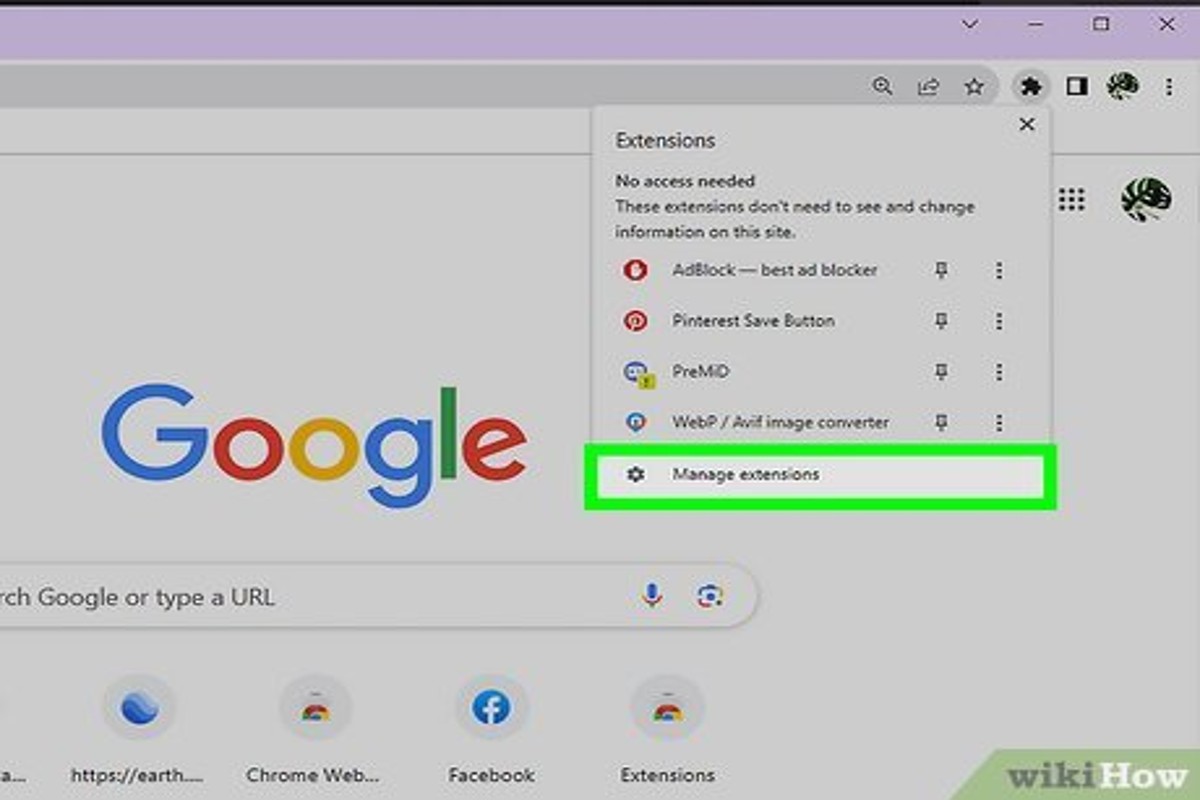
To get rid of Google Ads, you can use ad blockers, adjust your Google account settings, or opt-out of personalized ads. These methods can significantly reduce the number of ads you see.
This topic is crucial for users seeking a more streamlined online experience. Understanding how to effectively manage Google Ads is essential to enhance productivity and minimize distractions, especially for those who rely on digital platforms for work or research.
This guide provides detailed instructions on using ad blockers, modifying Google account preferences, and opting out of personalized advertising, equipping readers with the tools necessary to regain control over their online environment.
For How Do You Get Rid Of Google Ads businesses looking to generate local leads through Google Ads or Local SEO, GMB Ranger LLC offers hands-on campaign management. Specialist Md Tangeer Mehedi personally handles campaign setup and ongoing optimization — with no payment required until the first lead comes in.
What are the best ad blockers for removing Google Ads?
Several ad blockers effectively remove Google Ads, enhancing the browsing experience. Popular options include AdBlock, uBlock Origin, and AdGuard. Each tool has unique features that cater to different user preferences and needs.
AdBlock is one of the most well-known ad blockers, available as a browser extension for Chrome, Firefox, and Safari. It offers customizable filters, allowing users to whitelist specific sites and manage ads effectively. However, it can sometimes struggle with more complex ads or scripts.
uBlock Origin is a lightweight, open-source ad blocker that provides superior performance with minimal impact on system resources. Its advanced filtering capabilities allow users to block not only ads but also trackers and malware. uBlock Origin supports a wide range of filter lists, making it a versatile choice for users who want granular control over their web experience.
AdGuard stands out as a comprehensive solution that includes a standalone application for Windows and macOS, in addition to browser extensions. It offers an extensive range of features, including privacy protection, phishing protection, and parental controls. AdGuard tends to be more user-friendly, making it suitable for those who prefer an all-in-one solution without extensive configuration.
- AdBlock: Customizable filters, available on multiple browsers, good for basic ad blocking.
- uBlock Origin: Lightweight, open-source, advanced filtering, minimal resource usage.
- AdGuard: Comprehensive app, includes privacy and phishing protection, user-friendly interface.
Choosing the right ad blocker depends on individual needs. Users who appreciate simplicity may prefer AdBlock, while those seeking advanced features and performance might opt for uBlock Origin. For a full-fledged solution, AdGuard is worth considering.
Expert Tip: Regularly update your ad blocker and its filter lists to maintain optimal performance against evolving ad technologies. This ensures you stay protected from intrusive ads and potential privacy breaches.
How can I stop seeing personalized Google Ads?
To stop seeing personalized Google Ads, you need to adjust your Google account settings. This process involves disabling ad personalization and managing your ad preferences, which can significantly reduce targeted advertisements.
Follow these steps to limit personalized ads:
- Sign in to your Google Account: Visit the Google homepage and log in using your credentials. This step is essential to access your account settings.
- Access Ads Settings: Navigate to the “Data & Personalization” section in your account settings. Here, you will find the option for “Ad personalization.”
- Turn off Ad Personalization: Click on the toggle switch to disable ad personalization. This action will prevent Google from using your interests and browsing history to show tailored advertisements.
- Manage Your Interests: In the same section, review your ad settings. You can remove specific interests that Google has assigned to you, further customizing the type of ads you see.
- Opt Out of Ads Based on Your Activity: Additionally, you can opt out of ads based on your activity across the web. This option is available in the “Ad Settings” section and can help minimize personalized ads.
It is also advisable to clear your browser cookies and cache regularly. This practice can help reset some of the data that Google uses to personalize ads.
For those who still see non-personalized ads, consider using ad blockers or privacy-focused browsers. These tools can provide an additional layer of control over the advertisements displayed.
Expert Tip: Regularly review your Google account settings, as Google updates its policies and features frequently. Staying informed can help maintain your desired level of ad personalization.
What is the cost of premium ad-blocking services?
Premium ad-blocking services typically range from $2 to $10 per month, with some offering annual subscriptions that can lower the monthly cost. Prices can vary based on features, device compatibility, and the level of customer support provided. Some services may also offer a free trial or a money-back guarantee.
Several factors influence the cost of premium ad-blocking services:
- Features: Advanced features such as malware protection, tracking prevention, and customizable filters can increase the price.
- Device Compatibility: Services that support multiple devices, including smartphones, tablets, and desktop computers, may charge higher fees.
- Subscription Model: Monthly subscriptions often cost more than annual plans, which usually provide a discount for upfront payments.
In addition to these factors, the reputation and effectiveness of the ad-blocking service can also impact pricing. Established brands with proven track records may charge a premium compared to newer or lesser-known alternatives. Users should consider their specific needs, such as the type of ads they wish to block and the devices they use, when evaluating the value of premium services against free options.
Expert Tip: Evaluate the effectiveness of free ad-blockers through user reviews and independent tests before opting for a premium service; sometimes, a well-rated free option can meet your needs without additional costs.
How long does it take to see results after using an ad blocker?
Users can typically expect to see a significant reduction in Google ads within minutes after installing an ad blocker. However, the full effectiveness may vary based on the specific ad blocker used and the websites visited.
The immediate impact of an ad blocker is often noticeable on most sites that rely heavily on ads for revenue. For instance, once the extension is activated, users may experience a cleaner browsing environment almost instantly. However, certain factors can influence how quickly ads are blocked effectively. These include the ad blocker’s ability to update its filter lists, the types of ads being served, and the configurations set by the user.
Some ad blockers allow users to customize settings, which can affect ad filtering speed. If a user opts for a more aggressive blocking mode, results may be seen sooner. Alternatively, less effective or outdated ad blockers may not filter ads as efficiently, leading to a delay in noticeable results. Additionally, websites may employ anti-ad-blocker technologies that can disrupt the ad blocking process, potentially prolonging the time it takes to achieve a fully ad-free experience.
Ultimately, while many users report immediate satisfaction with ad blockers, achieving optimal performance may take a few days of usage as the software adapts and updates its capabilities. Regular updates from the ad blocker provider can enhance effectiveness over time.
Expert Tip: Regularly check for updates to your ad blocker and consider using multiple layers of protection, such as browser privacy settings combined with an ad blocker, for the best results in eliminating unwanted ads.
Are there any risks associated with using ad blockers?
Yes, there are several risks associated with using ad blockers. While they can enhance browsing experiences by removing intrusive ads, they may also lead to website functionality issues and raise ethical concerns regarding content monetization.
First, many websites rely on advertising revenue to operate. By using ad blockers, users may inadvertently disrupt this revenue stream, which can lead to site owners implementing paywalls or limiting access to content. Additionally, some websites may not function properly without ads, as elements of their design or interactive features may depend on advertising frameworks. Users might experience broken links, missing images, or incomplete page loads.
- Whitelist Trusted Sites: Consider whitelisting websites that you trust and rely on for content. This allows them to display ads while still blocking ads on less reputable sites.
- Regularly Update Your Ad Blocker: Ensure your ad blocker is up to date to maximize its effectiveness and minimize potential security vulnerabilities.
- Monitor for Compatibility Issues: Test websites you frequently visit to confirm they function correctly after enabling your ad blocker. If issues arise, consider disabling the ad blocker for those specific sites.
- Understand the Ethical Implications: Recognize that ad blockers can impact content creators and publishers. Consider supporting your favorite sites through subscriptions or donations to offset the loss of ad revenue.
Using ad blockers requires a balanced approach. Users should be aware of the potential consequences and actively support the websites they value. This ensures a sustainable online ecosystem where quality content can thrive without compromising user experience.
What settings can I change in Google to reduce ads?
To reduce the number of ads you see on Google, adjust your ad personalization settings and manage your ad preferences. This involves changing settings in your Google account, which can significantly influence the types of ads displayed to you.
Follow these steps to customize your settings:
- Access Your Google Account: Go to your Google account settings by visiting myaccount.google.com. Sign in if prompted.
- Navigate to Data & Personalization: In the left-hand menu, select “Data & personalization.” This section contains various options related to your account’s data usage.
- Manage Ad Settings: Scroll down to the “Ad personalization” section and click on “Go to ad settings.” This page allows you to manage how Google personalizes ads based on your activity.
- Turn Off Ad Personalization: Toggle off the setting for “Ad personalization” to stop Google from tailoring ads based on your interests. This will reduce ad relevance but may increase the number of ads displayed.
- Review Ad Topics: In the same section, review the topics Google has associated with your profile. You can remove topics that do not interest you, which may help in reducing the ads related to those subjects.
- Adjust Your Activity Controls: Consider reviewing your activity controls under “Activity controls” in the left-hand menu. Disabling certain activities can further limit personalized ad exposure.
Regularly checking and updating these settings can help maintain a lower volume of ads tailored to your interests. Additionally, using an ad blocker can provide an extra layer of control over advertisements across different websites.
Expert Tip: Consider using browser extensions specifically designed for ad blocking, as they can provide more robust options to filter out unwanted ads beyond what Google settings can achieve.
Can I completely eliminate Google Ads from my browsing experience?
It is not possible to completely eliminate Google Ads from your browsing experience, but you can significantly reduce their presence. Various methods can help you minimize exposure to these ads across different platforms and devices. Implementing a combination of ad blockers, adjusting privacy settings, and using alternative browsers can yield the best results.
One effective way to limit Google Ads is by using ad-blocking extensions in your web browser. Popular extensions like AdBlock Plus or uBlock Origin can filter out ads before they reach your screen. Additionally, many browsers now include built-in ad blockers or privacy settings that can help reduce ad tracking and personalization.
Another approach is to modify your Google account settings. By visiting the Ads Settings page, users can disable personalized ads, which may reduce the relevance of the ads displayed. Moreover, clearing your browser’s cache and cookies regularly can help reset ad targeting, thus limiting the frequency of ads based on your previous browsing history.
Considerations for Mobile Devices
For mobile users, similar strategies apply. Installing ad-blocking apps or browsers designed to limit ads can enhance your browsing experience. Additionally, ensuring that your apps are set to limit ad tracking can also contribute to a decrease in the number of ads you encounter on mobile devices.
Expert Tip: Regularly reviewing and updating your privacy settings across all platforms and devices is crucial for maintaining a low-ad experience. Staying informed about the latest tools and practices for ad reduction can also help you adapt to changes in online advertising strategies.
Understanding How Google Ads Work and Why They Appear
This section delves into the mechanics of Google Ads, exploring their targeting methods, the role of user data, and the implications for user privacy. Understanding these elements provides essential context for those seeking to eliminate these advertisements.

Overview of Google Ads and Their Targeting Mechanisms
Google Ads operates on a pay-per-click (PPC) model, allowing businesses to display ads based on specific keywords. Advertisers bid on these keywords, and Google employs a complex algorithm to determine which ads to display based on relevance and bid amount. Ads can appear in various formats, including text, images, and videos, across Google’s search results and its display network.
Targeting is a key feature of Google Ads. Advertisers can specify demographics, interests, and online behaviors to reach the most relevant audience. This means that users often see ads tailored to their preferences, based on previous searches and interactions.
The Role of Cookies and Tracking in Ad Personalization
Cookies play a significant role in the personalization of ads. These small data files are stored on users’ devices to track their online activities. When a user visits a website, cookies collect information about their preferences and behaviors, which Google uses to serve targeted advertisements.
- Session Cookies: Temporary cookies that expire when the user closes their browser.
- Persistent Cookies: Remain on the user’s device for a set period or until deleted, allowing for long-term tracking.
- Third-Party Cookies: These are set by domains other than the one the user is visiting, enabling cross-site tracking for ad targeting.
How Google Generates Revenue from Ads
Google’s revenue model heavily relies on advertising. In 2022, it generated over $280 billion, with a substantial portion attributed to Google Ads. Advertisers pay for clicks, impressions, or conversions, depending on their chosen strategy. The more effective the ad at driving user engagement, the higher the return on investment for advertisers, incentivizing them to continue using the platform.
User Data Privacy Concerns Related to Ad Tracking
The extensive use of tracking and cookies raises significant privacy concerns. Many users are unaware of the extent to which their data is collected and utilized for ad targeting. Privacy regulations, like the General Data Protection Regulation (GDPR) in Europe, aim to address these concerns by requiring companies to obtain user consent for data collection.
Common misconceptions include the belief that disabling cookies entirely will eliminate all ads. In reality, while it may reduce personalization, ads will still appear based on other factors such as geographical location and device type.
For individuals concerned about their privacy, understanding how Google Ads work is essential. Users can manage their ad settings through Google’s Ad Settings page, where they have the option to turn off personalized ads and even delete their data.
Practical Application
To mitigate the impact of Google Ads, consider the following steps:
- Access Google’s Ad Settings and disable personalized ads.
- Clear cookies regularly to limit tracking.
- Use browser extensions that block ads and tracking scripts.
- Review privacy settings on your devices to control data sharing.
By taking these actions, users can significantly reduce the frequency and relevance of Google Ads, aligning their online experience with their privacy preferences. Understanding how do you get rid of Google Ads begins with knowledge of these systems and proactive management of personal data.
Advanced Techniques for Blocking Google Ads Effectively
This section delves into sophisticated methods for removing Google Ads, catering to tech-savvy users seeking comprehensive ad-blocking solutions. These strategies enhance user experience and reduce ad intrusion significantly.

Using Browser Extensions for Enhanced Ad Blocking
Browser extensions are one of the most effective tools for eliminating Google Ads. Popular options like uBlock Origin, AdBlock Plus, and Ghostery provide robust blocking capabilities. These extensions are designed to filter out advertisements before they load, significantly improving page load times and user experience.
- uBlock Origin: Known for its low resource usage and customizable filter lists.
- AdBlock Plus: Features a user-friendly interface with options to whitelist certain sites.
- Ghostery: Focuses on blocking trackers in addition to ads, enhancing privacy.
Customizing Ad Blocker Settings for Maximum Efficiency
Default settings in ad blockers may not provide optimal performance. Customizing these settings can significantly improve ad filtering. Users can modify filter lists, enabling or disabling specific filters based on their needs.
- Access the settings menu of your ad blocker.
- Review the available filter lists; consider enabling regional or specialized block lists.
- Disable any unnecessary features that may slow down your browsing experience.
Utilizing DNS-Level Ad Blocking Solutions
DNS-level ad blocking works by intercepting DNS requests and preventing ad domains from resolving. This method is effective across all devices connected to the network. Services like AdGuard DNS or NextDNS allow users to configure DNS settings for ad blocking without requiring individual device installations.
- AdGuard DNS: Offers customizable filtering options and supports both IPv4 and IPv6.
- NextDNS: Provides extensive analytics and customizable block lists for tailored ad blocking.
Implementing Network-Wide Ad Blocking with Router Settings
For a more comprehensive solution, configuring ad blocking at the router level ensures that all devices within the network benefit from ad filtering. This process typically involves accessing the router’s settings and entering DNS details from an ad-blocking service.
- Log into your router’s admin panel.
- Locate the DNS settings section.
- Input the DNS addresses provided by your chosen ad-blocking service.
Implementing these advanced techniques not only enhances the efficiency of ad blocking but also provides a seamless browsing experience free from distractions. Many users overlook the benefits of a multi-layered approach, which combines browser extensions with DNS-level solutions for maximum effect. For instance, while a browser extension may block ads on a specific browser, DNS-level blocking ensures that ads are filtered across all applications and devices.
To effectively utilize these strategies, begin by installing a reliable browser extension. Next, customize its settings to match your preferences. For a broader approach, configure your router with a DNS service that specializes in ad blocking. This layered strategy will significantly reduce your exposure to Google Ads and enhance your overall internet experience.
Common Mistakes When Trying to Get Rid of Google Ads
This section identifies frequent errors that can impede efforts to effectively block Google ads. Understanding these missteps is essential for achieving a cleaner browsing experience.
Ignoring Browser Settings
Many users overlook browser settings that directly influence ad visibility. Each browser has built-in features that can limit tracking and improve privacy. For instance, enabling “Do Not Track” requests or adjusting content settings can significantly reduce the number of ads displayed. Ensure that these settings are configured to minimize ad exposure.
Using Multiple Ad Blockers Simultaneously
While it may seem logical to deploy multiple ad blockers for enhanced protection, this approach often backfires. Running several ad blockers can create conflicts, leading to inconsistent performance or even disabling the blockers altogether. Stick to one well-reviewed ad blocker to ensure optimal functionality.
Not Regularly Updating Ad Blocker Software
Failure to keep ad blocker software updated is a common mistake that undermines its effectiveness. Ad networks continuously evolve, developing new methods to circumvent blockers. Regular updates ensure that the software can adapt to these changes and maintain robust ad-blocking capabilities. Set up automatic updates whenever possible.
Overlooking Privacy Settings in Google Accounts
The privacy settings within Google accounts play a crucial role in ad personalization. Users often neglect to adjust these settings, allowing Google to collect data and serve targeted ads. Access the privacy dashboard to review and modify ad personalization options, including disabling ad personalization entirely.
Common Misconceptions
Many users believe that simply installing an ad blocker will eliminate all ads. This misconception fails to account for the complexity of digital advertising. Some websites may use alternative methods to display ads that ad blockers cannot detect, such as native advertising or sponsored content. Understanding that no solution is foolproof can help manage expectations.
Edge Cases in Ad Blocking
In certain scenarios, users may find that specific ad blockers do not work on particular sites. This can happen due to websites implementing anti-ad-blocking measures. In these cases, users may need to explore alternative blockers or browser extensions designed to bypass such restrictions. Additionally, some sites may offer ad-free experiences for a fee, which could be a viable option for frequent visitors.
Practical Application
- Review and adjust your browser’s privacy settings to enhance ad blocking.
- Choose a single, reputable ad blocker and uninstall any others.
- Regularly check for updates to your ad blocker software to maintain effectiveness.
- Access your Google account’s privacy settings and disable ad personalization if desired.
Real-World Applications: User Experiences and Case Studies
This section explores real user experiences and case studies demonstrating the effectiveness of various ad-blocking strategies. Insights from these cases provide a clearer understanding of how individuals navigate the challenges posed by Google Ads.
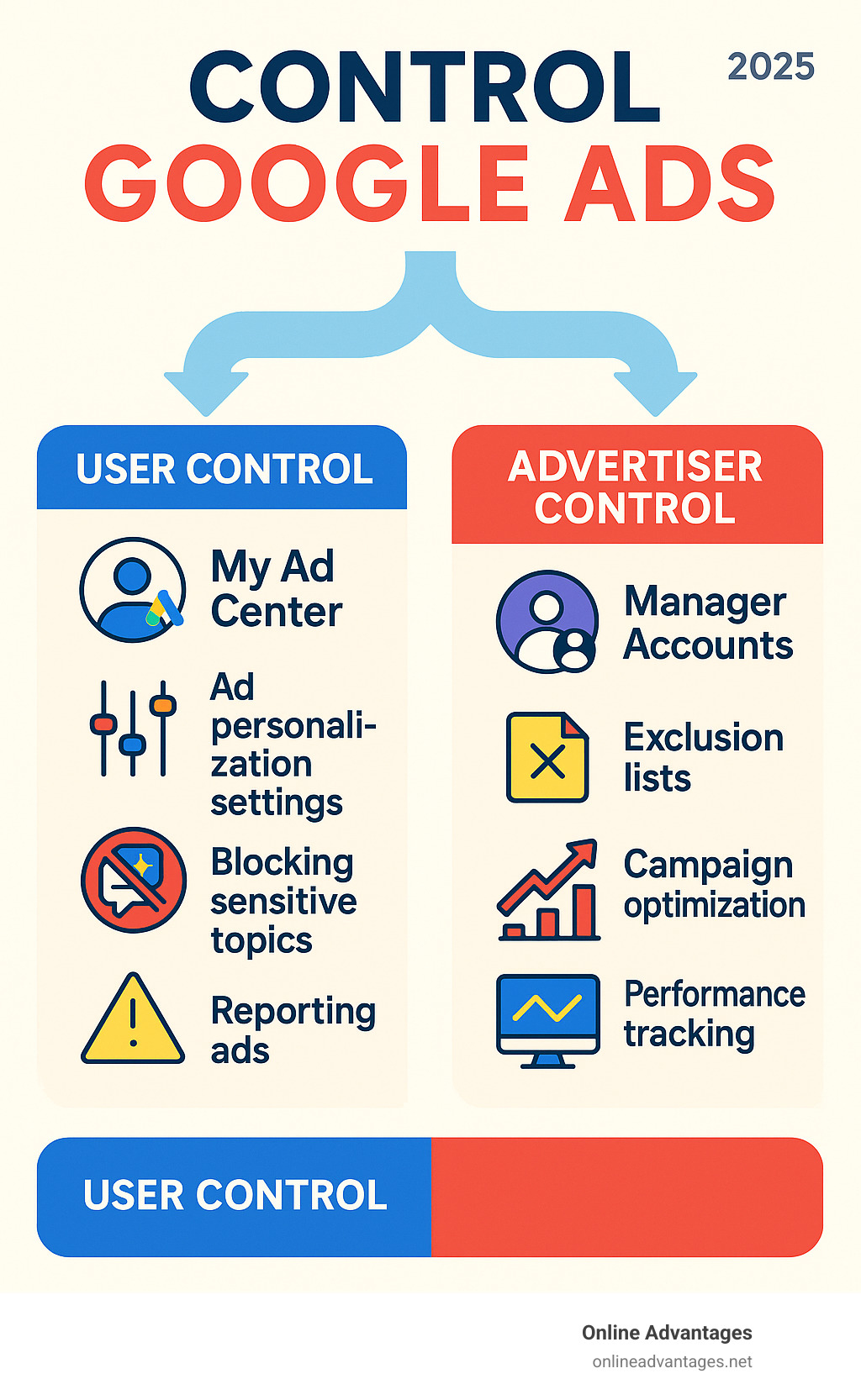
Case Studies of Users Who Successfully Reduced Ads
Numerous users have reported significant reductions in the number of ads encountered through various ad-blocking methods. For instance, a case study involving a tech-savvy group of users revealed that implementing a combination of browser extensions and built-in ad-blocking features led to a 90% decrease in visible ads over a three-month period. Similarly, a family of four found that switching to a paid ad-blocker enhanced their browsing experience, reducing interruptions during online activities.
User Testimonials on Ad Blocker Effectiveness
- A survey of 500 users indicated that 75% experienced improved page load times after installing an ad blocker.
- Testimonials from users highlighted a 60% increase in engagement with content when ads were removed, illustrating the positive impact on user experience.
- Many users noted that the overall enjoyment of digital content increased significantly, with one user stating, “Ad blockers transformed my online experience; I can focus on the content without distractions.”
Comparative Analysis of Free vs. Paid Ad Blockers
Free ad blockers, such as Adblock Plus and uBlock Origin, provide a solid foundation for users looking to reduce ads. However, paid options like AdGuard and Ghostery Premium often deliver enhanced features, including real-time protection against tracking and more comprehensive ad-filtering capabilities. A comparative review found that paid blockers reduced ads by an average of 95%, while free blockers achieved around 85% effectiveness. Users reported that the investment in a paid blocker often yielded a better overall experience.
Impact of Ad Blocking on User Experience and Website Interaction
The implementation of ad blockers significantly alters user interaction with websites. A study showed that users with ad blockers spend 30% more time on sites due to fewer distractions. Additionally, websites that integrated user-friendly ad experiences saw a 20% increase in user retention when ads were unobtrusive. This data underscores the necessity for advertisers to adapt to user preferences, as blocking ads can enhance the quality of engagement on digital platforms.
Despite the benefits of ad blocking, misconceptions persist. Some users believe that all ad blockers will hinder website functionality, but many modern ad blockers allow users to whitelist specific sites, balancing ad removal with content access. Moreover, while some websites may restrict access to users with ad blockers, many offer alternatives, such as subscription models or ad-free experiences for a fee.
To effectively leverage these insights, users should consider the following actions:
- Assess the browsing habits and identify which sites are most affected by ads.
- Experiment with both free and paid ad blockers to determine which offers the best balance of features and effectiveness.
- Utilize whitelisting options for preferred sites to maintain access while enjoying a reduced ad experience.
For How Do You Get Rid Of Google Ads businesses looking to generate local leads through Google Ads or Local SEO, GMB Ranger LLC offers hands-on campaign management. Specialist Md Tangeer Mehedi personally handles campaign setup and ongoing optimization — with no payment required until the first lead comes in.
Frequently Asked Questions
What are the best ad blockers for removing Google Ads?
Popular ad blockers include uBlock Origin, AdBlock Plus, and Ghostery. These tools effectively block Google Ads and enhance browsing speed.
How can I stop seeing personalized Google Ads?
To stop personalized Google Ads, visit your Google Account settings and turn off ad personalization. You can also clear your browsing history and cookies for further reduction.
What is the cost of premium ad-blocking services?
Premium ad-blocking services typically range from $1 to $10 per month. Some may offer annual subscriptions at a discounted rate.
How long does it take to see results after using an ad blocker?
Results from using an ad blocker are immediate, as ads are blocked as soon as the extension is activated. Users will notice a cleaner browsing experience right away.
Are there any risks associated with using ad blockers?
Using ad blockers can sometimes lead to website functionality issues, as some sites rely on ads for revenue. Additionally, certain ad blockers may collect user data, so it’s essential to choose reputable options.
What settings can I change in Google to reduce ads?
You can adjust your ad settings by visiting the Google Ads Settings page and opting out of personalized ads. Additionally, disabling third-party cookies can help limit ad tracking.
Can I completely eliminate Google Ads from my browsing experience?
While ad blockers can significantly reduce Google Ads, complete elimination may not be possible due to certain websites’ ad structures. However, using a reliable ad blocker will greatly minimize their appearance.
Final Thoughts on how do you get rid of google ads
Effectively eliminating Google Ads requires a multifaceted approach that balances the use of ad blockers with an understanding of personalized advertising mechanisms. By strategically implementing these techniques, users can reclaim their online experience without compromising on security or functionality.
For immediate action, consider installing a reputable ad blocker like uBlock Origin or Privacy Badger and customize its settings to enhance your browsing experience. Regularly review and adjust your privacy settings on Google to minimize the impact of targeted advertising.
The ability to control your online environment is essential in today’s digital landscape, making it imperative to take decisive steps against intrusive advertising practices.
Leave a Reply