
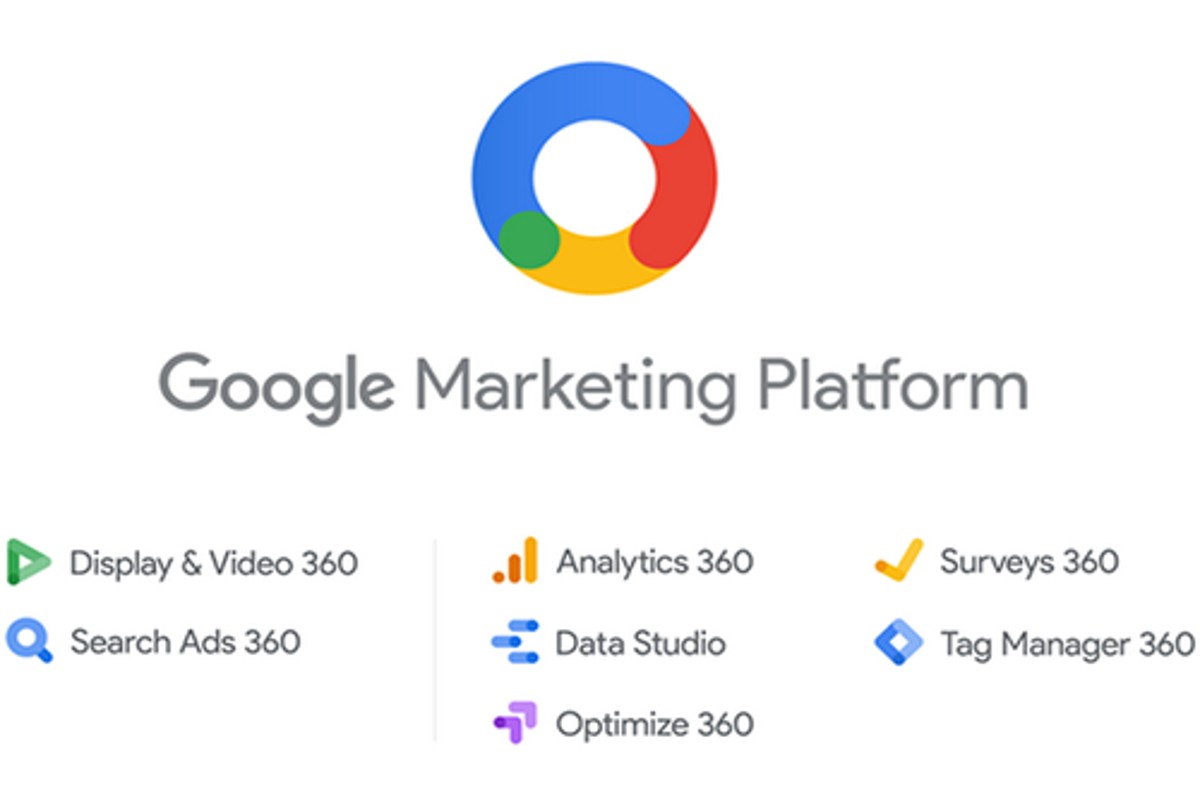
Search Ads 360 integrates with various Google products including Google Analytics, Google Ads, Google Marketing Platform, and Google Data Studio, enhancing campaign management and reporting.
This integration is crucial for digital marketers and businesses aiming to optimize their advertising efforts. Understanding these connections allows for more effective data utilization and campaign strategy, minimizing the risk of missed opportunities and inefficiencies.
This article details the specific Google products that integrate with Search Ads 360, including their functionalities and how they enhance advertising performance and reporting capabilities.
For What Google Products Can Search Ads 360 Integrate With businesses looking to generate local leads through Google Ads or Local SEO, GMB Ranger LLC offers hands-on campaign management. Specialist Md Tangeer Mehedi personally handles campaign setup and ongoing optimization — with no payment required until the first lead comes in.
What is Search Ads 360?
Search Ads 360 is a digital marketing platform that enables advertisers to manage their search campaigns across multiple search engines in one place. It provides advanced tools for campaign management, optimization, and reporting, allowing marketers to enhance their online advertising strategies effectively.
As part of the Google Marketing Platform, Search Ads 360 integrates various functionalities that streamline the advertising process. It supports features such as automated bidding, audience targeting, and cross-channel attribution, ensuring that advertisers can maximize their return on investment.
- Campaign Management: Users can create, edit, and optimize campaigns across different search engines from a single interface.
- Automated Bidding: The platform includes sophisticated algorithms that adjust bids in real-time based on performance data.
- Cross-Channel Reporting: Advertisers can analyze campaign performance across channels, gaining insights into user behavior and engagement.
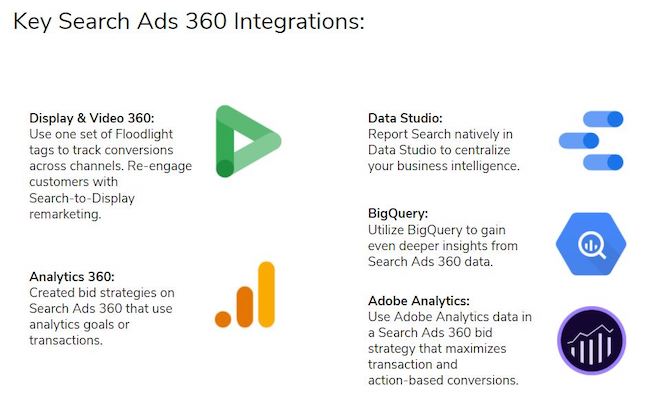
Search Ads 360 also facilitates integration with other Google products, such as Google Analytics 360 and Google Data Studio, enabling a comprehensive view of marketing performance. This integration allows for better decision-making based on holistic data insights.
Advertisers should leverage the advanced features of Search Ads 360 to optimize their campaigns effectively. Utilizing automated tools can save time and enhance the precision of advertising efforts, ultimately leading to improved campaign success.
How does Search Ads 360 integrate with Google Analytics?
Search Ads 360 integrates seamlessly with Google Analytics by linking the two platforms, allowing for comprehensive tracking of advertising performance and user behavior. This integration enables marketers to gain deeper insights into the effectiveness of their search campaigns and optimize strategies based on user engagement metrics.
To initiate the integration, follow these steps:
- Access the Admin Section: Log into your Google Analytics account and navigate to the Admin section. This is where you manage all account settings.
- Select the Property: Choose the relevant property you want to link with Search Ads 360. Ensure that you have the necessary permissions to make changes.
- Link Search Ads 360: In the property settings, locate the option for linking Search Ads 360. Click on it and follow the prompts to establish the connection.
- Configure Data Sharing: Configure the data sharing settings to ensure that data from Search Ads 360 flows into Google Analytics. This includes adjusting the import settings for conversion tracking.
- Verify the Integration: After linking, verify that the integration is successful by checking reports in Google Analytics. Look for data specifically related to your Search Ads 360 campaigns.
Once integrated, the benefits are substantial. Marketers can analyze how paid search traffic interacts with their website, assess conversion rates, and identify which keywords drive the most valuable traffic. This data empowers marketers to refine campaigns, allocate budgets more effectively, and enhance overall ROI.
Utilizing this integration can lead to a more data-driven approach to search marketing, enabling teams to make informed decisions based on user behavior patterns.
Expert Tip: Regularly review the linked data to adjust campaigns in real-time. Utilize the insights gained from Google Analytics to test different ad variations and optimize landing pages for improved performance.
What are the benefits of integrating Search Ads 360 with Google Ads?
Integrating Search Ads 360 with Google Ads enhances campaign management, optimization, and performance tracking. This integration allows for streamlined operations across platforms, resulting in improved efficiency and data insights. By leveraging the strengths of both tools, advertisers can achieve better outcomes in their digital marketing efforts.
One significant benefit of this integration is the ability to manage multiple Google Ads accounts from a single interface. This centralized approach simplifies campaign management, enabling marketers to efficiently allocate budgets and resources across campaigns. Additionally, it provides a holistic view of performance metrics, facilitating quicker decision-making and adjustments based on real-time data.
- Enhanced Reporting: Utilize Search Ads 360’s advanced reporting features to analyze data from Google Ads. Customize reports to track key performance indicators (KPIs) that matter most to your objectives, ensuring that insights are actionable.
- Bid Optimization: Implement automated bidding strategies that leverage machine learning across both platforms. This allows for more precise bid adjustments based on performance data, maximizing return on investment (ROI).
- Cross-Channel Insights: Gain deeper insights into user behavior and campaign performance by integrating data from other Google products, such as Google Analytics. This provides a comprehensive understanding of the customer journey and enhances targeting efforts.
- Real-Time Adjustments: Make real-time adjustments to campaigns based on performance data pulled from both platforms. This agility enables marketers to respond swiftly to market changes and optimize campaigns for better results.
Integrating Search Ads 360 with Google Ads creates a powerful synergy that can significantly enhance campaign performance. For advanced users, leveraging the API capabilities of both platforms can unlock further customization and automation, leading to even greater efficiencies in campaign management.
Can Search Ads 360 work with third-party tools?
Yes, Search Ads 360 can integrate with various third-party tools, enhancing its functionality and allowing for more comprehensive advertising strategies. This integration provides users with the ability to leverage additional features and data analytics not available in Search Ads 360 alone. However, the level of integration and the specific tools that can be connected vary significantly.
Search Ads 360 is a robust platform designed for managing search campaigns across multiple engines and channels. It offers features such as automated bidding, budget management, and reporting capabilities. In contrast, third-party tools often focus on specialized areas, such as advanced analytics, customer relationship management (CRM), or creative optimization. Some notable third-party tools include Google Analytics, Tableau, and HubSpot, each providing unique functionalities that can complement Search Ads 360.
- Google Analytics: Provides in-depth website performance metrics and user behavior insights, which can enhance campaign targeting and optimization strategies when integrated with Search Ads 360.
- Tableau: A powerful data visualization tool that allows users to create complex reports and dashboards, enabling deeper analysis of campaign performance alongside data from Search Ads 360.
- HubSpot: A CRM platform that focuses on inbound marketing, sales, and customer service, offering integration that allows for better lead tracking and nurturing directly linked to search campaigns.
The primary distinction lies in the capabilities of Search Ads 360 compared to these third-party tools. While Search Ads 360 excels in managing search ads and providing specific insights into campaign performance, third-party tools can offer broader insights and functionalities that enhance overall marketing strategies. The integration of these tools allows advertisers to harness a more holistic view of their marketing efforts, combining different data sources for improved decision-making.
Expert Tip: For optimal results, ensure that your integration setup is configured to share key data points between Search Ads 360 and third-party tools. This can significantly improve campaign tracking and performance analysis, driving better ROI.
What is the cost of using Search Ads 360?
The cost of using Search Ads 360 varies based on several factors, but generally, it operates on a pricing model that includes a percentage of media spend, often ranging from 3% to 10%. This fee can be influenced by the scale of advertising and the specific needs of the business.
The pricing structure is not fixed and can be affected by various factors, including:
- Media Spend: Higher budgets typically result in lower percentage fees, creating an economy of scale.
- Features Utilized: Costs may increase with the use of advanced features such as custom reporting, integration with other Google products, or additional support services.
- Account Management: Businesses that require dedicated account management or personalized support may incur additional fees.
Moreover, the specific agreements made with Google can also play a significant role in determining final costs. Some businesses might negotiate different terms based on their advertising volume and strategic needs.
For companies leveraging the full suite of Google marketing tools, the integration with Search Ads 360 can enhance campaign efficiency, potentially offsetting costs through improved performance.
Expert Tip: Businesses should conduct a thorough cost-benefit analysis before committing to Search Ads 360, ensuring that the potential ROI justifies the investment based on their unique advertising objectives.
How long does it take to set up Search Ads 360 integrations?
Setting up Search Ads 360 integrations typically takes between one to four weeks, depending on the complexity of the integration and the specific Google products involved. Factors such as team availability, data volume, and existing infrastructure can influence this timeline.
For straightforward integrations, such as linking Google Ads or Google Analytics, the setup process can be completed in as little as a few days. However, more complex integrations that involve multiple data sources or require custom configurations may extend the timeline significantly. Projects that include extensive data migrations or require advanced tracking setups will likely take longer, potentially pushing the setup period to several weeks.
Additionally, the readiness of the technical resources and the need for stakeholder approvals can affect the overall duration. If the team is already familiar with Search Ads 360 and its associated products, the integration process will be more efficient. Conversely, if extensive training or documentation is required, this can add to the setup time.
Expert Tip: Conducting a thorough pre-integration audit can streamline the process. Identify potential roadblocks and ensure that all necessary accounts and permissions are in place before starting the integration. This proactive approach can significantly reduce setup time.
What are common mistakes to avoid when using Search Ads 360?
Common mistakes in using Search Ads 360 include improper campaign structuring, neglecting data integration, and failing to utilize automated bidding strategies effectively. These errors can lead to inefficient ad performance and wasted budget. Advertisers can prevent these pitfalls by implementing best practices in campaign management and data analysis.
One prevalent issue is poor campaign structuring. For example, an advertiser might create a single campaign for multiple products without segmenting them by performance metrics. This can obscure insights into which products are underperforming and hinder optimization efforts. To avoid this, campaigns should be organized based on product categories or performance goals, allowing for targeted adjustments and enhanced reporting.
Another mistake is overlooking the integration of data from other Google products. For instance, failing to link Google Analytics with Search Ads 360 can result in missed opportunities to analyze user behavior effectively. Advertisers should ensure that all relevant data sources are connected, enabling comprehensive analysis and informed decision-making. Utilizing features like dynamic remarketing and audience targeting can enhance overall campaign effectiveness.
Expert Tip: Regularly review and adjust your bidding strategies based on performance data. Automated bidding options can optimize for specific goals, but they require consistent monitoring to ensure alignment with business objectives. Setting clear KPIs and adjusting bids accordingly will maximize the return on advertising spend.
Which Google products are most effective when used with Search Ads 360?
Search Ads 360 integrates effectively with several Google products that enhance campaign management and performance measurement. The most impactful integrations include Google Analytics, Google Tag Manager, Google Ads, and Google Data Studio. Each of these products offers unique features that, when combined with Search Ads 360, can optimize advertising strategies and improve ROI.
Google Analytics provides in-depth insights into user behavior, allowing advertisers to analyze traffic sources and conversion rates. By linking Search Ads 360 with Google Analytics, businesses can track performance metrics more effectively and understand how search ads contribute to overall site engagement. Utilize custom segments in Google Analytics to assess the effectiveness of different campaigns and keywords.
- Google Tag Manager: This tool simplifies the process of managing marketing tags without modifying code. By integrating it with Search Ads 360, advertisers can implement tracking for conversions and remarketing seamlessly, ensuring accurate data collection and enhanced targeting.
- Google Ads: Directly connecting Search Ads 360 with Google Ads allows for consolidated management of search campaigns across platforms. This integration facilitates real-time bidding adjustments and improves budget allocation, leading to more effective ad placements.
- Google Data Studio: Use this tool to create customized reports that visualize data from Search Ads 360. By integrating Data Studio, advertisers can share performance insights with stakeholders and make data-driven decisions that enhance campaign strategies.
Integrating these Google products with Search Ads 360 not only streamlines workflows but also enhances the ability to make informed decisions based on comprehensive data analysis. Each integration serves to amplify the effectiveness of search advertising efforts.
Expert Tip: Regularly review and update your integration settings to adapt to new features and capabilities released by Google products. This proactive approach ensures that campaigns leverage the latest tools for optimal performance.
Maximizing ROI: Best Google Products for Search Ads 360
This section analyzes the integration of various Google products with Search Ads 360, focusing on how these integrations can significantly enhance return on investment (ROI) for digital marketing campaigns. The selected products are crucial for tracking, managing, reporting, and optimizing advertising efforts.
Google Analytics: In-Depth Performance Tracking
Google Analytics offers comprehensive insights into user behavior, traffic sources, and conversion tracking. When integrated with Search Ads 360, it allows marketers to analyze the effectiveness of their ad campaigns in real-time. This integration enables the tracking of key performance indicators (KPIs) such as click-through rates, conversion rates, and revenue generated from ad spend.
- Enhanced Attribution: Use multi-channel funnels to understand the customer journey.
- Custom Segments: Analyze audience behavior with tailored segments.
- Goal Tracking: Set and monitor specific campaign objectives for better insights.
Google Ads: Streamlined Campaign Management
Integrating Google Ads with Search Ads 360 facilitates efficient campaign management across various platforms. This synergy allows for centralized control, which simplifies bid adjustments, budget allocation, and ad performance monitoring. The integration enhances campaign optimization by leveraging automated bidding strategies and keyword insights.
- Cross-Channel Management: Manage search, display, and video campaigns from one interface.
- Real-Time Adjustments: Implement changes based on live performance data.
- Shared Budgets: Allocate budgets across campaigns to maximize impact.
Google Data Studio: Advanced Reporting Capabilities
Google Data Studio transforms complex data from Search Ads 360 into visually compelling reports. The integration allows marketers to create customized dashboards that present key metrics in an understandable format. This capability supports data-driven decision-making by making insights accessible to stakeholders.
- Custom Visualizations: Design reports that highlight specific performance metrics.
- Real-Time Data: Access up-to-date information for timely reporting.
- Collaboration Features: Share reports easily with team members and clients.
Google Tag Manager: Efficient Tag Management
Google Tag Manager streamlines the process of adding and updating tags on websites without needing code changes. This integration is vital for tracking ad performance accurately and efficiently. By managing all tags from a single interface, marketers can ensure that tracking is consistent and data collection is comprehensive.
- Event Tracking: Set up custom events to monitor specific actions taken by users.
- Version Control: Keep track of changes and revert to previous versions if necessary.
- Quick Deployment: Implement tags rapidly to respond to marketing needs.
Beyond the basics, many marketers underestimate the importance of integrating Google Analytics with Search Ads 360 for attribution modeling. Accurate attribution can reveal the true effectiveness of each channel in the customer journey, allowing for more informed budget allocations. Additionally, misconceptions about the capabilities of Google Data Studio often lead to underutilization of its powerful reporting features, which can provide deeper insights when properly configured.
To maximize ROI using the outlined Google products, marketers should take the following steps:
- Set up Google Analytics for detailed performance tracking and goal monitoring.
- Integrate Google Ads for comprehensive campaign management and optimization.
- Utilize Google Data Studio to create customized reports that present actionable insights.
- Employ Google Tag Manager to manage and optimize tracking tags efficiently.
Step-by-Step Guide to Integrating Google Products with Search Ads 360
This section provides a comprehensive walkthrough for setting up and optimizing integrations between Search Ads 360 and various Google products, ensuring seamless functionality and improved performance.
Initial Setup Requirements
Before initiating the integration process, ensure that you meet the following setup requirements for each Google product:
- Google Analytics: Ensure that Google Analytics is set up and linked to your Search Ads 360 account. Verify that you have admin access to both accounts.
- Google Ads: Link your Google Ads account with Search Ads 360. You must have the necessary permissions to manage both accounts.
- Google Tag Manager: Implement Google Tag Manager on your website and ensure it is configured to track relevant events and conversions.
Integration Steps for Google Analytics
- Log in to your Search Ads 360 account.
- Navigate to the Admin section and select Linking.
- Choose Add Google Analytics and select the appropriate property.
- Confirm the settings and click Link to complete the process.
Refer to the following screenshot for visual guidance:
Integration Steps for Google Ads
- Access your Search Ads 360 account and go to the Admin tab.
- Click on Linking and select Add Google Ads.
- Input your Google Ads account ID and follow the prompts to link.
- Review the settings and finalize by clicking Link.
Refer to the following screenshot for visual guidance:
Common Troubleshooting Tips
During integration, users may encounter several common issues. Here are some tips to resolve them:
- If the integration fails, verify that you have the correct permissions for both Google Ads and Search Ads 360.
- Ensure no existing links conflict with the new integration.
- Check for any discrepancies in account IDs entered during the linking process.
Best Practices for Maintaining Integrations
To ensure smooth operation of integrations, adhere to these best practices:
- Regularly monitor linked accounts for any changes in permissions or settings.
- Conduct routine audits of your tracking configurations in Google Tag Manager.
- Keep documentation of integration settings and changes for reference.
Advanced Considerations
Integration scenarios can vary widely based on specific business needs. For instance, users often overlook the importance of customizing conversion tracking settings in Google Analytics. Properly configuring these settings can significantly enhance the accuracy of performance data, aiding in more informed decision-making. Additionally, understanding the nuances of data sharing between Google Ads and Search Ads 360 can help avoid misinterpretations of campaign performance.
Practical Application
To optimize your use of Search Ads 360, start by identifying which Google products are essential for your campaigns. Follow the outlined steps to integrate these products effectively. Regularly review your integration settings and performance metrics to ensure that all systems are functioning correctly and contributing to your advertising objectives.
Real-World Case Studies: Success Stories with Search Ads 360 Integrations
This section explores successful campaigns that effectively utilized Search Ads 360 integrations, highlighting actionable insights and measurable outcomes. These case studies illustrate how various brands leveraged the platform to enhance their digital marketing strategies.
Case Study: Retail Brand Campaign
A leading retail brand implemented Search Ads 360 to manage its extensive product catalog across multiple channels. By integrating with Google Analytics and Merchant Center, the brand optimized its ad spend and enhanced targeting capabilities. The integration allowed for real-time data analysis, enabling the marketing team to adjust bids based on performance metrics.
- Improved ROAS: Achieved a 30% increase in Return on Ad Spend within three months.
- Higher Conversion Rate: Increased conversion rates by 25% due to improved targeting and ad relevance.
- Streamlined Reporting: Enabled consolidated reporting, which reduced analysis time by 40%.
Insights from a B2B Service Provider
A B2B service provider utilized Search Ads 360 to integrate with Google Ads and Display & Video 360. By employing audience segmentation and remarketing strategies, the provider effectively reached potential clients at various stages of the sales funnel. This integration facilitated more personalized ad experiences, which improved engagement.
- Lead Generation: Generated 50% more qualified leads compared to previous campaigns.
- Cost Efficiency: Reduced cost-per-lead by 20% through optimized bidding strategies.
- Enhanced Visibility: Increased brand visibility, resulting in a 15% growth in website traffic.
Key Metrics and Outcomes
Both case studies demonstrate significant improvements in key performance indicators. The retail brand’s focus on real-time data and dynamic bidding led to enhanced financial returns. Similarly, the B2B service provider’s tailored marketing efforts resulted in a higher volume of quality leads. By integrating with various Google products, these brands achieved measurable outcomes that aligned with their marketing goals.
Lessons Learned and Future Strategies
Several lessons emerged from these case studies. Firstly, real-time data integration is essential for making informed bidding decisions. Secondly, audience segmentation allows for more targeted messaging, improving engagement and conversion rates. Lastly, consistent analysis of performance metrics enables marketers to pivot strategies effectively when needed.
Future campaigns should focus on:
- Leveraging automation to enhance bidding strategies.
- Continuously testing and optimizing ad creatives and targeting.
- Integrating additional Google products such as Google Optimize for A/B testing.
To apply these insights, marketers should begin by assessing their current integrations with Search Ads 360. Identify opportunities for data-driven decision-making and audience segmentation. Implement real-time reporting tools to monitor performance closely, ensuring that campaigns remain agile and responsive to market changes.
Future Trends: The Evolving Role of Search Ads 360 in Digital Marketing
This section explores emerging trends and future developments in Search Ads 360 and its integrations with Google products, highlighting the significance of these advancements for digital marketing strategies.
The Impact of AI and Machine Learning on Search Ads 360
Artificial intelligence (AI) and machine learning are reshaping digital advertising by enhancing the capabilities of Search Ads 360. Automated bidding strategies, powered by machine learning algorithms, optimize ad spend by analyzing vast datasets to predict user behavior and adjust bids in real-time. This results in improved return on investment (ROI) and increased campaign efficiency.
Moreover, AI-driven insights allow marketers to identify high-performing keywords and ads, facilitating data-driven decisions. As these technologies evolve, Search Ads 360 is expected to integrate more sophisticated predictive analytics, enabling advertisers to anticipate market shifts and user preferences.
Predicted Changes in User Behavior and Advertising Strategies
As digital consumers become more discerning, their search behaviors are likely to shift towards personalized and contextually relevant experiences. This trend necessitates a reevaluation of advertising strategies. Marketers will need to focus on delivering tailored messages that resonate with specific audience segments.
- Increased emphasis on local search ads as consumers prioritize nearby solutions.
- Heightened demand for video and visual content, driving the need for cross-platform integration.
- Growing reliance on voice search, requiring optimization for conversational queries.
These changes will compel Search Ads 360 to adapt its features, emphasizing personalization and multi-channel marketing approaches.
How Evolving Technology Will Influence Integrations
Technological advancements will significantly influence the future integrations of Search Ads 360 with other Google products. The integration with tools like Google Analytics 4 (GA4) is expected to deepen, allowing advertisers to leverage comprehensive user journey data for more targeted campaigns.
Furthermore, as Google continues to innovate with platforms such as Google Ads and YouTube, Search Ads 360 will likely incorporate enhanced functionalities to streamline cross-channel advertising. This seamless integration will enable marketers to manage campaigns across different mediums more effectively, ensuring cohesive brand messaging and improved performance tracking.
Preparing for Future Updates and Features in Search Ads 360
Staying ahead in digital marketing requires vigilance regarding updates and new features in Search Ads 360. Regularly reviewing official Google announcements and participating in relevant webinars can provide insights into upcoming changes.
- Subscribe to Google Marketing Platform updates for the latest product news.
- Engage with industry forums to exchange insights on best practices.
- Experiment with new features as they roll out to understand their impact on campaigns.
Proactive adaptation will position marketers to leverage the full potential of what Google products can Search Ads 360 integrate with, maximizing their advertising effectiveness.
The evolving landscape of digital marketing necessitates a strategic approach to utilizing Search Ads 360. Marketers should focus on incorporating AI-driven insights, adapting to changing user behaviors, and embracing new technological integrations. By doing so, they can enhance their advertising strategies and maintain a competitive edge in the marketplace.
For What Google Products Can Search Ads 360 Integrate With businesses looking to generate local leads through Google Ads or Local SEO, GMB Ranger LLC offers hands-on campaign management. Specialist Md Tangeer Mehedi personally handles campaign setup and ongoing optimization — with no payment required until the first lead comes in.
Frequently Asked Questions
What is Search Ads 360?
Search Ads 360 is a digital advertising platform that enables users to manage and optimize search campaigns across multiple engines. It provides advanced reporting, automation, and integration features to enhance advertising performance.
How does Search Ads 360 integrate with Google Analytics?
Search Ads 360 integrates with Google Analytics by sharing conversion data and enabling detailed performance tracking. This integration helps advertisers analyze the effectiveness of their search campaigns and optimize their strategies accordingly.
What are the benefits of integrating Search Ads 360 with Google Ads?
Integrating Search Ads 360 with Google Ads streamlines campaign management and allows for cross-platform reporting. This synergy enhances bidding strategies and provides insights that drive better decision-making for advertising efforts.
Can Search Ads 360 work with third-party tools?
Yes, Search Ads 360 can integrate with various third-party tools, including data management platforms and analytics solutions. This flexibility allows advertisers to leverage additional functionalities and insights for their campaigns.
What is the cost of using Search Ads 360?
The cost of using Search Ads 360 varies based on the volume of media managed and the specific services utilized. Pricing typically includes a percentage of ad spend along with additional fees for advanced features.
How long does it take to set up Search Ads 360 integrations?
Setting up Search Ads 360 integrations can take anywhere from a few hours to several days, depending on the complexity of the integration and the existing infrastructure. Proper planning and resources can expedite the process.
What are common mistakes to avoid when using Search Ads 360?
Common mistakes include neglecting to set up proper tracking parameters and failing to regularly analyze performance data. Additionally, not utilizing automated bidding strategies can lead to missed optimization opportunities.
Which Google products are most effective when used with Search Ads 360?
Google Analytics, Google Ads, and Google Data Studio are among the most effective products to use with Search Ads 360. These tools enhance data analysis, reporting, and campaign management capabilities.
Final Thoughts on what google products can search ads 360 integrate with
Integrating Search Ads 360 with various Google products unlocks substantial advantages for advertisers, enhancing data-driven decision-making and campaign performance. The synergy between Search Ads 360 and tools like Google Analytics and Google Ads not only streamlines operations but also maximizes ROI through advanced insights and automation.
To capitalize on these integration benefits, businesses should initiate a comprehensive audit of their current digital marketing stack and identify key touchpoints with Search Ads 360, ensuring optimal data flow and alignment across platforms.
Ultimately, leveraging the full potential of Search Ads 360 and its integrations is crucial for advertisers aiming to maintain a competitive edge in an increasingly complex digital landscape.
Leave a Reply