
Google Ads for Shopify store refers to the use of Google’s advertising platform to promote your Shopify products. This approach can significantly increase visibility and drive traffic, potentially boosting sales by up to 30% when optimized correctly.
Understanding Google Ads for your Shopify store is crucial for e-commerce success. With over 2 million active advertisers on Google, mastering this advertising platform can set your store apart in a competitive marketplace. Failing to leverage Google Ads effectively can result in missed opportunities to connect with potential customers who are actively searching for products like yours.
Neglecting to implement a sound google ads strategy can lead to wasted advertising budgets and lost sales, putting your business at a distinct disadvantage against competitors who fully utilize this powerful tool.
This article will provide a comprehensive overview of Google Ads for Shopify stores, covering essential topics such as a comparison of top providers, cost breakdowns, best practices for ad optimization, and strategies for integrating local SEO to enhance your advertising efforts.
For Shopify Store businesses looking to generate local leads through Google Ads or Local SEO, GMB Ranger LLC offers hands-on campaign management. Specialist Md Tangeer Mehedi personally handles campaign setup and ongoing optimization — with no payment required until the first lead comes in.
What are Google Ads for a Shopify store?
Google Ads for a Shopify store refers to the online advertising platform that allows Shopify merchants to promote their products on Google’s search results and display network. This advertising method helps drive targeted traffic to the store, with over 50% of online shoppers using Google to discover new products.
Google Ads operates on a pay-per-click (PPC) model, where advertisers pay each time a user clicks on their ad. For Shopify store owners, this means they can create tailored ads that appear when potential customers search for relevant keywords. The effectiveness of Google Ads is evident, as businesses earn an average of $2 in revenue for every $1 spent on Google Ads, making it a lucrative option for e-commerce.
- Search Ads: Text-based ads that appear in Google search results when users enter specific queries.
- Display Ads: Visual ads displayed on websites and apps within the Google Display Network, ideal for brand awareness.
- Shopping Ads: Ads that showcase products directly in search results, including images, prices, and store names.
To effectively utilize Google Ads, Shopify store owners should conduct thorough keyword research to identify terms that potential customers are searching for. Additionally, optimizing product listings and utilizing compelling ad copy can significantly improve click-through rates. Regularly monitoring ad performance and adjusting strategies based on data analytics will also enhance overall campaign effectiveness.
Expert insight: Implementing conversion tracking in Google Ads will provide invaluable insights into which ads generate sales, allowing for more informed budget allocations and strategic adjustments.
How to set up Google Ads for my Shopify store?
Setting up Google Ads for a Shopify store involves creating an account, linking it to your store, and configuring campaigns to drive traffic and sales. Follow these steps to effectively launch your Google Ads campaigns.
- Create a Google Ads Account: Visit the Google Ads website and sign up for an account. Provide the necessary business information, including your billing details.
- Link Your Shopify Store: In your Shopify admin panel, navigate to ‘Apps’ and search for the Google channel. Install it and follow the prompts to connect your Google Ads account.
- Set Up Conversion Tracking: Within Google Ads, set up conversion tracking to measure actions like purchases and sign-ups on your Shopify store. This helps evaluate the effectiveness of your ads.
- Create Your First Campaign: Choose a campaign type that aligns with your goals, such as Search or Shopping. Enter your campaign settings, including budget, bidding strategy, and target audience.
- Design Compelling Ads: Write engaging ad copy and select high-quality images or product listings that attract potential customers. Ensure that your ads comply with Google’s advertising policies.
- Monitor and Optimize: After launching your campaign, regularly check performance metrics. Adjust your bids, keywords, and ad copy based on data to improve results over time.
Each step is crucial for the successful setup of Google Ads. Proper conversion tracking allows for data-driven decisions, while ongoing optimization ensures that campaigns remain effective. It is also advisable to familiarize yourself with Google Ads tools, such as keyword planners and performance reports, to enhance your advertising strategy.
Expert insight: Regularly review your campaign performance and make data-driven adjustments. Utilize Google’s AI-driven recommendations to optimize bids and target audiences, enhancing your return on investment (ROI). Consider testing different ad formats to find what resonates best with your audience.
What is the cost of Google Ads for Shopify?
The cost of Google Ads for a Shopify store typically ranges from $1 to $2 per click, depending on various factors. On average, businesses spend around $9,000 to $10,000 monthly on Google Ads, but this can vary significantly based on the campaign objectives and competition in the market.
The pricing for Google Ads is influenced by several key factors:
- Bid Amount: The amount you are willing to pay per click directly impacts your ad placement. Higher bids usually lead to better visibility.
- Quality Score: This score, determined by the relevance of your ads, keywords, and landing pages, affects your cost-per-click (CPC). A higher Quality Score can lower your CPC.
- Industry Competition: The more competitive your industry, the higher the costs. For example, sectors like finance and insurance often see higher CPCs than e-commerce niches.
- Targeting Options: Specific targeting options, such as geographic location or audience demographics, can influence costs. More targeted campaigns may have higher costs but can yield better results.
Understanding these factors can help Shopify store owners optimize their Google Ads budgeting. It is crucial to monitor and adjust campaigns based on performance data to ensure a positive return on investment (ROI). Additionally, experimenting with ad formats, such as shopping ads, can also impact costs and effectiveness.
Expert insight: Regularly reviewing and adjusting bids, as well as investing in improving your Quality Score, can significantly enhance the efficiency of your Google Ads spend for your Shopify store.
How long does it take to see results from Google Ads?
Shopify store owners can generally expect to see initial results from Google Ads within 1 to 3 weeks after launching a campaign. However, achieving optimal performance may take 3 to 6 months, depending on various factors.
The timeline for seeing results from Google Ads can vary significantly based on several elements. One major factor is the competitiveness of the keywords being targeted. High-competition keywords may result in faster clicks but often lead to higher costs, which can affect overall return on investment (ROI). Conversely, less competitive keywords may take longer to yield results but can provide a more sustainable ROI over time.
Another critical aspect influencing the timeline is the quality of the ad content and landing pages. Well-crafted ads with compelling calls to action and optimized landing pages can lead to quicker conversions. Additionally, the initial budget allocated to the campaign will impact visibility and click-through rates. A higher budget typically allows for more impressions and quicker data collection, enabling faster adjustments to improve performance.
Expert insight: Regularly monitor and adjust campaigns based on performance metrics, such as click-through rates and conversion rates, to enhance results effectively. Implementing A/B testing on ad variations can also expedite finding the most effective approach for your Shopify store.
What are the best practices for Google Ads in Shopify?
To maximize the effectiveness of Google Ads for a Shopify store, businesses should adopt a strategic approach that focuses on targeted advertising, keyword optimization, and continuous performance analysis. Research indicates that well-optimized ads can increase click-through rates by up to 30%.
Implementing best practices for Google Ads involves several key strategies:
- Conduct Thorough Keyword Research: Utilize tools like Google Keyword Planner to identify high-traffic, relevant keywords specific to your products. Target long-tail keywords to capture more specific search intent.
- Optimize Product Listings: Ensure that product titles, descriptions, and images align with the keywords you are targeting. High-quality images and compelling descriptions can improve ad performance and conversion rates.
- Utilize Ad Extensions: Take advantage of ad extensions such as site links, callouts, and structured snippets. These features provide additional information and can significantly increase ad visibility and click-through rates.
- Set Up Conversion Tracking: Implement conversion tracking to measure the effectiveness of your ads. By analyzing which ads lead to sales, you can adjust your strategy to focus on high-performing campaigns.
- Regularly Monitor and Adjust Campaigns: Continuously analyze your ad performance data and adjust bids, targeting, and ad copy based on what is working. A/B testing different ads can reveal the most effective messaging.
Expert insight: Consider segmenting campaigns based on customer demographics and behavior. Tailoring ads to specific audience segments can enhance engagement and drive higher conversion rates.
How do Google Ads compare to Facebook Ads for Shopify?
Google Ads and Facebook Ads serve distinct purposes for Shopify stores, each with unique strengths. Google Ads generally excel in capturing intent-driven traffic through search queries, while Facebook Ads focus on demographic and interest-based targeting. According to a 2024 study, 50% of marketers reported higher conversion rates from Google Ads due to its intent-driven nature.
Google Ads operates primarily on a pay-per-click model, targeting users actively searching for specific products or services. This allows Shopify stores to reach potential customers at the moment they express intent to purchase. In contrast, Facebook Ads utilize a pay-per-impression or pay-per-click model that targets users based on their interests, behaviors, and demographics. This can lead to increased brand awareness but may not always translate to immediate sales.
- Targeting Capabilities: Google Ads targets based on search intent, while Facebook Ads focuses on user interests and social behavior.
- Ad Formats: Google Ads primarily uses text and shopping ads, whereas Facebook Ads offers a variety of formats, including image, video, and carousel ads.
- Conversion Timing: Google Ads often leads to quicker conversions due to its intent-based approach, while Facebook Ads may require multiple touchpoints before a user makes a purchase.
Both platforms can be effective, but their effectiveness largely depends on the business goals. If the goal is to capture immediate sales, Google Ads may be more advantageous. Conversely, for building brand awareness and engaging potential customers over time, Facebook Ads can be more beneficial.
Expert insight: A combined strategy utilizing both Google Ads for immediate conversions and Facebook Ads for long-term engagement often yields the best results for Shopify stores.
Can I target local customers using Google Ads for my Shopify store?
Yes, you can effectively target local customers using Google Ads for your Shopify store. By utilizing location targeting features, businesses can reach potential customers within specific geographic areas, enhancing the relevance of their ads. In 2024, approximately 46% of all Google searches were for local information, highlighting the importance of local targeting.
To implement local targeting, set up your Google Ads campaign and select the locations you want to target. For instance, if your Shopify store sells handmade jewelry based in Austin, Texas, you can specify a radius around Austin or target specific neighborhoods. This allows your ads to appear in search results for users within that geographical area, increasing the likelihood of conversions from local customers.
Additionally, consider leveraging Google Ads features such as location extensions, which display your store’s address, phone number, and a map link alongside your ads. This not only helps drive foot traffic to a physical store but also enhances credibility. For example, a local bakery could showcase its freshly baked goods to potential customers in the vicinity, resulting in increased online orders or in-store visits.
Expert insight: Tailoring your Google Ads campaigns to local audiences can significantly improve return on investment (ROI) by focusing on users who are more likely to convert, thus optimizing your advertising budget.
Advanced Strategies for Google Ads Success
This section delves into advanced tactics that transform basic Google Ads setups into powerful marketing tools for Shopify stores. These strategies focus on optimization and targeting to enhance ad performance and ROI.

Utilizing Remarketing Strategies to Re-engage Visitors
Remarketing allows Shopify store owners to reconnect with users who have previously engaged with their website but did not convert. By displaying tailored ads to these potential customers as they browse other sites, businesses can significantly increase the chances of conversion. Remarketing campaigns can utilize both standard and dynamic ads to showcase previously viewed products.
- Standard Remarketing: Displays ads to visitors who have previously interacted with the website.
- Dynamic Remarketing: Shows ads featuring specific products that users viewed, enhancing relevance.
- Remarketing Lists for Search Ads (RLSA): Targets users who have previously visited the site when they conduct related searches.
Leveraging Audience Insights for Precise Targeting
Google Ads provides robust audience insights that allow Shopify store owners to refine their targeting strategies. By analyzing data on user demographics, interests, and behaviors, businesses can create more effective ad campaigns. For instance, using the “In-market audiences” feature can target users actively searching for products similar to those offered in the store.
According to recent data, businesses that utilize detailed audience segmentation see an average increase of 30% in conversion rates compared to those using broader targeting methods.
Implementing Conversion Tracking for Better ROI
Effective conversion tracking is essential for measuring the success of Google Ads campaigns. Implementing conversion tracking allows businesses to understand which ads and keywords are driving actual sales. Setting up conversion actions in Google Ads can be done through various methods, including:
- Using the Google Ads conversion tracking tag.
-
Integrating Google Analytics with Google Ads for comprehensive insights.
- Utilizing Shopify’s built-in conversion tracking features.
Accurate tracking enables store owners to allocate their budgets more effectively, ensuring that high-performing ads receive the investment needed for continued success.
Testing Ad Formats and Extensions for Improved Engagement
Experimenting with different ad formats and extensions can significantly enhance user engagement. Google Ads offers multiple ad formats, including text ads, shopping ads, and video ads, each serving different marketing objectives. Ad extensions, which provide additional information and call-to-action options, can also improve click-through rates.
- Sitelink Extensions: Directs users to specific pages of the Shopify store.
- Callout Extensions: Highlights unique selling propositions.
- Structured Snippets: Showcases specific aspects of products or services.
Testing various combinations of formats and extensions can lead to performance improvements up to 20% in engagement metrics.
Common misconceptions about Google Ads often lead to underperformance. One such misconception is that higher bids always result in better ad placements. In reality, ad quality, relevance, and historical performance play a critical role in determining ad rank. Thus, focusing solely on bid amounts can lead to wasted budget without substantial returns.
To leverage these advanced strategies effectively, Shopify store owners should take the following actionable steps:
- Set up and optimize remarketing campaigns targeting previous visitors.
- Utilize audience insights to create tailored ad groups.
- Implement conversion tracking to monitor campaign performance rigorously.
- Regularly test and analyze different ad formats and extensions to find the most effective combinations.
Common Mistakes to Avoid with Google Ads
Many Shopify store owners encounter pitfalls that can significantly hinder their advertising effectiveness. This section highlights common mistakes to help merchants optimize their Google Ads campaigns and maximize return on investment.
Neglecting Keyword Research and Selection
Effective Google Ads campaigns start with comprehensive keyword research. Store owners often overlook this crucial step, leading to poorly targeted ads. Failing to identify the right keywords can result in low-quality traffic and high costs. According to recent studies, businesses that invest time in keyword research can see a 50% increase in conversion rates compared to those who do not.
Ignoring Ad Performance Metrics
Monitoring ad performance metrics is essential for success. Many Shopify store owners fail to analyze key performance indicators (KPIs), such as click-through rates (CTR) and conversion rates. Ignoring these metrics can lead to continued spending on underperforming ads, ultimately draining marketing budgets. Regularly reviewing performance data allows for timely adjustments and optimization, improving overall campaign efficacy.
Failing to Optimize Landing Pages
The effectiveness of Google Ads is closely tied to the quality of landing pages. A common mistake is directing traffic to generic pages that do not align with ad content. This disconnect can result in high bounce rates and low conversions. Research indicates that optimized landing pages can increase conversion rates by up to 300%. Key elements to optimize include page load speed, relevance of content, and clear calls to action.
Not Utilizing Negative Keywords Effectively
Negative keywords are a powerful tool in Google Ads that prevent ads from showing for irrelevant searches. Many advertisers overlook this feature, resulting in wasted ad spend on clicks that do not convert. Implementing a negative keyword strategy can significantly improve campaign efficiency. For instance, using negative keywords can reduce wasted ad spend by up to 30%, allowing for better allocation of budget towards high-performing terms.
While these common mistakes can undermine the effectiveness of Google Ads for Shopify stores, understanding the nuances of each can lead to improved ad performance. Many store owners mistakenly believe that a high ad budget guarantees success. In reality, thoughtful strategy and continuous optimization are key. It’s essential to balance spending with precise targeting to achieve the best results.
To avoid these pitfalls, Shopify store owners should implement the following actionable steps:
- Conduct thorough keyword research using tools like Google Keyword Planner.
- Regularly review and analyze ad performance metrics to identify areas for improvement.
- Optimize landing pages based on user experience and relevance to the ad content.
- Develop a negative keyword list to refine targeting and reduce wasted ad spend.
By addressing these common mistakes, Shopify store owners can enhance their Google Ads strategies, driving more qualified traffic and ultimately increasing sales.
Real-World Case Studies of Shopify Stores Using Google Ads
This section examines successful implementations of Google Ads in Shopify businesses, highlighting strategies, outcomes, and valuable lessons learned from both successes and failures.
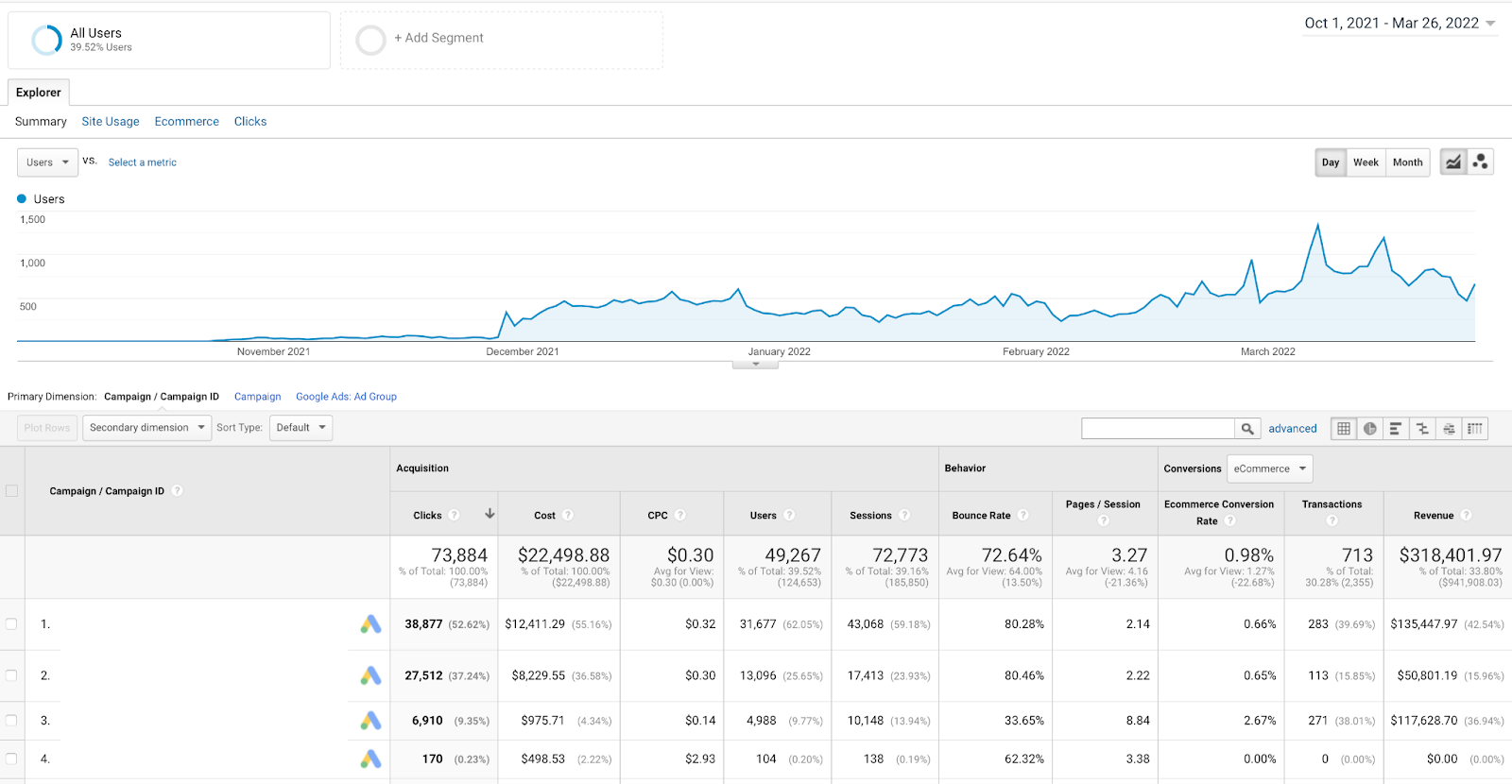
Case Study: XYZ Home Goods
XYZ Home Goods, an online retailer specializing in eco-friendly home products, launched a Google Ads campaign targeting environmentally conscious consumers. They utilized a mix of search and display ads to reach potential customers actively searching for sustainable home solutions.
Within six months of launching their campaign, XYZ Home Goods reported a 45% increase in website traffic and a 30% boost in conversion rates. Their strategy included targeted keywords such as “eco-friendly home decor” and “sustainable kitchenware,” ensuring they reached a relevant audience.
Analysis of Strategies Used
- Keyword Targeting: XYZ Home Goods focused on long-tail keywords that matched user intent, improving ad relevance and reducing cost-per-click.
- Ad Extensions: They implemented site link and callout extensions, which increased their ad visibility and provided additional information to potential customers.
- Remarketing Campaigns: The store utilized remarketing strategies to re-engage visitors who had previously shown interest, leading to higher conversion rates.
Lessons Learned from Failures and Successes
While XYZ Home Goods achieved notable success, they also faced challenges. Initially, their ads were too broad, leading to a high bounce rate of 60%. By refining their targeting and focusing on niche markets, they improved user engagement significantly. Key takeaways include:
- Refine keyword lists regularly based on performance data.
- Test different ad formats to determine which resonates best with the target audience.
- Monitor and adjust budgets based on campaign performance metrics.
Expert Insights: Common Misconceptions
Many Shopify store owners mistakenly believe that a higher budget guarantees success in Google Ads. However, effective targeting and ad optimization are often more critical than sheer spending. Additionally, it is a misconception that Google Ads only benefit larger brands. Small to medium-sized businesses can achieve significant results by focusing on niche markets and leveraging local targeting strategies.
Practical Application
To replicate the success seen by XYZ Home Goods, Shopify store owners should:
- Conduct thorough keyword research to identify long-tail keywords relevant to their products.
- Utilize ad extensions to enhance visibility and provide more information to potential customers.
- Implement remarketing strategies to engage previous visitors and boost conversion rates.
By applying these insights and strategies, Shopify businesses can effectively leverage Google Ads for increased visibility and sales growth.
Integrating Google Ads with Shopify SEO
This section explores the complementary relationship between Google Ads and SEO for Shopify stores, highlighting how paid advertising can enhance organic visibility and overall marketing effectiveness.
Understanding the Synergy Between Paid and Organic Search
The integration of Google Ads with Shopify SEO creates a powerful synergy that amplifies online visibility. While SEO focuses on organic search traffic through strategies like keyword optimization, backlink building, and quality content creation, Google Ads provides immediate visibility on search results pages. The dual approach allows businesses to capture a broader audience, as 70% of clicks on search results are attributed to organic listings, while 15% come from paid ads. This dynamic ensures that even if organic rankings fluctuate, paid ads can maintain visibility and drive traffic.
Using Google Ads Data to Inform SEO Strategies
Data from Google Ads can significantly enhance SEO strategies. By analyzing metrics such as click-through rates (CTR), conversion rates, and high-performing keywords, Shopify store owners can identify which terms resonate with their audience. For instance, if a specific keyword generates high traffic through ads, it may warrant further optimization in organic content. Additionally, tools like Google Analytics allow for tracking user behavior, revealing what content engages visitors, thus guiding future SEO efforts.
Balancing Paid Ads with Organic Traffic Growth
A sustainable marketing strategy requires a balance between paid advertising and organic growth. Relying solely on Google Ads can lead to increased costs without fostering a long-term customer base. Conversely, focusing exclusively on SEO may limit immediate revenue potential. A balanced approach involves allocating budget to Google Ads for immediate visibility while investing in SEO to build a robust organic presence. For example, a Shopify store may choose to run promotions through Google Ads while concurrently optimizing product descriptions and blog content to improve organic rankings.
Creating a Cohesive Marketing Strategy
A cohesive marketing strategy integrates Google Ads and Shopify SEO efforts for maximum impact. This involves aligning messaging across both channels, ensuring that ad content reflects the same tone and keywords as organic content. Utilizing remarketing campaigns through Google Ads can also reinforce brand awareness among users who have previously engaged with the website. According to recent studies, businesses that implement a cohesive strategy see a 30% higher engagement rate compared to those that operate in silos.
Common misconceptions about the relationship between Google Ads and SEO suggest that one can entirely replace the other. However, both strategies serve distinct purposes and complement each other effectively. For example, while Google Ads can drive immediate traffic, a well-optimized SEO strategy builds lasting authority and trust with search engines. Furthermore, seasonal trends can impact the effectiveness of both strategies; thus, flexibility and a willingness to adapt are essential.
To effectively integrate Google Ads with Shopify SEO, store owners should:
- Conduct keyword research using both Google Ads and SEO tools to identify high-value terms.
- Utilize Google Ads insights to refine SEO content and improve organic rankings.
- Monitor performance metrics regularly to adjust budget allocations between paid and organic strategies.
- Ensure consistent messaging across both Google Ads and organic content to enhance brand recognition.
By following these steps, Shopify store owners can create a dynamic marketing approach that leverages the strengths of both Google Ads and SEO to drive traffic, enhance visibility, and increase conversions.
Evaluating the Best Google Ads For Shopify Store
In the rapidly evolving landscape of digital marketing, comparing Google Ads providers is essential for Shopify store owners to maximize ROI. The global digital advertising market is projected to reach $786.2 billion by 2026, highlighting the importance of selecting the right tools for effective ad management. Key criteria for evaluation include pricing, features, and target audience alignment.
| Provider / Option | Best For | Pricing | Key Feature |
|---|---|---|---|
| AdEspresso | Small to medium businesses | $49 – $499/month | User-friendly interface with A/B testing |
| WordStream | Agencies managing multiple clients | $264/month | Comprehensive reporting tools |
| SEMrush | SEO and PPC integration | $119.95/month | Keyword research and competitive analysis |
| Google Ads Smart Campaigns | Beginners with limited time | Pay-per-click model | Automated ad creation |
| HubSpot Ads Software | Inbound marketing-focused brands | $800/month | Integration with CRM tools |
Criteria for Evaluating Program Quality
Pricing: Assess the total cost of ownership, including any hidden fees or additional charges. Ensure the pricing aligns with your budget and expected return on investment.
Key Features: Identify which features are most relevant to your business needs. Look for tools that offer A/B testing, reporting capabilities, and integration with existing systems to enhance your ad performance.
Target Audience: Understand who the provider is best suited for. Some tools cater to small businesses, while others are designed for agencies or larger enterprises. Choose a provider that aligns with your business scale and marketing goals.
User Experience: Evaluate the user interface and ease of use. A platform with a user-friendly design can significantly reduce the learning curve and enhance productivity, especially for those with limited marketing experience.
How to Assess the Reputation and Reliability of Providers
- Check Customer Reviews: Look for reviews on independent platforms to gauge user satisfaction and identify any recurring issues.
- Evaluate Case Studies: Review case studies on the provider’s website to see how they have helped businesses similar to yours achieve their goals.
- Examine Support Options: Investigate the customer support options available, including response times and the availability of resources like tutorials or webinars.
- Request Demos: If possible, ask for a demo or trial period to test the platform firsthand and determine if it meets your needs.
- Verify Industry Recognition: Look for any awards or recognitions from industry experts or organizations that validate the provider’s credibility.
Which Google Ads For Shopify Store Is Right for You?
Choosing the right Google Ads solution for your Shopify store hinges on your specific business needs, budget, and goals. This decision guide outlines tailored recommendations based on different roles within the e-commerce ecosystem.
Solo entrepreneur
Solo entrepreneurs should consider Google Ads Smart Campaigns for a user-friendly experience. This option allows for easy setup and management, making it ideal for those with limited time and expertise. Costs can start as low as $10 per day, allowing for flexibility as you scale your advertising efforts.
E-commerce manager
E-commerce managers will benefit from using AdEspresso, which provides robust A/B testing features. This tool enables detailed analysis and optimization of ad performance across multiple campaigns, helping to enhance ROI. Subscription costs start around $49 per month, making it a valuable investment for serious optimization.
Digital marketing agency
For digital marketing agencies, WordStream is an excellent choice for managing multiple client accounts efficiently. Its comprehensive dashboard allows for streamlined PPC campaign management and reporting, which is essential for maintaining client satisfaction. Pricing typically starts at $264 per month, depending on the number of accounts managed.
SEO specialist
SEO specialists should integrate their strategies with PPC campaigns using SEMrush. This tool provides insights that help align SEO and paid search efforts, ensuring a cohesive approach to online visibility. SEMrush plans start at $119.95 per month, offering extensive features for both SEO and PPC analysis.
Local business owner
Local business owners should focus on the local targeting options within Google Ads to enhance their reach. Utilizing location-based keywords and geo-targeting can significantly increase foot traffic and local engagement. Starting with a daily budget of $20 can help test the waters effectively.
| If You Are… | Best Approach |
|---|---|
| Solo entrepreneur | Google Ads Smart Campaigns |
| E-commerce manager | AdEspresso for A/B testing |
| Digital marketing agency | WordStream for client management |
| SEO specialist | SEMrush for integration |
| Local business owner | Local targeting in Google Ads |
Local Considerations for Google Ads for Your Shopify Store
Understanding local market dynamics is crucial for optimizing Google Ads for a Shopify store. With 46% of all Google searches seeking local information, leveraging geographic targeting in ad campaigns can significantly enhance visibility and conversion rates. Local customers are 29% more likely to make a purchase after performing a local search, underscoring the importance of location-specific strategies.
Geographic Market Differences
In larger cities like New York or Los Angeles, competition for Google Ads can be fierce, necessitating higher bids and more tailored ad copy. Conversely, in smaller towns or rural areas, local Shopify stores may benefit from lower competition and potentially lower costs per click. Businesses in competitive markets should focus on niche keywords and local landmarks to stand out, while those in less competitive areas can capitalize on broader terms with less investment.
Local Business Applications
Local businesses can harness the power of Google Ads to drive foot traffic and online sales effectively. Consider these applications:
- Promoting seasonal sales or local events directly to nearby customers.
- Targeting specific neighborhoods with tailored messaging to enhance community engagement.
- Utilizing local inventory ads to showcase products available for immediate pickup.
- Running promotions tied to local holidays or festivals, increasing relevance and urgency.
Local Search and Visibility Impact
The integration of Google Ads with local search strategies can significantly boost visibility on Google Business Profiles (GBP) and improve local citations. To optimize for local search, businesses should:
- Ensure their Google Business Profile is fully optimized with accurate location, hours, and services.
- Incorporate location-based keywords into ad copy and landing pages.
- Utilize location extensions in Google Ads to display addresses and phone numbers directly in ads.
- Encourage customer reviews to enhance local rankings and credibility.
- Monitor local search performance regularly to adjust bids and targeting as needed.
Pricing and Cost in Local Markets
Costs for Google Ads can vary significantly based on geographic market. In competitive urban markets, businesses may face average cost-per-click (CPC) rates of $2.50 to $5.00, while in less competitive areas, CPC can drop to $1.00 to $2.00. Local businesses should budget around $500 to $2,000 monthly for targeted campaigns, depending on their market and advertising goals. In contrast, national players may allocate significantly higher budgets to maintain visibility across broader regions.
Local Implementation Checklist:
- Optimize your Google Business Profile with accurate information.
- Research local keywords relevant to your products.
- Set a monthly budget tailored to your local market conditions.
- Create targeted Google Ads campaigns focused on local demographics.
- Utilize location extensions in your ads.
- Encourage local customer reviews for credibility.
- Monitor and adjust bids based on local competition and performance.
For Shopify Store businesses looking to generate local leads through Google Ads or Local SEO, GMB Ranger LLC offers hands-on campaign management. Specialist Md Tangeer Mehedi personally handles campaign setup and ongoing optimization — with no payment required until the first lead comes in.
Frequently Asked Questions
What are Google Ads for a Shopify store?
Google Ads for a Shopify store are online advertisements that promote products or services directly on Google’s search results and partner sites. These ads help drive targeted traffic to your store, increasing visibility and potential sales.
How to set up Google Ads for my Shopify store?
To set up Google Ads for your Shopify store, create a Google Ads account and link it to your Shopify store. Use the Shopify Google channel to facilitate product setup and manage your campaigns effectively.
What is the cost of Google Ads for Shopify?
The cost of Google Ads for Shopify varies based on factors like keywords, competition, and your budget. Advertisers typically pay on a pay-per-click basis, meaning you only pay when someone clicks your ad.
How long does it take to see results from Google Ads?
Results from Google Ads can be seen within days, but significant outcomes may take several weeks as campaigns optimize. Continuous monitoring and adjustments can enhance performance over time.
What are the best practices for Google Ads in Shopify?
Best practices for Google Ads in Shopify include using relevant keywords, optimizing ad copy, and utilizing targeted audiences. Regularly analyzing performance data and adjusting bids can improve campaign effectiveness.
How do Google Ads compare to Facebook Ads for Shopify?
Google Ads typically target users actively searching for products, while Facebook Ads focus on users based on interests and demographics. Both platforms can be effective, but their strategies and audience engagement differ significantly.
Can I target local customers using Google Ads for my Shopify store?
Yes, Google Ads allows you to target local customers by setting geographic parameters for your campaigns. This feature is beneficial for Shopify stores looking to attract nearby shoppers.
Final Thoughts on Google Ads for Shopify Store
Effective utilization of Google Ads can transform a Shopify store into a thriving e-commerce powerhouse, driving targeted traffic and increasing sales. Mastering the intricacies of ad setup, budget management, and strategic optimization is essential for achieving sustainable growth and maximizing ROI.
To enhance your Google Ads performance, conduct a thorough analysis of your competitors’ ad strategies and incorporate high-performing keywords into your campaigns. This targeted approach will help you refine your ads and better capture your audience’s attention.
Ready to elevate your Shopify store’s performance? Consider partnering with a google ads management agency to maximize your advertising efforts and achieve your business goals.
Investing time in mastering Google Ads is not merely an option; it is a crucial step in ensuring the long-term success of your Shopify store in an increasingly competitive digital landscape.
Leave a Reply