
Yes, you can add negative keywords in Google Ads to prevent your ads from showing for specific search terms. This feature enhances targeting precision and minimizes wasted ad spend.
Understanding how to utilize negative keywords is crucial for advertisers aiming to optimize their campaigns. Mismanagement of keywords can lead to irrelevant clicks, inflated budgets, and ultimately, poor campaign performance.
This guide will explain the process of adding negative keywords, the different types available, and best practices for effectively managing them in your Google Ads account.
For Can You Add Negative Keywords Google Ads businesses looking to generate local leads through Google Ads or Local SEO, GMB Ranger LLC offers hands-on campaign management. Specialist Md Tangeer Mehedi personally handles campaign setup and ongoing optimization — with no payment required until the first lead comes in.
What are negative keywords in Google Ads?
Negative keywords in Google Ads are specific terms that prevent ads from being triggered by certain search queries. They help advertisers exclude irrelevant traffic, ensuring that ads are shown only to users who are more likely to convert. By carefully selecting negative keywords, businesses can optimize their ad spend and improve campaign performance.
Negative keywords serve as a filter, allowing advertisers to refine their targeting strategy. For instance, if a company sells premium shoes, it may want to exclude searches that include the word “cheap.” This way, the ads will not be displayed to users looking for low-cost options, which are unlikely to convert into sales. Implementing negative keywords can significantly enhance the quality of traffic, leading to higher click-through rates (CTR) and better return on investment (ROI).
- Broad Match Negative Keywords: These will exclude any search queries that contain the specified term, regardless of the other words in the query.
- Phrase Match Negative Keywords: These will only exclude searches that contain the exact phrase specified, maintaining relevance for other terms.
- Exact Match Negative Keywords: These will exclude searches that exactly match the specified term, preventing unwanted impressions from closely related searches.
Choosing the right negative keywords requires ongoing analysis of search query reports to identify terms that generate clicks without conversions. Implementing these keywords is not a one-time task; it necessitates regular adjustments based on performance data. This dynamic approach helps maintain ad relevance and ensures that budgets are allocated efficiently.
Expert Tip: Regularly review search term reports to identify new negative keywords that can be added to your campaigns. This proactive management can prevent wasted ad spend and enhance overall campaign effectiveness.
How do you add negative keywords to Google Ads?
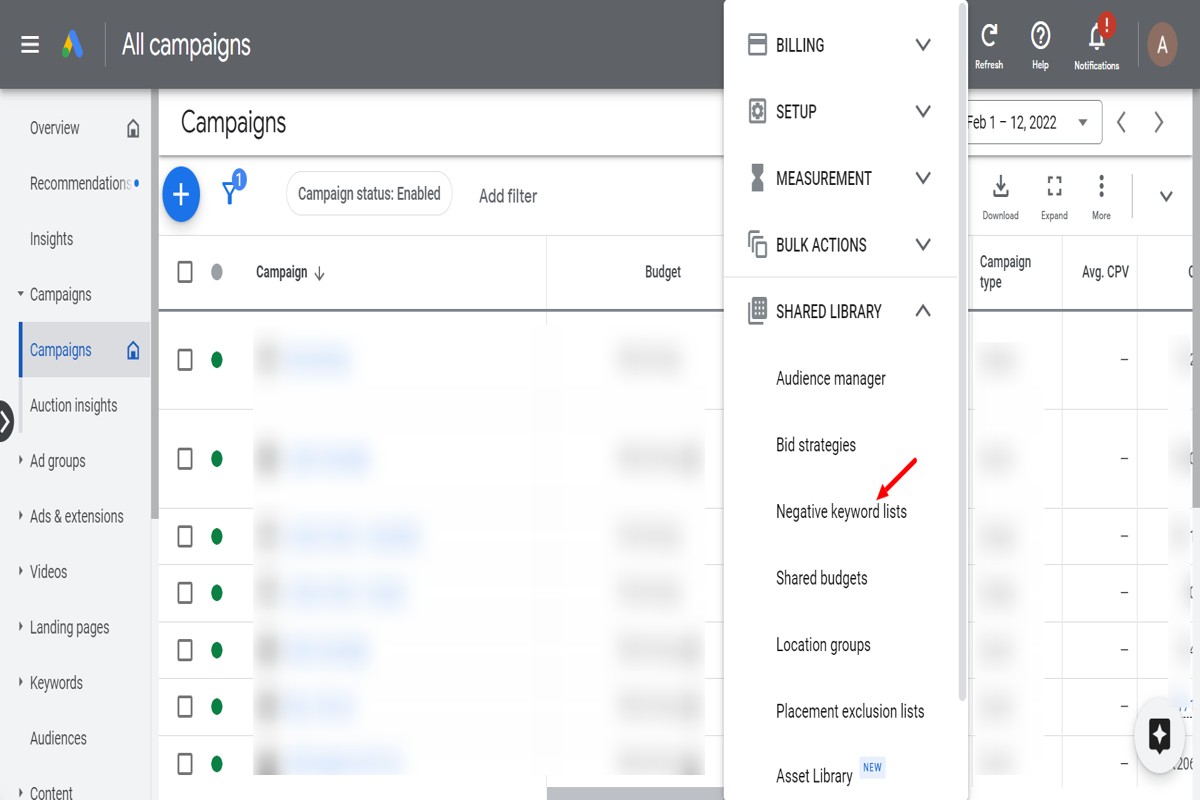
You can add negative keywords to Google Ads through the platform’s interface, enabling you to prevent your ads from showing for specific search terms. This process helps improve campaign targeting and efficiency by filtering out irrelevant traffic. Follow these steps to effectively add negative keywords to your campaigns.
- Sign in to your Google Ads account. Navigate to the Google Ads homepage and enter your login credentials to access your account dashboard.
- Select the campaign or ad group. In the campaign list, click on the specific campaign or ad group where you want to add negative keywords.
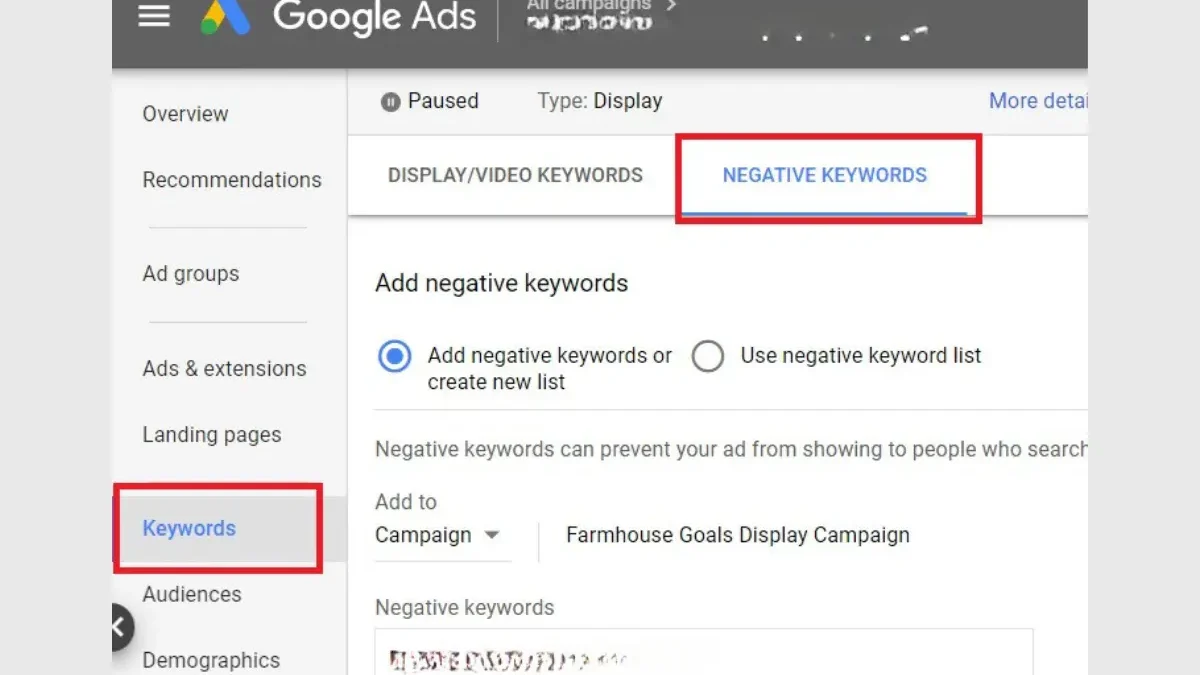
- Open the Keywords section. On the left-hand menu, find and click on “Keywords.” This will display both your positive and negative keywords.
- Click on Negative Keywords. Within the Keywords section, look for the “Negative Keywords” tab and click it to manage your negative keyword list.
- Add negative keywords. Click the plus (+) button to add new negative keywords. You can input them individually or upload a list, and select whether these keywords will apply to the campaign or ad group level.
- Save your changes. After entering the negative keywords, click “Save” to apply the changes. This will ensure that your ads are excluded from searches containing these terms.
Regularly review and update your negative keyword list to maintain optimal campaign performance. Consider using the search terms report to identify new negative keywords based on actual search queries that triggered your ads.
Expert Tip: Utilize broad match negative keywords strategically to eliminate a wide range of irrelevant queries. This can significantly enhance your ad relevance and click-through rates, improving overall campaign ROI.
What is the difference between negative keywords and regular keywords?
Negative keywords and regular keywords serve distinct purposes in Google Ads campaigns. Regular keywords trigger ads to show when users search for those terms, while negative keywords prevent ads from appearing for specific searches. This fundamental difference impacts how advertisers manage their campaigns and allocate their budgets.
Regular keywords are the terms that advertisers bid on to ensure their ads are displayed to users searching for relevant products or services. These keywords can be broad, phrase, or exact match, allowing for a range of search queries to trigger the ads. The goal is to maximize visibility and attract potential customers actively seeking what the advertiser offers.
In contrast, negative keywords are used to filter out specific search terms that are not relevant to the business. By adding negative keywords, advertisers can avoid showing their ads for queries that may lead to low-quality traffic or irrelevant clicks. This not only helps in saving budget but also improves the overall click-through rate (CTR) and conversion rates by ensuring ads are shown to a more targeted audience.
- Function: Regular keywords attract traffic; negative keywords block unwanted traffic.
- Purpose: Regular keywords aim to generate leads; negative keywords aim to refine and optimize ad visibility.
- Impact on Budget: Regular keywords can increase spending; negative keywords help conserve budget by avoiding irrelevant clicks.
Expert Tip: Regularly reviewing and updating negative keywords is essential for maintaining an effective Google Ads campaign. This practice allows advertisers to adapt to changing search behaviors and continually improve targeting strategies.
How much can negative keywords save you in Google Ads?
Utilizing negative keywords in Google Ads can lead to savings of 20% to 30% on your advertising costs by significantly reducing irrelevant clicks. This reduction translates directly to improved return on investment (ROI) as your budget is redirected toward more relevant traffic.
Cost savings from negative keywords are influenced by several factors. These factors include the competitiveness of your industry, the volume of irrelevant searches, and the overall effectiveness of your keyword strategy. By carefully selecting negative keywords, advertisers can better control their spend and direct funds toward more valuable clicks.
- Industry Competitiveness: Highly competitive industries may experience more wasted clicks, making negative keywords essential for cost control.
- Volume of Irrelevant Searches: The more irrelevant searches triggered by your ads, the higher the potential savings when negative keywords are applied.
- Keyword Strategy Effectiveness: A well-researched and executed keyword strategy that includes negative keywords can lead to better-targeted ads and improved click-through rates (CTR).
Implementing negative keywords not only saves costs but also enhances ad performance. By filtering out unwanted traffic, advertisers can achieve higher quality scores, leading to lower costs per click (CPC) and improved ad placements.
Expert Tip: Regularly review search term reports to identify new negative keywords. This proactive approach ensures continuous refinement of your campaigns, maximizing cost savings and ad effectiveness over time.
How long does it take to see results from adding negative keywords?
Typically, results from adding negative keywords in Google Ads can be seen within 24 hours to a week. However, the exact timeframe may vary based on several factors, including campaign settings, keyword competition, and traffic volume.
The immediate impact of adding negative keywords can often be observed within a day. This is especially true for campaigns with high traffic, where ad impressions can change rapidly. In contrast, campaigns with lower traffic may take longer to reflect changes, as fewer users are exposed to the ads. Additionally, if the negative keywords are applied to a broad range of campaigns or ad groups, the effects may manifest more quickly across those areas.
Other factors that may influence the timeline include the existing quality of the ads and keywords, the overall budget allocated to the campaigns, and the competitive landscape. If the negative keywords significantly reduce irrelevant traffic, the campaign may show improved performance metrics, such as a higher click-through rate (CTR) or lower cost per conversion, within a week. However, ongoing monitoring is essential to accurately assess the long-term impact of these adjustments.
Practical Implications
After implementing negative keywords, it is advisable to allow at least two weeks for comprehensive analysis. This period enables advertisers to collect enough data to evaluate performance trends and make informed decisions about future adjustments. Regular review of search term reports can further help identify additional negative keywords that may enhance campaign efficiency.
Expert Tip: Always align negative keywords with your overall marketing strategy. Regularly updating your negative keyword list can prevent wasted spend and improve ROI, ensuring that your ads reach the most relevant audience.
What are the best practices for using negative keywords in Google Ads?
To maximize the effectiveness of Google Ads campaigns, implementing negative keywords is essential. Negative keywords prevent ads from appearing for specific search queries that are irrelevant or unprofitable. This strategic approach helps improve click-through rates and overall return on investment.
Effective management of negative keywords involves several best practices:
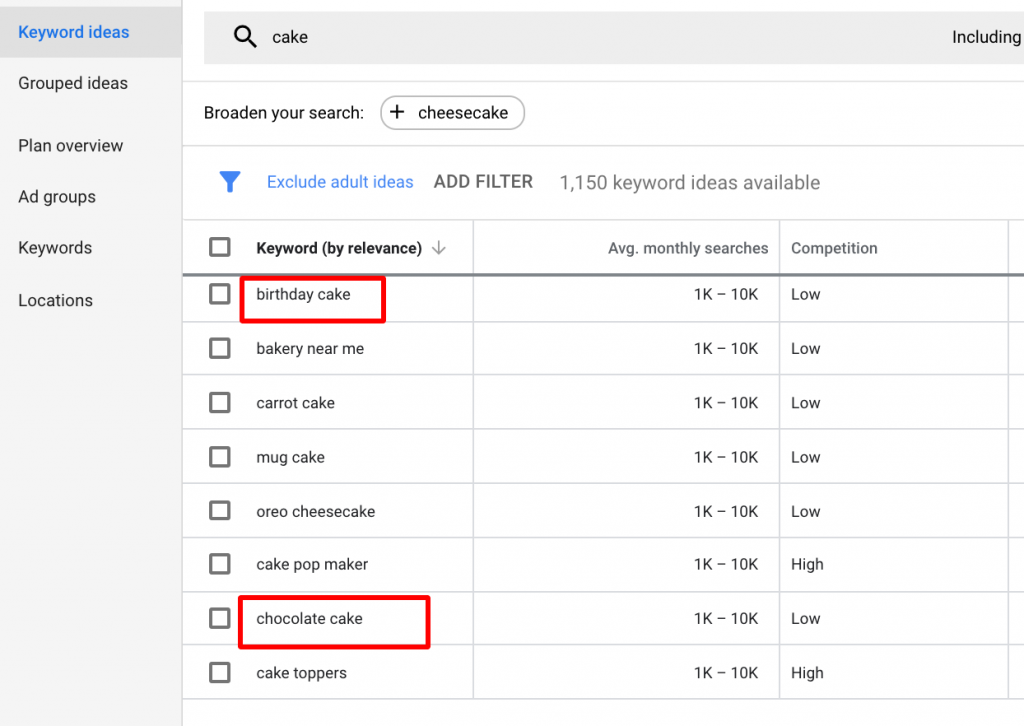
- Conduct Thorough Keyword Research: Use tools like Google Keyword Planner to identify keywords that are frequently searched but do not align with your offerings. This helps in compiling a comprehensive list of terms to exclude.
- Regularly Review Search Term Reports: Analyze the search terms that trigger your ads. This allows you to identify irrelevant terms that may not have been initially considered, enabling you to refine your negative keyword list continuously.
- Organize Negative Keywords by Campaign or Ad Group: Structure your negative keywords hierarchically. This ensures that specific keywords are excluded from relevant campaigns without impacting others, enhancing targeting precision.
- Use Broad Match Negative Keywords Wisely: Implement broad match negative keywords to exclude variations of a term. However, monitor the impact closely to avoid inadvertently blocking relevant traffic.
- Test and Iterate: Regularly evaluate the performance of your campaigns after adding new negative keywords. Adjust your strategy based on the outcomes to ensure that your ads remain relevant and effective.
Effective use of negative keywords can significantly enhance ad performance and reduce wasted spend. Analyzing performance data and maintaining flexibility in your keyword strategy will yield the best results over time.
Expert Tip: Consider creating a separate campaign focused solely on negative keywords. This allows for easier management and evaluation of their impact on overall campaign performance, ensuring continuous optimization.
Can you use negative keywords for specific campaigns only?
Yes, negative keywords can be applied to specific campaigns in Google Ads. This allows advertisers to refine targeting and optimize their ad spend by excluding irrelevant search terms for individual campaigns without impacting the entire account.
For example, consider a company that sells athletic shoes and has separate campaigns for running shoes and casual sneakers. If the running shoes campaign includes a negative keyword like “casual,” this prevents ads from showing when users search for “casual running shoes.” In this case, the negative keyword is specific to the running shoes campaign, ensuring that the ads only reach users genuinely interested in running products.
In contrast, if the company adds “cheap” as a negative keyword at the account level, it will affect all campaigns. This means that none of the campaigns—running shoes or casual sneakers—will appear for searches that include “cheap.” This broader application might be useful for maintaining brand positioning, but it can limit visibility across campaigns where price-sensitive customers may be relevant.
Expert Tip: Regularly review search term reports to identify negative keywords that can enhance specific campaigns. Tailoring negative keywords at the campaign level can significantly improve ad relevance and increase conversion rates.
Advanced Strategies for Negative Keyword Management
This section delves into sophisticated strategies for managing negative keywords in Google Ads, emphasizing their critical role in enhancing campaign efficiency and targeting precision.
Utilizing Keyword Research Tools
Leveraging keyword research tools can significantly enhance the identification of potential negative keywords. Tools such as Google Keyword Planner, SEMrush, and Ahrefs provide insights into search volume, competition, and related queries. By analyzing these metrics, advertisers can uncover irrelevant or low-performing terms that could negatively impact campaign performance.
Segmenting Negative Keywords
Segmenting negative keywords by campaign and ad group allows for more tailored targeting. This strategy ensures that specific negative keywords do not hinder relevant ads from appearing. For instance, if a campaign focuses on “running shoes,” including “free” as a negative keyword in that specific campaign prevents ads from being shown to users searching for “free running shoes,” thus optimizing ad spend.
Regular Review and Updates
Consistently reviewing and updating negative keyword lists based on performance data is essential. Campaign performance can change due to shifts in consumer behavior or market trends. Analyzing search term reports regularly helps identify new irrelevant keywords or confirm the continued relevance of existing ones. A quarterly or bi-monthly review cycle is often effective for many advertisers.
Implementing Negative Keyword Match Types
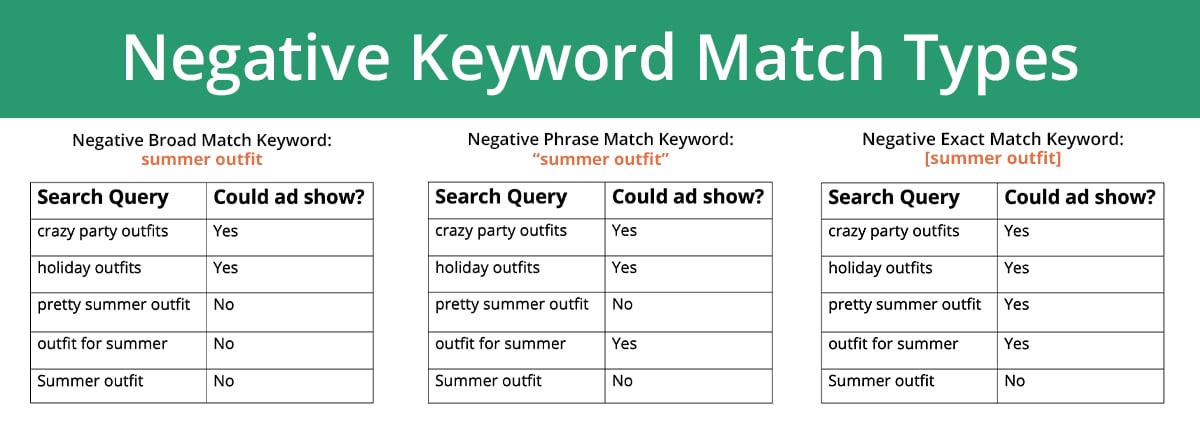
Employing different negative keyword match types provides advertisers with precise control over which searches trigger their ads. Google Ads offers three match types for negative keywords: Negative Broad Match, Negative Phrase Match, and Negative Exact Match. Each type allows varying levels of specificity:
- Negative Broad Match: Excludes searches containing the negative keyword in any order.
- Negative Phrase Match: Excludes searches containing the exact phrase of the negative keyword.
- Negative Exact Match: Excludes searches that exactly match the negative keyword.
Nuance and Expert Layer
Common misconceptions surround the use of negative keywords, particularly the belief that they should only be added in reaction to poor performance. In reality, proactive negative keyword management can prevent issues before they arise. Additionally, many advertisers neglect the importance of negative keywords in brand safety. For instance, if an ad for luxury watches uses “cheap” as a negative keyword, this not only filters out low-quality traffic but also reinforces brand positioning. Understanding the broader implications of negative keyword strategies can lead to a more robust campaign framework.
Practical Application
To effectively implement these strategies, advertisers should follow these actionable steps:
- Use keyword research tools to compile a list of potential negative keywords.
- Organize negative keywords by campaign and ad group to enhance targeting accuracy.
- Regularly analyze performance data and update negative keyword lists accordingly.
- Utilize various negative keyword match types to refine ad targeting.
By applying these advanced strategies, advertisers can significantly improve their ad performance and budget efficiency, ensuring that they reach the right audience with the right message.
Common Mistakes to Avoid with Negative Keywords
Effectively managing negative keywords is essential for optimizing Google Ads campaigns. This section identifies common pitfalls that advertisers encounter, providing insights to enhance campaign performance.
Overloading Campaigns with Too Many Negative Keywords
One prevalent mistake is adding an excessive number of negative keywords to campaigns. While the intention is to refine targeting, overloading can lead to unintended consequences. A bloated negative keyword list can inadvertently exclude relevant traffic, hindering visibility and lowering overall impressions. Focus on the most impactful terms that clearly align with your campaign goals.
Neglecting to Monitor the Impact of Negative Keywords
Many advertisers fail to regularly assess how negative keywords affect their campaigns. This oversight can prevent identification of negative keywords that may be limiting reach or performance. Conduct routine performance reviews to analyze metrics such as click-through rates (CTR) and conversion rates. If certain negative keywords are consistently blocking valuable traffic, consider revising or removing them.
Failing to Differentiate Between Broad and Exact Match Negative Keywords
Understanding the distinction between broad match and exact match negative keywords is crucial. Broad match negative keywords prevent ads from showing for any search query that contains the specified term, regardless of order. In contrast, exact match negative keywords restrict ads only for searches that precisely match the term. Misuse of these match types can lead to overly restrictive targeting, limiting ad exposure unnecessarily.
Ignoring Seasonal Trends That May Require Adjustments
Seasonal trends can significantly influence search behavior, and failing to adjust negative keyword lists accordingly can result in missed opportunities. For instance, a product that is popular during the holidays may require a re-evaluation of negative keywords post-season. Regularly review keyword performance data and adjust negative keywords to align with changing consumer interests and search patterns.
Nuance in Negative Keyword Strategy
While the basics of negative keywords are straightforward, nuanced strategies can enhance effectiveness. For example, incorporating negative keyword lists at the campaign level versus the ad group level can create more tailored targeting. Additionally, some advertisers mistakenly believe that negative keywords only apply to search terms; however, they also influence how ads appear on the Google Display Network. Understanding these subtleties can lead to a more sophisticated approach to negative keyword management.
Practical Application
- Regularly audit your negative keyword list to ensure relevance and effectiveness.
- Monitor campaign performance metrics to gauge the impact of negative keywords.
- Differentiate between broad and exact match negative keywords to optimize targeting.
- Adjust negative keywords based on seasonal trends to capture changing consumer behavior.
By implementing these strategies, advertisers can maximize the benefits of negative keywords in Google Ads, enhancing overall campaign performance and achieving better results.
Real-World Applications of Negative Keywords in Different Industries
This section explores how various industries utilize negative keywords to refine their advertising strategies, enhance targeting, and ultimately improve their return on investment. By examining specific case studies, the practical implications of negative keywords become clear.
E-commerce: Reducing Irrelevant Traffic
In the e-commerce sector, negative keywords play a pivotal role in optimizing ad campaigns. For instance, an online clothing retailer may choose to exclude terms such as “free,” “cheap,” or “discount” from their campaigns. This strategy effectively filters out users who are not willing to pay full price, thereby increasing conversion rates.
- Targeted campaigns result in higher click-through rates.
- Excluding irrelevant terms reduces wasted ad spend.
- Improved user engagement leads to better overall campaign performance.
Travel: Tailoring for Seasonal Promotions
The travel industry frequently uses negative keywords to align with seasonal promotions. A ski resort, for example, might add negative keywords like “summer” or “beach” to avoid attracting users looking for warm-weather vacations. This ensures that marketing efforts reach individuals specifically interested in winter sports, thus maximizing booking potential during peak season.
Local Businesses: Enhancing Local Targeting
Local businesses often benefit from incorporating location-specific negative keywords. A coffee shop in Seattle might exclude terms such as “New York” or “Los Angeles” to prevent ads from appearing to users in unrelated geographic areas. By narrowing their focus, these businesses can enhance their visibility to potential customers in their immediate vicinity.
B2B: Filtering Out Non-Qualified Leads
In the B2B sector, negative keywords are essential for filtering out non-qualified leads. A software company might use negative keywords like “free trial” or “cheap software” to deter budget-conscious clients who are unlikely to convert into high-value customers. This approach helps in directing resources toward leads that align with their target audience profile.
Negative keywords can also be used to prevent ads from appearing alongside unrelated searches, which is particularly beneficial for B2B firms that require a more sophisticated lead generation approach.
Nuance / Expert Layer
While the benefits of negative keywords are widely recognized, misconceptions exist regarding their implementation. A common error is assuming that negative keywords only serve to exclude irrelevant traffic. However, they can also be strategically used to refine messaging. For example, a business might employ negative keywords not just to filter out “cheap” but also to clarify their brand positioning as premium. This distinction can impact how ads are perceived, helping to attract the right audience while maintaining brand integrity.
Practical Application
To effectively implement negative keywords in your Google Ads campaigns, consider the following steps:
- Identify irrelevant terms through keyword research and customer feedback.
- Compile a list of negative keywords specific to your industry and target audience.
- Regularly review and update your negative keyword list based on performance data.
- Utilize negative keywords in conjunction with other targeting options for optimal results.
By integrating these strategies, businesses can significantly enhance their ad campaigns and improve their overall advertising efficiency. Implementing negative keywords is a key step in ensuring that your advertising budget is spent effectively and that you reach the most relevant audience possible.
Comparative Analysis: Negative Keywords vs. Other Ad Targeting Techniques
This section delves into the relationship between negative keywords and other ad targeting techniques, providing insights into their distinct roles within Google Ads campaigns. Understanding these differences is essential for optimizing ad spend and improving campaign performance.
Negative Keywords vs. Keyword Match Types
Negative keywords serve a different purpose compared to standard keyword match types: broad, phrase, and exact. While match types determine when ads will trigger based on user search queries, negative keywords prevent ads from appearing for specific terms.
– **Broad Match**: Ads can show for searches that include misspellings, synonyms, and related searches.
– **Phrase Match**: Ads display for searches that include the exact phrase or close variations.
– **Exact Match**: Ads trigger only for searches that exactly match the keyword.
In contrast, negative keywords filter out irrelevant traffic. For instance, a business selling luxury watches may use “cheap” as a negative keyword to avoid budget-conscious shoppers. This precision helps maintain a high-quality audience and maximizes return on investment.
Negative Keywords vs. Audience Targeting
Audience targeting allows advertisers to focus on specific demographics, interests, or behaviors, ensuring ads reach the right people. However, negative keywords refine this approach by excluding certain queries that might attract unwanted traffic.
Consider a company marketing a high-end product. While they may target affluent audiences, negative keywords can further exclude terms like “discount” or “sale” to maintain brand positioning.
When to use each technique depends on campaign goals. If the objective is to enhance brand perception, negative keywords play a critical role. Conversely, if the aim is to broaden reach, audience targeting may take precedence.
Effectiveness of Negative Keywords vs. Negative Audiences
Negative audiences function similarly to negative keywords, allowing advertisers to exclude specific user groups from seeing their ads. However, there are key differences in application and effectiveness.
– **Negative Keywords**: Focus on specific search terms, enhancing relevance at the query level.
– **Negative Audiences**: Target broader user profiles based on behavior or interests.
A negative audience strategy might be effective for campaigns with a defined customer persona. However, negative keywords offer more granular control, particularly for campaigns with diverse products or services.
Negative Keywords with Ad Scheduling and Location Targeting
Integrating negative keywords with ad scheduling and location targeting can significantly enhance campaign efficiency.
– **Ad Scheduling**: This feature allows ads to run only at specific times. Combining it with negative keywords ensures that ads do not appear during hours when irrelevant searches are likely.
– **Location Targeting**: Advertisers can target specific geographical areas. Negative keywords can further refine this by excluding terms that may not resonate in certain locations, improving relevance.
For example, a regional restaurant chain may use negative keywords to exclude searches for “pizza” outside their service area, ensuring that ads are only served to potential customers within the targeted geographical zone.
Nuance and Expert Layer
A common misconception is that negative keywords are only beneficial for large-scale campaigns. In reality, even small businesses can leverage negative keywords effectively. For instance, a local service provider might find that excluding terms like “DIY” or “how to” can dramatically enhance ad performance, as these queries typically indicate users looking for free information rather than services.
Furthermore, advertisers often overlook the potential of regularly updating their negative keyword lists. Continuous analysis of search term reports can uncover new terms to exclude, adapting to market trends and consumer behavior shifts.
Practical Application
To optimize the use of negative keywords in Google Ads, follow these actionable steps:
1. **Conduct Keyword Research**: Identify potential negative keywords based on search intent.
2. **Analyze Search Term Reports**: Regularly review reports to discover irrelevant queries.
3. **Implement Negative Keywords**: Add identified terms to your campaigns to filter out unwanted traffic.
4. **Test and Adjust**: Monitor campaign performance and adjust negative keywords as necessary to maximize effectiveness.
By strategically incorporating negative keywords alongside other targeting techniques, advertisers can enhance their campaigns and drive more qualified traffic.
For Can You Add Negative Keywords Google Ads businesses looking to generate local leads through Google Ads or Local SEO, GMB Ranger LLC offers hands-on campaign management. Specialist Md Tangeer Mehedi personally handles campaign setup and ongoing optimization — with no payment required until the first lead comes in.
Frequently Asked Questions
What are negative keywords in Google Ads?
Negative keywords in Google Ads are terms that prevent your ads from showing for specific search queries. They help refine targeting by excluding irrelevant traffic, improving ad performance.
How do you add negative keywords to Google Ads?
To add negative keywords in Google Ads, navigate to the “Keywords” section of your campaign or ad group. From there, select “Negative Keywords” and input the terms you wish to exclude.
What is the difference between negative keywords and regular keywords?
Regular keywords trigger your ads to appear for relevant searches, while negative keywords prevent ads from showing for specific unwanted queries. This distinction enhances ad targeting and budget efficiency.
How much can negative keywords save you in Google Ads?
Negative keywords can significantly reduce wasted ad spend by filtering out irrelevant traffic. This targeted approach can lead to improved click-through rates and a better return on investment.
How long does it take to see results from adding negative keywords?
Results from adding negative keywords can often be seen within a few days to weeks, depending on campaign traffic. Monitoring performance metrics will help assess the impact of the changes.
What are the best practices for using negative keywords in Google Ads?
Best practices include regularly reviewing search term reports, using broad match negative keywords for wider exclusions, and organizing keywords into relevant lists. This approach ensures effective ad targeting and budget management.
Can you use negative keywords for specific campaigns only?
Yes, negative keywords can be applied at both the campaign and ad group levels in Google Ads. This flexibility allows for tailored exclusion strategies based on specific campaign goals.
Final Thoughts on can you add negative keywords google ads
Incorporating negative keywords into Google Ads campaigns is not merely a tactical adjustment; it is a strategic necessity that can significantly enhance ad performance, improve ROI, and streamline targeting. By effectively managing negative keywords, advertisers can eliminate wasteful spending and focus their budgets on high-intent traffic.
To maximize the benefits of negative keywords, conduct a thorough audit of your existing campaigns and identify terms that are triggering irrelevant clicks. Implement a structured approach to regularly update your negative keyword list based on performance data and emerging trends.
Mastering negative keyword management is essential for optimizing ad spend and driving qualified traffic, ultimately leading to greater business success.
Leave a Reply