
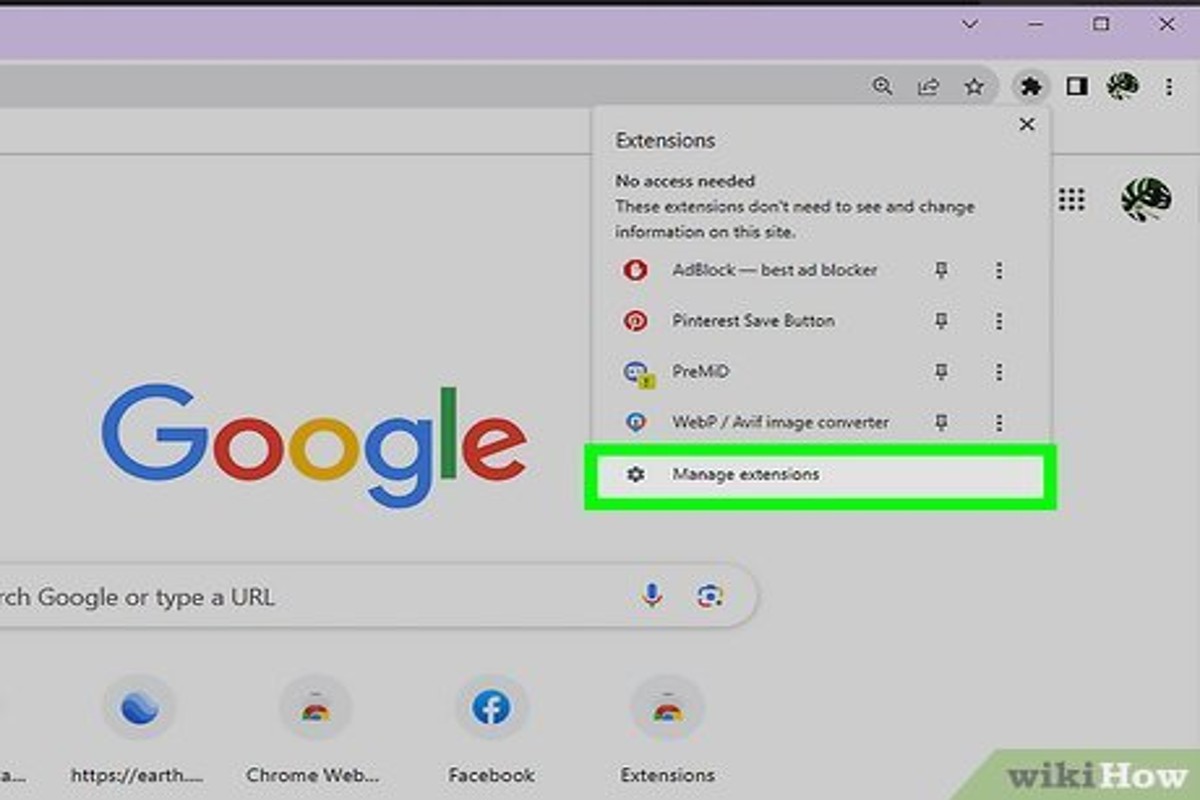
How to remove Google Ads involves accessing your Google Ads account, selecting the campaign to pause or delete, and choosing the appropriate option. Additionally, users can utilize browser extensions to block ads effectively.
This topic is crucial for businesses and individuals looking to manage their online advertising strategies effectively. Misunderstanding the process can lead to unintended ad spend or ineffective campaign management, impacting overall marketing performance.
This guide provides detailed steps for pausing or deleting campaigns within Google Ads, as well as recommendations for browser extensions that can block unwanted ads, ensuring a streamlined online experience.
For How To Remove Google Ads businesses looking to generate local leads through Google Ads or Local SEO, GMB Ranger LLC offers hands-on campaign management. Specialist Md Tangeer Mehedi personally handles campaign setup and ongoing optimization — with no payment required until the first lead comes in.
What are Google Ads and why would I want to remove them?
Google Ads are online advertisements created and managed through Google’s advertising platform, allowing businesses to promote their products and services across various websites and Google services. Users may wish to remove or block these ads for reasons such as reducing distractions, improving web page load times, or enhancing overall browsing experience.
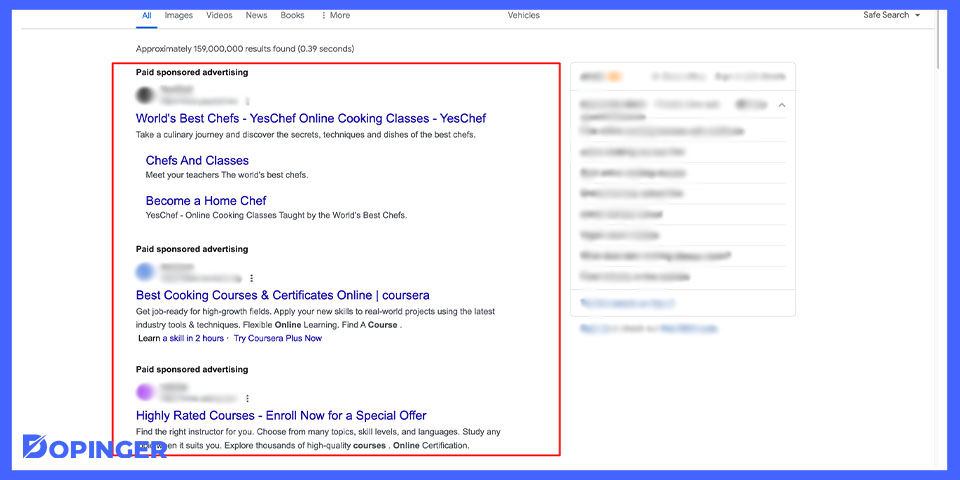
Google Ads can appear in multiple formats, including:
- Search Ads: Text-based ads that appear at the top of Google’s search results.
- Display Ads: Visual banner ads shown on websites within the Google Display Network.
- Video Ads: Ads that play before, during, or after video content on platforms like YouTube.
Common reasons for wanting to remove Google Ads include concerns about privacy, as ads are often targeted based on user behavior and preferences. Additionally, users may experience frustration with intrusive ads that disrupt content consumption or lead to slower browsing speeds. For some, the presence of ads can detract from the aesthetic appeal of a website, prompting them to seek solutions to block or limit these advertisements.
Moreover, there are practical implications for businesses that rely on Google Ads for revenue. If many users choose to block ads, it can impact the effectiveness of advertising campaigns, leading to reduced income for content creators who depend on ad revenue. This creates a balancing act between user experience and the financial viability of free online content.
Expert Tip: Utilizing ad-blocking browser extensions can significantly enhance your browsing experience, but be mindful that some websites may restrict access to their content if ad blockers are detected. Consider whitelisting sites that provide valuable content while still managing your ad exposure.
How do I remove Google Ads from my website?
To remove Google Ads from your website, you must disable or remove the ad code from your site’s HTML. This process varies slightly depending on the platform you are using to manage your website.
Follow these steps to effectively remove Google Ads:
- Identify the Ad Code: Locate the Google Ads code in your website’s HTML. This code is typically found in the header or footer sections of your site.
- Access Your Website’s Code: Use your website’s content management system (CMS) or FTP client to access the HTML files. For CMS platforms like WordPress, navigate to the theme editor.
- Remove the Ad Code: Delete the Google Ads script from the HTML. Ensure you are removing the correct code to avoid affecting other functionalities.
- Save Changes: After removing the code, save the changes to your HTML files. If using a CMS, make sure to update or publish the changes.
- Clear Cache: If your website uses a caching plugin or service, clear the cache to ensure the changes take effect immediately. This step prevents users from seeing the ads until the cache is refreshed.
- Verify Removal: Visit your website in an incognito browser window or after clearing your browser’s cache. Check to confirm that the ads have been successfully removed.
Removing Google Ads may impact your website’s revenue if you were monetizing through Google AdSense. Consider alternative monetization strategies if necessary.
Ensure that you regularly review your website’s code and settings. Keeping your site free from unwanted ads will enhance user experience and maintain your brand’s integrity.
What are the best practices for removing Google Ads?
To effectively remove Google Ads, users should implement a series of strategic practices that enhance their browsing experience. These methods range from adjusting account settings to utilizing specific tools designed for ad blocking. By following these best practices, users can significantly reduce or eliminate unwanted advertisements.
One of the most straightforward methods is to adjust ad settings within a Google account. Users can visit the Google Ads Settings page and turn off personalized ads, which limits the ads displayed based on user behavior. Additionally, users can opt-out of ad personalization entirely by adjusting their ad settings in their Google account.
- Use an Ad Blocker: Install a reputable ad blocker extension on your web browser. Popular options include AdBlock Plus, uBlock Origin, and Privacy Badger. These tools effectively block most Google Ads and other intrusive advertisements across websites.
- Clear Browsing Data: Regularly clear your browser’s cache and cookies. This action can reset ad targeting and may reduce the number of personalized ads you see. Most browsers offer this option under their settings menu.
- Disable JavaScript: For advanced users, disabling JavaScript can prevent many ads from loading. However, this may affect website functionality, so it should be used selectively.
- Utilize Incognito Mode: Browsing in Incognito or Private mode can limit tracking by preventing cookies from being stored. This mode can help you avoid personalized ads while browsing.
These strategies can be combined for more effective ad removal. Regularly reviewing and updating ad preferences ensures that users maintain a clutter-free browsing experience. Implementing these best practices not only enhances user satisfaction but also improves overall internet privacy.
Expert Tip: Consider using a VPN with ad-blocking capabilities for an additional layer of privacy and ad removal. This can help in masking your online activities while simultaneously reducing the number of ads displayed.
How much does it cost to remove Google Ads?
The cost to remove Google Ads can vary significantly based on the method used and the extent of the removal process. While some users may manage the removal independently at no cost, others may opt for professional services that can range from $50 to $500 or more, depending on specific needs.
Several factors influence the overall cost of removing Google Ads. These include:
- Method of Removal: Self-removal through settings or ad blockers incurs no financial cost, while hiring a digital marketing agency or consultant can lead to fees based on their hourly rates or project scope.
- Tools and Software: Utilizing third-party tools or software designed to block or manage ads may involve subscription fees, which can range from $10 to $30 per month.
- Ad Complexity: The complexity of the ads and the platforms involved can affect costs. For instance, removing ads from multiple platforms or dealing with advanced targeting options may require more extensive work.
Additionally, businesses may need to consider the potential loss of revenue when removing ads that drive traffic to their sites. This decision should be weighed against the benefits of a cleaner user experience and potential increases in organic traffic.
Expert Tip: Regularly reviewing and optimizing ad settings can reduce the need for removal, providing a balance between user experience and effective advertising. Investing in training for staff on ad management may yield long-term savings compared to outsourcing.
How long does it take to remove Google Ads?
Removing Google Ads can take anywhere from a few hours to several days, depending on the platform and the method used. For instance, if you are simply disabling ads on your own Google account, the process is immediate. However, if you are looking to remove ads from a website or application that you manage, it may take longer due to additional technical steps or approvals required.
For individual users wishing to disable personalized ads, the process involves accessing Google account settings and adjusting ad preferences. This typically takes less than an hour. In contrast, businesses managing Google Ads campaigns may require a more complex approach. They need to pause or delete campaigns in Google Ads, which can take several hours to complete, especially if there are multiple campaigns or if the user is unfamiliar with the interface.
Additionally, the time it takes for Google to process these changes can vary. Once a campaign is deleted or paused, it may take up to 24 hours for the ads to stop appearing. For websites or apps utilizing Google AdSense, removing ads can involve altering code or settings and may require additional time for changes to propagate across the platform.
Expert Tip: When removing Google Ads from a business perspective, consider analyzing campaign performance data beforehand. This can help in making informed decisions about which ads to remove and ensure that valuable insights are not lost during the process.
Can I remove Google Ads on mobile devices?
Yes, you can remove or block Google Ads on mobile devices through various methods. These methods include adjusting your ad settings, using ad blockers, and altering browser settings. While complete removal is challenging, significant reduction of ads is achievable.
To block Google Ads on mobile devices, start by managing your ad personalization settings. Visit your Google account settings and navigate to the “Data & Personalization” section. Here, you can turn off ad personalization, which will limit targeted ads based on your activity but may not eliminate all ads entirely.
- Use an Ad Blocker: Download a reputable ad blocker app from your device’s app store. These apps can effectively block ads across various browsers and apps, enhancing your browsing experience.
- Adjust Browser Settings: If you use a mobile browser, access its settings to enable features that block pop-ups and ads. Browsers like Chrome and Firefox have built-in options to reduce ad visibility.
- Disable Ads in Apps: Some apps allow you to disable ads through in-app settings. Check the settings menu of individual apps to see if this option is available, especially in free versions.
While these methods can significantly reduce the number of Google Ads you encounter on mobile devices, some ads may still appear due to the nature of free content and services. Regularly updating your ad-blocking tools and settings can enhance their effectiveness.
For optimal results, consider combining multiple strategies. Using an ad blocker alongside personalized ad settings will provide the best defense against intrusive advertising on mobile devices.
What are the common mistakes when trying to remove Google Ads?
Users often make several common mistakes when attempting to remove Google Ads, which can impede the effectiveness of their efforts. Key errors include overlooking ad settings, mismanaging browser extensions, and neglecting to clear cache regularly. Understanding these pitfalls can help streamline the ad removal process.
One frequent mistake occurs when users attempt to block ads without checking their browser settings. For instance, a user may install an ad-blocking extension without adjusting its settings, resulting in ineffective ad removal. They might also forget to enable or configure the ad-blocker correctly, allowing Google Ads to continue displaying. Always verify that the ad-blocker is activated and set to block ads effectively.
Another issue arises from not clearing the browser cache and cookies. For example, a user might install an ad-blocker but still see ads due to stored data. Browsers often retain cached versions of web pages, including advertisements, which can lead to confusion. Regularly clearing cache and cookies can help ensure that the latest settings are applied and ads are removed. Additionally, users may mistakenly believe that simply disabling ads on one platform will remove them across all devices, which is not the case. Each device and browser may require separate configurations.
Expert Tip: To enhance ad removal efforts, consider using a combination of ad-blocking extensions and privacy-focused browsers, as they can provide a more comprehensive solution against unwanted ads. Regularly updating these tools ensures optimal performance against evolving advertising techniques.
Are there alternatives to removing Google Ads?
Yes, there are several alternatives to removing Google Ads, including blocking, filtering, and customizing ad preferences. These methods allow users to manage their ad experience without entirely eliminating ads from their browsing sessions. Each option has its own advantages and limitations, making them suitable for different user preferences.
One common alternative is using ad blockers. These browser extensions prevent ads from displaying on websites, effectively removing them from the user’s view. Popular ad blockers include AdBlock Plus and uBlock Origin. While effective, ad blockers can sometimes disrupt website functionality, and some websites may prompt users to disable them to access content.
Another approach is adjusting ad settings within Google Account. Users can visit the Ad Settings page to control the types of ads displayed based on their interests. This method allows for a more tailored ad experience without completely blocking ads. However, some users may find that personalized ads are still intrusive, depending on their preferences.
- Ad Blockers: Prevent ads from displaying, but may affect website usability.
- Ad Settings: Customize the types of ads shown, but ads will still appear.
- Browser Settings: Use built-in features to limit tracking and ad personalization, but this may not remove all ads.
Each of these alternatives offers a way to mitigate the impact of Google Ads, but the effectiveness can vary based on individual usage patterns and preferences. Users should consider their specific needs and the potential trade-offs of each option before deciding on the best approach.
For a more controlled browsing experience, combining ad blockers with customized ad settings can significantly reduce unwanted ad exposure while retaining website functionality. This dual approach allows users to enjoy the benefits of a less cluttered online environment.
Advanced Techniques for Removing Google Ads
This section delves into advanced methods and tools for effectively removing Google Ads, providing a comprehensive understanding of how to enhance your browsing experience by minimizing unwanted advertisements.
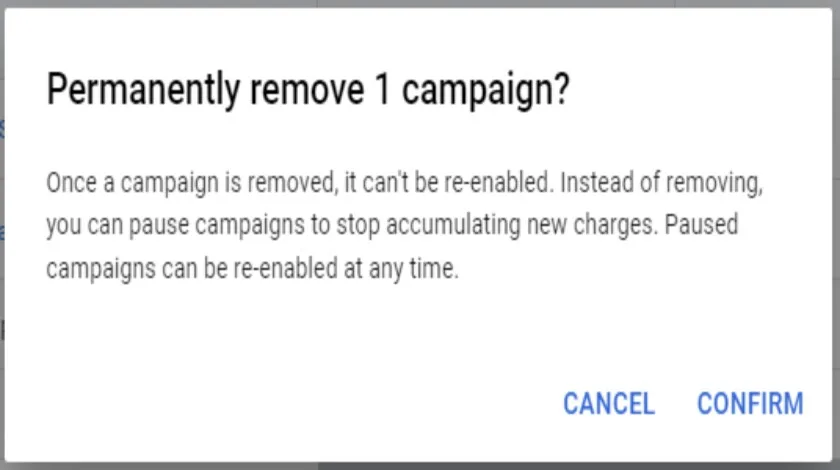
Utilizing Browser Extensions for Ad Blocking
Browser extensions serve as powerful tools for blocking ads, including Google Ads. Popular ad-blocking extensions such as uBlock Origin, Adblock Plus, and Ghostery can be installed on most major browsers. These extensions not only prevent ads from displaying but also enhance page load times and protect user privacy.
- uBlock Origin: Highly customizable and lightweight, it allows users to block specific elements on a webpage.
- Adblock Plus: Offers a user-friendly interface with adjustable settings and filter lists, making it suitable for novice users.
- Ghostery: Focuses on tracking prevention as well as ad blocking, providing insights into what trackers are present on a site.
Implementing Custom Scripts for Ad Removal
For users with programming knowledge, custom scripts can be employed to remove Google Ads directly from webpages. Tools like Greasemonkey or Tampermonkey allow users to run custom JavaScript to modify webpage content. By writing scripts that target specific ad elements, users can create a tailored browsing experience.
- Install Greasemonkey or Tampermonkey from your browser’s extension store.
- Create a new script and identify the HTML elements associated with Google Ads.
- Write JavaScript code to hide or remove these elements upon page load.
Leveraging Privacy-Focused Browsers
Privacy-focused browsers, such as Brave and Firefox Focus, come equipped with built-in ad-blocking features. These browsers not only block Google Ads but also safeguard user data from trackers and third-party advertisers. Switching to one of these browsers can significantly reduce ad exposure without the need for additional extensions.
Understanding Ad Settings in Google Accounts
Google provides users with control over personalized ads through their account settings. By accessing the Ad Settings page, users can adjust their preferences to limit the types of ads shown. Disabling ad personalization can reduce the frequency of targeted ads, although it may not eliminate all ads entirely.
To modify ad settings:
- Log into your Google Account.
- Navigate to the Data & Personalization section.
- Locate Ad Personalization and toggle it off.
Common misconceptions about ad blocking often involve the belief that all ads can be completely eliminated. While advanced techniques significantly reduce ad visibility, some ads may still appear due to site-specific coding or dynamic ad delivery methods. It is essential to remain updated on the latest ad-blocking technologies and methods to stay ahead of evolving advertising strategies.
To implement these advanced techniques effectively, users should consider installing a reputable ad-blocking extension, exploring custom scripts for specific needs, switching to a privacy-focused browser, and adjusting their Google account settings to limit ad personalization. Combining these methods will create a robust strategy for effectively managing and removing Google Ads.
Real-World Applications: Case Studies of Ad Removal
This section explores real-life examples of how removing Google Ads has positively impacted website owners and users. It highlights the benefits of ad removal through case studies, user testimonials, and a comparative analysis of ad removal versus ad blocking.
Case Study: Enhanced User Experience for a Blog Owner
A blog owner specializing in travel content decided to remove Google Ads to improve user experience. Previously, the site featured multiple ads, which detracted from the reading experience and led to high bounce rates. After removing the ads, the blog saw a 25% increase in average time spent on the site and a significant reduction in bounce rates. This change allowed users to focus on the content without distractions, resulting in more engaged readers.
Impact of Ad Removal on Traffic and Engagement
The removal of ads can significantly enhance user engagement metrics. In the aforementioned case, the blog reported a 30% increase in page views within three months of ad removal. User interaction, reflected through comments and shares, also rose by 40%. This shift illustrates that a cleaner, ad-free environment can cultivate a loyal readership, ultimately boosting both traffic and engagement.
Comparative Analysis: Ad Removal vs. Ad Blocking
- Ad Removal focuses on eliminating ads entirely from a website, providing a seamless user experience.
- Ad Blocking involves using software to prevent ads from displaying, which may not address the core issue of user engagement.
- While ad blocking can enhance user experience temporarily, it may lead to lost revenue for website owners, creating a cycle of reliance on ads for income.
Ad removal, on the other hand, fosters a more sustainable model by prioritizing user experience, potentially leading to increased organic traffic and revenue through alternative monetization strategies.
User Testimonials on the Benefits of Ad Removal
Feedback from users who have experienced ad removal often highlights the following benefits:
- Improved loading times, leading to a smoother browsing experience.
- Increased satisfaction with content consumption, resulting in higher return visits.
- A perception of higher quality and credibility of the website.
One user noted, “The absence of ads made my reading experience much more enjoyable. I now visit this site regularly because I can focus on the content without interruptions.”
Nuance: Misconceptions About Ad Removal
Many believe that removing ads will lead to a significant drop in revenue, but this is not universally true. Websites can explore alternative monetization methods, such as affiliate marketing or sponsored content, which can be more lucrative and less intrusive. Additionally, some website owners fear that removing ads will diminish traffic; however, improved user experience often results in increased organic search visibility and higher user retention rates. Balancing user experience with revenue generation requires a strategic approach that may not be covered in typical discussions about ad removal.
Practical Application: Steps to Remove Google Ads
For website owners considering ad removal, the following steps can be implemented:
- Evaluate the current user engagement metrics to establish a baseline.
- Remove Google Ads from the website to create an ad-free environment.
- Monitor traffic and user engagement metrics over the following months.
- Explore alternative monetization methods to maintain revenue streams.
By following these steps, website owners can effectively enhance user experience while also potentially increasing overall site performance.
Common Mistakes to Avoid When Removing Google Ads
This section identifies frequent pitfalls users encounter when attempting to remove Google Ads and provides strategies to avoid them. Recognizing these mistakes is essential for a successful ad removal process.

Not Understanding Ad Settings Before Removal
Before initiating the removal of Google Ads, users often overlook the importance of familiarizing themselves with ad settings. Google offers a range of customization options that allow users to adjust ad preferences without complete removal. Failing to explore these settings can lead to unnecessary disruptions in user experience or loss of beneficial ads.
Relying Solely on Browser Settings
Many individuals assume that adjusting browser settings alone will eliminate Google Ads. While browser extensions and settings can block ads, they may not be comprehensive solutions. This approach can lead to inconsistent experiences across different platforms and devices. Additional tools, such as ad blockers or privacy-focused browsers, should be considered for a more effective ad removal.
Ignoring the Impact of Ad Removal on Revenue for Businesses
Individuals and businesses often neglect to consider the financial implications of removing Google Ads. For businesses relying on ad revenue, complete removal can significantly impact their income streams. Understanding the balance between user experience and potential revenue loss is crucial when deciding on ad removal strategies.
Failing to Test Removal Effectiveness Across Different Devices
Users frequently make the mistake of testing ad removal only on a single device. Ads may appear differently across various platforms, including smartphones, tablets, and desktops. It is essential to conduct thorough testing across all devices to ensure that the removal is consistent and effective.
Nuance in Ad Removal Strategies
Many articles on removing Google Ads fail to address the nuances involved in the process. For instance, some users mistakenly believe that ad blockers will eliminate all ads, including those that are non-intrusive or relevant. Additionally, the effectiveness of ad removal can vary based on user behavior and browsing history. Recognizing these subtleties can lead to a more tailored approach that aligns with individual needs.
Practical Application
- Review Google ad settings before making any changes to understand available options.
- Explore and install ad-blocking tools for comprehensive ad removal.
- Assess the financial implications of removing ads, especially for business websites.
- Test ad removal effectiveness on multiple devices to ensure consistency.
Comparing Different Methods to Remove Google Ads
This section analyzes various methods for removing Google Ads, evaluating their effectiveness, costs, and suitability for different scenarios. Understanding these options can empower users to make informed decisions about their ad management strategies.

Direct Removal via Google Ads Account
The most straightforward approach to removing Google Ads involves accessing the Google Ads account directly. Users can pause or delete specific campaigns or ads, effectively stopping their display.
- Pros: Immediate effect, full control over ad content.
- Cons: Requires account access; may not remove ads from third-party sites.
Using Ad Blockers
Ad blockers are browser extensions designed to stop ads from displaying on web pages. They can be installed easily and can prevent Google Ads from appearing across various sites.
- Pros: Easy to implement, no technical skills required, blocks ads from all sources.
- Cons: Some websites may restrict access due to ad blocking; effectiveness can vary based on blocker type.
Cost Analysis of Third-Party Services vs. DIY Methods
Third-party services offer professional solutions for ad removal, but they come at a cost. Analyzing the financial implications helps in deciding the best route.
- DIY Methods: Typically free but may require time and effort.
- Third-Party Services: Costs can range from $50 to several hundred dollars depending on service complexity.
For users with limited budgets, DIY methods may be preferable, while businesses seeking comprehensive solutions might find the investment in third-party services worthwhile.
Effectiveness of Different Approaches in Various Scenarios
Different methods can yield varying results based on the user’s goals and context. For instance, a user looking to eliminate ads on a personal device may benefit from ad blockers, while a business needing to control its advertising presence would find direct removal through its Google Ads account more effective.
- Personal Use: Ad blockers are highly effective.
- Business Use: Direct removal via Google Ads account is optimal.
- Website Management: Third-party services can provide tailored solutions.
A common misconception is that ad blockers will completely eliminate all forms of advertising. In reality, some ads may still appear, especially if the ad formats are new or less conventional. Furthermore, reliance on ad blockers can lead to a diminished user experience on certain websites, which may depend on ad revenue.
To effectively manage Google Ads, users should evaluate their specific needs and choose a method accordingly. For immediate ad removal, accessing the Google Ads account is recommended. For broader ad-blocking needs, installing a reputable ad blocker can provide a simple, user-friendly solution. Businesses should consider the potential return on investment when opting for third-party services, weighing the costs against the benefits of professional ad management.
For How To Remove Google Ads businesses looking to generate local leads through Google Ads or Local SEO, GMB Ranger LLC offers hands-on campaign management. Specialist Md Tangeer Mehedi personally handles campaign setup and ongoing optimization — with no payment required until the first lead comes in.
Frequently Asked Questions
What are Google Ads and why would I want to remove them?
Google Ads are paid advertisements displayed on Google search results and partner sites. Users may want to remove them to enhance user experience, reduce distractions, or improve site performance.
How do I remove Google Ads from my website?
To remove Google Ads, access your website’s code or CMS settings and delete the ad scripts or plugins. Ensure to save changes and clear your cache to reflect the updates.
What are the best practices for removing Google Ads?
Best practices include backing up your website before making changes, testing the site after removal, and ensuring that ad removal does not affect revenue or site functionality. Regularly review your site to maintain optimal performance.
How much does it cost to remove Google Ads?
Removing Google Ads typically does not incur direct costs, as it involves adjustments to your website’s code or settings. However, consider potential revenue loss if ads were generating income.
How long does it take to remove Google Ads?
The removal process can be completed in a matter of minutes, depending on your familiarity with the website’s platform. Changes may take additional time to propagate across all devices and browsers.
Can I remove Google Ads on mobile devices?
Yes, Google Ads can be removed from mobile devices by adjusting the website’s mobile settings or code. Ensure that any changes are tested across various mobile platforms for consistency.
What are the common mistakes when trying to remove Google Ads?
Common mistakes include not backing up the website before changes, accidentally deleting essential code, and failing to test the site post-removal. It’s important to follow a systematic approach to avoid these pitfalls.
Are there alternatives to removing Google Ads?
Alternatives to removing Google Ads include adjusting ad settings to reduce the number of ads displayed or using ad blockers. Additionally, consider optimizing ad placements for better user experience without complete removal.
Final Thoughts on How To Remove Google Ads
Successfully removing Google Ads requires a strategic approach tailored to your specific online presence and goals. By understanding the implications of ad removal and employing best practices, you can enhance user experience and potentially improve site performance.
To take decisive action, conduct a thorough audit of your website’s ad placements and analytics to identify areas where Google Ads detract from user engagement. This will provide a solid foundation for implementing effective removal strategies.
Removing Google Ads is not just a matter of aesthetics; it is essential for creating a focused, user-centric platform that fosters genuine engagement and loyalty.
Leave a Reply