
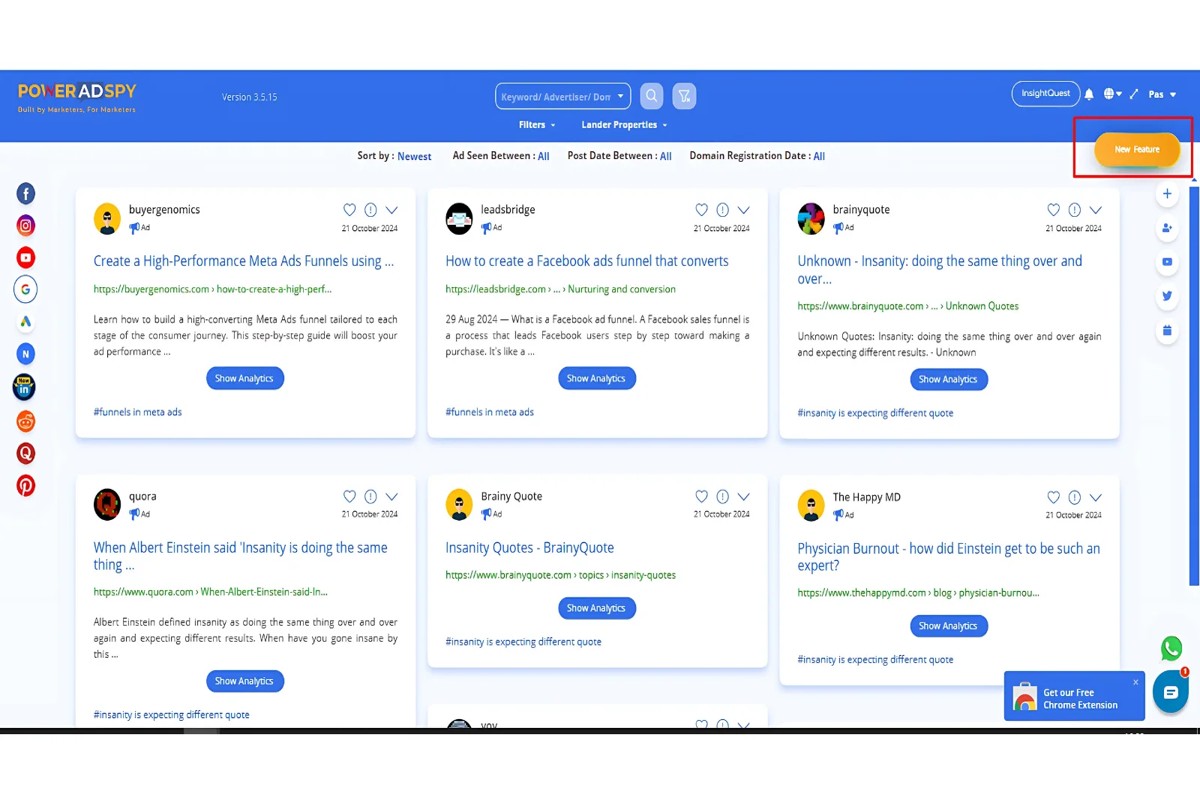
To check where my competitors are using Google Ads, utilize tools like SEMrush, SpyFu, or the Google Ads Auction Insights report. These resources provide valuable insights into ad placements and the keywords competitors are leveraging.
Understanding where competitors are advertising is crucial for businesses aiming to enhance their online presence. Companies that overlook these insights risk missing opportunities to optimize their own ad strategies and could fall behind in competitive markets.
This article details how to effectively use SEMrush, SpyFu, and Google Ads Auction Insights to analyze competitor ad strategies, uncovering key placements and keyword tactics that can inform your marketing efforts.
For How To Check Where My Competitors Are Using Google Ads businesses looking to generate local leads through Google Ads or Local SEO, GMB Ranger LLC offers hands-on campaign management. Specialist Md Tangeer Mehedi personally handles campaign setup and ongoing optimization — with no payment required until the first lead comes in.
What tools can I use to see competitor Google Ads?
Several tools provide insights into where competitors are using Google Ads. Popular options include SEMrush, SpyFu, and AdBeat, each offering unique features for analyzing ad strategies. These tools can help businesses identify competitor keywords, ad copy, and overall advertising trends.
1. SEMrush: This comprehensive marketing platform offers a dedicated tool for analyzing competitors’ paid search strategies. Users can view the keywords their competitors are bidding on, ad copy variations, and traffic estimates, providing a clear picture of their advertising tactics.
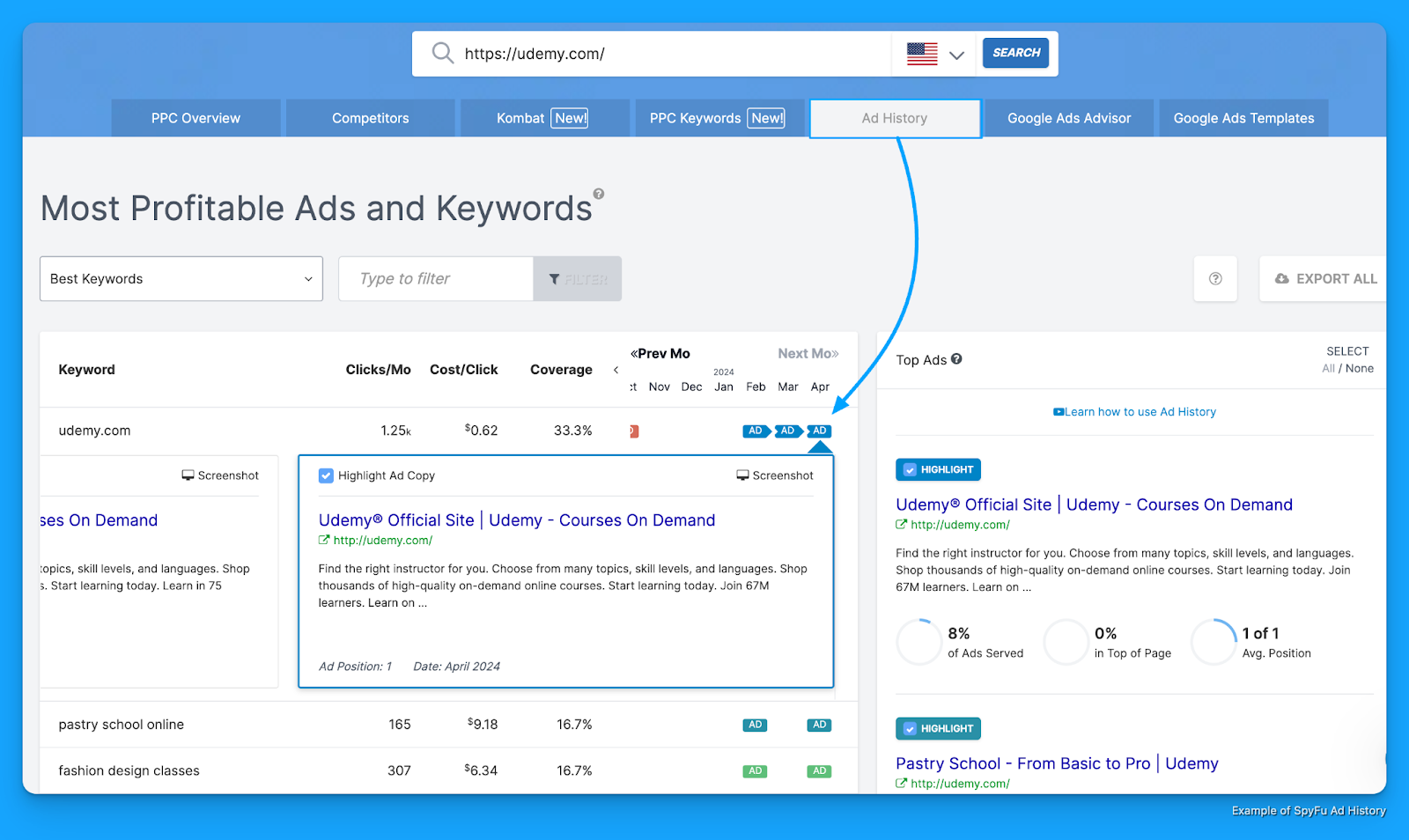
2. SpyFu: SpyFu specializes in competitive intelligence and allows users to explore competitors’ Google Ads campaigns. It offers insights on the keywords competitors have purchased over time and the ad variations they’ve used, making it easier to gauge advertising effectiveness.
3. AdBeat: AdBeat focuses on display advertising but also provides insights into Google Ads. Users can analyze competitors’ ad placements, creatives, and spending patterns, which can inform their own advertising strategies. The platform’s historical data can reveal trends and shifts in competitor strategies.
4. iSpionage: This tool offers insights into competitor PPC campaigns, allowing users to examine keywords, ad copy, and even landing pages. It provides a comprehensive overview that can help businesses refine their own campaigns based on competitor performance.
5. SimilarWeb: While primarily known for website traffic analysis, SimilarWeb also offers insights into digital advertising. Users can see where competitors are investing in ads, along with estimated traffic generated from those campaigns, enabling better strategic planning.
These tools can vary in pricing and features, so choosing one that aligns with specific business needs is crucial. Utilizing a combination of these platforms can yield a more comprehensive understanding of the competitive landscape.
Expert Tip: Regularly monitor competitor ads, as changes in their strategies can indicate shifts in market trends or consumer behavior. Staying updated allows businesses to adapt their own advertising efforts effectively, maintaining a competitive edge.
How do I analyze my competitors’ Google Ads strategy?
To analyze your competitors’ Google Ads strategy, utilize a combination of tools and techniques to gather data on their ad placements, keywords, and target audiences. This process involves researching their ads, examining their keywords, and understanding their audience targeting methods.
Start by using tools like SEMrush, SpyFu, or Ahrefs, which provide insights into your competitors’ ad campaigns. These platforms allow you to see the keywords your competitors are bidding on, their ad copy, and the estimated budget they allocate to their Google Ads efforts. Additionally, you can analyze the ad placements across various search queries and websites, giving you a broader view of their advertising strategy.
- Identify Competitors: Begin by compiling a list of your primary competitors. Focus on those who operate within the same industry and target a similar audience.
- Utilize Ad Intelligence Tools: Use tools such as SEMrush or SpyFu to access your competitors’ ad history. These tools provide data on keywords, ad copy, and estimated traffic, allowing for in-depth analysis.
- Examine Keyword Strategies: Look at the keywords your competitors are using. Identify which keywords have high search volumes and low competition, as these may provide opportunities for your own campaigns.
- Analyze Ad Copy: Review the ad copy used by competitors. Take note of the messaging, call-to-action, and unique selling propositions to identify effective strategies that resonate with the target audience.
- Monitor Ad Placements: Track where your competitors’ ads appear, including search results and display networks. This helps you understand their targeting strategy and the types of sites they prioritize for placements.
- Assess Audience Targeting: Investigate how competitors might be segmenting their audience. Use tools that provide demographic insights, helping you understand who is being targeted.
When analyzing competitors, remember to regularly monitor their strategies, as the digital landscape is ever-changing. Staying updated on your competitors’ ads can provide you with actionable insights to refine your own advertising efforts.
Expert Tip: Explore the “Ad Variations” feature in your chosen tool to analyze different ad formats and messages used by competitors. This can reveal testing strategies and successful elements that you may adapt for your own campaigns.
What is the Google Ads Auction Insights report?
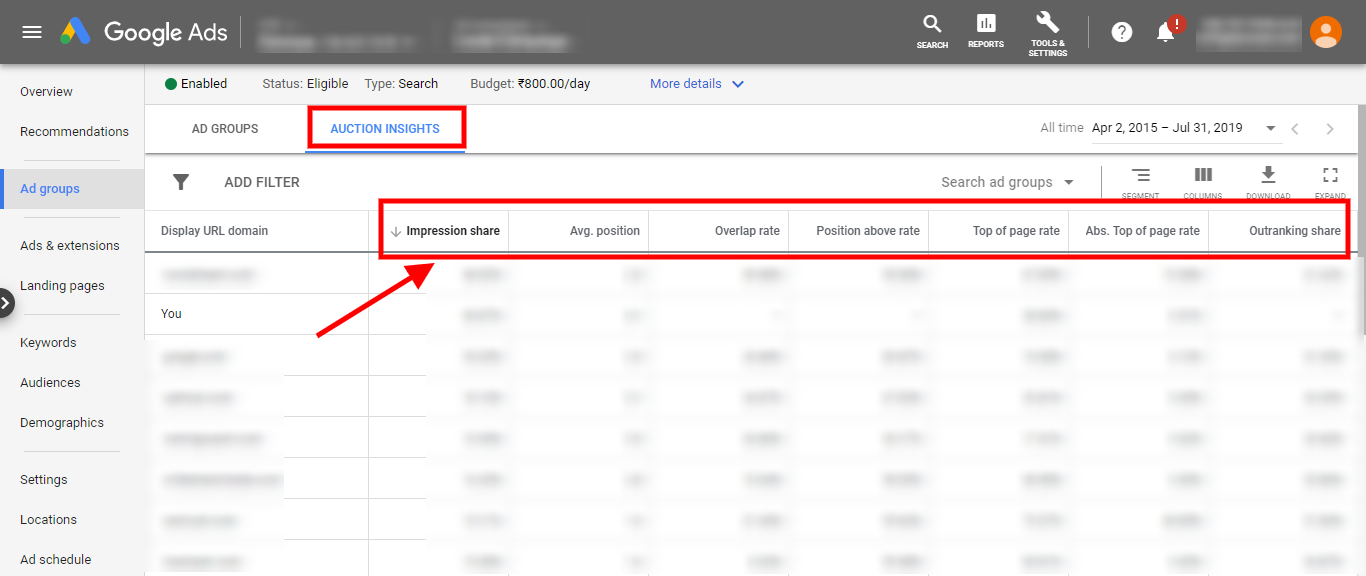
The Google Ads Auction Insights report provides advertisers with data on how their ads perform compared to competitors in the same auction. This report reveals key metrics that indicate the competitive landscape, helping advertisers understand their standing in relation to others targeting the same keywords.
The Auction Insights report includes several important metrics, which can highlight areas of strength and opportunities for improvement. Advertisers can use this information to adjust their bidding strategies, optimize their ad placements, and enhance their overall campaign effectiveness.
- Impression Share: This metric shows the percentage of impressions received versus the total available impressions.
- Average Position: Indicates the average rank of your ads in comparison to competitors.
- Overlap Rate: This reveals how often your ads were shown at the same time as a competitor’s ads.
- Position Above Rate: This indicates how often your ad appeared above a competitor’s ad in search results.
- Ad Relevance: A crucial factor affecting your ad’s performance, indicating how closely your ad matches the search intent.
Analyzing these metrics allows advertisers to pinpoint specific areas where they are lagging behind competitors. For instance, if a business sees a low impression share, it may need to increase its bid or improve its Quality Score. Conversely, a high position above rate suggests effective ad strategies that can be leveraged further.
Strategically utilizing the Auction Insights report can lead to more informed decisions, ultimately enhancing competitive advantage within the advertising space.
Expert Tip: Regularly monitor the Auction Insights report to identify trends over time, as shifts in competitor behavior can signal opportunities for campaign adjustments or innovative approaches to ad targeting.
How much does it cost to use tools for competitor analysis?
The cost of tools for competitor analysis generally ranges from $29 to $500 per month. The specific price depends on the features offered, the scale of data access, and the number of users. Some tools also provide tiered pricing based on the level of service selected.
Several factors can influence the cost of these tools:
- Features and Capabilities: Tools with advanced features such as real-time tracking, detailed reporting, and multi-channel analysis tend to be more expensive.
- Subscription Plans: Many platforms offer different plans, including basic, professional, and enterprise levels, each with varying levels of data access and support.
- Number of Users: Some tools charge based on the number of users or accounts that will access the software, impacting the overall cost.
- Contract Length: Annual subscriptions often come at a discounted rate compared to monthly subscriptions, which can make a significant difference in overall costs.
Investing in a robust competitor analysis tool can yield substantial insights into advertising strategies, making it a valuable expense for businesses aiming to enhance their marketing efforts. Selecting the right tool involves balancing features with budget constraints to ensure adequate data access without overspending.
Expert Tip: Evaluate trial periods offered by many tools to assess their value before committing to a subscription, ensuring the selected tool meets specific business needs effectively.
How long does it take to analyze competitor Google Ads?
Analyzing competitor Google Ads typically takes anywhere from a few hours to several days. The exact duration depends on the depth of analysis required and the number of competitors being evaluated. A thorough examination of multiple campaigns may extend the time needed for a complete understanding.
Several factors influence the time investment for this analysis. First, the complexity of the competitors’ advertising strategies plays a significant role. If competitors utilize various ad formats, targeting options, and extensive keyword lists, the analysis will require more time to dissect these elements. Second, the tools employed for the analysis can impact efficiency. Using advanced analytics platforms can streamline the process, whereas manual checks will likely take longer. Lastly, the analyst’s familiarity with the industry and Google Ads can affect the speed of the evaluation; seasoned professionals may navigate the data more swiftly than those new to the field.
Additionally, the level of detail desired in the analysis will dictate the time commitment. A basic overview may only require a few hours, focusing on high-level metrics like ad spend and keyword usage. Conversely, a comprehensive dive into ad performance, audience targeting, and competitive positioning will necessitate a more significant investment of time. Therefore, establishing clear objectives for the analysis can help streamline the process and focus efforts where they will yield the most valuable insights.
Expert Tip: To expedite the analysis process, prioritize competitors based on their market share and ad visibility. Start with a few key players before expanding the scope, allowing for a more manageable analysis that can be scaled as needed.
What are the best practices for checking competitor ads?
To effectively analyze competitor ads, it is essential to adopt systematic best practices. Regularly updating data, focusing on high-performing keywords, and monitoring ad copy are key components of a robust strategy. These practices will provide valuable insights into competitors’ advertising strategies and help refine your own campaigns.
First, consistently track and update your data on competitor ads. Google Ads and other tools, such as SEMrush or SpyFu, allow users to monitor changes in ad placement and spending. Frequent updates help identify trends and shifts in competitor strategies, ensuring that your analysis remains relevant and actionable.
- Focus on high-performing keywords: Identify the keywords that drive the most traffic for your competitors. Tools like Google Keyword Planner can help uncover these terms. By understanding which keywords are successful, you can optimize your own campaigns to compete more effectively.
- Analyze ad copy variations: Examine the different versions of ad copy used by competitors. Take note of headlines, calls to action, and promotional offers. This analysis can reveal effective messaging strategies that resonate with target audiences, which can inform your own ad content.
- Utilize competitor ad libraries: Platforms like the Facebook Ad Library and Google Ads Transparency Center provide access to many active ads. Reviewing these ads can help identify successful formats and placements, allowing for strategic insights into your own advertising efforts.
- Monitor landing pages: Check the landing pages linked to competitor ads. Observe their design, content, and user experience. This can provide insights into how competitors convert traffic and what elements might enhance your own landing pages.
Regularly assess these aspects to stay ahead in your industry. Monitoring competitor ads is not a one-time task but an ongoing process that requires diligence and adaptability.
Expert Tip: Leverage A/B testing for your ads based on insights gained from competitor analysis. This allows for data-driven decision-making and optimization over time.
Can I see my competitors’ Google Ads for free?
Yes, it is possible to see some of your competitors’ Google Ads for free, but the insights are limited. Several online tools provide basic information about competitors’ advertising strategies without charge. However, for comprehensive insights and detailed analysis, paid tools offer significantly more robust data.
Free tools typically include platforms like Google’s Ad Preview and Diagnosis Tool, which allows users to view live ads based on specific keywords and locations. Additionally, tools such as SpyFu and SimilarWeb provide limited insights into competitor ad spending and keywords but may not capture the full scope of their advertising efforts. The data from these free resources often lacks depth and can be outdated or incomplete.
In contrast, paid tools like SEMrush, Ahrefs, and iSpionage offer extensive features, including detailed ad copy analysis, historical data, and competitive benchmarking. These platforms can track multiple aspects of competitors’ Google Ads campaigns, including ad placements, landing page performance, and conversion metrics. The investment in a paid tool can yield a more strategic understanding of competitors’ advertising tactics, enabling businesses to adjust their strategies effectively.
- Free Tools: Basic insights, limited data, no historical context.
- Paid Tools: Comprehensive analysis, historical data, in-depth competitor benchmarking.
Expert Tip: Leverage both free and paid tools for a well-rounded view. Start with free tools to gather initial insights, then consider investing in a paid solution for deeper analysis as your advertising strategy matures.
What are common mistakes in analyzing competitor Google Ads?
Common mistakes in analyzing competitor Google Ads include focusing solely on one competitor and neglecting key ad performance metrics. These oversights can lead to incomplete insights and misguided strategies. Without a broader perspective and thorough analysis, businesses may miss valuable opportunities to refine their own advertising efforts.
A typical scenario involves a business examining only its closest competitor, assuming that their strategies represent the industry standard. For instance, if Company A only analyzes the Google Ads of Company B, they may overlook effective tactics employed by Company C or emerging competitors. This narrow focus can result in missed trends and innovations that could enhance Company A’s advertising effectiveness.
Additionally, many analysts fail to consider essential performance metrics such as click-through rates (CTR), conversion rates, and ad positioning. Relying on superficial observations, such as ad copy or keywords, without understanding how these elements perform can lead to misguided conclusions. For example, if Company A notices that Company B’s ads appear frequently but does not assess their engagement metrics, they may mistakenly perceive Company B’s approach as superior when, in reality, it may be underperforming.
Expert Tip: Always analyze a range of competitors and prioritize metrics that reflect actual performance. This comprehensive approach not only provides a clearer picture but also enables the identification of actionable insights that can significantly impact ad effectiveness.
Understanding Google Ads Competitive Analysis Tools
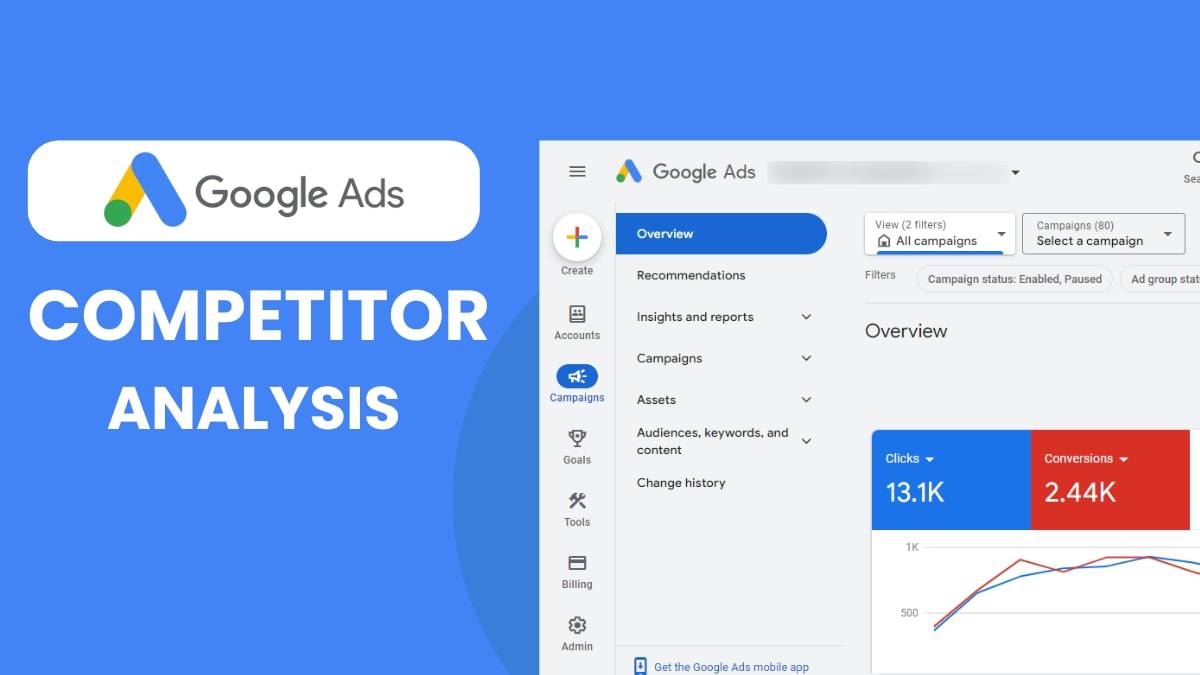
This section explores essential tools for conducting competitor analysis in Google Ads, highlighting their unique features and advantages. Utilizing these tools can significantly enhance your advertising strategy by providing insights into competitors’ performance and tactics.
Popular Tools for Competitive Analysis
- SEMrush: This comprehensive marketing tool offers a robust suite for keyword tracking and ad copy analysis. Users can delve into competitor ad strategies, organic keywords, and display advertising, making it a versatile option for marketers at all levels.
- SpyFu: Focused primarily on PPC, SpyFu allows users to research competitors’ keywords and their historical performance. Its keyword grouping feature is particularly useful for identifying which keywords yield the best results over time.
- Ahrefs: While Ahrefs is renowned for its SEO capabilities, it also provides insights into paid advertising. Users can analyze ad copy and keyword strategies, although its primary strength lies in organic search analysis.
Feature Comparison
- Keyword Tracking: SEMrush excels with detailed keyword metrics, while SpyFu provides historical keyword data. Ahrefs offers a more integrated view of keyword performance across both paid and organic channels.
- Ad Copy Analysis: SEMrush and SpyFu both feature ad copy analysis tools, allowing users to view competitors’ current and past ads. Ahrefs provides insights but is less focused on ad copy specifics.
- Budget Estimates: SEMrush provides estimated ad budgets, giving users a clearer picture of competitors’ spending. SpyFu also offers budget insights, whereas Ahrefs lacks this feature altogether.
User Experience and Ease of Use
For beginners, SEMrush and SpyFu offer intuitive interfaces, making it easy to navigate through various features. Both tools provide tutorials and customer support, enhancing the user experience. In contrast, Ahrefs may present a steeper learning curve due to its extensive functionalities, which cater more to advanced marketers.
Cost-Benefit Analysis
Free versions of these tools provide limited access, often restricting keyword searches and ad history. SEMrush offers a 7-day trial for $7, while SpyFu provides a basic free version with limited data. Ahrefs does not have a free tier, but it offers a trial for a nominal fee. Premium versions typically range from $99 to $399 per month, depending on the features and level of access required. Evaluating the potential return on investment from these tools is essential for budget-conscious marketers.
Common misconceptions about these tools include the belief that they provide real-time data. In reality, most tools aggregate data over time, which may lead to inaccuracies. Additionally, some marketers assume that using multiple tools is necessary for comprehensive analysis. In many cases, a single tool with robust features suffices, depending on specific needs and goals.
To effectively leverage these insights, marketers should start by selecting one or two tools based on their requirements. Conduct a thorough analysis of competitors’ ad strategies, focusing on keywords and ad copy that yield high engagement. Regularly monitor these insights to adapt and optimize your Google Ads campaigns, ensuring alignment with market trends and competitor actions.
Crafting a Strategy Based on Competitor Insights
This section delves into the strategic advantages of analyzing competitor data in Google Ads. By understanding where competitors excel, advertisers can refine their own campaigns for enhanced performance.
Identifying High-Performing Keywords and Ad Placements
Analyzing competitor ads can reveal valuable insights into their keyword strategy. Use tools like SEMrush or Ahrefs to identify the keywords driving traffic to competitors’ sites. Focus on:
- High-volume keywords: Keywords that generate significant search traffic.
- Long-tail keywords: More specific phrases that may have less competition but higher conversion rates.
- Negative keywords: Terms competitors exclude to improve ad relevance.
Additionally, examine ad placements across the Google Display Network. Identify which websites and platforms yield the best results for competitors, providing a roadmap for your own targeting.
Adapting Successful Ad Copy While Maintaining Brand Voice
Competitor ad copy can serve as inspiration for your messaging. Analyze their headlines, descriptions, and call-to-action phrases. Pay attention to:
- Emotional triggers: Words that resonate with the target audience.
- Unique selling propositions (USPs): Key features that set products apart.
- Formatting styles: Use of bullet points, numbers, or questions that engage users.
While adapting ideas, ensure that the brand voice remains consistent. Mixing inspiration with originality fosters authenticity while still leveraging proven strategies.
Setting Benchmarks for Your Own Campaigns
Utilizing competitor performance data allows for effective benchmarking. Analyze metrics such as click-through rates (CTR), conversion rates, and ad spend. Establish performance benchmarks by:
- Identifying top competitors and their average metrics.
- Comparing your own campaign results against these benchmarks.
- Continuously adjusting your strategies based on performance gaps.
This process enables setting realistic goals and expectations for your advertising efforts.
Implementing A/B Testing Based on Insights Gathered
A/B testing is essential for optimizing ad campaigns. Use insights from competitor analysis to design tests that focus on:
- Ad copy variations: Test different headlines or descriptions.
- Targeting options: Experiment with different demographics or interests.
- Landing page designs: Assess which layouts yield better conversion rates.
Regularly refining ads based on A/B testing results ensures continuous improvement and adaptation to market trends.
Competitor analysis is not merely about imitation; it is about strategic enhancement. Marketers should take actionable steps such as identifying high-performing keywords, adapting effective ad copy, setting performance benchmarks, and implementing A/B tests. By leveraging these insights, advertisers can create campaigns that not only compete but excel in the digital advertising landscape.
Real-World Case Studies of Successful Competitor Analysis
This section presents detailed case studies demonstrating how various businesses utilized competitor analysis to enhance their Google Ads performance. By examining their strategies and outcomes, valuable insights can be gleaned to inform your own campaigns.
Case Study 1: E-commerce Retailer
An online fashion retailer increased its return on ad spend (ROAS) by 150% after conducting competitor analysis. They utilized tools like SEMrush and SpyFu to identify top-performing keywords used by competitors. By focusing on competitor ad copies and landing pages, they discovered a gap in the market for eco-friendly clothing.
- Keyword Research: Targeted keywords that competitors overlooked.
- Ad Copy Optimization: Created compelling ad texts emphasizing sustainability.
- Landing Page Improvement: Enhanced user experience on product pages.
As a result, the retailer saw a 40% increase in click-through rates (CTR) and a significant boost in conversions. This case exemplifies the importance of identifying market gaps and aligning ad strategies accordingly.
Case Study 2: Local Service Provider
A plumbing service in a competitive urban market leveraged competitor analysis to refine its Google Ads strategy. By analyzing local competitors’ ad placements and keywords, the company identified underutilized terms related to emergency plumbing services.
- Geotargeting: Focused ads on high-density residential areas.
- Ad Extensions: Implemented call extensions to encourage immediate contact.
- Competitive Bidding: Adjusted bids on high-impact keywords based on competitor spending.
This strategic shift led to a 60% increase in leads over three months. The takeaway is that local businesses can significantly benefit from hyper-targeted campaigns that capitalize on specific service gaps.
Case Study 3: SaaS Company
A software-as-a-service (SaaS) company specializing in project management tools achieved a 200% increase in user sign-ups by conducting a thorough analysis of competitor ads. They focused on the features highlighted by competitors and adjusted their messaging to emphasize unique selling points.
- Feature Comparison: Identified key features that resonated with users.
- Content Marketing Integration: Created informative content that aligned with ad campaigns.
- Targeting Adjustments: Refined audience targeting based on competitor demographics.
This approach led to a substantial improvement in brand recognition and user acquisition. The lesson here is to differentiate offerings clearly and communicate unique advantages effectively.
Competitor analysis can reveal not just what works, but what does not. Many businesses mistakenly focus solely on high-traffic keywords without considering the competitive landscape. An effective strategy involves analyzing competitors’ strengths and weaknesses to identify opportunities for differentiation.
To apply these insights effectively:
- Utilize tools like SEMrush or SpyFu for comprehensive competitor research.
- Monitor competitor ad copies and landing pages regularly to identify trends.
- Implement changes based on findings, such as adjusting keywords, ad copy, and targeting strategies.
By adopting these practices, businesses can leverage competitor analysis to enhance their Google Ads performance and achieve better outcomes in their marketing efforts.
Common Pitfalls in Competitor Google Ads Analysis and How to Avoid Them
This section identifies common mistakes marketers encounter when analyzing competitor Google Ads and provides strategies to mitigate these pitfalls. Awareness of these issues is essential for effective ad strategy development.
Overlooking Seasonal Trends in Ad Performance
Many marketers fail to account for seasonal fluctuations that can significantly impact ad performance. For example, a spike in searches during holiday seasons or back-to-school periods may inflate a competitor’s visibility. Ignoring these trends can lead to misinterpretation of data, resulting in misguided strategic decisions.
To avoid this pitfall, conduct a thorough analysis of seasonal patterns relevant to your industry. Utilize tools like Google Trends to identify when specific keywords peak in popularity. This context can help differentiate between genuine success and temporary fluctuations.
Focusing Too Narrowly on One Competitor Without Context
Focusing solely on one competitor can skew analysis. Competitors often operate in different segments, targeting varying audiences or utilizing distinct strategies. Evaluating only one source can lead to a narrow view, preventing a comprehensive understanding of the competitive landscape.
- Expand your analysis to include multiple competitors.
- Compare their ad strategies side by side.
- Assess how each competitor positions itself within the broader industry context.
Neglecting to Track Changes Over Time for Accurate Comparisons
Competitor ad performance is not static; it evolves with market dynamics and consumer behavior. Failing to track these changes can result in outdated insights, leading to ineffective decision-making. Regular monitoring is essential to identify trends and shifts in competitor strategies.
Implement a systematic approach to documenting changes in competitors’ ad campaigns. Utilize tools like SEMrush or SpyFu to monitor historical ad data, allowing for accurate long-term comparisons and trend analysis.
Failing to Integrate Insights into a Broader Marketing Strategy
Insights gleaned from competitor analysis must inform and enhance your overall marketing strategy. Isolated data points can lack actionable value if not integrated with your business objectives. This oversight can lead to missed opportunities for optimization and growth.
Ensure that findings from competitor analysis are aligned with your marketing goals. Create a framework that connects insights to specific actions, such as adjusting budget allocations, refining targeting parameters, or enhancing creative messaging.
Nuance: Understanding Contextual Variability
One common misconception is that the success of a competitor’s ad can be replicated without considering contextual differences. Factors such as geographic location, target demographics, and market saturation can dramatically influence ad performance. For instance, a successful campaign in a metropolitan area may not yield the same results in a rural market. A nuanced approach involves understanding these variables and tailoring strategies accordingly.
Practical Application
To effectively analyze competitor Google Ads, implement the following actions:
- Utilize tools to gather data on multiple competitors and track seasonal trends.
- Document changes over time to identify significant shifts in strategies.
- Incorporate insights into your overall marketing plan, ensuring alignment with business objectives.
By addressing these common pitfalls, marketers can enhance their competitive analysis and develop more effective Google Ads strategies. Following these guidelines will lead to more informed decision-making and improved campaign performance.
For How To Check Where My Competitors Are Using Google Ads businesses looking to generate local leads through Google Ads or Local SEO, GMB Ranger LLC offers hands-on campaign management. Specialist Md Tangeer Mehedi personally handles campaign setup and ongoing optimization — with no payment required until the first lead comes in.
Frequently Asked Questions
What tools can I use to see competitor Google Ads?
Tools such as SEMrush, SpyFu, and Adbeat allow users to view competitor Google Ads campaigns. These platforms provide insights into ad copy, keywords, and budget estimates.
How do I analyze my competitors’ Google Ads strategy?
Analyzing competitors’ Google Ads strategy involves examining their ad copy, targeting options, and keyword choices. Utilize tools to track their performance and identify gaps in your own strategy.
What is the Google Ads Auction Insights report?
The Google Ads Auction Insights report provides data on how your ads perform compared to competitors in the same auctions. It includes metrics like impression share, average position, and overlap rate.
How much does it cost to use tools for competitor analysis?
Costs for competitor analysis tools vary, with subscriptions typically ranging from $50 to several hundred dollars per month. Many offer free trials or basic features at no cost.
How long does it take to analyze competitor Google Ads?
The time required to analyze competitor Google Ads can range from a few hours to several days, depending on the depth of analysis. Quick overviews can be done in a short time, while comprehensive assessments take longer.
What are the best practices for checking competitor ads?
Best practices include regularly monitoring competitor ads, documenting findings, and identifying trends over time. Focus on analyzing ad copy, keywords, and landing pages for insights.
Can I see my competitors’ Google Ads for free?
While some basic insights can be gained through free tools like Google Ads’ Auction Insights, comprehensive competitor analysis typically requires paid tools. Free trials may also provide temporary access to advanced features.
What are common mistakes in analyzing competitor Google Ads?
Common mistakes include focusing solely on ad copy without considering targeting and keywords. Additionally, failing to track changes over time can lead to incomplete insights.
Final Thoughts on how to check where my competitors are using google ads
Understanding where competitors deploy Google Ads is crucial for refining your own advertising strategies. Utilizing advanced tools and insights not only enhances your market positioning but also enables you to craft targeted campaigns that resonate with your audience.
To maximize the efficacy of your competitor analysis, invest in a robust tool like SEMrush or SpyFu and conduct a comprehensive review of your competitors’ ad placements and keyword strategies. This data will inform your next campaign, allowing you to exploit gaps in the market.
Mastering the nuances of competitor Google Ads analysis is imperative for sustaining competitive advantage in an increasingly crowded digital landscape.
Leave a Reply