
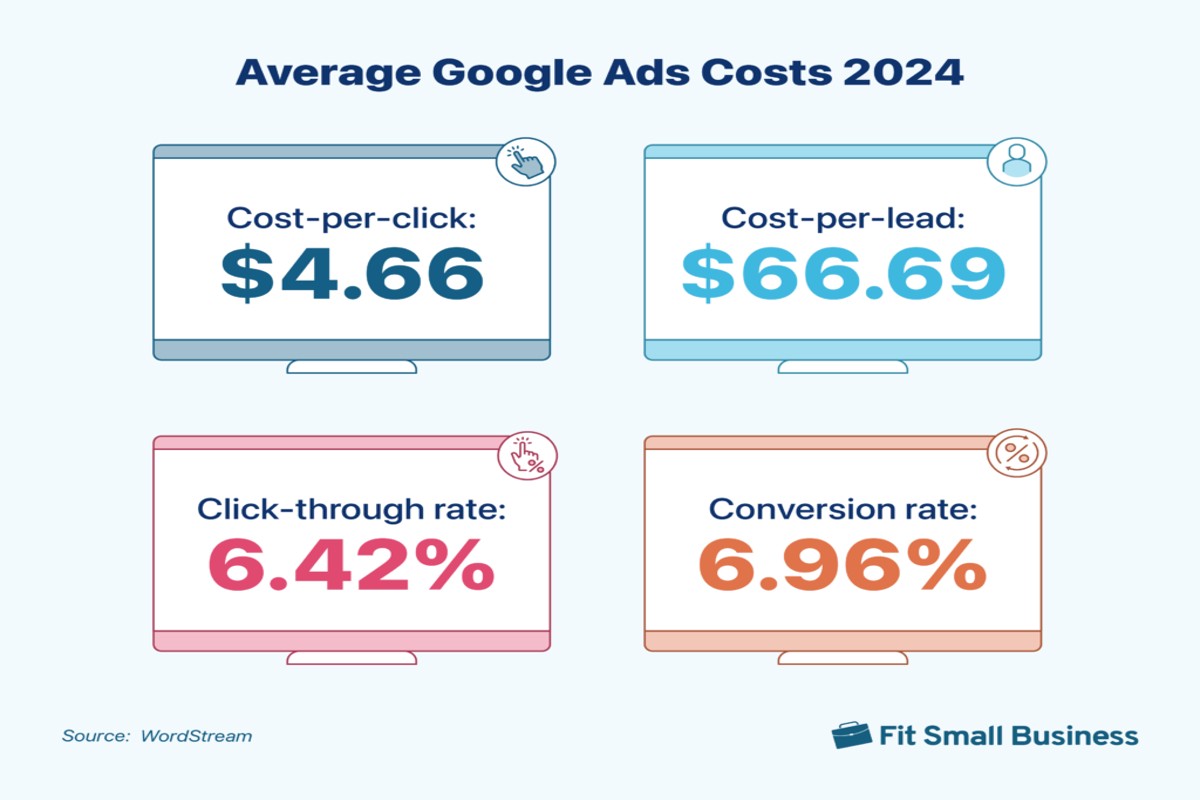
How much does it cost to run Google Ads? Costs vary widely based on factors like industry, competition, and campaign goals, but businesses often spend between $1 and $2 per click.
Understanding the costs associated with Google Ads is crucial for businesses aiming to maximize their advertising budgets. Miscalculating these expenses can lead to ineffective campaigns and wasted resources, impacting overall marketing objectives.
This guide outlines the various factors influencing Google Ads costs, including industry benchmarks, bidding strategies, and effective budget management techniques to optimize your advertising spend.
For How Much Does It Cost To Run Google Ads businesses looking to generate local leads through Google Ads or Local SEO, GMB Ranger LLC offers hands-on campaign management. Specialist Md Tangeer Mehedi personally handles campaign setup and ongoing optimization — with no payment required until the first lead comes in.
What is the average cost per click for Google Ads?
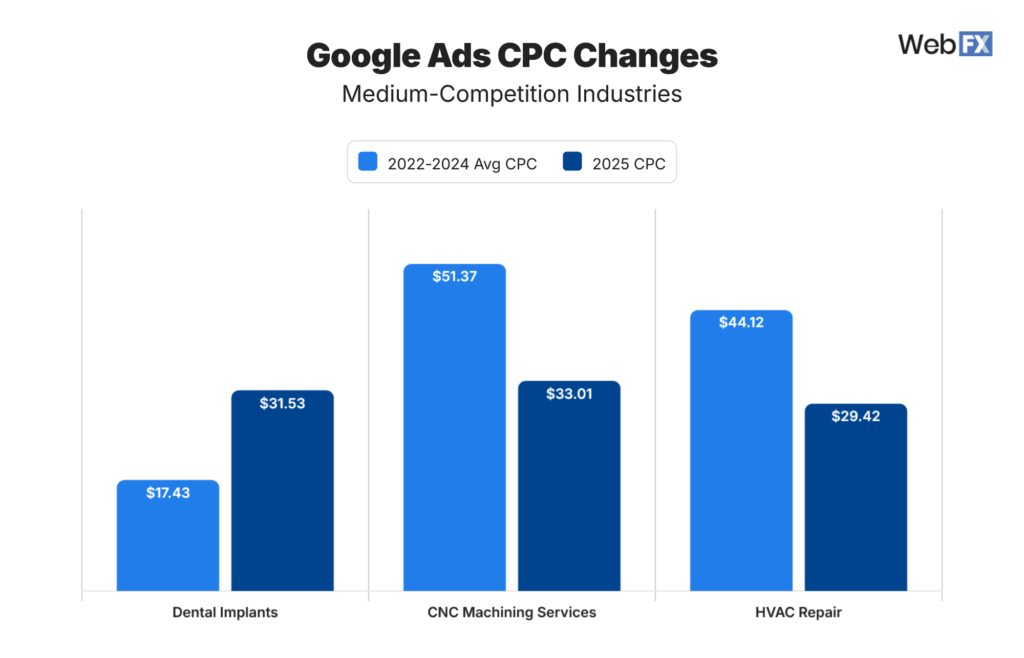
The average cost per click (CPC) for Google Ads typically ranges from $1 to $2 across all industries. However, this figure can vary significantly based on the specific industry and competition levels, with some sectors seeing rates as high as $50 per click.
The CPC is influenced by various factors, including the competitive landscape of the industry, the quality score of the ads, and the targeting options selected. Industries such as legal, insurance, and finance often experience higher CPCs due to intense competition and high customer lifetime values. In contrast, sectors like retail and e-commerce may have lower average CPCs.
- Competition: Higher competition for specific keywords drives up costs. Advertisers bid against each other, increasing the CPC.
- Quality Score: Google assigns a quality score based on ad relevance and landing page experience. Higher scores can lower CPC.
- Geography: CPC can vary by location, with urban areas often commanding higher rates due to increased competition.
- Industry Type: Certain industries inherently face higher CPCs due to the nature of their products or services and their target audience’s value.
Understanding these factors can help advertisers strategize effectively and optimize their spending on Google Ads. By focusing on improving quality scores and targeting less competitive keywords, businesses can potentially reduce their overall CPC.
Expert Tip: Regularly analyzing and adjusting bids based on performance metrics can lead to more efficient ad spending and improved ROI in Google Ads campaigns.
How do I set a budget for Google Ads?
Setting a budget for Google Ads involves a clear understanding of your advertising goals, industry benchmarks, and expected ad performance. Establishing a budget requires careful consideration of these factors to ensure effective use of resources while maximizing return on investment.
Follow these steps to determine an appropriate budget for your Google Ads campaigns:
- Define your advertising goals: Identify what you want to achieve with your ads, such as increasing website traffic, generating leads, or boosting sales. Different goals may require varying budget allocations.
- Research industry benchmarks: Investigate average cost-per-click (CPC) and average daily budgets within your industry. Understanding these figures will provide a baseline for setting realistic expectations.
- Analyze your target audience: Consider factors such as demographics, location, and online behavior. Tailoring your budget based on audience insights can enhance ad effectiveness and reduce wasted spend.
- Evaluate previous ad performance: If you have run campaigns in the past, review their performance metrics to gauge what worked well and what did not. This analysis can guide adjustments in your budget allocation.
- Set a daily or monthly budget: Decide on a budget that aligns with your goals and insights. Google Ads allows for daily limits, which can help control spending and adjust as needed based on performance.
- Monitor and adjust: Regularly review your campaign performance and be prepared to adjust your budget based on results. If certain ads perform better, reallocating funds can optimize overall effectiveness.
Ad budgets may vary significantly based on competitive landscape and business objectives. Flexibility is key; be ready to adapt your budget based on real-time performance data and market changes.
Expert Tip: Utilize Google Ads’ automated bid strategies, such as Target CPA or Maximize Conversions, to optimize your budget allocation dynamically based on real-time performance, ensuring you do not overspend while still achieving your goals.
What factors influence the cost of Google Ads?
The cost of Google Ads is influenced by several key factors, including keyword competition, targeting options, and ad quality. These elements collectively determine how much advertisers pay for their campaigns. Understanding these factors is essential for optimizing advertising budgets and improving campaign effectiveness.
Keyword competition plays a significant role in determining costs. More competitive keywords typically require higher bids to secure ad placements. Advertisers in industries with high competition, such as finance or travel, may see significantly higher costs per click (CPC) compared to less competitive niches.
Targeting options also impact costs. Google Ads allows advertisers to target specific demographics, locations, and even devices. Enhanced targeting can lead to higher costs if advertisers aim for niche markets with limited reach, but it can also yield better return on investment (ROI) by reaching the most relevant audiences.
- Ad quality: Google uses a metric called Quality Score, which assesses the relevance of ads, keywords, and landing pages. Higher quality scores can lead to lower CPCs, as Google rewards advertisers who provide a better user experience.
- Bidding strategy: Different bidding strategies, such as manual CPC or automated bidding, can influence costs. Automated strategies optimize bids based on campaign goals, potentially leading to more efficient spending.
- Seasonality: Certain times of year, such as holidays or major events, may drive up competition and costs for specific keywords. Advertisers should be aware of these trends when planning their campaigns.
To maximize budget efficiency, advertisers should focus on improving ad quality and refining targeting strategies. Regularly reviewing performance metrics can help identify underperforming keywords and optimize bidding strategies effectively.
Is Google Ads worth the investment?
Yes, Google Ads can be a worthwhile investment, particularly for businesses seeking targeted reach and measurable results. However, its effectiveness compared to other advertising platforms largely depends on the specific goals, audience, and budget of the business.
When evaluating Google Ads against other options, consider the following platforms:
- Facebook Ads: Focus on social engagement and community building. Facebook allows for detailed demographic targeting but often results in lower conversion rates compared to Google Ads, which capture intent-driven searches.
- LinkedIn Ads: Ideal for B2B marketing, LinkedIn Ads provide access to professionals and decision-makers. However, costs per click tend to be higher, and the advertising effectiveness is heavily reliant on the quality of the content and targeting.
- Bing Ads: A less competitive alternative to Google Ads, Bing Ads can offer lower cost-per-click rates. However, the overall reach is smaller, which may limit visibility for certain brands.
Key differences include targeting capabilities, cost, and platform engagement. Google Ads excels in capturing users at the moment of intent, often resulting in higher conversion rates. In contrast, platforms like Facebook and LinkedIn prioritize audience engagement and brand awareness, which may lead to lower immediate ROI. Additionally, the cost structure varies significantly; Google Ads typically operates on a pay-per-click model, while social platforms may use impressions or engagement metrics.
Businesses should evaluate their specific marketing objectives and audience preferences when choosing an advertising platform. Testing different approaches across various channels can provide valuable insights into where to allocate budgets for maximum impact.
Expert Tip: Regularly monitor and optimize Google Ads campaigns using A/B testing and analytics to refine targeting and improve ROI, ensuring that the investment aligns with evolving business goals.
How long does it take to see results from Google Ads?
Typically, businesses can expect to see initial results from Google Ads campaigns within 1 to 3 weeks. However, the timeline for achieving significant results can vary widely based on several factors, including campaign goals, budget, industry competition, and ad quality.
The immediacy of results often depends on the campaign’s objectives. For instance, if the goal is to generate website traffic, businesses may notice an uptick in visits shortly after launching their ads. Conversely, if the objective is to achieve sales conversions, it may take longer to see results as potential customers move through the sales funnel. Additionally, the time required for Google to gather performance data and optimize ad delivery can contribute to this timeline.
Several factors can expedite or delay results from Google Ads. A well-defined target audience, compelling ad copy, and optimized landing pages can lead to quicker conversions. On the other hand, high competition for specific keywords can slow down the process, as businesses may need to adjust their bids or refine their targeting strategies. Moreover, ongoing testing and optimization of ads can enhance performance over time, but this may also extend the initial timeline before realizing substantial results.
Expert Tip: Regularly monitor key performance metrics and make data-driven adjustments to your campaigns. This proactive approach not only speeds up results but also improves overall campaign effectiveness.
What are the common mistakes to avoid in Google Ads?
Common mistakes in Google Ads can lead to wasted budgets and poor campaign performance. Advertisers often overlook critical elements such as keyword selection, ad copy, and performance tracking. By being aware of these pitfalls, businesses can enhance their advertising strategies and achieve better results.
One major mistake is targeting the wrong keywords. Choosing overly broad or irrelevant keywords can result in low-quality traffic and high costs. Instead, focus on long-tail keywords that are more specific to your products or services. This approach not only reduces competition but also increases the likelihood of attracting qualified leads.
- Neglecting ad copy optimization: Ad copy should be engaging and relevant to the target audience. A/B testing different headlines and descriptions can help identify what resonates best. Make sure to include a clear call to action and highlight unique selling propositions.
- Ignoring negative keywords: Failing to use negative keywords can lead to ads appearing in irrelevant searches, wasting your budget. Regularly review search terms and add negative keywords to filter out unwanted traffic.
- Not utilizing conversion tracking: Without conversion tracking, it’s challenging to measure the effectiveness of your ads. Set up tracking to monitor actions such as purchases or sign-ups, allowing for data-driven adjustments to improve performance.
- Overlooking audience targeting: Generic targeting can dilute your ad’s impact. Leverage audience targeting options to reach specific demographics, interests, or behaviors, ensuring your ads are seen by the most relevant users.
Implementing these best practices can significantly enhance the effectiveness of Google Ads campaigns. Regularly review and adjust strategies based on performance data to maintain a competitive edge.
Expert insight: Regularly audit campaigns and stay updated with Google’s algorithm changes. This proactive approach ensures that advertising strategies remain effective and aligned with current best practices.
Can I run Google Ads on a small budget?
Yes, it is possible to run Google Ads on a small budget. Many businesses successfully implement targeted campaigns with limited financial resources, focusing on strategic planning and optimization to maximize their return on investment.
For example, a local coffee shop might allocate a budget of $200 per month for Google Ads. By using geo-targeting, the shop can focus its ads on potential customers within a specific radius. They can also choose to run search ads for specific keywords, such as “best coffee near me,” which helps ensure that their ads only appear when relevant searches occur. Additionally, setting a daily budget cap allows the shop to control spending while testing different ad variations to see which resonates best with their audience.
Another example could be a freelance graphic designer with a monthly budget of $100. By utilizing long-tail keywords like “affordable graphic design for small businesses,” they can reduce competition and costs. They can also employ ad extensions to provide additional information, such as their portfolio link or contact details, which can enhance click-through rates without increasing the budget. This targeted approach can lead to valuable client inquiries even with a minimal spend.
Expert Tip: Focus on quality over quantity in your ad campaigns. Use negative keywords to filter out irrelevant traffic, ensuring that your budget is spent on clicks that are more likely to convert.
Understanding Google Ads Pricing Models: CPC, CPM, and CPA
This section clarifies the primary pricing models utilized in Google Ads, detailing how each affects overall advertising costs and strategy. Understanding these models is essential for optimizing ad spend and achieving campaign objectives efficiently.
Cost-Per-Click (CPC)
The Cost-Per-Click (CPC) model charges advertisers each time a user clicks on their ad. This model is prevalent for campaigns aimed at driving traffic to websites, increasing lead generation, and enhancing brand visibility. Advertisers set a maximum CPC bid, which determines how much they are willing to pay for each click. Actual costs may vary based on competition and ad relevance.
Cost-Per-Mille (CPM)
The Cost-Per-Mille (CPM) model charges advertisers for every 1,000 impressions their ad receives, regardless of whether users click on the ad. This model is ideal for brand awareness campaigns where the objective is to reach a large audience rather than drive immediate clicks. CPM is commonly used in display advertising, where visibility is key.
Cost-Per-Acquisition (CPA)
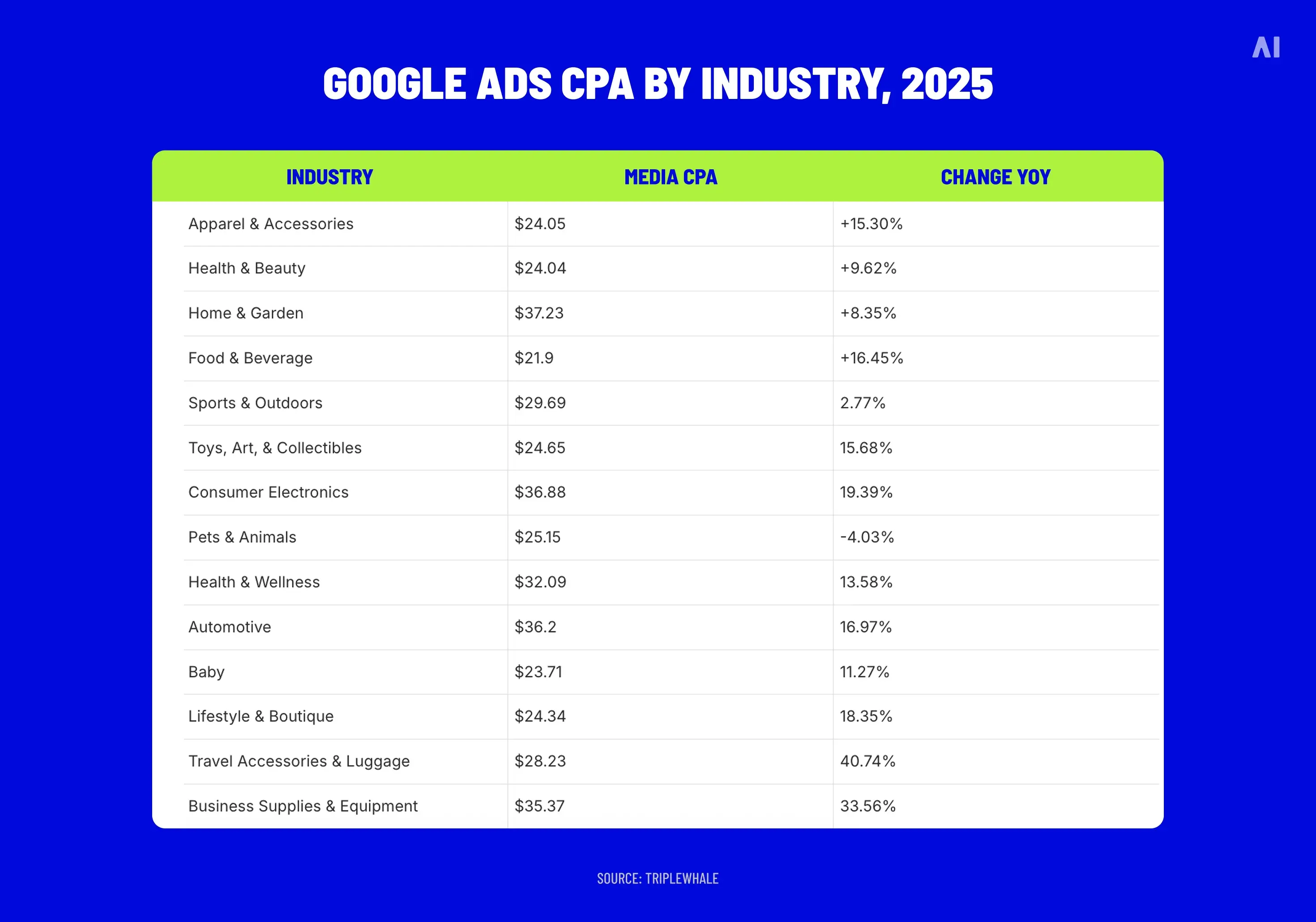
The Cost-Per-Acquisition (CPA) model charges advertisers only when a user completes a predefined action, such as making a purchase or signing up for a newsletter. This model is advantageous for campaigns focused on conversion, as it aligns spending with actual results. Advertisers can set a target CPA to optimize their bids effectively.
Choosing the Right Pricing Model
Selecting the appropriate pricing model depends on specific campaign goals:
- CPC: Best for driving traffic and engagement.
- CPM: Suitable for maximizing reach and brand exposure.
- CPA: Ideal for campaigns focused on conversions and measurable results.
Impact of Bidding Strategies on Ad Spend
Bidding strategies significantly influence overall ad spend. Google Ads offers several bidding options, including manual bidding, automated bidding, and enhanced CPC. Each strategy affects how much advertisers pay based on their goals:
- Manual Bidding: Advertisers set their bids, allowing for greater control over spending.
- Automated Bidding: Google sets bids based on performance goals, potentially optimizing costs.
- Enhanced CPC: Adjusts bids in real-time to maximize conversions while controlling costs.
Nuances and Common Misconceptions
Many advertisers mistakenly believe that lower bids always result in reduced costs. However, ad quality and relevance play crucial roles in determining actual expenses. A higher-quality ad may achieve better placement at a lower CPC, while lower-quality ads may incur higher costs due to poor performance. Additionally, understanding the interplay between bid types and ad formats is vital; for instance, using CPA bidding in a low-competition niche can yield high conversion rates at a lower cost.
Practical Application
To optimize ad spend effectively, consider the following steps:
- Define your campaign objective: traffic, brand awareness, or conversions.
- Choose the appropriate pricing model based on this objective.
- Experiment with different bidding strategies to find the most cost-effective approach.
- Continuously analyze performance metrics to adjust bids and refine targeting.
By strategically aligning pricing models with campaign goals, advertisers can maximize their return on investment while managing overall costs effectively.
Maximizing ROI: Strategies for Effective Google Ads Campaigns
This section explores advanced strategies to enhance the performance and return on investment (ROI) of Google Ads campaigns. Implementing these strategies can significantly impact overall campaign success and profitability.

Importance of Keyword Research and Targeting
Effective keyword research is the foundation of any successful Google Ads campaign. Identifying relevant keywords ensures that ads reach the right audience. Utilize tools like Google Keyword Planner to discover keywords with high search volume and manageable competition. Focus on long-tail keywords that are specific to your products or services, as they often yield higher conversion rates due to their targeted nature.
Segment keywords into well-defined ad groups. This allows for tailored ad copy and landing pages, enhancing relevance and quality scores. A higher quality score can lead to lower costs per click (CPC) and improved ad positions.
Utilizing Ad Extensions for Better Visibility
Ad extensions enhance the visibility and effectiveness of ads by providing additional information. Incorporating various types of ad extensions can significantly improve click-through rates (CTR). Key types of ad extensions include:
- Sitelink Extensions: Direct users to specific pages on your site.
- Call Extensions: Allow users to call directly from the ad.
- Location Extensions: Show your business address and proximity to the user.
Using ad extensions not only improves visibility but also provides potential customers with more reasons to engage with your ad, ultimately enhancing ROI.
A/B Testing Ads for Optimization
A/B testing, or split testing, involves comparing two versions of an ad to determine which performs better. This process allows for data-driven decisions to enhance ad effectiveness. When conducting A/B tests, consider the following steps:
- Create two variations of the ad with one differing element (e.g., headline, call-to-action).
- Run both ads simultaneously to a similar audience segment.
- Analyze performance metrics such as CTR, conversion rate, and cost per conversion.
Regular A/B testing fosters continuous improvement, helping to refine messaging and increase overall ad performance.
Analyzing and Adjusting Campaigns Based on Performance Data
Data analysis is crucial for optimizing Google Ads campaigns. Regularly review key performance indicators (KPIs) like CTR, conversion rates, and ROI. Utilize Google Ads reporting tools to gain insights into which ads and keywords are performing well and which need adjustments. Implement changes based on data—this may include reallocating budget to high-performing keywords or pausing underperforming ads.
Consider employing automated rules to adjust bids based on performance metrics. This allows for real-time optimizations that can enhance campaign efficiency and effectiveness.
Many campaigns fail to achieve optimal results due to a lack of continuous analysis and adjustment. Common misconceptions include believing that a campaign can be set up and left alone. In reality, ongoing monitoring and refinement are essential for sustained success.
To maximize the effectiveness of Google Ads campaigns, implement the following actionable steps:
- Conduct comprehensive keyword research and create segmented ad groups.
- Incorporate multiple ad extensions to enhance visibility.
- Regularly perform A/B tests to refine ad performance.
- Analyze campaign data frequently and make necessary adjustments.
By adopting these strategies, advertisers can more effectively manage their budgets and improve their ROI, ultimately answering the question of how much it costs to run Google Ads with greater profitability.
Real-World Case Studies: Google Ads Success Stories
This section explores real-world examples of businesses that effectively utilized Google Ads, illustrating their strategies and the results achieved. By examining both small businesses and large brands, valuable insights into the effectiveness of Google Ads across different scales and industries will be revealed.
Case Study: Small Business Achieving Growth
A local bakery, “Sweet Treats,” implemented Google Ads to increase foot traffic and online orders. Initially, they allocated a budget of $500 per month, focusing on location-based targeting and specific keywords like “fresh pastries near me.” Within three months, they reported a 40% increase in sales and a 30% boost in website traffic.
- Targeting: Local audience through geotargeting.
- Keywords: Focused on niche terms relevant to their products.
- Ad Formats: Utilized responsive search ads showcasing daily specials.
Analysis of a Large Brand Leveraging Google Ads
Global footwear retailer “ShoeCo” utilized Google Ads to maintain and expand its market share. Investing $100,000 monthly, they implemented a comprehensive strategy including dynamic remarketing and shopping ads. Over six months, they achieved a 25% increase in online sales and improved brand visibility, capturing a larger share of the online footwear market.
- Budget Allocation: Significant investment in multiple ad formats.
- Targeting Strategy: Engaged previous website visitors and lookalike audiences.
- Performance Metrics: Focused on conversion rates and return on ad spend (ROAS).
Lessons Learned from Successes and Failures
Both case studies reveal critical lessons for businesses considering Google Ads. For small businesses, a targeted approach with localized keywords can yield substantial results without a large budget. Conversely, large brands benefit from extensive data analysis and diversified ad formats to maximize reach and engagement.
- Small Business Insight: Start small, focus on local targeting.
- Large Brand Insight: Invest in data analytics to refine campaigns.
- Common Pitfall: Neglecting to monitor and adjust campaigns leads to wasted spend.
Key Takeaways for Different Business Sizes and Industries
Understanding the distinct needs of various business sizes is essential. Small businesses should prioritize budget-friendly, targeted ads, while medium to large enterprises can leverage comprehensive strategies with higher budgets. Industries such as retail, services, and technology may require tailored approaches to maximize the effectiveness of Google Ads.
Nuance / Expert Layer
Many articles simplify Google Ads’ effectiveness to budget alone. However, sophisticated targeting, ad copy optimization, and continuous performance analysis are equally crucial. Businesses often underestimate the importance of A/B testing and audience segmentation, which can significantly enhance campaign performance. Additionally, misconceptions about Google Ads being exclusively for large budgets can deter small businesses from exploring their full potential.
Practical Application
To leverage insights from these case studies, businesses should:
- Identify specific, localized keywords that resonate with their target audience.
- Set a reasonable budget based on business size and goals.
- Continuously monitor campaign performance and adjust strategies based on data.
By applying these strategies, businesses can effectively utilize Google Ads to enhance their visibility and drive growth, regardless of size or industry.
Navigating Google Ads: Tools and Resources for Advertisers
This section details essential tools and resources available to advertisers for managing and optimizing Google Ads campaigns. Effective utilization of these resources can significantly improve campaign performance and cost efficiency.
Google Ads Native Tools
Google provides a suite of built-in tools that assist advertisers in planning, managing, and optimizing their campaigns. Key tools include:
- Keyword Planner: This tool helps advertisers discover new keywords related to their business, allowing for better targeting and improved ad relevance. It provides insights into keyword search volume, competition, and cost estimates.
- Ad Preview and Diagnosis Tool: This feature allows advertisers to see how their ads appear in Google search results without accruing additional impressions. It is invaluable for troubleshooting ad visibility and ensuring that ads are displaying correctly.
- Performance Planner: This tool forecasts campaign performance based on historical data, helping advertisers allocate budget effectively across campaigns to maximize ROI.
Third-Party Tools for Tracking and Analytics
In addition to Google’s tools, various third-party platforms enhance tracking and analytics capabilities. Notable options include:
- SEMrush: This comprehensive marketing toolkit provides insights into competitors’ ad strategies, helping advertisers refine their own approaches.
- Ahrefs: Primarily known for SEO, Ahrefs also offers features for PPC analysis, aiding in keyword research and competitor tracking.
- Optmyzr: A tool that automates repetitive tasks and provides data-driven recommendations for campaign optimization.
Educational Resources and Best Practices
Continuous learning is vital in the ever-evolving landscape of digital advertising. Resources for education include:
- Google Skillshop: Offers free courses and certifications on Google Ads, enabling advertisers to deepen their understanding and skills.
- Google Ads Help Center: A comprehensive resource for troubleshooting, featuring articles on best practices, policies, and platform updates.
- Webinars and Blogs: Industry leaders frequently host webinars and publish blogs with the latest trends, tips, and case studies relevant to Google Ads.
Community Forums and Support
Participating in community forums can provide valuable insights and solutions. Key forums include:
- Google Ads Community: A forum where users can ask questions, share experiences, and receive feedback from both Google representatives and fellow advertisers.
- Reddit (r/PPC): A community dedicated to pay-per-click advertising, where users discuss strategies, tools, and experiences.
- Facebook Groups: Various groups dedicated to Google Ads and digital marketing offer a platform for networking and sharing knowledge.
Many advertisers underestimate the value of these community resources, often opting for isolated problem-solving. Engaging with peers can yield unexpected solutions and innovative strategies.
To maximize the effectiveness of Google Ads campaigns, advertisers should actively utilize these tools and resources. Start by familiarizing yourself with Google’s native tools, integrate third-party analytics for deeper insights, and commit to ongoing education through courses and community engagement. This proactive approach will lead to more informed decisions and ultimately better performance in terms of cost efficiency and campaign results.
For How Much Does It Cost To Run Google Ads businesses looking to generate local leads through Google Ads or Local SEO, GMB Ranger LLC offers hands-on campaign management. Specialist Md Tangeer Mehedi personally handles campaign setup and ongoing optimization — with no payment required until the first lead comes in.
Frequently Asked Questions
What is the average cost per click for Google Ads?
The average cost per click (CPC) for Google Ads typically ranges from $1 to $2 across various industries. However, costs can vary significantly based on competition and keywords.
How do I set a budget for Google Ads?
To set a budget for Google Ads, determine your overall marketing budget and allocate a specific amount for ad spend. Use Google Ads tools to estimate costs based on your goals and desired reach.
What factors influence the cost of Google Ads?
Factors influencing the cost of Google Ads include keyword competitiveness, ad quality, and targeting options. Additionally, your bid strategy and geographic location can affect pricing.
Is Google Ads worth the investment?
Google Ads can be a worthwhile investment if managed effectively, as it provides targeted reach and measurable results. Businesses often see a positive return on investment when campaigns are optimized for performance.
How long does it take to see results from Google Ads?
Results from Google Ads can often be seen within a few days of launching a campaign. However, optimizing for better performance may take several weeks as data is collected and analyzed.
What are the common mistakes to avoid in Google Ads?
Common mistakes in Google Ads include neglecting keyword research, failing to optimize ad copy, and ignoring negative keywords. Additionally, not tracking performance metrics can lead to wasted ad spend.
Can I run Google Ads on a small budget?
Yes, Google Ads can be run on a small budget by setting daily spending limits and focusing on specific, less competitive keywords. Careful targeting and ad optimization can maximize results even with limited funds.
Final Thoughts on how much does it cost to run google ads
Understanding the costs associated with running Google Ads is crucial for businesses aiming to optimize their marketing budgets. The average cost per click can vary significantly based on industry, competition, and targeted demographics, making it essential to tailor your approach to achieve maximum ROI.
To effectively manage your Google Ads budget, conduct thorough keyword research and set clear, measurable goals for your campaigns. This targeted strategy will not only help in controlling costs but also enhance overall performance.
Investing in Google Ads can yield substantial returns when approached strategically, underscoring its importance as a cornerstone of modern digital marketing.
Leave a Reply