
To use Google Ads to generate leads effectively, create targeted ad campaigns utilizing relevant keywords, optimize landing pages for higher conversion rates, and consistently track performance metrics to refine your strategy.
Understanding how to leverage Google Ads for lead generation is crucial for businesses aiming to expand their customer base. Missteps in ad targeting or landing page optimization can result in wasted budget and missed opportunities, making it essential for marketers to grasp these principles.
This article will detail the process of setting up effective Google Ads campaigns, optimizing landing pages for conversions, and analyzing performance metrics to enhance lead generation efforts.
For How To Use Google Ads To Generate Leads businesses looking to generate local leads through Google Ads or Local SEO, GMB Ranger LLC offers hands-on campaign management. Specialist Md Tangeer Mehedi personally handles campaign setup and ongoing optimization — with no payment required until the first lead comes in.
What are the best practices for using Google Ads to generate leads?
Effective lead generation through Google Ads involves strategic targeting, compelling ad copy, and optimized landing pages. Implementing best practices in these areas can significantly enhance campaign performance and conversion rates. This approach ensures that ads reach the right audience and compel them to take action.
One of the most critical aspects of lead generation is targeting the right audience. Utilize Google Ads’ audience targeting features, such as demographics, interests, and remarketing lists, to reach potential customers who are most likely to convert. Leverage custom intent audiences to target users actively searching for products or services similar to yours. This precise targeting increases the likelihood of engagement and lead generation.
- Create compelling ad copy: Develop ads that clearly communicate your value proposition. Use action-oriented language and include a strong call-to-action (CTA) that prompts users to click through. Highlight unique selling points and benefits that resonate with your target audience.
- Optimize landing pages: Ensure that landing pages are relevant to the ads and designed for conversion. Use clear headlines, concise content, and prominent CTAs. A/B test different versions of landing pages to identify which elements drive the highest conversion rates.
- Utilize ad extensions: Enhance ads with ad extensions like sitelinks, callouts, and structured snippets. These additions provide users with more information and options, improving the overall click-through rate (CTR) and increasing the chances of lead capture.
- Monitor and adjust campaigns: Regularly review campaign performance data to identify trends and areas for improvement. Adjust bidding strategies, keywords, and ad copy based on performance metrics to optimize lead generation efforts continuously.
Expert Tip: Consider leveraging Google’s Smart Bidding strategies, such as Target CPA or Target ROAS, to automate bidding based on your specific lead generation goals. This approach can enhance efficiency and drive better results over time.
How much does it cost to use Google Ads for lead generation?
The cost of using Google Ads for lead generation can range from $1 to over $50 per click, depending on various factors. Businesses often spend an average of $1,000 to $10,000 monthly, but costs can fluctuate significantly based on the industry and competition level. Effective budgeting and continuous monitoring of return on investment (ROI) are essential for maximizing the effectiveness of these ads.
Several factors influence the overall cost of Google Ads, including:
- Industry Competition: Highly competitive industries, such as legal services or finance, typically see higher costs per click (CPC) due to increased bidding on keywords.
- Keyword Selection: The choice of keywords significantly affects costs. High-demand keywords can be more expensive, while niche keywords may offer lower CPC.
- Ad Quality and Relevance: Google’s Quality Score, which assesses the relevance of ads and landing pages, impacts costs. Higher quality scores can lead to lower CPC and better ad placements.
- Geographic Targeting: Advertisers targeting specific regions or demographics may incur varying costs based on local competition and demand.
- Ad Format: Different ad formats (text, video, display) may have different costs associated with them, influencing overall lead generation budgets.
Understanding these cost determinants helps businesses tailor their strategies effectively. Regular analysis of campaign performance can also lead to adjustments in bidding strategies, optimizing spend and enhancing lead quality.
Expert Tip: Consider using negative keywords to filter out irrelevant traffic. This can reduce wasted ad spend and improve the efficiency of lead generation efforts, ensuring that budget allocation is focused on high-converting search terms.
How long does it take to see results from Google Ads lead generation?
Results from Google Ads lead generation can typically be observed within a few days of launching a campaign. However, fully optimizing these campaigns to maximize lead generation may take several weeks of adjustments and monitoring.
Several factors influence the timeline for seeing results. First, the industry and competition level play a significant role. Highly competitive keywords may require more time and budget to generate leads, as it takes longer to refine bidding strategies and ad placements. Additionally, the quality of the ad copy and landing pages directly affects conversion rates. Well-designed, targeted ads will attract leads more quickly than generic ads.
Another factor to consider is the learning phase of Google Ads. During the initial period, the platform gathers data on user interactions and conversions. This phase typically lasts about 7 to 14 days, after which Google starts optimizing ad placements based on performance metrics. Ongoing optimization is crucial; regularly adjusting targeting, keywords, and ad copy can lead to improved results over time.
Expert Tip: To accelerate lead generation, conduct A/B testing on different ad variations and landing pages. This approach allows for the identification of the most effective elements, ultimately reducing the time needed to achieve optimal results.
What types of Google Ads are best for generating leads?
Search ads and display ads are the two primary types of Google Ads that effectively generate leads. Each type offers distinct advantages based on specific marketing objectives and target audiences. Choosing the right ad type can drastically influence lead quality and conversion rates.
Search ads appear at the top of Google’s search results when users enter relevant keywords. This format targets users actively seeking solutions, making it highly effective for capturing high-intent leads. By leveraging keyword targeting, businesses can align their offerings with user intent, ultimately driving traffic that is more likely to convert.
Display ads, on the other hand, are visual advertisements that appear across Google’s Display Network, which includes millions of websites and apps. These ads are particularly useful for brand awareness and retargeting, allowing businesses to reach users who may not be actively searching for their products or services. Display ads can effectively nurture leads through visual storytelling and engaging content, even before potential customers express clear buying intent.
- Search Ads: Target users actively searching for specific keywords. High intent leads.
- Display Ads: Visual ads displayed on a network of sites. Focus on brand awareness and retargeting.
Key Differences
- Intent: Search ads capture immediate intent; display ads build awareness over time.
- Format: Search ads are text-based; display ads are visual and can include images and videos.
- Targeting: Search ads rely on keyword targeting; display ads utilize demographic and interest-based targeting.
Expert Tip: For optimal lead generation, consider integrating both ad types in your strategy. Use search ads to capture immediate leads, while employing display ads for retargeting and nurturing prospects who have previously engaged with your brand.
How do I create a Google Ads campaign for lead generation?
To create a Google Ads campaign for lead generation, start by defining your goals, selecting relevant keywords, designing compelling ad copy, and setting up conversion tracking. This structured approach ensures that your campaign is focused on attracting potential customers and measuring its effectiveness.
Begin by clearly defining your campaign goals. Identify what constitutes a lead for your business—this could be filling out a contact form, signing up for a newsletter, or making a phone call. Once your goals are established, research and select keywords that your target audience is likely to use when searching for your products or services. Utilizing tools like Google Keyword Planner can help you identify high-performing keywords that align with your business objectives.
Next, craft persuasive ad copy that resonates with your audience. Highlight the unique selling points of your offerings and include a strong call-to-action (CTA) that prompts users to take the desired action. Ensure that your ad copy is relevant to the keywords you selected, as this relevance is crucial for achieving a high Quality Score in Google Ads. After your ads are set up, implement conversion tracking to monitor the actions users take after clicking your ads. This will provide valuable insights into what is working and what needs adjustment.
Monitoring and Optimization
Regularly review your campaign performance data. Analyze metrics such as click-through rates (CTR), conversion rates, and cost per conversion. Use this data to optimize your keywords and ad copy continuously. Adjust bids and explore A/B testing different versions of your ads to discover what drives the best results.
When generating leads through Google Ads, consider the user experience on your landing page. Ensure that it is optimized for conversions, with clear messaging and an easy-to-complete form. A seamless experience from ad click to conversion can significantly enhance lead generation efforts.
Expert Tip: Leverage remarketing campaigns to re-engage users who did not convert initially. This strategy allows you to display targeted ads to users who have previously interacted with your website, increasing the likelihood of conversion through familiar touchpoints.
What should I include in my landing page for Google Ads?
A successful landing page for Google Ads should include a clear call-to-action, relevant content, and an easy-to-navigate design. These elements significantly enhance user experience and improve conversion rates. Prioritizing these aspects will help capture and retain potential leads effectively.
- Compelling Call-to-Action (CTA): The CTA should be prominently displayed and use action-oriented language. Phrases like “Get Your Free Quote” or “Sign Up Now” encourage immediate action.
- Relevant and Engaging Content: Ensure that the content on the landing page aligns with the ad that brought the user there. This includes addressing the specific needs or pain points highlighted in the ad, thereby maintaining a consistent message.
- Streamlined Design: A clean, uncluttered layout enhances user navigation. Avoid excessive text and graphics that can distract from the main message, and ensure that the page is mobile-friendly.
- Trust Signals: Incorporate elements that build credibility, such as testimonials, client logos, or industry certifications. These signals can reassure potential leads about the legitimacy of your offering.
- Lead Capture Form: If applicable, include a simple form to collect user information. Limit the number of fields to increase completion rates; typically, asking for a name and email is sufficient.
Each of these elements plays a critical role in guiding visitors toward conversion. Tailor your landing page to your target audience, ensuring that every component serves a purpose in the lead generation process. Regularly testing variations of your landing page can also yield insights into what resonates best with your audience.
Expert Tip: Utilize A/B testing to refine your landing page. Experiment with different CTAs, headlines, and design layouts to determine what combination yields the highest conversion rates, ensuring continuous improvement in your lead generation efforts.
Can I use Google Ads for local lead generation?
Yes, Google Ads can be effectively utilized for local lead generation. By leveraging location targeting and incorporating local keywords, businesses can attract potential customers within specific geographic areas. This targeted approach ensures that marketing efforts reach the most relevant audience.
For example, a plumbing service in Austin, Texas, can create a Google Ads campaign that focuses on keywords like “plumber in Austin” or “emergency plumbing services Austin.” By setting the campaign’s location targeting to a specific radius around the city, the ads will only be shown to users searching for plumbing services within that area. This increases the likelihood of attracting leads who are ready to hire a plumber nearby.
Additionally, utilizing features such as Google My Business can enhance local visibility. When potential customers search for services, local results can appear prominently, often including contact information and user reviews. This not only helps in lead generation but also establishes credibility and trust among local consumers.
Expert Tip: Regularly analyze the performance of local campaigns and adjust targeting parameters as needed. This ongoing optimization can significantly improve conversion rates and the overall effectiveness of your lead generation efforts.
What common mistakes should I avoid when using Google Ads for leads?
To maximize the effectiveness of Google Ads for lead generation, avoid common pitfalls such as targeting too broad an audience, neglecting ad copy quality, and failing to track conversions. Each of these mistakes can significantly hinder campaign performance and lead acquisition.
First, targeting an overly broad audience can dilute your ad’s effectiveness. Instead, focus on specific demographics and interests that align closely with your ideal customer profile. Utilize Google Ads’ targeting features, such as location targeting, in-market audiences, and custom intent audiences, to hone in on users more likely to convert. This approach not only increases relevance but also improves your return on investment.
Second, the quality of your ad copy is paramount. Ensure that your headlines and descriptions are clear, compelling, and directly address the needs and pain points of your target audience. A/B testing different versions of your ad copy can help identify what resonates best with potential leads. Additionally, incorporating strong calls-to-action (CTAs) will guide users toward the desired action, whether it’s filling out a form or making a phone call.
Lastly, failing to track conversions can jeopardize your campaign’s overall success. Implement conversion tracking to monitor which ads and keywords are driving leads. This data is essential for optimizing your campaigns and reallocating budget towards the most effective strategies. Regularly analyze performance metrics to make informed adjustments that enhance lead generation over time.
Expert Tip: Leverage remarketing strategies to re-engage potential leads who have interacted with your website but did not convert. This can significantly boost your lead generation efforts and improve overall campaign performance.
Advanced Targeting Strategies for Effective Lead Generation
This section delves into sophisticated targeting strategies within Google Ads that significantly enhance lead quality and relevance. By leveraging these advanced options, advertisers can create more personalized and effective campaigns.
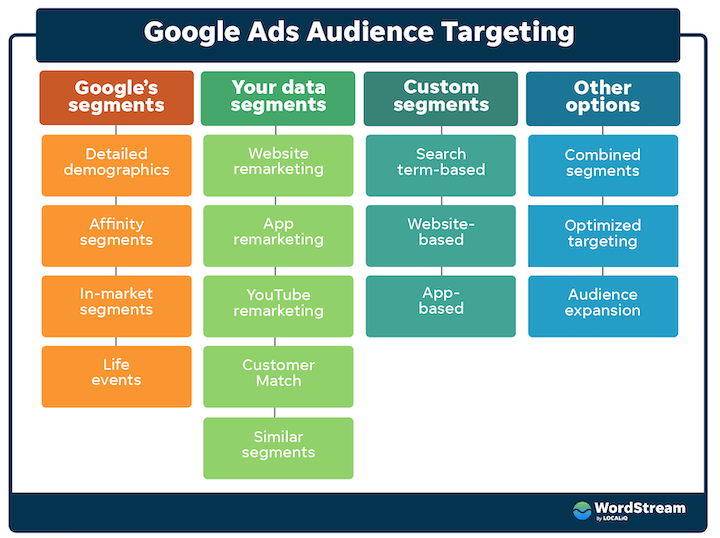
Utilizing Audience Segmentation for Tailored Ads
Audience segmentation allows advertisers to categorize potential leads based on specific characteristics, behaviors, and interests. By creating tailored ads for distinct segments, businesses can increase engagement and conversion rates. For example, a software company may create separate ad campaigns for small businesses, enterprise clients, and individual users, ensuring that each segment receives messaging that resonates with their unique needs.
Implementing Remarketing Strategies to Recapture Interest
Remarketing is an effective strategy for re-engaging potential leads who have previously interacted with a business’s website or ads. By displaying targeted ads to users who have shown interest but did not convert, businesses can remind them of their offerings and encourage them to take action. This strategy can be fine-tuned by creating custom audiences based on user behavior, such as pages visited or time spent on the site.
Leveraging Demographic Targeting for Better Alignment
Demographic targeting enables advertisers to focus on specific groups based on age, gender, parental status, and household income. This precise targeting helps align ad messaging with the preferences and needs of distinct demographic segments. For instance, a luxury brand may target higher-income households, while a family-oriented product may focus on parents. By tailoring ads to these demographics, businesses can enhance relevance and improve lead quality.
Using In-Market and Affinity Audiences for Precision
In-market audiences consist of users who are actively researching or comparing products and services, making them prime candidates for lead generation. Affinity audiences, on the other hand, are based on users’ interests and lifestyle choices. By targeting these audiences, businesses can reach individuals who are more likely to convert. For example, a travel agency can target in-market audiences looking for vacation packages while also reaching affinity audiences interested in travel and adventure.
Common misconceptions about audience targeting include the belief that broader targeting always yields better results. In reality, overly broad campaigns can dilute messaging and reduce conversion rates. Additionally, many advertisers neglect to regularly update their audience segments based on changing consumer behavior, leading to missed opportunities for engagement.
Practical Application
- Conduct a thorough analysis of your current audience to identify distinct segments.
- Set up remarketing campaigns to reach users who have engaged with your site but did not convert.
- Utilize Google Ads’ demographic targeting options to refine your audience based on age, gender, and income.
- Incorporate in-market and affinity audiences into your campaigns to enhance targeting precision.
Implementing these advanced targeting strategies can maximize the effectiveness of Google Ads in generating leads. By focusing on audience segmentation, remarketing, demographic targeting, and precision targeting, businesses can drive higher engagement and conversion rates.
Optimizing Your Google Ads for Maximum ROI
This section provides actionable strategies for refining Google Ads campaigns to enhance return on investment (ROI). By focusing on specific optimization techniques, marketers can significantly improve lead generation outcomes.

A/B Testing Ad Variations
A/B testing is a crucial method for determining which ad variations perform best. This involves creating multiple versions of an ad, altering elements such as headlines, descriptions, and calls to action. Running these variations simultaneously allows for real-time performance insights, enabling marketers to identify which elements resonate with their target audience.
- Headlines: Experiment with different headlines to see which captures attention more effectively.
- Ad Copy: Test various descriptions to determine which generates higher click-through rates (CTR).
- Call to Action: Vary the wording of calls to action to evaluate which prompts more conversions.
Adjusting Bids Based on Keyword Performance
Monitoring keyword performance is essential for maximizing ROI. Keywords should be categorized into three performance tiers: high-performing, average-performing, and low-performing. Adjust bids accordingly:
- Increase bids for high-performing keywords that consistently generate leads.
- Maintain or slightly decrease bids for average-performing keywords to test potential improvements.
- Reduce or pause bids for low-performing keywords to minimize wasted spend.
Analyzing and Utilizing Quality Score Metrics
The Quality Score is a critical metric that affects ad placement and cost-per-click (CPC). It is based on the relevance of keywords, ad copy, and landing page experience. Regularly analyzing Quality Scores enables marketers to identify areas for improvement:
- Relevance: Ensure that ad copy aligns closely with targeted keywords.
- Landing Page Experience: Optimize landing pages for speed, relevance, and user experience.
- Expected CTR: Craft compelling ad copy that encourages clicks.
Implementing Conversion Tracking and Analytics Tools
Conversion tracking is vital for understanding the effectiveness of Google Ads campaigns. By implementing tracking codes on landing pages, businesses can monitor conversions and identify which ads drive the most leads. Utilize analytics tools such as Google Analytics to gain deeper insights into user behavior and campaign performance.
Setting up goals in Google Analytics allows for tracking specific actions, such as form submissions or purchases. This data can inform future ad strategy and budget allocation.
Misconceptions often arise around the effectiveness of Google Ads. Many assume that simply increasing ad spend will lead to more leads; however, without optimization, increased spending can lead to diminished returns. Effective optimization requires a balanced approach, focusing on both ad quality and budget management.
To apply these insights, marketers should start implementing A/B tests for ad variations immediately. Regularly review keyword performance and adjust bids accordingly. Analyze Quality Scores and enhance landing page experiences. Finally, establish conversion tracking to gain actionable insights from campaign performance. This structured approach will lead to more effective lead generation through Google Ads.
Real-World Case Studies of Successful Google Ads Campaigns
This section explores successful Google Ads campaigns across various industries, highlighting effective strategies for lead generation and the measurable outcomes achieved. Understanding these examples provides valuable insights for businesses aiming to enhance their own Google Ads efforts.

Case Study 1: Home Improvement Company
A leading home improvement company implemented a Google Ads campaign focused on local service keywords. The campaign featured targeted ad groups for specific services such as kitchen remodeling and roofing repairs. By utilizing geo-targeting, the company ensured ads reached potential customers within a 30-mile radius.
- Campaign Duration: 6 months
- Click-Through Rate (CTR): 8.5%
- Cost Per Lead (CPL): $25
The campaign generated over 500 leads, with a conversion rate of 15%. Lessons learned included the importance of ad copy that highlights unique selling propositions and the need for continuous A/B testing to optimize performance.
Case Study 2: SaaS Provider
A SaaS company specializing in project management software targeted small businesses through Google Ads. The campaign emphasized high-intent keywords like “best project management tool” and used ad extensions to provide additional information, such as customer testimonials and free trials.
- Campaign Duration: 3 months
- CTR: 12%
- CPL: $15
With a total of 1,000 leads generated, the company achieved a 20% conversion rate into paying customers. Key strategies included leveraging remarketing to re-engage visitors who did not convert initially and refining keyword targeting based on search term reports.
Case Study 3: Educational Institution
An online educational institution focused on lead generation for its courses through a Google Ads campaign that targeted students and professionals looking to upskill. The institution created a dedicated landing page for each course, optimizing for relevant keywords.
- Campaign Duration: 4 months
- CTR: 10%
- CPL: $30
The campaign resulted in 700 leads, with a conversion rate of 18%. Important tactics included using video ads to showcase course content and implementing call-to-action buttons that encouraged immediate sign-ups.
Key Takeaways for Replicating Success
Analyzing these case studies reveals several strategies that can be applied to enhance lead generation through Google Ads:
- Target Specific Audiences: Utilize geo-targeting and audience segmentation to reach potential customers effectively.
- Optimize Ad Copy: Highlight unique selling points and include strong calls-to-action to improve engagement.
- Utilize Extensions: Implement ad extensions to provide additional information and improve visibility in search results.
- Monitor and Adjust: Continuously analyze performance metrics and adjust campaigns based on data insights.
Successful Google Ads campaigns require a focused strategy and ongoing optimization. Businesses should regularly review performance metrics, experiment with different ad formats, and refine their targeting to maximize lead generation potential. By applying these insights, organizations can effectively leverage Google Ads as a powerful tool for attracting and converting leads.
Common Pitfalls in Google Ads Lead Generation and How to Avoid Them
This section identifies frequent mistakes in Google Ads lead generation and provides actionable solutions to enhance campaign effectiveness. Recognizing and addressing these pitfalls is essential for optimizing ad performance and maximizing lead acquisition.

Continuous Optimization is Key
Many advertisers underestimate the necessity of continuous optimization in their Google Ads campaigns. Initial settings may yield satisfactory results, but market dynamics and user behavior can shift rapidly. Regularly revisiting and adjusting targeting, ad copy, and bidding strategies ensures alignment with current trends and audience needs.
- Analyze campaign performance metrics weekly.
- Test different ad copies and landing pages to measure effectiveness.
- Adjust bids based on performance to maximize ROI.
Avoiding Keyword Stuffing and Irrelevant Targeting
Keyword stuffing, the practice of overloading ads with keywords, can lead to poor performance and disapproval from Google. Instead, focus on relevant targeting that aligns with user intent. This approach not only improves ad quality scores but also enhances the likelihood of attracting qualified leads.
- Utilize keyword research tools to identify high-performing, relevant keywords.
- Employ negative keywords to filter out irrelevant traffic.
- Segment campaigns by audience demographics to target specific user groups effectively.
The Importance of User Experience on Landing Pages
The experience users encounter on landing pages significantly impacts conversion rates. A poorly designed landing page can deter potential leads, regardless of the quality of the ad. Ensure that landing pages are optimized for user experience, featuring clear calls to action, fast loading times, and mobile responsiveness.
- Conduct A/B testing to determine the most effective layout and content.
- Ensure that the landing page content aligns with the ad’s promise.
- Minimize distractions by eliminating unnecessary links and information.
Learning from Competitors Without Imitating Them
While analyzing competitor strategies can provide valuable insights, direct imitation can lead to ineffective campaigns. Instead, focus on understanding what works for them and adapting those insights to fit your unique brand voice and offerings. This approach fosters innovation and differentiation in a competitive landscape.
- Identify competitors with successful campaigns and analyze their ad copy and targeting.
- Look for gaps in their strategies that your business can exploit.
- Develop unique value propositions that resonate with your target audience.
Many advertisers overlook the nuances of Google Ads lead generation, leading to missed opportunities. For instance, a common misconception is that higher spending always results in better leads. In reality, effective targeting and quality ad content are often more critical than budget alone.
To apply these insights effectively, advertisers should:
- Implement a regular schedule for performance reviews and optimizations.
- Use keyword research to refine targeting and eliminate wasteful spending.
- Regularly test and enhance landing pages for optimal user experience.
- Analyze competitors to inform your strategy while maintaining originality.
For How To Use Google Ads To Generate Leads businesses looking to generate local leads through Google Ads or Local SEO, GMB Ranger LLC offers hands-on campaign management. Specialist Md Tangeer Mehedi personally handles campaign setup and ongoing optimization — with no payment required until the first lead comes in.
Frequently Asked Questions
What are the best practices for using Google Ads to generate leads?
Best practices include targeting specific keywords, using compelling ad copy, and optimizing landing pages for conversions. Regularly analyzing performance data helps refine strategies and improve ROI.
How much does it cost to use Google Ads for lead generation?
The cost of Google Ads varies based on factors like competition, keywords, and targeting options. On average, businesses can expect to spend between $1 to $2 per click for lead generation campaigns.
How long does it take to see results from Google Ads lead generation?
Results from Google Ads can typically be seen within a few days to weeks, depending on campaign setup and budget. However, optimizing for better performance may take longer.
What types of Google Ads are best for generating leads?
Search ads and display ads are effective for lead generation, as they can target users actively searching for services. Additionally, remarketing ads can help re-engage previous visitors and convert them into leads.
How do I create a Google Ads campaign for lead generation?
To create a Google Ads campaign for lead generation, start by defining your goals, selecting relevant keywords, and crafting targeted ad copy. Set up conversion tracking to measure lead generation success effectively.
What should I include in my landing page for Google Ads?
Your landing page should feature a clear call-to-action, concise information about your offer, and a simple lead capture form. Ensure the page is mobile-friendly and loads quickly to enhance user experience.
Can I use Google Ads for local lead generation?
Yes, Google Ads is highly effective for local lead generation. Utilizing location targeting and local keywords can help attract potential customers in your specific geographic area.
What common mistakes should I avoid when using Google Ads for leads?
Avoid common mistakes such as neglecting keyword research, using generic ad copy, and not tracking conversions. Additionally, failing to optimize landing pages can hinder lead generation efforts.
Final Thoughts on how to use google ads to generate leads
Effective lead generation through Google Ads hinges on strategic targeting, meticulous optimization, and a comprehensive understanding of audience behavior. By leveraging advanced techniques and analyzing real-world case studies, businesses can significantly enhance their ROI and drive meaningful engagement.
To elevate your lead generation efforts, conduct a thorough audit of your current Google Ads campaigns, focusing on keyword performance and audience segmentation to identify areas for immediate improvement.
Mastering Google Ads is not just about visibility; it’s about converting that visibility into actionable leads that drive growth and success in a competitive landscape.
Leave a Reply