
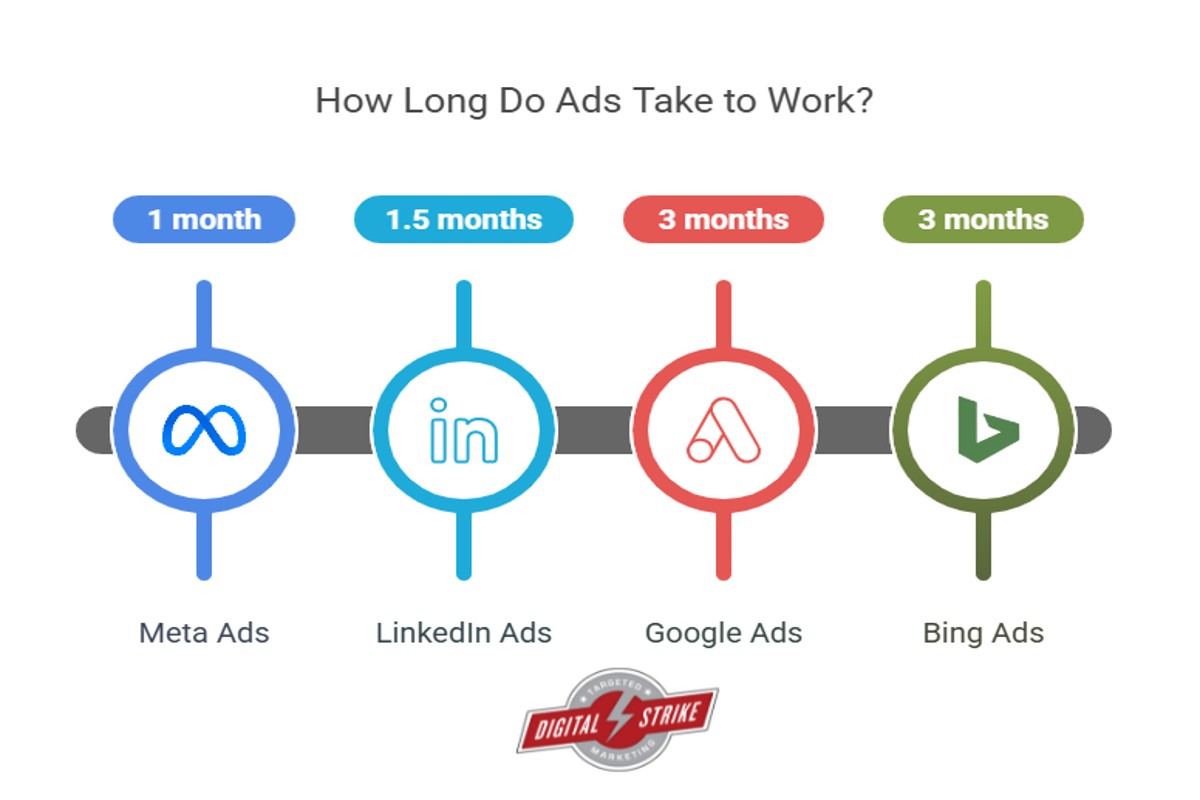
How long does it take for Google Ads to work? Typically, Google Ads can start generating traffic within hours, but optimal results may take several weeks as campaigns are optimized.
Understanding the timeline for Google Ads effectiveness is crucial for businesses and marketers aiming to leverage online advertising. Misjudging this timeframe can lead to unrealistic expectations, wasted budgets, and missed opportunities for engagement and sales.
This guide will detail the typical timeline for Google Ads to show results, factors influencing performance, and best practices for optimizing campaigns to achieve the desired outcomes efficiently.
For How Long Does It Take For Google Ads To Work businesses looking to generate local leads through Google Ads or Local SEO, GMB Ranger LLC offers hands-on campaign management. Specialist Md Tangeer Mehedi personally handles campaign setup and ongoing optimization — with no payment required until the first lead comes in.
How quickly can I see results from Google Ads?
You can typically see results from Google Ads within 24 hours of launching a campaign. However, while initial visibility in search results can be immediate, measurable performance improvements may take one to two weeks as data accumulates and optimizations are made.
The immediate visibility of your ads is influenced by factors such as your bid strategy, ad quality, and the competitiveness of your target keywords. Once your ads are live, they can appear in search results almost instantly, allowing potential customers to see your offerings right away. However, this does not guarantee clicks or conversions, which depend on how appealing your ad is to users and how well it aligns with their search intent.
Long-term performance metrics, like conversion rates and return on ad spend (ROAS), require time to stabilize. Google Ads uses machine learning algorithms that optimize ad delivery over time based on user interaction. Therefore, a more accurate assessment of your campaign’s effectiveness generally occurs after a few weeks, as the system gathers enough data to identify patterns and make informed adjustments.
Additionally, factors such as your budget, audience targeting, and the overall health of your website can significantly impact how quickly you see tangible results. A well-structured campaign with targeted keywords and compelling ad copy is more likely to yield faster results than one that is poorly optimized.
Expert Tip: Regularly monitor your campaign’s performance and make data-driven adjustments to optimize ad spend. Implement A/B testing to refine ad copy and landing pages, which can accelerate positive results.
What factors affect how long Google Ads take to work?
The time it takes for Google Ads to deliver results is influenced by several key factors, including budget, targeting, and competition. Each of these elements can significantly impact ad performance and the speed at which a campaign achieves its goals. Therefore, understanding these components is essential for optimizing ad effectiveness.
First, the budget allocated for a Google Ads campaign plays a critical role. A higher budget allows for more extensive visibility and quicker data collection, enabling faster adjustments based on performance metrics. Conversely, a limited budget may restrict ad reach, delaying the time it takes to see measurable outcomes.
Targeting is another significant factor. Advertisers must determine the right audience for their ads through demographic, geographic, and behavioral targeting. Well-defined targeting can lead to higher engagement rates and a quicker return on investment (ROI). If the targeting is too broad or not aligned with the product, it may result in decreased performance and longer wait times for results.
Finally, competition in the industry impacts how long it takes for Google Ads to work. In highly competitive markets, bidding for keywords can be aggressive, leading to higher costs per click (CPC) and potentially slower results. Advertisers in less competitive niches may find it easier to achieve visibility and generate leads quickly.
Expert Tip: To accelerate results, consider using A/B testing for ad copy and landing pages. This allows for real-time optimization based on performance data, ultimately reducing the time needed to identify effective strategies.
How do Google Ads compare to SEO in terms of speed?
Google Ads provide immediate visibility, often generating traffic within hours of launching a campaign. In contrast, Search Engine Optimization (SEO) typically takes several months to show significant results. While Google Ads can drive quick conversions, SEO focuses on sustainable, long-term growth.
The primary difference lies in the speed of results. Google Ads allows businesses to create targeted campaigns that appear at the top of search results almost instantly, depending on budget and competition. This immediacy can be particularly beneficial for time-sensitive promotions or new product launches. However, once a campaign stops, the visibility ceases, making it a short-term strategy.
On the other hand, SEO involves optimizing website content and structure to improve organic search rankings over time. Factors such as keyword research, content quality, and backlink acquisition contribute to SEO effectiveness. While the initial investment in time and resources may not yield quick results, the benefits of SEO can lead to sustained traffic and brand authority. Once established, organic rankings can provide ongoing visibility without continued financial outlay, distinguishing it as a long-term investment.
- Speed: Google Ads show results almost immediately; SEO takes months.
- Cost: Google Ads require ongoing investment; SEO builds organic traffic over time.
- Longevity: SEO results can persist long after effort; Google Ads stop generating traffic once the budget is exhausted.
Expert Tip: Businesses should consider a hybrid approach, using Google Ads for immediate needs while investing in SEO for long-term growth. This strategy capitalizes on the strengths of both methods, allowing for a balanced marketing plan.
What is the average cost of running Google Ads?
The average cost of running Google Ads can range from **$1 to $2 per click** on the Search Network, while display ads can cost approximately **$0.50 to $1.00 per click**. These costs can vary significantly based on several factors, including industry competition and ad placement. Businesses should prepare for a budget that reflects these averages to effectively utilize Google Ads and achieve desired results.
Several factors influence the cost of running Google Ads:
- Industry Competition: Highly competitive industries, such as legal services or finance, often have higher costs per click due to increased bidding wars for keywords.
- Target Audience: Costs can vary based on geographic targeting and demographics. Ads aimed at larger, more affluent markets may incur higher costs.
- Quality Score: Google assigns a Quality Score based on ad relevance, click-through rates, and landing page experience. A higher score can lower costs by improving ad rankings without increasing bids.
- Ad Format: Different formats (text, display, video) have varying costs. Video ads, for example, may have a different pricing structure compared to text ads.
Implementing effective keyword strategies and optimizing ad performance can enhance results and potentially lower costs. Monitoring and adjusting campaigns regularly can lead to more efficient spend and improved return on investment.
Expert Tip: Consider using automated bidding strategies, which adjust bids in real-time to maximize ad performance based on your budget and goals. This can enhance cost efficiency and improve the speed of generating results from your Google Ads campaigns.
What are best practices for optimizing Google Ads for faster results?
Optimizing Google Ads effectively can accelerate desired results significantly. Implementing targeted strategies can enhance ad performance and improve conversion rates, leading to quicker outcomes. Here are best practices that can help achieve faster results with your campaigns.
- Utilize Targeted Keywords: Conduct thorough keyword research to identify high-intent phrases relevant to your business. Focus on long-tail keywords that align closely with user search intent, as they often yield higher conversion rates.
- Optimize Ad Copy: Craft compelling ad copy that includes targeted keywords and clear calls to action. Highlight unique selling propositions (USPs) and ensure the message resonates with the target audience to boost click-through rates (CTR).
- Leverage Ad Extensions: Use ad extensions to provide additional information and increase visibility. Extensions such as site links, callouts, and structured snippets enhance ad effectiveness and improve engagement, leading to faster results.
- Implement Conversion Tracking: Set up conversion tracking to measure the performance of your ads. This data informs adjustments and optimizations, allowing for strategic changes that can enhance overall campaign effectiveness.
- Test and Refine Campaigns: Regularly A/B test different elements of your ads, such as headlines, images, and targeting options. Use the insights gained to refine campaigns continuously, ensuring that the ads remain relevant and effective.
These strategies not only improve ad performance but also facilitate a more efficient allocation of budget and resources. Analyzing data and making informed adjustments can lead to accelerated results, maximizing the return on investment in Google Ads.
Maximizing budget efficiency through targeted ad spending can significantly impact the speed of achieving results. Monitoring performance metrics closely allows for real-time adjustments, making campaigns more agile and responsive to market conditions.
Can I improve my Google Ads performance quickly?
Yes, it is possible to enhance Google Ads performance in a short timeframe with targeted strategies. Implementing immediate adjustments can lead to noticeable improvements in metrics such as click-through rate (CTR) and conversion rate. However, some changes may require time to fully reflect in your campaign results.
To quickly boost performance, focus on the following actionable steps:
- Refine Keywords: Conduct a rapid review of your keywords. Eliminate underperforming keywords and add high-performing, relevant variations to increase visibility.
- Adjust Bids: Increase bids on high-performing ads and keywords to gain better ad placements. Conversely, lower bids on underperforming keywords to optimize your budget.
- Enhance Ad Copy: Test different ad variations by changing headlines and descriptions. Use compelling language that highlights unique selling points and includes clear calls to action.
- Utilize Ad Extensions: Implement ad extensions like site links, callouts, and structured snippets. These can enhance ad visibility and provide additional information to potential customers.
- Optimize Landing Pages: Ensure landing pages are relevant to your ads and optimized for conversions. Improve loading speed and user experience to reduce bounce rates.
- Leverage Audience Targeting: Use audience targeting features to reach specific demographics or remarket to previous visitors. This can increase ad relevance and improve conversion rates.
Regularly monitor the performance of these changes to gauge their effectiveness. Adjust strategies as necessary based on real-time data.
Expert Tip: Implement A/B testing for your ads and landing pages to quickly identify what resonates best with your audience, allowing for informed adjustments that can significantly boost performance in a short period. Consistently analyze the results to refine your approach for optimal outcomes.
How long should I run Google Ads to see significant results?
To see significant results from Google Ads, a minimum duration of three to six months is typically recommended. This timeframe allows enough data to be collected to assess performance metrics like click-through rates, conversion rates, and overall return on investment (ROI).
Several factors influence how quickly results can be observed. The complexity of the campaign, including the number of keywords, ad formats, and targeting options, plays a significant role. For instance, campaigns with higher competition may require more time to optimize bids and ad placements effectively. Additionally, the quality of the ad creatives and landing pages can impact user engagement and conversion rates, further affecting the timeline for achieving measurable outcomes.
Another critical aspect is the seasonality of the product or service being advertised. Certain industries may experience fluctuations in demand based on the time of year, which can either accelerate or delay the realization of results. For example, retail campaigns may yield quicker returns during peak shopping seasons compared to off-peak periods.
Practical Implications
Running Google Ads without sufficient time for evaluation can lead to premature conclusions about campaign effectiveness. It is advisable to continuously monitor performance metrics throughout the campaign and make incremental adjustments based on data analysis. Regularly reviewing key performance indicators (KPIs) such as cost per acquisition (CPA) and customer lifetime value (CLV) will provide insights into optimizing the campaign for better results.
Expert Tip: Utilize A/B testing for different ad creatives and targeting strategies during the initial months. This approach can help identify the most effective combinations early in the campaign, potentially speeding up the timeline for achieving significant results.
What common mistakes delay Google Ads effectiveness?
Several common mistakes can significantly delay the effectiveness of Google Ads campaigns. Misconfigured settings, inadequate keyword research, and lack of proper ad testing often lead to suboptimal performance and wasted budgets. Understanding these pitfalls is essential for achieving quicker and more effective results.
One frequent error is failing to conduct thorough keyword research. For example, a business selling eco-friendly products may target overly broad keywords like “environment” instead of more specific phrases like “biodegradable kitchenware.” This mismatch can lead to irrelevant clicks and low conversion rates, prolonging the time taken to see meaningful results. Additionally, not utilizing negative keywords can result in ads appearing for unrelated queries, further diluting budget efficiency.
Another mistake is neglecting ad copy testing. Consider a scenario where a company runs a single ad variation for an extended period without assessing its performance against different headlines or descriptions. If the ad fails to resonate with the target audience, the campaign will struggle to generate clicks and conversions. Regularly testing and optimizing ad copy is essential to identify what attracts potential customers and to enhance overall campaign performance.
Lastly, improper campaign settings can also hinder effectiveness. For instance, a business may set a low daily budget without considering competition or seasonal trends. If the budget is too restrictive during peak times, ads may not run frequently enough to gain traction, ultimately delaying results. Regularly reviewing and adjusting campaign settings based on performance data is crucial for optimizing ad visibility and engagement.
Expert Tip: Implementing a structured A/B testing approach for both keywords and ad copy can provide valuable insights that accelerate campaign performance. Use data-driven decisions to refine targeting and messaging continuously, ensuring that the ads resonate with the intended audience.
Understanding Google Ads Metrics: What to Track for Success
This section explores essential metrics that determine the effectiveness of Google Ads campaigns. Monitoring these metrics allows advertisers to assess performance and make informed decisions for optimization.

Key Performance Indicators (KPIs) to Monitor
Key Performance Indicators (KPIs) serve as benchmarks for evaluating the success of Google Ads campaigns. Focusing on the right KPIs enables advertisers to identify strengths and weaknesses in their strategies. Common KPIs include:
- Impressions: The number of times ads are displayed.
- Clicks: The total number of clicks on ads, indicating user interest.
- Conversions: The number of desired actions taken by users, such as purchases or sign-ups.
- Cost Per Click (CPC): The average amount spent for each click on an ad.
- Return on Ad Spend (ROAS): Revenue generated for every dollar spent on advertising.
Understanding Click-Through Rates (CTR) and Conversion Rates
Click-Through Rate (CTR) and conversion rates are pivotal metrics in assessing ad performance. CTR measures the ratio of users who click on an ad to the total number of impressions, expressed as a percentage. A higher CTR indicates effective ad copy and targeting.
Conversion rates reflect the percentage of users who complete a desired action after clicking an ad. A strong conversion rate suggests that the landing page and ad messaging align well with user expectations. Both metrics provide insight into user engagement and the effectiveness of ad placements.
The Importance of Quality Score in Ad Performance
Quality Score is a critical factor that influences ad positioning and CPC. Google assigns a Quality Score based on the relevance of keywords, ad copy, and landing page experience. A higher Quality Score can lead to lower CPCs and better ad placements, enhancing overall campaign performance. Advertisers should strive to improve their Quality Score by ensuring that all components of their ads are relevant and engaging.
How to Analyze Data for Continuous Improvement
Analyzing performance data is vital for optimizing Google Ads campaigns. Regularly reviewing KPIs allows advertisers to spot trends, identify underperforming ads, and make necessary adjustments. Utilize the following steps for effective data analysis:
- Set a regular schedule for reviewing campaign performance, such as weekly or monthly.
- Compare current data against historical performance to identify improvements or declines.
- Test variations of ad copy, targeting, and bidding strategies to see which combinations yield the best results.
- Implement changes based on insights gained from data analysis and monitor the outcomes.
Many advertisers overlook the importance of segmenting data for deeper insights. By analyzing performance across different demographics, devices, and timeframes, advertisers can uncover hidden opportunities and refine their strategies further. This nuanced approach enables targeted improvements that can significantly enhance campaign effectiveness.
To leverage these insights effectively, prioritize tracking KPIs relevant to your business goals. Regularly assess CTR, conversion rates, and Quality Score to identify areas for improvement. Implement A/B testing to optimize ad elements and use performance data to inform future campaigns. By adopting a data-driven approach, advertisers can maximize the effectiveness of their Google Ads and achieve desired results more efficiently.
The Role of Targeting in Google Ads Success
Effective targeting is a cornerstone of Google Ads success, significantly influencing ad visibility and return on investment (ROI). This section explores various targeting strategies that can accelerate the effectiveness of Google Ads campaigns.
Demographic and Geographic Targeting Strategies
Demographic targeting allows advertisers to specify criteria such as age, gender, and income level. By aligning ads with the characteristics of the most likely customers, businesses can enhance engagement rates. For example, a luxury brand may choose to target individuals aged 30-50 with higher income levels, maximizing the relevance of their ads.
Geographic targeting enables advertisers to reach users in specific locations. This is especially useful for local businesses or those with region-specific products. By focusing on particular cities or even zip codes, businesses can ensure that their ads resonate with the local audience, leading to increased conversions.
Using Audience Segmentation for Better Results
Audience segmentation involves dividing a broader audience into smaller, more defined groups based on shared characteristics or behaviors. This strategy allows for highly tailored messaging. For instance, targeting previous website visitors with customized ads can lead to higher engagement rates. The Google Ads platform provides tools to create segments based on criteria such as interests, online behaviors, and purchase history.
- Custom Audiences: Create lists based on customer data.
- Similar Audiences: Target users similar to existing customers.
- In-Market Audiences: Reach users actively searching for specific products.
The Impact of Keyword Selection on Ad Visibility
Keyword selection is critical for achieving visibility in Google Ads. Choosing the right keywords ensures that ads appear when potential customers search for related terms. Conducting thorough keyword research helps identify high-traffic keywords that align with business objectives. Long-tail keywords, while having lower search volume, often result in higher conversion rates due to their specificity.
Additionally, utilizing negative keywords can prevent ads from showing up in irrelevant searches. This enhances targeting precision, ensuring that ad spend is directed toward users with genuine interest.
Leveraging Remarketing for Faster Conversions
Remarketing is a powerful strategy that targets users who have previously interacted with a website or app. By serving tailored ads to these users, businesses can re-engage potential customers who may not have converted on their first visit. Remarketing campaigns can significantly shorten the conversion timeline, as these users are already familiar with the brand.
Utilizing dynamic remarketing can further enhance this strategy. Ads can be customized to show specific products that users viewed, increasing the likelihood of conversion.
Nuance / Expert Layer
An often-overlooked aspect of targeting in Google Ads is the balance between broad and narrow targeting. While narrow targeting can yield high conversion rates, it may limit audience reach and overall impressions. Conversely, broad targeting can generate more clicks but may lead to lower conversion rates due to less relevant traffic. Finding the right mix is essential for optimizing ad performance. Additionally, misconceptions exist regarding the notion that more targeting options always lead to better results. In reality, excessive targeting can lead to audience fatigue and reduced ad performance over time.
Practical Application
To maximize the effectiveness of Google Ads, businesses should take the following actionable steps:
- Conduct thorough demographic and geographic analysis to refine targeting.
- Utilize audience segmentation to personalize ad messaging.
- Perform keyword research to select high-performing and relevant keywords.
- Implement remarketing campaigns to re-engage previous visitors.
By strategically focusing on these elements, businesses can significantly enhance their Google Ads performance and achieve quicker results, addressing the question of how long does it take for Google Ads to work.
Ad Budgeting: How Much Should You Spend for Quick Results?
This section delves into effective budget allocation for Google Ads and its direct impact on the speed of achieving results. A well-structured budget can significantly enhance ad visibility and overall campaign performance.
Determining an Effective Budget for Your Goals
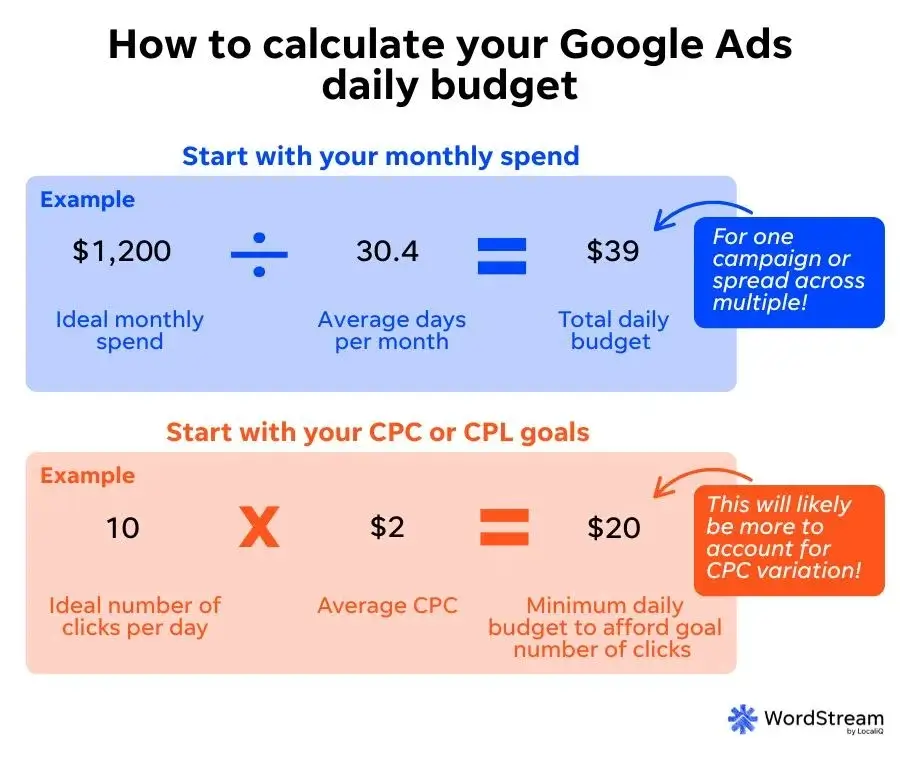
Establishing a budget begins with understanding your business objectives. Align your budget with specific goals, such as increasing website traffic, generating leads, or driving sales. For instance, if the aim is to generate leads, consider a budget that allows for an aggressive approach in high-competition sectors. A common starting point is to allocate a minimum of $10 to $50 per day, depending on industry standards and competitive landscape.
Balancing CPC and CPA for Optimal Performance
Cost-Per-Click (CPC) and Cost-Per-Acquisition (CPA) are two critical metrics for budget allocation. CPC refers to the amount spent for each click on your ad, while CPA measures the cost to acquire a customer. Finding the right balance between these two metrics is essential. If CPC is too high, it may drain your budget without yielding substantial results. Conversely, a low CPA indicates efficient spending that can lead to quicker returns.
- Monitor CPC: Aim for a CPC that is sustainable for your budget while maintaining ad visibility.
- Evaluate CPA: Adjust your bids based on the CPA to ensure you are spending efficiently.
- Test and Optimize: Regularly analyze and adjust both CPC and CPA to improve performance over time.
The Relationship Between Budget and Ad Visibility
Your budget directly influences ad visibility within Google Ads. A higher budget allows for more frequent ad placements, increasing the likelihood of clicks and conversions. Ads with limited budgets may not display consistently, resulting in missed opportunities. To maximize visibility, businesses should consider increasing budgets during peak times and adjusting them based on performance data.
Adjusting Budgets Based on Performance Data
Continuous monitoring and adjustment of the budget based on performance data are vital for optimizing campaigns. Use Google Ads analytics to track key performance indicators (KPIs) such as click-through rate (CTR), conversion rate, and overall ROI. If certain ads underperform, reallocating budget to higher-performing campaigns can accelerate results. Implementing a data-driven approach ensures that funds are utilized effectively, enhancing the speed at which Google Ads can work.
Many advertisers mistakenly believe that increasing the budget alone guarantees faster results. While a higher budget can improve visibility, without optimizing ad copy, targeting, and landing pages, results may still lag. Focus on creating high-quality ads and targeting the right audience, alongside appropriate budget allocation.
To apply this knowledge effectively, start by defining your campaign goals and setting a preliminary budget. Monitor key metrics such as CPC and CPA, and be prepared to adjust your budget based on performance insights. Regularly review your ad performance data and reallocate funds to maximize ROI. This proactive approach will help ensure that your Google Ads campaign delivers results more swiftly and efficiently.
Real-World Case Studies: Google Ads Success Stories
This section highlights real-life examples of businesses that successfully implemented Google Ads, showcasing the timelines and strategies behind their achievements. Analyzing these case studies offers valuable insights into what it takes to achieve results through targeted advertising.

Case Study 1: E-commerce Retailer
An online clothing retailer utilized Google Ads to boost its visibility during a seasonal sale. The campaign was launched with a budget of $5,000, focusing on specific keywords related to summer apparel. Within the first week, the retailer reported a 30% increase in website traffic, leading to direct sales growth of 25% by the end of the month. This success stemmed from targeted ad copy and the use of shopping ads to showcase products visually.
Case Study 2: Local Service Provider
A plumbing service in a metropolitan area implemented Google Ads to attract local customers. By leveraging geo-targeting and ad extensions, the business saw a significant increase in call inquiries. The campaign resulted in a 50% rise in service appointments within six weeks. Key to their success was the strategic use of local keywords and the inclusion of customer testimonials in the ad copy.
Case Study 3: SaaS Company
A software-as-a-service (SaaS) company focused on lead generation through Google Ads. With a budget of $10,000 over three months, the campaign aimed to capture leads through search and display ads. By optimizing landing pages and using retargeting strategies, the company achieved a 40% increase in qualified leads by the end of the campaign. The timeline for results varied, with initial lead generation evident within the first month, but significant conversions occurred in the later stages due to ongoing optimization.
Lessons Learned from Successful Google Ads Campaigns
- Targeted Keyword Selection: Choosing specific and relevant keywords enhances ad performance.
- Ad Copy Optimization: Compelling ad copy with clear calls to action drives higher click-through rates.
- Continuous Monitoring: Regularly analyzing campaign performance allows for timely adjustments and improvements.
Timelines for Achieving Results
The timeline for seeing results from Google Ads varies by industry. E-commerce businesses may experience immediate sales spikes, while B2B companies may require longer to convert leads into sales. A general framework includes:
- Initial Launch (0-1 month): Awareness and traffic generation.
- Optimization Phase (1-3 months): Improvement in ad performance and increased engagement.
- Conversion Phase (3-6 months): Notable sales growth and lead conversions.
Common Strategies Used by Successful Advertisers
Successful advertisers often employ several key strategies to enhance their Google Ads campaigns:
- Utilizing ad extensions to provide additional information and improve visibility.
- Implementing A/B testing to determine the most effective ad variations.
- Segmenting audiences to tailor messages and improve relevance.
Expert-level insight reveals that many businesses underestimate the time needed to refine their campaigns. Initial results may not always be indicative of long-term success. A common misconception is that Google Ads guarantees immediate sales, but effective campaigns often require ongoing adjustments and learning from data to optimize performance.
For businesses looking to replicate these successes, focus on understanding your target audience and continuously optimizing based on data insights. Start with a clear budget, define specific goals, and be prepared to adjust strategies as results come in. Consider setting up a structured approach to monitor performance metrics, which will enable more informed decisions and enhance overall campaign effectiveness.
For How Long Does It Take For Google Ads To Work businesses looking to generate local leads through Google Ads or Local SEO, GMB Ranger LLC offers hands-on campaign management. Specialist Md Tangeer Mehedi personally handles campaign setup and ongoing optimization — with no payment required until the first lead comes in.
Frequently Asked Questions
How quickly can I see results from Google Ads?
Results from Google Ads can often be seen within a few hours to a few days after launching a campaign. However, achieving optimal performance may take several weeks as the campaign gathers data and refines targeting.
What factors affect how long Google Ads take to work?
Factors that influence the speed of Google Ads effectiveness include campaign budget, competition in the industry, ad quality, and targeting settings. These elements can either accelerate or delay the time it takes to see results.
How do Google Ads compare to SEO in terms of speed?
Google Ads typically provide faster results compared to SEO, as ads can start generating traffic immediately after launch. In contrast, SEO efforts can take months to build visibility and rank in search results.
What is the average cost of running Google Ads?
The average cost of running Google Ads varies widely based on industry, competition, and campaign goals, but businesses often spend between $1 to $2 per click. It’s essential to set a budget that aligns with specific marketing objectives.
What are best practices for optimizing Google Ads for faster results?
To optimize Google Ads for quicker results, focus on high-quality keywords, compelling ad copy, and targeted landing pages. Regularly monitor performance and adjust bids and targeting based on real-time data.
Can I improve my Google Ads performance quickly?
Yes, performance can be improved quickly by refining targeting, increasing budget, and enhancing ad quality. Implementing A/B testing for ads can also yield immediate insights for optimization.
How long should I run Google Ads to see significant results?
Running Google Ads for at least three to six months is recommended to see significant results and gather enough data for effective optimization. This timeframe allows for adjustments based on performance trends.
What common mistakes delay Google Ads effectiveness?
Common mistakes that can delay Google Ads effectiveness include poor keyword selection, low-quality ad copy, and inadequate budget allocation. Additionally, neglecting to analyze performance data can hinder timely improvements.
Final Thoughts on how long does it take for google ads to work
Understanding the timeline for Google Ads effectiveness hinges on various factors, including campaign structure, targeting precision, and budget allocation. While some businesses may notice immediate traction, others might require a more extended period to optimize their strategies and achieve sustainable results.
To accelerate your Google Ads success, conduct thorough keyword research and refine your targeting parameters; this can significantly enhance the relevance of your ads and improve conversion rates, ultimately reducing the time it takes to see meaningful results.
The urgency of mastering Google Ads cannot be overstated, as it remains a pivotal tool for driving immediate traffic and generating leads in an increasingly competitive digital landscape.
Leave a Reply