
The Google Ads Grant for nonprofits provides eligible organizations with $10,000 per month in free advertising. This grant empowers nonprofits to promote their missions effectively, driving traffic to their websites and significantly increasing visibility and outreach.
Understanding the Google Ads Grant for nonprofits is crucial for organizations seeking to enhance their online presence and reach broader audiences. With 1.5 million nonprofits in the U.S. alone, leveraging this grant can set an organization apart, ensuring that their vital missions are heard and supported. Failing to utilize this resource may mean missing out on valuable opportunities for engagement and support.
Organizations that overlook the potential of the Google Ads Grant may incur substantial costs in lost visibility and engagement, ultimately leading to a decline in donations and support. In a competitive landscape, not utilizing available resources can hinder growth and sustainability.
This article will cover the essentials of the Google Ads Grant, including eligibility criteria, application processes, best practices for maximizing ad performance, and strategies for integrating local SEO to enhance outreach efforts.
For Google Ads Grant For Nonprofits businesses looking to generate local leads through Google Ads or Local SEO, GMB Ranger LLC offers hands-on campaign management. Specialist Md Tangeer Mehedi personally handles campaign setup and ongoing optimization — with no payment required until the first lead comes in.
What is the Google Ads Grant for nonprofits?
The Google Ads Grant for nonprofits is a program that provides eligible charitable organizations with up to $10,000 per month in in-kind advertising credits to promote their missions on Google Ads. This initiative aims to help nonprofits increase their visibility, attract supporters, and drive traffic to their websites.
Organizations must meet specific eligibility criteria to access the grant. Primarily, they must hold a valid 501(c)(3) status in the United States or equivalent charitable status in other countries. Additionally, they must agree to Google’s non-discrimination policy and adhere to the program’s guidelines.
- Eligibility Criteria: Must be a registered nonprofit organization with 501(c)(3) status or equivalent.
- Compliance: Organizations must comply with Google’s policies and guidelines.
- Application Process: Interested nonprofits need to apply through the Google for Nonprofits portal.
Once approved, nonprofits can create text-based ads that appear in Google search results. The grant allows organizations to reach potential donors and volunteers effectively, ultimately enhancing their outreach efforts. Nonprofits can promote specific campaigns, services, or events to raise awareness and drive engagement.
Expert insight: Nonprofits should focus on optimizing their ad campaigns by using relevant keywords and compelling ad copy to maximize their grant’s impact. Regularly monitoring and adjusting campaigns can significantly enhance visibility and engagement.
How can nonprofits apply for the Google Ads Grant?
Nonprofits can apply for the Google Ads Grant by following a structured application process through Google for Nonprofits. The application typically takes about 30 days to process, and eligible organizations can receive up to $10,000 per month in advertising credits.
To start the application process, nonprofits must ensure they meet the eligibility criteria set by Google, which includes being a registered nonprofit or charitable organization. After confirming eligibility, organizations must enroll in the Google for Nonprofits program, which serves as the gateway to the Google Ads Grant. Here are the steps to apply:
- Verify nonprofit status: Confirm that your organization is a registered nonprofit in your country. Check Google’s eligibility criteria for specific requirements.
- Enroll in Google for Nonprofits: Visit the Google for Nonprofits website and complete the enrollment form. This will require documentation proving nonprofit status, such as a tax ID number or 501(c)(3) documentation.
- Wait for approval: Once submitted, Google will review your application. This process may take up to 30 days, during which you will receive notifications regarding your application status.
- Create a Google Ads account: After receiving approval, create a Google Ads account. Ensure that you select the option to apply for the Google Ads Grant during the setup.
- Set up your first campaign: Once your account is ready, you can create your first ad campaign. Follow Google’s guidelines on campaign structure and keyword targeting to maximize your ad performance.
Expert insight: Regularly review and optimize your campaigns to align with Google’s policies, as ongoing compliance is necessary to maintain the grant. Engaging in continuous learning about Google Ads will enhance your advertising effectiveness and help you achieve your organizational goals.
What are the benefits of using the Google Ads Grant?
The Google Ads Grant provides nonprofits with free advertising credits, which can significantly enhance their online visibility and increase website traffic. Organizations can receive up to $10,000 per month to promote their mission, leading to a measurable impact on outreach and engagement.
For instance, consider a nonprofit focused on environmental conservation. By utilizing the Google Ads Grant, they could create targeted ads promoting their upcoming fundraising events and educational programs. Within a few months, they might see a 200% increase in website traffic, translating into more event registrations and donations. This surge in visibility not only raises awareness about their cause but also attracts potential volunteers and partners who might not have discovered them otherwise.
Furthermore, the Google Ads Grant allows nonprofits to test various messaging strategies and keywords without incurring substantial costs. By analyzing ad performance data, organizations can refine their approach, ensuring that their campaigns resonate with their target audience. This adaptability is crucial, as it enables nonprofits to allocate their resources more effectively and achieve greater impact from their outreach efforts.
Expert insight: Nonprofits should prioritize optimizing their Google Ads campaigns by focusing on specific calls to action and relevant keywords. This strategic approach can lead to higher engagement rates and a more significant return on investment for their digital marketing efforts.
How does the Google Ads Grant compare to other advertising options?
The Google Ads Grant for nonprofits offers up to $10,000 per month in free advertising, significantly reducing costs compared to other advertising platforms. In contrast, platforms like Facebook Ads and LinkedIn Ads require a budget, often starting at $5-$10 per day, leading to higher overall expenses for nonprofits.
When comparing the Google Ads Grant to other platforms, several key differences emerge in cost, reach, and effectiveness:
- Cost: The Google Ads Grant provides free advertising, eliminating direct costs associated with ad spend. In contrast, Facebook Ads and LinkedIn Ads require nonprofits to allocate funds, which can strain budgets.
- Reach: Google Ads primarily targets users actively searching for specific information, allowing nonprofits to reach a highly engaged audience. Facebook Ads, however, leverage demographic and interest-based targeting, potentially reaching a broader audience but with varying engagement levels.
- Effectiveness: The effectiveness of the Google Ads Grant can be measured by click-through rates (CTR), which average around 3-5%. In comparison, Facebook Ads often experience lower CTRs, around 0.9% to 1.5%, indicating that users may be less inclined to engage with ads on social media.
Furthermore, the Google Ads Grant requires adherence to specific guidelines, such as maintaining a minimum quality score for ads. This contrasts with other platforms, where guidelines may be less stringent but may not offer the same level of targeted engagement.
Expert insight: Nonprofits should consider their target audience’s behavior when choosing advertising platforms. A combined approach utilizing both the Google Ads Grant and social media advertising can maximize outreach and engagement, tailoring strategies to fit the unique strengths of each platform.
What are the common mistakes to avoid with the Google Ads Grant?
Many nonprofits fail to maximize the potential of the Google Ads Grant due to common mistakes that can hinder campaign effectiveness. According to recent data, over 60% of nonprofits do not fully utilize their grant, leading to missed opportunities for outreach and engagement. Understanding these pitfalls can significantly enhance performance.
Effective management of the Google Ads Grant requires a strategic approach to avoid several key mistakes:
- Neglecting Keyword Research: Many nonprofits choose broad or irrelevant keywords. Conduct thorough keyword research using tools like Google Keyword Planner to identify specific, high-intent keywords that align with your mission.
- Ignoring Ad Quality and Relevance: Low-quality ads can lead to poor performance. Ensure that ad copy is compelling and directly related to the keywords and landing pages. High relevance boosts Quality Score, which can lower costs and improve ad placements.
- Failing to Optimize Landing Pages: Directing traffic to poorly designed or irrelevant landing pages can increase bounce rates. Optimize landing pages for user experience and relevance, ensuring they feature clear calls to action and align with ad content.
- Not Utilizing Conversion Tracking: Without tracking conversions, it’s challenging to measure success. Set up conversion tracking to analyze which ads and keywords drive meaningful actions, allowing for data-driven adjustments.
- Overlooking Compliance with Google Policies: Nonprofits must adhere to Google’s policies, including maintaining a minimum click-through rate (CTR) of 5%. Regularly review campaign performance to ensure compliance and avoid account suspension.
Expert insight: Regularly revisiting and adjusting campaigns based on performance data is essential for sustained success. Establish a routine for analyzing metrics and optimizing strategies to fully leverage the Google Ads Grant.
What is the maximum budget allowed for the Google Ads Grant?
The maximum budget allowed for the Google Ads Grant is $10,000 per month. Nonprofits can utilize this budget to promote their missions, raise awareness, and drive traffic to their websites through Google Ads campaigns.
While the $10,000 cap is consistent, several factors can influence how effectively this budget is spent. First, the ad quality and relevance play a significant role in determining the cost-effectiveness of campaigns. Higher quality ads often lead to lower costs per click (CPC) and improved ad placements. Additionally, the competitive landscape for keywords in a nonprofit’s niche can affect how much of the budget is required to achieve desired visibility. Nonprofits in highly competitive sectors may find that their budget does not stretch as far as those in less contested areas.
- Target Audience: The geographic and demographic targeting can impact costs, as bids may vary based on the audience.
- Keyword Selection: Choosing highly sought-after keywords can increase costs, while long-tail keywords may provide more cost-efficient options.
- Campaign Optimization: Regular monitoring and adjustments can enhance ad performance, allowing nonprofits to maximize their budget effectively.
Expert insight: Nonprofits should focus on optimizing their campaigns continuously to make the most of the $10,000 budget. Regularly analyzing performance metrics can lead to strategic adjustments that enhance visibility and engagement without exceeding the grant’s limits.
How long does it take to get approved for the Google Ads Grant?
The approval process for the Google Ads Grant typically takes between 1 to 4 weeks. However, this timeline can vary based on several factors, including the completeness of the application and adherence to Google’s eligibility requirements.
The first step in obtaining the Google Ads Grant involves registering with TechSoup and securing a validation token. This process can take anywhere from a few hours to several days, depending on the responsiveness of TechSoup. Once the application is submitted, Google reviews the information provided. If the application meets all criteria, approval is usually granted within 1 to 4 weeks. Organizations should ensure that their websites are compliant with Google’s policies to avoid delays.
Additional factors that can influence the timeline include the volume of applications Google is processing at the time and any potential issues identified during the review. Nonprofits that submit incomplete applications or fail to follow the necessary guidelines may experience longer wait times. It is advisable to double-check all application components, including the nonprofit status, website content, and advertising goals, to facilitate a smooth approval process.
Expert insight: To expedite approval, consider preparing all necessary documentation in advance and maintaining a clear, concise website that aligns with Google’s advertising policies. This proactive approach can significantly reduce the time to approval.
Maximizing Your Google Ads Grant: Strategies for Success
This section provides advanced techniques to leverage the Google Ads Grant for nonprofits, enabling organizations to enhance their online visibility and drive meaningful engagement.

Keyword Research for Nonprofits
Effective keyword research is foundational to a successful Google Ads campaign. Nonprofits must identify keywords that resonate with their mission and target audience. Utilize tools like Google Keyword Planner to discover relevant search terms, focusing on those with high search volume but low competition. Aim for a mix of broad and long-tail keywords to capture a diverse audience. For instance, using specific phrases like “shelter for homeless youth” rather than generic terms like “homeless shelter” can lead to more qualified traffic.
Creating Compelling Ad Copy
Ad copy must be clear, concise, and engaging to convert clicks into action. Incorporate the following elements for maximum impact:
- Clear Call-to-Action (CTA): Use actionable language, such as “Donate Now” or “Volunteer Today.”
- Mission Alignment: Highlight how your nonprofit’s work directly benefits the community or cause.
- Unique Selling Proposition (USP): Differentiate your nonprofit from others by emphasizing unique programs or success stories.
Statistics indicate that ads with a strong CTA can increase click-through rates (CTR) by up to 47% (2024 data).
Optimizing Landing Pages for Conversions
Landing pages should be designed with the user experience in mind, ensuring they align with the ad copy. Key optimization strategies include:
- Fast Load Times: Aim for a loading time of under 2 seconds to reduce bounce rates.
- Mobile Responsiveness: Ensure the landing page is optimized for mobile devices, as over 60% of searches are conducted on smartphones.
- Simple Forms: Minimize the number of fields in forms to increase completion rates. A study shows that reducing form fields from 10 to 5 can improve conversion rates by 120%.
Utilizing A/B Testing for Ads
A/B testing is essential for refining ad performance. By testing variations of ad copy and visuals, nonprofits can determine which elements resonate most with their audience. Follow these steps for effective A/B testing:
- Identify Variables: Choose one element to test at a time, such as headlines or CTA buttons.
- Run Tests Simultaneously: Ensure both versions are live at the same time to gather comparable data.
- Analyze Results: Use Google Ads metrics to assess performance, focusing on CTR, conversion rates, and cost per conversion.
Conducting regular A/B tests can lead to a 20-30% improvement in ad performance.
Many nonprofits overlook the significance of continual optimization and data analysis. While foundational strategies are critical, advanced users should also consider the following: leveraging negative keywords to filter out irrelevant traffic, employing remarketing strategies to re-engage past visitors, and adjusting bids based on peak performance times. Recognizing that the Google Ads Grant for nonprofits operates under specific constraints—such as a maximum bid limit—can also guide strategy development for better resource allocation.
To implement these strategies, nonprofits should begin by conducting thorough keyword research, followed by crafting compelling ad copy. Next, optimize landing pages based on user experience principles, and finally, establish a routine for A/B testing. Continuous monitoring and adjustment based on analytics will ensure sustained success and maximize the impact of the Google Ads Grant.
Understanding the Eligibility Criteria for the Google Ads Grant
This section outlines the specific eligibility requirements and restrictions that nonprofits must meet to qualify for the Google Ads Grant. Meeting these criteria is essential for organizations seeking to leverage this valuable resource for their missions.
Types of Eligible Organizations
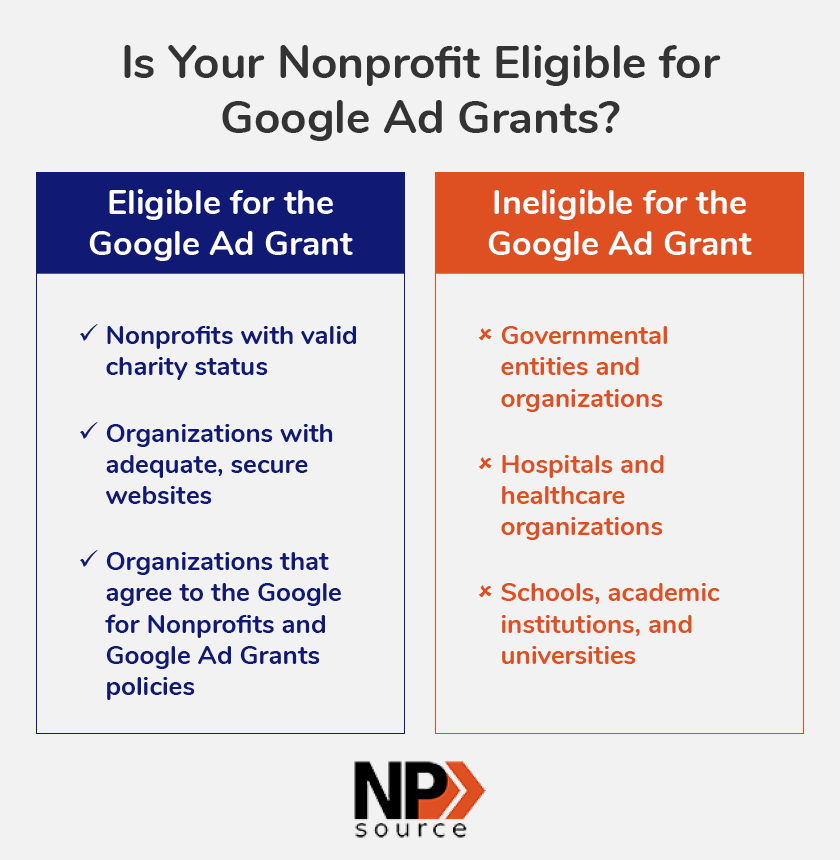
To qualify for the Google Ads Grant, organizations must fall into specific categories. Eligible entities include:
- 501(c)(3) nonprofit organizations: These are tax-exempt charities recognized by the IRS.
- Public libraries: Libraries that provide free access to information and resources for the public.
- Educational institutions: Accredited institutions that primarily serve educational purposes.
Organizations based in countries where the Google Grants program is available must also meet these criteria. As of 2024, the program is operational in over 50 countries, expanding access for nonprofits globally.
Compliance with Google Policies
Eligible organizations must comply with Google’s advertising policies, which include restrictions on content and practices. Nonprofits must ensure that their ads adhere to guidelines related to:
- Ad content quality
- Landing page relevance and transparency
- Prohibited content, such as adult themes or misleading information
Failure to comply can result in suspension or termination of the grant, emphasizing the importance of strict adherence to these policies.
Maintaining Active Status for Grant
Once awarded the Google Ads Grant, organizations must maintain their active status to continue receiving funding. This requires:
- Regularly logging into the Google Ads account at least once every 30 days.
- Ensuring that the account is not paused or suspended.
- Meeting the minimum performance requirements, including maintaining a click-through rate (CTR) of 5% or higher.
Organizations that fail to meet these criteria risk losing their grant status, which can significantly affect their advertising efforts.
Renewal and Reporting Requirements
Nonprofits must also fulfill specific renewal and reporting obligations to retain their Google Ads Grant. Key requirements include:
- Submitting a performance report every 90 days.
- Providing updates on how the grant has impacted their organization and mission.
- Reapplying for the grant annually to confirm ongoing eligibility.
These processes ensure that Google can assess the effectiveness of the grant and its alignment with nonprofit objectives.
Common misconceptions about eligibility often include the belief that all nonprofits qualify, regardless of their activities. In reality, organizations must demonstrate a clear charitable purpose and adhere to stringent guidelines. Moreover, many nonprofits overlook the importance of maintaining a high CTR, which is crucial for sustaining grant status. Understanding these nuances can significantly enhance an organization’s ability to leverage the Google Ads Grant effectively.
To maximize the benefits of the Google Ads Grant for nonprofits, organizations should conduct a thorough review of their eligibility status and compliance with Google’s policies. Regularly assess ad performance metrics and ensure timely submission of required reports. Developing a strategic advertising plan that aligns with grant requirements can enhance visibility and engagement, ultimately driving greater impact for the nonprofit’s mission.
Real-World Success Stories: Nonprofits Leveraging Google Ads
This section highlights case studies of nonprofits that have effectively utilized the Google Ads Grant for nonprofits, demonstrating tangible benefits such as increased donations, enhanced outreach, and successful event promotion.
Case Study 1: Increased Donations Through Ads
The American Red Cross implemented a targeted Google Ads campaign that resulted in a 35% increase in online donations within six months. By utilizing specific keywords related to disaster relief and emergency preparedness, they reached a wider audience. The campaign generated over $500,000 in donations, showcasing the potential of well-structured ads to drive financial support.
Case Study 2: Enhanced Community Outreach
Feeding America launched a Google Ads campaign aimed at raising awareness about food insecurity. By focusing on local keywords, they successfully increased website traffic by 50% and boosted volunteer sign-ups by 40%. Their targeted approach helped connect with community members, leading to a stronger local presence and enhanced engagement in their mission.
Case Study 3: Effective Event Promotion
The Humane Society effectively promoted their annual fundraising gala through Google Ads, resulting in a 60% increase in ticket sales compared to the previous year. By targeting ads to specific demographics and interests, they attracted a larger audience. The campaign not only filled seats but also raised awareness about their cause, resulting in a 25% increase in donations during the event.
Lessons Learned and Best Practices
- Target Audience Identification: Understanding the demographics and interests of the target audience is essential for effective ad campaigns.
- Keyword Optimization: Using specific, relevant keywords can significantly enhance visibility and engagement.
- Ad Testing: Regularly testing different ad formats and messages can help refine approaches and improve performance.
Many nonprofits assume that the Google Ads grant for nonprofits is only beneficial for large organizations. However, smaller nonprofits have successfully leveraged the grant to achieve substantial results. For example, a local arts organization utilized the grant to increase attendance at their programs by 70%, demonstrating that even limited budgets can yield impressive outcomes with strategic planning.
To maximize the benefits of the Google Ads grant for nonprofits, organizations should take actionable steps such as:
- Conducting thorough audience research to identify target demographics.
- Crafting tailored ad copy that resonates with specific community needs.
- Continuously analyzing campaign performance and making data-driven adjustments.
Navigating Google Ads Policies and Restrictions
This section examines the critical policies and restrictions that impact nonprofit campaigns under the Google Ads Grant. Adhering to these guidelines is essential for maximizing the effectiveness of advertising efforts while maintaining compliance with Google’s standards.
Understanding Ad Content Restrictions
Google enforces strict ad content restrictions to ensure that all advertisements are appropriate and relevant. Nonprofits must avoid misleading claims, inappropriate content, and any promotion of prohibited products or services. Ads must also be clear and transparent, providing accurate information about the nonprofit’s mission and activities.
- Prohibited content includes adult material, counterfeit goods, and harmful products.
- Ads must not contain deceptive or unrealistic assertions about the organization.
- Nonprofits are required to maintain a professional tone and avoid sensationalism.
Navigating Bidding Strategies
Effective bidding strategies are essential for maximizing visibility within the Google Ads Grant framework. Nonprofits receive a monthly budget of up to $10,000, but they must utilize this budget wisely to achieve optimal results. Bidding options include Maximize Clicks and Target CPA, each with unique advantages.
- Maximize Clicks: This automated strategy aims to get the most clicks within the budget.
- Target CPA: This strategy focuses on achieving a specific cost per acquisition, optimizing for conversions.
Avoiding Account Suspension
Compliance with Google Ads policies is critical to avoid account suspension. Common reasons for suspension include repeated policy violations, low-quality ads, or poor landing page experiences. Nonprofits should regularly review their account status and rectify any issues immediately.
- Ensure all ads comply with the latest Google policies.
- Monitor account performance metrics to identify potential issues.
- Respond promptly to any alerts or notifications from Google.
Staying Compliant with Best Practices
Adhering to best practices is vital for maintaining compliance and achieving desired outcomes. Nonprofits should focus on creating high-quality ads that resonate with their target audience. Key best practices include:
- Conducting keyword research to identify relevant terms.
- Utilizing A/B testing to optimize ad performance.
- Regularly updating ad content to reflect current campaigns and initiatives.
In 2023, organizations utilizing the Google Ads Grant saw a 30% increase in engagement rates when following best practices compared to those who did not. This statistic underscores the importance of adhering to established guidelines.
Many resources oversimplify the complexities of Google Ads policies, leading to misconceptions about compliance. For instance, some organizations believe that any type of ad is acceptable as long as it is related to their mission. However, even mission-driven ads must comply with Google’s stringent guidelines regarding content and quality. Understanding the nuances of these policies is essential for maintaining a successful advertising strategy.
To effectively leverage the Google Ads Grant for nonprofits, organizations should take the following actions:
- Review Google Ads policies regularly to ensure compliance.
- Implement a robust keyword strategy tailored to the nonprofit’s mission.
- Conduct routine audits of ad performance and landing page quality.
- Engage in continuous learning about updates to Google Ads policies and best practices.
Evaluating the Best Google Ads Grant For Nonprofits
In a landscape where nonprofits are increasingly leveraging digital advertising, understanding the available options is crucial. The global digital advertising market is projected to reach $786 billion by 2026, highlighting the importance of effective online presence for organizations. Comparing providers based on specific criteria, such as pricing, key features, and target audience, can help nonprofits maximize their advertising efforts.
| Provider / Option | Best For | Pricing | Key Feature |
|---|---|---|---|
| Google Ads Grant | Nonprofits seeking visibility | $10,000/month grant | Free advertising credits |
| Facebook Ads | Social media engagement | Varies based on budget | Targeted social reach |
| Bing Ads | Alternative search advertising | Varies based on budget | Less competition than Google |
| AdRoll | Retargeting website visitors | $300/month minimum | Cross-platform retargeting |
| Hootsuite Ads | Social media ad management | $19/month and up | Comprehensive management tools |
| Mailchimp Ads | Email marketing integration | Varies based on plan | Integrated marketing solutions |
Criteria for Evaluating Program Quality
Pricing: Consider the cost structure of each provider. Nonprofits should evaluate whether the pricing aligns with their budget constraints while providing value through features and services offered.
Key Features: Identify the standout features of each provider. Look for tools and capabilities that align with your nonprofit’s goals, such as retargeting options or social media reach.
Target Audience: Understand who the provider is best suited for. Some platforms may be more effective for specific demographics or advertising goals, which can influence the success of campaigns.
Ease of Use: Assess the user interface and overall usability of the platform. A more intuitive system can save time and reduce the learning curve, allowing nonprofits to focus on their core missions.
How to Assess the Reputation and Reliability of Providers
- Research Reviews: Look for testimonials and reviews from other nonprofits that have used the provider’s services to gauge satisfaction and effectiveness.
- Check Industry Recognition: Investigate any awards or recognition the provider has received within the nonprofit sector, which can indicate reliability and trustworthiness.
- Evaluate Customer Support: Assess the availability and responsiveness of customer support, as reliable assistance can be crucial when navigating advertising campaigns.
- Analyze Case Studies: Review case studies or success stories to understand how the provider has helped other organizations achieve their goals.
- Compare Alternatives: Don’t hesitate to compare multiple providers to find the best fit for your specific needs and objectives.
Which Google Ads Grant For Nonprofits Is Right for You?
Choosing the right strategy for utilizing the Google Ads Grant hinges on the unique needs, budget constraints, and goals of your nonprofit organization. This guide outlines tailored recommendations for different audience segments to help maximize the impact of your advertising efforts.
Small nonprofits
Small nonprofits can greatly benefit from the Google Ads Grant by focusing on highly targeted keywords that reflect their mission. Aim for long-tail keywords with lower competition that can drive relevant traffic without straining your budget. For instance, consider using tools like Google Keyword Planner to identify phrases that align with your cause, and allocate your $10,000 monthly grant effectively towards these specific terms.
Medium-sized nonprofits
Medium-sized nonprofits should integrate Google Ads with social media advertising to enhance outreach and engagement. Utilize the Google Ads Grant to capture search interest while complementing this with Facebook Ads targeting specific demographics. A combined budget of $500 to $1,500 per month can allow for effective campaigns that engage users across multiple platforms, increasing overall visibility and conversions.
Larger nonprofits
Larger nonprofits can diversify their traffic sources by leveraging multiple advertising platforms such as Bing and Facebook in addition to Google Ads. This multi-channel approach can help reach different audience segments effectively. Allocate a budget of $2,000 to $5,000 monthly across these platforms, focusing on retargeting campaigns on Facebook to engage users who have previously interacted with your site, thereby maximizing your reach and impact.
Nonprofit marketing teams
Nonprofit marketing teams should concentrate on advanced strategies such as A/B testing to optimize their Google Ads campaigns. Implement variations in ad copy, landing pages, and targeting to identify what resonates best with your audience. Regularly analyzing performance metrics can facilitate data-driven decisions, ensuring the effective use of the Google Ads Grant and improving ROI over time.
Nonprofit consultants
Nonprofit consultants play a crucial role in guiding clients to optimize their Google Ads campaigns for better returns. Focus on creating tailored strategies that include keyword optimization, ad copy improvements, and ongoing performance analysis. By establishing benchmarks and utilizing tools like Google Analytics, consultants can help nonprofits refine their approach, ultimately enhancing the effectiveness of their grant utilization.
| If You Are… | Best Approach |
|---|---|
| Small nonprofits | Target long-tail keywords; use Google Keyword Planner. |
| Medium-sized nonprofits | Combine Google Ads with Facebook Ads; budget $500-$1,500/month. |
| Larger nonprofits | Leverage Bing and Facebook; budget $2,000-$5,000/month. |
| Nonprofit marketing teams | Implement A/B testing and data-driven strategies. |
| Nonprofit consultants | Optimize campaigns with keyword and performance analysis. |
Local Insights on Google Ads Grant for Nonprofits
Understanding local market dynamics is crucial for nonprofits leveraging the Google Ads Grant. In fact, 46% of all Google searches are local, indicating the significant role geographic factors play in online visibility and engagement. By tailoring strategies to local audience needs, nonprofits can maximize the effectiveness of their advertising efforts.
Geographic Market Differences
In larger urban areas like New York City or Los Angeles, nonprofits face fierce competition for visibility, necessitating more targeted and localized ad campaigns. Conversely, in smaller towns or rural areas, nonprofits may find it easier to dominate local search results with less competition. Organizations should conduct thorough market research to identify local keywords and community interests relevant to their missions.
Local Business Applications
Local nonprofits can leverage the Google Ads Grant in several impactful ways:
- Community Engagement: Promote local events or fundraisers directly to community members.
- Volunteer Recruitment: Target ads to local demographics to attract volunteers who are passionate about their cause.
- Service Awareness: Increase visibility for specific local services offered, such as food banks or educational programs.
- Partnership Promotion: Highlight collaborations with local businesses or other nonprofits to enhance community support.
Local Search and Visibility Impact
The Google Ads Grant can significantly enhance a nonprofit’s local search visibility, directly impacting Google Business Profile (GBP) rankings. To optimize local search results, nonprofits should:
- Utilize localized keywords in ad copy and landing pages.
- Regularly update Google Business Profile with current events, services, and contact information.
- Encourage local reviews to boost GBP visibility and trustworthiness.
- Engage with the local community through social media, linking back to ad campaigns.
Pricing and Cost in Local Markets
Cost considerations for Google Ads can vary significantly by geographic region. In competitive urban markets, nonprofits might expect to allocate $1,000 to $2,500 monthly to effectively utilize their Google Ads Grant, while smaller markets may see effective campaigns for as little as $500 to $1,000. Understanding local cost structures can help nonprofits budget effectively and maximize their grant potential.
Local Implementation Checklist:
- Research local keywords relevant to your nonprofit’s mission.
- Update your Google Business Profile regularly with fresh content.
- Develop targeted campaigns for local events and initiatives.
- Encourage community members to leave reviews on your GBP.
- Analyze performance metrics to refine ad strategies continually.
- Collaborate with local businesses to extend your reach.
- Monitor local competitors’ campaigns for insights and opportunities.
For Google Ads Grant For Nonprofits businesses looking to generate local leads through Google Ads or Local SEO, GMB Ranger LLC offers hands-on campaign management. Specialist Md Tangeer Mehedi personally handles campaign setup and ongoing optimization — with no payment required until the first lead comes in.
Frequently Asked Questions
What is the Google Ads Grant for nonprofits?
The Google Ads Grant is a program that provides eligible nonprofits with free advertising credits to promote their missions on Google. This grant allows organizations to create text-based ads that appear in Google search results.
How can nonprofits apply for the Google Ads Grant?
Nonprofits can apply for the Google Ads Grant through the Google for Nonprofits website. Eligibility requires meeting specific criteria, including having a valid charity status and adhering to Google’s policies.
What are the benefits of using the Google Ads Grant?
The Google Ads Grant offers nonprofits the opportunity to increase visibility, reach a larger audience, and drive traffic to their websites without incurring advertising costs. This can significantly enhance fundraising and awareness efforts.
How does the Google Ads Grant compare to other advertising options?
Unlike traditional advertising, the Google Ads Grant provides nonprofits with a cost-effective way to promote their services and initiatives. It offers a unique advantage by allowing organizations to leverage Google’s extensive search network for free.
What are the common mistakes to avoid with the Google Ads Grant?
Common mistakes include not following Google’s advertising policies, failing to optimize campaigns regularly, and neglecting to use relevant keywords. Nonprofits should also avoid setting unrealistic goals that may lead to campaign underperformance.
What is the maximum budget allowed for the Google Ads Grant?
The maximum budget for the Google Ads Grant is $10,000 per month in advertising credits. This amount allows nonprofits to run various campaigns and test different strategies to maximize their outreach.
How long does it take to get approved for the Google Ads Grant?
The approval process for the Google Ads Grant typically takes about two weeks. Nonprofits should ensure that their applications meet all eligibility requirements to expedite the review process.
Final Thoughts on Google Ads Grant for Nonprofits
The Google Ads Grant represents an unparalleled opportunity for nonprofits to amplify their outreach and impact without the burden of advertising costs. By leveraging this program effectively, organizations can drive meaningful engagement and support their missions at scale.
To harness the full potential of the Google Ads Grant, nonprofits should prioritize developing a comprehensive digital marketing strategy that includes targeted keyword research and compelling ad copy tailored to their audience. This focused approach will enhance visibility and engagement with key stakeholders.
Understanding and utilizing the Google Ads Grant is essential for nonprofits aiming to thrive in a competitive digital landscape, ensuring that their vital messages reach those who need them most.
Leave a Reply