
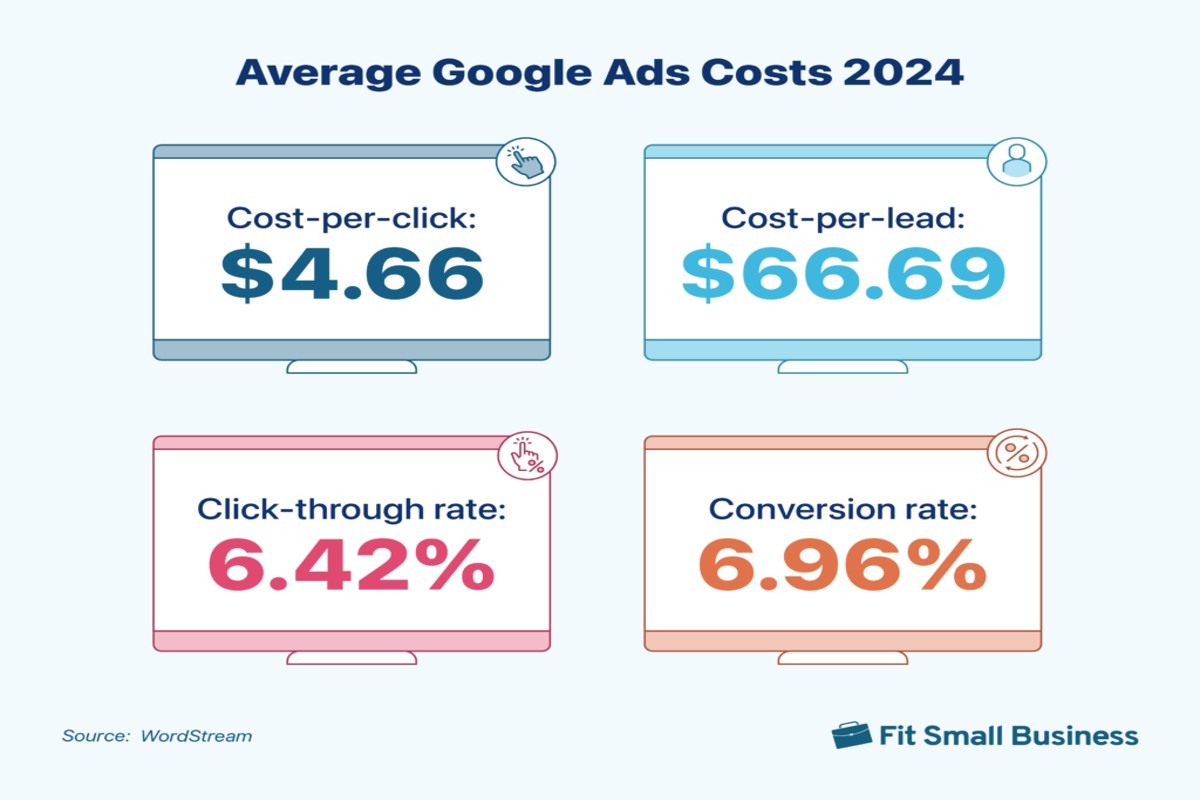
The cost of Google Ads varies widely depending on factors such as industry, competition, and targeting strategies. On average, businesses can expect a cost-per-click (CPC) ranging from $1 to $2, making it crucial for effective budgeting and maximizing return on investment (ROI).
Understanding the cost of Google Ads is essential for businesses looking to enhance their online visibility and drive targeted traffic. With digital advertising spending projected to exceed $500 billion globally, knowing how to allocate your budget effectively can differentiate successful campaigns from those that underperform.
Failure to accurately gauge Google Ads costs can lead to wasted marketing resources, missed revenue opportunities, and a significant competitive disadvantage in an increasingly crowded digital landscape.
This article will provide a detailed examination of Google Ads costs, including a breakdown of average costs across industries, comparisons of leading advertising platforms, best practices for budgeting, and insights into leveraging local SEO for enhanced results.
For How Much Do Google Ads Cost businesses looking to generate local leads through Google Ads or Local SEO, GMB Ranger LLC offers hands-on campaign management. Specialist Md Tangeer Mehedi personally handles campaign setup and ongoing optimization — with no payment required until the first lead comes in.
What factors affect the cost of Google Ads?
The cost of Google Ads can range from a few cents to over $50 per click, depending on various factors. In 2024, the average cost per click (CPC) across all industries is estimated to be around $2.69, but this can vary significantly based on specific circumstances.
Several factors influence the pricing of Google Ads, including competition, industry, and targeting options. Understanding these elements can help businesses better plan their advertising budgets and optimize their campaigns.
- Competition: The level of competition for keywords directly affects costs. High-demand keywords, often associated with lucrative industries, can command higher CPCs due to increased bidding from multiple advertisers.
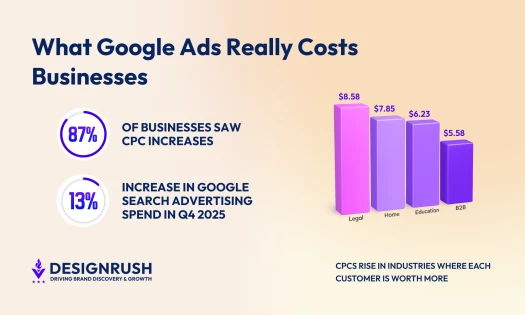
- Industry: Different industries have varying average costs. For example, legal and insurance sectors typically experience higher costs per click, sometimes exceeding $50, while retail and e-commerce may have lower average costs.
- Targeting Options: The precision of your targeting can impact costs. More specific targeting, such as geographical location or demographic factors, may lead to higher costs but can also yield better conversion rates.
- Ad Quality: Google uses a Quality Score to determine ad placement and cost. Higher quality ads that are relevant to users can lower CPCs and improve ad position, leading to more effective spending.
- Seasonality: Certain times of the year, such as holidays or major events, can affect ad costs. Businesses often increase their budgets during peak seasons, leading to higher competition and costs.
Expert insight: To manage costs effectively, advertisers should focus on improving their Quality Score and consider long-tail keywords, which often have lower competition and costs, while still driving relevant traffic.
How can I reduce my Google Ads costs?
To reduce Google Ads costs, focus on optimizing your campaigns, improving your Quality Score, and refining your targeting. Implementing these strategies can lower costs by as much as 20% or more, depending on your current campaign efficiency.
Start by regularly reviewing and adjusting your keywords. Use negative keywords to filter out irrelevant searches, which helps avoid unnecessary spending. Additionally, refine your ad copy and landing pages to improve click-through rates (CTR) and conversion rates. A higher CTR can lead to a better Quality Score, which directly impacts your cost-per-click (CPC).
Next, examine your targeting settings. Utilizing demographic targeting, geographic targeting, and device targeting can help ensure your ads reach the right audience. For instance, if certain demographics yield higher conversion rates, prioritize them in your campaigns. Regular A/B testing of ad variations can also reveal what resonates best with your audience, leading to more effective spending.
Lastly, consider setting a daily budget cap to control your overall spend. This prevents overspending on campaigns that may not be performing well. Monitor performance metrics closely, and be prepared to pause or adjust campaigns that are not delivering satisfactory results.
Expert insight: Utilize Google Ads’ built-in tools like the Keyword Planner and Bid Simulator to make data-driven decisions. These tools can help identify cost-saving opportunities while optimizing your ad performance.
What is the average CPC for Google Ads?
The average cost-per-click (CPC) for Google Ads varies by industry, but as of 2024, it typically ranges from $1 to $2 on the Google Search Network. In competitive sectors, such as legal or finance, CPC can exceed $50.
CPC, or cost-per-click, is a pricing model used in online advertising where advertisers pay a fee each time one of their ads is clicked. This metric is crucial for measuring the effectiveness of campaigns and understanding overall advertising costs. Various factors influence CPC, including keyword competitiveness, ad quality, and targeting options.
Several elements can affect the average CPC:
- Industry Competition: Industries with high competition, like insurance or legal services, often see higher CPCs due to increased demand for limited keywords.
- Quality Score: Google assigns a Quality Score to ads based on relevance, expected click-through rate, and landing page experience. A higher Quality Score can lead to a lower CPC.
- Geographic Targeting: CPC may vary by location. Ads targeting urban areas or regions with higher purchasing power generally incur higher costs.
Advertisers should also consider their budget and campaign goals when evaluating CPC. A higher CPC can be justified if it leads to higher conversion rates and return on investment (ROI).
Expert insight: Regularly reviewing and optimizing ad campaigns can improve Quality Scores, thereby reducing CPC and enhancing overall advertising efficiency.
How do Google Ads compare to Facebook Ads in cost?
Google Ads typically have a higher cost-per-click (CPC) compared to Facebook Ads. In 2024, the average CPC for Google Ads is around $2.69, while Facebook Ads average about $1.27 per click. Both platforms, however, offer unique advantages based on marketing objectives.
Google Ads operate primarily on a pay-per-click (PPC) model, where advertisers bid on keywords relevant to their business. The costs can vary significantly depending on the industry, competition, and keyword popularity. For high-demand sectors like legal or finance, CPC can escalate beyond $50. In contrast, Facebook Ads utilize a cost-per-impression (CPM) model, focusing on user engagement and demographic targeting. This can result in lower overall costs when targeting specific audiences, as advertisers pay for impressions rather than direct clicks.
Another key difference lies in the effectiveness for various marketing objectives. Google Ads excel in capturing demand when users actively search for products or services. This intent-driven approach often leads to higher conversion rates. On the contrary, Facebook Ads are better suited for brand awareness and engagement, targeting users based on interests rather than immediate intent. This distinction can affect overall advertising spend and return on investment (ROI).
| Aspect | Google Ads | Facebook Ads |
|---|---|---|
| Typical CPC | $2.69 | $1.27 |
| Cost Model | Pay-per-click (PPC) | Cost-per-impression (CPM) |
| Best For | Intent-driven conversions | Brand awareness and engagement |
Expert insight: When choosing between Google Ads and Facebook Ads, consider your specific marketing goals. If immediate sales are the priority, Google Ads may provide better ROI, whereas Facebook Ads can be more effective for long-term brand building.
What is the best budget for Google Ads?
The best budget for Google Ads varies significantly based on business size and marketing goals. Small businesses might start with a budget of $300 to $1,000 per month, while larger enterprises may invest $10,000 or more monthly. According to industry benchmarks, businesses typically allocate around 7-10% of their total revenue to advertising, which can guide budget decisions.
When determining the ideal budget for Google Ads, it’s essential to consider factors such as industry competitiveness, target audience, and campaign objectives. A well-defined budget allows for more strategic ad placements and better ROI. Businesses should also monitor performance metrics regularly to adjust spending according to results.
- Define clear goals: Establish specific objectives for your campaigns, such as lead generation or brand awareness, to guide budget allocation effectively.
- Start small and scale: Begin with a conservative budget to test different ads and keywords. Once effective strategies are identified, gradually increase spending.
- Utilize negative keywords: Implement negative keywords to prevent ads from showing on irrelevant searches, optimizing budget efficiency by directing funds to high-performing areas.
- Monitor and adjust: Regularly analyze campaign performance data. Adjust budgets based on what is driving the best results, reallocating funds to higher-performing ads.
- Consider seasonal trends: Adjust budgets based on seasonal demand fluctuations in your industry, ensuring sufficient funds during peak times for maximum visibility.
Expert insight: Businesses should consider leveraging automated bidding strategies offered by Google Ads, which can optimize spend based on real-time data, ensuring more efficient use of the budget.
How long does it take to see results from Google Ads?
Typically, businesses can expect to see initial results from Google Ads within 1 to 3 months after launching their campaigns. However, the timeline can vary significantly based on several factors, including the industry, competition, and campaign optimization strategies.
Several elements influence the speed at which results materialize. First, the level of competition in your industry plays a critical role. Highly competitive sectors may require a longer time to optimize and refine ad strategies to achieve desired outcomes. Second, the type of goals set for the campaign—such as brand awareness versus lead generation—can affect the timeframe. Brand awareness campaigns may show quicker visibility, while lead generation efforts often require a more prolonged engagement to convert clicks into customers.
Additionally, the initial setup and ongoing optimization of the Google Ads account are vital. Effective keyword research, ad copywriting, and landing page design can lead to faster results. Continual monitoring and adjustment of campaigns based on performance metrics can further enhance the effectiveness and speed of achieving results. For instance, according to industry reports, businesses that actively manage their campaigns can see a 30% faster return on investment compared to those that do not.
Expert insight: To accelerate results, focus on optimizing ad copy and targeting specific demographics. Regularly assess and adjust your keywords and bids to align with evolving market trends.
Understanding Google Ads Pricing Models
This section explores the fundamental pricing models used in Google Ads—CPC, CPM, and CPA—along with guidance on selecting the most effective model for your advertising campaigns. A clear understanding of these models is essential for optimizing ad spend and achieving desired marketing outcomes.
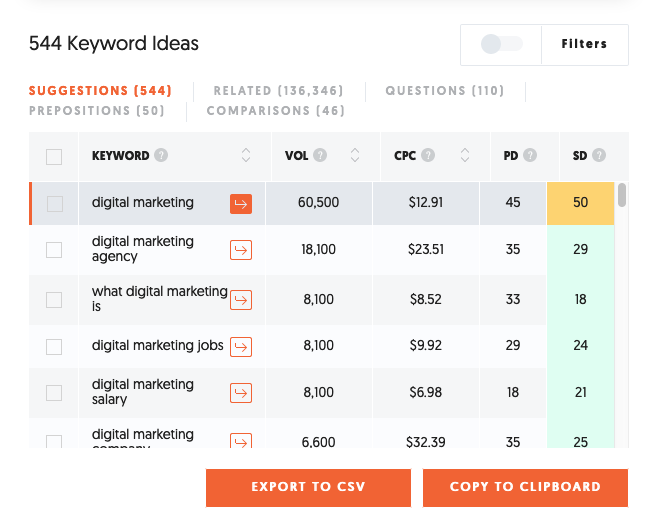
Overview of Pricing Models
Google Ads operates primarily on three pricing models: Cost Per Click (CPC), Cost Per Thousand Impressions (CPM), and Cost Per Acquisition (CPA). Each model serves different advertising objectives and can significantly impact your overall campaign costs.
- CPC: Advertisers pay each time a user clicks on their ad. This model is ideal for campaigns focused on driving traffic to a website. As of 2024, the average CPC for Google Ads across various industries ranges from $1 to $2, with competitive sectors reaching upwards of $5.
- CPM: Advertisers pay for every thousand impressions their ad receives, regardless of clicks. This model is suited for brand awareness campaigns. The average CPM in Google Ads is approximately $2 to $10, varying by industry and audience targeting.
- CPA: Advertisers pay only when a specific action is completed, such as a purchase or sign-up. This model is effective for performance-driven campaigns. The average CPA can vary widely, typically ranging from $30 to $100, depending on the industry and campaign goals.
Choosing the Right Model for Your Campaign
Selecting the appropriate pricing model hinges on your campaign objectives. For businesses aiming to increase website traffic, CPC is often the best choice. Conversely, organizations focused on brand visibility may benefit more from CPM. For those prioritizing conversions, CPA provides a performance-based approach that aligns costs with actual results.
Consider the following factors when choosing a model:
- Campaign Objectives: Define the primary goal—traffic, impressions, or conversions.
- Budget Constraints: Assess how much you are willing to spend per click, impression, or acquisition.
- Industry Standards: Research average costs within your industry to set realistic expectations.
Case Studies of Effective Pricing Strategies
Several companies illustrate the effective use of different pricing models:
- A fashion retailer utilized CPC extensively to drive traffic to their online store, achieving a 25% increase in sales within three months.
- A tech startup focused on brand awareness through CPM, resulting in a 40% rise in social media engagement.
- A SaaS company implemented CPA for lead generation, achieving a cost-per-lead of $50, significantly lower than their previous CPC campaigns.
Nuances in Google Ads Pricing
Many advertisers mistakenly assume that lower costs always yield better results. However, the effectiveness of a pricing model depends on alignment with specific campaign goals. For instance, a low CPC may drive traffic, but if those visitors do not convert, the investment may not deliver value. Additionally, seasonal trends can significantly affect costs; for example, the holiday season often sees increased competition, driving up CPC and CPA rates. Understanding these dynamics allows advertisers to adjust strategies accordingly.
Practical Application
To optimize your Google Ads costs, follow these actionable steps:
- Define your campaign goals clearly.
- Analyze your budget and determine which model best fits your objectives.
- Monitor performance metrics regularly to assess the effectiveness of your chosen model.
- Be prepared to adjust your strategy based on market trends and campaign performance data.
By leveraging the appropriate pricing model and continuously optimizing your approach, you can effectively manage how much Google Ads cost while maximizing your return on investment.
Maximizing ROI with Google Ads
This section delves into strategic approaches for optimizing ad spend and enhancing return on investment (ROI) through Google Ads. By leveraging effective keyword research, utilizing ad extensions, and implementing A/B testing, advertisers can significantly improve campaign performance.

Importance of Keyword Research and Selection
Effective keyword research is foundational to any successful Google Ads campaign. Selecting the right keywords ensures that ads reach the most relevant audience, maximizing the chances of conversion. Tools like Google Keyword Planner can provide insights into search volume, competition, and cost-per-click (CPC) estimates. For instance, keywords with a high search volume but low competition often yield a better ROI. In 2024, businesses that invested in comprehensive keyword research reported up to a 30% increase in conversion rates compared to those who did not prioritize this step.
Utilizing Ad Extensions to Enhance Visibility
Ad extensions are valuable features that allow advertisers to provide additional information directly within the ad. These extensions can include sitelinks, callouts, structured snippets, and location information, which enhance the visibility and attractiveness of ads. According to Google, the use of ad extensions can increase click-through rates (CTR) by up to 15%. By offering users more options and information, ad extensions not only improve engagement but also contribute to a lower cost per acquisition (CPA).
A/B Testing for Better Performance Insights
A/B testing is a critical method for optimizing Google Ads campaigns. By comparing two versions of an ad, advertisers can identify which elements resonate more with their target audience. This process involves changing one variable at a time, such as the headline, description, or call-to-action (CTA), and measuring the performance difference. A study revealed that businesses using A/B testing saw a 20% improvement in overall ad performance. Regularly testing and refining ad components can lead to significant increases in both CTR and ROI.
Nuance: Addressing Common Misconceptions
Many advertisers mistakenly believe that higher bids automatically lead to better ad placements. This is not universally true; ad quality and relevance also play critical roles in determining ad position and effectiveness. Google’s Quality Score, which incorporates factors like click-through rate, ad relevance, and landing page experience, significantly influences ad performance. Advertisers should strive for a balance between competitive bidding and maintaining high-quality scores to achieve sustainable ROI.
Practical Application
- Conduct thorough keyword research using tools to identify high-value keywords.
- Incorporate multiple ad extensions to provide users with additional information and options.
- Implement A/B testing on ad copy and landing pages to continuously optimize performance.
- Monitor Quality Scores regularly and adjust bids based on both performance data and quality metrics.
By applying these strategies, advertisers can effectively manage their budgets while maximizing the effectiveness of their campaigns. Understanding how much do Google Ads cost involves not just bid amounts, but also the strategic management of keywords, ad formats, and testing methodologies.
Common Mistakes in Google Ads Campaigns
Identifying and avoiding common pitfalls in Google Ads is essential for maximizing return on investment. Overspending and underperforming campaigns often stem from preventable mistakes that can derail advertising efforts.

Neglecting to Track Conversions
One of the most significant errors in Google Ads campaigns is failing to track conversions. Without conversion tracking, advertisers lack visibility into how effectively their ads drive valuable actions, such as purchases or sign-ups. In 2024, businesses that implemented conversion tracking reported a 25% increase in campaign ROI compared to those that did not.
Failing to Optimize Landing Pages
Landing pages serve as the critical touchpoint after a user clicks an ad. If these pages are not optimized for user experience and relevance, even the best-performing ads can result in high bounce rates and low conversion rates. According to recent studies, optimized landing pages can improve conversion rates by up to 50%. Key elements to focus on include:
- Clear, compelling headlines
- Fast loading times
- Relevant and concise content
- Strong calls to action
Ignoring Negative Keywords and Their Impact
Negative keywords prevent ads from displaying for irrelevant searches, thus saving budget and increasing relevancy. Advertisers who fail to utilize negative keywords often find their ads appearing in unrelated searches, leading to wasted clicks. In 2025, campaigns that effectively employed negative keywords saw a 30% decrease in cost-per-click (CPC) and improved overall ad performance.
Nuances of Google Ads Management
Many advertisers mistakenly believe that simply launching a campaign will yield results. However, ongoing management is critical. Regularly reviewing ad performance, adjusting bids, and refining targeting parameters are necessary for sustained success. Furthermore, misconceptions about Google Ads often lead to overspending. For instance, some assume that higher bids always result in better placements, but quality score plays a pivotal role in ad positioning and cost efficiency. A comprehensive approach combining bid management with quality score optimization is essential for effective campaigns.
Practical Application
To enhance your Google Ads campaigns, implement the following actionable strategies:
- Set up conversion tracking to measure the effectiveness of your ads.
- Regularly test and optimize landing pages for higher conversion rates.
- Utilize negative keywords to refine your targeting and reduce wasted spend.
- Conduct periodic reviews of ad performance and adjust strategies accordingly.
By addressing these common mistakes, advertisers can significantly reduce unnecessary costs and improve the effectiveness of their Google Ads campaigns, ultimately leading to a better understanding of how much do Google Ads cost in relation to their actual return on investment.
Local Businesses and Google Ads: A Strategic Approach
This section examines how local businesses can leverage Google Ads to effectively attract customers in their vicinity. By utilizing targeted strategies, businesses can optimize their ad spend and enhance customer engagement.
Setting Up Location Targeting for Local Reach
Location targeting is a fundamental component for local businesses using Google Ads. This feature allows advertisers to specify geographic areas where their ads will appear, ensuring that messages reach potential customers nearby. Businesses can target specific cities, regions, or even a radius around their physical location, enhancing the relevance of their ads.
According to recent data, businesses that implement location targeting see an average increase of 30% in click-through rates (CTR) compared to non-targeted campaigns. This higher engagement translates to more foot traffic and inquiries from local consumers.
Creating Compelling Ad Copy for Local Audiences
Crafting ad copy that resonates with local audiences is essential for maximizing the effectiveness of Google Ads. Local businesses should focus on incorporating local keywords and phrases that their target customers are likely to use in searches. Highlighting unique selling propositions, such as special promotions or local partnerships, can also capture attention.
- Use local landmarks or neighborhoods in your ad copy.
- Include calls to action that encourage immediate visits or inquiries.
- Emphasize any local awards or recognitions to build credibility.
Data from 2024 indicates that ads featuring localized content have a 20% higher conversion rate than generic ads, underscoring the importance of relevance in local marketing efforts.
Utilizing Google My Business to Enhance Ad Effectiveness
Integrating Google My Business (GMB) with Google Ads can significantly enhance advertising effectiveness. GMB allows businesses to manage their online presence, including location, hours, and customer reviews. By linking GMB to Google Ads, businesses can display essential information directly in their ads, such as their address and phone number.
Moreover, promotional posts on GMB can be featured in ads, providing customers with timely information about offers or events. Local businesses that utilize both platforms effectively can increase their visibility in local searches, driving more conversions.
Common misconceptions about Google Ads suggest that they are only effective for large businesses. However, local businesses can achieve substantial results by focusing on niche markets and specific demographics. For instance, a small coffee shop could target ads to customers within a one-mile radius, significantly enhancing the return on ad spend (ROAS).
To effectively implement these strategies, local businesses should take the following actionable steps:
- Set up location targeting in Google Ads to reach potential customers within a defined area.
- Create ad copy that emphasizes local relevance and calls to action.
- Regularly update and manage Google My Business to keep information current and engaging.
By applying these strategies, local businesses can maximize their Google Ads investment and drive meaningful engagement with their target audience, answering the question of how much do Google Ads cost in terms of both dollars and potential customer acquisition.
Evaluating the Best How Much Do Google Ads Cost
In the rapidly evolving digital advertising landscape, understanding the cost structures of various ad providers is crucial for businesses of all sizes. By 2026, the global digital advertising market is projected to reach over $786 billion, highlighting the importance of strategic ad spending. Evaluating options based on pricing, target audience, and unique features can help businesses make informed decisions.
| Provider / Option | Best For | Pricing | Key Feature |
|---|---|---|---|
| Google Ads | All business sizes and needs | $1 – $2 per click on average | Extensive reach and targeting options |
| Bing Ads | Lower competition markets | $0.5 – $1 per click | Cost-effective alternative to Google |
| Facebook Ads | Social media-driven campaigns | $0.97 – $3 per click | Highly targeted audience segmentation |
| AdRoll | Retargeting and display ads | Varies based on campaign goals | Cross-platform retargeting capabilities |
| LinkedIn Ads | B2B marketing and professionals | $2 – $7 per click | Professional audience targeting |
| Pinterest Ads | Visual product promotion | $0.10 – $1.50 per click | Engaging visual ad formats |
| Twitter Ads | Real-time engagement and trends | $0.50 – $2 per click | Promote tweets and trends effectively |
Criteria for Evaluating Program Quality
- Cost Efficiency: Analyze the cost per click (CPC) in relation to your budget and expected ROI. Lower CPC is beneficial, but ensure it aligns with your campaign goals.
- Target Audience: Identify whether the platform effectively reaches your desired demographic. Each provider has unique strengths in audience targeting that can impact campaign success.
- Ad Formats: Review the types of ad formats available on each platform. Some providers offer more engaging visual options or specific formats that may suit your marketing objectives better.
- Performance Metrics: Consider the analytics and reporting tools offered by each provider. Access to detailed performance metrics can help refine campaigns and improve effectiveness.
How to Assess the Reputation and Reliability of Providers
- Research Reviews: Look for reviews and testimonials from current and past users to gauge satisfaction and effectiveness.
- Check Case Studies: Evaluate case studies that demonstrate successful campaigns and the provider’s ability to deliver results.
- Evaluate Customer Support: Assess the quality and availability of customer support services, as responsive support can be crucial for campaign management.
- Analyze Transparency: Ensure the provider offers clear pricing structures and policies to avoid unexpected costs during your campaigns.
Which How Much Do Google Ads Cost Is Right for You?
The best approach to Google Ads pricing varies significantly based on your business type, budget constraints, and specific marketing goals. This guide provides tailored recommendations to help you make informed decisions that align with your unique needs.
Small business owners
For small business owners, focusing on local campaigns within Google Ads can maximize visibility and drive foot traffic. Utilize location targeting to reach potential customers in your area, with a budget starting around $300 to $500 per month. This investment can yield substantial returns, especially when combined with Google My Business listings for enhanced local search presence.
E-commerce brands
E-commerce brands should consider supplementing Google Ads with visually compelling Facebook and Pinterest Ads to promote products effectively. A budget of $500 to $1,500 per month can facilitate dynamic retargeting campaigns, driving traffic to your online store and increasing conversion rates through visually appealing content that resonates with your target audience.
B2B companies
B2B companies can leverage LinkedIn Ads to effectively target professional audiences and generate high-quality leads. Allocating a budget of $1,000 to $3,000 per month allows for sponsored content and InMail campaigns, which can directly engage decision-makers in your industry, thereby enhancing lead generation efforts significantly.
Digital marketing agencies
Digital marketing agencies should employ a strategic mix of Google Ads and Bing Ads to optimize client campaigns across different platforms. A combined budget of $1,500 to $5,000 per month can facilitate A/B testing and performance tracking, ensuring that campaigns are tailored to achieve the best ROI for clients while exploring diverse audience segments on both platforms.
| If You Are… | Best Approach |
|---|---|
| Small business owners | Focus on Google Ads local campaigns ($300 – $500/month) |
| E-commerce brands | Utilize Facebook and Pinterest Ads ($500 – $1,500/month) |
| B2B companies | Leverage LinkedIn Ads ($1,000 – $3,000/month) |
| Digital marketing agencies | Employ Google and Bing Ads ($1,500 – $5,000/month) |
Understanding Google Ads Costs in Local Markets
Geographic and local market factors significantly influence the costs associated with Google Ads. According to recent studies, 76% of local mobile searches result in a visit to a nearby business within a day, underscoring how local intent drives advertising effectiveness. Therefore, understanding local dynamics can help businesses optimize their ad spend and improve ROI.
Geographic Market Differences
Costs for Google Ads can vary dramatically based on geographic location. For instance, businesses in metropolitan areas like New York City or Los Angeles may face higher competition and consequently higher CPC (cost-per-click) rates, which can range from $6 to $12 for certain industries. In contrast, businesses in smaller towns or less competitive markets may see CPC rates between $1 to $4. Local businesses must be aware of their market saturation to budget effectively.
Local Business Applications
Local businesses can leverage Google Ads to enhance visibility and attract nearby customers. Here are some tailored applications:
- Targeted Promotions: Local restaurants can run ads for daily specials that only target users within a 5-mile radius.
- Event Marketing: A local gym can promote free trial classes to residents in the area, driving foot traffic during peak hours.
- Seasonal Campaigns: Florists can create ads for holidays like Valentine’s Day or Mother’s Day, specifically targeting local customers.
- Localized Keywords: A plumbing service can focus on specific neighborhoods in their ads, improving relevance and reducing costs.
Local Search and Visibility Impact
Understanding how Google Ads costs relate to local search rankings is crucial. Businesses that invest in Google Ads can enhance their visibility on local SERPs, which often results in a higher ranking for their Google Business Profile (GBP). Local SEO actions to consider include:
- Optimize Google Business Profile with accurate information and relevant keywords.
- Encourage customer reviews to boost local rankings.
- Use location-based keywords in ad campaigns to improve local relevance.
- Monitor local competitors’ ad strategies to adjust bids and targeting.
Pricing and Cost in Local Markets
Costs for Google Ads can vary significantly by geographic market. In densely populated urban areas, businesses might need to budget anywhere from $1,000 to $5,000 monthly for effective campaigns. Conversely, in less competitive rural markets, a budget of $300 to $1,000 may suffice to generate substantial leads. Local businesses should assess their market dynamics and competitor ad spend to determine appropriate budgets.
Local Implementation Checklist:
- Research local competition and average CPC rates in your area.
- Create localized ad campaigns targeting specific neighborhoods.
- Optimize your Google Business Profile for better visibility.
- Set a monthly budget based on local market analysis.
- Monitor and adjust bids based on performance metrics.
- Engage with customer reviews to enhance local reputation.
- Utilize seasonal trends to inform ad strategies and promotions.
For How Much Do Google Ads Cost businesses looking to generate local leads through Google Ads or Local SEO, GMB Ranger LLC offers hands-on campaign management. Specialist Md Tangeer Mehedi personally handles campaign setup and ongoing optimization — with no payment required until the first lead comes in.
Frequently Asked Questions
What factors affect the cost of Google Ads?
The cost of Google Ads is influenced by factors such as keyword competition, ad quality, targeting options, and your bidding strategy. Higher competition for specific keywords typically results in increased costs.
How can I reduce my Google Ads costs?
To reduce Google Ads costs, focus on optimizing your ad quality, refining your targeting, and using negative keywords to filter out irrelevant traffic. Additionally, adjusting your bidding strategy can help manage expenses effectively.
What is the average CPC for Google Ads?
The average cost-per-click (CPC) for Google Ads varies widely by industry but typically ranges from $1 to $2 on the Search Network. In competitive sectors, CPC can exceed $50.
How do Google Ads compare to Facebook Ads in cost?
Google Ads generally have a higher cost-per-click compared to Facebook Ads, which often feature lower CPCs due to different targeting methods. However, the effectiveness of each platform depends on your specific marketing goals and audience.
What is the best budget for Google Ads?
The best budget for Google Ads depends on your business goals, industry, and competition. A starting budget of $10 to $50 per day is common for small businesses, but it should be adjusted based on performance data.
How long does it take to see results from Google Ads?
Results from Google Ads can be seen within a few hours to a few days, depending on your campaign settings and budget. However, optimizing for maximum effectiveness may take several weeks of data analysis and adjustments.
Final Thoughts on how much do google ads cost
Understanding the multifaceted nature of Google Ads costs is essential for any business aiming to maximize its digital marketing budget. The interplay of factors such as keyword competition, target audience, and campaign objectives can significantly influence overall expenditures. By strategically optimizing campaigns and avoiding common pitfalls, advertisers can effectively manage costs while enhancing their return on investment.
To take immediate action, conduct a thorough audit of your current Google Ads campaigns, focusing specifically on identifying high-cost keywords that may not be delivering satisfactory results. This will enable you to reallocate your budget towards more effective strategies.
Mastering Google Ads costs is not merely a financial consideration; it is a critical component of a successful digital marketing strategy that can drive sustained business growth and competitive advantage.
Leave a Reply