
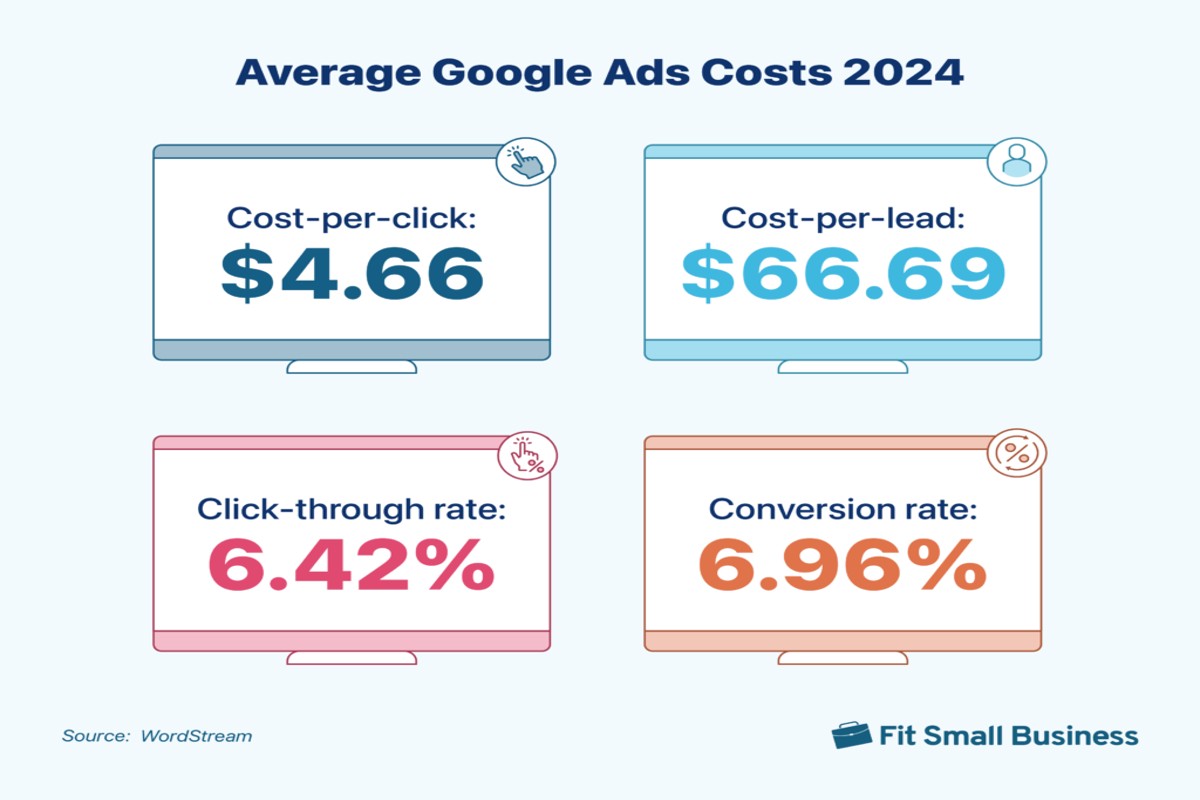
How much does Google Ads cost? The cost of Google Ads varies widely based on factors such as industry, competition, and targeting options, with average costs ranging from $1 to $2 per click.
Understanding the costs associated with Google Ads is crucial for businesses looking to maximize their online advertising budgets. Misjudging these expenses can lead to ineffective campaigns, wasted resources, and missed opportunities for growth.
This guide will detail the factors influencing Google Ads pricing, provide insights on bidding strategies, and outline average costs across different industries to help businesses make informed decisions.
For How Much Does Google Ad Cost businesses looking to generate local leads through Google Ads or Local SEO, GMB Ranger LLC offers hands-on campaign management. Specialist Md Tangeer Mehedi personally handles campaign setup and ongoing optimization — with no payment required until the first lead comes in.
What factors influence the cost of Google Ads?
The cost of Google Ads varies widely based on several factors. On average, businesses pay between $1 and $2 per click, but this can fluctuate significantly based on the specifics of the campaign. Key elements that influence these costs include competition, keyword selection, and ad quality.
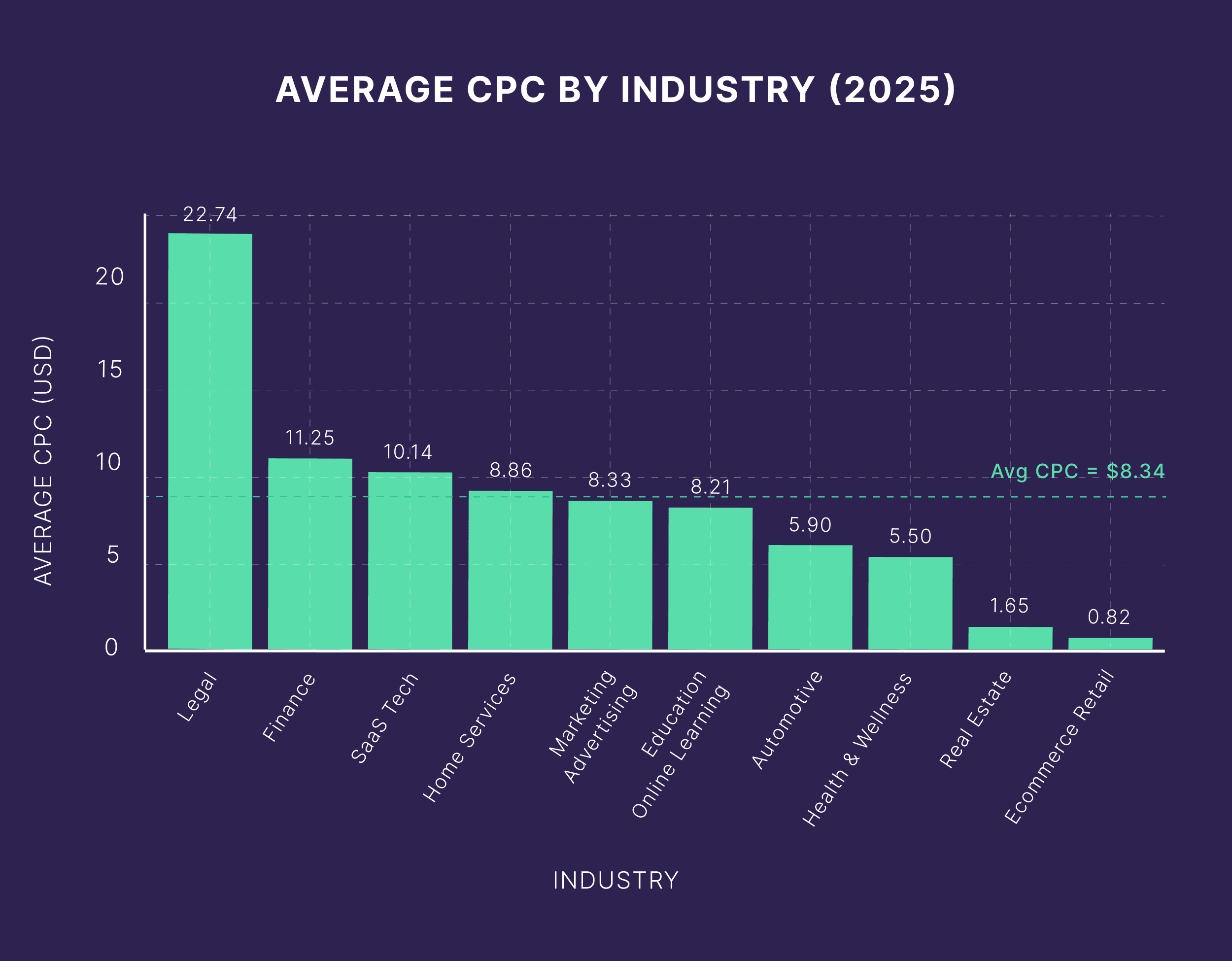
Competition in the market plays a major role in determining costs. Highly competitive industries, such as finance or legal services, often see higher click prices due to the increased demand for limited ad space. In contrast, niches with less competition may yield lower costs. Additionally, the selection of keywords directly impacts pricing; long-tail keywords tend to be cheaper than broad keywords, but they may also attract less traffic.
- Ad Quality Score: Google evaluates the relevance and quality of ads, affecting costs. Higher quality ads can lower the cost per click.
- Bid Strategy: The chosen bidding strategy, whether manual or automated, influences how much you pay for clicks. Some strategies prioritize visibility, which can increase costs.
- Geographic Targeting: Targeting specific locations can also impact costs. Ads targeting high-demand urban areas may incur higher rates compared to rural locations.
Effective campaign management is essential. Regularly reviewing performance metrics and adjusting bids based on conversion data can optimize ad spend and improve return on investment.
Expert Tip: Implementing A/B testing for ad variations can significantly enhance quality scores and reduce overall costs, maximizing the effectiveness of your advertising budget.
How can I calculate my Google Ads budget?
Calculating your Google Ads budget involves assessing your advertising goals, determining your target cost-per-click (CPC), and estimating the volume of clicks you expect. By following a structured approach, you can create a budget that aligns with your marketing objectives.
Start by defining your advertising goals. Are you aiming for brand awareness, lead generation, or sales? Your objectives will influence how much you should be willing to spend. Next, research your industry to determine an appropriate target CPC. This can vary significantly based on competition and keywords within your niche.
- Set a Monthly Budget: Decide how much you can afford to spend each month on Google Ads. Consider your overall marketing budget and allocate a portion specifically for paid search ads.
- Estimate Click Volume: Use the Google Ads Keyword Planner to estimate the number of clicks you might receive based on your target keywords. This tool provides insights on expected traffic and competition.
- Calculate Your Target CPC: Divide your monthly budget by the estimated number of clicks to determine your target CPC. For example, if your budget is $1,000 and you expect 500 clicks, your target CPC would be $2.
- Consider Additional Costs: Be aware of other potential costs, such as management fees if using an agency, or costs associated with landing page development. These should be included in your overall budget.
- Monitor and Adjust: After launching your campaign, continuously monitor performance. Adjust your budget based on the results, focusing on what drives the best ROI.
Setting a realistic budget is crucial for long-term success in Google Ads. Analyze competitors and industry benchmarks to ensure your budget remains competitive and effective.
Expert Tip: Utilize A/B testing for different ad variations, which can help optimize your budget by identifying the most effective ads, thereby maximizing your return on investment.
Is Google Ads worth the cost for small businesses?
Yes, Google Ads can be worth the cost for small businesses, depending on their goals and industry. When executed effectively, it can yield a significant return on investment (ROI) compared to other advertising methods. However, the value derived from Google Ads varies based on several factors, including budget, competition, and campaign strategy.
Small businesses often face unique challenges when allocating marketing budgets. Google Ads operates on a pay-per-click (PPC) model, which means businesses only pay when users click their ads. This can be beneficial compared to traditional advertising methods, such as print or TV ads, where costs are incurred regardless of engagement. However, the effectiveness of Google Ads heavily depends on the selection of keywords and the quality of ad content. Poorly targeted campaigns can lead to wasted spend without generating leads or sales.
- Google Ads: Offers precise targeting and measurable results. Businesses can adjust their campaigns in real-time based on performance data.
- Social Media Advertising: While often less expensive, it may not reach users actively searching for products or services, resulting in lower conversion rates.
- Print Advertising: Typically incurs high upfront costs with no performance tracking, making it harder to assess ROI.
Additionally, competition plays a crucial role in determining the success of Google Ads campaigns. In high-competition industries, the cost per click can escalate, potentially diminishing ROI. Small businesses should conduct thorough keyword research and consider long-tail keywords to mitigate costs while targeting specific audiences.
Expert Tip: Implement conversion tracking to measure the effectiveness of your Google Ads campaigns accurately. This data allows for ongoing optimization and can significantly enhance ROI over time.
What is the average cost-per-click for Google Ads?
The average cost-per-click (CPC) for Google Ads varies significantly by industry but typically ranges from $1 to $2 on the Google Search Network. In some competitive sectors, CPC can reach $50 or more. Overall, the specific CPC will depend on various factors, including the industry, competition, and the quality of the ads.
The cost of Google Ads is influenced by several factors that can either drive prices up or down. These factors include:
- Industry Competition: Highly competitive industries, such as legal services or finance, often see higher CPC rates due to increased bidding activity among advertisers.
- Quality Score: Google assigns a Quality Score based on the relevance of the ad, the landing page experience, and expected click-through rates. A higher Quality Score can lower CPC.
- Geographic Targeting: Costs can vary based on location. Urban areas with more competition may have higher CPC rates than rural areas.
- Ad Format: Different ad formats, such as display ads or shopping ads, can have varying costs associated with them. Some formats may offer lower CPCs due to less competition.
Advertisers should regularly analyze their campaigns and adjust bids according to performance metrics. Identifying low-performing keywords can help reallocate budget to more effective terms, ultimately reducing overall costs.
For optimal budget management, consider setting a daily budget cap to avoid overspending while testing different campaigns. This allows for adjustments based on actual performance data and helps maintain control over advertising expenses.
Expert Tip: Utilize Google Ads’ Keyword Planner tool to research average CPCs in your industry before launching campaigns. This tool provides valuable insights into keyword competition and potential cost expectations, enabling more informed bidding strategies.
How long does it take to see results from Google Ads?
Typically, advertisers can expect to see initial results from Google Ads within 1 to 3 weeks after launching a campaign. However, achieving optimal performance may take several months, depending on various factors such as campaign goals, competition, and industry.
Several elements influence the timeline for seeing results. The complexity of the campaign plays a significant role; campaigns targeting broad audiences or multiple products may require more time to optimize. Additionally, the quality of the ads and landing pages affects performance. High-quality ads that resonate with the target audience can lead to faster results. Conversely, poorly optimized campaigns may take longer to yield significant outcomes.
Another critical factor is the level of competition in the chosen keywords or niches. In highly competitive markets, it may take longer to establish a foothold and see substantial traffic or conversions. Budget allocation also impacts results; a higher budget can accelerate visibility and engagement, leading to quicker results. Conversely, limited spending may prolong the time needed for effective results to materialize.
Expert Tip
To expedite results, consider conducting A/B testing on ad variations and targeting strategies. Continuous monitoring and adjustments based on performance data can significantly enhance campaign effectiveness, leading to quicker returns on investment.
What are the best practices for optimizing Google Ads costs?
Optimizing Google Ads costs involves implementing strategies that enhance campaign performance while reducing expenses. By focusing on targeting, ad quality, and continuous monitoring, advertisers can achieve a more efficient allocation of their budgets. Here are several best practices to consider.
- Refine Targeting: Use demographic targeting to reach specific audiences based on age, gender, and interests. Experiment with location targeting to focus on high-converting regions. This precision minimizes wasted spend on irrelevant clicks.
- Leverage Negative Keywords: Identify and add negative keywords to your campaigns to prevent your ads from appearing for unrelated search queries. This action helps improve the relevance of your ads, leading to a lower cost per click (CPC).
- Optimize Ad Quality: Create compelling ad copy and use relevant keywords. A higher Quality Score reduces the cost per click and improves ad positioning. Regularly test different headlines and descriptions to find the most effective combinations.
- Utilize Bid Strategies: Employ automated bidding strategies like Target CPA (Cost Per Acquisition) or Target ROAS (Return on Ad Spend) to optimize bids based on your specific goals. These strategies help manage costs effectively while maximizing conversions.
- Monitor and Adjust Regularly: Continuously review campaign performance metrics. Analyze data on click-through rates (CTR), conversion rates, and cost per conversion to identify underperforming areas. Make data-driven adjustments to improve campaign efficiency.
Implementing these best practices can significantly enhance the effectiveness of Google Ads campaigns while keeping costs manageable. Focus on tracking performance and adapting strategies based on real-time data to ensure ongoing improvements.
Expert Tip: Consider using A/B testing for landing pages alongside your ads. This approach can reveal which variations yield the best conversion rates, directly impacting your overall advertising costs.
Can I set a daily budget for Google Ads?
Yes, you can set a daily budget for Google Ads, allowing you to control your spending on advertising. This feature provides flexibility, enabling you to allocate funds according to your marketing strategy and objectives.
For example, consider a small business that wants to promote its new product. The owner decides on a daily budget of $50. This means that Google Ads will not spend more than this amount each day on their campaigns. If the ads run effectively, the owner may receive a certain number of clicks or impressions, depending on their chosen keywords and competition.
It’s essential to understand that the actual spend may vary from day to day. If one day the ads generate more clicks at a lower cost, they may only use $30 of the budget. Conversely, on a day with higher competition or more effective ads, the system might reach the daily cap of $50. This flexibility helps businesses manage costs while optimizing ad performance over time.
Additionally, Google Ads allows for adjustments to the daily budget at any point. If the initial budget proves too low or too high based on campaign performance, adjustments can be made easily to align with changing business goals.
Expert Tip: Regularly review performance metrics to assess whether the daily budget meets your objectives. If campaigns consistently max out the budget, consider increasing it to capitalize on demand, while if the budget is rarely reached, it may be time to refine targeting or ad content.
What common mistakes should I avoid with Google Ads budgeting?
Common mistakes in Google Ads budgeting can severely impact campaign performance and return on investment. Avoiding these errors is essential for effective ad spend management. Key budgeting mistakes include not setting clear goals, underutilizing budget data, and neglecting ongoing optimization.
First, many advertisers fail to define specific objectives for their campaigns. Without clear goals, it becomes challenging to allocate budgets effectively. Setting measurable targets, such as lead generation or sales conversion rates, helps ensure that budget allocations align with desired outcomes.
- Ignoring historical performance data: Relying solely on estimated costs can lead to overspending. Analyzing previous campaign data provides insights into which keywords or ad groups deliver the best ROI, allowing for more informed budget decisions.
- Setting a daily budget too low: A budget that is too restrictive can limit visibility and reduce the potential for conversions. Ensure that daily budgets reflect the competitive landscape of your industry and allow for sufficient ad impressions.
- Neglecting to adjust budgets based on performance: Ad performance can fluctuate due to various factors. Regularly reviewing and adjusting budgets based on what is working can optimize ad spend and maximize returns.
- Not accounting for seasonality: Many businesses experience seasonal fluctuations. Budgeting should reflect these trends to ensure adequate funding during peak times and prevent wasted spend during slower periods.
Expertly managing Google Ads budgets requires continuous monitoring and adaptation. By implementing these best practices, advertisers can enhance their campaigns and achieve their marketing objectives more efficiently.
Understanding Google Ads Auction and Bidding Strategies
This section delves into the Google Ads auction process and its associated bidding strategies, providing essential insights into how ad costs are determined and optimized for advertisers.

Overview of the Google Ads Auction Process
The Google Ads auction is a complex system that determines which ads appear on the search engine results page (SERP) and in what order. Advertisers bid on keywords relevant to their business, and the auction occurs each time a user initiates a search for those keywords. The auction is not solely based on the highest bid; instead, it incorporates various factors to ensure that users see the most relevant ads.
Different Bidding Strategies
Google Ads offers several bidding strategies, enabling advertisers to choose the approach that aligns best with their campaign goals:
- CPC (Cost Per Click): Advertisers pay for each click on their ad. This strategy is ideal for driving traffic to websites.
- CPM (Cost Per Mille): Advertisers pay for every 1,000 impressions of their ad. This approach is often used for brand awareness campaigns.
- CPA (Cost Per Acquisition): Advertisers pay when a user takes a specific action, such as making a purchase or signing up for a newsletter. This strategy focuses on conversions rather than clicks or impressions.
How Quality Score Affects Ad Costs
Quality Score is a critical metric that Google uses to evaluate the relevance and quality of an ad. It is based on factors such as the expected click-through rate (CTR), ad relevance, and landing page experience. A higher Quality Score can lead to lower costs and better ad positions. Advertisers with high Quality Scores may pay less per click than those with lower scores for the same keyword.
The Role of Ad Rank in Determining Placement and Cost
Ad Rank is the position of an ad on the SERP and is determined by the combination of bid amount and Quality Score. A higher Ad Rank means better visibility, which can result in more clicks and conversions. Google calculates Ad Rank using the following formula:
- Bid Amount
- Quality Score
- Ad Extensions and other relevant factors
Ultimately, advertisers must balance their bids and focus on improving their Quality Scores to achieve a desirable Ad Rank while managing costs effectively.
Nuance / Expert Layer
Many advertisers mistakenly believe that simply increasing their bids will guarantee higher ad placements. However, this is not always the case. Ad Rank is a more nuanced metric, and a well-crafted ad with a high Quality Score can outperform higher bids with poorer relevance. Additionally, seasonal trends can significantly impact bidding dynamics, as competition for certain keywords may fluctuate during peak times, leading to increased costs. Understanding these subtleties can provide a competitive advantage in the Google Ads environment.
Practical Application
To leverage this information effectively, advertisers should focus on optimizing their Quality Scores through relevant ad copy, targeted keywords, and user-friendly landing pages. Regularly reviewing bidding strategies and adjusting them based on campaign performance will also help in managing costs effectively. Utilize A/B testing to determine which ads yield the best results, ensuring that advertising spend aligns with overall business objectives.
Comparative Analysis: Google Ads vs. Other Advertising Platforms
This section provides an in-depth examination of Google Ads costs compared to other advertising platforms, focusing on Facebook Ads and Bing Ads. By analyzing cost structures, targeting capabilities, and return on investment (ROI), marketers can make informed decisions about where to allocate their advertising budgets.
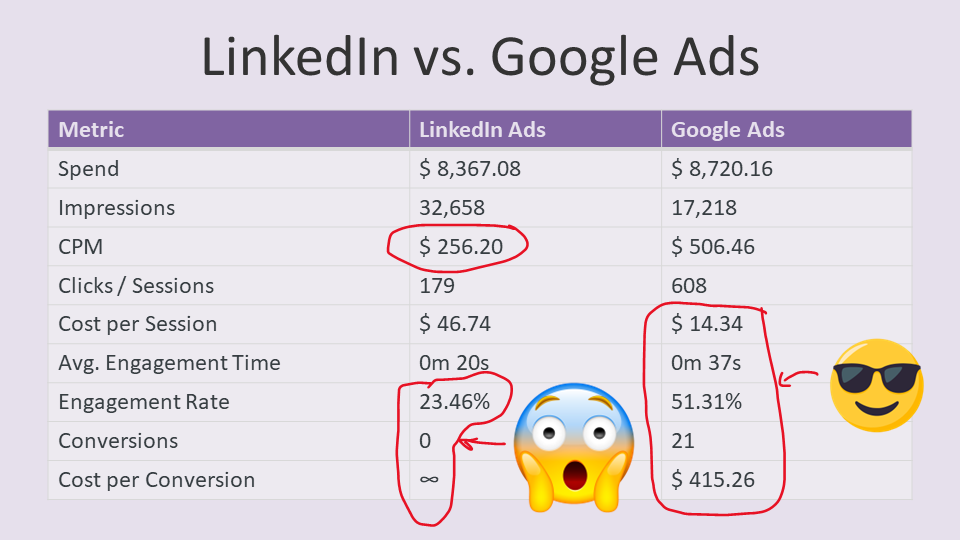
Cost Comparison Across Different Advertising Platforms
The cost of advertising on Google Ads varies significantly based on industry, competition, and targeting options. On average, businesses can expect to pay between $1 to $2 per click for Google Ads, with some industries experiencing costs exceeding $50 per click. In contrast, Facebook Ads typically range from $0.50 to $3 per click, while Bing Ads often present a lower cost, averaging $1 to $1.50 per click. This variance highlights the need for careful budget allocation based on campaign goals.
Targeting Capabilities and Audience Reach
Google Ads offers robust targeting capabilities, including keyword targeting, demographic targeting, and remarketing. This allows advertisers to reach users actively searching for specific products or services. In comparison, Facebook Ads excel in demographic and interest-based targeting, providing access to a vast audience of over 2.8 billion monthly active users. Bing Ads, while often overlooked, can effectively reach a unique audience, particularly in the U.S., where it captures about 6% of the search market.
ROI Analysis for Various Platforms
Return on investment (ROI) can vary widely among platforms. Google Ads generally provides a high ROI due to its intent-driven traffic, with many businesses reporting an average return of $2 for every $1 spent. Facebook Ads can also deliver strong ROI, particularly for brand awareness and engagement campaigns, although exact figures depend on the creative quality and audience targeting. Bing Ads may offer lower overall reach but can provide a similar or even higher ROI in niche markets where competition is less fierce.
When to Choose Google Ads Over Alternatives
- When targeting users with high purchase intent looking for specific products or services.
- If the business operates in a competitive industry where search visibility is crucial.
- When data-driven strategies are essential for optimizing ad performance through keyword research and analytics.
Choosing Google Ads is particularly advantageous for industries like e-commerce, travel, and finance, where immediate consumer action is crucial. Alternatively, Facebook Ads may be more suitable for brand-building campaigns or when targeting specific demographics and interests. Bing Ads can be beneficial for businesses looking to maximize their budget in less competitive sectors.
Many marketers mistakenly believe that lower-cost platforms automatically yield better results. However, the effectiveness of an advertising platform is heavily influenced by the quality of the ad content, the precision of targeting, and the overall marketing strategy. Google Ads may appear more expensive but often delivers superior results due to its intent-driven traffic.
To leverage this information effectively, businesses should assess their target audience and marketing objectives. Allocate budgets based on expected ROI, test campaigns across platforms, and continuously analyze performance data. This approach ensures that advertising efforts align with business goals, maximizing the impact of every dollar spent.
Real-World Case Studies: Successful Google Ads Campaigns
This section examines real-world examples of businesses that effectively utilized Google Ads, highlighting their costs and results. These case studies illuminate the diverse strategies employed across different industries and the tangible outcomes achieved through targeted advertising.
Case Study 1: E-commerce Retailer
An online sports apparel retailer allocated a monthly budget of $10,000 to Google Ads. The campaign was structured around specific product categories, using both search and display ads to reach potential customers. Over a three-month period, the retailer achieved a return on investment (ROI) of 300%, with a 5% conversion rate and over 15,000 website visits directly attributable to the ads.
- Monthly Budget: $10,000
- ROI: 300%
- Conversion Rate: 5%
- Website Visits: 15,000+
Case Study 2: Local Service Provider
A plumbing company in a metropolitan area invested $3,000 monthly in Google Ads, focusing on location-based keywords and emergency services. The campaign generated 200 leads per month, with a conversion rate of 10%. The company realized an ROI of 400%, significantly increasing its customer base and brand visibility in the local market.
- Monthly Budget: $3,000
- Leads Generated: 200 per month
- Conversion Rate: 10%
- ROI: 400%
Case Study 3: SaaS Company
A software-as-a-service (SaaS) company focused on project management tools spent $15,000 on a Google Ads campaign targeting B2B clients. The ads were primarily search-based, emphasizing free trial offers. Over six months, the campaign resulted in 1,000 new subscriptions and a 350% ROI, demonstrating the effectiveness of strategic keyword targeting and compelling ad copy.
- Monthly Budget: $15,000
- New Subscriptions: 1,000
- ROI: 350%
Analyzing Performance Metrics
Performance metrics are critical in assessing the effectiveness of Google Ads campaigns. Key metrics include:
- Click-Through Rate (CTR): Indicates the percentage of users who clicked on the ad after seeing it.
- Cost Per Click (CPC): Represents the cost incurred for each click on the ad.
- Quality Score: A metric that Google uses to determine ad placement and cost based on relevance and performance.
Understanding these metrics helps businesses refine their campaigns, improve ad targeting, and enhance ROI.
Lessons Learned and Key Takeaways
Successful Google Ads campaigns share several common elements:
- Clear objectives: Define specific goals for each campaign.
- Targeted keywords: Research and select keywords that align with the target audience.
- Regular optimization: Continually analyze performance data and adjust bids, ads, and targeting strategies.
These elements are crucial for maximizing the effectiveness of advertising spend and achieving desired outcomes.
To leverage the insights from these case studies, businesses should:
- Establish a clear budget and allocate resources based on industry benchmarks.
- Utilize data analytics tools to track performance metrics diligently.
- Experiment with ad formats and targeting options to discover what resonates best with the audience.
Advanced Techniques for Reducing Google Ads Costs
This section outlines expert strategies for optimizing Google Ads campaigns to minimize costs while maintaining performance. Implementing these techniques can lead to significant savings and improved return on investment (ROI).

Utilizing Negative Keywords Effectively
Incorporating negative keywords is a critical strategy for reducing wasted ad spend. Negative keywords prevent ads from showing up for irrelevant searches, ensuring that the budget is allocated to more relevant traffic. For example, if a campaign promotes luxury watches, adding “cheap” as a negative keyword can eliminate clicks from users looking for budget options.
- Conduct thorough keyword research to identify terms that do not align with your offerings.
- Regularly update your negative keyword list based on search term reports.
- Utilize broad, phrase, and exact match types for negative keywords to maximize efficiency.
Ad Scheduling and Targeting Refinements
Timing is crucial in optimizing ad spend. Ad scheduling allows advertisers to run ads during peak performance times, ensuring maximum visibility when target audiences are most active. Analyzing historical data can help identify these peak hours or days.
- Use Google Ads’ performance reports to determine the best-performing times for your ads.
- Consider geographic targeting to focus on regions with higher conversion rates.
- Adjust bids based on time of day or location to optimize budget allocation.
A/B Testing for Improved Ad Performance
A/B testing, or split testing, is essential for refining ad performance without increasing costs. By comparing two variations of an ad, you can identify which elements drive better results. This includes testing headlines, descriptions, and calls to action.
- Create two ad variations with one differing element.
- Run both ads simultaneously to gather performance data.
- Analyze results and implement changes based on the winning ad’s performance.
Leveraging Remarketing Strategies to Enhance ROI
Remarketing targets users who have previously interacted with your website, increasing the chances of conversion. This strategy allows advertisers to tailor ads based on user behavior, enhancing engagement and reducing costs associated with attracting new visitors.
- Set up remarketing lists to segment users based on their actions on your site.
- Create tailored ads that address the specific interests or behaviors of returning users.
- Monitor and adjust campaigns based on engagement metrics to maximize effectiveness.
While these techniques are effective, it is essential to recognize that their success depends on continuous analysis and adaptation. For instance, relying solely on negative keywords without regular updates can lead to missed opportunities. Additionally, many advertisers underestimate the importance of A/B testing, often sticking with familiar ads instead of exploring new possibilities. This mindset can limit performance improvements.
To implement these strategies effectively, begin by conducting a thorough audit of your existing campaigns. Identify underperforming keywords and potential negative keywords to add. Next, analyze your ad performance data to determine optimal scheduling and targeting. Set up A/B tests for your ads and leverage remarketing to re-engage past visitors. Regularly review these strategies to adapt to market changes and optimize costs continually.
For How Much Does Google Ad Cost businesses looking to generate local leads through Google Ads or Local SEO, GMB Ranger LLC offers hands-on campaign management. Specialist Md Tangeer Mehedi personally handles campaign setup and ongoing optimization — with no payment required until the first lead comes in.
Frequently Asked Questions
What factors influence the cost of Google Ads?
The cost of Google Ads is influenced by factors such as keyword competitiveness, ad quality score, and bidding strategy. Advertisers also need to consider their target audience and geographic location.
How can I calculate my Google Ads budget?
To calculate your Google Ads budget, determine your overall marketing budget and allocate a specific percentage for ads. Consider your goals, average cost-per-click, and expected conversion rates to refine your budget further.
Is Google Ads worth the cost for small businesses?
Google Ads can be worth the investment for small businesses if they target the right keywords and audience effectively. With proper management, it can lead to increased visibility and sales, offering a strong return on investment.
What is the average cost-per-click for Google Ads?
The average cost-per-click (CPC) for Google Ads varies widely by industry but typically ranges from $1 to $2 on the search network. Highly competitive industries may see CPCs significantly higher than this average.
How long does it take to see results from Google Ads?
Results from Google Ads can often be seen within a few hours of launching a campaign, but significant data analysis typically requires a few weeks. Ongoing optimization is essential for sustained performance improvement.
What are the best practices for optimizing Google Ads costs?
To optimize Google Ads costs, focus on relevant keywords, refine targeting options, and improve ad quality scores. Regularly reviewing performance metrics and adjusting bids can also enhance cost efficiency.
Can I set a daily budget for Google Ads?
Yes, Google Ads allows you to set a daily budget to control your spending. This feature helps ensure that you do not exceed your desired expenditure while still reaching your advertising goals.
What common mistakes should I avoid with Google Ads budgeting?
Common mistakes include setting unrealistic budgets, neglecting to monitor performance, and failing to adjust bids based on results. Additionally, not utilizing negative keywords can lead to wasted ad spend.
Final Thoughts on how much does google ad cost
The cost of Google Ads is inherently variable, influenced by numerous factors including industry competitiveness, targeting strategies, and overall campaign objectives. Understanding these dynamics enables businesses to allocate their budgets effectively and maximize their return on investment.
To optimize your spending, conduct a thorough analysis of your target market and competitors, then adjust your bidding strategies accordingly. Consider utilizing tools like Google’s Keyword Planner to identify the most cost-effective keywords for your campaigns.
Mastering Google Ads is not just a financial decision; it is a strategic move that can significantly enhance your market presence and drive growth in an increasingly digital landscape.
Leave a Reply