
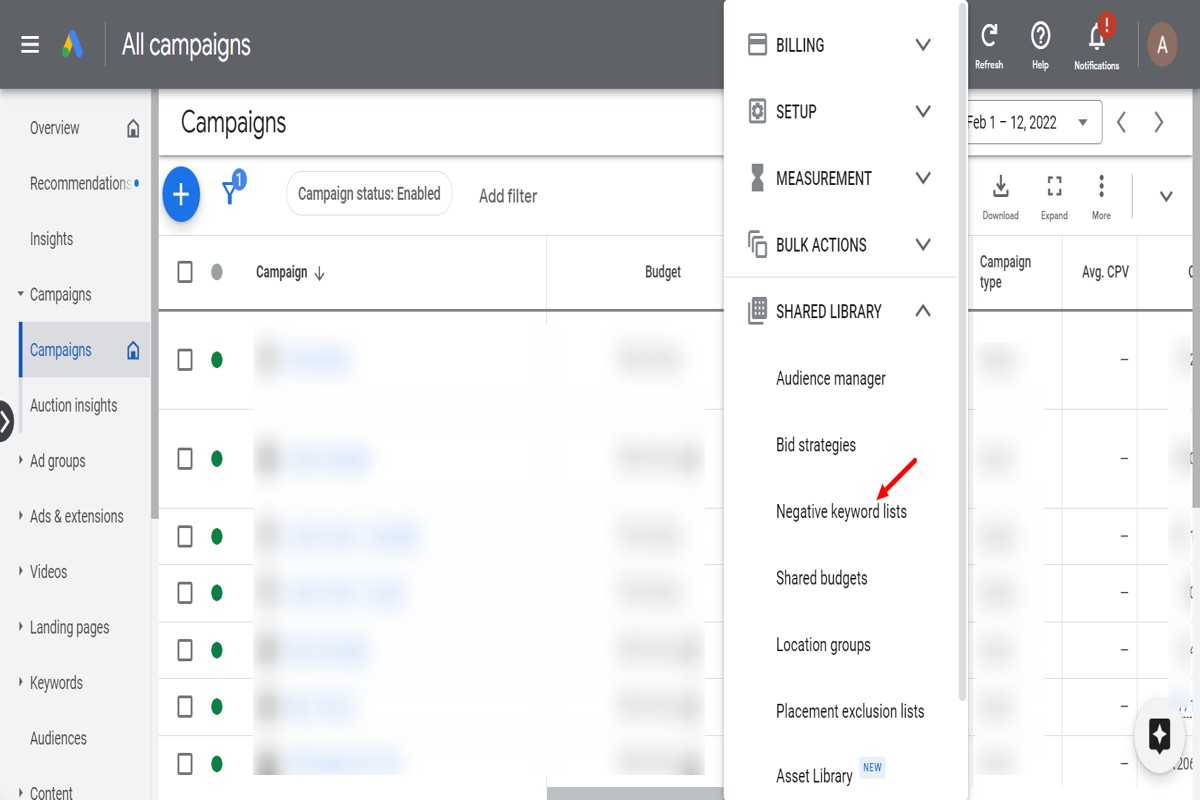
To find negative keywords for Google Ads, start by analyzing your search terms report, using keyword research tools, and reviewing competitor keywords. This process helps identify terms that are irrelevant to your business, ensuring your ads reach the right audience.
Understanding how to find negative keywords is crucial for optimizing Google Ads campaigns. Advertisers who neglect this aspect risk wasting budget on irrelevant clicks, leading to poor campaign performance and reduced return on investment.
This guide provides a comprehensive approach to identifying negative keywords, detailing methods such as analyzing search term reports, utilizing keyword research tools, and examining competitor strategies to refine your advertising efforts.
For How To Find Negative Keywords Google Ads businesses looking to generate local leads through Google Ads or Local SEO, GMB Ranger LLC offers hands-on campaign management. Specialist Md Tangeer Mehedi personally handles campaign setup and ongoing optimization — with no payment required until the first lead comes in.
What are negative keywords in Google Ads?
Negative keywords in Google Ads are specific terms or phrases that prevent ads from being triggered by certain search queries. Their primary purpose is to filter out irrelevant traffic, ensuring that ads are shown only to users who are more likely to convert.
By using negative keywords, advertisers can save budget and improve campaign performance by avoiding clicks from users who are not interested in their products or services. For instance, if a business sells luxury watches, they might add “cheap” as a negative keyword to avoid appearing for searches that include that term.
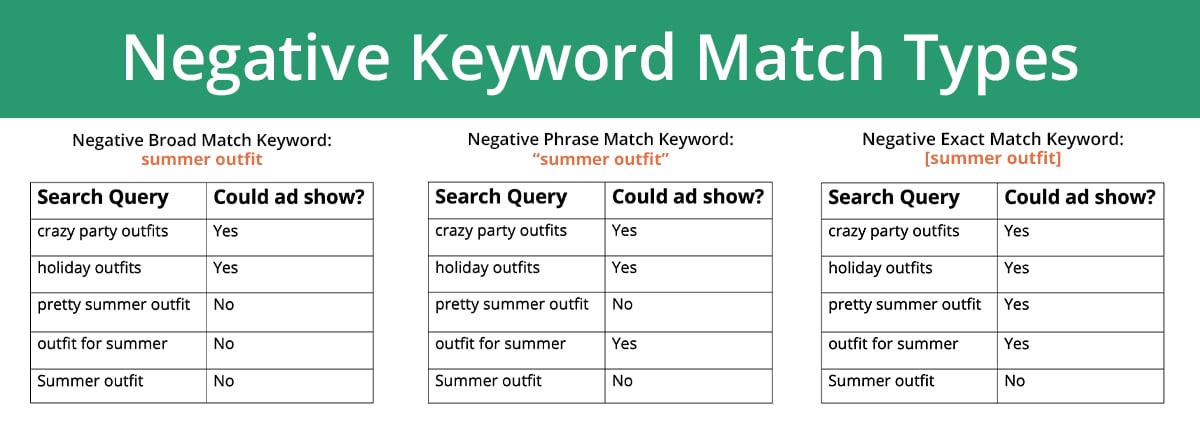
- Broad Match Negative Keywords: These keywords will exclude your ad from appearing for any search queries that include the negative keyword in any order.
- Phrase Match Negative Keywords: Your ad will not show for search queries that contain the exact phrase of the negative keyword.
- Exact Match Negative Keywords: This option ensures your ad is excluded only for search queries that match the negative keyword exactly.
Implementing negative keywords effectively can significantly enhance the relevance of your ad campaigns. Regularly reviewing search terms can help identify additional negative keywords to refine targeting further.
Expert Tip: Utilize Google’s Keyword Planner and Search Terms report to discover potential negative keywords based on actual search data. This proactive approach can lead to improved click-through rates and lower costs per acquisition.
How do I find negative keywords for my Google Ads campaign?
To find negative keywords for your Google Ads campaign, utilize tools such as Google Ads Keyword Planner, search term reports, and third-party keyword research tools. By analyzing the data these resources provide, you can effectively identify terms that may not align with your advertising goals. Implementing negative keywords helps in refining targeting and improving overall campaign performance.
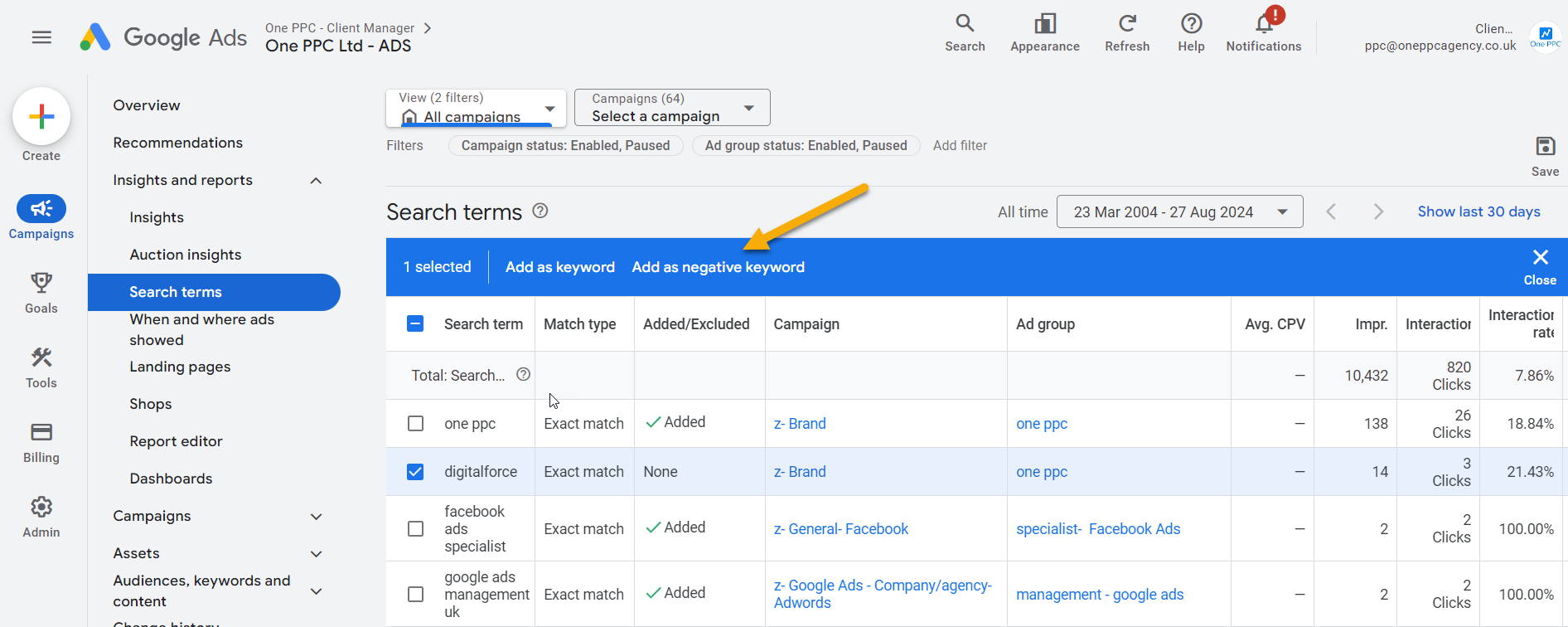
Begin by reviewing the Search Terms Report within Google Ads. This report shows actual queries that triggered your ads. Filter through the list to identify irrelevant terms that resulted in clicks but did not lead to conversions. Make a list of these terms as potential negative keywords. Next, use the Keyword Planner tool to explore related keywords and identify variations that could also be irrelevant. By inputting your existing keywords, you can discover additional negative keywords that may not directly appear in your reports.
Another effective method involves leveraging third-party tools such as SEMrush or Ahrefs. These platforms provide insights into competitors’ keywords and can highlight which terms to exclude. Additionally, consider using Google Trends to analyze search patterns and identify seasonal or trending terms that may not align with your business objectives. Regularly updating your negative keyword list will enhance ad performance and reduce wasted spending.
Utilizing Competitor Analysis
Conducting a competitive analysis can also help in identifying negative keywords. By examining competitors’ ads and keywords, marketers can uncover terms that may not resonate with their target audience. This strategic approach not only saves budget but also optimizes the relevance of your ads.
When identifying negative keywords, always consider the context in which they appear. Certain terms may be relevant in one context but irrelevant in another. Regularly revisiting and revising your negative keyword list based on new data will ensure your campaigns remain efficient and targeted.
Expert Tip: Implement a routine check of your negative keyword list at least quarterly. This proactive approach can significantly improve your ad spend efficiency and ensure alignment with shifting market trends.
What is the impact of using negative keywords in Google Ads?
Using negative keywords in Google Ads can significantly enhance campaign performance by preventing ads from showing for irrelevant searches. This targeted approach leads to cost savings and improved conversion rates. In contrast, not using negative keywords often results in wasted ad spend and lower engagement.
The primary difference between using and not using negative keywords lies in budget efficiency. Advertisers who incorporate negative keywords can avoid showing ads for terms that do not align with their offerings. This targeted filtering helps to reduce costs associated with clicks from users who are unlikely to convert. In comparison, campaigns without negative keywords may attract irrelevant traffic, leading to inflated costs and decreased return on investment (ROI).
Another critical difference is the quality of traffic. Negative keywords help refine audience targeting, ensuring that ads reach users with a higher intent to purchase. When irrelevant searches are excluded, the remaining audience is more likely to engage with the ads, which can lead to higher click-through rates (CTR) and conversion rates. Conversely, without negative keywords, ads may reach a broad audience that includes many users who have no interest in the product or service offered.
- Cost Efficiency: Negative keywords reduce unnecessary ad spend on irrelevant searches.
- Quality of Traffic: Improved targeting leads to higher engagement and conversion rates.
- Better ROI: Fewer wasted clicks result in a more favorable return on advertising spend.
Incorporating negative keywords requires ongoing analysis of search terms and performance data. Regularly updating negative keywords based on campaign performance can further optimize results. This proactive approach is essential for maximizing the effectiveness of Google Ads campaigns.
Expert Tip: Utilize the Search Terms report to identify potential negative keywords. This report provides insights into actual queries triggering your ads, allowing for data-driven decisions to refine targeting further.
How much time should I spend finding negative keywords?
Spending between 2 to 5 hours initially on negative keyword research is advisable, depending on the size and complexity of your Google Ads campaign. For smaller campaigns, this may require less time, while larger, multi-ad group campaigns may necessitate additional hours to ensure thorough coverage.
Several factors influence the time commitment for finding negative keywords. The overall scope of the campaign is a primary consideration. For instance, campaigns with multiple ad groups or extensive keyword lists will require more time to analyze and identify irrelevant terms. Additionally, the level of competition in the industry can affect how many negative keywords are needed. In highly competitive sectors, more granular negative keyword research may be essential to avoid wasted ad spend.
Another key aspect to consider is the tools available for research. Utilizing advanced keyword research tools can streamline the process, allowing advertisers to quickly identify potential negative keywords from search term reports and competitor analysis. The frequency of reviewing and updating negative keywords is also pertinent; ongoing campaigns should allocate regular intervals—such as monthly or quarterly—to reassess and refine the negative keyword list based on performance data.
Expert Tip: Focus on long-tail keywords that might attract irrelevant traffic. Regularly review search term reports to adjust your negative keyword list and enhance campaign efficiency.
What are the best practices for managing negative keywords?
Effectively managing negative keywords is essential for optimizing Google Ads campaigns and improving overall performance. Regular updates and strategic management of negative keywords can significantly enhance ad targeting and reduce wasted spend. Implementing best practices ensures that negative keywords remain relevant and effective throughout the campaign’s lifecycle.
To maintain an effective negative keyword strategy, consider the following best practices:
- Regular Review and Update: Schedule consistent reviews of your negative keyword list, ideally every month. Analyze search term reports to identify new irrelevant terms that should be added as negative keywords.
- Utilize Keyword Research Tools: Leverage tools like Google Keyword Planner or third-party platforms to discover potential negative keywords. These tools can provide insights into related searches that may not align with your campaign objectives.
- Segment Negative Keywords: Organize negative keywords into different lists based on campaigns or ad groups. This practice allows for more targeted management and helps maintain clarity in your advertising strategies.
- Monitor Performance Metrics: Track key performance indicators (KPIs) such as click-through rate (CTR) and conversion rates. If certain keywords are consistently underperforming, consider adding them to your negative keyword list.
- Collaborate with Teams: Engage with your marketing and sales teams to gather insights on customer feedback and product changes. Their input can help identify new negative keywords that reflect shifts in consumer behavior or market trends.
Regularly implementing these best practices ensures that negative keywords are effectively managed, maintaining alignment with campaign goals. This proactive approach can lead to better ad performance and improved return on investment (ROI).
Expert Tip: Consider using negative keyword match types strategically. Broad match negatives can prevent your ads from showing for a wide range of irrelevant queries, while phrase or exact match negatives can target specific terms more precisely, enhancing control over ad visibility.
Can I use negative keywords for specific match types?
Yes, negative keywords can be used with specific match types in Google Ads. Advertisers can apply broad, phrase, and exact match types to negative keywords, allowing for refined control over which search queries trigger their ads.
For example, suppose a company sells high-end running shoes and wants to exclude searches related to “cheap running shoes.” By adding “cheap” as a negative keyword using the phrase match type (e.g., “cheap running shoes”), the ads will not appear for search queries that include that phrase, such as “best cheap running shoes” or “buy cheap running shoes.” This helps focus the ad spend on users more likely to convert, filtering out low-intent traffic.
Alternatively, using the exact match type for a negative keyword (e.g., [cheap running shoes]) will exclude only that specific search term. This is beneficial when there is a clear, undesirable term that must be removed from the targeting. In contrast, applying a broad match negative keyword (e.g., cheap) can exclude any search query that contains that word, which may be too restrictive if users are also searching for relevant products without the negative qualifier. Selecting the appropriate match type for negative keywords is crucial for optimizing campaign performance.
Expert Tip: Regularly review search term reports to identify new negative keywords that may arise as user behavior changes, ensuring ongoing optimization of ad campaigns.
What tools can help me find negative keywords?
Several tools can aid in identifying negative keywords for Google Ads campaigns. These tools utilize various data sources and methodologies to uncover terms that may detract from ad performance. Utilizing a combination of these tools can enhance the effectiveness of your keyword strategy.
- Google Ads Keyword Planner: This free tool allows users to research keywords and see their search volume and competition. By analyzing keyword suggestions, advertisers can identify terms that do not align with their offerings and add them as negative keywords.
- SEMrush: SEMrush provides a comprehensive suite for keyword research, including a feature that suggests negative keywords based on existing campaigns. Its analytics can help pinpoint irrelevant search terms that could waste ad spend.
- Ahrefs: Known for its extensive keyword database, Ahrefs can also assist in finding negative keywords. Users can explore search queries that lead to their ads and identify terms that do not convert, making them candidates for exclusion.
- Ubersuggest: This tool offers keyword suggestions and insights into competitors’ strategies. By reviewing which keywords drive traffic to competitors, users can identify irrelevant terms that may also affect their campaigns negatively.
- Negative Keyword Tool: This dedicated tool simplifies the process of finding negative keywords by generating lists based on seed keywords. It helps advertisers quickly compile a list of terms that may not lead to conversions.
Combining insights from these tools with regular campaign performance reviews can significantly enhance the efficiency of Google Ads efforts. Regularly updating negative keywords based on user search behavior is crucial for maintaining optimal ad performance.
Expert Tip: Regularly analyze the search terms report in Google Ads to discover new negative keywords. This proactive approach ensures that your campaigns remain focused and cost-effective, preventing budget wastage on irrelevant traffic.
How do I analyze the performance of negative keywords?
Analyzing the performance of negative keywords involves assessing their impact on ad visibility and overall campaign effectiveness. This process helps in identifying which negative keywords are enhancing ROI by reducing irrelevant clicks. A systematic approach can reveal insights about your ad campaigns and inform future keyword strategies.
- Review Search Terms Report: Start by examining the Search Terms Report in Google Ads. This report shows the actual queries that triggered your ads, allowing you to identify which terms led to clicks and conversions, and which were irrelevant.
- Analyze Impressions and Clicks: Compare the performance of your ads before and after implementing negative keywords. Look for changes in impressions and click-through rates (CTR). A decrease in irrelevant clicks suggests that your negative keywords are effectively filtering out non-converting traffic.
- Monitor Conversion Rates: Assess conversion rates for campaigns with negative keywords applied. An increase in conversion rates can indicate that the negative keywords are preventing wasted ad spend on non-relevant traffic, thereby improving overall campaign performance.
- Adjust Bids and Budget: Evaluate the cost-effectiveness of your campaigns by analyzing the cost per acquisition (CPA) and return on ad spend (ROAS). Lower CPA and higher ROAS post-implementation of negative keywords indicate successful filtering.
- Regularly Update Negative Keywords: Continually review and refine your list of negative keywords based on ongoing performance data. This iterative process ensures that your campaigns remain optimized and relevant to your target audience.
Regularly analyzing the performance of negative keywords not only enhances current campaign strategies but also informs future keyword planning. Using data-driven insights allows for more effective budget allocation and improved ad relevance, ultimately leading to better campaign outcomes.
Expert Tip: Utilize automated rules in Google Ads to adjust bids or pause keywords based on performance metrics, ensuring that your campaigns remain agile and responsive to data trends.
Advanced Techniques for Identifying Negative Keywords
This section delves into advanced strategies for identifying negative keywords that basic methods often overlook. Employing these techniques can enhance campaign efficiency and reduce wasted ad spend.
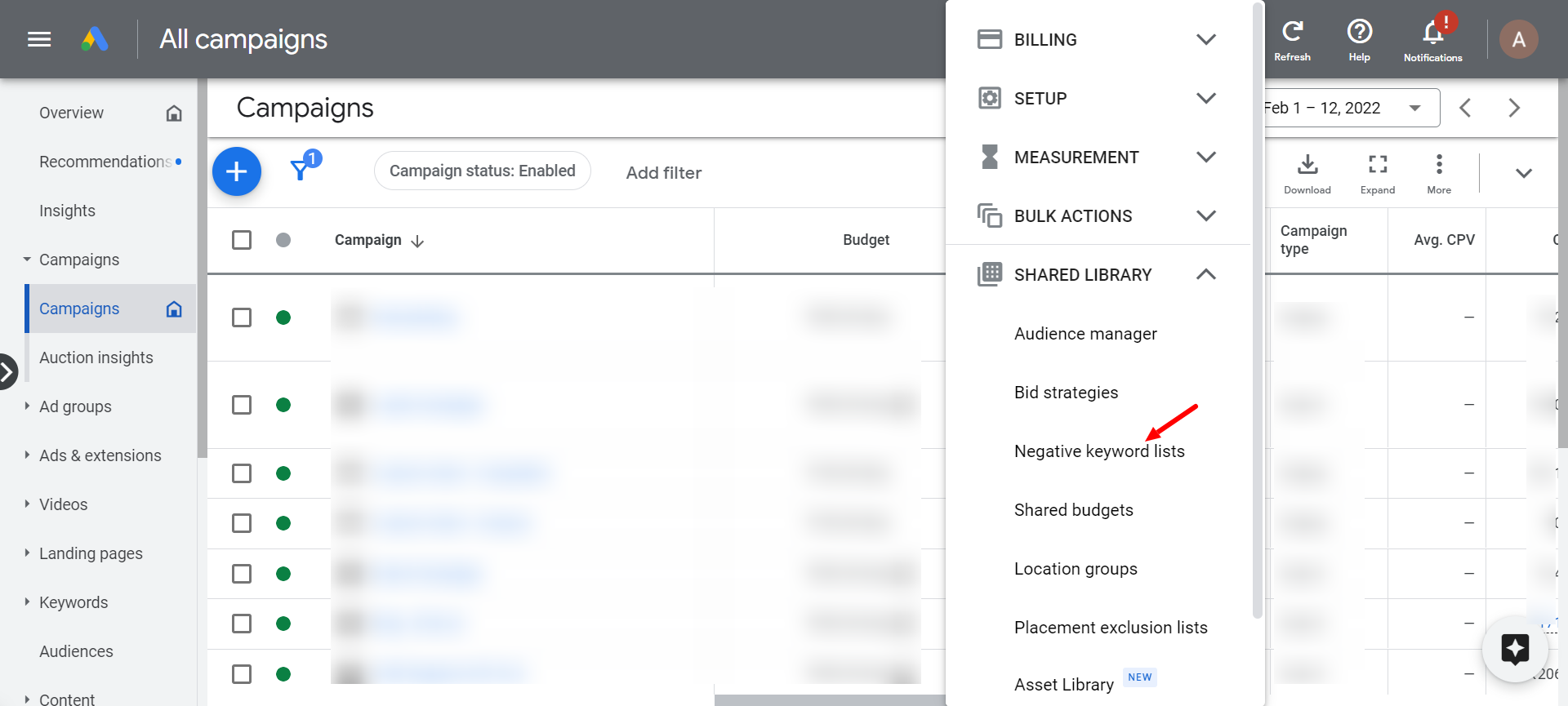
Utilizing Google Analytics for Behavior Analysis
Google Analytics offers valuable insights into user behavior on your website. By analyzing traffic sources, you can identify which keywords lead to high bounce rates or low engagement. Focus on the following metrics:
- Bounce Rate: A high bounce rate indicates users are not finding relevant content.
- Average Session Duration: Short session durations suggest that visitors are not engaged.
- Conversion Rate: Low conversion rates for specific keywords may highlight ineffective targeting.
By cross-referencing these metrics with your keyword list, you can pinpoint potential negative keywords that detract from your campaign’s performance.
Leveraging Competitor Analysis Tools
Competitor analysis tools such as SEMrush, Ahrefs, and SpyFu can reveal valuable insights into your competitors’ keyword strategies. By examining the keywords they target and those they exclude, you can gain a clearer understanding of which keywords may not be relevant for your audience. Focus on:
- Identifying keywords that competitors bid on but yield low ROI.
- Discovering keywords that generate impressions but no clicks.
- Analyzing competitors’ negative keyword lists, if available.
This analysis can help you avoid similar pitfalls and refine your own keyword strategy.
Implementing A/B Testing for Keyword Variations
A/B testing can provide insights into which keywords perform best under various conditions. By creating different ad groups that focus on specific keyword variations, you can assess performance differences. Key steps include:
- Develop multiple ad variations that target different keywords.
- Monitor performance metrics such as CTR, conversion rates, and cost per conversion.
- Identify low-performing keywords that should be added to your negative keyword list.
This method allows for data-driven decisions regarding keyword optimization.
Exploring Industry-Specific Forums and Discussions
Industry-specific forums, social media groups, and Q&A platforms like Reddit can provide insights into user intent and common misconceptions. Engaging in these discussions can reveal:
- Keywords that users associate with negative experiences.
- Common questions indicating a mismatch between user intent and your offerings.
- Trends in terminology that may not align with your target audience’s expectations.
By tapping into these conversations, marketers can uncover valuable negative keywords that traditional research may miss.
Many marketers overlook the significance of contextual relevance when identifying negative keywords. For instance, a keyword might perform well in one industry but poorly in another due to differing consumer expectations or product offerings. Additionally, relying solely on automated suggestions from Google Ads can lead to missed opportunities. A thorough understanding of your audience and continuous research is essential to create a comprehensive negative keyword strategy.
To effectively implement these advanced techniques, marketers should:
- Regularly review Google Analytics for behavioral patterns.
- Leverage competitor tools to identify strategic gaps.
- Conduct A/B tests to refine keyword targeting continuously.
- Engage with industry communities to gain insights into user intent.
By adopting these practices, advertisers can significantly enhance their Google Ads campaigns and minimize wasted budget on irrelevant clicks.
Common Mistakes to Avoid with Negative Keywords
Effectively managing negative keywords is essential for optimizing Google Ads campaigns and minimizing wasted spend. This section addresses common pitfalls marketers encounter that can lead to ineffective keyword strategies.
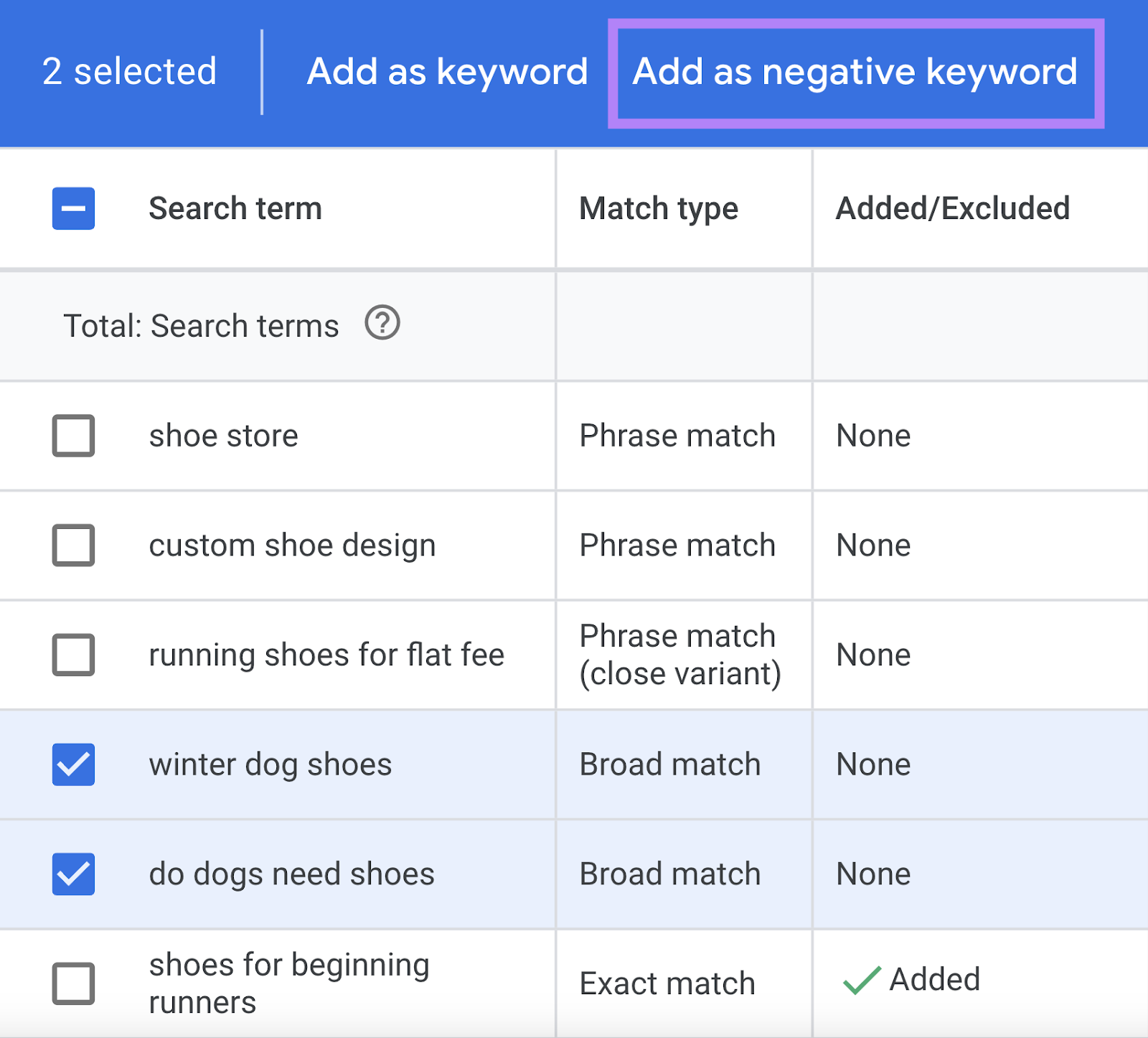
Overusing Broad Negative Keywords
One prevalent mistake is the overuse of broad negative keywords. While broad matches can prevent ads from appearing for unrelated searches, they can also unintentionally exclude relevant traffic. For instance, using “free” as a broad negative keyword may block potential customers looking for “free trial” offers. A balanced approach is crucial to ensure that important search queries are not inadvertently filtered out.
Neglecting to Update Negative Keyword Lists Regularly
Another common error is failing to refresh negative keyword lists periodically. As market trends and consumer behavior evolve, previously effective negative keywords may become less relevant. Regularly reviewing and updating these lists allows marketers to adapt to changing search patterns, ensuring campaigns remain aligned with current audience interests.
Ignoring Search Term Reports for Insights
Many marketers overlook the value of search term reports, which provide insights into actual queries triggering ad impressions. By analyzing these reports, marketers can identify irrelevant search terms and add them as negative keywords. Ignoring this data can result in continued ad spend on terms that do not convert, undermining overall campaign effectiveness.
Failing to Categorize Negative Keywords Effectively
Effective categorization of negative keywords is often neglected. Marketers may lump all negative keywords into a single list, which complicates management and analysis. Instead, organizing negative keywords into categories based on themes or intent allows for more precise campaign adjustments and performance tracking.
Nuance / Expert Layer
One misconception is that negative keywords only serve to block irrelevant traffic. However, negative keywords can also refine targeting by excluding terms that may attract unwanted clicks. For example, if a company sells premium products, adding “cheap” as a negative keyword can help maintain brand positioning. Moreover, distinguishing between broad, phrase, and exact match negative keywords can enhance control over ad visibility. Marketers should recognize that while broad matches can offer wider exclusion, they may also lead to unintended consequences. Thus, a strategic blend of match types is essential.
Practical Application
- Review search term reports weekly to identify new negative keywords.
- Avoid broad negative keywords unless they are carefully considered for potential exclusions.
- Update negative keyword lists monthly to reflect changing trends.
- Organize negative keywords into specific categories to streamline management.
By implementing these strategies, marketers can enhance the efficiency of their Google Ads campaigns and reduce wasted expenditure. Focus on regular analysis and strategic categorization to optimize results effectively.
Real-World Case Studies: Success Stories with Negative Keywords
This section examines practical case studies of businesses that successfully implemented negative keywords to enhance their Google Ads performance. These real-world examples illustrate the tangible benefits of strategic keyword management.
Retail Brand Reduces Ad Spend
A national retail brand focused on outdoor gear noticed an increase in irrelevant clicks, leading to inflated ad spend. By conducting a thorough analysis of search terms, they identified several negative keywords that did not align with their product offerings, such as “cheap” and “free.” After implementing these negative keywords, the brand reduced its monthly ad spend by 30% while maintaining a stable conversion rate. This strategic move not only improved their budget efficiency but also allowed them to allocate resources to more profitable campaigns.
Service Provider Improves Conversion Rates
A local plumbing service provider struggled with low conversion rates despite a significant ad budget. Upon reviewing their search term report, they discovered that many clicks were generated by users searching for DIY plumbing solutions. By adding negative keywords like “DIY” and “how to fix,” the provider refined their targeting. Consequently, their conversion rate improved by 25% in just three months, demonstrating the power of negative keyword optimization in attracting the right audience.
Tech Company Optimizes PPC Strategy
A tech startup specializing in cybersecurity solutions faced challenges with their pay-per-click (PPC) campaigns. They found that a substantial portion of their traffic came from users searching for free antivirus software. By implementing negative keywords related to “free” and “trial,” the startup was able to enhance their ad relevance. This adjustment not only reduced wasted spend but also led to a 40% increase in qualified leads, showcasing the impact of precise targeting on overall PPC effectiveness.
E-Commerce Site Increases ROI
An e-commerce website selling high-end electronics sought to improve its return on investment (ROI) from Google Ads. After analyzing their campaigns, they identified negative keywords such as “used” and “refurbished,” which attracted low-intent traffic. By refining their keyword list, the e-commerce site experienced a remarkable 50% increase in ROI within four months. This case highlights how negative keywords can significantly enhance the quality of traffic and overall profitability.
While these case studies illustrate clear success, it is essential to recognize that negative keyword strategies are not one-size-fits-all. Many businesses mistakenly assume that only broad negative keywords are effective. In reality, a combination of broad, phrase, and exact match negative keywords is often necessary to create a finely tuned campaign. Furthermore, ongoing analysis and adjustment are critical, as search behaviors and market dynamics can shift over time. Regularly revisiting and updating negative keywords ensures continued campaign optimization.
To effectively apply these insights, businesses should begin by auditing their current Google Ads campaigns. Follow these steps:
- Review search term reports to identify low-performing keywords.
- Compile a list of potential negative keywords based on your findings.
- Implement these negative keywords in your campaigns.
- Monitor performance metrics to assess the impact of your changes.
- Regularly update your negative keyword list to reflect changes in search behavior.
By following these actionable steps, businesses can leverage negative keywords to enhance their Google Ads performance and achieve better results.
Comparative Analysis of Negative Keyword Strategies
This section examines various strategies for implementing negative keywords in Google Ads, highlighting their effectiveness across different industries. By understanding these strategies, advertisers can optimize their campaigns and improve ROI.
Manual vs. Automated Negative Keyword Management
Manual management of negative keywords involves regularly reviewing search term reports and adding keywords that trigger irrelevant clicks. This approach allows for granular control but can be time-consuming. In contrast, automated management utilizes tools such as Google Ads’ negative keyword lists and scripts, which can streamline the process and save time. Automated systems can adjust negative keywords based on performance data, potentially improving efficiency.
- Manual Management: Requires ongoing attention; offers high customization.
- Automated Management: Saves time; relies on algorithms for optimization.
- Hybrid Approach: Combines both methods for balanced control and efficiency.
Effectiveness of Different Match Types
Negative keywords can be categorized into three match types: broad match, phrase match, and exact match. Each type has varying effectiveness depending on the industry.
- Broad Match: Filters out a wide array of irrelevant queries but may lead to accidental exclusions, particularly in niche markets.
- Phrase Match: More precise, ensuring relevant phrases are excluded without overly restricting traffic.
- Exact Match: Provides the highest level of control, ideal for industries with specific target audiences.
Industry-Specific Strategies for Negative Keyword Usage
Different industries may require tailored approaches to negative keyword strategies due to varied consumer behavior and market dynamics. For example:
- E-commerce: Focus on excluding terms like “free,” “cheap,” and “discount” to target quality traffic.
- Healthcare: Use negative keywords to filter out irrelevant queries that could lead to misinformation or non-patient inquiries.
- Travel and Hospitality: Exclude terms related to local searches if targeting a global audience to avoid irrelevant clicks.
Evaluating the Impact of Seasonal Trends
Seasonal trends can significantly affect keyword relevance. Advertisers must adjust their negative keyword lists to reflect seasonal changes in consumer behavior. For instance, during holiday seasons, keywords related to “gift” or “sale” may become more relevant, while others, such as “summer,” may need to be excluded in winter months. Regular analysis of seasonal trends ensures that campaigns remain aligned with current consumer interests.
Common misconceptions include the belief that negative keywords are a one-time setup. In reality, they require continuous monitoring and adjustment to maintain effectiveness.
Practical Application
To implement these strategies effectively, advertisers should:
- Conduct regular audits of search term reports to identify potential negative keywords.
- Choose the appropriate match types based on industry needs and campaign goals.
- Customize negative keyword strategies to fit seasonal trends and specific industry requirements.
By applying these practices, advertisers can enhance their campaign performance and reduce wasted ad spend, ultimately achieving better results in their Google Ads efforts.
For How To Find Negative Keywords Google Ads businesses looking to generate local leads through Google Ads or Local SEO, GMB Ranger LLC offers hands-on campaign management. Specialist Md Tangeer Mehedi personally handles campaign setup and ongoing optimization — with no payment required until the first lead comes in.
Frequently Asked Questions
What are negative keywords in Google Ads?
Negative keywords are specific terms that prevent your ads from being shown for irrelevant searches. By using negative keywords, you can filter out traffic that is unlikely to convert, improving your campaign’s efficiency.
How do I find negative keywords for my Google Ads campaign?
To find negative keywords, analyze search term reports, identify irrelevant queries, and use keyword research tools. Consider your target audience and the intent behind their searches to refine your list effectively.
What is the impact of using negative keywords in Google Ads?
Using negative keywords can significantly enhance your campaign’s performance by reducing wasted ad spend and increasing click-through rates. This leads to a higher return on investment and better overall ad relevance.
How much time should I spend finding negative keywords?
The time spent on finding negative keywords varies depending on campaign size and complexity, but regular reviews are essential. Allocate time initially to build a comprehensive list, then revisit it periodically to refine and update as needed.
What are the best practices for managing negative keywords?
Best practices include regularly reviewing search term reports, organizing negative keywords into lists, and utilizing both broad and exact match types. Consistent monitoring and updates ensure your negative keyword strategy remains effective over time.
Can I use negative keywords for specific match types?
Yes, negative keywords can be applied using broad, phrase, or exact match types in Google Ads. This flexibility allows for precise control over which searches trigger your ads, enhancing targeting efficiency.
What tools can help me find negative keywords?
Tools such as Google Keyword Planner, SEMrush, and Ahrefs can assist in identifying potential negative keywords. Additionally, Google Ads’ own search term reports are invaluable for discovering irrelevant queries that should be excluded.
How do I analyze the performance of negative keywords?
To analyze the performance of negative keywords, monitor key metrics such as click-through rates, conversion rates, and overall ad spend. Regularly review search term reports to assess whether your negative keywords effectively filter out unwanted traffic.
Final Thoughts on how to find negative keywords google ads
Effectively identifying negative keywords is essential for optimizing Google Ads campaigns, as it enhances targeting precision and maximizes return on investment. Utilizing advanced techniques and learning from real-world case studies can significantly improve campaign performance by filtering out irrelevant traffic.
Conduct a thorough audit of your existing keyword list, leveraging tools like Google Search Console and keyword research platforms to identify and implement negative keywords that align with your business objectives.
Mastering the art of negative keyword identification not only reduces wasted ad spend but also refines your audience targeting, ultimately driving more qualified leads to your business.
Leave a Reply